Solved What software to use with SSD clone and for backup too? Many Choices!!

Just mark E (system reserved) inactive. Does it boot (even without dvd in tray)? That's what I asked! If you don't answer, I can't give you further instructions. If it does boot, post screenshot.

I first wanna have prove. Afterwards we just gonna delete old C and system reserved.

I ( and you) want it to boot even without old HDD!! so if old HDD fails...it still can boot.

"system reserved" is just for bootmenu and bootmgr. But it can also be merged to OS (as we did a long time a go succesfully).
 
Last edited:

My Computer My Computer

At a glance

Microsoft Windows 7 Home Premium 64-bits 7601...Intel(R) Core(TM) i3 CPU M 370 @ 2.40GHz4,00 GBATI Mobility Radeon HD 5400 Series
Computer type
Laptop
Computer Manufacturer/Model Number
ACER ASPIRE 5742G
OS
Microsoft Windows 7 Home Premium 64-bits 7601 Multiprocessor Free Service Pack 1
CPU
Intel(R) Core(TM) i3 CPU M 370 @ 2.40GHz
Motherboard
Acer Aspire 5742G
Memory
4,00 GB
Graphics Card(s)
ATI Mobility Radeon HD 5400 Series
Sound Card
(1) AMD High Definition Audio Device (2) Realtek High Defi
Screen Resolution
1366 x 768 x 32 bits (4294967296 colors) @ 60 Hz
Hard Drives
WDC WD5000BEVT-22ZAT0
It booted up just fine yesterday after I did the "startup repair" 3 times on each OS drive. After that, it started up fine w/o DVD and I was able to post those two reports yesterday.

This morning it started up fine w/o DVD. After I marked the E (system reserved) inactive this morning, it wouldn't boot up at all. I either got the message that "operation system was not found" or the cursor just blinked in the upper left corner. These were with a black screen with white letters or symbols. I had to do "startup repair" 3 times on each OS drive again to get it going again.

If it does boot, post screenshot.
I'm not sure what you want here. What should I show?
 

My Computer My Computer

At a glance

Windows 7 Ultimate (x64) Service Pack 1 (buil...Intel(R) Core(TM) i5-2450M CPU @ 2.50GHz8 GBIntel HD Graphics 3000 with up to 1.6GB dynam...
Computer Manufacturer/Model Number
Dell 17R N7110 Inspiron laptop
OS
Windows 7 Ultimate (x64) Service Pack 1 (build 7601)
CPU
Intel(R) Core(TM) i5-2450M CPU @ 2.50GHz
Motherboard
Dell Inc. 0YH79Y A00
Memory
8 GB
Graphics Card(s)
Intel HD Graphics 3000 with up to 1.6GB dynamic video memory
Sound Card
SRS Premium Sound - (1) Realtek High Definition Audio
Monitor(s) Displays
17.3" diagonal HD+ TrueLife LED display
Screen Resolution
1600x900 resolution
Hard Drives
1 TB HD #ST1000LM024 HN-M101MBB,

512 GB Samsung 840 Pro SSD
PSU
stock
Case
stock
Cooling
stock
Keyboard
stock
Mouse
stock
Internet Speed
WiFi
Other Info
Printer: HP Photosmart C3180
It booted up just fine yesterday after I did the "startup repair" 3 times on each OS drive. After that, it started up fine w/o DVD and I was able to post those two reports yesterday.

This morning it started up fine w/o DVD. After I marked the E (system reserved) inactive this morning, it wouldn't boot up at all. I either got the message that "operation system was not found" or the cursor just blinked in the upper left corner. These were with a black screen with white letters or symbols. I had to do "startup repair" 3 times on each OS drive again to get it going again.

If it does boot, post screenshot.
I'm not sure what you want here. What should I show?
Boot to SSD when system reserved and old C are BOTH inactive. Post disk management then
 

My Computer My Computer

At a glance

Microsoft Windows 7 Home Premium 64-bits 7601...Intel(R) Core(TM) i3 CPU M 370 @ 2.40GHz4,00 GBATI Mobility Radeon HD 5400 Series
Computer type
Laptop
Computer Manufacturer/Model Number
ACER ASPIRE 5742G
OS
Microsoft Windows 7 Home Premium 64-bits 7601 Multiprocessor Free Service Pack 1
CPU
Intel(R) Core(TM) i3 CPU M 370 @ 2.40GHz
Motherboard
Acer Aspire 5742G
Memory
4,00 GB
Graphics Card(s)
ATI Mobility Radeon HD 5400 Series
Sound Card
(1) AMD High Definition Audio Device (2) Realtek High Defi
Screen Resolution
1366 x 768 x 32 bits (4294967296 colors) @ 60 Hz
Hard Drives
WDC WD5000BEVT-22ZAT0
So you can't boot from SSD (make it active) when system reserved and old C are inactive?
Try it with and without dvd inserted.

Are you 100% sure, it doesn't work? If so, we keep system reserved on old harddisk. Of course mark it active.
 

My Computer My Computer

At a glance

Microsoft Windows 7 Home Premium 64-bits 7601...Intel(R) Core(TM) i3 CPU M 370 @ 2.40GHz4,00 GBATI Mobility Radeon HD 5400 Series
Computer type
Laptop
Computer Manufacturer/Model Number
ACER ASPIRE 5742G
OS
Microsoft Windows 7 Home Premium 64-bits 7601 Multiprocessor Free Service Pack 1
CPU
Intel(R) Core(TM) i3 CPU M 370 @ 2.40GHz
Motherboard
Acer Aspire 5742G
Memory
4,00 GB
Graphics Card(s)
ATI Mobility Radeon HD 5400 Series
Sound Card
(1) AMD High Definition Audio Device (2) Realtek High Defi
Screen Resolution
1366 x 768 x 32 bits (4294967296 colors) @ 60 Hz
Hard Drives
WDC WD5000BEVT-22ZAT0
I deleted what I recently posted. I reported the results wrong. I didn't get it deleted quick enough, because you did see it.

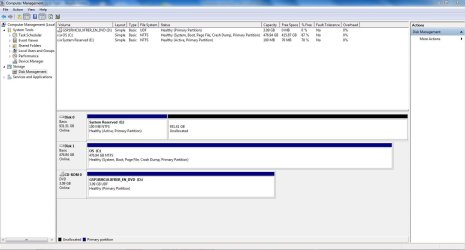
Anyway, this is what I meant to say:
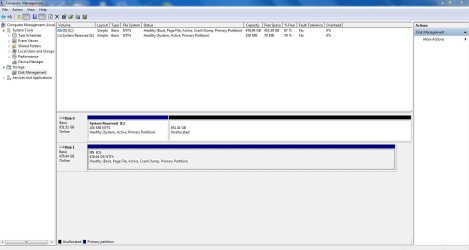
C is the HD now and it is not marked active.
D is now the SSD. Both it and E (system reserved) are active.

When the computer boots up, it offers two choices; C and D.

Since I made some errors in my previous post and you responded to my errors, I don't know what to do.
 

Attachments

  • Capture disk management 2_5_13 11_40 AM.JPG
    Capture disk management 2_5_13 11_40 AM.JPG
    102.7 KB · Views: 2

My Computer My Computer

At a glance

Windows 7 Ultimate (x64) Service Pack 1 (buil...Intel(R) Core(TM) i5-2450M CPU @ 2.50GHz8 GBIntel HD Graphics 3000 with up to 1.6GB dynam...
Computer Manufacturer/Model Number
Dell 17R N7110 Inspiron laptop
OS
Windows 7 Ultimate (x64) Service Pack 1 (build 7601)
CPU
Intel(R) Core(TM) i5-2450M CPU @ 2.50GHz
Motherboard
Dell Inc. 0YH79Y A00
Memory
8 GB
Graphics Card(s)
Intel HD Graphics 3000 with up to 1.6GB dynamic video memory
Sound Card
SRS Premium Sound - (1) Realtek High Definition Audio
Monitor(s) Displays
17.3" diagonal HD+ TrueLife LED display
Screen Resolution
1600x900 resolution
Hard Drives
1 TB HD #ST1000LM024 HN-M101MBB,

512 GB Samsung 840 Pro SSD
PSU
stock
Case
stock
Cooling
stock
Keyboard
stock
Mouse
stock
Internet Speed
WiFi
Other Info
Printer: HP Photosmart C3180
  1. Boot into SSD.
  2. delete the 911GB partition on old disk. Do it in disk managemet. Just right richt on it and do "delete volume".
old C has been cloned and is available on SSD anyway.
Still booted to SSD. Do in elevated command prompt:
Code:
bcdedit/store  c:\boot\bcd  /enum  all

All lines with device, osdevice, filedevice, ramdiskdevice refer to C or BOOT? Post results
 

My Computer My Computer

At a glance

Microsoft Windows 7 Home Premium 64-bits 7601...Intel(R) Core(TM) i3 CPU M 370 @ 2.40GHz4,00 GBATI Mobility Radeon HD 5400 Series
Computer type
Laptop
Computer Manufacturer/Model Number
ACER ASPIRE 5742G
OS
Microsoft Windows 7 Home Premium 64-bits 7601 Multiprocessor Free Service Pack 1
CPU
Intel(R) Core(TM) i3 CPU M 370 @ 2.40GHz
Motherboard
Acer Aspire 5742G
Memory
4,00 GB
Graphics Card(s)
ATI Mobility Radeon HD 5400 Series
Sound Card
(1) AMD High Definition Audio Device (2) Realtek High Defi
Screen Resolution
1366 x 768 x 32 bits (4294967296 colors) @ 60 Hz
Hard Drives
WDC WD5000BEVT-22ZAT0
I had to go to a doctor's appointment. His is a plastic surgeon. We talked about closing up my wound.

  1. Boot into SSD.
  2. delete the 911GB partition on old disk. Do it in disk management. Just right richt on it and do "delete volume".
old C has been cloned and is available on SSD anyway.
Done
Still booted to SSD. Do in elevated command prompt:
Code:
bcdedit/store  c:\boot\bcd  /enum  all
All lines with device, osdevice, filedevice, ramdiskdevice refer to C or BOOT? Post results
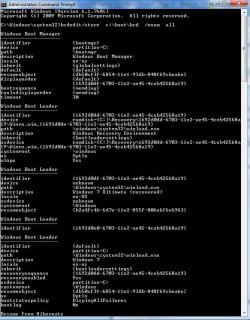
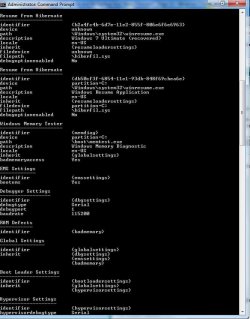
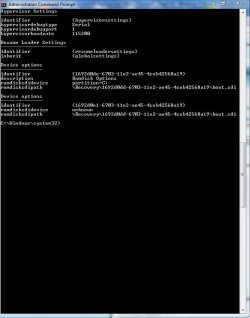
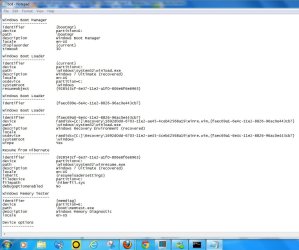
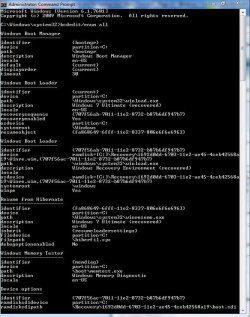
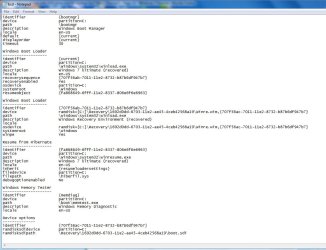
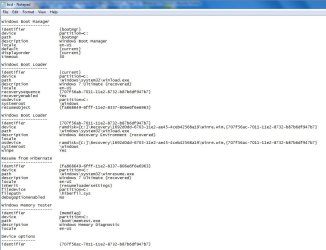
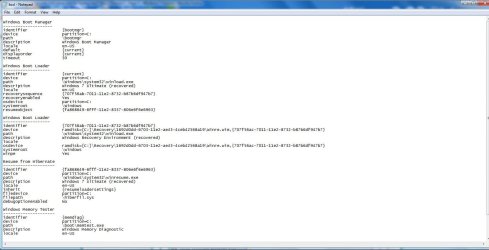
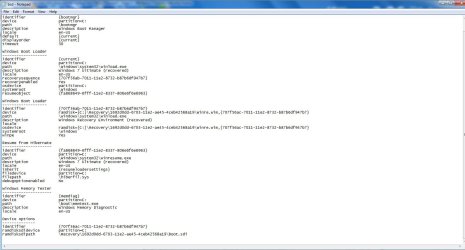
I don't know how to interpret the results. Here are the snips.
 

Attachments

  • Capture acp 01 2_5_13.JPG
    Capture acp 01 2_5_13.JPG
    91.5 KB · Views: 1
  • Capture acp 02 2_5_13.JPG
    Capture acp 02 2_5_13.JPG
    70 KB · Views: 1
  • Capture acp 03 2_5_13.JPG
    Capture acp 03 2_5_13.JPG
    46.7 KB · Views: 1
  • Capture bcd 01 2_5_13.JPG
    Capture bcd 01 2_5_13.JPG
    100.1 KB · Views: 0
  • Capture bcd 02 2_5_13.JPG
    Capture bcd 02 2_5_13.JPG
    99.2 KB · Views: 1

My Computer My Computer

At a glance

Windows 7 Ultimate (x64) Service Pack 1 (buil...Intel(R) Core(TM) i5-2450M CPU @ 2.50GHz8 GBIntel HD Graphics 3000 with up to 1.6GB dynam...
Computer Manufacturer/Model Number
Dell 17R N7110 Inspiron laptop
OS
Windows 7 Ultimate (x64) Service Pack 1 (build 7601)
CPU
Intel(R) Core(TM) i5-2450M CPU @ 2.50GHz
Motherboard
Dell Inc. 0YH79Y A00
Memory
8 GB
Graphics Card(s)
Intel HD Graphics 3000 with up to 1.6GB dynamic video memory
Sound Card
SRS Premium Sound - (1) Realtek High Definition Audio
Monitor(s) Displays
17.3" diagonal HD+ TrueLife LED display
Screen Resolution
1600x900 resolution
Hard Drives
1 TB HD #ST1000LM024 HN-M101MBB,

512 GB Samsung 840 Pro SSD
PSU
stock
Case
stock
Cooling
stock
Keyboard
stock
Mouse
stock
Internet Speed
WiFi
Other Info
Printer: HP Photosmart C3180
Boot from win7 DVD.->command prompt:
Code:
diskpart
list  vol
exit
Write down drive letters of system reserved and SSD. they are C and D... correct?


Code:
attrib  -h  -s  c:\boot\bcd
attrib  -h  -s  d:\boot\bcd
del   c:\boot\bcd
del   d:\boot\bcd

Now boot menu is gone on system reserved. And on SSD as well (although not used at all).

Now do a startup repair 3 times (from dvd) with reboots in between. this is easier then fixing a totally messed boot menu.

Now boot normally and post output of
Code:
bcdedit/enum all
 

My Computer My Computer

At a glance

Microsoft Windows 7 Home Premium 64-bits 7601...Intel(R) Core(TM) i3 CPU M 370 @ 2.40GHz4,00 GBATI Mobility Radeon HD 5400 Series
Computer type
Laptop
Computer Manufacturer/Model Number
ACER ASPIRE 5742G
OS
Microsoft Windows 7 Home Premium 64-bits 7601 Multiprocessor Free Service Pack 1
CPU
Intel(R) Core(TM) i3 CPU M 370 @ 2.40GHz
Motherboard
Acer Aspire 5742G
Memory
4,00 GB
Graphics Card(s)
ATI Mobility Radeon HD 5400 Series
Sound Card
(1) AMD High Definition Audio Device (2) Realtek High Defi
Screen Resolution
1366 x 768 x 32 bits (4294967296 colors) @ 60 Hz
Hard Drives
WDC WD5000BEVT-22ZAT0
I followed the instructions above. I have a couple of small problems now for you. See below for the descriptions. I have some snips below too.

It will not boot up unless I have the Win 7 installation disk in. Then when I shut it off, it takes a long time and then a blue screen pops up with a long error message. It doesn't stay on long enough for me to read it. When I first turn it on and it asks for the Win 7 install disk, I get this error on a black screen with white writing:

File: \Boot\BCD
Status: 0xc000000f
Info: An error occurred while attempting to read the boot configuration data.
 

Attachments

  • Capture acp101 2_5_13.JPG
    Capture acp101 2_5_13.JPG
    89 KB · Views: 0
  • Capture bcd102 2_5_13.JPG
    Capture bcd102 2_5_13.JPG
    97.4 KB · Views: 0
  • Capture bcd 101 2_5_13.JPG
    Capture bcd 101 2_5_13.JPG
    94.1 KB · Views: 1

My Computer My Computer

At a glance

Windows 7 Ultimate (x64) Service Pack 1 (buil...Intel(R) Core(TM) i5-2450M CPU @ 2.50GHz8 GBIntel HD Graphics 3000 with up to 1.6GB dynam...
Computer Manufacturer/Model Number
Dell 17R N7110 Inspiron laptop
OS
Windows 7 Ultimate (x64) Service Pack 1 (build 7601)
CPU
Intel(R) Core(TM) i5-2450M CPU @ 2.50GHz
Motherboard
Dell Inc. 0YH79Y A00
Memory
8 GB
Graphics Card(s)
Intel HD Graphics 3000 with up to 1.6GB dynamic video memory
Sound Card
SRS Premium Sound - (1) Realtek High Definition Audio
Monitor(s) Displays
17.3" diagonal HD+ TrueLife LED display
Screen Resolution
1600x900 resolution
Hard Drives
1 TB HD #ST1000LM024 HN-M101MBB,

512 GB Samsung 840 Pro SSD
PSU
stock
Case
stock
Cooling
stock
Keyboard
stock
Mouse
stock
Internet Speed
WiFi
Other Info
Printer: HP Photosmart C3180
boot from win7 dvd->command prompt. I assume C=system reserved and D=SSD now(?)
Code:
diskpart
list vol
sel vol D (the SSD)
inactive
sel vol C  (system reserved)
active
exit

I only want system reserved to be active!
Try to boot. If not booting.... startup repair 3 times.
Post results.

Also do this http://pcsupport.about.com/od/windows7/ht/automatic-restart-windows-7.htm
and in elevated command prompt
Code:
[FONT=Courier New]fsutil behavior query DisableDeleteNotify[/FONT]
Is its value 0?

http://www.sevenforums.com/tutorials/330-system-protection-turn-off.html be sure the settings on SSD are like


Max usage 10GB is enough. Disable system protection on any ghost disks in the list
 

My Computer My Computer

At a glance

Microsoft Windows 7 Home Premium 64-bits 7601...Intel(R) Core(TM) i3 CPU M 370 @ 2.40GHz4,00 GBATI Mobility Radeon HD 5400 Series
Computer type
Laptop
Computer Manufacturer/Model Number
ACER ASPIRE 5742G
OS
Microsoft Windows 7 Home Premium 64-bits 7601 Multiprocessor Free Service Pack 1
CPU
Intel(R) Core(TM) i3 CPU M 370 @ 2.40GHz
Motherboard
Acer Aspire 5742G
Memory
4,00 GB
Graphics Card(s)
ATI Mobility Radeon HD 5400 Series
Sound Card
(1) AMD High Definition Audio Device (2) Realtek High Defi
Screen Resolution
1366 x 768 x 32 bits (4294967296 colors) @ 60 Hz
Hard Drives
WDC WD5000BEVT-22ZAT0
View attachment 254055
boot from win7 dvd->command prompt. I assume C=system reserved and D=SSD now(?)
Code:
diskpart
list vol
sel vol D (the SSD)
inactive
sel vol C  (system reserved)
active
exit
I only want system reserved to be active!
Try to boot. If not booting.... startup repair 3 times.
Post results.
I've been wrestling with this laptop all afternoon using startup repair. At times it wouldn't even bootup with a Win 7 install disk. I tried a different Win 7 Ultimate 64bit disk and I was able to get back to the forum so that I could post. At this time, it will not bootup unless I use a Win 7 Ult Install disk.

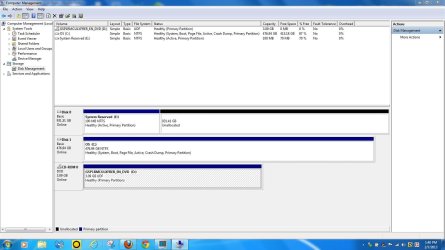
See disk management snip. I think that this is what you want. System reserved is the only active partition. Also at the bottom is a zipped fine named LeftC. I ran SF Diagnostic Tool and this is the results.

I was able to see blue screen now. The error was:
DRIVER_POWER_STATE_FAILURE
and in elevated command prompt
Code:
[FONT=Courier New]fsutil behavior query DisableDeleteNotify[/FONT]
Is its value 0?
I got 0.
http://www.sevenforums.com/tutorials/330-system-protection-turn-off.html
be sure the settings on SSD are like


Max usage 10GB is enough. Disable system protection on any ghost disks in the list
I ended up with 3% or about 14GB. 2% was 8GB, so I settled for 3%. No ghost disks.
 

Attachments

  • Capture dm 2_6_13.JPG
    Capture dm 2_6_13.JPG
    99.6 KB · Views: 4
  • LeftC.zip
    LeftC.zip
    3.1 MB · Views: 2
Last edited:

My Computer My Computer

At a glance

Windows 7 Ultimate (x64) Service Pack 1 (buil...Intel(R) Core(TM) i5-2450M CPU @ 2.50GHz8 GBIntel HD Graphics 3000 with up to 1.6GB dynam...
Computer Manufacturer/Model Number
Dell 17R N7110 Inspiron laptop
OS
Windows 7 Ultimate (x64) Service Pack 1 (build 7601)
CPU
Intel(R) Core(TM) i5-2450M CPU @ 2.50GHz
Motherboard
Dell Inc. 0YH79Y A00
Memory
8 GB
Graphics Card(s)
Intel HD Graphics 3000 with up to 1.6GB dynamic video memory
Sound Card
SRS Premium Sound - (1) Realtek High Definition Audio
Monitor(s) Displays
17.3" diagonal HD+ TrueLife LED display
Screen Resolution
1600x900 resolution
Hard Drives
1 TB HD #ST1000LM024 HN-M101MBB,

512 GB Samsung 840 Pro SSD
PSU
stock
Case
stock
Cooling
stock
Keyboard
stock
Mouse
stock
Internet Speed
WiFi
Other Info
Printer: HP Photosmart C3180
win7 startup repair and boot while win7 disk inserted... They seem to fix boot menu on ssd and boot from SSD. Do it again. Check if system reserved is active! But if you boots normally it loads boot menu from system reserved. No boot menu anymore there. So transfer boot menu from SSD to system reserved. Boot to SSD with win7 disk in. Be sure only system reserved is active. be sure ssd is marked "system" in disk management (so it has boot menu[at least now]).

In elevated command prompt
Code:
bcdedit/export  e:\boot\bcd
Current boot menu has now been exported (actually copied).

Code:
bcdedit/enum all /store e:\boot\bcd
bcdedit/enum all /store c:\boot\bcd
Both are the same now? Both are pointing to C (check lines like device, osdevice etc)

reboot normally without dvd
 
Last edited:

My Computer My Computer

At a glance

Microsoft Windows 7 Home Premium 64-bits 7601...Intel(R) Core(TM) i3 CPU M 370 @ 2.40GHz4,00 GBATI Mobility Radeon HD 5400 Series
Computer type
Laptop
Computer Manufacturer/Model Number
ACER ASPIRE 5742G
OS
Microsoft Windows 7 Home Premium 64-bits 7601 Multiprocessor Free Service Pack 1
CPU
Intel(R) Core(TM) i3 CPU M 370 @ 2.40GHz
Motherboard
Acer Aspire 5742G
Memory
4,00 GB
Graphics Card(s)
ATI Mobility Radeon HD 5400 Series
Sound Card
(1) AMD High Definition Audio Device (2) Realtek High Defi
Screen Resolution
1366 x 768 x 32 bits (4294967296 colors) @ 60 Hz
Hard Drives
WDC WD5000BEVT-22ZAT0
win7 startup repair and boot while win7 disk inserted... They seem to fix boot menu on ssd and boot from SSD. Do it again. Check if system reserved is active! But if you boots normally it loads boot menu from system reserved. No boot menu anymore there. So transfer boot menu from SSD to system reserved. Boot to SSD with win7 disk in. Be sure only system reserved is active. be sure ssd is marked "system" in disk management (so it has boot menu[at least now]).
I'm somewhat confused as to what I am supposed to do with the above. I'm lost, really. Do I just do a startup repair 3 times again?

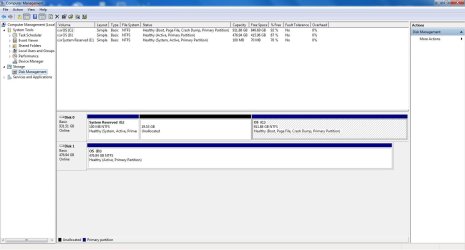
Also, take a look at the disk management snip today. Both system reserved (E) and OS (C) are active. Yesterday, I only had system reserved active. How did the computer make this happen?
 

Attachments

  • Capture dm 2_7_13 01.JPG
    Capture dm 2_7_13 01.JPG
    122.4 KB · Views: 3

My Computer My Computer

At a glance

Windows 7 Ultimate (x64) Service Pack 1 (buil...Intel(R) Core(TM) i5-2450M CPU @ 2.50GHz8 GBIntel HD Graphics 3000 with up to 1.6GB dynam...
Computer Manufacturer/Model Number
Dell 17R N7110 Inspiron laptop
OS
Windows 7 Ultimate (x64) Service Pack 1 (build 7601)
CPU
Intel(R) Core(TM) i5-2450M CPU @ 2.50GHz
Motherboard
Dell Inc. 0YH79Y A00
Memory
8 GB
Graphics Card(s)
Intel HD Graphics 3000 with up to 1.6GB dynamic video memory
Sound Card
SRS Premium Sound - (1) Realtek High Definition Audio
Monitor(s) Displays
17.3" diagonal HD+ TrueLife LED display
Screen Resolution
1600x900 resolution
Hard Drives
1 TB HD #ST1000LM024 HN-M101MBB,

512 GB Samsung 840 Pro SSD
PSU
stock
Case
stock
Cooling
stock
Keyboard
stock
Mouse
stock
Internet Speed
WiFi
Other Info
Printer: HP Photosmart C3180
If windows boots normally it only tries to boot from old harddisk as you told me before.

Startup repair did fix the boot from SSD. It repaired the boot menu on wrong disk. startup repair is confused!

bootmenu on ssd is fine! you did post it before. Copy it it system reserved.

So do all commands as explained in #152
 

My Computer My Computer

At a glance

Microsoft Windows 7 Home Premium 64-bits 7601...Intel(R) Core(TM) i3 CPU M 370 @ 2.40GHz4,00 GBATI Mobility Radeon HD 5400 Series
Computer type
Laptop
Computer Manufacturer/Model Number
ACER ASPIRE 5742G
OS
Microsoft Windows 7 Home Premium 64-bits 7601 Multiprocessor Free Service Pack 1
CPU
Intel(R) Core(TM) i3 CPU M 370 @ 2.40GHz
Motherboard
Acer Aspire 5742G
Memory
4,00 GB
Graphics Card(s)
ATI Mobility Radeon HD 5400 Series
Sound Card
(1) AMD High Definition Audio Device (2) Realtek High Defi
Screen Resolution
1366 x 768 x 32 bits (4294967296 colors) @ 60 Hz
Hard Drives
WDC WD5000BEVT-22ZAT0
So just do from within win7 elevated command prompt, so not from win7 dvd (but you can have win7 dvd inserted)

Code:
bcdedit/export  e:\boot\bcd

It copies the current bootmenu (bcd file) to f (system reserved)
Current bcd is bootable and is on C as I saw on disk management screenshot.

After this command c:\boot\bcd has been copied to e:\boot\bcd and system will boot fine (eject dvd first)
 
Last edited:

My Computer My Computer

At a glance

Microsoft Windows 7 Home Premium 64-bits 7601...Intel(R) Core(TM) i3 CPU M 370 @ 2.40GHz4,00 GBATI Mobility Radeon HD 5400 Series
Computer type
Laptop
Computer Manufacturer/Model Number
ACER ASPIRE 5742G
OS
Microsoft Windows 7 Home Premium 64-bits 7601 Multiprocessor Free Service Pack 1
CPU
Intel(R) Core(TM) i3 CPU M 370 @ 2.40GHz
Motherboard
Acer Aspire 5742G
Memory
4,00 GB
Graphics Card(s)
ATI Mobility Radeon HD 5400 Series
Sound Card
(1) AMD High Definition Audio Device (2) Realtek High Defi
Screen Resolution
1366 x 768 x 32 bits (4294967296 colors) @ 60 Hz
Hard Drives
WDC WD5000BEVT-22ZAT0
win7 startup repair and boot while win7 disk inserted... They seem to fix boot menu on ssd and boot from SSD. Do it again. Check if system reserved is active! But if you boots normally it loads boot menu from system reserved. No boot menu anymore there. So transfer boot menu from SSD to system reserved. Boot to SSD with win7 disk in. Be sure only system reserved is active. be sure ssd is marked "system" in disk management (so it has boot menu[at least now]).

In elevated command prompt
Code:
bcdedit/export  f:\boot\bcd
Current boot menu has now been exported (actually copied).

Code:
bcdedit/enum all /store f:\boot\bcd
bcdedit/enum all /store c:\boot\bcd
Both are the same now? Both are pointing to C (check lines like device, osdevice etc)

reboot normally without dvd
Take a look at the snips. I think that all is pointing to C. E (system reserved) is still the only active partition.
 

Attachments

  • Capture bcdn 2_7_13 01.JPG
    Capture bcdn 2_7_13 01.JPG
    103.5 KB · Views: 2
  • Capture bcdn 2_7_13 02.JPG
    Capture bcdn 2_7_13 02.JPG
    105.7 KB · Views: 2

My Computer My Computer

At a glance

Windows 7 Ultimate (x64) Service Pack 1 (buil...Intel(R) Core(TM) i5-2450M CPU @ 2.50GHz8 GBIntel HD Graphics 3000 with up to 1.6GB dynam...
Computer Manufacturer/Model Number
Dell 17R N7110 Inspiron laptop
OS
Windows 7 Ultimate (x64) Service Pack 1 (build 7601)
CPU
Intel(R) Core(TM) i5-2450M CPU @ 2.50GHz
Motherboard
Dell Inc. 0YH79Y A00
Memory
8 GB
Graphics Card(s)
Intel HD Graphics 3000 with up to 1.6GB dynamic video memory
Sound Card
SRS Premium Sound - (1) Realtek High Definition Audio
Monitor(s) Displays
17.3" diagonal HD+ TrueLife LED display
Screen Resolution
1600x900 resolution
Hard Drives
1 TB HD #ST1000LM024 HN-M101MBB,

512 GB Samsung 840 Pro SSD
PSU
stock
Case
stock
Cooling
stock
Keyboard
stock
Mouse
stock
Internet Speed
WiFi
Other Info
Printer: HP Photosmart C3180
win7 startup repair and boot while win7 disk inserted... They seem to fix boot menu on ssd and boot from SSD. Do it again. Check if system reserved is active! But if you boots normally it loads boot menu from system reserved. No boot menu anymore there. So transfer boot menu from SSD to system reserved. Boot to SSD with win7 disk in. Be sure only system reserved is active. be sure ssd is marked "system" in disk management (so it has boot menu[at least now]).

In elevated command prompt
Code:
bcdedit/export  e:\boot\bcd
Current boot menu has now been exported (actually copied).

Code:
bcdedit/enum all /store e:\boot\bcd
bcdedit/enum all /store c:\boot\bcd
Both are the same now? Both are pointing to C (check lines like device, osdevice etc)

reboot normally without dvd
Take a look at the snips. I think that all is pointing to C. E (system reserved) is still the only active partition.

All looks fine. I assume this was ooutput of
bcdedit/enum all /store e:\boot\bcd
and bcdedit/enum all /store c:\boot\bcd

Why are you calling it E? (I wrote it wrong...system reserved is called E)
 

My Computer My Computer

At a glance

Microsoft Windows 7 Home Premium 64-bits 7601...Intel(R) Core(TM) i3 CPU M 370 @ 2.40GHz4,00 GBATI Mobility Radeon HD 5400 Series
Computer type
Laptop
Computer Manufacturer/Model Number
ACER ASPIRE 5742G
OS
Microsoft Windows 7 Home Premium 64-bits 7601 Multiprocessor Free Service Pack 1
CPU
Intel(R) Core(TM) i3 CPU M 370 @ 2.40GHz
Motherboard
Acer Aspire 5742G
Memory
4,00 GB
Graphics Card(s)
ATI Mobility Radeon HD 5400 Series
Sound Card
(1) AMD High Definition Audio Device (2) Realtek High Defi
Screen Resolution
1366 x 768 x 32 bits (4294967296 colors) @ 60 Hz
Hard Drives
WDC WD5000BEVT-22ZAT0
So just do from within win7 elevated command prompt, so not from win7 dvd (but you can have win7 dvd inserted)

Code:
bcdedit/export  f:\boot\bcd
It copies the current bootmenu (bcd file) to f (system reserved)
Current bcd is bootable and is on C as I saw on disk management screenshot.

After this command c:\boot\bcd has been copied to f:\boot\bcd and system will boot fine (eject dvd first)
I just saw this. I did "bcdedit/export f:\boot\bcd" and it was successful. I have been changing "f" to "e" which is the system reserved partition.

Do I do anything with "After this command c:\boot\bcd has been copied to f:\boot\bcd and system will boot fine (eject dvd first)" other than eject dvd?
 

My Computer My Computer

At a glance

Windows 7 Ultimate (x64) Service Pack 1 (buil...Intel(R) Core(TM) i5-2450M CPU @ 2.50GHz8 GBIntel HD Graphics 3000 with up to 1.6GB dynam...
Computer Manufacturer/Model Number
Dell 17R N7110 Inspiron laptop
OS
Windows 7 Ultimate (x64) Service Pack 1 (build 7601)
CPU
Intel(R) Core(TM) i5-2450M CPU @ 2.50GHz
Motherboard
Dell Inc. 0YH79Y A00
Memory
8 GB
Graphics Card(s)
Intel HD Graphics 3000 with up to 1.6GB dynamic video memory
Sound Card
SRS Premium Sound - (1) Realtek High Definition Audio
Monitor(s) Displays
17.3" diagonal HD+ TrueLife LED display
Screen Resolution
1600x900 resolution
Hard Drives
1 TB HD #ST1000LM024 HN-M101MBB,

512 GB Samsung 840 Pro SSD
PSU
stock
Case
stock
Cooling
stock
Keyboard
stock
Mouse
stock
Internet Speed
WiFi
Other Info
Printer: HP Photosmart C3180
So you did
bcdedit/export e:\boot\bcd
bcdedit/enum all /store c:\boot\bcd
bcdedit/enum all /store e:\boot\bcd

If so:
  1. eject dvd
  2. boot normally
  3. post disk management output
 

My Computer My Computer

At a glance

Microsoft Windows 7 Home Premium 64-bits 7601...Intel(R) Core(TM) i3 CPU M 370 @ 2.40GHz4,00 GBATI Mobility Radeon HD 5400 Series
Computer type
Laptop
Computer Manufacturer/Model Number
ACER ASPIRE 5742G
OS
Microsoft Windows 7 Home Premium 64-bits 7601 Multiprocessor Free Service Pack 1
CPU
Intel(R) Core(TM) i3 CPU M 370 @ 2.40GHz
Motherboard
Acer Aspire 5742G
Memory
4,00 GB
Graphics Card(s)
ATI Mobility Radeon HD 5400 Series
Sound Card
(1) AMD High Definition Audio Device (2) Realtek High Defi
Screen Resolution
1366 x 768 x 32 bits (4294967296 colors) @ 60 Hz
Hard Drives
WDC WD5000BEVT-22ZAT0
So you did
bcdedit/export e:\boot\bcd
bcdedit/enum all /store c:\boot\bcd
bcdedit/enum all /store e:\boot\bcd

If so:
  1. eject dvd
  2. boot normally
  3. post disk management output
I did the above. When I first shut down this computer w/o install DVD I got a blue screen saying "DRIVER_POWER_STATE_FAILURE." I booted into safe mode and it worked OK. I then rebooted to Windows and restarted it several times all w/o install DVD and it is working OK. Below is a snip of disk management. (Both C and E are active again??)
 

Attachments

  • Capture dm 2_7_13 02.JPG
    Capture dm 2_7_13 02.JPG
    95.1 KB · Views: 2

My Computer My Computer

At a glance

Windows 7 Ultimate (x64) Service Pack 1 (buil...Intel(R) Core(TM) i5-2450M CPU @ 2.50GHz8 GBIntel HD Graphics 3000 with up to 1.6GB dynam...
Computer Manufacturer/Model Number
Dell 17R N7110 Inspiron laptop
OS
Windows 7 Ultimate (x64) Service Pack 1 (build 7601)
CPU
Intel(R) Core(TM) i5-2450M CPU @ 2.50GHz
Motherboard
Dell Inc. 0YH79Y A00
Memory
8 GB
Graphics Card(s)
Intel HD Graphics 3000 with up to 1.6GB dynamic video memory
Sound Card
SRS Premium Sound - (1) Realtek High Definition Audio
Monitor(s) Displays
17.3" diagonal HD+ TrueLife LED display
Screen Resolution
1600x900 resolution
Hard Drives
1 TB HD #ST1000LM024 HN-M101MBB,

512 GB Samsung 840 Pro SSD
PSU
stock
Case
stock
Cooling
stock
Keyboard
stock
Mouse
stock
Internet Speed
WiFi
Other Info
Printer: HP Photosmart C3180
Back
Top