
You are using an out of date browser. It may not display this or other websites correctly.
You should upgrade or use an alternative browser.
You should upgrade or use an alternative browser.
DNS Server Client won't start - dependent service does not exist
- Thread starter pajk
- Start date
you are simply missing key as described in #19
All things in that key are default things even {8ECC055D-047F-11D1-A537-0000F8753ED1}
But creating the key manually won't work. You don't have permissions to do it. But we gonna fix that
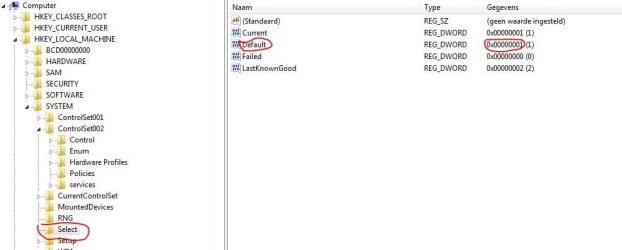
HKEY_LOCAL_MACHINE\SYSTEM\Select what is value of Default on the right panel?
Since when do you have the problems?
All things in that key are default things even {8ECC055D-047F-11D1-A537-0000F8753ED1}
But creating the key manually won't work. You don't have permissions to do it. But we gonna fix that
HKEY_LOCAL_MACHINE\SYSTEM\Select what is value of Default on the right panel?
Since when do you have the problems?
Last edited:
My Computer
At a glance
Microsoft Windows 7 Home Premium 64-bits 7601...Intel(R) Core(TM) i3 CPU M 370 @ 2.40GHz4,00 GBATI Mobility Radeon HD 5400 Series
- Computer type
- Laptop
- Computer Manufacturer/Model Number
- ACER ASPIRE 5742G
- OS
- Microsoft Windows 7 Home Premium 64-bits 7601 Multiprocessor Free Service Pack 1
- CPU
- Intel(R) Core(TM) i3 CPU M 370 @ 2.40GHz
- Motherboard
- Acer Aspire 5742G
- Memory
- 4,00 GB
- Graphics Card(s)
- ATI Mobility Radeon HD 5400 Series
- Sound Card
- (1) AMD High Definition Audio Device (2) Realtek High Defi
- Screen Resolution
- 1366 x 768 x 32 bits (4294967296 colors) @ 60 Hz
- Hard Drives
- WDC WD5000BEVT-22ZAT0
HKEY_LOCAL_MACHINE\SYSTEM\Select what is value of Default on the right panel?Default is (value not set) I noticed the problem about 2 weeks ago but it may have been going on longer.
Attachments
My Computer
At a glance
Microsoft Windows 7 Home Premium 64-bits 7601...Intel(R) Core(TM) i3 CPU M 370 @ 2.40GHz4,00 GBATI Mobility Radeon HD 5400 Series
- Computer type
- Laptop
- Computer Manufacturer/Model Number
- ACER ASPIRE 5742G
- OS
- Microsoft Windows 7 Home Premium 64-bits 7601 Multiprocessor Free Service Pack 1
- CPU
- Intel(R) Core(TM) i3 CPU M 370 @ 2.40GHz
- Motherboard
- Acer Aspire 5742G
- Memory
- 4,00 GB
- Graphics Card(s)
- ATI Mobility Radeon HD 5400 Series
- Sound Card
- (1) AMD High Definition Audio Device (2) Realtek High Defi
- Screen Resolution
- 1366 x 768 x 32 bits (4294967296 colors) @ 60 Hz
- Hard Drives
- WDC WD5000BEVT-22ZAT0
It is the same as you have posted
I find another easy trick to do it.
Create a folder C:\TDX
Put both files I attach in that folder
One file is psexec.exe and one file is ff.reg (my LEGACY_TDX key)
In elevated command prompt:
Code:
C:
CD  \TDX
psexec -i -s cmd.exe
[B]A new command prompt window opens. Goto that window[/B]
whoami
[B]Are you really system now?[/B]
C:
CD  \TDX
start  ff.reg
[B]import succesfully?[/B]Post back results
Reboot system. Now it works? You can delete C:\TDX if you don't need it anymore
Attachments
Last edited:
My Computer
At a glance
Microsoft Windows 7 Home Premium 64-bits 7601...Intel(R) Core(TM) i3 CPU M 370 @ 2.40GHz4,00 GBATI Mobility Radeon HD 5400 Series
- Computer type
- Laptop
- Computer Manufacturer/Model Number
- ACER ASPIRE 5742G
- OS
- Microsoft Windows 7 Home Premium 64-bits 7601 Multiprocessor Free Service Pack 1
- CPU
- Intel(R) Core(TM) i3 CPU M 370 @ 2.40GHz
- Motherboard
- Acer Aspire 5742G
- Memory
- 4,00 GB
- Graphics Card(s)
- ATI Mobility Radeon HD 5400 Series
- Sound Card
- (1) AMD High Definition Audio Device (2) Realtek High Defi
- Screen Resolution
- 1366 x 768 x 32 bits (4294967296 colors) @ 60 Hz
- Hard Drives
- WDC WD5000BEVT-22ZAT0

DHCP Client service is still not dependend of TDX. Don't know why but that's wrong!!Hi-
Uploading the TDX registry worked, I now have DNS server running and can access all my shared drives. Thanks for all your help.
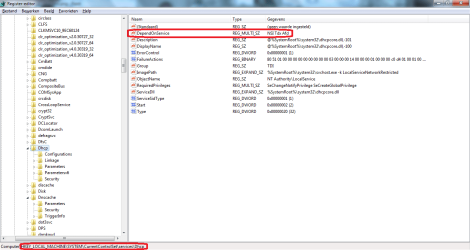
In registry HKEY_LOCAL_MACHINE\SYSTEM\CurrentControlSet\services\Dhcp
change value of DependOnService to value as shown
Who did delete the dependency? Who did delete the registry key LEGACY_TDX? Did you have a virus? Did you clean a virus?
Attachments

My Computer
At a glance
Microsoft Windows 7 Home Premium 64-bits 7601...Intel(R) Core(TM) i3 CPU M 370 @ 2.40GHz4,00 GBATI Mobility Radeon HD 5400 Series
- Computer type
- Laptop
- Computer Manufacturer/Model Number
- ACER ASPIRE 5742G
- OS
- Microsoft Windows 7 Home Premium 64-bits 7601 Multiprocessor Free Service Pack 1
- CPU
- Intel(R) Core(TM) i3 CPU M 370 @ 2.40GHz
- Motherboard
- Acer Aspire 5742G
- Memory
- 4,00 GB
- Graphics Card(s)
- ATI Mobility Radeon HD 5400 Series
- Sound Card
- (1) AMD High Definition Audio Device (2) Realtek High Defi
- Screen Resolution
- 1366 x 768 x 32 bits (4294967296 colors) @ 60 Hz
- Hard Drives
- WDC WD5000BEVT-22ZAT0
Did you do EXACTLY what I told in #26 ?I got the attached error when running start ff.reg from an elevated command prompt
My Computer
At a glance
Microsoft Windows 7 Home Premium 64-bits 7601...Intel(R) Core(TM) i3 CPU M 370 @ 2.40GHz4,00 GBATI Mobility Radeon HD 5400 Series
- Computer type
- Laptop
- Computer Manufacturer/Model Number
- ACER ASPIRE 5742G
- OS
- Microsoft Windows 7 Home Premium 64-bits 7601 Multiprocessor Free Service Pack 1
- CPU
- Intel(R) Core(TM) i3 CPU M 370 @ 2.40GHz
- Motherboard
- Acer Aspire 5742G
- Memory
- 4,00 GB
- Graphics Card(s)
- ATI Mobility Radeon HD 5400 Series
- Sound Card
- (1) AMD High Definition Audio Device (2) Realtek High Defi
- Screen Resolution
- 1366 x 768 x 32 bits (4294967296 colors) @ 60 Hz
- Hard Drives
- WDC WD5000BEVT-22ZAT0
Sorry for a bump on this thread,
I have this DNS won't start problem, all the other services needed for file sharing have started (Server, DHCP, so on...) Just this DNS Client I am missing to make it complete. I tried that ff.reg up above and I get the error "Error cannot access registry".
Any help guys? I have recently had an issue with DHCP not starting and deleting that Dependent registry key fixed that just this DNS now won't boot?
Thanks
Nick
I have this DNS won't start problem, all the other services needed for file sharing have started (Server, DHCP, so on...) Just this DNS Client I am missing to make it complete. I tried that ff.reg up above and I get the error "Error cannot access registry".
Any help guys? I have recently had an issue with DHCP not starting and deleting that Dependent registry key fixed that just this DNS now won't boot?
Thanks
Nick
My Computer
At a glance
Windows 7 x32
- Computer type
- PC/Desktop
- OS
- Windows 7 x32
What did you delete? Did you try to import my fix with psexec?Sorry for a bump on this thread,
I have this DNS won't start problem, all the other services needed for file sharing have started (Server, DHCP, so on...) Just this DNS Client I am missing to make it complete. I tried that ff.reg up above and I get the error "Error cannot access registry".
Any help guys? I have recently had an issue with DHCP not starting and deleting that Dependent registry key fixed that just this DNS now won't boot?
Thanks
Nick
My Computer
At a glance
Microsoft Windows 7 Home Premium 64-bits 7601...Intel(R) Core(TM) i3 CPU M 370 @ 2.40GHz4,00 GBATI Mobility Radeon HD 5400 Series
- Computer type
- Laptop
- Computer Manufacturer/Model Number
- ACER ASPIRE 5742G
- OS
- Microsoft Windows 7 Home Premium 64-bits 7601 Multiprocessor Free Service Pack 1
- CPU
- Intel(R) Core(TM) i3 CPU M 370 @ 2.40GHz
- Motherboard
- Acer Aspire 5742G
- Memory
- 4,00 GB
- Graphics Card(s)
- ATI Mobility Radeon HD 5400 Series
- Sound Card
- (1) AMD High Definition Audio Device (2) Realtek High Defi
- Screen Resolution
- 1366 x 768 x 32 bits (4294967296 colors) @ 60 Hz
- Hard Drives
- WDC WD5000BEVT-22ZAT0
I deleted the "DependonService" from the DHCP registry. I cannot seem to see an exe file for psexec? I made a .bat file and copied the code into it and ran it and it prompted me, do I really want to mess with the registry yadda yadda I chose yes and that's when it said the registry is not accessible.
That's what I put in the bat file.
Code:
C:
CD  \TDX
psexec -i -s cmd.exe
A new command prompt window opens. Goto that window
whoami
Are you really system now?
C:
CD  \TDX
start  ff.reg
import succesfully?
That's what I put in the bat file.
My Computer
At a glance
Windows 7 x32
- Computer type
- PC/Desktop
- OS
- Windows 7 x32
Now psexec is attached. Put in in c:\windows\system32I deleted the "DependonService" from the DHCP registry. I cannot seem to see an exe file for psexec? I made a .bat file and copied the code into it and ran it and it prompted me, do I really want to mess with the registry yadda yadda I chose yes and that's when it said the registry is not accessible.
Code:C: CD \TDX psexec -i -s cmd.exe A new command prompt window opens. Goto that window whoami Are you really system now? C: CD \TDX start ff.reg import succesfully?
That's what I put in the bat file.
After that open an http://www.sevenforums.com/tutorials/783-elevated-command-prompt.html
Now do MANUALLY:
Code:
C:
CD  \TDX
psexec -i -s cmd.exe
A new command prompt window opens. Goto that window
whoami
Are you really system now?
C:
CD  \TDX
start  ff.reg
import succesfully?You may delete folder \TDX afterwards if you wish
What exactly did you delete? Anyway revert the changes!I deleted the "DependonService" from the DHCP registry
My Computer
At a glance
Microsoft Windows 7 Home Premium 64-bits 7601...Intel(R) Core(TM) i3 CPU M 370 @ 2.40GHz4,00 GBATI Mobility Radeon HD 5400 Series
- Computer type
- Laptop
- Computer Manufacturer/Model Number
- ACER ASPIRE 5742G
- OS
- Microsoft Windows 7 Home Premium 64-bits 7601 Multiprocessor Free Service Pack 1
- CPU
- Intel(R) Core(TM) i3 CPU M 370 @ 2.40GHz
- Motherboard
- Acer Aspire 5742G
- Memory
- 4,00 GB
- Graphics Card(s)
- ATI Mobility Radeon HD 5400 Series
- Sound Card
- (1) AMD High Definition Audio Device (2) Realtek High Defi
- Screen Resolution
- 1366 x 768 x 32 bits (4294967296 colors) @ 60 Hz
- Hard Drives
- WDC WD5000BEVT-22ZAT0
Cheers for the reply,
I still cannot see the attached psexec.exe mate. I never made a backup of DependonService before I deleted it the guide I read didn't mention about backing it up? It must have been rewritten back into the registry as DHCP is running fine where as before it wasn't.
Nick
I still cannot see the attached psexec.exe mate. I never made a backup of DependonService before I deleted it the guide I read didn't mention about backing it up? It must have been rewritten back into the registry as DHCP is running fine where as before it wasn't.
Nick
My Computer
At a glance
Windows 7 x32
- Computer type
- PC/Desktop
- OS
- Windows 7 x32
psexec is in zip file on PsExecCheers for the reply,
I still cannot see the attached psexec.exe mate. I never made a backup of DependonService before I deleted it the guide I read didn't mention about backing it up? It must have been rewritten back into the registry as DHCP is running fine where as before it wasn't.
Nick
I don't know why attachement is gone
My Computer
At a glance
Microsoft Windows 7 Home Premium 64-bits 7601...Intel(R) Core(TM) i3 CPU M 370 @ 2.40GHz4,00 GBATI Mobility Radeon HD 5400 Series
- Computer type
- Laptop
- Computer Manufacturer/Model Number
- ACER ASPIRE 5742G
- OS
- Microsoft Windows 7 Home Premium 64-bits 7601 Multiprocessor Free Service Pack 1
- CPU
- Intel(R) Core(TM) i3 CPU M 370 @ 2.40GHz
- Motherboard
- Acer Aspire 5742G
- Memory
- 4,00 GB
- Graphics Card(s)
- ATI Mobility Radeon HD 5400 Series
- Sound Card
- (1) AMD High Definition Audio Device (2) Realtek High Defi
- Screen Resolution
- 1366 x 768 x 32 bits (4294967296 colors) @ 60 Hz
- Hard Drives
- WDC WD5000BEVT-22ZAT0

My Computer
At a glance
Microsoft Windows 7 Home Premium 64-bits 7601...Intel(R) Core(TM) i3 CPU M 370 @ 2.40GHz4,00 GBATI Mobility Radeon HD 5400 Series
- Computer type
- Laptop
- Computer Manufacturer/Model Number
- ACER ASPIRE 5742G
- OS
- Microsoft Windows 7 Home Premium 64-bits 7601 Multiprocessor Free Service Pack 1
- CPU
- Intel(R) Core(TM) i3 CPU M 370 @ 2.40GHz
- Motherboard
- Acer Aspire 5742G
- Memory
- 4,00 GB
- Graphics Card(s)
- ATI Mobility Radeon HD 5400 Series
- Sound Card
- (1) AMD High Definition Audio Device (2) Realtek High Defi
- Screen Resolution
- 1366 x 768 x 32 bits (4294967296 colors) @ 60 Hz
- Hard Drives
- WDC WD5000BEVT-22ZAT0
Similar threads
- Replies
- 1
- Views
- 5K

- Replies
- 27
- Views
- 16K

- Replies
- 5
- Views
- 9K

- Replies
- 5
- Views
- 8K
