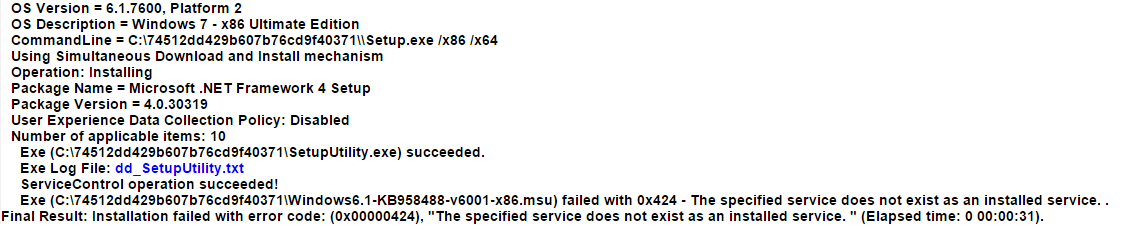
.Net 4.0 error 0x00000424 "the specified service does not exist"

sephoy

New member
Local time
2:03 AM
Messages
3
.Net 4.0 error 0x00000424 "the specified service does not exist"

Hi! I'm Having trouble installing Microsoft .Net 4.0. I've tried every solution I found on the internet and still nothing. Also I may have accidentally removed it before from my programs. Is there any way I could fix this without having to lose my files(i.e. reformatting). Thanks a lot!
 

Attachments

  • dotNet Error LOG.png
    dotNet Error LOG.png
    15.6 KB · Views: 3

My Computer My Computer

At a glance

Windows 7 Ultimate 32bitIntel Pentium P6000Intel HD
Computer type
PC/Desktop
Computer Manufacturer/Model Number
Neo
OS
Windows 7 Ultimate 32bit
CPU
Intel Pentium P6000
Graphics Card(s)
Intel HD
Antivirus
Eset

My Computer My Computer

At a glance

Win 7 x64 Home Premium (and x86 VirtualBox VM...i3 370M/i7 6500U8GB - finally :)/8GBit's an i3, dude!/dual Intel&nVidia
Computer type
Laptop
Computer Manufacturer/Model Number
Asus K52F or Lenovo B51-80
OS
Win 7 x64 Home Premium (and x86 VirtualBox VM)/Win10
CPU
i3 370M/i7 6500U
Motherboard
Asus/Lenovo
Memory
8GB - finally :)/8GB
Graphics Card(s)
it's an i3, dude!/dual Intel&nVidia
Sound Card
onboard
Monitor(s) Displays
15.6" built-in
Screen Resolution
1366x768/1920x1080
Hard Drives
750GB Seagate internal
Sundry external drives attached to other computers on the local network
1TB SSD on the Lenovo
PSU
n/a
Internet Speed
as much as I can get - usually on a dongle/phone, so <1MB/s
Antivirus
MSE/Defender
Browser
IE11/12/Edge/Chrome/FF(if I must)
Here is the copy. Thank you for taking the time to look into this.

========================================

Farbar Service Scanner Version: 17-01-2015
Ran by Valued User (administrator) on 10-03-2015 at 20:06:41
Running from "C:\Users\Valued User\Downloads"
Microsoft Windows 7 Ultimate (X86)
Boot Mode: Normal
****************************************************************

Internet Services:
============

Connection Status:
==============
Localhost is accessible.
LAN connected.
Google IP is accessible.
Google.com is accessible.
Yahoo.com is accessible.


Windows Firewall:
=============

Firewall Disabled Policy:
==================


System Restore:
============

System Restore Policy:
========================


Action Center:
============


Windows Update:
============
wuauserv Service is not running. Checking service configuration:
The start type of wuauserv service is OK.
The ImagePath of wuauserv service is OK.
The ServiceDll of wuauserv: "C:\Windows\system32\wuaueng.dll".


Windows Autoupdate Disabled Policy:
============================


Windows Defender:
==============

Other Services:
==============


File Check:
========
C:\Windows\system32\nsisvc.dll => File is digitally signed
C:\Windows\system32\Drivers\nsiproxy.sys => File is digitally signed
C:\Windows\system32\dhcpcore.dll => File is digitally signed
C:\Windows\system32\Drivers\afd.sys => File is digitally signed
C:\Windows\system32\Drivers\tdx.sys => File is digitally signed
C:\Windows\system32\Drivers\tcpip.sys => File is digitally signed
C:\Windows\system32\dnsrslvr.dll => File is digitally signed
C:\Windows\system32\mpssvc.dll => File is digitally signed
C:\Windows\system32\bfe.dll => File is digitally signed
C:\Windows\system32\Drivers\mpsdrv.sys => File is digitally signed
C:\Windows\system32\SDRSVC.dll => File is digitally signed
C:\Windows\system32\vssvc.exe => File is digitally signed
C:\Windows\system32\wscsvc.dll => File is digitally signed
C:\Windows\system32\wbem\WMIsvc.dll => File is digitally signed
C:\Windows\system32\wuaueng.dll => File is digitally signed
C:\Windows\system32\qmgr.dll => File is digitally signed
C:\Windows\system32\es.dll => File is digitally signed
C:\Windows\system32\cryptsvc.dll => File is digitally signed
C:\Program Files\Windows Defender\MpSvc.dll => File is digitally signed
C:\Windows\system32\ipnathlp.dll => File is digitally signed
C:\Windows\system32\iphlpsvc.dll => File is digitally signed
C:\Windows\system32\svchost.exe => File is digitally signed
C:\Windows\system32\rpcss.dll => File is digitally signed


**** End of log ****
 

My Computer My Computer

At a glance

Windows 7 Ultimate 32bitIntel Pentium P6000Intel HD
Computer type
PC/Desktop
Computer Manufacturer/Model Number
Neo
OS
Windows 7 Ultimate 32bit
CPU
Intel Pentium P6000
Graphics Card(s)
Intel HD
Antivirus
Eset
That at least gives me an idea of where to start!
Let's have a closer look at the wuauserv service...

Open an Elevated Command Prompt, and run the following command

REG QUERY HKLM\SYSTEM\CurrentControlSet\Services\wuauserv /S

Post the results...

Here are some instructions to make life easier :)
1) To open an Elevated Command Prompt Window (the ECP window), click on Start, All Programs, Accessories – then right-click on Command Prompt, and select Run as Administrator. Accept the UAC prompt.
2) To run the commands easier, highlight the block of commands, and right-click on the highlight – select Copy. In the CP Window, click on the black/white icon at top left – select Paste. The commands will run but may not complete the last command, so hit the Enter Key once.
3) To copy the results... click on the Black/White icon in the top left, and select Edit... 'Select All', and hit the Enter key - then use Ctrl+V or r-click+Paste to paste it into your response.
 

My Computer My Computer

At a glance

Win 7 x64 Home Premium (and x86 VirtualBox VM...i3 370M/i7 6500U8GB - finally :)/8GBit's an i3, dude!/dual Intel&nVidia
Computer type
Laptop
Computer Manufacturer/Model Number
Asus K52F or Lenovo B51-80
OS
Win 7 x64 Home Premium (and x86 VirtualBox VM)/Win10
CPU
i3 370M/i7 6500U
Motherboard
Asus/Lenovo
Memory
8GB - finally :)/8GB
Graphics Card(s)
it's an i3, dude!/dual Intel&nVidia
Sound Card
onboard
Monitor(s) Displays
15.6" built-in
Screen Resolution
1366x768/1920x1080
Hard Drives
750GB Seagate internal
Sundry external drives attached to other computers on the local network
1TB SSD on the Lenovo
PSU
n/a
Internet Speed
as much as I can get - usually on a dongle/phone, so <1MB/s
Antivirus
MSE/Defender
Browser
IE11/12/Edge/Chrome/FF(if I must)
Hi! Here is what you requested. If its not too much to ask, could you tell me what this command do?

======================================================

HKEY_LOCAL_MACHINE\system\CurrentControlSet\Services\wuauserv
PreshutdownTimeout REG_DWORD 0x36ee800
DisplayName REG_SZ Windows Update
ImagePath REG_EXPAND_SZ %systemroot%\system32\svchost.exe -k netsvcs
Description REG_SZ Hiermee wordt de mogelijkheid om updates voor Windo
ws en andere programma's te zoeken, te downloaden en te installeren ingeschakeld
. Als deze service is uitgeschakeld, kunnen gebruikers van deze computer Windows
Update of de functie voor het automatisch bijwerken niet gebruiken, en programm
a's kunnen de API Windows Update Agent (WUA) niet gebruiken.
ObjectName REG_SZ LocalSystem
ErrorControl REG_DWORD 0x1
Start REG_DWORD 0x2
DelayedAutoStart REG_DWORD 0x1
Type REG_DWORD 0x20
DependOnService REG_MULTI_SZ rpcss
ServiceSidType REG_DWORD 0x1
RequiredPrivileges REG_MULTI_SZ SeAuditPrivilege\0SeCreateGlobalPrivil
ege\0SeCreatePageFilePrivilege\0SeTcbPrivilege\0SeAssignPrimaryTokenPrivilege\0S
eImpersonatePrivilege\0SeIncreaseQuotaPrivilege
FailureActions REG_BINARY 80510100000000000000000003000000140000000100
000060EA000000000000000000000000000000000000

HKEY_LOCAL_MACHINE\system\CurrentControlSet\Services\wuauserv\Parameters
ServiceDll REG_EXPAND_SZ C:\Windows\system32\wuaueng.dll
ServiceMain REG_SZ WUServiceMain
ServiceDllUnloadOnStop REG_DWORD 0x1

HKEY_LOCAL_MACHINE\system\CurrentControlSet\Services\wuauserv\Security
Security REG_BINARY 010014807800000084000000140000003000000002001C0001
00000002801400FF000F000101000000000001000000000200480003000000000014009D00020001
010000000000050B00000000001800FF010F000102000000000005200000002002000000001400FF
010F00010100000000000512000000010100000000000512000000010100000000000512000000

 

My Computer My Computer

At a glance

Windows 7 Ultimate 32bitIntel Pentium P6000Intel HD
Computer type
PC/Desktop
Computer Manufacturer/Model Number
Neo
OS
Windows 7 Ultimate 32bit
CPU
Intel Pentium P6000
Graphics Card(s)
Intel HD
Antivirus
Eset
REG QUERY commands reveal the data in the Windows registry that may be controlling almost any interaction with the OS - the trick to reading the output is to have some idea as to what is 'normal' for any given query.

In this case, this all looks perfectly normal - which means that we have to look elsewhere for the source of the problem.

Possibly, there'll be a clue in the Event logs...

Open Event Viewer
click on the Windows logs entry in the left pane to expand it.
Now click on the Application entry - wait while it loads.
Click on 'File' in the menu bar and select Save...
Save the file as Appevt.evtx
Repeat for the System log
then zip both, and upload them.
 

My Computer My Computer

At a glance

Win 7 x64 Home Premium (and x86 VirtualBox VM...i3 370M/i7 6500U8GB - finally :)/8GBit's an i3, dude!/dual Intel&nVidia
Computer type
Laptop
Computer Manufacturer/Model Number
Asus K52F or Lenovo B51-80
OS
Win 7 x64 Home Premium (and x86 VirtualBox VM)/Win10
CPU
i3 370M/i7 6500U
Motherboard
Asus/Lenovo
Memory
8GB - finally :)/8GB
Graphics Card(s)
it's an i3, dude!/dual Intel&nVidia
Sound Card
onboard
Monitor(s) Displays
15.6" built-in
Screen Resolution
1366x768/1920x1080
Hard Drives
750GB Seagate internal
Sundry external drives attached to other computers on the local network
1TB SSD on the Lenovo
PSU
n/a
Internet Speed
as much as I can get - usually on a dongle/phone, so <1MB/s
Antivirus
MSE/Defender
Browser
IE11/12/Edge/Chrome/FF(if I must)
Back
Top