Solved help choosing a mbo ( upgrade)

Thanks mikezilla2 for coming back and letting us know your selection of case. You will be able to do a lot with your choice. I always start a build with the roots of a system. A case that has a lot of room and cools well and a power supply of quality that is more than needed by at least a 100w.

linnemeyerhere does a nice job on cable management and that is very important for air flow in any case. I also use Corsair water cooler and they work well in conjunction with Noctua fans. I have a i960 3.2 (run hot normally at stock) clocked a little over 4.2 with two Noctua fans push pull and a H50 and run cool. Which tell me the (H) series coolers do work. This is just food for though and research. Their/there are a lot of new self contained water coolers that have come out in the last few months that I haven't researched. Their/there is no research needed on fans. Noctua is the boss.

I complement you on the time you took for research. If you continue in that fashion you will be happy with you build. If you have any question or need of a opinion please let us know.

This should make you feel good.
http://www.guru3d.com/articles_pages/cm_storm_trooper_review,11.html
 

My Computer My Computer

Computer type
PC/Desktop
Computer Manufacturer/Model Number
Home made Desktop
OS
Windows 10 Pro. 64/ version 1709 Windows 7 Pro/64
CPU
Intel i7-6800K @ 4.3
Motherboard
ASUS X-99 Deluxe II
Memory
Corsair Platinum 16 gig @2400
Graphics Card(s)
EVGA GTX 1070 OC
Monitor(s) Displays
Asus 27" LED LCD/VE278Q
Screen Resolution
1920-1080 or 1280-720 HDMI
Hard Drives
INTEL SSD 730-240 Gb Sata 3.0/
PSU
EVGA Platium 1200W
Case
Phanteks Luxe Tempered Glass 8 fans/ one radiator
Cooling
XSPC/ Water Cooled CPU
Keyboard
Das 4 Professional
Mouse
Logitech M705/MX Anywhere 2-S
Internet Speed
100 mbits
Antivirus
Microsoft Security Essentials/ Malwarebytes Premium 3.0/ SAS
Browser
I.E. 11 default/Firefox/ ISP Time Warner Cable/Spectrum
Other Info
LG BluRay Burner/
Sound system-KLipsch-THX/
Icy Dock ssd Hot Swap bays.

My Computer My Computer

OS
Windows 7 Ultimate x64
CPU
I74770K
Motherboard
Z87
Graphics Card(s)
GTX960 4GB
Sound Card
bulit in -
Monitor(s) Displays
braiva KDL-40Z4500
Screen Resolution
1920X1080p
I like MSI but most here would suggest ASUS and there is no doubt they take overclocking very serious, here are a couple examples:

ASUS Maximus V Formula Intel Z77 Express Motherboard - ATX, DDR3, 2800(O.C.), Socket 1155, Intel Z77 Chipset, RJ-45, HDMI, USB 3.0, ROG CPU-Z, CrossFireX, RAID at TigerDirect.com

ASUS SABERTOOTH Z77 Intel Series 7 Motherboard - ATX, Socket H2 (LGA115), Intel Z77 Express, 1866MHz DDR3, SATA III (6Gb/s), RAID, 8-CH Audio, Gigabit LAN, USB 3.0, PCIe 3.0, Thermal Armor at TigerDirect.com

ASUS P8Z77-V PRO Intel 7 Series Motherboard - ATX, Socket H2 (LGA1155), Intel Z77, 2400MHz DDR3 (O.C.), SATA III (6Gb/s), RAID, 8-CH Audio, Gigabit LAN, USB 3.0, PCIe 3.0, WiFi-N, SLI/CrossFireX at TigerDirect.com

I would get another matching ram module as this is a dual channel chip or look into a new more powerful set and start with 2x8gb and then order a second or pop for 4x4gb in a strong performing ram. I went with Crucial Tactical and have been very please, Corsair,G Skill and Kingston are also great.
 

My Computer My Computer

Computer type
PC/Desktop
Computer Manufacturer/Model Number
A blend of brains, brawn and dumb luck.
OS
Windows 7 Ultimate 64
CPU
i7 3770k OC'd 4.6 @ 1.17v, also FX 8120 & i5 miniITX
Motherboard
MSI P67A-GD80 b3
Memory
32 gb G.Skill Sniper DDR3 10-12-12-31 @ 2133
Graphics Card(s)
XFX Radeon 7870 2GB DDR5
Sound Card
Sound Blaster Z Series Card
Monitor(s) Displays
(2) LG LED 23" 1920 x 1080 2ms Monitors via mini d-port
Screen Resolution
1680 X 1050 p
Hard Drives
Samsung 256 gb 830 SSD sata III
(1) 1 tb WD Black
(2) 1 tb Hitachi deskmates/sata II
(2) 1 tb WD green/sata II
(2) 3 tb Seagate Barracuda
(1) 120 gb OCZ Vertex SS
(1) Drobo 5N w/5 Seagate 3tb
PSU
EVGA modular 1000G2 80% gold rating & APC 1200 RS
Case
CoolerMaster Storm Styker
Cooling
7 case fans 140mm & 120mm, NZXT Kraken X60
Keyboard
(2) Logitech Illuminated Keyboards (1) usb (1) wireless
Mouse
Logitech G700 & T-BC21 - nano nx for the laptop
Internet Speed
Basic 120mbps down
Antivirus
Trend Micro Titanium Max Security & Malwarebytes Premium
Browser
Chrome and IE 10
Other Info
5 Noctua case fans + 3 Noctua in p/p on NZXT cooler
Integrated hot swap drive bays for 2.5" Drives
(2) Lite-on dvd/cd/Blu Ray optical 22X
Integrated fan controller and led on/off
HP Officejet Pro 8630 all-n-one
Hot-swappable 3.5" hard drive bay
Netgear Nighthawk router
Asus USB 3 & sata 6 PCIe card
Vantec IDE to sata adptr./Ultra sata adptr
Lenovo L420 i5 lappy with m sata
Drobo 5N advanced NAS
cheers il have to give it a think , i guess in the end im probbly looking at getting new ram should i be looking at DDR3 ram or DDR 2 ram ? aussimng i occupy all 4 slots sooner or later ? the other thing im not so srue about is i could be looking at non standerd size ATX boards more room more slots - can you provide any examples in both brands MSI and ASUS ? i guess im also looking at a 512gb or 500gb SSD tho pricing for all of this is well costly
 

My Computer My Computer

OS
Windows 7 Ultimate x64
CPU
I74770K
Motherboard
Z87
Graphics Card(s)
GTX960 4GB
Sound Card
bulit in -
Monitor(s) Displays
braiva KDL-40Z4500
Screen Resolution
1920X1080p
I wouldn't waste my money on that large a SSD and instead zone in on the 128gb min. to 256gb only. Then invest your savings in a large spinner. This is my ram I'm using and I will also list two other types at opposites ends of the price spectrum.

Ram would only be DDR3 desktop style and look for 1866-2133.

First here's mine and I dig it !
Crucial Ballistix Tactical Tracer 4GB 240-Pin DDR3 SDRAM DDR3 1866 (PC3 14900) Desktop Memory (with Orange/Blue Light) Model BLT4G3D1869DT2TXOB - Newegg.com

Now the high end dream ram.
CORSAIR Dominator Platinum 8GB (2 x 4GB) 240-Pin DDR3 SDRAM DDR3 2133 Desktop Memory Model CMD8GX3M2B2133C9 - Newegg.com

And now the bang for buck.
G.SKILL Ripjaws Z Series 8GB (4 x 2GB) 240-Pin DDR3 SDRAM DDR3 2133 (PC3 17000) Desktop Memory Model F3-17000CL9Q-8GBZH - Newegg.com
 
Last edited:

My Computer My Computer

Computer type
PC/Desktop
Computer Manufacturer/Model Number
A blend of brains, brawn and dumb luck.
OS
Windows 7 Ultimate 64
CPU
i7 3770k OC'd 4.6 @ 1.17v, also FX 8120 & i5 miniITX
Motherboard
MSI P67A-GD80 b3
Memory
32 gb G.Skill Sniper DDR3 10-12-12-31 @ 2133
Graphics Card(s)
XFX Radeon 7870 2GB DDR5
Sound Card
Sound Blaster Z Series Card
Monitor(s) Displays
(2) LG LED 23" 1920 x 1080 2ms Monitors via mini d-port
Screen Resolution
1680 X 1050 p
Hard Drives
Samsung 256 gb 830 SSD sata III
(1) 1 tb WD Black
(2) 1 tb Hitachi deskmates/sata II
(2) 1 tb WD green/sata II
(2) 3 tb Seagate Barracuda
(1) 120 gb OCZ Vertex SS
(1) Drobo 5N w/5 Seagate 3tb
PSU
EVGA modular 1000G2 80% gold rating & APC 1200 RS
Case
CoolerMaster Storm Styker
Cooling
7 case fans 140mm & 120mm, NZXT Kraken X60
Keyboard
(2) Logitech Illuminated Keyboards (1) usb (1) wireless
Mouse
Logitech G700 & T-BC21 - nano nx for the laptop
Internet Speed
Basic 120mbps down
Antivirus
Trend Micro Titanium Max Security & Malwarebytes Premium
Browser
Chrome and IE 10
Other Info
5 Noctua case fans + 3 Noctua in p/p on NZXT cooler
Integrated hot swap drive bays for 2.5" Drives
(2) Lite-on dvd/cd/Blu Ray optical 22X
Integrated fan controller and led on/off
HP Officejet Pro 8630 all-n-one
Hot-swappable 3.5" hard drive bay
Netgear Nighthawk router
Asus USB 3 & sata 6 PCIe card
Vantec IDE to sata adptr./Ultra sata adptr
Lenovo L420 i5 lappy with m sata
Drobo 5N advanced NAS
SSD's

Wicked SSD, I scored the last of the 830 series and so glad, only get the Pro series !!!!!
SAMSUNG MZ-7PD256BW - Newegg.com

All my others have been Crucial SSD's they rock !
Crucial M4 CT256M4SSD2 Solid State Drive - Newegg.com

Mobo's well if cost was no object with MSI then this is the bad boy I would wish for.
MSI Z77A-GD80 LGA 1155 Intel Z77 HDMI SATA 6Gb/s USB 3.0 ATX Intel Motherboard with UEFI BIOS and Thunderbolt - Newegg.com

Or you could look for mid value.
MSI Z77A-G45 Thunderbolt ATX Intel Motherboard with UEFI BIOS - Newegg.com

Call me crazy but I like AsRock as well.
ASRock X79 Extreme6 ATX Intel Motherboard - Newegg.com

Then you have the ROG ASUS.
ASUS Intel Z77 Express Motherboard and ASUS REPUBLIC OF GAMERS T-SHIRT Bundle at TigerDirect.com

In all cases just get the full ATX mobo and I do like the look of the ASUS Armor mobo's as I previously sent you if you like a clean look and want to show off your build it's the bomb !

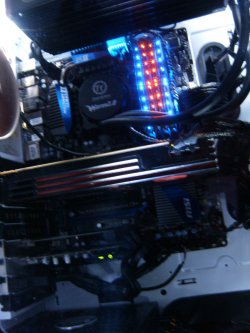
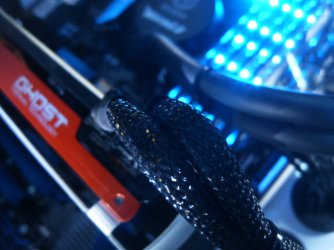
Here's my crucial tactical's in two of many color modes:
HPIM2660.jpg

HPIM2914.JPG
 

My Computer My Computer

Computer type
PC/Desktop
Computer Manufacturer/Model Number
A blend of brains, brawn and dumb luck.
OS
Windows 7 Ultimate 64
CPU
i7 3770k OC'd 4.6 @ 1.17v, also FX 8120 & i5 miniITX
Motherboard
MSI P67A-GD80 b3
Memory
32 gb G.Skill Sniper DDR3 10-12-12-31 @ 2133
Graphics Card(s)
XFX Radeon 7870 2GB DDR5
Sound Card
Sound Blaster Z Series Card
Monitor(s) Displays
(2) LG LED 23" 1920 x 1080 2ms Monitors via mini d-port
Screen Resolution
1680 X 1050 p
Hard Drives
Samsung 256 gb 830 SSD sata III
(1) 1 tb WD Black
(2) 1 tb Hitachi deskmates/sata II
(2) 1 tb WD green/sata II
(2) 3 tb Seagate Barracuda
(1) 120 gb OCZ Vertex SS
(1) Drobo 5N w/5 Seagate 3tb
PSU
EVGA modular 1000G2 80% gold rating & APC 1200 RS
Case
CoolerMaster Storm Styker
Cooling
7 case fans 140mm & 120mm, NZXT Kraken X60
Keyboard
(2) Logitech Illuminated Keyboards (1) usb (1) wireless
Mouse
Logitech G700 & T-BC21 - nano nx for the laptop
Internet Speed
Basic 120mbps down
Antivirus
Trend Micro Titanium Max Security & Malwarebytes Premium
Browser
Chrome and IE 10
Other Info
5 Noctua case fans + 3 Noctua in p/p on NZXT cooler
Integrated hot swap drive bays for 2.5" Drives
(2) Lite-on dvd/cd/Blu Ray optical 22X
Integrated fan controller and led on/off
HP Officejet Pro 8630 all-n-one
Hot-swappable 3.5" hard drive bay
Netgear Nighthawk router
Asus USB 3 & sata 6 PCIe card
Vantec IDE to sata adptr./Ultra sata adptr
Lenovo L420 i5 lappy with m sata
Drobo 5N advanced NAS
cheers mate hmm i like the look of the AS rock given all the free ram slots and the price but it seems like its missing somthing at first i thought it was a 3.0 pci slot that is missing but thats there

heres the currnt ram i have
Corsair 12GB (3x 4GB) 240-Pin DDR3 1600MHz DOMINATOR memory kit for Intel triple channel memory - $113 - Skycomp Computer Store

if i was to buy anything better i think it would be 8 gb sticks ie 2X8gb or 4x8gb part of what stopped me from upgrading in the first place was this post qoute from anthoer forum - this was months ago granted i think i miss read it "If all your RAM slots are populated, you will not find a LGA1155 motherboard that will use all 6 modules."
im using 3 full qoute below

quote_icon.png
Originally Posted by mikezilla2
so with that i need to find a new mbo the old GA-X58A-UD3R just wont cut it im afraid
Not when your CPU architect changes from LGA1366 to LGA1155.

If all your RAM slots are populated, you will not find a LGA1155 motherboard that will use all 6 modules. In fact when changing from LGA1366 to LGA1155, you will be slightly downgrading from tri-channel to dual-channel memory. If you plan on at least running with dual channel, you will need to find another matching stick. Or replace one of the modules for another set of dual-channel memory. With LGA1155 if you populate two slots with dual-channel capable memory and then populate a second channel with only one module, your PC will step down to single channel memory operations.

For clarity, are your PCI cards PCIe x1? This would mean you need at least two PCIe x1 card slots along with the one PCIe x16. For the record your motherboard does not have version PCIe 3.0 slots. PCIe 3.0 is new and have just recently been released with Ivy-Bridge(and a few Sandy Bridge) motherboards.


so i guess the question is what mobo do i need to get that will support everything well almost everytihng that that the old mbo supports in terms of pcie and what not but will also support tri channel for 3 or more lots of ram one thing that would be nice would be bulit in wifi and bulit in blu tooth but then again i might be better off with a wireless card i normally use an ethernet cable but some times i need to use the cable on other no wifi enabled devices also this is the cheapest iv seen a 3770k priced at site: greenbotit GREENBOXiT Online Computer Store in terms of SSDs well i did just miss out on a 510 for 379 it seems , to me SSDs are sort of a waste until they start putting out 1tbs or close to it but given how often i move files around i think its best i get a SSD for that , the taticals are nice but yea if i buy any more ram it would be 8gb sticks ether 2 or 1 set i wont need extra cooling for standerd and turbo boost settings will i ? my case is pretty much stock ie what came with it plus one extra fan on the side somewhere - i did build it but i think this time i might get someone to put the cpu on the board before i do anything else

i think iv covered everything my profile has my current specs i think will check but is there anymore info needed ? cheers for your help so far :)
 

My Computer My Computer

OS
Windows 7 Ultimate x64
CPU
I74770K
Motherboard
Z87
Graphics Card(s)
GTX960 4GB
Sound Card
bulit in -
Monitor(s) Displays
braiva KDL-40Z4500
Screen Resolution
1920X1080p
I'll see if I can help out. Linnemeyerhere gave you really good options for components above. I'll give you my recommendations as well.

Motherboard: For normal builds, I prefer, and recommend Asus boards. The seem to have a winner at almost any price point. I use the Z77 Sabertooth and I really freakin like it. Great warranty, great performance, and it looks amazing. I'm not familiar enough with the RoG boards to pick one out, but you pretty much can't go wrong with any of the Asus Maximus boards.

RAM: I have had 2 sets of Corsair Vengeance 16GB kits(4 x 4gb) one 1600MHz and the one I'm currently using, 1866MHz. Both sets had sequential serial numbers and both passed 12+ hours of Memtest 86+ with no errors. Good stuff. Unless you are working with large resolution pictures or doing other editing work, stick with 16gb. It is completely overkill for me, but it was a good price and I'll never need anymore until I move to a new platform, which will be at least when DDR4 is out. Frequency and CAS Latency is something to keep in mind when buying RAM.....I believe it is more important than capacity to be honest. At current pricing, the sweet spot for RAM is 1866MHz with a CAS Latency of 9. I have done the math and ran through the formulas and when you factor in price AND performance, it is the clear winner. I would go with what I could find the cheapest....either a 2x8gb kit, or 4x4gb kit......probably not a nickels worth of difference in performance. I will say this: the price of 2133MHz RAM has dropped some, and you could grab some of that if you REALLY need the extra frequency......but tests on Anandtech have shown that for Ivy Bridge and the Z77 chipset, it is really not needed.

SSD: Forget the 500/512GB SSD's. 128/256GB is the sweet spot. Most of the time the 256GB models will be the best performers, and all you get with 512 is more capacity. Also, SSD's do quite a bit more than just transfer files fast. In fact, unless you are transferring files from one SSD to another, you won't see those insanely fast Sequential Read/Write speeds. When transferring between two devices, you are at the mercy of the slowest device. If your system has an SSD for the OS/Programs and a mechanical hard drive for storage, you will always be limited by the slower HD. A few things you will see with an SSD are: programs opening almost instantly, extractions and installations several times faster than a hard drive, and incredible reboot times. Do yourself a favor and buy one for how fast and responsive Windows will be.

All that said, here are links to what I recommend.

Motherboard:

Asus Z77 Sabertooth
Asus Maximus V Formula
Asus P8Z77-V Pro

RAM: NOTE: You can get the Corsair Vengeance RAM in several colors. I think they come in Black, Blue, Red, Gold

Corsair Vengeance 16GB 1866MHz Kit
Corsair Vengeance 16GB 2133MHz Kit

SSD:

Samsung 840 Pro 256GB
OCZ Vector 256GB
Plextor M5 Pro 256GB
Corsair Neutron GTX 240G
 

My Computer My Computer

Computer type
PC/Desktop
Computer Manufacturer/Model Number
Custom Built
OS
Windows 7 Professional 64bit SP1
CPU
Intel Core i5-3570K @ 4.5GHz
Motherboard
Asus Sabertooth Z77
Memory
Corsair Vengeance 16GB (4x4) @1866MHz CL 9-9-9-24 1T
Graphics Card(s)
EVGA GTX 750 Ti FTW
Sound Card
Onboard Audio
Monitor(s) Displays
Dell S2309W
Screen Resolution
1920x1080
Hard Drives
Samsung 830 128GB SSD - OS
(4) Seagate 5TB HDD
(1) Seagate 2TB HDD
PSU
Seasonic X750 80+ Gold Full Modular
Case
Antec Eleven Hundred Super Mid Tower
Cooling
Intel Liquid Cooler
Keyboard
Max Nighthawk X8 Mechanical keyboard
Mouse
Mionix Naos 7000
Internet Speed
50 Mbps Down / 10 Mbps Up
Antivirus
Microsoft Security Essentials/Malwarebytes Anti-Malware
Browser
Chrome/Firefox
Other Info
Klipsch ProMedia 2.1's
Asus RT-N66R Wireless Router
thanks very much but umm can you touch on my qoute that i made ?


"If all your RAM slots are populated, you will not find a LGA1155 motherboard that will use all 6 modules. In fact when changing from LGA1366 to LGA1155, you will be slightly downgrading from tri-channel to dual-channel memory. If you plan on at least running with dual channel, you will need to find another matching stick. Or replace one of the modules for another set of dual-channel memory. With LGA1155 if you populate two slots with dual-channel capable memory and then populate a second channel with only one module, your PC will step down to single channel memory operations.

For clarity, are your PCI cards PCIe x1? This would mean you need at least two PCIe x1 card slots along with the one PCIe x16. For the record your motherboard does not have version PCIe 3.0 slots. PCIe 3.0 is new and have just recently been released with Ivy-Bridge(and a few Sandy Bridge) motherboards."

it might not apply here at all but it is what im dealing with , as for SSDs its a $130 difference hmm i think its worth it but yea the ram problem is relly bugging me ...
 

My Computer My Computer

OS
Windows 7 Ultimate x64
CPU
I74770K
Motherboard
Z87
Graphics Card(s)
GTX960 4GB
Sound Card
bulit in -
Monitor(s) Displays
braiva KDL-40Z4500
Screen Resolution
1920X1080p
What exactly are you asking about RAM? Socket 1155 Z77 boards have 4 DIMM slots for RAM sticks. You can either use 2 or 4 and run in Dual Channel. Socket 1366 could run in Triple Channel, using either 3 or 6 sticks. Motherboards have color-coded DIMM slots. On a Z77 board, if you were using 2 sticks of RAM, you would put both in the same color slot, and of course if you were using 4, all slots would be used and it would still be dual channel. On Socket 1366 boards with six DIMM slots, if you had 3 sticks of RAM, you would put all of them in the same color slot to run in triple channel.

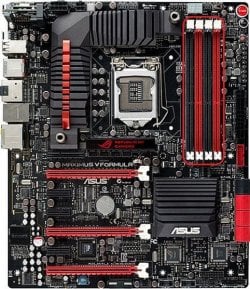
Here is a picture of an Asus Maximus motherboard with the 4 DIMM slots outlined
Motherboard DIMM Slots.JPG

If you had 2 sticks of RAM, you would put them in the black slots(check your motherboard manual to verify), and it would run in Dual Channel. If you are wanting to use your old RAM your best bet would be to just use 2 of the 3 sticks because then it would be running symmetrical dual channel. You can't run 3 sticks in triple channel on a Socket 1155 motherboard. Triple channel was a Socket 1366 feature.

I hope that helped some.
 

My Computer My Computer

Computer type
PC/Desktop
Computer Manufacturer/Model Number
Custom Built
OS
Windows 7 Professional 64bit SP1
CPU
Intel Core i5-3570K @ 4.5GHz
Motherboard
Asus Sabertooth Z77
Memory
Corsair Vengeance 16GB (4x4) @1866MHz CL 9-9-9-24 1T
Graphics Card(s)
EVGA GTX 750 Ti FTW
Sound Card
Onboard Audio
Monitor(s) Displays
Dell S2309W
Screen Resolution
1920x1080
Hard Drives
Samsung 830 128GB SSD - OS
(4) Seagate 5TB HDD
(1) Seagate 2TB HDD
PSU
Seasonic X750 80+ Gold Full Modular
Case
Antec Eleven Hundred Super Mid Tower
Cooling
Intel Liquid Cooler
Keyboard
Max Nighthawk X8 Mechanical keyboard
Mouse
Mionix Naos 7000
Internet Speed
50 Mbps Down / 10 Mbps Up
Antivirus
Microsoft Security Essentials/Malwarebytes Anti-Malware
Browser
Chrome/Firefox
Other Info
Klipsch ProMedia 2.1's
Asus RT-N66R Wireless Router
thank you very much that is exzacily what i wanted to konw , guess id pick ether a sabertooth or V formula unless it would conflict with my needs ? im also wondering about the new CPUs and mobos coming out this year ? ....
 

My Computer My Computer

OS
Windows 7 Ultimate x64
CPU
I74770K
Motherboard
Z87
Graphics Card(s)
GTX960 4GB
Sound Card
bulit in -
Monitor(s) Displays
braiva KDL-40Z4500
Screen Resolution
1920X1080p
thank you very much that is exzacily what i wanted to konw , guess id pick ether a sabertooth or V formula unless it would conflict with my needs ? im also wondering about the new CPUs and mobos coming out this year ? ....

You mean the ones that will be soldered together? :geek:
 

My Computer My Computer

Computer type
PC/Desktop
OS
Windows 7 professional X64
CPU
AMD A10-5800K OC@ 4.4Ghz.
Motherboard
Gigabyte F2A85X-UP4
Memory
8GB Kingston HyperX Blu 1333mhz
Graphics Card(s)
XFX HD7870 2GB Core Edition
Monitor(s) Displays
Acer AL2216W
Screen Resolution
1680x1050
Hard Drives
Seagate Barracuda 500gb 7200rpm
Seagate Barracuda 1.5TB 7200rpm
PSU
Cooler Master Silent Pro M 850W
Case
Thermaltake Commander MS-I
Cooling
Cooler Master N520
Mouse
Logitech M504
Internet Speed
10Mbps

My Computer My Computer

Computer Manufacturer/Model Number
homegrown
OS
Windows 7 Pro X64 SP1
CPU
Intel Core I7-3930k
Motherboard
Asus P9X79 Pro
Memory
16 GB Gskill DDR3-2133
Graphics Card(s)
eVGA GTX680
Sound Card
Creative X-Fi Titanium
Monitor(s) Displays
As PA246Q
Screen Resolution
1920 X 1200
Hard Drives
Corsair Force GT, 120 GB
WDC 1.5TB Caviar Black
PSU
PCP&C Silencer 750 Crossfire
Case
Silverstone FT02
Cooling
Noctua NH-D14
Keyboard
cheap Logitech USB
Mouse
Microsoft Intellimouse Explorer (old optical) USB
Internet Speed
6Mb cable
Other Info
Pioneer BDR-205
Samsung SH-203B
Monsoon 5.1 speakers
Haswell will be coming out later this year, as well as Ivy Bridge-Extreme(Socket 2011). Nobody knows anything concrete really, just speculation. Haswell will probably run ~10% better than Ivy Bridge(Socket 1155) and will have better built in graphics. If Haswell comes out in a few months and you can wait, you have two options: Get cheap Ivy Bridge parts, or build a new Haswell rig. I personally would probably wait and see what the review sites say about Haswell CPU's and make my decision then. They might not be any better than IB, or they could blow it's doors off! It all depends on how quickly you want a new PC.
 

My Computer My Computer

Computer type
PC/Desktop
Computer Manufacturer/Model Number
Custom Built
OS
Windows 7 Professional 64bit SP1
CPU
Intel Core i5-3570K @ 4.5GHz
Motherboard
Asus Sabertooth Z77
Memory
Corsair Vengeance 16GB (4x4) @1866MHz CL 9-9-9-24 1T
Graphics Card(s)
EVGA GTX 750 Ti FTW
Sound Card
Onboard Audio
Monitor(s) Displays
Dell S2309W
Screen Resolution
1920x1080
Hard Drives
Samsung 830 128GB SSD - OS
(4) Seagate 5TB HDD
(1) Seagate 2TB HDD
PSU
Seasonic X750 80+ Gold Full Modular
Case
Antec Eleven Hundred Super Mid Tower
Cooling
Intel Liquid Cooler
Keyboard
Max Nighthawk X8 Mechanical keyboard
Mouse
Mionix Naos 7000
Internet Speed
50 Mbps Down / 10 Mbps Up
Antivirus
Microsoft Security Essentials/Malwarebytes Anti-Malware
Browser
Chrome/Firefox
Other Info
Klipsch ProMedia 2.1's
Asus RT-N66R Wireless Router
well i wasint expecting them to arrive that quickly so im planning to get a 4770K and just wondering if the ASUS SABERTOOTH Z87 is a good choice of mobo or if i should go with something else given my requirements im likily going to buy this ether next month or the month after :) keeping in mind what ever i get windows 7 is going on it or should i be looking at Asus M6E - yea this topic is getting pretty long in the tooth
 

My Computer My Computer

OS
Windows 7 Ultimate x64
CPU
I74770K
Motherboard
Z87
Graphics Card(s)
GTX960 4GB
Sound Card
bulit in -
Monitor(s) Displays
braiva KDL-40Z4500
Screen Resolution
1920X1080p
I would wait until Haswell is released but as far as brands, I would say ASUS. I have a MSI board but their documentation is quite inept.
 

My Computer My Computer

Computer type
PC/Desktop
Computer Manufacturer/Model Number
Custom Build
OS
Win 10 Pro 64
CPU
Intel Core i7 960 @3.20 GHz
Motherboard
MSI MS7522
Memory
24.0 GB DDR3
Graphics Card(s)
EVGA GTX 750Ti
Monitor(s) Displays
LG E2341 23 Inch
Screen Resolution
1920x1080
Hard Drives
1TB Western Dgital 1002FAEX-00Y9A0
1TB Hitachi HDS721010CLA322
PSU
700 Watt
Case
Haf 912
Cooling
Fans
Keyboard
Logitech MK710
Mouse
Logitech M705
Internet Speed
Cable
Antivirus
AIS 2015 .10.0.2225
Browser
Firefox 49
Other Info
MalwareBytes Anti-Rootkit utility

My Computer My Computer

Computer type
PC/Desktop
Computer Manufacturer/Model Number
A blend of brains, brawn and dumb luck.
OS
Windows 7 Ultimate 64
CPU
i7 3770k OC'd 4.6 @ 1.17v, also FX 8120 & i5 miniITX
Motherboard
MSI P67A-GD80 b3
Memory
32 gb G.Skill Sniper DDR3 10-12-12-31 @ 2133
Graphics Card(s)
XFX Radeon 7870 2GB DDR5
Sound Card
Sound Blaster Z Series Card
Monitor(s) Displays
(2) LG LED 23" 1920 x 1080 2ms Monitors via mini d-port
Screen Resolution
1680 X 1050 p
Hard Drives
Samsung 256 gb 830 SSD sata III
(1) 1 tb WD Black
(2) 1 tb Hitachi deskmates/sata II
(2) 1 tb WD green/sata II
(2) 3 tb Seagate Barracuda
(1) 120 gb OCZ Vertex SS
(1) Drobo 5N w/5 Seagate 3tb
PSU
EVGA modular 1000G2 80% gold rating & APC 1200 RS
Case
CoolerMaster Storm Styker
Cooling
7 case fans 140mm & 120mm, NZXT Kraken X60
Keyboard
(2) Logitech Illuminated Keyboards (1) usb (1) wireless
Mouse
Logitech G700 & T-BC21 - nano nx for the laptop
Internet Speed
Basic 120mbps down
Antivirus
Trend Micro Titanium Max Security & Malwarebytes Premium
Browser
Chrome and IE 10
Other Info
5 Noctua case fans + 3 Noctua in p/p on NZXT cooler
Integrated hot swap drive bays for 2.5" Drives
(2) Lite-on dvd/cd/Blu Ray optical 22X
Integrated fan controller and led on/off
HP Officejet Pro 8630 all-n-one
Hot-swappable 3.5" hard drive bay
Netgear Nighthawk router
Asus USB 3 & sata 6 PCIe card
Vantec IDE to sata adptr./Ultra sata adptr
Lenovo L420 i5 lappy with m sata
Drobo 5N advanced NAS
somthings missing could have sworn i was looking at a mbo the other day that had 6 slots for ram ,well a price for one thing havent seen a price anywere that it seems to support alot of old style plugs vga and what not somthnig i cant say i need regardless heres a post i i recived on anthoer forum


"I'd recommend an Asus Z87-Pro or Maximus VI Hero. Z87-Pro seemed pretty solid with good features. I now have an Asus Maximus VI Hero which is a much prettier board and I have a better feeling towards it, not to mention the BIOS is a lot nicer... Given these chips get so hot and have limited overclockability it's not really going to matter what you get as long as it has an 8 phase VRM at least. Pick the board that has the best looking heatsinks and features. Wouldn't go past an Asus or Gigabyte though.

VRM ? any way is there any of the mbos that will work with the currnt ram i have as well as ram @ say 2001mhz ? none of the mobos mention this .......


ether way if m miss interapting and it dosnt matter if that is the case then id probbly want to go with this

http://www.iibuy.com.au/asus-sabert...an-raid-nfc-atx-intel-motherboard_p44401.html
 
Last edited:

My Computer My Computer

OS
Windows 7 Ultimate x64
CPU
I74770K
Motherboard
Z87
Graphics Card(s)
GTX960 4GB
Sound Card
bulit in -
Monitor(s) Displays
braiva KDL-40Z4500
Screen Resolution
1920X1080p
Back
Top