Wireless connection but no internet access Windows 7 Ultimate

Stift

New member
Local time
12:43 PM
Messages
12
Location
Belgium
Hi,

I seem to have a problem with my Medion Akoya Netbook, which operates Windows 7 ultimate. Until yesterday I had no problem accessing the internet. But after I updated and ran Avast! (free virus protection) and ran Reg Cure Pro (Clean Up-progam), I could not access the internet anymore. It says I am connected, but that there is no internet access. We share the router with 5 people, but the others don't seem to have any problem. So I think i'ts nothing to do with the router. (a solution I keep finding on the windows-anwser-pages)

I have been surfing an searching all day allready and troubleshooting my own ideas, but nothing seems to work. It seems a lot of people are getting this problem, but it also seems there is a variaty of ways to fix it. None of them work for me.

So that is why I'm asking for specific help here. I copy-pasted the info about my connections through command promp (I found out to do so on this forum). So I was wondering if someone is able to help and advise me. Thx!

Microsoft Windows [Version 6.1.7600]
Copyright (c) 2009 Microsoft Corporation. All rights reserved.

C:\Users\Stift>IPCONFIG/ALL

Windows IP Configuration

Host Name . . . . . . . . . . . . : Stift-PC
Primary Dns Suffix . . . . . . . :
Node Type . . . . . . . . . . . . : Broadcast
IP Routing Enabled. . . . . . . . : No
WINS Proxy Enabled. . . . . . . . : No

Wireless LAN adapter Wireless Network Connection:

Connection-specific DNS Suffix . :
Description . . . . . . . . . . . : Intel(R) Centrino(R) Wireless-N 130
Physical Address. . . . . . . . . : B8-03-05-99-12-5E
DHCP Enabled. . . . . . . . . . . : Yes
Autoconfiguration Enabled . . . . : Yes
Link-local IPv6 Address . . . . . : fe80::741a:6d89:ca79:f51d%15(Preferred)
Autoconfiguration IPv4 Address. . : 169.254.245.29(Preferred)
Subnet Mask . . . . . . . . . . . : 255.255.0.0
Default Gateway . . . . . . . . . :
DNS Servers . . . . . . . . . . . : 208.67.220.220
NetBIOS over Tcpip. . . . . . . . : Disabled

Ethernet adapter Local Area Connection:

Media State . . . . . . . . . . . : Media disconnected
Connection-specific DNS Suffix . :
Description . . . . . . . . . . . : Realtek PCIe FE Family Controller
Physical Address. . . . . . . . . : 4C-72-B9-44-76-4E
DHCP Enabled. . . . . . . . . . . : Yes
Autoconfiguration Enabled . . . . : Yes

Tunnel adapter Teredo Tunneling Pseudo-Interface:

Media State . . . . . . . . . . . : Media disconnected
Connection-specific DNS Suffix . :
Description . . . . . . . . . . . : Teredo Tunneling Pseudo-Interface
Physical Address. . . . . . . . . : 00-00-00-00-00-00-00-E0
DHCP Enabled. . . . . . . . . . . : No
Autoconfiguration Enabled . . . . : Yes
 

My Computer My Computer

Computer type
Laptop
Computer Manufacturer/Model Number
Medion Akoya E1230 Notebook PC
OS
Windows 7 Ultimate x32
Hi first try using system restore to restore to a date before reg cure was installed as registry cleaners can do more harm than good.

Please let us know the results.
 

My Computer My Computer

Computer Manufacturer/Model Number
HP Compaq 6715B
OS
Windows 7 Ultimate x64
CPU
AMD turion 64x2 TL-64 2.2Ghz
Motherboard
HC030
Memory
Sodimm DDR2 4GB
Graphics Card(s)
ATI Radeon 1250 128MB IGP
Hard Drives
Fujitsu Siemens 500GB sata 3.0 Gb/s
Seems to me that you are not connected to the router. As there is no default gateway. That is why you have the APIPA (169.254.245.29)

could you go to the following:
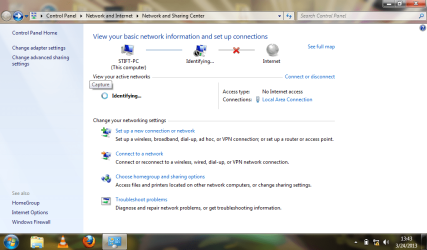
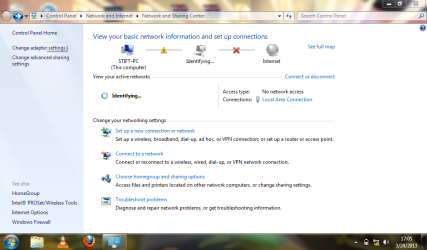
Start - Control Panel - Network and Internet - Network and Sharing Centre

And post a screen shot of that screen please.
 

My Computer My Computer

Computer type
PC/Desktop
Computer Manufacturer/Model Number
Dell / Lenovo g550
OS
Windows 7 Ultimate 64-bit
CPU
Intel Core 2 Duo E6550 @2.33GHz
Motherboard
foxconn g33m02
Memory
4GB DDR"
Graphics Card(s)
NVIDIA GeForce 8600 GS
Hard Drives
HDD 1 = 150GB
HDD 2 = 1.5TB
PSU
450W
Cooling
Stock fan
Internet Speed
12Mb
Antivirus
AVG Internet Security
Thx for replying so fast! Hope to fix it as fast too ;)

@The Cyberman: That was one of the first things I did. First I restored to the Reg Cure-restore point without effect. Secondly I restored with the Automatic Restore Point generator. I also uninstalled Avast!-antivirus, I figured it might be the version-upgrade that ****ed things up. But also without effect.

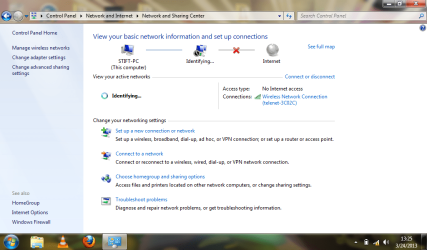
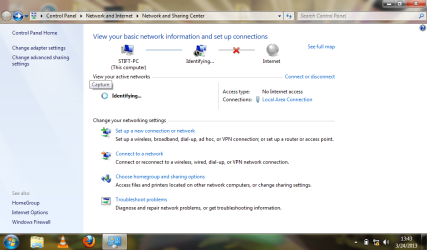
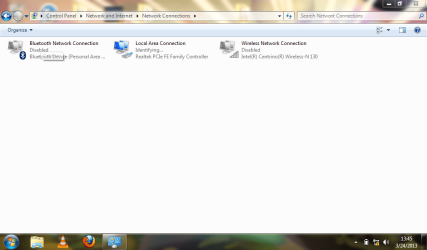
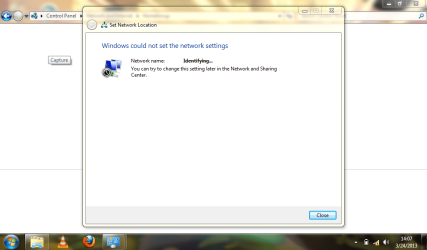
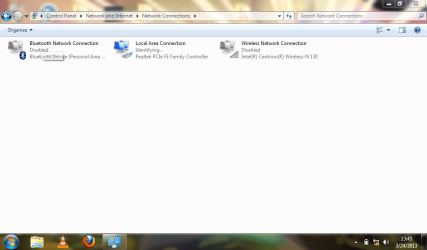
@benjy206: Indeed my laptop seems to have problems identifying/getting acces to the router. But I truely don't know how to fix this. I made the screenshot yopu asked for and also some other screenshots that might be relevant, I don't realy know. Because the problem aslo seems to be happening when I try to connect with a LANcable, I also made a screenshot of this.
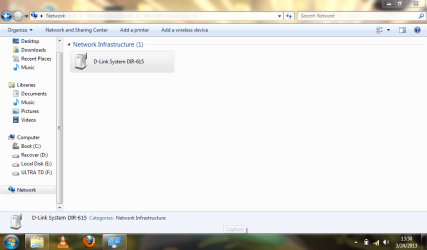
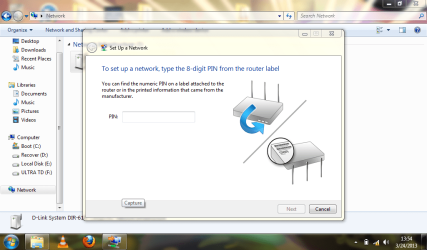
Then I made a screenshot af the modem it detects when looking in the "network"-section in windows explorer. The modem we have is a cbn model CH6541E used by the belgian webprovider Telenet. To me it looks to be the wrong one it recognizes (maybe the one of the neigbours...). I also don't find the 8-digit Pincode on the modem it asks to give in.
An other thing that might be relevant here is that in the "Advanced Sharin Settings", I don't seem to be able to turn on the "network discovery".
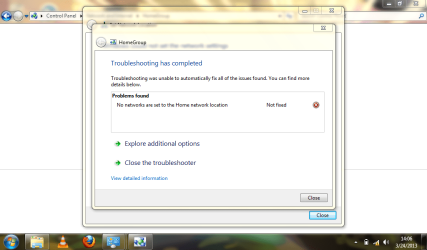
Lastly I did some troubleshooting and have a screenshot from the result of the "Homegroup Troubelshooting" as a paste of the "Network Troubleshooting" here:

Diagnostics Information (Network Adapter)
Details about network adapter diagnosis:

Network adapter Wireless Network Connection driver information:

Description . . . . . . . . . . : Intel(R) Centrino(R) Wireless-N 130
Manufacturer . . . . . . . . . : Intel Corporation
Provider . . . . . . . . . . . : Intel
Version . . . . . . . . . . . : 15.0.1.1
Inf File Name . . . . . . . . . : C:\Windows\INF\oem7.inf
Inf File Date . . . . . . . . . : Monday, February 13, 2012 3:02:48 PM
Section Name . . . . . . . . . : Install_MPCIEX_GEN_0130_BGN_1x1_HMC_WIN7_BGN
Hardware ID . . . . . . . . . . : pci\ven_8086&dev_0896&subsys_50058086
Instance Status Flags . . . . . : 0x180200a
Device Manager Status Code . . : 0
IfType . . . . . . . . . . . . : 71
Physical Media Type . . . . . . : 9


Diagnostics Information (Wireless Connectivity)
Details about wireless connectivity diagnosis:

Information for connection being diagnosed
Interface GUID: a3cd8e02-27fb-4973-9206-468c11deb674
Interface name: Intel(R) Centrino(R) Wireless-N 130
Interface type: Native WiFi

Connection incident diagnosed
Auto Configuration ID: 1
Connection ID: 1

Connection status summary
Connection started at: 2013-03-24 13:47:27-434
Profile match: Success
Pre-Association: Success
Association: Success
Security and Authentication: Success

List of visible access point(s): 8 item(s) total, 8 item(s) displayed
BSSID BSS Type PHY Signal(dB) Chnl/freq SSID
-------------------------------------------------------------------------
5E-35-3B-1D-FC-D9 Infra <unknown> -62 10 TELENETHOMESPOT
5C-35-3B-1D-FC-D8 Infra <unknown> -60 10 telenet-3C02C
00-1C-DF-7F-6E-7D Infra <unknown> -51 6 Belkin_N_Wireless_7F6E7D
00-24-01-D3-69-5A Infra g -85 6 Wifi 27
5C-35-3B-0C-CF-B6 Infra <unknown> -71 1 telenet-9D4EB
5E-35-3B-0C-CF-B7 Infra <unknown> -72 1 TELENETHOMESPOT
84-C9-B2-D5-01-BA Infra <unknown> -86 1 elza
00-21-29-74-7B-5E Infra g -89 12 vanbeneden

Connection History

Information for Auto Configuration ID 1

List of visible networks: 7 item(s) total, 7 item(s) displayed
BSS Type PHY Security Signal(RSSI) Compatible SSID
------------------------------------------------------------------------------
Infra <unknown> No 81 Yes TELENETHOMESPOT
Infra <unknown> Yes 99 Yes telenet-3C02C
Infra <unknown> Yes 81 Yes Belkin_N_Wireless_7F6E7D
Infra g Yes 33 Yes Wifi 27
Infra <unknown> Yes 45 Yes telenet-9D4EB
Infra <unknown> Yes 18 Yes elza
Infra g Yes 18 Yes vanbeneden

List of preferred networks: 1 item(s)
Profile: telenet-3C02C
SSID: telenet-3C02C
SSID length: 13
Connection mode: Infra
Security: Yes
Set by group policy: No
Connect even if network is not broadcasting: No
Connectable: Yes

Information for Connection ID 1
Connection started at: 2013-03-24 13:47:27-434
Auto Configuration ID: 1
Profile: telenet-3C02C
SSID: telenet-3C02C
SSID length: 13
Connection mode: Infra
Security: Yes
Pre-Association and Association
Connectivity settings provided by hardware manufacturer (IHV): No
Security settings provided by hardware manufacturer (IHV): No
Profile matches network requirements: Success
Pre-association status: Success
Association status: Success
Last AP: 5c-35-3b-1d-fc-d8
Security and Authentication
Configured security type: WPA2-PSK
Configured encryption type: CCMP(AES)
802.1X protocol: No
Key exchange initiated: Yes
Unicast key received: Yes
Multicast key received: Yes
Number of security packets received: 0
Number of security packets sent: 0
Security attempt status: Success
Connectivity
Packet statistics
Ndis Rx: 668
Ndis Tx: 92
Unicast decrypt success: 0
Multicast decrypt success: 0
Unicast decrypt failure: 0
Multicast decrypt failure: 0
Rx success: 517
Rx failure: 0
Tx success: 1
Tx failure: 0
Tx retry: 0
Tx multiple retry: 0
Tx max lifetime exceeded: 0
Tx ACK failure: 0
Roaming history: 0 item(s)


Diagnostics Information (Wireless Connectivity)
Details about wireless connectivity diagnosis:

For complete information about this session see the wireless connectivity information event.

Helper Class: Auto Configuration
Initialize status: Success

Information for connection being diagnosed
Interface GUID: a3cd8e02-27fb-4973-9206-468c11deb674
Interface name: Intel(R) Centrino(R) Wireless-N 130
Interface type: Native WiFi

Result of diagnosis: There may be problem


Diagnostics Information (Wireless Network Adapter)
Details about wireless network adapter diagnosis:

For complete information about this session see the wireless connectivity information event.

Helper Class: Native WiFi MSM
Initialize status: Success

Information for connection being diagnosed
Interface GUID: a3cd8e02-27fb-4973-9206-468c11deb674
Interface name: Intel(R) Centrino(R) Wireless-N 130
Interface type: Native WiFi
Profile: telenet-3C02C
SSID: telenet-3C02C
SSID length: 13
Connection mode: Infra
Security: Yes
Connect even if network is not broadcasting: No

Result of diagnosis: There may be problem


Screenshot 1.png

Screenshot 2.png

Screenshot 3.png

Screenshot 4.png

Screenshot 5.png

Screenshot 6.png

Screenshot 7.png

Screenshot 8.png
 

My Computer My Computer

Computer type
Laptop
Computer Manufacturer/Model Number
Medion Akoya E1230 Notebook PC
OS
Windows 7 Ultimate x32
1. Is this the only computer affected or are all computers on the network affected also?
2. Try connecting the computer direct to the modem and see if you have internet connectivity using an ethernet cable.
 

My Computer My Computer

Computer Manufacturer/Model Number
HP Compaq 6715B
OS
Windows 7 Ultimate x64
CPU
AMD turion 64x2 TL-64 2.2Ghz
Motherboard
HC030
Memory
Sodimm DDR2 4GB
Graphics Card(s)
ATI Radeon 1250 128MB IGP
Hard Drives
Fujitsu Siemens 500GB sata 3.0 Gb/s
1. Is this the only computer affected or are all computers on the network affected also?
2. Try connecting the computer direct to the modem and see if you have internet connectivity using an ethernet cable.
Ya it seems to be the modems config? You can see that in one picture there he is connected to "telenet-3C02C".

Try as CyberMan say's connected the cable directly to the modem.
 

My Computer My Computer

Computer type
PC/Desktop
Computer Manufacturer/Model Number
Dell / Lenovo g550
OS
Windows 7 Ultimate 64-bit
CPU
Intel Core 2 Duo E6550 @2.33GHz
Motherboard
foxconn g33m02
Memory
4GB DDR"
Graphics Card(s)
NVIDIA GeForce 8600 GS
Hard Drives
HDD 1 = 150GB
HDD 2 = 1.5TB
PSU
450W
Cooling
Stock fan
Internet Speed
12Mb
Antivirus
AVG Internet Security
Yes, this laptop is the onlyone experiencing the problem. The one I'm using right now for example is on the same modem.
And these screenshots were allready from a cable directly to the modem...:confused:

Screenshot 2.png

Screenshot 3.png
 

My Computer My Computer

Computer type
Laptop
Computer Manufacturer/Model Number
Medion Akoya E1230 Notebook PC
OS
Windows 7 Ultimate x32
from the pictures and diagnostics it appears telenet-3C02C is the Dlink DIR-615 SSID and that isnot the modem just a wireless router that is connected to a modem.

Will await confirmation from OP.
 

My Computer My Computer

Computer Manufacturer/Model Number
HP Compaq 6715B
OS
Windows 7 Ultimate x64
CPU
AMD turion 64x2 TL-64 2.2Ghz
Motherboard
HC030
Memory
Sodimm DDR2 4GB
Graphics Card(s)
ATI Radeon 1250 128MB IGP
Hard Drives
Fujitsu Siemens 500GB sata 3.0 Gb/s
Yes, this laptop is the onlyone experiencing the problem. The one I'm using right now for example is on the same modem.
And these screenshots were allready from a cable directly to the modem...:confused:

View attachment 260846

View attachment 260847

Thanks for confirmation.

1. Download the latest drivers for your ethernet adapter card and wireless adapter card from the computer manufacturer's website if a branded computer or if a custom or self built computer from the motherboard manufacturer's website.

Use another computer to download drivers and copy to a USB stick and then transfer to probmatic computer and install the drivers and restart computer.

2. Open a cmd prompt by right clicking and choosing run as administrator and type:

netsh int ip reset reset.log press enter
netsh int ipv6 reset reset.log press enter
netsh winsock reset catalog press enter
ipconfig /flushdns press enter and restart computer.

Check internet connectivity using ethernet connection and let us know what the results are please.
 

My Computer My Computer

Computer Manufacturer/Model Number
HP Compaq 6715B
OS
Windows 7 Ultimate x64
CPU
AMD turion 64x2 TL-64 2.2Ghz
Motherboard
HC030
Memory
Sodimm DDR2 4GB
Graphics Card(s)
ATI Radeon 1250 128MB IGP
Hard Drives
Fujitsu Siemens 500GB sata 3.0 Gb/s
Yes, this laptop is the onlyone experiencing the problem. The one I'm using right now for example is on the same modem.
And these screenshots were allready from a cable directly to the modem...:confused:

View attachment 260846

View attachment 260847

Thanks for confirmation.

1. Download the latest drivers for your ethernet adapter card and wireless adapter card from the computer manufacturer's website if a branded computer or if a custom or self built computer from the motherboard manufacturer's website.

Use another computer to download drivers and copy to a USB stick and then transfer to probmatic computer and install the drivers and restart computer.

2. Open a cmd prompt by right clicking and choosing run as administrator and type:

netsh int ip reset reset.log press enter
netsh int ipv6 reset reset.log press enter
netsh winsock reset catalog press enter
ipconfig /flushdns press enter and restart computer.

Check internet connectivity using ethernet connection and let us know what the results are please.

Let you take it from here CyberMan. Busy so taking me to long to reply.
 

My Computer My Computer

Computer type
PC/Desktop
Computer Manufacturer/Model Number
Dell / Lenovo g550
OS
Windows 7 Ultimate 64-bit
CPU
Intel Core 2 Duo E6550 @2.33GHz
Motherboard
foxconn g33m02
Memory
4GB DDR"
Graphics Card(s)
NVIDIA GeForce 8600 GS
Hard Drives
HDD 1 = 150GB
HDD 2 = 1.5TB
PSU
450W
Cooling
Stock fan
Internet Speed
12Mb
Antivirus
AVG Internet Security
No worries benjy206 feel free to chip in when you have time.
 

My Computer My Computer

Computer Manufacturer/Model Number
HP Compaq 6715B
OS
Windows 7 Ultimate x64
CPU
AMD turion 64x2 TL-64 2.2Ghz
Motherboard
HC030
Memory
Sodimm DDR2 4GB
Graphics Card(s)
ATI Radeon 1250 128MB IGP
Hard Drives
Fujitsu Siemens 500GB sata 3.0 Gb/s
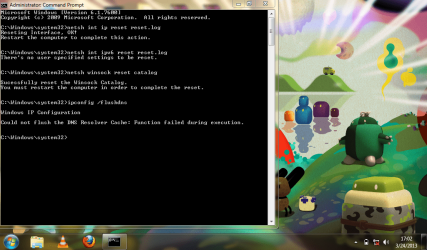
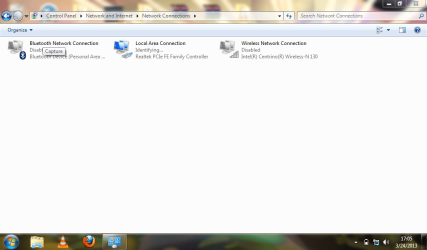
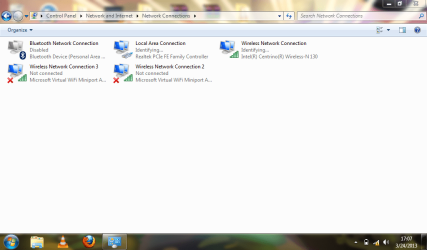
Well, I did what you said. downloaded the drivers from Realtek for Ethernet and from Intel for Wireless. Installed them, restarted, tried to reset in cmd prompt. But it gave me a problem with the flush dns... (see first screenshot) then I restarted and tried the connection, but still the same problem. Also there seems to be created a new virtual wirelless connection or something... (screenshot 4)
screenshot reset.png

screenshot reset 1.png

screenshot reset 2.png

screenshot reset 3.png

Microsoft Windows [Version 6.1.7600]
Copyright (c) 2009 Microsoft Corporation. All rights reserved.

C:\Windows\system32>ipconfig /all

Windows IP Configuration

Host Name . . . . . . . . . . . . : Stift-PC
Primary Dns Suffix . . . . . . . :
Node Type . . . . . . . . . . . . : Broadcast
IP Routing Enabled. . . . . . . . : No
WINS Proxy Enabled. . . . . . . . : No

Wireless LAN adapter Wireless Network Connection 3:

Media State . . . . . . . . . . . : Media disconnected
Connection-specific DNS Suffix . :
Description . . . . . . . . . . . : Microsoft Virtual WiFi Miniport Adapter #
2
Physical Address. . . . . . . . . : B8-03-05-99-12-5F
DHCP Enabled. . . . . . . . . . . : Yes
Autoconfiguration Enabled . . . . : Yes

Wireless LAN adapter Wireless Network Connection 2:

Media State . . . . . . . . . . . : Media disconnected
Connection-specific DNS Suffix . :
Description . . . . . . . . . . . : Microsoft Virtual WiFi Miniport Adapter
Physical Address. . . . . . . . . : B8-03-05-99-12-5F
DHCP Enabled. . . . . . . . . . . : Yes
Autoconfiguration Enabled . . . . : Yes

Wireless LAN adapter Wireless Network Connection:

Connection-specific DNS Suffix . :
Description . . . . . . . . . . . : Intel(R) Centrino(R) Wireless-N 130
Physical Address. . . . . . . . . : B8-03-05-99-12-5E
DHCP Enabled. . . . . . . . . . . : Yes
Autoconfiguration Enabled . . . . : Yes
Link-local IPv6 Address . . . . . : fe80::741a:6d89:ca79:f51d%15(Preferred)
Autoconfiguration IPv4 Address. . : 169.254.245.29(Preferred)
Subnet Mask . . . . . . . . . . . : 255.255.0.0
Default Gateway . . . . . . . . . :
DNS Servers . . . . . . . . . . . : 208.67.220.220
NetBIOS over Tcpip. . . . . . . . : Disabled

Ethernet adapter Local Area Connection:

Connection-specific DNS Suffix . :
Description . . . . . . . . . . . : Realtek PCIe FE Family Controller
Physical Address. . . . . . . . . : 4C-72-B9-44-76-4E
DHCP Enabled. . . . . . . . . . . : Yes
Autoconfiguration Enabled . . . . : Yes
Link-local IPv6 Address . . . . . : fe80::11b3:96b8:e497:85df%13(Preferred)
Autoconfiguration IPv4 Address. . : 169.254.133.223(Preferred)
Subnet Mask . . . . . . . . . . . : 255.255.0.0
Default Gateway . . . . . . . . . :
DNS Servers . . . . . . . . . . . : fec0:0:0:ffff::1%1
fec0:0:0:ffff::2%1
fec0:0:0:ffff::3%1
NetBIOS over Tcpip. . . . . . . . : Disabled

Tunnel adapter Teredo Tunneling Pseudo-Interface:

Media State . . . . . . . . . . . : Media disconnected
Connection-specific DNS Suffix . :
Description . . . . . . . . . . . : Teredo Tunneling Pseudo-Interface
Physical Address. . . . . . . . . : 00-00-00-00-00-00-00-E0
DHCP Enabled. . . . . . . . . . . : No
Autoconfiguration Enabled . . . . : Yes

C:\Windows\system32>
 

My Computer My Computer

Computer type
Laptop
Computer Manufacturer/Model Number
Medion Akoya E1230 Notebook PC
OS
Windows 7 Ultimate x32
disable the virtual wireless connections 2 and 3 they are not needed.

Open a cmd prompt agin with admin privledges and type:

sfc /scannow press enter

Let it repair anyhting it finds and restart computer.

Run ipconfig /flushdns again and restart.
 

My Computer My Computer

Computer Manufacturer/Model Number
HP Compaq 6715B
OS
Windows 7 Ultimate x64
CPU
AMD turion 64x2 TL-64 2.2Ghz
Motherboard
HC030
Memory
Sodimm DDR2 4GB
Graphics Card(s)
ATI Radeon 1250 128MB IGP
Hard Drives
Fujitsu Siemens 500GB sata 3.0 Gb/s
Yes disable wireless connections 2 + 3.

Also i would recommened after the ipconfig /flushdns to do ipconfig /release + ipconfig /renew

Seems like your pc isn't pulling the information from the modem
 

My Computer My Computer

Computer type
PC/Desktop
Computer Manufacturer/Model Number
Dell / Lenovo g550
OS
Windows 7 Ultimate 64-bit
CPU
Intel Core 2 Duo E6550 @2.33GHz
Motherboard
foxconn g33m02
Memory
4GB DDR"
Graphics Card(s)
NVIDIA GeForce 8600 GS
Hard Drives
HDD 1 = 150GB
HDD 2 = 1.5TB
PSU
450W
Cooling
Stock fan
Internet Speed
12Mb
Antivirus
AVG Internet Security
did it, but once again I get the same message: "could not flush the DNS Resolver Cache:Function failed during execution"
still no connection after reboot...
 

My Computer My Computer

Computer type
Laptop
Computer Manufacturer/Model Number
Medion Akoya E1230 Notebook PC
OS
Windows 7 Ultimate x32
Hmmm could you do a screen shot of this file:

Path = C:\windows\system32\drivers\etc\hosts (open with notepad.)
 

My Computer My Computer

Computer type
PC/Desktop
Computer Manufacturer/Model Number
Dell / Lenovo g550
OS
Windows 7 Ultimate 64-bit
CPU
Intel Core 2 Duo E6550 @2.33GHz
Motherboard
foxconn g33m02
Memory
4GB DDR"
Graphics Card(s)
NVIDIA GeForce 8600 GS
Hard Drives
HDD 1 = 150GB
HDD 2 = 1.5TB
PSU
450W
Cooling
Stock fan
Internet Speed
12Mb
Antivirus
AVG Internet Security
here it is:

hosts.png
 

My Computer My Computer

Computer type
Laptop
Computer Manufacturer/Model Number
Medion Akoya E1230 Notebook PC
OS
Windows 7 Ultimate x32
Ok seems fine.

That computer that your are on could you do a print screen of ipconfig /all. If it is connected to the network that your are trying to get the other computer on
 

My Computer My Computer

Computer type
PC/Desktop
Computer Manufacturer/Model Number
Dell / Lenovo g550
OS
Windows 7 Ultimate 64-bit
CPU
Intel Core 2 Duo E6550 @2.33GHz
Motherboard
foxconn g33m02
Memory
4GB DDR"
Graphics Card(s)
NVIDIA GeForce 8600 GS
Hard Drives
HDD 1 = 150GB
HDD 2 = 1.5TB
PSU
450W
Cooling
Stock fan
Internet Speed
12Mb
Antivirus
AVG Internet Security
It is indeed the network I am trying to get on, with the other laptop as well:

Microsoft Windows XP [versie 5.1.2600]
(C) Copyright 1985-2001 Microsoft Corp.

C:\WINDOWS>ipconfig /all

Windows IP-configuratie

Host-naam . . . . . . . . . . . .: Bernadette
Primair DNS-achtervoegsel. . . . .:
Knooppunttype . . . . . . . . . . : hybride
IP-routering ingeschakeld. . . . .: nee
WINS-proxy ingeschakeld . . . . . : nee
DNS-achtervoegselzoeklijst. . . . : lan_dn

Ethernet-adapter LAN-verbinding:

Status van medium . . . . . . . . : medium ontkoppeld
Beschrijving . . . . . . . . . . .:
Realtek RTL8102E Family PCI-E Fast Ethernet NIC
Fysiek adres. . . . . . . . . . . : 00-21-85-D9-E6-13

Ethernet-adapter Draadloze netwerkverbinding:

Verbindingsspec. DNS-achtervoegsel: lan_dn
Beschrijving . . . . . . . . . . .:
802.11n Wireless LAN Card
Fysiek adres. . . . . . . . . . . : 00-22-43-14-9C-AB
DHCP ingeshakeld. . . . . . . . . : ja
Autom. configuratie ingeschakeld. : ja
IP-adres. . . . . . . . . . . . . : 192.168.0.226
Subnetmasker. . . . . . . . . . . : 255.255.255.0
Standaardgateway. . . . . . . . . : 192.168.0.1
DHCP-server . . . . . . . . . . . : 192.168.0.1
DNS-servers . . . . . . . . . . . : 195.130.130.1
195.130.131.1
Lease verkregen . . . . . . . . . : zondag 24 maart 2013 19:52:38
Lease verlopen . . . . . . . . . : zondag 24 maart 2013 20:52:38

C:\WINDOWS>
 

My Computer My Computer

Computer type
Laptop
Computer Manufacturer/Model Number
Medion Akoya E1230 Notebook PC
OS
Windows 7 Ultimate x32
Ok connect to the network on the pc. (the one that isn't working)

Open Network and sharing center. - Change Adapter Settings - Right Click on your wirelss Adapter. - Properties - Single Click on TCP/IPv4 - Then click properties - Click Use the following IP Address - IP:192.168.0.235 Subnet Mask:255.255.255.0 Default Gateway:192.168.0.1

Then use the following DNS Server:

195.130.130.1
Click OK.

Post back to tell me the results
 

My Computer My Computer

Computer type
PC/Desktop
Computer Manufacturer/Model Number
Dell / Lenovo g550
OS
Windows 7 Ultimate 64-bit
CPU
Intel Core 2 Duo E6550 @2.33GHz
Motherboard
foxconn g33m02
Memory
4GB DDR"
Graphics Card(s)
NVIDIA GeForce 8600 GS
Hard Drives
HDD 1 = 150GB
HDD 2 = 1.5TB
PSU
450W
Cooling
Stock fan
Internet Speed
12Mb
Antivirus
AVG Internet Security
Back
Top