Looking to Upgrade to a New SSD

Thank you Computiac....some valuable information.
 

My Computer My Computer

At a glance

Windows 7 Professional 64bit SP1Intel Core i5-3570K @ 4.5GHzCorsair Vengeance 16GB (4x4) @1866MHz CL 9-9-...EVGA GTX 750 Ti FTW
Computer type
PC/Desktop
Computer Manufacturer/Model Number
Custom Built
OS
Windows 7 Professional 64bit SP1
CPU
Intel Core i5-3570K @ 4.5GHz
Motherboard
Asus Sabertooth Z77
Memory
Corsair Vengeance 16GB (4x4) @1866MHz CL 9-9-9-24 1T
Graphics Card(s)
EVGA GTX 750 Ti FTW
Sound Card
Onboard Audio
Monitor(s) Displays
Dell S2309W
Screen Resolution
1920x1080
Hard Drives
Samsung 830 128GB SSD - OS
(4) Seagate 5TB HDD
(1) Seagate 2TB HDD
PSU
Seasonic X750 80+ Gold Full Modular
Case
Antec Eleven Hundred Super Mid Tower
Cooling
Intel Liquid Cooler
Keyboard
Max Nighthawk X8 Mechanical keyboard
Mouse
Mionix Naos 7000
Internet Speed
50 Mbps Down / 10 Mbps Up
Antivirus
Microsoft Security Essentials/Malwarebytes Anti-Malware
Browser
Chrome/Firefox
Other Info
Klipsch ProMedia 2.1's
Asus RT-N66R Wireless Router
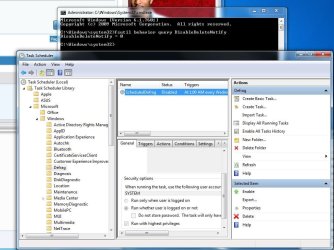
Hello Again..... I turned off Defrag, and trim is enabled. so my next question is

If i turn of the PC, attached the HDD again, Boot up from SSD, i should be able to see the HDD in Disk managemanet ?

Firmware is up to date
 

Attachments

  • Defrag Disabled.JPG
    Defrag Disabled.JPG
    99.2 KB · Views: 3
Last edited:

My Computer My Computer

At a glance

Genuine windows 7X64AMD 8320 FX Processor8 Gigs Corsair Vengance DDR3 1886 MHZEVGA GTX 750 Ti FTW
Computer type
PC/Desktop
Computer Manufacturer/Model Number
Personal build
OS
Genuine windows 7X64
CPU
AMD 8320 FX Processor
Motherboard
Asus Sabertoothe 990 FX R2.0 AM2+/AM2 AMD MB
Memory
8 Gigs Corsair Vengance DDR3 1886 MHZ
Graphics Card(s)
EVGA GTX 750 Ti FTW
Sound Card
On board
Monitor(s) Displays
ASUS VE247H 24 inch
Screen Resolution
HDMI
Hard Drives
Samsung 120GB 2.5-inch SSD 840 SATA III
PSU
Corsair 750 Watts
Case
Gigabyte case
Cooling
Zellman CNPS 10 Extreme
Internet Speed
50megs
Antivirus
AVG Free
When you install an SSD in a computer running Windows 7, it automatically turns off the disk defragmenter for THAT drive
That is definitely true when you make a fresh install on the SSD. The installer will turn defrag off. But I am not sure whether that would apply when you move the OS with an image to the SSD. I never checked that.

I can verify that i had to turn off Defrag after moving the Imaged OS.
 

My Computer My Computer

At a glance

Genuine windows 7X64AMD 8320 FX Processor8 Gigs Corsair Vengance DDR3 1886 MHZEVGA GTX 750 Ti FTW
Computer type
PC/Desktop
Computer Manufacturer/Model Number
Personal build
OS
Genuine windows 7X64
CPU
AMD 8320 FX Processor
Motherboard
Asus Sabertoothe 990 FX R2.0 AM2+/AM2 AMD MB
Memory
8 Gigs Corsair Vengance DDR3 1886 MHZ
Graphics Card(s)
EVGA GTX 750 Ti FTW
Sound Card
On board
Monitor(s) Displays
ASUS VE247H 24 inch
Screen Resolution
HDMI
Hard Drives
Samsung 120GB 2.5-inch SSD 840 SATA III
PSU
Corsair 750 Watts
Case
Gigabyte case
Cooling
Zellman CNPS 10 Extreme
Internet Speed
50megs
Antivirus
AVG Free

My Computer My Computer

At a glance

Windows 8.1.1 64biti7-4700MQ8.0GB PC3-12800 DDR3L SDRAM 1600 MHzIntel® HD Graphics 4600
Computer type
Laptop
Computer Manufacturer/Model Number
Lenovo Z710 #59400485
OS
Windows 8.1.1 64bit
CPU
i7-4700MQ
Memory
8.0GB PC3-12800 DDR3L SDRAM 1600 MHz
Graphics Card(s)
Intel® HD Graphics 4600
Sound Card
on-board
Monitor(s) Displays
17.3"
Screen Resolution
1920x1080
Hard Drives
1TB 5400 RPM;(OS,programs)


Hitachi, 1Tb external,(B'up)
PSU
4 Cell 41 Watt Hour Lithium-Ion
Case
Lenovo
Cooling
Air in, Air out.
Keyboard
Logitech - Y-UY95 - Illuminated
Mouse
M$ - Arc Touch
Internet Speed
59 Mb down / 25 Mb up
Antivirus
Defender
Browser
Firefox (newest)
Other Info
MBAM Pro, SAS Pro, Revo Pro.

Ext. HP 2311 Monitor
When you install an SSD in a computer running Windows 7, it automatically turns off the disk defragmenter for THAT drive
That is definitely true when you make a fresh install on the SSD. The installer will turn defrag off. But I am not sure whether that would apply when you move the OS with an image to the SSD. I never checked that.

I used Paragon Migrate a few days ago and the answer is No, it does not turn off Defragment to the SSD. It does, list it 1st in the order to defrag.

I turned off the scheduled defragment option.
Yeah, that's what I always did when I migrated an OS from the HDD. But there are many ways to migrate. Maybe e.g. the Paragon Migration tool turns it off. I usually do it the 'manual' way.
 

My Computer My Computer

At a glance

Vista, Windows7, Mint Mate, Zorin, Windows 8from 1.6GHz Duo to i7
Computer Manufacturer/Model Number
HP, Dell, Gateway, Toshiba - 4 laptops and 2 desktops
OS
Vista, Windows7, Mint Mate, Zorin, Windows 8
CPU
from 1.6GHz Duo to i7
Monitor(s) Displays
2x HP w2207
Hard Drives
5x HDD, 7x SSD, 12x Externals
Keyboard
with trackball - no mices
Mouse
Trackball mice
Internet Speed
DSL 6000
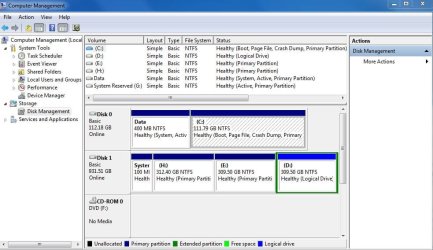
Hello Again, I now Believe i can go ahead and Format the "H" Partition ?

I have a Image of the SSD on my EXT HD and the "G" System Reserve Partition ?
 

Attachments

  • Both Hard Drives.JPG
    Both Hard Drives.JPG
    83.1 KB · Views: 6
Last edited:

My Computer My Computer

At a glance

Genuine windows 7X64AMD 8320 FX Processor8 Gigs Corsair Vengance DDR3 1886 MHZEVGA GTX 750 Ti FTW
Computer type
PC/Desktop
Computer Manufacturer/Model Number
Personal build
OS
Genuine windows 7X64
CPU
AMD 8320 FX Processor
Motherboard
Asus Sabertoothe 990 FX R2.0 AM2+/AM2 AMD MB
Memory
8 Gigs Corsair Vengance DDR3 1886 MHZ
Graphics Card(s)
EVGA GTX 750 Ti FTW
Sound Card
On board
Monitor(s) Displays
ASUS VE247H 24 inch
Screen Resolution
HDMI
Hard Drives
Samsung 120GB 2.5-inch SSD 840 SATA III
PSU
Corsair 750 Watts
Case
Gigabyte case
Cooling
Zellman CNPS 10 Extreme
Internet Speed
50megs
Antivirus
AVG Free
Whilst you are at it, get the little 100MB partition too (I believe it's 'G'). I would not reformat but delete the partitions and the volumes in Disk Management and when you have the unallocated space (H and G together), then you can create a new simple partition from that. Just keep right clicking on the partitions/freespace/unallocated space and you will see.
 

My Computer My Computer

At a glance

Vista, Windows7, Mint Mate, Zorin, Windows 8from 1.6GHz Duo to i7
Computer Manufacturer/Model Number
HP, Dell, Gateway, Toshiba - 4 laptops and 2 desktops
OS
Vista, Windows7, Mint Mate, Zorin, Windows 8
CPU
from 1.6GHz Duo to i7
Monitor(s) Displays
2x HP w2207
Hard Drives
5x HDD, 7x SSD, 12x Externals
Keyboard
with trackball - no mices
Mouse
Trackball mice
Internet Speed
DSL 6000
I think the 840 vs 840 pro decision's been made. But I went for the pro based on specs & warranty. It cost an extra $48 which I thought I'd soon forget. Would you really notice a performance difference in day to day use - who knows.
 

My Computer My Computer

At a glance

Windows 7x64 Home Premium SP1Intel i7 2600kG.Skill Ripjaws (DDR3-1600) 2x4GBNvidia GeForce GTS 450; Intel HD Graphics 300...
Computer type
PC/Desktop
Computer Manufacturer/Model Number
Own build
OS
Windows 7x64 Home Premium SP1
CPU
Intel i7 2600k
Motherboard
ASUS P8Z68 Deluxe
Memory
G.Skill Ripjaws (DDR3-1600) 2x4GB
Graphics Card(s)
Nvidia GeForce GTS 450; Intel HD Graphics 3000(GT2+)
Monitor(s) Displays
Dell Ultrasharp IPS panel U2311H, Samsung SyncMaster P2350
Screen Resolution
1920x1080
Hard Drives
Samsung 850 Pro SSD 256GB, Samsung SSD 840 120GB, Seagates 1TB Barracuda ST31000528AS x2
PSU
Seasonic M12II 520W
Case
Lian Li Lancool PC-K60
Cooling
Case: 1x120mm, 3x140mm CPU: Hyper 212+
Keyboard
Logitech MK520 (wireless)
Mouse
Logitech MK520
Internet Speed
6-7 Mbps
Antivirus
Norton Security Premium, Malwarebytes on 2 (MSE on 3rd PC)
Browser
FireFox
Other Info
Audio: Logitech Z523 2.1
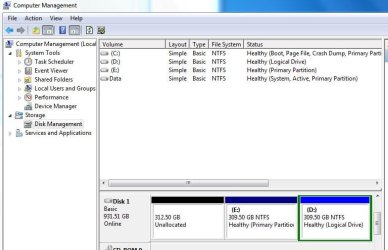
Hello Again. I Think i got it right .... i do believe there is nothing else to do ?

Is there anything i forgot to do ?

Once again Thanks
 

Attachments

  • HDD unallocated space.JPG
    HDD unallocated space.JPG
    53.3 KB · Views: 7
  • New Simple Volume.JPG
    New Simple Volume.JPG
    61.8 KB · Views: 6
  • COMPUTER.JPG
    COMPUTER.JPG
    24.9 KB · Views: 10

My Computer My Computer

At a glance

Genuine windows 7X64AMD 8320 FX Processor8 Gigs Corsair Vengance DDR3 1886 MHZEVGA GTX 750 Ti FTW
Computer type
PC/Desktop
Computer Manufacturer/Model Number
Personal build
OS
Genuine windows 7X64
CPU
AMD 8320 FX Processor
Motherboard
Asus Sabertoothe 990 FX R2.0 AM2+/AM2 AMD MB
Memory
8 Gigs Corsair Vengance DDR3 1886 MHZ
Graphics Card(s)
EVGA GTX 750 Ti FTW
Sound Card
On board
Monitor(s) Displays
ASUS VE247H 24 inch
Screen Resolution
HDMI
Hard Drives
Samsung 120GB 2.5-inch SSD 840 SATA III
PSU
Corsair 750 Watts
Case
Gigabyte case
Cooling
Zellman CNPS 10 Extreme
Internet Speed
50megs
Antivirus
AVG Free
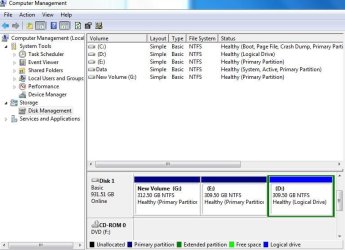
Pantz, so you left it as three partitions ?

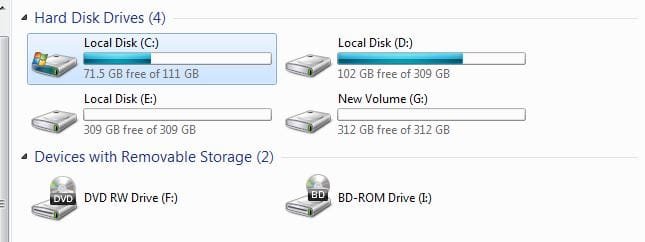
This is mine:
 
Last edited:

My Computer My Computer

At a glance

Windows 8.1.1 64biti7-4700MQ8.0GB PC3-12800 DDR3L SDRAM 1600 MHzIntel® HD Graphics 4600
Computer type
Laptop
Computer Manufacturer/Model Number
Lenovo Z710 #59400485
OS
Windows 8.1.1 64bit
CPU
i7-4700MQ
Memory
8.0GB PC3-12800 DDR3L SDRAM 1600 MHz
Graphics Card(s)
Intel® HD Graphics 4600
Sound Card
on-board
Monitor(s) Displays
17.3"
Screen Resolution
1920x1080
Hard Drives
1TB 5400 RPM;(OS,programs)


Hitachi, 1Tb external,(B'up)
PSU
4 Cell 41 Watt Hour Lithium-Ion
Case
Lenovo
Cooling
Air in, Air out.
Keyboard
Logitech - Y-UY95 - Illuminated
Mouse
M$ - Arc Touch
Internet Speed
59 Mb down / 25 Mb up
Antivirus
Defender
Browser
Firefox (newest)
Other Info
MBAM Pro, SAS Pro, Revo Pro.

Ext. HP 2311 Monitor
You have an awful lot of stuff on your SSD's C partition. Is your user data on there too.
 

My Computer My Computer

At a glance

Vista, Windows7, Mint Mate, Zorin, Windows 8from 1.6GHz Duo to i7
Computer Manufacturer/Model Number
HP, Dell, Gateway, Toshiba - 4 laptops and 2 desktops
OS
Vista, Windows7, Mint Mate, Zorin, Windows 8
CPU
from 1.6GHz Duo to i7
Monitor(s) Displays
2x HP w2207
Hard Drives
5x HDD, 7x SSD, 12x Externals
Keyboard
with trackball - no mices
Mouse
Trackball mice
Internet Speed
DSL 6000
You have an awful lot of stuff on your SSD's C partition. Is your user data on there too.

Who are you referring to ?
Pantz or me.
 

My Computer My Computer

At a glance

Windows 8.1.1 64biti7-4700MQ8.0GB PC3-12800 DDR3L SDRAM 1600 MHzIntel® HD Graphics 4600
Computer type
Laptop
Computer Manufacturer/Model Number
Lenovo Z710 #59400485
OS
Windows 8.1.1 64bit
CPU
i7-4700MQ
Memory
8.0GB PC3-12800 DDR3L SDRAM 1600 MHz
Graphics Card(s)
Intel® HD Graphics 4600
Sound Card
on-board
Monitor(s) Displays
17.3"
Screen Resolution
1920x1080
Hard Drives
1TB 5400 RPM;(OS,programs)


Hitachi, 1Tb external,(B'up)
PSU
4 Cell 41 Watt Hour Lithium-Ion
Case
Lenovo
Cooling
Air in, Air out.
Keyboard
Logitech - Y-UY95 - Illuminated
Mouse
M$ - Arc Touch
Internet Speed
59 Mb down / 25 Mb up
Antivirus
Defender
Browser
Firefox (newest)
Other Info
MBAM Pro, SAS Pro, Revo Pro.

Ext. HP 2311 Monitor
Actually both of you. An average system should take about 25GBs if it is tuned correctly.
 

My Computer My Computer

At a glance

Vista, Windows7, Mint Mate, Zorin, Windows 8from 1.6GHz Duo to i7
Computer Manufacturer/Model Number
HP, Dell, Gateway, Toshiba - 4 laptops and 2 desktops
OS
Vista, Windows7, Mint Mate, Zorin, Windows 8
CPU
from 1.6GHz Duo to i7
Monitor(s) Displays
2x HP w2207
Hard Drives
5x HDD, 7x SSD, 12x Externals
Keyboard
with trackball - no mices
Mouse
Trackball mice
Internet Speed
DSL 6000
OS says 58.1GB
What if anything can I put on the HDD ?
Should ask how to tune correctly ?
 
Last edited:

My Computer My Computer

At a glance

Windows 8.1.1 64biti7-4700MQ8.0GB PC3-12800 DDR3L SDRAM 1600 MHzIntel® HD Graphics 4600
Computer type
Laptop
Computer Manufacturer/Model Number
Lenovo Z710 #59400485
OS
Windows 8.1.1 64bit
CPU
i7-4700MQ
Memory
8.0GB PC3-12800 DDR3L SDRAM 1600 MHz
Graphics Card(s)
Intel® HD Graphics 4600
Sound Card
on-board
Monitor(s) Displays
17.3"
Screen Resolution
1920x1080
Hard Drives
1TB 5400 RPM;(OS,programs)


Hitachi, 1Tb external,(B'up)
PSU
4 Cell 41 Watt Hour Lithium-Ion
Case
Lenovo
Cooling
Air in, Air out.
Keyboard
Logitech - Y-UY95 - Illuminated
Mouse
M$ - Arc Touch
Internet Speed
59 Mb down / 25 Mb up
Antivirus
Defender
Browser
Firefox (newest)
Other Info
MBAM Pro, SAS Pro, Revo Pro.

Ext. HP 2311 Monitor
Hello Again, Yes my OLD HD was a 1T drive, I originally made it into 3 partitions ( in 2009), The New SSD has not been partitioned. i keep my music and games on the D: Partition on the OLD HD.

The 40Gigs on the SSD, is the Migration of the OS and Programs from what i originally had on the old HD.
 

My Computer My Computer

At a glance

Genuine windows 7X64AMD 8320 FX Processor8 Gigs Corsair Vengance DDR3 1886 MHZEVGA GTX 750 Ti FTW
Computer type
PC/Desktop
Computer Manufacturer/Model Number
Personal build
OS
Genuine windows 7X64
CPU
AMD 8320 FX Processor
Motherboard
Asus Sabertoothe 990 FX R2.0 AM2+/AM2 AMD MB
Memory
8 Gigs Corsair Vengance DDR3 1886 MHZ
Graphics Card(s)
EVGA GTX 750 Ti FTW
Sound Card
On board
Monitor(s) Displays
ASUS VE247H 24 inch
Screen Resolution
HDMI
Hard Drives
Samsung 120GB 2.5-inch SSD 840 SATA III
PSU
Corsair 750 Watts
Case
Gigabyte case
Cooling
Zellman CNPS 10 Extreme
Internet Speed
50megs
Antivirus
AVG Free
All OS files should stay on the SSD. But the user files can go on the spinner. If you want to move user files, let me know. I tell you the best way.

Well tuned system means:

Hiberfile eliminated
Pagefile reduced to 1 or 2GB
All bloatware and trial programs uninstalled
No major games installed. With Games, the size can be significantly more than 25GB

PS: 40GB is still a lot. You must have some really big programs.
 

My Computer My Computer

At a glance

Vista, Windows7, Mint Mate, Zorin, Windows 8from 1.6GHz Duo to i7
Computer Manufacturer/Model Number
HP, Dell, Gateway, Toshiba - 4 laptops and 2 desktops
OS
Vista, Windows7, Mint Mate, Zorin, Windows 8
CPU
from 1.6GHz Duo to i7
Monitor(s) Displays
2x HP w2207
Hard Drives
5x HDD, 7x SSD, 12x Externals
Keyboard
with trackball - no mices
Mouse
Trackball mice
Internet Speed
DSL 6000
44GBs of data will easily migrate to a 128GB SSD - no problems. If this is a Dell system though, it will also migrate the recovery partition because that's where the bootmgr is - if not, you get only the small 100MB system partition. That we can fix later.

yes i do have some programs on the SSD from the Migration form the Spinner HD

If removing the user files to the spinner would help then yes i would like to know how to do that.

i can always un install the programs i dont need from the SSD

Thanks
 

My Computer My Computer

At a glance

Genuine windows 7X64AMD 8320 FX Processor8 Gigs Corsair Vengance DDR3 1886 MHZEVGA GTX 750 Ti FTW
Computer type
PC/Desktop
Computer Manufacturer/Model Number
Personal build
OS
Genuine windows 7X64
CPU
AMD 8320 FX Processor
Motherboard
Asus Sabertoothe 990 FX R2.0 AM2+/AM2 AMD MB
Memory
8 Gigs Corsair Vengance DDR3 1886 MHZ
Graphics Card(s)
EVGA GTX 750 Ti FTW
Sound Card
On board
Monitor(s) Displays
ASUS VE247H 24 inch
Screen Resolution
HDMI
Hard Drives
Samsung 120GB 2.5-inch SSD 840 SATA III
PSU
Corsair 750 Watts
Case
Gigabyte case
Cooling
Zellman CNPS 10 Extreme
Internet Speed
50megs
Antivirus
AVG Free
Set the page file to 1GB min. and 2GB max.
Where do I find the Hiberfile ?
If I right click on user files and then use send to, to move them to the HDD;
then go back to user files and delete them, is this OK ?

I have no games or other junk.

Down to 38.7 now.
 

My Computer My Computer

At a glance

Windows 8.1.1 64biti7-4700MQ8.0GB PC3-12800 DDR3L SDRAM 1600 MHzIntel® HD Graphics 4600
Computer type
Laptop
Computer Manufacturer/Model Number
Lenovo Z710 #59400485
OS
Windows 8.1.1 64bit
CPU
i7-4700MQ
Memory
8.0GB PC3-12800 DDR3L SDRAM 1600 MHz
Graphics Card(s)
Intel® HD Graphics 4600
Sound Card
on-board
Monitor(s) Displays
17.3"
Screen Resolution
1920x1080
Hard Drives
1TB 5400 RPM;(OS,programs)


Hitachi, 1Tb external,(B'up)
PSU
4 Cell 41 Watt Hour Lithium-Ion
Case
Lenovo
Cooling
Air in, Air out.
Keyboard
Logitech - Y-UY95 - Illuminated
Mouse
M$ - Arc Touch
Internet Speed
59 Mb down / 25 Mb up
Antivirus
Defender
Browser
Firefox (newest)
Other Info
MBAM Pro, SAS Pro, Revo Pro.

Ext. HP 2311 Monitor
Here is the way I move user files to the spinner:

1. I create folders for Documents, Music, Videos, and Pictures on the spinner

2. I right click on those folders and INCLUDE them in their respective libraries

3. I rename them in the library (the left pane) to e.g. WHS Documents. That way they will not also be called 'My Documents'

4. I move my own folders (not the OS default folders) to their repective folders on the spinner. The OS default folders I leave in place because certain programs want to store things there. When you move the user folders, make sure that the program generated folders are not being moved.

You then will end up with 3 folders in the library - e.g. for Videos (see picture)
My Videos
Public Videos
Your name Videos

The advantage of this setup is that the program generated folders (which are usually quite small) will not get mixed up with your user folders.

There is another way to move the user folders and that is via the location tab in the folder properties. But that moves everything and the default location of those folders. Very often that gets messed up if you don't do it right and you are stuck with them where they are because the location tab disappears. Not recommended to do it that way (although I once published a video tutorial showing how to do that, LOL). You live and learn.
 

Attachments

  • 2013-03-27_2005.png
    2013-03-27_2005.png
    7.1 KB · Views: 14

My Computer My Computer

At a glance

Vista, Windows7, Mint Mate, Zorin, Windows 8from 1.6GHz Duo to i7
Computer Manufacturer/Model Number
HP, Dell, Gateway, Toshiba - 4 laptops and 2 desktops
OS
Vista, Windows7, Mint Mate, Zorin, Windows 8
CPU
from 1.6GHz Duo to i7
Monitor(s) Displays
2x HP w2207
Hard Drives
5x HDD, 7x SSD, 12x Externals
Keyboard
with trackball - no mices
Mouse
Trackball mice
Internet Speed
DSL 6000
Set the page file to 1GB min. and 2GB max.
Where do I find the Hiberfile ?
If I right click on user files and then use send to, to move them to the HDD;
then go back to user files and delete them, is this OK ?

I have no games or other junk.

Down to 38.7 now.
To get rid of the hiberfile, open an elevated command prompt and run this command

powercfg -h off

Your method of moving files is a bit aleatory. See my post above.
 

My Computer My Computer

At a glance

Vista, Windows7, Mint Mate, Zorin, Windows 8from 1.6GHz Duo to i7
Computer Manufacturer/Model Number
HP, Dell, Gateway, Toshiba - 4 laptops and 2 desktops
OS
Vista, Windows7, Mint Mate, Zorin, Windows 8
CPU
from 1.6GHz Duo to i7
Monitor(s) Displays
2x HP w2207
Hard Drives
5x HDD, 7x SSD, 12x Externals
Keyboard
with trackball - no mices
Mouse
Trackball mice
Internet Speed
DSL 6000
Back
Top