
Solved IE10-32bit - browser and other windows backgrounds

UsernameIssues

a.k.a. UNI
Guru
Gold Member
Local time
7:45 AM
Messages
8,138
Another friend's computer (laptop).
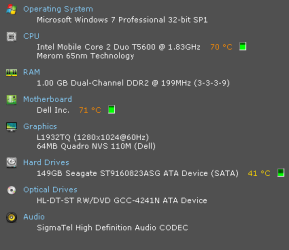
specs2.png

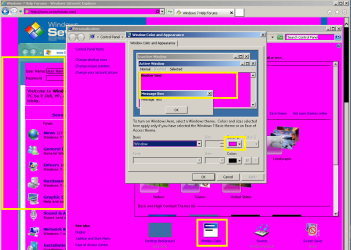
I know that I can change the background via "Window Color", but when the color is white, why does the Seven Forums look like this?
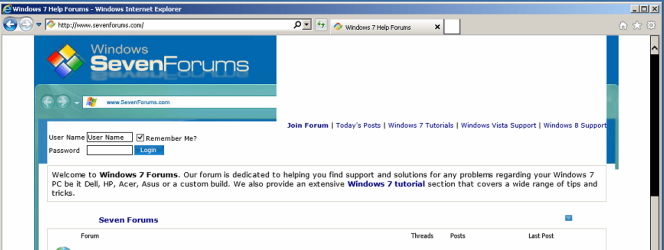
IE10-32bit-1.png

IE10-32bit-2.png

I've reset IE10... any other suggestions that I can do via remote control?
 

My Computer My Computer

At a glance

W7 Pro SP1 64biti78GBIntel HD Graphics
Computer type
Laptop
Computer Manufacturer/Model Number
Employer provided Dell Latitude
OS
W7 Pro SP1 64bit
CPU
i7
Memory
8GB
Graphics Card(s)
Intel HD Graphics
Hard Drives
crappy SSD
Antivirus
Employer mandated Symantec Endpoint Protection
Browser
Pale Moon 64bit, IE11 64bit & Chrome 64bit
Another friend's computer (laptop).
View attachment 262131

I know that I can change the background via "Window Color", but when the color is white, why does the Seven Forums look like this?

View attachment 262129

View attachment 262130

I've reset IE10... any other suggestions that I can do via remote control?

OK, let's see.

Launch IE > Click the gear icon on the top right > Click "Internet Options"

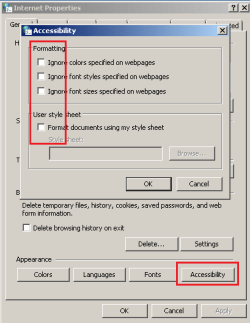
Now click "Accessibility" under Appearance in the General tab.

Make sure everything is unchecked. Does that help?
 
Thanks for the idea - I do not think that I've ever been inside of that window.

All settings are clear:
IE10-32bit-3.png

And I've reset IE via this...
IE10-32bit-4.png
...before posting those images in the OP.
 

My Computer My Computer

At a glance

W7 Pro SP1 64biti78GBIntel HD Graphics
Computer type
Laptop
Computer Manufacturer/Model Number
Employer provided Dell Latitude
OS
W7 Pro SP1 64bit
CPU
i7
Memory
8GB
Graphics Card(s)
Intel HD Graphics
Hard Drives
crappy SSD
Antivirus
Employer mandated Symantec Endpoint Protection
Browser
Pale Moon 64bit, IE11 64bit & Chrome 64bit
Sorry - I missed that - we posted at the same time.

I unchecked that option
loaded the Seven Forums page
opened the option back up for the screenshot:
IE10-32bit-5.png

That option is checked by default. Unchecking it allows you pick colors to override what the web page wants to show you. This install of IE10 seems to be overriding the webpage colors via some other setting. If only I could find out which setting that is.

Thanks for your help. Please keep looking around. I could use another set of eyes on this.
 

My Computer My Computer

At a glance

W7 Pro SP1 64biti78GBIntel HD Graphics
Computer type
Laptop
Computer Manufacturer/Model Number
Employer provided Dell Latitude
OS
W7 Pro SP1 64bit
CPU
i7
Memory
8GB
Graphics Card(s)
Intel HD Graphics
Hard Drives
crappy SSD
Antivirus
Employer mandated Symantec Endpoint Protection
Browser
Pale Moon 64bit, IE11 64bit & Chrome 64bit
I'm not sure that this hardware can handle Aero.

I will check, but I'll have to tell TeamViewer not to turn Aero off... if I can turn it on.
 

My Computer My Computer

At a glance

W7 Pro SP1 64biti78GBIntel HD Graphics
Computer type
Laptop
Computer Manufacturer/Model Number
Employer provided Dell Latitude
OS
W7 Pro SP1 64bit
CPU
i7
Memory
8GB
Graphics Card(s)
Intel HD Graphics
Hard Drives
crappy SSD
Antivirus
Employer mandated Symantec Endpoint Protection
Browser
Pale Moon 64bit, IE11 64bit & Chrome 64bit
If it can't handle Aero, switch to Basic theme atleast and see if it helps. I see the classic theme is in use. Seems there's something wrong with accessibility themes. Can't think of anything else. Check out "Ease of access" in control panel. There's something to do with the registry I suppose.
 
Thanks for the ideas. I did get it to go to Aero.

I had IE10 showing the Seven Forums in the background while the theme changed from classic to Aero. Making the switch seems to have fixed things... but I know that I tried that before.

I've already set it back to classic, saved the theme and deleted the old one. The Seven Forums' pages (and other pages) look normal. I'll test to see if it holds after a reboot... but I'll have to wait until Windows Update completes the .NET 4.5 patches.

It took a very long time to uninstall the 19 .NET updates and .NET4 itself. Maybe one of those uninstalls did something unexpected to the way the theme change acted this time. Dell's add-on for detecting the laptop's service tag claimed that the .NET 4 install was bad - hence the move to .NET 4.5.

Edit: IE10 looks fine - even after a reboot.

Edit2: Dells add-on works with .NET4.5 :-)

Thanks so much for your help. I probably would not have tried the theme change again. The user does not need any of the accessibility features. I just found references to that causing issues with webpage backgrounds.
 

My Computer My Computer

At a glance

W7 Pro SP1 64biti78GBIntel HD Graphics
Computer type
Laptop
Computer Manufacturer/Model Number
Employer provided Dell Latitude
OS
W7 Pro SP1 64bit
CPU
i7
Memory
8GB
Graphics Card(s)
Intel HD Graphics
Hard Drives
crappy SSD
Antivirus
Employer mandated Symantec Endpoint Protection
Browser
Pale Moon 64bit, IE11 64bit & Chrome 64bit
Thanks for the ideas. I did get it to go to Aero.

I had IE10 showing the Seven Forums in the background while the theme changed from classic to Aero. Making the switch seems to have fixed things... but I know that I tried that before.

I've already set it back to classic, saved the theme and deleted the old one. The Seven Forums' pages (and other pages) look normal. I'll test to see if it holds after a reboot... but I'll have to wait until Windows Update completes the .NET 4.5 patches.

It took a very long time to uninstall the 19 .NET updates and .NET4 itself. Maybe one of those uninstalls did something unexpected to the way the theme change acted this time. Dell's add-on for detecting the laptop's service tag claimed that the .NET 4 install was bad - hence the move to .NET 4.5.

Edit: IE10 looks fine - even after a reboot.

Edit2: Dells add-on works with .NET4.5 :-)

Thanks so much for your help. I probably would not have tried the theme change again. The user does not need any of the accessibility features. I just found references to that causing issues with webpage backgrounds.

Glad to know my idea just worked fine! :D
 
Back
Top