Solved Unable to run Ping and Traceroute

probuddha

New member
Member
VIP
Local time
3:39 AM
Messages
194
Location
Calcutta
Hello

I installed ibVPN trial version yesterday for a test run and within an hour of running it, I uninstalled it.

However, since then, I am unable to run Ping and Traceroutes to any website through the CMD. I later noticed a TAP 2 network adapter being installed along with the VPN client, but I removed it through Device Manager.

But still can't run ping and traceroutes

Code:
C:\>tracert google.com
Unable to resolve target system name google.com.

Code:
C:\>ping google.com
Ping request could not find host google.com. Please check the name and try again

Please advise

Many thanks!
.
 

My Computer My Computer

At a glance

Win 7 Professional 64 bitAMD FX-6100Corsair Vengeance 1600 Mhz 8 GBATI Radeon HD 5450 1GB
Computer type
PC/Desktop
Computer Manufacturer/Model Number
Custom Build
OS
Win 7 Professional 64 bit
CPU
AMD FX-6100
Motherboard
M5A78L-M/USB3
Memory
Corsair Vengeance 1600 Mhz 8 GB
Graphics Card(s)
ATI Radeon HD 5450 1GB
Sound Card
On Board
Monitor(s) Displays
LG Flatron L177WSB
Screen Resolution
1440 x 900
Hard Drives
Crucial MX 100 - 256 GB (Primary C:)
Seagate Barracuda - 160 GB
Seagate Barracuda - 500 GB
PSU
Cooler Master B500 Ver 2.0
Case
Cooler Master Elite 430
Cooling
Stock AMD Cooler
Keyboard
TVS Gold
Mouse
DELL USB
Internet Speed
1 Mbps
Antivirus
Avast Home V 12.1
Browser
Chrome
Other Info
Lenovo ThinkPad - E420
Hi probuddha.

Could you please post up the command ipconfig /all

Also do you have internet access?
 

My Computer My Computer

At a glance

Windows 7 Ultimate 64-bitIntel Core 2 Duo E6550 @2.33GHz4GB DDR"NVIDIA GeForce 8600 GS
Computer type
PC/Desktop
Computer Manufacturer/Model Number
Dell / Lenovo g550
OS
Windows 7 Ultimate 64-bit
CPU
Intel Core 2 Duo E6550 @2.33GHz
Motherboard
foxconn g33m02
Memory
4GB DDR"
Graphics Card(s)
NVIDIA GeForce 8600 GS
Hard Drives
HDD 1 = 150GB
HDD 2 = 1.5TB
PSU
450W
Cooling
Stock fan
Internet Speed
12Mb
Antivirus
AVG Internet Security
Hi Brendan

Thanks for your response.

Yes, I have full internet access and following is my ipconfig /all result

Code:
C:\>ipconfig /all

Windows IP Configuration

   Host Name . . . . . . . . . . . . : PB-PC
   Primary Dns Suffix  . . . . . . . :
   Node Type . . . . . . . . . . . . : Hybrid
   IP Routing Enabled. . . . . . . . : No
   WINS Proxy Enabled. . . . . . . . : No

Ethernet adapter Local Area Connection:

   Connection-specific DNS Suffix  . :
   Description . . . . . . . . . . . : Realtek PCIe GBE Family Controller
   Physical Address. . . . . . . . . : 94-DE-80-28-C5-97
   DHCP Enabled. . . . . . . . . . . : Yes
   Autoconfiguration Enabled . . . . : Yes
   Link-local IPv6 Address . . . . . : fe80::e8:3c5a:2176:5bdd%11(Preferred)
   IPv4 Address. . . . . . . . . . . : 192.168.0.100(Preferred)
   Subnet Mask . . . . . . . . . . . : 255.255.255.0
   Lease Obtained. . . . . . . . . . : Friday, 12 April 2013 11:24:44 AM
   Lease Expires . . . . . . . . . . : Friday, 12 April 2013 3:24:44 PM
   Default Gateway . . . . . . . . . : 192.168.0.1
   DHCP Server . . . . . . . . . . . : 192.168.0.1
   DHCPv6 IAID . . . . . . . . . . . : 244637312
   DHCPv6 Client DUID. . . . . . . . : 00-01-00-01-18-F3-D6-EC-94-DE-80-28-C5-97

   DNS Servers . . . . . . . . . . . : 8.8.8.8
                                       8.8.4.4
   NetBIOS over Tcpip. . . . . . . . : Enabled

Tunnel adapter isatap.{15ADA4D7-BCAD-4BCD-A740-E92347C33664}:

   Media State . . . . . . . . . . . : Media disconnected
   Connection-specific DNS Suffix  . :
   Description . . . . . . . . . . . : Microsoft ISATAP Adapter
   Physical Address. . . . . . . . . : 00-00-00-00-00-00-00-E0
   DHCP Enabled. . . . . . . . . . . : No
   Autoconfiguration Enabled . . . . : Yes

Tunnel adapter Teredo Tunneling Pseudo-Interface:

   Connection-specific DNS Suffix  . :
   Description . . . . . . . . . . . : Teredo Tunneling Pseudo-Interface
   Physical Address. . . . . . . . . : 00-00-00-00-00-00-00-E0
   DHCP Enabled. . . . . . . . . . . : No
   Autoconfiguration Enabled . . . . : Yes
   IPv6 Address. . . . . . . . . . . : 2001:0:4137:9e76:24e1:38ce:8a3d:b505(Pref
erred)
   Link-local IPv6 Address . . . . . : fe80::24e1:38ce:8a3d:b505%13(Preferred)
   Default Gateway . . . . . . . . . : ::
   NetBIOS over Tcpip. . . . . . . . : Disabled


Thanks
 

My Computer My Computer

At a glance

Win 7 Professional 64 bitAMD FX-6100Corsair Vengeance 1600 Mhz 8 GBATI Radeon HD 5450 1GB
Computer type
PC/Desktop
Computer Manufacturer/Model Number
Custom Build
OS
Win 7 Professional 64 bit
CPU
AMD FX-6100
Motherboard
M5A78L-M/USB3
Memory
Corsair Vengeance 1600 Mhz 8 GB
Graphics Card(s)
ATI Radeon HD 5450 1GB
Sound Card
On Board
Monitor(s) Displays
LG Flatron L177WSB
Screen Resolution
1440 x 900
Hard Drives
Crucial MX 100 - 256 GB (Primary C:)
Seagate Barracuda - 160 GB
Seagate Barracuda - 500 GB
PSU
Cooler Master B500 Ver 2.0
Case
Cooler Master Elite 430
Cooling
Stock AMD Cooler
Keyboard
TVS Gold
Mouse
DELL USB
Internet Speed
1 Mbps
Antivirus
Avast Home V 12.1
Browser
Chrome
Other Info
Lenovo ThinkPad - E420
Hi Brendan

Thanks for your response.

Yes, I have full internet access and following is my ipconfig /all result

Code:
C:\>ipconfig /all
 
Windows IP Configuration
 
   Host Name . . . . . . . . . . . . : PB-PC
   Primary Dns Suffix  . . . . . . . :
   Node Type . . . . . . . . . . . . : Hybrid
   IP Routing Enabled. . . . . . . . : No
   WINS Proxy Enabled. . . . . . . . : No
 
Ethernet adapter Local Area Connection:
 
   Connection-specific DNS Suffix  . :
   Description . . . . . . . . . . . : Realtek PCIe GBE Family Controller
   Physical Address. . . . . . . . . : 94-DE-80-28-C5-97
   DHCP Enabled. . . . . . . . . . . : Yes
   Autoconfiguration Enabled . . . . : Yes
   Link-local IPv6 Address . . . . . : fe80::e8:3c5a:2176:5bdd%11(Preferred)
   IPv4 Address. . . . . . . . . . . : 192.168.0.100(Preferred)
   Subnet Mask . . . . . . . . . . . : 255.255.255.0
   Lease Obtained. . . . . . . . . . : Friday, 12 April 2013 11:24:44 AM
   Lease Expires . . . . . . . . . . : Friday, 12 April 2013 3:24:44 PM
   Default Gateway . . . . . . . . . : 192.168.0.1
   DHCP Server . . . . . . . . . . . : 192.168.0.1
   DHCPv6 IAID . . . . . . . . . . . : 244637312
   DHCPv6 Client DUID. . . . . . . . : 00-01-00-01-18-F3-D6-EC-94-DE-80-28-C5-97
 
   DNS Servers . . . . . . . . . . . : 8.8.8.8
                                       8.8.4.4
   NetBIOS over Tcpip. . . . . . . . : Enabled
 
Tunnel adapter isatap.{15ADA4D7-BCAD-4BCD-A740-E92347C33664}:
 
   Media State . . . . . . . . . . . : Media disconnected
   Connection-specific DNS Suffix  . :
   Description . . . . . . . . . . . : Microsoft ISATAP Adapter
   Physical Address. . . . . . . . . : 00-00-00-00-00-00-00-E0
   DHCP Enabled. . . . . . . . . . . : No
   Autoconfiguration Enabled . . . . : Yes
 
Tunnel adapter Teredo Tunneling Pseudo-Interface:
 
   Connection-specific DNS Suffix  . :
   Description . . . . . . . . . . . : Teredo Tunneling Pseudo-Interface
   Physical Address. . . . . . . . . : 00-00-00-00-00-00-00-E0
   DHCP Enabled. . . . . . . . . . . : No
   Autoconfiguration Enabled . . . . : Yes
   IPv6 Address. . . . . . . . . . . : 2001:0:4137:9e76:24e1:38ce:8a3d:b505(Pref
erred)
   Link-local IPv6 Address . . . . . : fe80::24e1:38ce:8a3d:b505%13(Preferred)
   Default Gateway . . . . . . . . . : ::
   NetBIOS over Tcpip. . . . . . . . : Disabled


Thanks

Ok I see your using google's DNS server. Try to ping this address 173.194.34.103
 

My Computer My Computer

At a glance

Windows 7 Ultimate 64-bitIntel Core 2 Duo E6550 @2.33GHz4GB DDR"NVIDIA GeForce 8600 GS
Computer type
PC/Desktop
Computer Manufacturer/Model Number
Dell / Lenovo g550
OS
Windows 7 Ultimate 64-bit
CPU
Intel Core 2 Duo E6550 @2.33GHz
Motherboard
foxconn g33m02
Memory
4GB DDR"
Graphics Card(s)
NVIDIA GeForce 8600 GS
Hard Drives
HDD 1 = 150GB
HDD 2 = 1.5TB
PSU
450W
Cooling
Stock fan
Internet Speed
12Mb
Antivirus
AVG Internet Security
Here you go

Code:
C:\>ping 173.194.34.103

Pinging 173.194.34.103 with 32 bytes of data:
Reply from 173.194.34.103: bytes=32 time=552ms TTL=43
Reply from 173.194.34.103: bytes=32 time=563ms TTL=43

Ping statistics for 173.194.34.103:
    Packets: Sent = 4, Received = 4, Lost = 0 (0% loss),
Approximate round trip times in milli-seconds:
    Minimum = 552ms, Maximum = 563ms, Average = 560ms

Note - Overall my ISP sucks big time...but this time, the pings are higher following an undersea cable cut which is yet to be restored
 

My Computer My Computer

At a glance

Win 7 Professional 64 bitAMD FX-6100Corsair Vengeance 1600 Mhz 8 GBATI Radeon HD 5450 1GB
Computer type
PC/Desktop
Computer Manufacturer/Model Number
Custom Build
OS
Win 7 Professional 64 bit
CPU
AMD FX-6100
Motherboard
M5A78L-M/USB3
Memory
Corsair Vengeance 1600 Mhz 8 GB
Graphics Card(s)
ATI Radeon HD 5450 1GB
Sound Card
On Board
Monitor(s) Displays
LG Flatron L177WSB
Screen Resolution
1440 x 900
Hard Drives
Crucial MX 100 - 256 GB (Primary C:)
Seagate Barracuda - 160 GB
Seagate Barracuda - 500 GB
PSU
Cooler Master B500 Ver 2.0
Case
Cooler Master Elite 430
Cooling
Stock AMD Cooler
Keyboard
TVS Gold
Mouse
DELL USB
Internet Speed
1 Mbps
Antivirus
Avast Home V 12.1
Browser
Chrome
Other Info
Lenovo ThinkPad - E420
Here you go

Code:
C:\>ping 173.194.34.103
 
Pinging 173.194.34.103 with 32 bytes of data:
Reply from 173.194.34.103: bytes=32 time=552ms TTL=43
Reply from 173.194.34.103: bytes=32 time=563ms TTL=43
 
Ping statistics for 173.194.34.103:
    Packets: Sent = 4, Received = 4, Lost = 0 (0% loss),
Approximate round trip times in milli-seconds:
    Minimum = 552ms, Maximum = 563ms, Average = 560ms

Note - Overall my ISP sucks big time...but this time, the pings are higher following an undersea cable cut which is yet to be restored

Ok your getting a reply from google.com. So what this says to me is a dns problem.

Try the following command. ipconfig /flushdns
 

My Computer My Computer

At a glance

Windows 7 Ultimate 64-bitIntel Core 2 Duo E6550 @2.33GHz4GB DDR"NVIDIA GeForce 8600 GS
Computer type
PC/Desktop
Computer Manufacturer/Model Number
Dell / Lenovo g550
OS
Windows 7 Ultimate 64-bit
CPU
Intel Core 2 Duo E6550 @2.33GHz
Motherboard
foxconn g33m02
Memory
4GB DDR"
Graphics Card(s)
NVIDIA GeForce 8600 GS
Hard Drives
HDD 1 = 150GB
HDD 2 = 1.5TB
PSU
450W
Cooling
Stock fan
Internet Speed
12Mb
Antivirus
AVG Internet Security
Flushed the DNS - still no improvement :(
 

My Computer My Computer

At a glance

Win 7 Professional 64 bitAMD FX-6100Corsair Vengeance 1600 Mhz 8 GBATI Radeon HD 5450 1GB
Computer type
PC/Desktop
Computer Manufacturer/Model Number
Custom Build
OS
Win 7 Professional 64 bit
CPU
AMD FX-6100
Motherboard
M5A78L-M/USB3
Memory
Corsair Vengeance 1600 Mhz 8 GB
Graphics Card(s)
ATI Radeon HD 5450 1GB
Sound Card
On Board
Monitor(s) Displays
LG Flatron L177WSB
Screen Resolution
1440 x 900
Hard Drives
Crucial MX 100 - 256 GB (Primary C:)
Seagate Barracuda - 160 GB
Seagate Barracuda - 500 GB
PSU
Cooler Master B500 Ver 2.0
Case
Cooler Master Elite 430
Cooling
Stock AMD Cooler
Keyboard
TVS Gold
Mouse
DELL USB
Internet Speed
1 Mbps
Antivirus
Avast Home V 12.1
Browser
Chrome
Other Info
Lenovo ThinkPad - E420
How about changing you dns server to another one. Such as your own ISP?
 

My Computer My Computer

At a glance

Windows 7 Ultimate 64-bitIntel Core 2 Duo E6550 @2.33GHz4GB DDR"NVIDIA GeForce 8600 GS
Computer type
PC/Desktop
Computer Manufacturer/Model Number
Dell / Lenovo g550
OS
Windows 7 Ultimate 64-bit
CPU
Intel Core 2 Duo E6550 @2.33GHz
Motherboard
foxconn g33m02
Memory
4GB DDR"
Graphics Card(s)
NVIDIA GeForce 8600 GS
Hard Drives
HDD 1 = 150GB
HDD 2 = 1.5TB
PSU
450W
Cooling
Stock fan
Internet Speed
12Mb
Antivirus
AVG Internet Security

My Computer My Computer

At a glance

Windows 7 Ultimate 64-bitIntel Core 2 Duo E6550 @2.33GHz4GB DDR"NVIDIA GeForce 8600 GS
Computer type
PC/Desktop
Computer Manufacturer/Model Number
Dell / Lenovo g550
OS
Windows 7 Ultimate 64-bit
CPU
Intel Core 2 Duo E6550 @2.33GHz
Motherboard
foxconn g33m02
Memory
4GB DDR"
Graphics Card(s)
NVIDIA GeForce 8600 GS
Hard Drives
HDD 1 = 150GB
HDD 2 = 1.5TB
PSU
450W
Cooling
Stock fan
Internet Speed
12Mb
Antivirus
AVG Internet Security
Reverted to the ISP's default DNS..but still the problem persists.

Also when I deactivated the adapter to change the DNS, I got the following prompt


Does this indicate something?
 

Attachments

  • network-prompt.png
    network-prompt.png
    6.5 KB · Views: 7

My Computer My Computer

At a glance

Win 7 Professional 64 bitAMD FX-6100Corsair Vengeance 1600 Mhz 8 GBATI Radeon HD 5450 1GB
Computer type
PC/Desktop
Computer Manufacturer/Model Number
Custom Build
OS
Win 7 Professional 64 bit
CPU
AMD FX-6100
Motherboard
M5A78L-M/USB3
Memory
Corsair Vengeance 1600 Mhz 8 GB
Graphics Card(s)
ATI Radeon HD 5450 1GB
Sound Card
On Board
Monitor(s) Displays
LG Flatron L177WSB
Screen Resolution
1440 x 900
Hard Drives
Crucial MX 100 - 256 GB (Primary C:)
Seagate Barracuda - 160 GB
Seagate Barracuda - 500 GB
PSU
Cooler Master B500 Ver 2.0
Case
Cooler Master Elite 430
Cooling
Stock AMD Cooler
Keyboard
TVS Gold
Mouse
DELL USB
Internet Speed
1 Mbps
Antivirus
Avast Home V 12.1
Browser
Chrome
Other Info
Lenovo ThinkPad - E420

My Computer My Computer

At a glance

Windows 7 Ultimate 64-bitIntel Core 2 Duo E6550 @2.33GHz4GB DDR"NVIDIA GeForce 8600 GS
Computer type
PC/Desktop
Computer Manufacturer/Model Number
Dell / Lenovo g550
OS
Windows 7 Ultimate 64-bit
CPU
Intel Core 2 Duo E6550 @2.33GHz
Motherboard
foxconn g33m02
Memory
4GB DDR"
Graphics Card(s)
NVIDIA GeForce 8600 GS
Hard Drives
HDD 1 = 150GB
HDD 2 = 1.5TB
PSU
450W
Cooling
Stock fan
Internet Speed
12Mb
Antivirus
AVG Internet Security
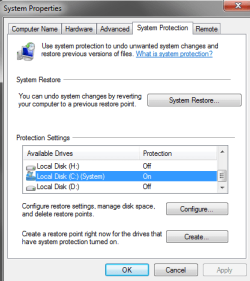
I have no restore points on my system :(
 

My Computer My Computer

At a glance

Win 7 Professional 64 bitAMD FX-6100Corsair Vengeance 1600 Mhz 8 GBATI Radeon HD 5450 1GB
Computer type
PC/Desktop
Computer Manufacturer/Model Number
Custom Build
OS
Win 7 Professional 64 bit
CPU
AMD FX-6100
Motherboard
M5A78L-M/USB3
Memory
Corsair Vengeance 1600 Mhz 8 GB
Graphics Card(s)
ATI Radeon HD 5450 1GB
Sound Card
On Board
Monitor(s) Displays
LG Flatron L177WSB
Screen Resolution
1440 x 900
Hard Drives
Crucial MX 100 - 256 GB (Primary C:)
Seagate Barracuda - 160 GB
Seagate Barracuda - 500 GB
PSU
Cooler Master B500 Ver 2.0
Case
Cooler Master Elite 430
Cooling
Stock AMD Cooler
Keyboard
TVS Gold
Mouse
DELL USB
Internet Speed
1 Mbps
Antivirus
Avast Home V 12.1
Browser
Chrome
Other Info
Lenovo ThinkPad - E420

My Computer My Computer

At a glance

Windows 7 Ultimate 64-bitIntel Core 2 Duo E6550 @2.33GHz4GB DDR"NVIDIA GeForce 8600 GS
Computer type
PC/Desktop
Computer Manufacturer/Model Number
Dell / Lenovo g550
OS
Windows 7 Ultimate 64-bit
CPU
Intel Core 2 Duo E6550 @2.33GHz
Motherboard
foxconn g33m02
Memory
4GB DDR"
Graphics Card(s)
NVIDIA GeForce 8600 GS
Hard Drives
HDD 1 = 150GB
HDD 2 = 1.5TB
PSU
450W
Cooling
Stock fan
Internet Speed
12Mb
Antivirus
AVG Internet Security
System Restore on my PC seems to be enabled already, please see screenshot below

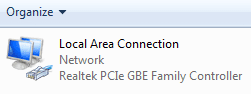
Also when I try to ping and trace routes to IP addresses, it works, but not with any domain names

Screenshot of my network adapter also attached
 

Attachments

  • sys-restore.png
    sys-restore.png
    13.9 KB · Views: 4
  • network-adapter.png
    network-adapter.png
    2.8 KB · Views: 8

My Computer My Computer

At a glance

Win 7 Professional 64 bitAMD FX-6100Corsair Vengeance 1600 Mhz 8 GBATI Radeon HD 5450 1GB
Computer type
PC/Desktop
Computer Manufacturer/Model Number
Custom Build
OS
Win 7 Professional 64 bit
CPU
AMD FX-6100
Motherboard
M5A78L-M/USB3
Memory
Corsair Vengeance 1600 Mhz 8 GB
Graphics Card(s)
ATI Radeon HD 5450 1GB
Sound Card
On Board
Monitor(s) Displays
LG Flatron L177WSB
Screen Resolution
1440 x 900
Hard Drives
Crucial MX 100 - 256 GB (Primary C:)
Seagate Barracuda - 160 GB
Seagate Barracuda - 500 GB
PSU
Cooler Master B500 Ver 2.0
Case
Cooler Master Elite 430
Cooling
Stock AMD Cooler
Keyboard
TVS Gold
Mouse
DELL USB
Internet Speed
1 Mbps
Antivirus
Avast Home V 12.1
Browser
Chrome
Other Info
Lenovo ThinkPad - E420

My Computer My Computer

At a glance

Windows 7 Ultimate 64-bitIntel Core 2 Duo E6550 @2.33GHz4GB DDR"NVIDIA GeForce 8600 GS
Computer type
PC/Desktop
Computer Manufacturer/Model Number
Dell / Lenovo g550
OS
Windows 7 Ultimate 64-bit
CPU
Intel Core 2 Duo E6550 @2.33GHz
Motherboard
foxconn g33m02
Memory
4GB DDR"
Graphics Card(s)
NVIDIA GeForce 8600 GS
Hard Drives
HDD 1 = 150GB
HDD 2 = 1.5TB
PSU
450W
Cooling
Stock fan
Internet Speed
12Mb
Antivirus
AVG Internet Security
I reinstalled my network adapter...still no improvement

Also I noticed that my CMD takes a few seconds to close after clicking the X on it. Previously it was instant
 

My Computer My Computer

At a glance

Win 7 Professional 64 bitAMD FX-6100Corsair Vengeance 1600 Mhz 8 GBATI Radeon HD 5450 1GB
Computer type
PC/Desktop
Computer Manufacturer/Model Number
Custom Build
OS
Win 7 Professional 64 bit
CPU
AMD FX-6100
Motherboard
M5A78L-M/USB3
Memory
Corsair Vengeance 1600 Mhz 8 GB
Graphics Card(s)
ATI Radeon HD 5450 1GB
Sound Card
On Board
Monitor(s) Displays
LG Flatron L177WSB
Screen Resolution
1440 x 900
Hard Drives
Crucial MX 100 - 256 GB (Primary C:)
Seagate Barracuda - 160 GB
Seagate Barracuda - 500 GB
PSU
Cooler Master B500 Ver 2.0
Case
Cooler Master Elite 430
Cooling
Stock AMD Cooler
Keyboard
TVS Gold
Mouse
DELL USB
Internet Speed
1 Mbps
Antivirus
Avast Home V 12.1
Browser
Chrome
Other Info
Lenovo ThinkPad - E420
Yes I would try going into safe mode and see if you can do a system restore because if you have them on it should be creating restore points
 

My Computer My Computer

At a glance

Windows 7 Ultimate 64-bitIntel Core 2 Duo E6550 @2.33GHz4GB DDR"NVIDIA GeForce 8600 GS
Computer type
PC/Desktop
Computer Manufacturer/Model Number
Dell / Lenovo g550
OS
Windows 7 Ultimate 64-bit
CPU
Intel Core 2 Duo E6550 @2.33GHz
Motherboard
foxconn g33m02
Memory
4GB DDR"
Graphics Card(s)
NVIDIA GeForce 8600 GS
Hard Drives
HDD 1 = 150GB
HDD 2 = 1.5TB
PSU
450W
Cooling
Stock fan
Internet Speed
12Mb
Antivirus
AVG Internet Security
Problem Solved!

Hi

So I tried this method as suggested in this thread and it seemed to fix the problem

Code:
Let’s try to reset WINSOCK, IPv4 TCP/IP and IPv6 TCP/IP stack.
 
a. Click on Start and in the search box, type cmd.
b. Right click on the Command Prompt, select "Run as Administrator" to open a Command Prompt.
c. At the command prompt window, type the following commands:
[B]netsh winsock reset catalog[/B] that resets WINSOCK entries to installation defaults.
[B]netsh int ipv4 reset reset.log[/B] that resets IPv4 TCP/IP stack to installation defaults.
[B]netsh int ipv6 reset reset.log[/B] resets IPv6 TCP/IP stack to installation defaults.
d. Restart the computer.

I can now ping and trace routes to domain names as well :) Also that message box that appeared while accessing the properties of the network adapter didn't show up this time

Thank you so much for your help on this Brendan, very appreciated!
 

My Computer My Computer

At a glance

Win 7 Professional 64 bitAMD FX-6100Corsair Vengeance 1600 Mhz 8 GBATI Radeon HD 5450 1GB
Computer type
PC/Desktop
Computer Manufacturer/Model Number
Custom Build
OS
Win 7 Professional 64 bit
CPU
AMD FX-6100
Motherboard
M5A78L-M/USB3
Memory
Corsair Vengeance 1600 Mhz 8 GB
Graphics Card(s)
ATI Radeon HD 5450 1GB
Sound Card
On Board
Monitor(s) Displays
LG Flatron L177WSB
Screen Resolution
1440 x 900
Hard Drives
Crucial MX 100 - 256 GB (Primary C:)
Seagate Barracuda - 160 GB
Seagate Barracuda - 500 GB
PSU
Cooler Master B500 Ver 2.0
Case
Cooler Master Elite 430
Cooling
Stock AMD Cooler
Keyboard
TVS Gold
Mouse
DELL USB
Internet Speed
1 Mbps
Antivirus
Avast Home V 12.1
Browser
Chrome
Other Info
Lenovo ThinkPad - E420
Hi

So I tried this method as suggested in this thread and it seemed to fix the problem

Code:
Let’s try to reset WINSOCK, IPv4 TCP/IP and IPv6 TCP/IP stack.
 
a. Click on Start and in the search box, type cmd.
b. Right click on the Command Prompt, select "Run as Administrator" to open a Command Prompt.
c. At the command prompt window, type the following commands:
[B]netsh winsock reset catalog[/B] that resets WINSOCK entries to installation defaults.
[B]netsh int ipv4 reset reset.log[/B] that resets IPv4 TCP/IP stack to installation defaults.
[B]netsh int ipv6 reset reset.log[/B] resets IPv6 TCP/IP stack to installation defaults.
d. Restart the computer.

I can now ping and trace routes to domain names as well :) Also that message box that appeared while accessing the properties of the network adapter didn't show up this time

Thank you so much for your help on this Brendan, very appreciated!

No problem
 

My Computer My Computer

At a glance

Windows 7 Ultimate 64-bitIntel Core 2 Duo E6550 @2.33GHz4GB DDR"NVIDIA GeForce 8600 GS
Computer type
PC/Desktop
Computer Manufacturer/Model Number
Dell / Lenovo g550
OS
Windows 7 Ultimate 64-bit
CPU
Intel Core 2 Duo E6550 @2.33GHz
Motherboard
foxconn g33m02
Memory
4GB DDR"
Graphics Card(s)
NVIDIA GeForce 8600 GS
Hard Drives
HDD 1 = 150GB
HDD 2 = 1.5TB
PSU
450W
Cooling
Stock fan
Internet Speed
12Mb
Antivirus
AVG Internet Security
Back
Top