Solved Re-Imaging From An External To An SSD

MCxWillyxP

New member
Local time
2:46 PM
Messages
6
I have created a system image of my Windows 7 OS from my HDD onto my external hard drive. The image is about 250GB and the new SSD is 500GB.

When I try and run the system repair (restore a system image) from the external HDD to the new SSD, I get error error 0x80042412.

I've tried literally everything, I've tried to create a new partition; didn't work. I tried a fresh install onto the SSD before migrating the system image; didn't work. There are a lot of similar threads that I have previously read through but none of the solutions have helped.

Thanks for your help in advance guys.
 
Last edited:

My Computer My Computer

At a glance

Windows 7 Home 64-BitIntel i7-2600k8GB Corsair Vengeance Blue (2 x 4GB)NVIDIA MSI GTX560 Ti
Computer type
PC/Desktop
Computer Manufacturer/Model Number
Custom Build
OS
Windows 7 Home 64-Bit
CPU
Intel i7-2600k
Motherboard
ASUS Maximus IV Gene-Z
Memory
8GB Corsair Vengeance Blue (2 x 4GB)
Graphics Card(s)
NVIDIA MSI GTX560 Ti

My Computer My Computer

At a glance

Windows 7 Ultimate X64 SP1Intel i5-2550K, Differing ~4.4-4.8GHz No buil...16GB G.Skill Sniper 1866MHz @ 2133MHz 2x8GBASUS GTX650TIB-DC2OC-2GD5, (650TI Boost)
Computer type
PC/Desktop
Computer Manufacturer/Model Number
Home Built Desktop By DataTech
OS
Windows 7 Ultimate X64 SP1
CPU
Intel i5-2550K, Differing ~4.4-4.8GHz No built in GPU
Motherboard
ASUS P8Z68-V PRO/GEN3
Memory
16GB G.Skill Sniper 1866MHz @ 2133MHz 2x8GB
Graphics Card(s)
ASUS GTX650TIB-DC2OC-2GD5, (650TI Boost)
Sound Card
Onboard Realtek 5-1
Monitor(s) Displays
Samsung P2570HD
Screen Resolution
1920x1080
Hard Drives
Samsung 840 Pro 256GB SSD for OS, 500GB Seagate Constellation (Enterprise drive) for Data
PSU
Corsair HX650W
Case
Inwin Dragon Rider
Cooling
Hyper 212 EVO w/two Noctua fans, push-pull, @1300 RPM
Keyboard
E-Z Eyes, bright yellow keys with large characters
Mouse
steelseries SENSEI Laser Pro Gaming
Internet Speed
48-51Mbs Mbs down, 11 Mbs up Xfinity Cable
Antivirus
Norton Internet Security 2013
Browser
IE 10, Opera, Pale Moon if needed
Other Info
4 case fans, LG BluRay-RE, ASUS DVD-RW, Mr. Fusion power supply, 1.21 gigawatts.
I've already been through that tutorial, followed it down to the line and yet I still end up with an error.
 

My Computer My Computer

At a glance

Windows 7 Home 64-BitIntel i7-2600k8GB Corsair Vengeance Blue (2 x 4GB)NVIDIA MSI GTX560 Ti
Computer type
PC/Desktop
Computer Manufacturer/Model Number
Custom Build
OS
Windows 7 Home 64-Bit
CPU
Intel i7-2600k
Motherboard
ASUS Maximus IV Gene-Z
Memory
8GB Corsair Vengeance Blue (2 x 4GB)
Graphics Card(s)
NVIDIA MSI GTX560 Ti
I'm not willing to pay out for software when the method I'm using should work.
 

My Computer My Computer

At a glance

Windows 7 Home 64-BitIntel i7-2600k8GB Corsair Vengeance Blue (2 x 4GB)NVIDIA MSI GTX560 Ti
Computer type
PC/Desktop
Computer Manufacturer/Model Number
Custom Build
OS
Windows 7 Home 64-Bit
CPU
Intel i7-2600k
Motherboard
ASUS Maximus IV Gene-Z
Memory
8GB Corsair Vengeance Blue (2 x 4GB)
Graphics Card(s)
NVIDIA MSI GTX560 Ti

My Computer My Computer

At a glance

win7 Ult 64i7 3930K & 3960X16GB G-Skill 2133MHzSapphire HD 7970
Computer Manufacturer/Model Number
My Build
OS
win7 Ult 64
CPU
i7 3930K & 3960X
Motherboard
ASUS P9X79 Deluxe
Memory
16GB G-Skill 2133MHz
Graphics Card(s)
Sapphire HD 7970
Sound Card
On-board
Monitor(s) Displays
ASUS 27 inch
Screen Resolution
1920X1080
Hard Drives
Crucial M4 256GB, 1.5TB WD Black for Data/Images
PSU
Corsair AX1200
Case
NZXT 810
Cooling
Custom Loop, Swiftech HDBlock
Keyboard
Mionix
Mouse
Mionix
Internet Speed
Cable
Thanks for that, got it all transferred now.

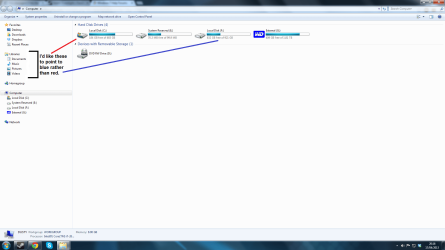
One more question though; I want to store all of the User data on my HDD rather than on the SSD so how do I configure my settings so that the libraries automatically save and load using the HDD rather than the SSD?
 

Attachments

  • Save Config.png
    Save Config.png
    68.4 KB · Views: 7

My Computer My Computer

At a glance

Windows 7 Home 64-BitIntel i7-2600k8GB Corsair Vengeance Blue (2 x 4GB)NVIDIA MSI GTX560 Ti
Computer type
PC/Desktop
Computer Manufacturer/Model Number
Custom Build
OS
Windows 7 Home 64-Bit
CPU
Intel i7-2600k
Motherboard
ASUS Maximus IV Gene-Z
Memory
8GB Corsair Vengeance Blue (2 x 4GB)
Graphics Card(s)
NVIDIA MSI GTX560 Ti
Thanks for that, got it all transferred now.

One more question though; I want to store all of the User data on my HDD rather than on the SSD so how do I configure my settings so that the libraries automatically save and load using the HDD rather than the SSD?
First make a folder on HDD as placeholder of the new stuff. For example F:\yourname

Then in explorer goto %userprofile%

Then cut/paste folders from %userprofile% to F:\yourname
Contacts
Desktop
Documents
Downloads
Favorites
Links
Music
Pictures
Saved Games
Searches
Videos
(Some folders have "My" as prefix). Cut/paste ... not copy!!

Do the same for C:\users\public (public music/documents etcetera). Not all folders listed above are there! Put them in F:\Public for example

All libraries are updated automagically.

Don't do the appdata/tracing/libraries folders!
 

My Computer My Computer

At a glance

Microsoft Windows 7 Home Premium 64-bits 7601...Intel(R) Core(TM) i3 CPU M 370 @ 2.40GHz4,00 GBATI Mobility Radeon HD 5400 Series
Computer type
Laptop
Computer Manufacturer/Model Number
ACER ASPIRE 5742G
OS
Microsoft Windows 7 Home Premium 64-bits 7601 Multiprocessor Free Service Pack 1
CPU
Intel(R) Core(TM) i3 CPU M 370 @ 2.40GHz
Motherboard
Acer Aspire 5742G
Memory
4,00 GB
Graphics Card(s)
ATI Mobility Radeon HD 5400 Series
Sound Card
(1) AMD High Definition Audio Device (2) Realtek High Defi
Screen Resolution
1366 x 768 x 32 bits (4294967296 colors) @ 60 Hz
Hard Drives
WDC WD5000BEVT-22ZAT0

My Computer My Computer

At a glance

Windows 7 Ultimate X64 SP1Intel i5-2550K, Differing ~4.4-4.8GHz No buil...16GB G.Skill Sniper 1866MHz @ 2133MHz 2x8GBASUS GTX650TIB-DC2OC-2GD5, (650TI Boost)
Computer type
PC/Desktop
Computer Manufacturer/Model Number
Home Built Desktop By DataTech
OS
Windows 7 Ultimate X64 SP1
CPU
Intel i5-2550K, Differing ~4.4-4.8GHz No built in GPU
Motherboard
ASUS P8Z68-V PRO/GEN3
Memory
16GB G.Skill Sniper 1866MHz @ 2133MHz 2x8GB
Graphics Card(s)
ASUS GTX650TIB-DC2OC-2GD5, (650TI Boost)
Sound Card
Onboard Realtek 5-1
Monitor(s) Displays
Samsung P2570HD
Screen Resolution
1920x1080
Hard Drives
Samsung 840 Pro 256GB SSD for OS, 500GB Seagate Constellation (Enterprise drive) for Data
PSU
Corsair HX650W
Case
Inwin Dragon Rider
Cooling
Hyper 212 EVO w/two Noctua fans, push-pull, @1300 RPM
Keyboard
E-Z Eyes, bright yellow keys with large characters
Mouse
steelseries SENSEI Laser Pro Gaming
Internet Speed
48-51Mbs Mbs down, 11 Mbs up Xfinity Cable
Antivirus
Norton Internet Security 2013
Browser
IE 10, Opera, Pale Moon if needed
Other Info
4 case fans, LG BluRay-RE, ASUS DVD-RW, Mr. Fusion power supply, 1.21 gigawatts.

My Computer My Computer

At a glance

Microsoft Windows 7 Home Premium 64-bits 7601...Intel(R) Core(TM) i3 CPU M 370 @ 2.40GHz4,00 GBATI Mobility Radeon HD 5400 Series
Computer type
Laptop
Computer Manufacturer/Model Number
ACER ASPIRE 5742G
OS
Microsoft Windows 7 Home Premium 64-bits 7601 Multiprocessor Free Service Pack 1
CPU
Intel(R) Core(TM) i3 CPU M 370 @ 2.40GHz
Motherboard
Acer Aspire 5742G
Memory
4,00 GB
Graphics Card(s)
ATI Mobility Radeon HD 5400 Series
Sound Card
(1) AMD High Definition Audio Device (2) Realtek High Defi
Screen Resolution
1366 x 768 x 32 bits (4294967296 colors) @ 60 Hz
Hard Drives
WDC WD5000BEVT-22ZAT0

My Computer My Computer

At a glance

Windows 7 Ultimate X64 SP1Intel i5-2550K, Differing ~4.4-4.8GHz No buil...16GB G.Skill Sniper 1866MHz @ 2133MHz 2x8GBASUS GTX650TIB-DC2OC-2GD5, (650TI Boost)
Computer type
PC/Desktop
Computer Manufacturer/Model Number
Home Built Desktop By DataTech
OS
Windows 7 Ultimate X64 SP1
CPU
Intel i5-2550K, Differing ~4.4-4.8GHz No built in GPU
Motherboard
ASUS P8Z68-V PRO/GEN3
Memory
16GB G.Skill Sniper 1866MHz @ 2133MHz 2x8GB
Graphics Card(s)
ASUS GTX650TIB-DC2OC-2GD5, (650TI Boost)
Sound Card
Onboard Realtek 5-1
Monitor(s) Displays
Samsung P2570HD
Screen Resolution
1920x1080
Hard Drives
Samsung 840 Pro 256GB SSD for OS, 500GB Seagate Constellation (Enterprise drive) for Data
PSU
Corsair HX650W
Case
Inwin Dragon Rider
Cooling
Hyper 212 EVO w/two Noctua fans, push-pull, @1300 RPM
Keyboard
E-Z Eyes, bright yellow keys with large characters
Mouse
steelseries SENSEI Laser Pro Gaming
Internet Speed
48-51Mbs Mbs down, 11 Mbs up Xfinity Cable
Antivirus
Norton Internet Security 2013
Browser
IE 10, Opera, Pale Moon if needed
Other Info
4 case fans, LG BluRay-RE, ASUS DVD-RW, Mr. Fusion power supply, 1.21 gigawatts.
Cheers guys, great help.

So now that all of my old HDD content is on my new SSD (through the imaging), would it be worth formatting that HDD before I set up the new library locations?
 

My Computer My Computer

At a glance

Windows 7 Home 64-BitIntel i7-2600k8GB Corsair Vengeance Blue (2 x 4GB)NVIDIA MSI GTX560 Ti
Computer type
PC/Desktop
Computer Manufacturer/Model Number
Custom Build
OS
Windows 7 Home 64-Bit
CPU
Intel i7-2600k
Motherboard
ASUS Maximus IV Gene-Z
Memory
8GB Corsair Vengeance Blue (2 x 4GB)
Graphics Card(s)
NVIDIA MSI GTX560 Ti

My Computer My Computer

At a glance

Microsoft Windows 7 Home Premium 64-bits 7601...Intel(R) Core(TM) i3 CPU M 370 @ 2.40GHz4,00 GBATI Mobility Radeon HD 5400 Series
Computer type
Laptop
Computer Manufacturer/Model Number
ACER ASPIRE 5742G
OS
Microsoft Windows 7 Home Premium 64-bits 7601 Multiprocessor Free Service Pack 1
CPU
Intel(R) Core(TM) i3 CPU M 370 @ 2.40GHz
Motherboard
Acer Aspire 5742G
Memory
4,00 GB
Graphics Card(s)
ATI Mobility Radeon HD 5400 Series
Sound Card
(1) AMD High Definition Audio Device (2) Realtek High Defi
Screen Resolution
1366 x 768 x 32 bits (4294967296 colors) @ 60 Hz
Hard Drives
WDC WD5000BEVT-22ZAT0

My Computer My Computer

At a glance

Windows 7 Ultimate X64 SP1Intel i5-2550K, Differing ~4.4-4.8GHz No buil...16GB G.Skill Sniper 1866MHz @ 2133MHz 2x8GBASUS GTX650TIB-DC2OC-2GD5, (650TI Boost)
Computer type
PC/Desktop
Computer Manufacturer/Model Number
Home Built Desktop By DataTech
OS
Windows 7 Ultimate X64 SP1
CPU
Intel i5-2550K, Differing ~4.4-4.8GHz No built in GPU
Motherboard
ASUS P8Z68-V PRO/GEN3
Memory
16GB G.Skill Sniper 1866MHz @ 2133MHz 2x8GB
Graphics Card(s)
ASUS GTX650TIB-DC2OC-2GD5, (650TI Boost)
Sound Card
Onboard Realtek 5-1
Monitor(s) Displays
Samsung P2570HD
Screen Resolution
1920x1080
Hard Drives
Samsung 840 Pro 256GB SSD for OS, 500GB Seagate Constellation (Enterprise drive) for Data
PSU
Corsair HX650W
Case
Inwin Dragon Rider
Cooling
Hyper 212 EVO w/two Noctua fans, push-pull, @1300 RPM
Keyboard
E-Z Eyes, bright yellow keys with large characters
Mouse
steelseries SENSEI Laser Pro Gaming
Internet Speed
48-51Mbs Mbs down, 11 Mbs up Xfinity Cable
Antivirus
Norton Internet Security 2013
Browser
IE 10, Opera, Pale Moon if needed
Other Info
4 case fans, LG BluRay-RE, ASUS DVD-RW, Mr. Fusion power supply, 1.21 gigawatts.
Cheers guys, great help.

So now that all of my old HDD content is on my new SSD (through the imaging), would it be worth formatting that HDD before I set up the new library locations?
Yes, that's what I do. You could also leave the data there and make a new folder for the Users folders you want to move. I would also make sure it's marked INactive.
http://www.sevenforums.com/tutorials/197157-partition-mark-inactive.html


I think rather than saving any old data, I'll just wipe it. That way it can literally just be used as a storage drive. Thanks for the suggestion though.

Thanks to everyone that helped me, it's very much appreciated :)
 

My Computer My Computer

At a glance

Windows 7 Home 64-BitIntel i7-2600k8GB Corsair Vengeance Blue (2 x 4GB)NVIDIA MSI GTX560 Ti
Computer type
PC/Desktop
Computer Manufacturer/Model Number
Custom Build
OS
Windows 7 Home 64-Bit
CPU
Intel i7-2600k
Motherboard
ASUS Maximus IV Gene-Z
Memory
8GB Corsair Vengeance Blue (2 x 4GB)
Graphics Card(s)
NVIDIA MSI GTX560 Ti
Just in case any one was interested in fixing the 0x80042412 error problem.

When you restore an system image from one hard drive to a new hard drive using a repair disk on your windows 7 system, you may get the error below:

"No disk can be used 0x80042412"

How to fix?

Trying to go from a 500gb drive to another 500gb drive and getting the same error. I went into Diskpart and type "select disk=0". Then I type "detail disk" to make sure I had the right drive. I typed "Clean", and then "exit" to get out of Diskpart. And then I started the image recovery and finally it works. Before I did these commands I had formatted the drive to one large partition, set the partition to active, and made sure it had a drive letter assigned.


If your destination disk has a lower capacity than the source disk, you need to go into the disk manager and shrink each partition on the source disk before restoring.

Example: Source is a 500GB hard drive with only 100GB of data, but destination is a 300GB hard drive. You will need to shrink the source partitions to 1GB less than maximum (100 + 1GB) before restoring.
 

My Computer My Computer

At a glance

Windows 7 Ult, Windows 8.1 Pro,Q9650-4.275GHz, E8600 4.5GHz, E6750-3.8GHzG.Skill PC2 9600 1200Mhz 5 5 5 15 2TGTX480
Computer type
PC/Desktop
Computer Manufacturer/Model Number
Home built
OS
Windows 7 Ult, Windows 8.1 Pro,
CPU
Q9650-4.275GHz, E8600 4.5GHz, E6750-3.8GHz
Motherboard
Evga 780i FTW
Memory
G.Skill PC2 9600 1200Mhz 5 5 5 15 2T
Graphics Card(s)
GTX480
Sound Card
Asus Xonar D2
Monitor(s) Displays
HannsG
Screen Resolution
1680X1050
Hard Drives
GSkill Phoenix Pro 120GB SSD
PSU
ThermalTake Toughpower 1000Watt modular
Case
ThermalTake XaserV
Cooling
Xigmatek S1283
Keyboard
Logitech G15
Mouse
Logitech G9
Internet Speed
T1
Just in case any one was interested in fixing the 0x80042412 error problem.

When you restore an system image from one hard drive to a new hard drive using a repair disk on your windows 7 system, you may get the error below:

"No disk can be used 0x80042412"

How to fix?

Trying to go from a 500gb drive to another 500gb drive and getting the same error. I went into Diskpart and type "select disk=0". Then I type "detail disk" to make sure I had the right drive. I typed "Clean", and then "exit" to get out of Diskpart. And then I started the image recovery and finally it works. Before I did these commands I had formatted the drive to one large partition, set the partition to active, and made sure it had a drive letter assigned.


If your destination disk has a lower capacity than the source disk, you need to go into the disk manager and shrink each partition on the source disk before restoring.

Example: Source is a 500GB hard drive with only 100GB of data, but destination is a 300GB hard drive. You will need to shrink the source partitions to 1GB less than maximum (100 + 1GB) before restoring.
You will need to shrink the source partitions to 1GB less than maximum (100 + 1GB) before BACKUP.
Even more correct: Make the last sector of last partition fit on destination disk
 

My Computer My Computer

At a glance

Microsoft Windows 7 Home Premium 64-bits 7601...Intel(R) Core(TM) i3 CPU M 370 @ 2.40GHz4,00 GBATI Mobility Radeon HD 5400 Series
Computer type
Laptop
Computer Manufacturer/Model Number
ACER ASPIRE 5742G
OS
Microsoft Windows 7 Home Premium 64-bits 7601 Multiprocessor Free Service Pack 1
CPU
Intel(R) Core(TM) i3 CPU M 370 @ 2.40GHz
Motherboard
Acer Aspire 5742G
Memory
4,00 GB
Graphics Card(s)
ATI Mobility Radeon HD 5400 Series
Sound Card
(1) AMD High Definition Audio Device (2) Realtek High Defi
Screen Resolution
1366 x 768 x 32 bits (4294967296 colors) @ 60 Hz
Hard Drives
WDC WD5000BEVT-22ZAT0
I only copied that from another place, but you are correct it should obviously say before the system image is created or you may get the error message again.

I personally never have any problems using Windows 7 file recovery but I did take the time to look up the error # and posted some possible solutions just in case anyone else comes across this thread.
 

My Computer My Computer

At a glance

Windows 7 Ult, Windows 8.1 Pro,Q9650-4.275GHz, E8600 4.5GHz, E6750-3.8GHzG.Skill PC2 9600 1200Mhz 5 5 5 15 2TGTX480
Computer type
PC/Desktop
Computer Manufacturer/Model Number
Home built
OS
Windows 7 Ult, Windows 8.1 Pro,
CPU
Q9650-4.275GHz, E8600 4.5GHz, E6750-3.8GHz
Motherboard
Evga 780i FTW
Memory
G.Skill PC2 9600 1200Mhz 5 5 5 15 2T
Graphics Card(s)
GTX480
Sound Card
Asus Xonar D2
Monitor(s) Displays
HannsG
Screen Resolution
1680X1050
Hard Drives
GSkill Phoenix Pro 120GB SSD
PSU
ThermalTake Toughpower 1000Watt modular
Case
ThermalTake XaserV
Cooling
Xigmatek S1283
Keyboard
Logitech G15
Mouse
Logitech G9
Internet Speed
T1
Back
Top