Access denied editing text files to root C drive

morpheus305

New member
Local time
2:30 PM
Messages
26
I thought i had all my permissions and sharing done correctly until i tried to edit a text file across my network on another windows 7 machine. When i go to save the file it ask me "save as" which it never did while trying to do the same thing on a windows xp machine. Well after the save as i try to save over the existing file and it as if i wanna replace the file then after hitting ok i get Access Denied message.

-I have sharing on the drive and the file set to Everyone with full access
-I have security tab setup so Everyone and Administrators have full access on both drive and file
-I tried changing ownership of the file several times and that has done nothing on both drive and file
-Also tried owership with inheritance turned off and on
-Even tried with firewalls/av software turned on and off
-The file is not blocked or anything like that
-UAC is turned off on both machines
-I can edit the file locally
-I have notepad set to "Run as Administrator" on both windows 7 machines
-I can write to the root C: such as copying over a .exe file or something like that. The issue is editing a text file only.

I can edit a text file on the root C drive on a windows xp machine but not any windows 7 machines across network. I am guessing i must of missed some windows 7 permissions policy some where to enable this. Now i can edit a file on windows 7 machines if it's not on the root of the drive say C:\testfolder\testfile.txt
 

My Computer My Computer

At a glance

windows 7 64bit professional
Computer type
PC/Desktop
OS
windows 7 64bit professional
Just a thought; would that file be set read only on the Windows 7 computer?
 

My Computer My Computer

At a glance

Windows 10 Pro. 64/ version 1709 Windows 7 Pr...Intel i7-6800K @ 4.3Corsair Platinum 16 gig @2400EVGA GTX 1070 OC
Computer type
PC/Desktop
Computer Manufacturer/Model Number
Home made Desktop
OS
Windows 10 Pro. 64/ version 1709 Windows 7 Pro/64
CPU
Intel i7-6800K @ 4.3
Motherboard
ASUS X-99 Deluxe II
Memory
Corsair Platinum 16 gig @2400
Graphics Card(s)
EVGA GTX 1070 OC
Monitor(s) Displays
Asus 27" LED LCD/VE278Q
Screen Resolution
1920-1080 or 1280-720 HDMI
Hard Drives
INTEL SSD 730-240 Gb Sata 3.0/
PSU
EVGA Platium 1200W
Case
Phanteks Luxe Tempered Glass 8 fans/ one radiator
Cooling
XSPC/ Water Cooled CPU
Keyboard
Das 4 Professional
Mouse
Logitech M705/MX Anywhere 2-S
Internet Speed
100 mbits
Antivirus
Microsoft Security Essentials/ Malwarebytes Premium 3.0/ SAS
Browser
I.E. 11 default/Firefox/ ISP Time Warner Cable/Spectrum
Other Info
LG BluRay Burner/
Sound system-KLipsch-THX/
Icy Dock ssd Hot Swap bays.
How do i check that?
 

My Computer My Computer

At a glance

windows 7 64bit professional
Computer type
PC/Desktop
OS
windows 7 64bit professional
Go to the program, file or folder and right click and choose properties. See if the Read Only is darkened.
 

My Computer My Computer

At a glance

Windows 10 Pro. 64/ version 1709 Windows 7 Pr...Intel i7-6800K @ 4.3Corsair Platinum 16 gig @2400EVGA GTX 1070 OC
Computer type
PC/Desktop
Computer Manufacturer/Model Number
Home made Desktop
OS
Windows 10 Pro. 64/ version 1709 Windows 7 Pro/64
CPU
Intel i7-6800K @ 4.3
Motherboard
ASUS X-99 Deluxe II
Memory
Corsair Platinum 16 gig @2400
Graphics Card(s)
EVGA GTX 1070 OC
Monitor(s) Displays
Asus 27" LED LCD/VE278Q
Screen Resolution
1920-1080 or 1280-720 HDMI
Hard Drives
INTEL SSD 730-240 Gb Sata 3.0/
PSU
EVGA Platium 1200W
Case
Phanteks Luxe Tempered Glass 8 fans/ one radiator
Cooling
XSPC/ Water Cooled CPU
Keyboard
Das 4 Professional
Mouse
Logitech M705/MX Anywhere 2-S
Internet Speed
100 mbits
Antivirus
Microsoft Security Essentials/ Malwarebytes Premium 3.0/ SAS
Browser
I.E. 11 default/Firefox/ ISP Time Warner Cable/Spectrum
Other Info
LG BluRay Burner/
Sound system-KLipsch-THX/
Icy Dock ssd Hot Swap bays.

My Computer My Computer

At a glance

windows 7 64bit professional
Computer type
PC/Desktop
OS
windows 7 64bit professional
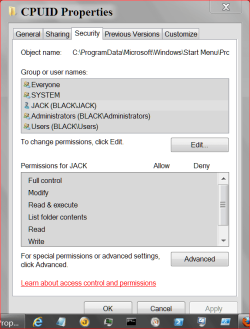
The only other thing I can think of is while in properties of that program on the problem computer is to tick Security and make sure every one you want to have permission has the control you desire.
Everyone isn't everyone. At least on my system.
Look in Group of user Names.

Notice that Everyone has all check marks but when JACK (BLACK/JACK) is selected their are no check marks. So ever Everyone does not mean Everyone.
I would have to select each individually and give the permission of my choice.

CPUID 2.PNG

CPUID 1.PNG

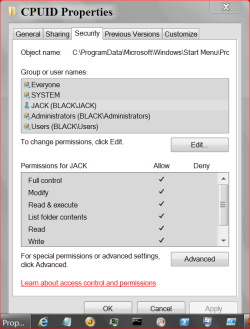
Looks like this this when I give JACK (BLACK/JACK) full permission.

CPUID 3.PNG

I hope this helps.

This might also help.

http://www.sevenforums.com/tutorials/24232-sharing-permissions.html
 
Last edited:

My Computer My Computer

At a glance

Windows 10 Pro. 64/ version 1709 Windows 7 Pr...Intel i7-6800K @ 4.3Corsair Platinum 16 gig @2400EVGA GTX 1070 OC
Computer type
PC/Desktop
Computer Manufacturer/Model Number
Home made Desktop
OS
Windows 10 Pro. 64/ version 1709 Windows 7 Pro/64
CPU
Intel i7-6800K @ 4.3
Motherboard
ASUS X-99 Deluxe II
Memory
Corsair Platinum 16 gig @2400
Graphics Card(s)
EVGA GTX 1070 OC
Monitor(s) Displays
Asus 27" LED LCD/VE278Q
Screen Resolution
1920-1080 or 1280-720 HDMI
Hard Drives
INTEL SSD 730-240 Gb Sata 3.0/
PSU
EVGA Platium 1200W
Case
Phanteks Luxe Tempered Glass 8 fans/ one radiator
Cooling
XSPC/ Water Cooled CPU
Keyboard
Das 4 Professional
Mouse
Logitech M705/MX Anywhere 2-S
Internet Speed
100 mbits
Antivirus
Microsoft Security Essentials/ Malwarebytes Premium 3.0/ SAS
Browser
I.E. 11 default/Firefox/ ISP Time Warner Cable/Spectrum
Other Info
LG BluRay Burner/
Sound system-KLipsch-THX/
Icy Dock ssd Hot Swap bays.
The only other thing I can think of is while in properties of that program on the problem computer is to tick Security and make sure every one you want to have permission has the control you desire.
Everyone isn't everyone. At least on my system.
Look in Group of user Names.

Notice that Everyone has all check marks but when JACK (BLACK/JACK) is selected their are no check marks. So ever Everyone does not mean Everyone.
I would have to select each individually and give the permission of my choice.

View attachment 264921

View attachment 264922

Looks like this this when I give JACK (BLACK/JACK) full permission.

View attachment 264923

I hope this helps.

This might also help.

http://www.sevenforums.com/tutorials/24232-sharing-permissions.html

Went back and double checked all of that on both computers. Program, folder, and file. This has to be a windows 7 root drive only problem cause i can edit text file from all other places well except from places like c:\windows and such. Did they change some from xp to win 7 about writing or modifying files on the root of the system drive?
 

My Computer My Computer

At a glance

windows 7 64bit professional
Computer type
PC/Desktop
OS
windows 7 64bit professional
I really don't know. I haven't used XP for a long time so my memory is falling short.
I will go back to the Ranch and see if I can find some help.
Should be some folks by when they get a chance.
Hang in there.

Did you look through the Tutorial I posted.

Sharing and Permissions
 

My Computer My Computer

At a glance

Windows 10 Pro. 64/ version 1709 Windows 7 Pr...Intel i7-6800K @ 4.3Corsair Platinum 16 gig @2400EVGA GTX 1070 OC
Computer type
PC/Desktop
Computer Manufacturer/Model Number
Home made Desktop
OS
Windows 10 Pro. 64/ version 1709 Windows 7 Pro/64
CPU
Intel i7-6800K @ 4.3
Motherboard
ASUS X-99 Deluxe II
Memory
Corsair Platinum 16 gig @2400
Graphics Card(s)
EVGA GTX 1070 OC
Monitor(s) Displays
Asus 27" LED LCD/VE278Q
Screen Resolution
1920-1080 or 1280-720 HDMI
Hard Drives
INTEL SSD 730-240 Gb Sata 3.0/
PSU
EVGA Platium 1200W
Case
Phanteks Luxe Tempered Glass 8 fans/ one radiator
Cooling
XSPC/ Water Cooled CPU
Keyboard
Das 4 Professional
Mouse
Logitech M705/MX Anywhere 2-S
Internet Speed
100 mbits
Antivirus
Microsoft Security Essentials/ Malwarebytes Premium 3.0/ SAS
Browser
I.E. 11 default/Firefox/ ISP Time Warner Cable/Spectrum
Other Info
LG BluRay Burner/
Sound system-KLipsch-THX/
Icy Dock ssd Hot Swap bays.
I really don't know. I haven't used XP for a long time so my memory is falling short.
I will go back to the Ranch and see if I can find some help.
Should be some folks by when they get a chance.
Hang in there.

Did you look through the Tutorial I posted.

Sharing and Permissions

Yes and everything is setup like that.

Here is a test for you or who ever. If you have to windows 7 machines in your home on the same workgroup(not homegroup) just try and open a text file on the root of of OS drive across the network and modify and try saving it to the same location. It should be a pretty simple test.
 

My Computer My Computer

At a glance

windows 7 64bit professional
Computer type
PC/Desktop
OS
windows 7 64bit professional
I find it easier to read ICACLS output for permissions.

ICACLS <pathname>\<filename>

(e.g. ICACLS C:\Windows\System32\slui.exe )

You can try running it locally by remote, and running it remotely, and see if there's a difference.

Post the results, and I'll try and interpret them
 

My Computer My Computer

At a glance

Win 7 x64 Home Premium (and x86 VirtualBox VM...i3 370M/i7 6500U8GB - finally :)/8GBit's an i3, dude!/dual Intel&nVidia
Computer type
Laptop
Computer Manufacturer/Model Number
Asus K52F or Lenovo B51-80
OS
Win 7 x64 Home Premium (and x86 VirtualBox VM)/Win10
CPU
i3 370M/i7 6500U
Motherboard
Asus/Lenovo
Memory
8GB - finally :)/8GB
Graphics Card(s)
it's an i3, dude!/dual Intel&nVidia
Sound Card
onboard
Monitor(s) Displays
15.6" built-in
Screen Resolution
1366x768/1920x1080
Hard Drives
750GB Seagate internal
Sundry external drives attached to other computers on the local network
1TB SSD on the Lenovo
PSU
n/a
Internet Speed
as much as I can get - usually on a dongle/phone, so <1MB/s
Antivirus
MSE/Defender
Browser
IE11/12/Edge/Chrome/FF(if I must)
I find it easier to read ICACLS output for permissions.

ICACLS <pathname>\<filename>

(e.g. ICACLS C:\Windows\System32\slui.exe )

You can try running it locally by remote, and running it remotely, and see if there's a difference.

Post the results, and I'll try and interpret them

C:\Users\Me>ICACLS C:\links.txt
C:\links.txt Everyone: (F)
Andrew\Me: (F)
BUILTIN\Administrators: (F)
NT AUTHORITY\SYSTEM: (F)
BUILTIN\Users: (F)
Mandatory Label\High Mandatory Level: (I)(NW)

Successfully processed 1 files; Failed processing 0 files
 

My Computer My Computer

At a glance

windows 7 64bit professional
Computer type
PC/Desktop
OS
windows 7 64bit professional
There's one default permission entry missing there - which may be because it's missing from the parent folder...

Run the following command and let's see what we get...

ICACLS C:\
 

My Computer My Computer

At a glance

Win 7 x64 Home Premium (and x86 VirtualBox VM...i3 370M/i7 6500U8GB - finally :)/8GBit's an i3, dude!/dual Intel&nVidia
Computer type
Laptop
Computer Manufacturer/Model Number
Asus K52F or Lenovo B51-80
OS
Win 7 x64 Home Premium (and x86 VirtualBox VM)/Win10
CPU
i3 370M/i7 6500U
Motherboard
Asus/Lenovo
Memory
8GB - finally :)/8GB
Graphics Card(s)
it's an i3, dude!/dual Intel&nVidia
Sound Card
onboard
Monitor(s) Displays
15.6" built-in
Screen Resolution
1366x768/1920x1080
Hard Drives
750GB Seagate internal
Sundry external drives attached to other computers on the local network
1TB SSD on the Lenovo
PSU
n/a
Internet Speed
as much as I can get - usually on a dongle/phone, so <1MB/s
Antivirus
MSE/Defender
Browser
IE11/12/Edge/Chrome/FF(if I must)
There's one default permission entry missing there - which may be because it's missing from the parent folder...

Run the following command and let's see what we get...

ICACLS C:\

C:\Users\Me>ICACLS C:\
C:\ Everyone: (OI)(CI)(F)
NT AUTHORITY\Authenticated Users: (OI)(CI)(F)
Andrew\Me: (OI)(CI)(F)
BUILTIN\Administrators: (OI)(CI)(F)
NT AUTHORITY\SYSTEM: (OI)(CI)(F)
BUILTIN\Users: (OI)(CI)(F)
Mandatory Label\High Mandatory Level: (OI)(NP)(IO)(NW)

Successfully processed 1 files; Failed processing 0 files
 

My Computer My Computer

At a glance

windows 7 64bit professional
Computer type
PC/Desktop
OS
windows 7 64bit professional
OK - maybe if we change that permission then, it'll correct things. (there's a minor inheritance error)

run the following commands from an Elevated Command prompt...

ICACLS C:\links.txt /remove "Mandatory Label\High Mandatory Level"
ICACLS C:\ /grant "NT AUTHORITY\Authenticated Users":(IO)(OI)(CI)(F)
ICACLS C:\ /grant "NT AUTHORITY\Authenticated Users":(AD)
ICACLS C:\ /grant "NT AUTHORITY\SYSTEM":(F)

ICACLS C:\
ICACLS C:\links.txt

post the results, and test the open/amend/save routine again.
 

My Computer My Computer

At a glance

Win 7 x64 Home Premium (and x86 VirtualBox VM...i3 370M/i7 6500U8GB - finally :)/8GBit's an i3, dude!/dual Intel&nVidia
Computer type
Laptop
Computer Manufacturer/Model Number
Asus K52F or Lenovo B51-80
OS
Win 7 x64 Home Premium (and x86 VirtualBox VM)/Win10
CPU
i3 370M/i7 6500U
Motherboard
Asus/Lenovo
Memory
8GB - finally :)/8GB
Graphics Card(s)
it's an i3, dude!/dual Intel&nVidia
Sound Card
onboard
Monitor(s) Displays
15.6" built-in
Screen Resolution
1366x768/1920x1080
Hard Drives
750GB Seagate internal
Sundry external drives attached to other computers on the local network
1TB SSD on the Lenovo
PSU
n/a
Internet Speed
as much as I can get - usually on a dongle/phone, so <1MB/s
Antivirus
MSE/Defender
Browser
IE11/12/Edge/Chrome/FF(if I must)
Thank you Noel for coming to help.
 

My Computer My Computer

At a glance

Windows 10 Pro. 64/ version 1709 Windows 7 Pr...Intel i7-6800K @ 4.3Corsair Platinum 16 gig @2400EVGA GTX 1070 OC
Computer type
PC/Desktop
Computer Manufacturer/Model Number
Home made Desktop
OS
Windows 10 Pro. 64/ version 1709 Windows 7 Pro/64
CPU
Intel i7-6800K @ 4.3
Motherboard
ASUS X-99 Deluxe II
Memory
Corsair Platinum 16 gig @2400
Graphics Card(s)
EVGA GTX 1070 OC
Monitor(s) Displays
Asus 27" LED LCD/VE278Q
Screen Resolution
1920-1080 or 1280-720 HDMI
Hard Drives
INTEL SSD 730-240 Gb Sata 3.0/
PSU
EVGA Platium 1200W
Case
Phanteks Luxe Tempered Glass 8 fans/ one radiator
Cooling
XSPC/ Water Cooled CPU
Keyboard
Das 4 Professional
Mouse
Logitech M705/MX Anywhere 2-S
Internet Speed
100 mbits
Antivirus
Microsoft Security Essentials/ Malwarebytes Premium 3.0/ SAS
Browser
I.E. 11 default/Firefox/ ISP Time Warner Cable/Spectrum
Other Info
LG BluRay Burner/
Sound system-KLipsch-THX/
Icy Dock ssd Hot Swap bays.
Interesting problem :)
 

My Computer My Computer

At a glance

Win 7 x64 Home Premium (and x86 VirtualBox VM...i3 370M/i7 6500U8GB - finally :)/8GBit's an i3, dude!/dual Intel&nVidia
Computer type
Laptop
Computer Manufacturer/Model Number
Asus K52F or Lenovo B51-80
OS
Win 7 x64 Home Premium (and x86 VirtualBox VM)/Win10
CPU
i3 370M/i7 6500U
Motherboard
Asus/Lenovo
Memory
8GB - finally :)/8GB
Graphics Card(s)
it's an i3, dude!/dual Intel&nVidia
Sound Card
onboard
Monitor(s) Displays
15.6" built-in
Screen Resolution
1366x768/1920x1080
Hard Drives
750GB Seagate internal
Sundry external drives attached to other computers on the local network
1TB SSD on the Lenovo
PSU
n/a
Internet Speed
as much as I can get - usually on a dongle/phone, so <1MB/s
Antivirus
MSE/Defender
Browser
IE11/12/Edge/Chrome/FF(if I must)
OK - maybe if we change that permission then, it'll correct things. (there's a minor inheritance error)

run the following commands from an Elevated Command prompt...

ICACLS C:\links.txt /remove "Mandatory Label\High Mandatory Level"
ICACLS C:\ /grant "NT AUTHORITY\Authenticated Users": (IO)(OI)(CI)(F)
ICACLS C:\ /grant "NT AUTHORITY\Authenticated Users": (AD)
ICACLS C:\ /grant "NT AUTHORITY\SYSTEM": (F)

ICACLS C:\
ICACLS C:\links.txt

post the results, and test the open/amend/save routine again.

Ok just did everything you asked. Everything responded with successful messages but afterwards I tested it and the problem is still there :(

C:\Users\Me>ICACLS C:\
C:\ NT AUTHORITY\SYSTEM:(F)
NT AUTHORITY\Authenticated Users:(AD)
NT AUTHORITY\Authenticated Users:(OI)(CI)(IO)(F)
Everyone:(OI)(CI)(F)
NT AUTHORITY\Authenticated Users:(OI)(CI)(F)
Andrew\Me:(OI)(CI)(F)
BUILTIN\Administrators:(OI)(CI)(F)
NT AUTHORITY\SYSTEM:(OI)(CI)(F)
BUILTIN\Users:(OI)(CI)(F)
Mandatory Label\High Mandatory Level:(OI)(NP)(IO)(NW)

Successfully processed 1 files; Failed processing 0 files

C:\Users\Me>ICACLS C:\links.txt
C:\links.txt Everyone:(F)
Andrew\Me:(F)
BUILTIN\Administrators:(F)
NT AUTHORITY\SYSTEM:(F)
BUILTIN\Users:(F)
Mandatory Label\High Mandatory Level:(I)(NW)

Successfully processed 1 files; Failed processing 0 files
 

My Computer My Computer

At a glance

windows 7 64bit professional
Computer type
PC/Desktop
OS
windows 7 64bit professional
If you open Notepad as Administrator, does this give you sufficient rights?
Who is the Owner of the file?

By default, Standard users don't have access to the root folder - I think this is caused by the "Mandatory Label\High Mandatory Level" permission setting, which is inherited - and I can't find an easy way to switch it off....

This is actually a 'good thing' under most circumstances, as it prevents a lot of potential malware threats.

You can change this default using the procedures here...

http://en.wikipedia.org/wiki/Administrative_share
 

My Computer My Computer

At a glance

Win 7 x64 Home Premium (and x86 VirtualBox VM...i3 370M/i7 6500U8GB - finally :)/8GBit's an i3, dude!/dual Intel&nVidia
Computer type
Laptop
Computer Manufacturer/Model Number
Asus K52F or Lenovo B51-80
OS
Win 7 x64 Home Premium (and x86 VirtualBox VM)/Win10
CPU
i3 370M/i7 6500U
Motherboard
Asus/Lenovo
Memory
8GB - finally :)/8GB
Graphics Card(s)
it's an i3, dude!/dual Intel&nVidia
Sound Card
onboard
Monitor(s) Displays
15.6" built-in
Screen Resolution
1366x768/1920x1080
Hard Drives
750GB Seagate internal
Sundry external drives attached to other computers on the local network
1TB SSD on the Lenovo
PSU
n/a
Internet Speed
as much as I can get - usually on a dongle/phone, so <1MB/s
Antivirus
MSE/Defender
Browser
IE11/12/Edge/Chrome/FF(if I must)
Well I said this in my OP "-I have notepad set to "Run as Administrator" on both windows 7 machines" maybe I don't understand exactly what you want me to do. I have switched ownership of the file multiple times testing it out to see if it would fix the problem. I have tried Everyone, Me (Andrew\Me), Administrators(Andrew\Administrators), Authenticated Users, Users(Andrew\Users), SYSTEM. Right now it's set to Me (Andrew\Me).

How to enable in Windows Vista, Windows 7, and Windows 8

By default, Windows Vista and newer versions of Windows prevent local accounts from accessing administrative shares through the network.
To enable administrative shares you have to make a registry change. Click on Start Menu and in the search box type ‘regedit’ and press ENTER. Add this registry item:
Hive: HKEY_LOCAL_MACHINE
Key: Software\Microsoft\Windows\CurrentVersion\Policies\System
Name: LocalAccountTokenFilterPolicy
Data Type: REG_DWORD
Value: 1
After rebooting, the hidden share is accessible from other computers. Note that this change removes Windows' restrictions on remote User Account Control.
You may be able to use 'net stop server' and then 'net start server' from an administrative command prompt instead of rebooting.


When I was researching on how to fix this problem i saw a post with someone saying to do that. Problem is, I don't have LocalAccountTokenFilterPolicy in that folder. Not sure why or what I should do.
 

My Computer My Computer

At a glance

windows 7 64bit professional
Computer type
PC/Desktop
OS
windows 7 64bit professional
NoelDP you still around? You were responding back pretty fast. Just wondering if you stopped posting cause you were stumped or something else? I thought we might of been close to figuring this out.
 

My Computer My Computer

At a glance

windows 7 64bit professional
Computer type
PC/Desktop
OS
windows 7 64bit professional
Back
Top