

sora
New member
hi i got this problem  , after restarting my pc it says that it installed some updates . i 've got this problem i cannot browse internet
connect to any other server using any internet device , the weird thing that i'm talking via virtualbox , and you know that virtualbox connection is the same connection that i'm using ...
i think the problem is in my system somewhere e.e please help
erros messages :
chrome :
This webpage is not available
The webpage at Google might be temporarily down or it may have moved permanently to a new web address.
Error 4 (net::ERR_INVALID_ARGUMENT): Unknown error.
ie :
This page can't be displayed
•Make sure the web address Google is correct.
•Look for the page with your search engine.
•Refresh the page in a few minutes.
firefox :
Server not found
Firefox can't find the server at Google.
Check the address for typing errors such as
ww.example.com instead of
Example Domain
If you are unable to load any pages, check your computer's network
connection.
If your computer or network is protected by a firewall or proxy, make sure
that Firefox is permitted to access the Web.
i've reset my firewall settings to default and still same , stopped it and still same idk where is the problem , please help me
, after restarting my pc it says that it installed some updates . i 've got this problem i cannot browse internetconnect to any other server using any internet device , the weird thing that i'm talking via virtualbox , and you know that virtualbox connection is the same connection that i'm using ...
i think the problem is in my system somewhere e.e please help
erros messages :
chrome :
This webpage is not available
The webpage at Google might be temporarily down or it may have moved permanently to a new web address.
Error 4 (net::ERR_INVALID_ARGUMENT): Unknown error.
ie :
This page can't be displayed
•Make sure the web address Google is correct.
•Look for the page with your search engine.
•Refresh the page in a few minutes.
firefox :
Server not found
Firefox can't find the server at Google.
Check the address for typing errors such as
ww.example.com instead of
Example Domain
If you are unable to load any pages, check your computer's network
connection.
If your computer or network is protected by a firewall or proxy, make sure
that Firefox is permitted to access the Web.
i've reset my firewall settings to default and still same , stopped it and still same idk where is the problem , please help me
My Computer
At a glance
Windows 7 Ultimate x64AMD Athlon II x3DDR3 / 4 GBATI Radeon HD 3200
- Computer type
- PC/Desktop
- Computer Manufacturer/Model Number
- HP TouchSmart 300 PC
- OS
- Windows 7 Ultimate x64
- CPU
- AMD Athlon II x3
- Motherboard
- IDK
- Memory
- DDR3 / 4 GB
- Graphics Card(s)
- ATI Radeon HD 3200
- Screen Resolution
- 1600 x 900
- Keyboard
- HP
- Antivirus
- MSE
- Browser
- Chrome , Firefox , Internet Explorer


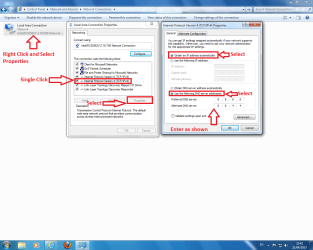
 All your driver are up-to-date?

