Internet stops working randomly

phamersma

New member
Local time
1:59 PM
Messages
17
Hi,

I have a fresh install of Windows 7 on a (partly) new Desktop. Sometimes suddenly internet gets really slow and stops working.
All other devices in my house (ipad, labtop (XP), phones) have no problems at all. This should suggest it's a problem of my PC but:
Connecting to the WiFi of my neighboor solves the problem!
Must be a problem of my PC and rooter together....

Update's i did to trie and solve the problem:
Update firmware rooter (D-Link 655 mixed WiFi)
Update drivers Wireless PCI card
Update AVG antivirus

From a tread in this forum i tried a static IP but didn't work.

Any suggestions?
 

My Computer My Computer

Computer type
PC/Desktop
Computer Manufacturer/Model Number
custom
OS
Windows 7 Professional x64 SP1
CPU
Celeron G530 Dual 2.4GHz
Memory
4GB
Hard Drives
128GB SSD +
500GB 7200rpm
Antivirus
AVG
Browser
Chrome
phamersma,
Welcome to the forums. Have a look here.

:ar: Network

Just wanted to add, sometimes antivirus plays in this. Have you considered MSE?
 
Last edited:

My Computer My Computer

Computer type
PC/Desktop
Computer Manufacturer/Model Number
Dude Build
OS
Windows 10 Pro X64
CPU
Intel(R) Core(TM) i5-3570K CPU OC@ 4.5GHZ Turbo
Motherboard
MSI Z77A-G45 Gaming
Memory
8.00 GB DDR3 1600Mhz
Graphics Card(s)
MSI Gaming X GTX 1070
Sound Card
Realtek High Definition
Monitor(s) Displays
Dell S23O9W, HP L1710
Screen Resolution
DELL-1920 x 1080 HP-1280 x1024
Hard Drives
Crucial m4 256 SSD, WD 7200RPM 500GB WD 1TB
PSU
Seasonic X650 GOLD
Case
Zalman Z12
Cooling
Antec Kuhler 920
Keyboard
Logitech
Mouse
MSI DS100 Interceptor
Internet Speed
50 down and 5 up
Antivirus
MSE
Browser
Chrome, IE 11
Other Info
Logitech X-620 Speakers
Tried it all. (althoug my problem is on WiFi not with a cable)
I get an error on Ping.
DHCP is enabled
Do not have integrated NIC
Again, all other devices connect perfect with my rooter.
 

My Computer My Computer

Computer type
PC/Desktop
Computer Manufacturer/Model Number
custom
OS
Windows 7 Professional x64 SP1
CPU
Celeron G530 Dual 2.4GHz
Memory
4GB
Hard Drives
128GB SSD +
500GB 7200rpm
Antivirus
AVG
Browser
Chrome
AVG uses a wireless filter that will cause connection problems on wireless machines. If the connection works on your neighbors router then find out which wireless settings he is using then use those settings, generally speaking it's best to use WPA2 security with AES encryption. The wireless channel being used also make's a difference, try changing channels.

Using the mixed mode settings on your DIR-655 will slow it down to wireless G speeds of 54Mbps, the N only settings will get you much more but won't support G clients or below. I'm using the same router by the way, no problems there at all.

I would need to see a screen shot of the ipconfig/all from this machine in order to help more. :)
 

My Computer My Computer

Computer type
PC/Desktop
Computer Manufacturer/Model Number
Home built
OS
Windows 7 Ult, Windows 8.1 Pro,
CPU
Q9650-4.275GHz, E8600 4.5GHz, E6750-3.8GHz
Motherboard
Evga 780i FTW
Memory
G.Skill PC2 9600 1200Mhz 5 5 5 15 2T
Graphics Card(s)
GTX480
Sound Card
Asus Xonar D2
Monitor(s) Displays
HannsG
Screen Resolution
1680X1050
Hard Drives
GSkill Phoenix Pro 120GB SSD
PSU
ThermalTake Toughpower 1000Watt modular
Case
ThermalTake XaserV
Cooling
Xigmatek S1283
Keyboard
Logitech G15
Mouse
Logitech G9
Internet Speed
T1
Checked wireless settings, all the same but the channel, but I allready changed the channel twice to try but made no difference. Same channel as the neighbors made my router unvisable.
Also the neighbours have a g/b-router. I need it set as mixed as i have an old labtop i use. So even if setting it to N-only it would not be a real solution... I will try anyway to see what happens.

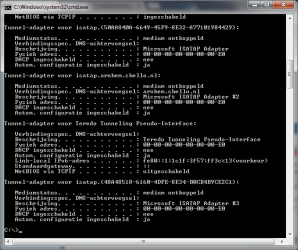
I attached my ipconfig in two parts as i seem to have a lot of "tunnel adapters" ( don't know what that means..)

And do you recommend a different AV like "avast" instead of AVG?
 

Attachments

  • ipconfig.png
    ipconfig.png
    23.7 KB · Views: 6
  • ipconfig2.png
    ipconfig2.png
    18 KB · Views: 4

My Computer My Computer

Computer type
PC/Desktop
Computer Manufacturer/Model Number
custom
OS
Windows 7 Professional x64 SP1
CPU
Celeron G530 Dual 2.4GHz
Memory
4GB
Hard Drives
128GB SSD +
500GB 7200rpm
Antivirus
AVG
Browser
Chrome
No problems with the ipconfig. Changing channels to the same as your neighbors should not be making your router disappear for any reason. Try resetting the DIR-655 completely and then type back in all wireless info, set up all up again, be sure and use WPA2 security with AES encryption.

That one legacy machine is slowing down all of your WiFi connections by as much as 6 times, legacy devices and mixed mode settings will bring your connection speeds down by as much as 6 times.
 

My Computer My Computer

Computer type
PC/Desktop
Computer Manufacturer/Model Number
Home built
OS
Windows 7 Ult, Windows 8.1 Pro,
CPU
Q9650-4.275GHz, E8600 4.5GHz, E6750-3.8GHz
Motherboard
Evga 780i FTW
Memory
G.Skill PC2 9600 1200Mhz 5 5 5 15 2T
Graphics Card(s)
GTX480
Sound Card
Asus Xonar D2
Monitor(s) Displays
HannsG
Screen Resolution
1680X1050
Hard Drives
GSkill Phoenix Pro 120GB SSD
PSU
ThermalTake Toughpower 1000Watt modular
Case
ThermalTake XaserV
Cooling
Xigmatek S1283
Keyboard
Logitech G15
Mouse
Logitech G9
Internet Speed
T1
Did a reset, set all as you said. Worked for the rest of the day. Today, same problem again.... N-only did not give problems for half a day.
Seems hopeless..... Now i''m back on the neighbours connection so i can use my Desktop....
I will try N-only for a little bit longer now alltough its not a real sollution...
by the way, when when connection starts to slow down and stops, the mouse starts to act strange as well. Gives hick-up when moving.
 

My Computer My Computer

Computer type
PC/Desktop
Computer Manufacturer/Model Number
custom
OS
Windows 7 Professional x64 SP1
CPU
Celeron G530 Dual 2.4GHz
Memory
4GB
Hard Drives
128GB SSD +
500GB 7200rpm
Antivirus
AVG
Browser
Chrome
You said you have a dir-655 router. Here are some things you can do. Go to router settings page, go to Advanced settings, go to firewall settings. Set both UDP Endpoint Filtering and TCP Endpoint Filtering to Endpoint Independentand save it. Make sure *enable anti-spoofing* is not checked. Now go to *Advanced Wireless*, make sure your transmit power is set to *High*,Beacon period set to *100*, RTS threshold set to 2346. Turn off your *Wifi protected setup*. See if any of this helps. I also have a D-link Dir-655.
 

My Computer My Computer

Computer type
PC/Desktop
Computer Manufacturer/Model Number
Custom Build
OS
Windows 7 Ultimate x64
CPU
FX 8350 @ 4.8ghz, turbo clocked to 5.4ghz
Motherboard
Asus Sabertooth FX990 Gen 3.0 R2.0
Memory
Mushkin Enhanced Blackline 16GB 1760mhz 10-10-9-24 T1
Graphics Card(s)
Gigabyte-660 Windforce OC- GPU Clock 1212MHz /3504MHz ram
Sound Card
Creative Sound Blaster Recon3D PCIe Sound Card
Monitor(s) Displays
Samsung SyncMaster S27B350H (HDMI)
Screen Resolution
1920x1080 60HZ
Hard Drives
1 x SSD Crucial M4 256GB (Primary OS)
3 x HDD WD 1TB
4 x HDD 2TB
1 x HDD 160GB (Secondary Backup OS)
Raid SATA III 6GB/s 4-port PCI-e Controller Card, Marvel 88SE9215 chipset
PSU
Chieftec-650-14CS (Modular) 80 Plus Gold-650 Watt
Case
Akasa Venom Toxic Gaming Big tower ( Custom Black ) Ver 2.0
Cooling
Water 2.0 PRO / GEIL Cyclone VRM / 6x120mm 2x220mm 2x140mm
Keyboard
Logitech G19
Mouse
Wireless Notebook Presenter Mouse 8000
Internet Speed
Fiber GBS
Antivirus
Don't Announce it to the world :)
Browser
Gotta have at least 1!
Did a reset, set all as you said. Worked for the rest of the day. Today, same problem again.... N-only did not give problems for half a day.
Seems hopeless..... Now i''m back on the neighbours connection so i can use my Desktop....
I will try N-only for a little bit longer now alltough its not a real sollution...
by the way, when when connection starts to slow down and stops, the mouse starts to act strange as well. Gives hick-up when moving.

Other than the endpoint settings all those other settings are Default.

I'd like to see what happens if you uninstall AVG completely from the system.

You should also get rid of the AVG toolbar scanner, use the uninstall tool for this. :)
 

My Computer My Computer

Computer type
PC/Desktop
Computer Manufacturer/Model Number
Home built
OS
Windows 7 Ult, Windows 8.1 Pro,
CPU
Q9650-4.275GHz, E8600 4.5GHz, E6750-3.8GHz
Motherboard
Evga 780i FTW
Memory
G.Skill PC2 9600 1200Mhz 5 5 5 15 2T
Graphics Card(s)
GTX480
Sound Card
Asus Xonar D2
Monitor(s) Displays
HannsG
Screen Resolution
1680X1050
Hard Drives
GSkill Phoenix Pro 120GB SSD
PSU
ThermalTake Toughpower 1000Watt modular
Case
ThermalTake XaserV
Cooling
Xigmatek S1283
Keyboard
Logitech G15
Mouse
Logitech G9
Internet Speed
T1
The endpoint settings seem to work! (indeed the rest was default) Alltough it's been working for only a short day now. The settings sped up the connection a bit as well.
It has been working for a few days before so i cant be sure jet if it stays. I'll keep you informed. Thanks allready!
 

My Computer My Computer

Computer type
PC/Desktop
Computer Manufacturer/Model Number
custom
OS
Windows 7 Professional x64 SP1
CPU
Celeron G530 Dual 2.4GHz
Memory
4GB
Hard Drives
128GB SSD +
500GB 7200rpm
Antivirus
AVG
Browser
Chrome
I am happy I helped I guess :)
 

My Computer My Computer

Computer type
PC/Desktop
Computer Manufacturer/Model Number
Custom Build
OS
Windows 7 Ultimate x64
CPU
FX 8350 @ 4.8ghz, turbo clocked to 5.4ghz
Motherboard
Asus Sabertooth FX990 Gen 3.0 R2.0
Memory
Mushkin Enhanced Blackline 16GB 1760mhz 10-10-9-24 T1
Graphics Card(s)
Gigabyte-660 Windforce OC- GPU Clock 1212MHz /3504MHz ram
Sound Card
Creative Sound Blaster Recon3D PCIe Sound Card
Monitor(s) Displays
Samsung SyncMaster S27B350H (HDMI)
Screen Resolution
1920x1080 60HZ
Hard Drives
1 x SSD Crucial M4 256GB (Primary OS)
3 x HDD WD 1TB
4 x HDD 2TB
1 x HDD 160GB (Secondary Backup OS)
Raid SATA III 6GB/s 4-port PCI-e Controller Card, Marvel 88SE9215 chipset
PSU
Chieftec-650-14CS (Modular) 80 Plus Gold-650 Watt
Case
Akasa Venom Toxic Gaming Big tower ( Custom Black ) Ver 2.0
Cooling
Water 2.0 PRO / GEIL Cyclone VRM / 6x120mm 2x220mm 2x140mm
Keyboard
Logitech G19
Mouse
Wireless Notebook Presenter Mouse 8000
Internet Speed
Fiber GBS
Antivirus
Don't Announce it to the world :)
Browser
Gotta have at least 1!
Not to be pessimistic but I doubt the endpoint settings fixed anything here. I've certainly never needed to mess with them and my 655 is always stable but I guess we will know for sure if the Op comes back again.

I've also checked the reviews for this router which there are very many, nobody ever mentioned adjusting those settings to get the router stable.

In fact the DIR-655 is probably the best router ever made although my Asus AC66U would be a close second I'm using it as an access point.
 

My Computer My Computer

Computer type
PC/Desktop
Computer Manufacturer/Model Number
Home built
OS
Windows 7 Ult, Windows 8.1 Pro,
CPU
Q9650-4.275GHz, E8600 4.5GHz, E6750-3.8GHz
Motherboard
Evga 780i FTW
Memory
G.Skill PC2 9600 1200Mhz 5 5 5 15 2T
Graphics Card(s)
GTX480
Sound Card
Asus Xonar D2
Monitor(s) Displays
HannsG
Screen Resolution
1680X1050
Hard Drives
GSkill Phoenix Pro 120GB SSD
PSU
ThermalTake Toughpower 1000Watt modular
Case
ThermalTake XaserV
Cooling
Xigmatek S1283
Keyboard
Logitech G15
Mouse
Logitech G9
Internet Speed
T1
well, i guess you are wright Chev65, it did not solv it. allthough internet doesn't stop working entirely, it becomes so slow it prcticly doesn't work. N-only does it a little bit better but still far from what it should be.
File transfers over the network crash so it seemss connection does get lost short periods.

I also searched DIR655 forums and tried more things like Short GI on and off, i also tried to use a wider band 40Hz and auto 20Hz/40Hz.
Nothing
On neighbours it still works good while they have a g-router and signel has same strengh (inSSIDer)

I tried speedtests with my legacy labtop (XP and wireless-g): wireless gives a 20Mb download speed while my desktop gives a 0.62Mb!!
I tried with disabled AVG. Speed was better but not much.

Been busy all weekend, i can't stand this!

I will try unstalling AVG and install a different free AV.
Any other ideas?
 

My Computer My Computer

Computer type
PC/Desktop
Computer Manufacturer/Model Number
custom
OS
Windows 7 Professional x64 SP1
CPU
Celeron G530 Dual 2.4GHz
Memory
4GB
Hard Drives
128GB SSD +
500GB 7200rpm
Antivirus
AVG
Browser
Chrome
Avira AV installed, doesn't make any difference.
 

My Computer My Computer

Computer type
PC/Desktop
Computer Manufacturer/Model Number
custom
OS
Windows 7 Professional x64 SP1
CPU
Celeron G530 Dual 2.4GHz
Memory
4GB
Hard Drives
128GB SSD +
500GB 7200rpm
Antivirus
AVG
Browser
Chrome

My Computer My Computer

Computer type
PC/Desktop
Computer Manufacturer/Model Number
Home built
OS
Windows 7 Ult, Windows 8.1 Pro,
CPU
Q9650-4.275GHz, E8600 4.5GHz, E6750-3.8GHz
Motherboard
Evga 780i FTW
Memory
G.Skill PC2 9600 1200Mhz 5 5 5 15 2T
Graphics Card(s)
GTX480
Sound Card
Asus Xonar D2
Monitor(s) Displays
HannsG
Screen Resolution
1680X1050
Hard Drives
GSkill Phoenix Pro 120GB SSD
PSU
ThermalTake Toughpower 1000Watt modular
Case
ThermalTake XaserV
Cooling
Xigmatek S1283
Keyboard
Logitech G15
Mouse
Logitech G9
Internet Speed
T1
Save mode solves the problem apperantly. Downloadspeed reaches 9Mb, back in Normal mode it drops to 0.32Mb. (But now i am on my neighbours network again witch gives a steady 7Mb). What does that mean?
 

My Computer My Computer

Computer type
PC/Desktop
Computer Manufacturer/Model Number
custom
OS
Windows 7 Professional x64 SP1
CPU
Celeron G530 Dual 2.4GHz
Memory
4GB
Hard Drives
128GB SSD +
500GB 7200rpm
Antivirus
AVG
Browser
Chrome
The problem accually got worse as video playback shows lags when i am on my own network connection....
 

My Computer My Computer

Computer type
PC/Desktop
Computer Manufacturer/Model Number
custom
OS
Windows 7 Professional x64 SP1
CPU
Celeron G530 Dual 2.4GHz
Memory
4GB
Hard Drives
128GB SSD +
500GB 7200rpm
Antivirus
AVG
Browser
Chrome
I guess you don't have any ideas anymore. As a finall resort. I re-installed Windows 7. Clean install with no AV gave the same problem. On neighbours network no problem. I even tried to install XP i had here with nothing else. Same.... I think this HAS to be a compatiblility problem between DIR 655 and mij Sweex W-lan card. (allthough in save mode it does work)
First time i installed Win 7 all worked fine for a month. After the firmware update (i tried as a solution) it never worked again.
Thanks for your thoughts. I geus i have to contact D-Link and sweexs......
 

My Computer My Computer

Computer type
PC/Desktop
Computer Manufacturer/Model Number
custom
OS
Windows 7 Professional x64 SP1
CPU
Celeron G530 Dual 2.4GHz
Memory
4GB
Hard Drives
128GB SSD +
500GB 7200rpm
Antivirus
AVG
Browser
Chrome
I guess you don't have any ideas anymore. As a finall resort. I re-installed Windows 7. Clean install with no AV gave the same problem. On neighbours network no problem. I even tried to install XP i had here with nothing else. Same.... I think this HAS to be a compatiblility problem between DIR 655 and mij Sweex W-lan card. (allthough in save mode it does work)
First time i installed Win 7 all worked fine for a month. After the firmware update (i tried as a solution) it never worked again.
Thanks for your thoughts. I geus i have to contact D-Link and sweexs......

When you did the firmware update, I'm assuming on the DIR-655, firmware 1.35NA 2010/11/12, after you updated the firmware did you take the router back to default settings? This sometimes is required in order for the router to work right.

On the D-link page for the router, try going to "Tools" then click on "System' left side, there is a default button there that says "restore factory defaults", hit that button and let it go back to default settings then redo the wireless settings etc. Let me know if anything changes.
 

My Computer My Computer

Computer type
PC/Desktop
Computer Manufacturer/Model Number
Home built
OS
Windows 7 Ult, Windows 8.1 Pro,
CPU
Q9650-4.275GHz, E8600 4.5GHz, E6750-3.8GHz
Motherboard
Evga 780i FTW
Memory
G.Skill PC2 9600 1200Mhz 5 5 5 15 2T
Graphics Card(s)
GTX480
Sound Card
Asus Xonar D2
Monitor(s) Displays
HannsG
Screen Resolution
1680X1050
Hard Drives
GSkill Phoenix Pro 120GB SSD
PSU
ThermalTake Toughpower 1000Watt modular
Case
ThermalTake XaserV
Cooling
Xigmatek S1283
Keyboard
Logitech G15
Mouse
Logitech G9
Internet Speed
T1
I allready tried that during this thread but tried it again just to be sure but it didn't help. I sent emails to D-link and Sweex now. See if they can help.... I wil let you know.

Thanks for your help chev65.
 

My Computer My Computer

Computer type
PC/Desktop
Computer Manufacturer/Model Number
custom
OS
Windows 7 Professional x64 SP1
CPU
Celeron G530 Dual 2.4GHz
Memory
4GB
Hard Drives
128GB SSD +
500GB 7200rpm
Antivirus
AVG
Browser
Chrome
Back
Top