Goodbye Mac, Hello ASUS. Need help getting online :x

I know, I know !!

If he only had a Beaming Pad :confused:
 

My Computer My Computer

At a glance

Windows 10 Pro x64Intel Core i7 6700KGSkill TridentZ RGB 16GB 3600 16-16-16-36EVGA GTX 980 Ti SC x2
Computer type
PC/Desktop
Computer Manufacturer/Model Number
Skylake Special #666
OS
Windows 10 Pro x64
CPU
Intel Core i7 6700K
Motherboard
Asus Sabertooth Z170 Mark 1
Memory
GSkill TridentZ RGB 16GB 3600 16-16-16-36
Graphics Card(s)
EVGA GTX 980 Ti SC x2
Sound Card
Realtek High Definition
Monitor(s) Displays
AOC G2460PG
Screen Resolution
1920 x 1080 144Hz
Hard Drives
Samsung 860 Pro 256GB, Seagate Barracuda 4TB x2
PSU
EVGA 1000 P2, EVGA White Custom Braided Cables
Case
Corsair Vengeance C70 Gunmetal Black
Cooling
Corsair H100i v2, Corsair ML120 x2, Thermal Grizzly Kryonaut
Keyboard
Logitech G910 Orion Spectrum
Mouse
Logitech G700s
Internet Speed
Verizon Fios Quantum Gateway 75/75
Antivirus
Windows Defender, Malwarebytes Free 3.8.3
Browser
Chrome
Other Info
Corsair SP120 x4, LG Blu-ray Drive, Durabrand HT-395 100 Watt Dolby Digital Amp, Corsair H2100 Wireless 7.1 Headset

My Computer My Computer

At a glance

Windows 74gbIntel HD Graphics 3000
Computer type
Laptop
Computer Manufacturer/Model Number
ASUS K35E
OS
Windows 7
Memory
4gb
Graphics Card(s)
Intel HD Graphics 3000
Hmm, apparently you have some (unknown) problem with your connection at home, is that where you were trying before? I suspect you will have to set the ASUS up with company passwords and such as the Mac had.
 

My Computer My Computer

At a glance

Windows 7 Ultimate X64 SP1Intel i5-2550K, Differing ~4.4-4.8GHz No buil...16GB G.Skill Sniper 1866MHz @ 2133MHz 2x8GBASUS GTX650TIB-DC2OC-2GD5, (650TI Boost)
Computer type
PC/Desktop
Computer Manufacturer/Model Number
Home Built Desktop By DataTech
OS
Windows 7 Ultimate X64 SP1
CPU
Intel i5-2550K, Differing ~4.4-4.8GHz No built in GPU
Motherboard
ASUS P8Z68-V PRO/GEN3
Memory
16GB G.Skill Sniper 1866MHz @ 2133MHz 2x8GB
Graphics Card(s)
ASUS GTX650TIB-DC2OC-2GD5, (650TI Boost)
Sound Card
Onboard Realtek 5-1
Monitor(s) Displays
Samsung P2570HD
Screen Resolution
1920x1080
Hard Drives
Samsung 840 Pro 256GB SSD for OS, 500GB Seagate Constellation (Enterprise drive) for Data
PSU
Corsair HX650W
Case
Inwin Dragon Rider
Cooling
Hyper 212 EVO w/two Noctua fans, push-pull, @1300 RPM
Keyboard
E-Z Eyes, bright yellow keys with large characters
Mouse
steelseries SENSEI Laser Pro Gaming
Internet Speed
48-51Mbs Mbs down, 11 Mbs up Xfinity Cable
Antivirus
Norton Internet Security 2013
Browser
IE 10, Opera, Pale Moon if needed
Other Info
4 case fans, LG BluRay-RE, ASUS DVD-RW, Mr. Fusion power supply, 1.21 gigawatts.
My work has everything restricted... I am not trying to use it here at work though so i dont mind. At home I use my iMac and have a wireless router. I am trying to figure out how to get my laptop to work from home through the wireless router. Do I have to do something special or does it look like everything in that screen shot checks out okay? Should I try taking it to a coffee join to see if I can pick up their wifi?
 

My Computer My Computer

At a glance

Windows 74gbIntel HD Graphics 3000
Computer type
Laptop
Computer Manufacturer/Model Number
ASUS K35E
OS
Windows 7
Memory
4gb
Graphics Card(s)
Intel HD Graphics 3000
The link you posted before as a screenshot is a link to dvxuser forum page.

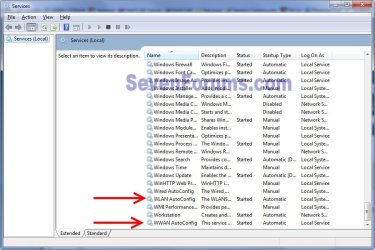
It would seem the wireless radio in the ASUS is not "on" and maybe the driver isn't installed. In the start search, again, type services.msc and click on the same services.msc in the resulting list, it should be the top-most item. In the Services window that opens scroll to the bottom to find WLAN Autoconfig and check that the service is started and set to automatic, see snip. There may be two of them.

services1.jpg
 

My Computer My Computer

At a glance

Windows 7 Ultimate X64 SP1Intel i5-2550K, Differing ~4.4-4.8GHz No buil...16GB G.Skill Sniper 1866MHz @ 2133MHz 2x8GBASUS GTX650TIB-DC2OC-2GD5, (650TI Boost)
Computer type
PC/Desktop
Computer Manufacturer/Model Number
Home Built Desktop By DataTech
OS
Windows 7 Ultimate X64 SP1
CPU
Intel i5-2550K, Differing ~4.4-4.8GHz No built in GPU
Motherboard
ASUS P8Z68-V PRO/GEN3
Memory
16GB G.Skill Sniper 1866MHz @ 2133MHz 2x8GB
Graphics Card(s)
ASUS GTX650TIB-DC2OC-2GD5, (650TI Boost)
Sound Card
Onboard Realtek 5-1
Monitor(s) Displays
Samsung P2570HD
Screen Resolution
1920x1080
Hard Drives
Samsung 840 Pro 256GB SSD for OS, 500GB Seagate Constellation (Enterprise drive) for Data
PSU
Corsair HX650W
Case
Inwin Dragon Rider
Cooling
Hyper 212 EVO w/two Noctua fans, push-pull, @1300 RPM
Keyboard
E-Z Eyes, bright yellow keys with large characters
Mouse
steelseries SENSEI Laser Pro Gaming
Internet Speed
48-51Mbs Mbs down, 11 Mbs up Xfinity Cable
Antivirus
Norton Internet Security 2013
Browser
IE 10, Opera, Pale Moon if needed
Other Info
4 case fans, LG BluRay-RE, ASUS DVD-RW, Mr. Fusion power supply, 1.21 gigawatts.

My Computer My Computer

At a glance

Windows 7 Ultimate X64 SP1Intel i5-2550K, Differing ~4.4-4.8GHz No buil...16GB G.Skill Sniper 1866MHz @ 2133MHz 2x8GBASUS GTX650TIB-DC2OC-2GD5, (650TI Boost)
Computer type
PC/Desktop
Computer Manufacturer/Model Number
Home Built Desktop By DataTech
OS
Windows 7 Ultimate X64 SP1
CPU
Intel i5-2550K, Differing ~4.4-4.8GHz No built in GPU
Motherboard
ASUS P8Z68-V PRO/GEN3
Memory
16GB G.Skill Sniper 1866MHz @ 2133MHz 2x8GB
Graphics Card(s)
ASUS GTX650TIB-DC2OC-2GD5, (650TI Boost)
Sound Card
Onboard Realtek 5-1
Monitor(s) Displays
Samsung P2570HD
Screen Resolution
1920x1080
Hard Drives
Samsung 840 Pro 256GB SSD for OS, 500GB Seagate Constellation (Enterprise drive) for Data
PSU
Corsair HX650W
Case
Inwin Dragon Rider
Cooling
Hyper 212 EVO w/two Noctua fans, push-pull, @1300 RPM
Keyboard
E-Z Eyes, bright yellow keys with large characters
Mouse
steelseries SENSEI Laser Pro Gaming
Internet Speed
48-51Mbs Mbs down, 11 Mbs up Xfinity Cable
Antivirus
Norton Internet Security 2013
Browser
IE 10, Opera, Pale Moon if needed
Other Info
4 case fans, LG BluRay-RE, ASUS DVD-RW, Mr. Fusion power supply, 1.21 gigawatts.
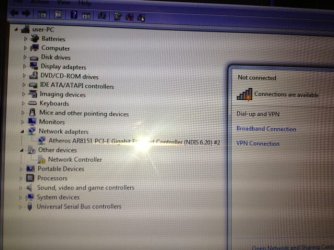
wireless.JPG
here is the ss i tried to upload.

I followed those steps, wlan was set to automatic but WWAN wwas set to manual. I switched it to auto and will go home at lunch to see if that makes a difference.

I am also trying to troubleshoot and it says network controller doesnt have a driver. Im not sure what the network controller is or how I could download this driver if that could be the problem.
 

My Computer My Computer

At a glance

Windows 74gbIntel HD Graphics 3000
Computer type
Laptop
Computer Manufacturer/Model Number
ASUS K35E
OS
Windows 7
Memory
4gb
Graphics Card(s)
Intel HD Graphics 3000
Before I went to bed last night I posted a picture showing how to see if you have your wireless driver installed and ready to connect, and if not how to run a Troubleshooter which will tell you exactly what is wrong. Now I wake up to see you not only didn't reply but are still wringing your hands not knowing what to do! :rolleyes:

It's quite obvious from your screenshot that the Wireless LAN Network driver is in error (with a !) and probably not installed. The Ethernet driver is installed and shown just above it.


AddRAM
provided your Wireless driver link almost a day ago, so have you made any attempt to install it? I guess not since you just said you don't know where you'd find it. Do you just blink by our posts as though they're not even there, after we do this work for you? :huh:

He seems to think it's the Azurewave but it could be any of those listed so keep trying to install each until the five-bar network icon shows up in your System tray so you can click on it to connect to your Network. You can determine exactly which make/model you have using
Hardware Identification

An alternate method is to plug in your PC by wire which should connect immediately, then click on the Network controller to open it, click Install Driver, then Search Automatically which should import the driver from Windows Updates. If not run all Important and Optional Updates after enabling
Automatically get recommended drivers and updates for your hardware (Step 3)
 
Last edited:
I miss understood the OP I have removed my post. Thanks for the info greg. I need more coffee.
 

My Computer My Computer

At a glance

Windows 10 Pro. 64/ version 1709 Windows 7 Pr...Intel i7-6800K @ 4.3Corsair Platinum 16 gig @2400EVGA GTX 1070 OC
Computer type
PC/Desktop
Computer Manufacturer/Model Number
Home made Desktop
OS
Windows 10 Pro. 64/ version 1709 Windows 7 Pro/64
CPU
Intel i7-6800K @ 4.3
Motherboard
ASUS X-99 Deluxe II
Memory
Corsair Platinum 16 gig @2400
Graphics Card(s)
EVGA GTX 1070 OC
Monitor(s) Displays
Asus 27" LED LCD/VE278Q
Screen Resolution
1920-1080 or 1280-720 HDMI
Hard Drives
INTEL SSD 730-240 Gb Sata 3.0/
PSU
EVGA Platium 1200W
Case
Phanteks Luxe Tempered Glass 8 fans/ one radiator
Cooling
XSPC/ Water Cooled CPU
Keyboard
Das 4 Professional
Mouse
Logitech M705/MX Anywhere 2-S
Internet Speed
100 mbits
Antivirus
Microsoft Security Essentials/ Malwarebytes Premium 3.0/ SAS
Browser
I.E. 11 default/Firefox/ ISP Time Warner Cable/Spectrum
Other Info
LG BluRay Burner/
Sound system-KLipsch-THX/
Icy Dock ssd Hot Swap bays.
Before I went to bed last night I posted a picture showing how to see if you have your wireless driver installed and ready to connect, and if not how to run a Troubleshooter which will tell you exactly what is wrong. Now I wake up to see you not only didn't reply but are still wringing your hands not knowing what to do! :rolleyes:

It's quite obvious from your screenshot that the Wireless LAN Network driver is in error (with a !) and probably not installed. The Ethernet driver is installed and shown just above it.


AddRAM
provided your Wireless driver link almost a day ago, so have you made any attempt to install it? I guess not since you just said you don't know where you'd find it. Do you just blink by our posts as though they're not even there, after we do this work for you? :huh:

He seems to think it's the Azurewave but it could be any of those listed so keep trying to install each until the five-bar network icon shows up in your System tray so you can click on it to connect to your Network. You can determine exactly which make/model you have using
Hardware Identification

An alternate method is to plug in your PC by wire which should connect immediately, then click on the Network controller to open it, click Install Driver, then Search Automatically which should import the driver from Windows Updates. If not run all Important and Optional Updates after enabling
Automatically get recommended drivers and updates for your hardware (Step 3)


plugging the laptop straight into my computer doesnt work from home for some reason... It works from my office but then everything is restricted so I cant search automatically for the right drivers. I went to ASUS - K53E
and then down to wireless and downloaded the first 4 options to a memory card and then tried to install them on my laptop but they wouldnt work. I guess ill try all 10 of them. Thanks for helping, sorry its just been a lot easier with macs
 

My Computer My Computer

At a glance

Windows 74gbIntel HD Graphics 3000
Computer type
Laptop
Computer Manufacturer/Model Number
ASUS K35E
OS
Windows 7
Memory
4gb
Graphics Card(s)
Intel HD Graphics 3000

My Computer My Computer

At a glance

Windows 74gbIntel HD Graphics 3000
Computer type
Laptop
Computer Manufacturer/Model Number
ASUS K35E
OS
Windows 7
Memory
4gb
Graphics Card(s)
Intel HD Graphics 3000
Asus drivers will not be found on any Sony Downloads page.

The driver will be on the Asus webpage for your model which we've linked you twice.

I would want to know why ethernet will not work at home, when you plug in by wire. Did you try power cycling the router, or plugging directly into the modem?

If either ethernet or wireless will not connect then rightclick the connection icon in System Tray (which I showed you in the picture posted) to run Troubleshooter which will determine the cause.
 
I got the wireless thing working... The link you guys were sending me was having me download the wrong file types or something... This page: ASUSTeK Computer Inc. -Support- Drivers and Download K53E
looks the same but had different types of downloads for each driver and that worked.

Hopefully it will detect my wireless router when i get home!!!

thanks for putting up with my newbiness, and hopefully from here on out I can enjoy windows and say goodbye to my Apple products!
 

My Computer My Computer

At a glance

Windows 74gbIntel HD Graphics 3000
Computer type
Laptop
Computer Manufacturer/Model Number
ASUS K35E
OS
Windows 7
Memory
4gb
Graphics Card(s)
Intel HD Graphics 3000
It's the same link. Had you put the OS version into the dropdown? That does narrow it some.

For the record which was the wireless adapter for your model?

Let us know if there's any problem connecting to your network through the System Tray connection icon.

If you're not ready to get the superior Clean Reinstall - Factory OEM Windows 7 then there are many tips given in that link you can benefit from, which reflect our experience with what works best in Win7 since before it was even released.
 
I used to have as Asus and I remember there was a swtich to enable wifi. I am wondering if you have detected that there is a switch which turns on/off the wireless connection. It is probably on the left side of the laptop, look in the manual to locate it. This needs to be switched to a position to enable wireless connection.
 

My Computer My Computer

At a glance

Windows 7 Home Premium x64, Windows 8 Proi5-2430M8 GbnVidia GeForce 610M
Computer type
Laptop
Computer Manufacturer/Model Number
Acer Aspire 5750G
OS
Windows 7 Home Premium x64, Windows 8 Pro
CPU
i5-2430M
Motherboard
Acer JE50_HR
Memory
8 Gb
Graphics Card(s)
nVidia GeForce 610M
Sound Card
Realtek High Definition Audio
Antivirus
Avast
Browser
Chrome
plugging the laptop straight into my computer doesnt work from home for some reason... It works from my office but then everything is restricted so I cant search automatically for the right drivers. I went to ASUS - K53E
and then down to wireless and downloaded the first 4 options to a memory card and then tried to install them on my laptop but they wouldnt work. I guess ill try all 10 of them. Thanks for helping, sorry its just been a lot easier with macs
You would need to plug your wired ethernet cable into the laptop. You will like Windows and a PC once you get acclimated. Just remember thatif you could do (##$$) on a Mac, doesn't mean you can in Windows. :geek:
 

My Computer My Computer

At a glance

Windows 7 Ultimate X64 SP1Intel i5-2550K, Differing ~4.4-4.8GHz No buil...16GB G.Skill Sniper 1866MHz @ 2133MHz 2x8GBASUS GTX650TIB-DC2OC-2GD5, (650TI Boost)
Computer type
PC/Desktop
Computer Manufacturer/Model Number
Home Built Desktop By DataTech
OS
Windows 7 Ultimate X64 SP1
CPU
Intel i5-2550K, Differing ~4.4-4.8GHz No built in GPU
Motherboard
ASUS P8Z68-V PRO/GEN3
Memory
16GB G.Skill Sniper 1866MHz @ 2133MHz 2x8GB
Graphics Card(s)
ASUS GTX650TIB-DC2OC-2GD5, (650TI Boost)
Sound Card
Onboard Realtek 5-1
Monitor(s) Displays
Samsung P2570HD
Screen Resolution
1920x1080
Hard Drives
Samsung 840 Pro 256GB SSD for OS, 500GB Seagate Constellation (Enterprise drive) for Data
PSU
Corsair HX650W
Case
Inwin Dragon Rider
Cooling
Hyper 212 EVO w/two Noctua fans, push-pull, @1300 RPM
Keyboard
E-Z Eyes, bright yellow keys with large characters
Mouse
steelseries SENSEI Laser Pro Gaming
Internet Speed
48-51Mbs Mbs down, 11 Mbs up Xfinity Cable
Antivirus
Norton Internet Security 2013
Browser
IE 10, Opera, Pale Moon if needed
Other Info
4 case fans, LG BluRay-RE, ASUS DVD-RW, Mr. Fusion power supply, 1.21 gigawatts.
My laptop doesn't have a physical wifi on off button. I had to install Atheros Wireless Lan Driver and Application.

The link that was provided here had 1 place to download from:
ASUS - K53E

This link i found is practically the same page but has 2/3 places to download each link from and the 2nd download worked:
ASUSTeK Computer Inc. -Support- Drivers and Download K53E

He was correct about everything, my computer model, windows 7 64bit!

Thanks so much guys, im now running my mac and ASUS from my apartment!
 

My Computer My Computer

At a glance

Windows 74gbIntel HD Graphics 3000
Computer type
Laptop
Computer Manufacturer/Model Number
ASUS K35E
OS
Windows 7
Memory
4gb
Graphics Card(s)
Intel HD Graphics 3000
Very good to hear Adambfoot, good indeed.
 

My Computer My Computer

At a glance

Windows 7 Ultimate X64 SP1Intel i5-2550K, Differing ~4.4-4.8GHz No buil...16GB G.Skill Sniper 1866MHz @ 2133MHz 2x8GBASUS GTX650TIB-DC2OC-2GD5, (650TI Boost)
Computer type
PC/Desktop
Computer Manufacturer/Model Number
Home Built Desktop By DataTech
OS
Windows 7 Ultimate X64 SP1
CPU
Intel i5-2550K, Differing ~4.4-4.8GHz No built in GPU
Motherboard
ASUS P8Z68-V PRO/GEN3
Memory
16GB G.Skill Sniper 1866MHz @ 2133MHz 2x8GB
Graphics Card(s)
ASUS GTX650TIB-DC2OC-2GD5, (650TI Boost)
Sound Card
Onboard Realtek 5-1
Monitor(s) Displays
Samsung P2570HD
Screen Resolution
1920x1080
Hard Drives
Samsung 840 Pro 256GB SSD for OS, 500GB Seagate Constellation (Enterprise drive) for Data
PSU
Corsair HX650W
Case
Inwin Dragon Rider
Cooling
Hyper 212 EVO w/two Noctua fans, push-pull, @1300 RPM
Keyboard
E-Z Eyes, bright yellow keys with large characters
Mouse
steelseries SENSEI Laser Pro Gaming
Internet Speed
48-51Mbs Mbs down, 11 Mbs up Xfinity Cable
Antivirus
Norton Internet Security 2013
Browser
IE 10, Opera, Pale Moon if needed
Other Info
4 case fans, LG BluRay-RE, ASUS DVD-RW, Mr. Fusion power supply, 1.21 gigawatts.
Back
Top