Solved How to Uninstall Ubuntu from a Dual Boot Windows 7 PC

nuflia

New member
Member
VIP
Local time
7:31 AM
Messages
138
HI
I've recently installed Ubuntu as a dual system, i installed it on separate partition, now i have dual boot Ubuntu and windows 7... WHAT I WANT , how to uninstall Ubuntu without affecting W7 to return my system as it was ; Windows 7 only...
Regards
 

My Computer My Computer

At a glance

Microsoft Windows 7 Home Premium 64-bit 7601 ...Intel(R) Core(TM) i5 CPU M 460 @ 2.53GHz8GB , SODIMM ,CT51264BF1339.M16FATI Mobility Radeon HD 5400 Series
Computer type
Laptop
Computer Manufacturer/Model Number
Dell studio 1558
OS
Microsoft Windows 7 Home Premium 64-bit 7601 Multiprocessor Free Service Pack 1
CPU
Intel(R) Core(TM) i5 CPU M 460 @ 2.53GHz
Motherboard
Dell Inc. 0874P6
Memory
8GB , SODIMM ,CT51264BF1339.M16F
Graphics Card(s)
ATI Mobility Radeon HD 5400 Series
Sound Card
(1) AMD High Definition Audio Device (2) High Definition A
Monitor(s) Displays
VideoController1
Screen Resolution
1366 x 768 x 4294967296 colors
Hard Drives
TOSHIBA MK5076GSX ATA Device, 500GB
PSU
Dell studio 1558 power supply uint
Case
Dell studio 1558
Cooling
GENUINE DELL STUDIO 1558 CPU COOPER HEATSINK with FAN.
Keyboard
dell keyboard
Mouse
optical external drive
Internet Speed
60Mb/s
Antivirus
Norton Internet Security version 20.4.0.40
Browser
Google chrome
Many thanks guys for your help, Yes I did use W7 installation disk to uninstall Ubuntu, I used the command prompt by typing the two commands
bootrec /fixboot
bootrec fixmbr
and now when my computer starts it boots to windows 7..
Thanks to every one tried to help
great forum
 

My Computer My Computer

At a glance

Microsoft Windows 7 Home Premium 64-bit 7601 ...Intel(R) Core(TM) i5 CPU M 460 @ 2.53GHz8GB , SODIMM ,CT51264BF1339.M16FATI Mobility Radeon HD 5400 Series
Computer type
Laptop
Computer Manufacturer/Model Number
Dell studio 1558
OS
Microsoft Windows 7 Home Premium 64-bit 7601 Multiprocessor Free Service Pack 1
CPU
Intel(R) Core(TM) i5 CPU M 460 @ 2.53GHz
Motherboard
Dell Inc. 0874P6
Memory
8GB , SODIMM ,CT51264BF1339.M16F
Graphics Card(s)
ATI Mobility Radeon HD 5400 Series
Sound Card
(1) AMD High Definition Audio Device (2) High Definition A
Monitor(s) Displays
VideoController1
Screen Resolution
1366 x 768 x 4294967296 colors
Hard Drives
TOSHIBA MK5076GSX ATA Device, 500GB
PSU
Dell studio 1558 power supply uint
Case
Dell studio 1558
Cooling
GENUINE DELL STUDIO 1558 CPU COOPER HEATSINK with FAN.
Keyboard
dell keyboard
Mouse
optical external drive
Internet Speed
60Mb/s
Antivirus
Norton Internet Security version 20.4.0.40
Browser
Google chrome
Thanks for the reply, the computer is booting now to W7 directly, but i still can not delete the Ubuntu partition, I think what i did was just removing the GRUB partition for Ubuntu not uninstalling it
 

My Computer My Computer

At a glance

Microsoft Windows 7 Home Premium 64-bit 7601 ...Intel(R) Core(TM) i5 CPU M 460 @ 2.53GHz8GB , SODIMM ,CT51264BF1339.M16FATI Mobility Radeon HD 5400 Series
Computer type
Laptop
Computer Manufacturer/Model Number
Dell studio 1558
OS
Microsoft Windows 7 Home Premium 64-bit 7601 Multiprocessor Free Service Pack 1
CPU
Intel(R) Core(TM) i5 CPU M 460 @ 2.53GHz
Motherboard
Dell Inc. 0874P6
Memory
8GB , SODIMM ,CT51264BF1339.M16F
Graphics Card(s)
ATI Mobility Radeon HD 5400 Series
Sound Card
(1) AMD High Definition Audio Device (2) High Definition A
Monitor(s) Displays
VideoController1
Screen Resolution
1366 x 768 x 4294967296 colors
Hard Drives
TOSHIBA MK5076GSX ATA Device, 500GB
PSU
Dell studio 1558 power supply uint
Case
Dell studio 1558
Cooling
GENUINE DELL STUDIO 1558 CPU COOPER HEATSINK with FAN.
Keyboard
dell keyboard
Mouse
optical external drive
Internet Speed
60Mb/s
Antivirus
Norton Internet Security version 20.4.0.40
Browser
Google chrome

My Computer My Computer

At a glance

Multi-Boot W7_Pro_x64 W8.1_Pro_x64 W10_Pro_x6...AMD Athlon II x4 6206GB GSkill DDR2 800AMD 4670 GPU + AMD 4200 IGP
Computer type
PC/Desktop
Computer Manufacturer/Model Number
home built
OS
Multi-Boot W7_Pro_x64 W8.1_Pro_x64 W10_Pro_x64 +Linux_VMs +Chromium_VM
CPU
AMD Athlon II x4 620
Motherboard
Gigabyte GA-MA785G-UD3H
Memory
6GB GSkill DDR2 800
Graphics Card(s)
AMD 4670 GPU + AMD 4200 IGP
Sound Card
on board Realtek ALC889A
Monitor(s) Displays
RCA 40" LCD TV, Insignia 32" LCD TV, HP 15" LCD monitor
Screen Resolution
1680 x 1050
Hard Drives
OCZ Vertex 3 120GB,
Samsung F3 1TB (3),
Several others - WD, Seagate, Hitachi, ...
PSU
Corsair 500 W
Case
Rosewill mid tower
Cooling
CM 90mm rifle
Keyboard
Gyration wireless, Logitech wireless, Dell USB wired
Mouse
Gyration wireless, Logitech wireless, V7 USB wired
Internet Speed
Spectrum - 100Mbps D / 10Mbps U
Antivirus
Avast, MBAM3, EMET, WinPatrol
Browser
Pale Moon, Firefox, IE
Other Info
2 multi-boot PC's
Mainly HTPC/Office/Gen purpose (no gaming).
Trendnet USB KVM.
LG DVD burner/Blue Ray Player.
Tray system for removable SATA backup drives.

Not currently OCd, under-volted.
I use Hybrid sleep, rarely re-boot or shutdown.

Hauppauge HD-PVR, Avermedia PCIe TV Tuner, Hauppauge PCI TV Tuner.
Thanks for the reply, the computer is booting now to W7 directly, but i still can not delete the Ubuntu partition, I think what i did was just removing the GRUB partition for Ubuntu not uninstalling it

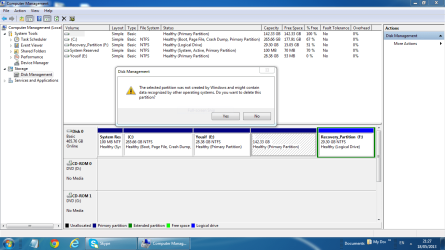
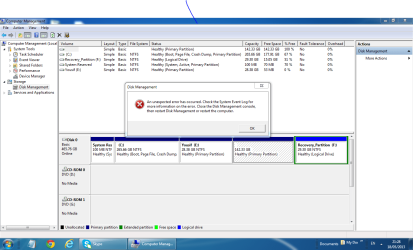
What do you mean you cannot delete Ubuntu partition? Did you try to delete it in Disk Mgmt? What is the error? Post back a screenshot of Disk Management - Post a Screen Capture Image - Windows 7 Help Forums

I also asked you if you have Repair My Computer on F8 menu at boot? Please answer the question. It normally is not rewritten there unless you do the full Startup Repair - Run up to 3 Separate Times and not dated XP-era bootrec commands that are only one of dozens of fixes automated in Startup Repair.
 
I think you're going to need to use the Ubuntu install partition manager to delete the Linux partitions. I've had issues like this and, for some reason, windows partition managers don't like messing with Linux partitions at all. Anyhow, that's what works for me at times like this.
 

My Computer My Computer

At a glance

Microsoft Windows 10 Home Build 15036Intel(R) Core(TM) i7-860 @ 2.80GHz4.00 GBNVIDIA GeForce GTX 750
Computer type
PC/Desktop
Computer Manufacturer/Model Number
iBuyPower NZXT
OS
Microsoft Windows 10 Home Build 15036
CPU
Intel(R) Core(TM) i7-860 @ 2.80GHz
Motherboard
Gigabyte Technology Co., Ltd. P55-UD3L
Memory
4.00 GB
Graphics Card(s)
NVIDIA GeForce GTX 750
Sound Card
(1) Line 6 UX2 (2) Realtek High Definition Audio
Monitor(s) Displays
23" acer
Screen Resolution
1920 x 1080 x 32 bits (4294967296 colors) @ 60 Hz
Hard Drives
(1) WDC WD5000AAKS-00D2B0 ATA Device (2) Seagate FreeAgent Go 250G USB Device
Cooling
Corsair H75 liquid cooler (Very easy to install, actually)
Internet Speed
60M cable modem-->Linksys E1200-->1Gbps net card
Browser
Chrome
Other Info
This is probably the longest I've ever had a Windows machine run without having to restore it to scratch. I'm used to restoring to "factory" about every 2 yrs. I've run with Win7 since new in 2009 and only recently (Nov, '14) restored to clean up the machine from all my 'xperimenting. LOL!! I may never need another machine.

Upgraded to 10 when it was still free, then installed 2017 update.
Do you have 2 threads for the same issue?
http://www.sevenforums.com/backup-r...untu-partition-after-uninstalling-ubuntu.html

Multiple threads can cause confusion and waste time of those trying to help you...

I am sorry i got confused and i wrote 2 threads one was about how to uninstall ubuntu and the other one was about how to delete the Ubuntu partition as i thought i was able to uninstall ubuntu but facing a proplem with deleting its partition afterwards...
 

My Computer My Computer

At a glance

Microsoft Windows 7 Home Premium 64-bit 7601 ...Intel(R) Core(TM) i5 CPU M 460 @ 2.53GHz8GB , SODIMM ,CT51264BF1339.M16FATI Mobility Radeon HD 5400 Series
Computer type
Laptop
Computer Manufacturer/Model Number
Dell studio 1558
OS
Microsoft Windows 7 Home Premium 64-bit 7601 Multiprocessor Free Service Pack 1
CPU
Intel(R) Core(TM) i5 CPU M 460 @ 2.53GHz
Motherboard
Dell Inc. 0874P6
Memory
8GB , SODIMM ,CT51264BF1339.M16F
Graphics Card(s)
ATI Mobility Radeon HD 5400 Series
Sound Card
(1) AMD High Definition Audio Device (2) High Definition A
Monitor(s) Displays
VideoController1
Screen Resolution
1366 x 768 x 4294967296 colors
Hard Drives
TOSHIBA MK5076GSX ATA Device, 500GB
PSU
Dell studio 1558 power supply uint
Case
Dell studio 1558
Cooling
GENUINE DELL STUDIO 1558 CPU COOPER HEATSINK with FAN.
Keyboard
dell keyboard
Mouse
optical external drive
Internet Speed
60Mb/s
Antivirus
Norton Internet Security version 20.4.0.40
Browser
Google chrome
Thanks for the reply, the computer is booting now to W7 directly, but i still can not delete the Ubuntu partition, I think what i did was just removing the GRUB partition for Ubuntu not uninstalling it

What do you mean you cannot delete Ubuntu partition? Did you try to delete it in Disk Mgmt? What is the error? Post back a screenshot of Disk Management - Post a Screen Capture Image - Windows 7 Help Forums

I also asked you if you have Repair My Computer on F8 menu at boot? Please answer the question. It normally is not rewritten there unless you do the full Startup Repair - Run up to 3 Separate Times and not dated XP-era bootrec commands that are only one of dozens of fixes automated in Startup Repair.

thanks for the reply, no i did not do f8 repair ,,,, attached you will see the screen capture images
so how can i do the 3-time repair ...
 

Attachments

  • 1.PNG
    1.PNG
    51.8 KB · Views: 6
  • 2.PNG
    2.PNG
    52.8 KB · Views: 4

My Computer My Computer

At a glance

Microsoft Windows 7 Home Premium 64-bit 7601 ...Intel(R) Core(TM) i5 CPU M 460 @ 2.53GHz8GB , SODIMM ,CT51264BF1339.M16FATI Mobility Radeon HD 5400 Series
Computer type
Laptop
Computer Manufacturer/Model Number
Dell studio 1558
OS
Microsoft Windows 7 Home Premium 64-bit 7601 Multiprocessor Free Service Pack 1
CPU
Intel(R) Core(TM) i5 CPU M 460 @ 2.53GHz
Motherboard
Dell Inc. 0874P6
Memory
8GB , SODIMM ,CT51264BF1339.M16F
Graphics Card(s)
ATI Mobility Radeon HD 5400 Series
Sound Card
(1) AMD High Definition Audio Device (2) High Definition A
Monitor(s) Displays
VideoController1
Screen Resolution
1366 x 768 x 4294967296 colors
Hard Drives
TOSHIBA MK5076GSX ATA Device, 500GB
PSU
Dell studio 1558 power supply uint
Case
Dell studio 1558
Cooling
GENUINE DELL STUDIO 1558 CPU COOPER HEATSINK with FAN.
Keyboard
dell keyboard
Mouse
optical external drive
Internet Speed
60Mb/s
Antivirus
Norton Internet Security version 20.4.0.40
Browser
Google chrome
I didn't ask you to do the F8 Repair. I asked you if Repair My Computer appears on the F8 menu. Why can't you answer the question?

If it doesn't appear then you need to run the three Startup Repairs to correctly finish rewriting the boot files to Win7. You said you ran bootrec commands, which are outdated and need to be run with the other automated repairs in Startup Repair. I've now repeated this three times. Why can't you understand it?

I am not sure how you have four Primary partitions plus a Logical one on a Basic HD which is limited to 3 Primary partitions and unlimited Logical. Use Free Partition Wizard to delete the partition. Then create another Logical partition in its space, or Extend the Primary partition on its left to the right, or Extend the Logical to the left into the deleted partition space. How to extend partition easily with Partition Wizard - video help.
 
I didn't ask you to do the F8 Repair. I asked you if Repair My Computer appears on the F8 menu. Why can't you answer the question?

If it doesn't appear then you need to run the three Startup Repairs to correctly finish rewriting the boot files to Win7. You said you ran bootrec commands, which are outdated and need to be run with the other automated repairs in Startup Repair. I've now repeated this three times. Why can't you understand it?

I am not sure how you have four Primary partitions plus a Logical one on a Basic HD which is limited to 3 Primary partitions and unlimited Logical. Use Free Partition Wizard to delete the partition. Then create another Logical partition in its space, or Extend the Primary partition on its left to the right, or Extend the Logical to the left into the deleted partition space. How to extend partition easily with Partition Wizard - video help.
i am sorry for not answering the questions, i do not know why i did not answer yes the repair my computers appears on F8 menu
 

My Computer My Computer

At a glance

Microsoft Windows 7 Home Premium 64-bit 7601 ...Intel(R) Core(TM) i5 CPU M 460 @ 2.53GHz8GB , SODIMM ,CT51264BF1339.M16FATI Mobility Radeon HD 5400 Series
Computer type
Laptop
Computer Manufacturer/Model Number
Dell studio 1558
OS
Microsoft Windows 7 Home Premium 64-bit 7601 Multiprocessor Free Service Pack 1
CPU
Intel(R) Core(TM) i5 CPU M 460 @ 2.53GHz
Motherboard
Dell Inc. 0874P6
Memory
8GB , SODIMM ,CT51264BF1339.M16F
Graphics Card(s)
ATI Mobility Radeon HD 5400 Series
Sound Card
(1) AMD High Definition Audio Device (2) High Definition A
Monitor(s) Displays
VideoController1
Screen Resolution
1366 x 768 x 4294967296 colors
Hard Drives
TOSHIBA MK5076GSX ATA Device, 500GB
PSU
Dell studio 1558 power supply uint
Case
Dell studio 1558
Cooling
GENUINE DELL STUDIO 1558 CPU COOPER HEATSINK with FAN.
Keyboard
dell keyboard
Mouse
optical external drive
Internet Speed
60Mb/s
Antivirus
Norton Internet Security version 20.4.0.40
Browser
Google chrome
I didn't ask you to do the F8 Repair. I asked you if Repair My Computer appears on the F8 menu. Why can't you answer the question?

If it doesn't appear then you need to run the three Startup Repairs to correctly finish rewriting the boot files to Win7. You said you ran bootrec commands, which are outdated and need to be run with the other automated repairs in Startup Repair. I've now repeated this three times. Why can't you understand it?

I am not sure how you have four Primary partitions plus a Logical one on a Basic HD which is limited to 3 Primary partitions and unlimited Logical. Use Free Partition Wizard to delete the partition. Then create another Logical partition in its space, or Extend the Primary partition on its left to the right, or Extend the Logical to the left into the deleted partition space. How to extend partition easily with Partition Wizard - video help.
the repair my computer does appear in F8 menu, I tried using many third parties software to delete and format, the Ubuntu partition, but no one does the job , every time i go to disk management tool i found the 142GB partition still as the same..
hope now you understand me
 

My Computer My Computer

At a glance

Microsoft Windows 7 Home Premium 64-bit 7601 ...Intel(R) Core(TM) i5 CPU M 460 @ 2.53GHz8GB , SODIMM ,CT51264BF1339.M16FATI Mobility Radeon HD 5400 Series
Computer type
Laptop
Computer Manufacturer/Model Number
Dell studio 1558
OS
Microsoft Windows 7 Home Premium 64-bit 7601 Multiprocessor Free Service Pack 1
CPU
Intel(R) Core(TM) i5 CPU M 460 @ 2.53GHz
Motherboard
Dell Inc. 0874P6
Memory
8GB , SODIMM ,CT51264BF1339.M16F
Graphics Card(s)
ATI Mobility Radeon HD 5400 Series
Sound Card
(1) AMD High Definition Audio Device (2) High Definition A
Monitor(s) Displays
VideoController1
Screen Resolution
1366 x 768 x 4294967296 colors
Hard Drives
TOSHIBA MK5076GSX ATA Device, 500GB
PSU
Dell studio 1558 power supply uint
Case
Dell studio 1558
Cooling
GENUINE DELL STUDIO 1558 CPU COOPER HEATSINK with FAN.
Keyboard
dell keyboard
Mouse
optical external drive
Internet Speed
60Mb/s
Antivirus
Norton Internet Security version 20.4.0.40
Browser
Google chrome
There are no flags on the 142gb Ubuntu partition that would make it perilous or prohibited to delete. Only if GRUB is involved could there be complications - if so uninstall it now to see.

To force delete the partition open an Elevated Command Prompt, type:
Diskpart
list disk
sel dis # (replace # with the correct disk #)
list part
Sel Part # (replace # with correct part # to delete)
Delete partition override
exit

You can now repartition the space in Disk Mgmt, or distribute the space to any other partition using How to extend partition easily with Partition Wizard - video help. If you are going to use Partition Wizard to do this then it should also be able to delete the partition first. If not report back the exact error.
 
There are no flags on the 142gb Ubuntu partition that would make it perilous or prohibited to delete. Only if GRUB is involved could there be complications - if so uninstall it now to see.

To force delete the partition open an Elevated Command Prompt, type:
Diskpart
list disk
sel dis # (replace # with the correct disk #)
list part
Sel Part # (replace # with correct part # to delete)
Delete partition override
exit

You can now repartition the space in Disk Mgmt, or distribute the space to any other partition using How to extend partition easily with Partition Wizard - video help. If you are going to use Partition Wizard to do this then it should also be able to delete the partition first. If not report back the exact error.

Many thanks for the reply and instruction , i will do what you told me and let you know
 

My Computer My Computer

At a glance

Microsoft Windows 7 Home Premium 64-bit 7601 ...Intel(R) Core(TM) i5 CPU M 460 @ 2.53GHz8GB , SODIMM ,CT51264BF1339.M16FATI Mobility Radeon HD 5400 Series
Computer type
Laptop
Computer Manufacturer/Model Number
Dell studio 1558
OS
Microsoft Windows 7 Home Premium 64-bit 7601 Multiprocessor Free Service Pack 1
CPU
Intel(R) Core(TM) i5 CPU M 460 @ 2.53GHz
Motherboard
Dell Inc. 0874P6
Memory
8GB , SODIMM ,CT51264BF1339.M16F
Graphics Card(s)
ATI Mobility Radeon HD 5400 Series
Sound Card
(1) AMD High Definition Audio Device (2) High Definition A
Monitor(s) Displays
VideoController1
Screen Resolution
1366 x 768 x 4294967296 colors
Hard Drives
TOSHIBA MK5076GSX ATA Device, 500GB
PSU
Dell studio 1558 power supply uint
Case
Dell studio 1558
Cooling
GENUINE DELL STUDIO 1558 CPU COOPER HEATSINK with FAN.
Keyboard
dell keyboard
Mouse
optical external drive
Internet Speed
60Mb/s
Antivirus
Norton Internet Security version 20.4.0.40
Browser
Google chrome
Many thanks gregrocker, I am able to solve the problem now , AND I deleted the Ubuntu partition and resize the partition again, It was my mistake that i did not apply the changes after using AOMEA..
thanks for being so helpful and it's really nice great forum.
 

My Computer My Computer

At a glance

Microsoft Windows 7 Home Premium 64-bit 7601 ...Intel(R) Core(TM) i5 CPU M 460 @ 2.53GHz8GB , SODIMM ,CT51264BF1339.M16FATI Mobility Radeon HD 5400 Series
Computer type
Laptop
Computer Manufacturer/Model Number
Dell studio 1558
OS
Microsoft Windows 7 Home Premium 64-bit 7601 Multiprocessor Free Service Pack 1
CPU
Intel(R) Core(TM) i5 CPU M 460 @ 2.53GHz
Motherboard
Dell Inc. 0874P6
Memory
8GB , SODIMM ,CT51264BF1339.M16F
Graphics Card(s)
ATI Mobility Radeon HD 5400 Series
Sound Card
(1) AMD High Definition Audio Device (2) High Definition A
Monitor(s) Displays
VideoController1
Screen Resolution
1366 x 768 x 4294967296 colors
Hard Drives
TOSHIBA MK5076GSX ATA Device, 500GB
PSU
Dell studio 1558 power supply uint
Case
Dell studio 1558
Cooling
GENUINE DELL STUDIO 1558 CPU COOPER HEATSINK with FAN.
Keyboard
dell keyboard
Mouse
optical external drive
Internet Speed
60Mb/s
Antivirus
Norton Internet Security version 20.4.0.40
Browser
Google chrome
Thanks, Great Forum and wonderful people
:)
 

My Computer My Computer

At a glance

Microsoft Windows 7 Home Premium 64-bit 7601 ...Intel(R) Core(TM) i5 CPU M 460 @ 2.53GHz8GB , SODIMM ,CT51264BF1339.M16FATI Mobility Radeon HD 5400 Series
Computer type
Laptop
Computer Manufacturer/Model Number
Dell studio 1558
OS
Microsoft Windows 7 Home Premium 64-bit 7601 Multiprocessor Free Service Pack 1
CPU
Intel(R) Core(TM) i5 CPU M 460 @ 2.53GHz
Motherboard
Dell Inc. 0874P6
Memory
8GB , SODIMM ,CT51264BF1339.M16F
Graphics Card(s)
ATI Mobility Radeon HD 5400 Series
Sound Card
(1) AMD High Definition Audio Device (2) High Definition A
Monitor(s) Displays
VideoController1
Screen Resolution
1366 x 768 x 4294967296 colors
Hard Drives
TOSHIBA MK5076GSX ATA Device, 500GB
PSU
Dell studio 1558 power supply uint
Case
Dell studio 1558
Cooling
GENUINE DELL STUDIO 1558 CPU COOPER HEATSINK with FAN.
Keyboard
dell keyboard
Mouse
optical external drive
Internet Speed
60Mb/s
Antivirus
Norton Internet Security version 20.4.0.40
Browser
Google chrome
We're glad to help! :geek: If everything's okay now you can mark the thread Solved at top.
 
Back
Top