changing "starting windows" message and other MUI questions

mikesw

New member
Local time
5:57 AM
Messages
3
A friend has win 7 x32 Ultimate SP1 installed on a laptop. He installed the Bulgarian MUI language pack. According to Msoft, this language hasn't been fully converted for the English version of the OS. There is no information that says what areas are fully converted and which ones not for the OS. The Internet Exploer 10 has the Bulgarian lang also installed.

He wants to send this laptop to his mother-in-law overseas who knows no English but wants to play on the computer and is embarrassed to let others know she knows nothing about computers.

The problem is, the OS messages on shutdown are in Bulgarian, but not all the startup messages.
In particular is the "Starting Windows" message on bootup. I don't see a tutorial on how to edit some file to check the string messages to see which ones aren't translated and have him translate the rest to Bulgarian, save the file and test it to make sure the messages are correct for her. I see the shutdown message tutorial and the Welcome one, but not bootup.

Is this typically the case for any "not fully translated" MUI installed on an English Win 7 (or vista)? What if the Win 7 was orginally installed with the Bulgarian native version of the OS? That is the version sold in Bulgaria would be fully translated and one would then have to install the English MUI. Maybe this is the route to take.

Are there any projects out there whereby people use resource hacker to convert non-fully translated MUIs for win 7 into a fully translated version of the OS? Then one would unzip the updated file versions onto their system to bring it up to a fully translated OS.

What about extracting the MUI download and using Resource hacker to correct/update the translations and then repackage and install this updated MUI onto the English version? Hence ones own custom MUI pack.

Another question is, I want to use dism to patch my AIO with all the hotfixes using the hotfix rollup, Msoft reliability and improvement fixes, and sec updates onto my Win 7 SP1, plut dotnetfix and other programs such as IE 10. However, MSoft says that if I install this patched Win 7 Sp1 and then try to install a Language MUI, that it breaks some of the translations. One must install the MUI before patching SP1 to prevent this. Is this true? Is there a MUI service pack for win 7 sp1 out yet?

I've tried this, but no change in the "starting windows" message in the Bulgarian language

open elevated CMD and do these 2 commands :
bcdedit /set {current} locale BG-bg
bcdboot %WinDir% /l BG-bg

Anybody play with "Visual bcdeditor" at ,
Visual BCD Editor - Windows 7|Vista

:geek:
 
Last edited by a moderator:

My Computer My Computer

At a glance

windows 7 ultimate x32intel
Computer type
PC/Desktop
Computer Manufacturer/Model Number
DELL
OS
windows 7 ultimate x32
CPU
intel
A friend has win 7 x32 Ultimate SP1 installed on a laptop. He installed the Bulgarian MUI language pack. According to Msoft, this language hasn't been fully converted for the English version of the OS. There is no information that says what areas are fully converted and which ones not for the OS. The Internet Exploer 10 has the Bulgarian lang also installed.

He wants to send this laptop to his mother-in-law overseas who knows no English but wants to play on the computer and is embarrassed to let others know she knows nothing about computers.

The problem is, the OS messages on shutdown are in Bulgarian, but not all the startup messages.
In particular is the "Starting Windows" message on bootup. I don't see a tutorial on how to edit some file to check the string messages to see which ones aren't translated and have him translate the rest to Bulgarian, save the file and test it to make sure the messages are correct for her. I see the shutdown message tutorial and the Welcome one, but not bootup.

Is this typically the case for any "not fully translated" MUI installed on an English Win 7 (or vista)? What if the Win 7 was orginally installed with the Bulgarian native version of the OS? That is the version sold in Bulgaria would be fully translated and one would then have to install the English MUI. Maybe this is the route to take.

Are there any projects out there whereby people use resource hacker to convert non-fully translated MUIs for win 7 into a fully translated version of the OS? Then one would unzip the updated file versions onto their system to bring it up to a fully translated OS.

What about extracting the MUI download and using Resource hacker to correct/update the translations and then repackage and install this updated MUI onto the English version? Hence ones own custom MUI pack.

Another question is, I want to use dism to patch my AIO with all the hotfixes using the hotfix rollup, Msoft reliability and improvement fixes, and sec updates onto my Win 7 SP1, plut dotnetfix and other programs such as IE 10. However, MSoft says that if I install this patched Win 7 Sp1 and then try to install a Language MUI, that it breaks some of the translations. One must install the MUI before patching SP1 to prevent this. Is this true? Is there a MUI service pack for win 7 sp1 out yet?

I've tried this, but no change in the "starting windows" message in the Bulgarian language

open elevated CMD and do these 2 commands :
bcdedit /set {current} locale BG-bg
bcdboot %WinDir% /l BG-bg

Anybody play with "Visual bcdeditor" at ,
Visual BCD Editor - Windows 7|Vista

:geek:
No help, Because this post breaks the forum rules.
 

My Computer My Computer

At a glance

Microsoft Windows 7 Professional 32-bit 7601 ...Intel(R) Core(TM) i3 CPU 530 @ 2.93GHz4,00 GBLogMeIn Mirror Driver, Intel(R) HD Graphics
Computer type
PC/Desktop
Computer Manufacturer/Model Number
heavydoooevil computer inc
OS
Microsoft Windows 7 Professional 32-bit 7601 Multiprocessor Free Service Pack 1
CPU
Intel(R) Core(TM) i3 CPU 530 @ 2.93GHz
Motherboard
ASUSTeK Computer INC. P7H55D-M EVO
Memory
4,00 GB
Graphics Card(s)
LogMeIn Mirror Driver, Intel(R) HD Graphics
Sound Card
High Definition Audio Device
Monitor(s) Displays
Sony XV TV
Screen Resolution
1920x1080
Hard Drives
1 ST3250620AS ATA Device, 2 WDC WD20EARS-00MVWB0 ATA Device
Keyboard
Logitech Washable K310
Mouse
Logitech USB M305
Internet Speed
YOU SHOULD SEE IN MY SIG BELOW
Antivirus
avast! Internet Security
Browser
Mozilla Firefox
Other Info
Samsung ML-2165 series printer
Sennheiser HDR 170
American Megatrend ASUS BIOS
How can a tutorial on changing the "starting windows" message break forum rules, when there is a tutorial on how to change the "shutdown" message and "logon" message and startup sound, and background etc? confused...Perhaps my question belongs under the "customization" section of the forum.

How can asking a question on Msofts "dism" break forum rules?
 

My Computer My Computer

At a glance

windows 7 ultimate x32intel
Computer type
PC/Desktop
Computer Manufacturer/Model Number
DELL
OS
windows 7 ultimate x32
CPU
intel
How can a tutorial on changing the "starting windows" message break forum rules, when there is a tutorial on how to change the "shutdown" message and "logon" message and startup sound, and background etc? confused...Perhaps my question belongs under the "customization" section of the forum.

How can asking a question on Msofts "dism" break forum rules?
Try Resource Hacker. If startup and shut off sound Use Sound control panel.
 

My Computer My Computer

At a glance

Microsoft Windows 7 Professional 32-bit 7601 ...Intel(R) Core(TM) i3 CPU 530 @ 2.93GHz4,00 GBLogMeIn Mirror Driver, Intel(R) HD Graphics
Computer type
PC/Desktop
Computer Manufacturer/Model Number
heavydoooevil computer inc
OS
Microsoft Windows 7 Professional 32-bit 7601 Multiprocessor Free Service Pack 1
CPU
Intel(R) Core(TM) i3 CPU 530 @ 2.93GHz
Motherboard
ASUSTeK Computer INC. P7H55D-M EVO
Memory
4,00 GB
Graphics Card(s)
LogMeIn Mirror Driver, Intel(R) HD Graphics
Sound Card
High Definition Audio Device
Monitor(s) Displays
Sony XV TV
Screen Resolution
1920x1080
Hard Drives
1 ST3250620AS ATA Device, 2 WDC WD20EARS-00MVWB0 ATA Device
Keyboard
Logitech Washable K310
Mouse
Logitech USB M305
Internet Speed
YOU SHOULD SEE IN MY SIG BELOW
Antivirus
avast! Internet Security
Browser
Mozilla Firefox
Other Info
Samsung ML-2165 series printer
Sennheiser HDR 170
American Megatrend ASUS BIOS
How can a tutorial on changing the "starting windows" message break forum rules, when there is a tutorial on how to change the "shutdown" message and "logon" message and startup sound, and background etc? confused...Perhaps my question belongs under the "customization" section of the forum.

How can asking a question on Msofts "dism" break forum rules?

Hi Mike, welcome to the Seven Forums.

Sometimes even the best of geeks post something before thinking. The best reaction is then not to react at all ;).

As language packs are a feature of Windows 7 Ultimate and and Enterprise editions there's of course nothing against forum rules that would make your question invalid. Here's a tip, follow this tutorial to change the welcome, log on and log off screens to Bulgarian: http://www.sevenforums.com/tutorial...e-settings-copy-new-users-welcome-screen.html

If you wipe the PC clean and reinstall Windows before shipping it to your friends mother, you could also try installing the Bulgarian language pack in Audit Mode during the installation and the when finalizing the installation select Bulgarian as the main language. Read this post about a similar issue for more information.

The text Starting Windows remains in original language, in this case English. I really do not understand how this could be an issue as the text is visible a few seconds only when booting the PC?

It is possible to change the startup animation which includes the Starting Windows text but as I have never done it I cannot tell you how to do that. Search Internet for Windows 7 boot animation and go from there. If you want to you can also disable the boot animation: http://www.sevenforums.com/tutorials/248361-gui-boot-enable-disable-windows.html

Kari
 

My Computer My Computer

At a glance

Windows 10 Pro x64 EN-GB1.6 GHz Intel Core i7-720QM Processor6 GBATI Mobility Radeon HD 5850 Graphics
Computer type
Laptop
Computer Manufacturer/Model Number
HP ENVY 17-1150eg
OS
Windows 10 Pro x64 EN-GB
CPU
1.6 GHz Intel Core i7-720QM Processor
Memory
6 GB
Graphics Card(s)
ATI Mobility Radeon HD 5850 Graphics
Sound Card
Beats sound system with integrated subwoofer
Monitor(s) Displays
17" laptop display, 22" LED and 32" Full HD TV through HDMI
Screen Resolution
1600*900 (1), 1920*1080 (2&3)
Hard Drives
Internal: 2 x 500 GB SATA Hard Disk Drive 7200 rpm
External: 2TB for backups, 3TB USB3 network drive for media
Cooling
As Envy runs a bit warm, I have it on a Cooler Master pad
Keyboard
Logitech diNovo Media Desktop Laser (bluetooth)
Mouse
Logitech Performance Mouse MX
Internet Speed
50/10 Mbps VDSL
Antivirus
Windows Defender 4.3.9431.0
Browser
Maxthon 3.5.2., IE11
A friend has win 7 x32 Ultimate SP1 installed on a laptop. He installed the Bulgarian MUI language pack. According to Msoft, this language hasn't been fully converted for the English version of the OS. There is no information that says what areas are fully converted and which ones not for the OS. The Internet Exploer 10 has the Bulgarian lang also installed.

He wants to send this laptop to his mother-in-law overseas who knows no English but wants to play on the computer and is embarrassed to let others know she knows nothing about computers.

The problem is, the OS messages on shutdown are in Bulgarian, but not all the startup messages.
In particular is the "Starting Windows" message on bootup. I don't see a tutorial on how to edit some file to check the string messages to see which ones aren't translated and have him translate the rest to Bulgarian, save the file and test it to make sure the messages are correct for her. I see the shutdown message tutorial and the Welcome one, but not bootup.

Is this typically the case for any "not fully translated" MUI installed on an English Win 7 (or vista)? What if the Win 7 was orginally installed with the Bulgarian native version of the OS? That is the version sold in Bulgaria would be fully translated and one would then have to install the English MUI. Maybe this is the route to take.

Are there any projects out there whereby people use resource hacker to convert non-fully translated MUIs for win 7 into a fully translated version of the OS? Then one would unzip the updated file versions onto their system to bring it up to a fully translated OS.

What about extracting the MUI download and using Resource hacker to correct/update the translations and then repackage and install this updated MUI onto the English version? Hence ones own custom MUI pack.

Another question is, I want to use dism to patch my AIO with all the hotfixes using the hotfix rollup, Msoft reliability and improvement fixes, and sec updates onto my Win 7 SP1, plut dotnetfix and other programs such as IE 10. However, MSoft says that if I install this patched Win 7 Sp1 and then try to install a Language MUI, that it breaks some of the translations. One must install the MUI before patching SP1 to prevent this. Is this true? Is there a MUI service pack for win 7 sp1 out yet?

I've tried this, but no change in the "starting windows" message in the Bulgarian language

open elevated CMD and do these 2 commands :
bcdedit /set {current} locale BG-bg
bcdboot %WinDir% /l BG-bg

Anybody play with "Visual bcdeditor" at ,
Visual BCD Editor - Windows 7|Vista

:geek:

Hi there
Install the Language pack and then you can set the display language to Bulgarian -- you should then get about 99% of all the displays in Bulgarian. You can also download similar language packs for Office too.

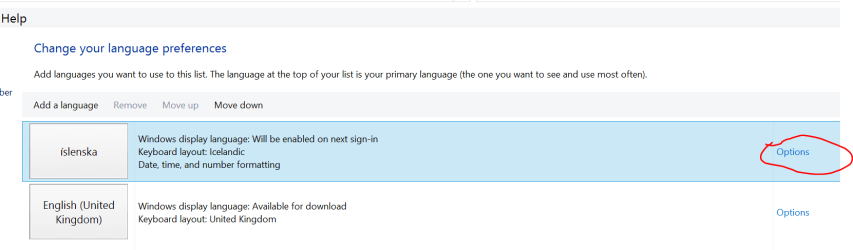
I'm running W8 so my screenshot is not exactly the same as W7 but it's similar -- set it from Language in the control panel. Download and install the language packs first though -- 32 / 64 bit depending on the version of Windows. Note also you can only install these on W7 PRO and above -- won't work on HOME PREMIUM unfortunately.

The most successful way to get this stuff to work is to install the base ENGLISH version of Windows and then add the languages you want. Note also if you need extra (non latin or even Double byte character sets - you'll have to add the language as an input method too).

I'm not 100% sure about the initial starting windows message though - mine boots from an SSD so fast that I don't have time to see it -- the password prompt message / logon is in Icelandic though.

A possible "Brute force" method might be to search windows where the boot splash screens are loaded from and if you can find a text string "Starting Windows" - use a disk text editor to translate and change the text - but backup your system first in case this hoses it all up.

Cheers
jimbo
 

Attachments

  • langpack.png
    langpack.png
    16.9 KB · Views: 1

My Computer My Computer

At a glance

Linux CENTOS 7 / various Windows OS'es and se...Intel i7 Intel i58GB, 16GBOn Motherboard
Computer type
PC/Desktop
Computer Manufacturer/Model Number
Custom built, several laptops HP/ASUS
OS
Linux CENTOS 7 / various Windows OS'es and servers
CPU
Intel i7 Intel i5
Memory
8GB, 16GB
Graphics Card(s)
On Motherboard
Sound Card
Realtek HD audio
Monitor(s) Displays
Apple Cinema display, Samsung LCD
Screen Resolution
1920 X 1080
Hard Drives
4 X 1TB SATA
Mouse
Toshiba wireless laser
Internet Speed
> 20MB up
Back
Top