Cannot download from IE9 or open windows defender

If neither Microsoft Security Essentials or Microsoft Securiy Client are listed, select not listed.

When asked to enter the product code, copy and paste the following code: {390DD8BB-BB57-4942-A029-2D913E4E9D74}
 

My Computer My Computer

At a glance

Windows 7 Home Premium
Computer type
PC/Desktop
Computer Manufacturer/Model Number
An ol' eMachines
OS
Windows 7 Home Premium
Internet Speed
Fine for me...I'm retired!
Also, do the following...

Please download OTL from one of these links:
http://oldtimer.geekstogo.com/OTL/OTL.exe
http://oldtimer.geekstogo.com/OTL.com
http://oldtimer.geekstogo.com/OTL.scr

It creates detailed reports of registry and file settings, and also includes advanced tools.

Save to the Desktop.

Make sure all other windows are closed, and double-click on the OTL icon to run it.

Click: Run Scan

Let OTL run uninterrupted.

When the scan completes, it opens two notepad files: OTL.txt and Extras.txt

These files are saved in the same location as OTL (the Desktop).

Please provide the contents of these files, and attach them to your reply.
 

My Computer My Computer

At a glance

Windows 7 Home Premium
Computer type
PC/Desktop
Computer Manufacturer/Model Number
An ol' eMachines
OS
Windows 7 Home Premium
Internet Speed
Fine for me...I'm retired!

If neither Microsoft Security Essentials or Microsoft Securiy Client are listed, select not listed.

When asked to enter the product code, copy and paste the following code: {390DD8BB-BB57-4942-A029-2D913E4E9D74}

neither of these methods worked and here are the files you requested. sorry to keep you both working like this, just want to get it fixed as I feel a little on edge having no antivirus software present
 

Attachments

My Computer My Computer

At a glance

Windows 7 Home Premium 64bit
Computer type
PC/Desktop
Computer Manufacturer/Model Number
HP
OS
Windows 7 Home Premium 64bit
Please go back to VistaKing's Post #37

Select the Not Listed option.

When asked to enter the product code, use the following:
{D954C6C2-544B-4091-A47F-11E77162883E}

Any luck installing MSE now?
 

My Computer My Computer

At a glance

Windows 7 Home Premium
Computer type
PC/Desktop
Computer Manufacturer/Model Number
An ol' eMachines
OS
Windows 7 Home Premium
Internet Speed
Fine for me...I'm retired!
still no luck
 

My Computer My Computer

At a glance

Windows 7 Home Premium 64bit
Computer type
PC/Desktop
Computer Manufacturer/Model Number
HP
OS
Windows 7 Home Premium 64bit
I'm wondering if I should just download another antivirus software and give up with MSE?
 

My Computer My Computer

At a glance

Windows 7 Home Premium 64bit
Computer type
PC/Desktop
Computer Manufacturer/Model Number
HP
OS
Windows 7 Home Premium 64bit
One last shot to remove MSE

Please try OPSWAT Uninstall McAfee, Symantec & other antivirus software with AppRemover

"AppRemover will find and uninstall any security applications on your system, such as virus protection programs and spybot removers. Sometimes antivirus programs do not uninstall completely, so if you're replacing one security application with another, AppRemover can help you remove the old program so you can start fresh with the new one. This free program works well and installs and uninstalls with no problems. It is useful for ensuring that there are no remnants of old and outdated security software lurking in your PC."

^^ Let's hope they mean it!!! ^^

Once downloaded, simply double-click the AppRemover icon.
Agree to the Terms and Conditions.
Press: Start

AppRemover detects and allows you to select which application to uninstall from your computer.

Select Microsoft Security Essentials forn the list.

Press: Remove Selected Applications

See how it goes...
 

My Computer My Computer

At a glance

Windows 7 Home Premium
Computer type
PC/Desktop
Computer Manufacturer/Model Number
An ol' eMachines
OS
Windows 7 Home Premium
Internet Speed
Fine for me...I'm retired!
One last shot to remove MSE

Please try OPSWAT Uninstall McAfee, Symantec & other antivirus software with AppRemover

"AppRemover will find and uninstall any security applications on your system, such as virus protection programs and spybot removers. Sometimes antivirus programs do not uninstall completely, so if you're replacing one security application with another, AppRemover can help you remove the old program so you can start fresh with the new one. This free program works well and installs and uninstalls with no problems. It is useful for ensuring that there are no remnants of old and outdated security software lurking in your PC."

^^ Let's hope they mean it!!! ^^

Once downloaded, simply double-click the AppRemover icon.
Agree to the Terms and Conditions.
Press: Start

AppRemover detects and allows you to select which application to uninstall from your computer.

Select Microsoft Security Essentials forn the list.

Press: Remove Selected Applications

See how it goes...

Unfortunately this time it looks like technology beat us. the application didn't detect anything. any other free antivirus software you can recommend?
 

My Computer My Computer

At a glance

Windows 7 Home Premium 64bit
Computer type
PC/Desktop
Computer Manufacturer/Model Number
HP
OS
Windows 7 Home Premium 64bit
razzledazzle94


Try this . Use the tool I posted on Post # 37 . Select Not Listed option

add this key {774088D4-0777-4D78-904D-E435B318F5D2} also try this key
{77A776C4-D10F-416D-88F0-53F2D9DCD9B3}

If the top doesn't help . See if this might work

:ar: Uninstalling MSE - Microsoft Community
 

My Computer My Computer

At a glance

Windows 7 Ultimate 32-Bit & Windows 7 Ultimat...Intel Core i7 CPU 950 @ 3.07GHzOCZ 6GB (3 x 2GB) 240-Pin DDR3 SDRAM DDR3 160...ATI Radeon HD 5700 Series
Computer Manufacturer/Model Number
Custom Built
OS
Windows 7 Ultimate 32-Bit & Windows 7 Ultimate 64-Bit
CPU
Intel Core i7 CPU 950 @ 3.07GHz
Motherboard
ASUS P6T DELUXE V2
Memory
OCZ 6GB (3 x 2GB) 240-Pin DDR3 SDRAM DDR3 1600 OCZ3X1600R2
Graphics Card(s)
ATI Radeon HD 5700 Series
Sound Card
OnBoard
Hard Drives
WD6400AACS-00M3B0 (640GB SATA )
PSU
CORSAIR 850w
Case
NZXT LEXA
Cooling
Intel Stock Heatsink Fan
Keyboard
Microsoft Wireless Laser Keyboard 7000
Mouse
Microsoft Wireless Laser Mouse 7000
Well, Rats!! So close...bear with us once more.

SystemLook gave us the following:
[HKEY_CLASSES_ROOT\Installer\UpgradeCodes\26D13F39948E1D546B0106B5539504D9]
"2C6C459DB44519044AF7117E172688E3"=""

:info: Since the following steps involve editing the Registry, please create new restore point before proceeding.
System Restore Point - Create
Select: Option Two


:info: Next, open Notepad.
Copy and paste all the text inside the code box below to Notepad:

Code:
cd /d "%ProgramFiles%\Microsoft Security Client"
ren "%ProgramFiles%\Microsoft Security Client" "Microsoft Security Client Old"
REG DELETE "HKEY_CLASSES_ROOT\Installer\UpgradeCodes\26D13F39948E1D546B0106B5539504D9" /f
REG DELETE "HKEY_LOCAL_MACHINE\SOFTWARE\Microsoft\Windows\CurrentVersion\Installer\UpgradeCodes\26D13F39948E1D546B0106B5539504D9" /f
Exit

In Notepad, go to File > Save As...
Save the file to: Desktop
Save the file as: rmvmse.bat
Save type as: All files

:info: On the Desktop, right-click: rmvmse.bat
Select: Run as Administrator
A command prompt window opens and then closes.

When done, restart the computer.

Last, on the Desktop, right-click rmvmse.bat, and select: Delete
Also empty the Recycle Bin.


:info: Go to Start > All Programs > Accessories > Command Prompt
Right-click on the Command Prompt, and select: Run as administrator
At the prompt, copy/paste (with the mouse):

Code:
cd C:\Program Files\Microsoft Security Essentials\Backup\amd64

Press: Enter

Now at the new prompt: C:\Program Files\Microsoft Security Essentials\Backup\amd64>
Copy/paste (with the mouse):

Code:
Setup.exe /u

Press: Enter

Does setup launch to uninstall MSE?


:info: If still no luck, we can deduct that this new variant of ZeroAccess has discovered and taken advantage of a serious flaw of MSE. It does not have a thorough removal tool.


:info: The following free AVs are available, and you may find more doing a Google search:
Avast! Free: http://www.avast.com/free-antivirus-download

Avira Free Antivirus 2013 | Download Best Free Antivirus Software
(Note - If it installs a version of the adware/spyware Ask Toolbar, suggest you Uncheck this option.)

.

.
 

My Computer My Computer

At a glance

Windows 7 Home Premium
Computer type
PC/Desktop
Computer Manufacturer/Model Number
An ol' eMachines
OS
Windows 7 Home Premium
Internet Speed
Fine for me...I'm retired!
razzledazzle94


Try this . Use the tool I posted on Post # 37 . Select Not Listed option

add this key {774088D4-0777-4D78-904D-E435B318F5D2} also try this key
{77A776C4-D10F-416D-88F0-53F2D9DCD9B3}

If the top doesn't help . See if this might work

:ar: Uninstalling MSE - Microsoft Community

Well, Rats!! So close...bear with us once more.

SystemLook gave us the following:
[HKEY_CLASSES_ROOT\Installer\UpgradeCodes\26D13F39948E1D546B0106B5539504D9]
"2C6C459DB44519044AF7117E172688E3"=""

:info: Since the following steps involve editing the Registry, please create new restore point before proceeding.
System Restore Point - Create
Select: Option Two


:info: Next, open Notepad.
Copy and paste all the text inside the code box below to Notepad:

Code:
cd /d "%ProgramFiles%\Microsoft Security Client"
ren "%ProgramFiles%\Microsoft Security Client" "Microsoft Security Client Old"
REG DELETE "HKEY_CLASSES_ROOT\Installer\UpgradeCodes\26D13F39948E1D546B0106B5539504D9" /f
REG DELETE "HKEY_LOCAL_MACHINE\SOFTWARE\Microsoft\Windows\CurrentVersion\Installer\UpgradeCodes\26D13F39948E1D546B0106B5539504D9" /f
Exit

In Notepad, go to File > Save As...
Save the file to: Desktop
Save the file as: rmvmse.bat
Save type as: All files

:info: On the Desktop, right-click: rmvmse.bat
Select: Run as Administrator
A command prompt window opens and then closes.

When done, restart the computer.

Last, on the Desktop, right-click rmvmse.bat, and select: Delete
Also empty the Recycle Bin.


:info: Go to Start > All Programs > Accessories > Command Prompt
Right-click on the Command Prompt, and select: Run as administrator
At the prompt, copy/paste (with the mouse):

Code:
cd C:\Program Files\Microsoft Security Essentials\Backup\amd64

Press: Enter

Now at the new prompt: C:\Program Files\Microsoft Security Essentials\Backup\amd64>
Copy/paste (with the mouse):

Code:
Setup.exe /u

Press: Enter

Does setup launch to uninstall MSE?


:info: If still no luck, we can deduct that this new variant of ZeroAccess has discovered and taken advantage of a serious flaw of MSE. It does not have a thorough removal tool.


:info: The following free AVs are available, and you may find more doing a Google search:
Avast! Free: http://www.avast.com/free-antivirus-download

Avira Free Antivirus 2013 | Download Best Free Antivirus Software
(Note - If it installs a version of the adware/spyware Ask Toolbar, suggest you Uncheck this option.)

.

.

still no luck. I think I'm just going to install avast. I can download from internet explorer now which was my main problem and I can just use avast now instead of MSE. thanks a lot for your help guys. really appreciate it
 

My Computer My Computer

At a glance

Windows 7 Home Premium 64bit
Computer type
PC/Desktop
Computer Manufacturer/Model Number
HP
OS
Windows 7 Home Premium 64bit
Please install avast! Free, and perform a full scan.

Post back on what it found, if anything.

To find the log, open avast!, and press: Scan Computer

There is an option there: Scan Logs
Click on it, and you get a new window with the Completed scans.

Your scan should be there.
 

My Computer My Computer

At a glance

Windows 7 Home Premium
Computer type
PC/Desktop
Computer Manufacturer/Model Number
An ol' eMachines
OS
Windows 7 Home Premium
Internet Speed
Fine for me...I'm retired!
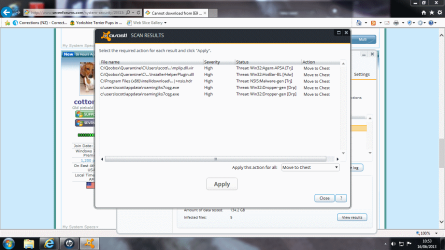
okay so here's what it found during the full scan.
 

Attachments

  • scan results.png
    scan results.png
    94.1 KB · Views: 2

My Computer My Computer

At a glance

Windows 7 Home Premium 64bit
Computer type
PC/Desktop
Computer Manufacturer/Model Number
HP
OS
Windows 7 Home Premium 64bit
Did you press Apply, and move the files to the Chest?

Please do the following...


:info: Download RogueKiller (Official website)
Select the x64 (64-bit) version.
Click the applicable button to download.
Save to the Desktop.

Close all windows and browsers.

Right-click and select: Run as Administrator

At the program console, wait for the prescan to finish. (Under Status, it says: Prescan finished.)

Press: SCAN


When done, a report opens on the Desktop: RKreport.txt

Please provide the RKreport.txt (Mode: Scan) in your reply.


:info: Follow with Malwarebytes' Anti-Malware:
http://www.malwarebytes.org/mbam-download-exe.php
Save to the Desktop.


MBAM may make changes to the Registry as part of its disinfection routine.
If using other security programs that detect Registry changes, they may interfere or alert you.
Temporarily disable such programs as shown, or permit them to allow the changes:
Info: http://www.bleepingcomputer.com/forums/topic114351.html


Right-click the MBAM file, and select: Run as Administrator
When the installation begins, follow the prompts.


At the last prompt of the Setup routine, make sure you leave both of these checked:
Update Malwarebytes' Anti-Malware
Launch Malwarebytes' Anti-Malware

However, uncheck: Enable free trial of Malwarebytes Anti-Malware PRO
Click: Finish


MBAM automatically starts and you are asked to update the program.
If an update is found, the program automatically updates itself.
Press the OK button to close the box and continue.


On the Scanner tab:
Make sure the Perform Full Scan option is selected.
Then click on the Scan button.


If asked to select the drives to scan, leave all the drives selected.
Click on the Start Scan button.


The scan may take some time to complete, so please be patient.


When the scan is finished, a message box shows The scan completed successfully. Click 'Show Results' to display all objects found.
Click OK to close the message box and continue with the removal process.


Back at the main Scanner screen:
Click on the Show Results button to see a list of any malware found.

Make sure everything is checked, and click: Remove Selected


When removal is completed, a report opens in Notepad.

The log is automatically saved and can also be viewed by clicking the Logs tab.


Please copy/paste the entire contents of the MBAM report in your reply.

Exit MBAM when done.


Note: If MBAM encounters a file that is difficult to remove, you are asked to reboot the computer so MBAM can proceed with the disinfection process. If asked to restart the computer, please do so immediately. Failure to reboot normally (not into safe mode) prevents MBAM from removing all the malware.

 

My Computer My Computer

At a glance

Windows 7 Home Premium
Computer type
PC/Desktop
Computer Manufacturer/Model Number
An ol' eMachines
OS
Windows 7 Home Premium
Internet Speed
Fine for me...I'm retired!
Back
Top