Windows is asking 'how to open' a random file at startup?

nabeelfarooqui9

New member
Member
Local time
12:14 PM
Messages
34
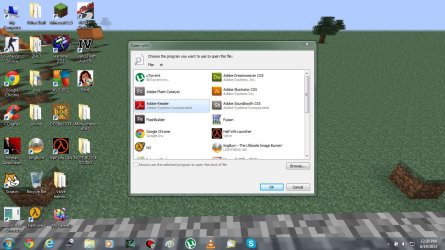
Ok, so whenever I start my laptop, (or restart or log off then log back in) I get an 'open with' dialog box (as seen in attachment).

The name of the file is 'dr', I guess that its part of the name of the user, Which i know because the address of my desktop is C:\Users\dr censored censored\Desktop.

I dont know if this happens only on This user account because Its the only one I have.
dr.jpg

If you need more info, then feel free to ask.
 

My Computer My Computer

Computer type
Laptop
Computer Manufacturer/Model Number
Sony (Vaio)
OS
Windows 7 Home Basic x64
CPU
Intel core i3-2330M Processor
Memory
4 gb
Graphics Card(s)
Nvidia geforce 410m
Antivirus
AVG Free edition
Browser
Chrome
Hi nabeelfarooqui9, welcome to Seven Forums.
Type the file extension in the search box at the top to find a program to open it with.
FILExt - The File Extension Source
 

My Computer My Computer

Computer Manufacturer/Model Number
Look in my Signature.
OS
Win7 H.Prem. 32bit+SP1

My Computer My Computer

Computer type
Laptop
Computer Manufacturer/Model Number
Sony (Vaio)
OS
Windows 7 Home Basic x64
CPU
Intel core i3-2330M Processor
Memory
4 gb
Graphics Card(s)
Nvidia geforce 410m
Antivirus
AVG Free edition
Browser
Chrome
If you type 'dr' in my link you'll get more info.
 

My Computer My Computer

Computer Manufacturer/Model Number
Look in my Signature.
OS
Win7 H.Prem. 32bit+SP1
If you type 'dr' in my link you'll get more info.

Ok i'll try that but if you read the first post correctly then you'll know that my computer name is also dr.
 

My Computer My Computer

Computer type
Laptop
Computer Manufacturer/Model Number
Sony (Vaio)
OS
Windows 7 Home Basic x64
CPU
Intel core i3-2330M Processor
Memory
4 gb
Graphics Card(s)
Nvidia geforce 410m
Antivirus
AVG Free edition
Browser
Chrome
I don't think its related to your computer name.
 

My Computer My Computer

Computer Manufacturer/Model Number
Look in my Signature.
OS
Win7 H.Prem. 32bit+SP1
I dont want to open it, i want to get rid of it.
 

My Computer My Computer

Computer type
Laptop
Computer Manufacturer/Model Number
Sony (Vaio)
OS
Windows 7 Home Basic x64
CPU
Intel core i3-2330M Processor
Memory
4 gb
Graphics Card(s)
Nvidia geforce 410m
Antivirus
AVG Free edition
Browser
Chrome
Take a look in C:\ProgramData\Microsoft\Windows\Start Menu\Programs\Startup folder and also look in C:\Users\YOUR USER NAME\AppData\Roaming\Microsoft\Windows\Start Menu\Programs\Startup folder and see if you have a file named dr and deleted if you do.
ProgramData and AppData is hidden use step 3 of this tutorial to unhide it http://www.sevenforums.com/tutorials/56005-file-folder-hide-unhide.html

Jerry
 

My Computer My Computer

Computer type
Laptop
Computer Manufacturer/Model Number
Sager NP9170
OS
Win 7 Pro x64 / Win 10 Pro
CPU
Intel(R) Core(TM) i7-3630QM CPU @ 2.40GHz
Motherboard
CLEVO P170EM
Memory
12 GB
Graphics Card(s)
(1) Intel(R) HD Graphics 4000 (2) NVIDIA GeForce GTX 675M
Sound Card
(1) Realtek High Definition Audio (2) Intel(R) Display Aud
Monitor(s) Displays
17.3
Screen Resolution
1920x1080
Hard Drives
(1) Samsung 860 EVO 500GB(OS) (1) Samsung 860 EVO 500GB(Data)
Keyboard
Backlite
Antivirus
MSE, Malwarebytes Pro
Browser
Firefox
Other Info
DESKTOP: Custom-built.
OS: Win 10 Pro x64.
CASE: Rosewill R5.
CPU: Intel I5 4670K CPU @ 3.40GHz.
CPU COOLER: Cool Master Hyper 212 EVO.
MOTHERBOARD: Asus Z87-A.
MEMORY: Kingston HyperX 2x4 GB.
GPU: Nvidia Geforce 650 TI.
PSU: Corsair TX750.
DRIVES: (1) Samsung 840 120 GB SSD (2) Western Digital blue 500 GB 7200 RPM.
Thanks but those folders are empty, I also un hid the folders.
 

My Computer My Computer

Computer type
Laptop
Computer Manufacturer/Model Number
Sony (Vaio)
OS
Windows 7 Home Basic x64
CPU
Intel core i3-2330M Processor
Memory
4 gb
Graphics Card(s)
Nvidia geforce 410m
Antivirus
AVG Free edition
Browser
Chrome
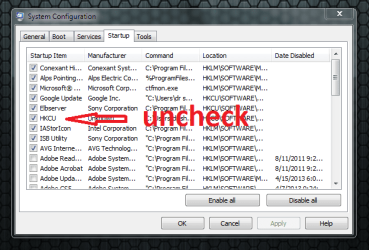
start msconfig. Goto startup tab. Make a screenshot and post. Maybe it doesn't show all. If so, scroll down and make another screenshot and post as well.
 

My Computer My Computer

Computer type
Laptop
Computer Manufacturer/Model Number
ACER ASPIRE 5742G
OS
Microsoft Windows 7 Home Premium 64-bits 7601 Multiprocessor Free Service Pack 1
CPU
Intel(R) Core(TM) i3 CPU M 370 @ 2.40GHz
Motherboard
Acer Aspire 5742G
Memory
4,00 GB
Graphics Card(s)
ATI Mobility Radeon HD 5400 Series
Sound Card
(1) AMD High Definition Audio Device (2) Realtek High Defi
Screen Resolution
1366 x 768 x 32 bits (4294967296 colors) @ 60 Hz
Hard Drives
WDC WD5000BEVT-22ZAT0
Make screenshot of registry key HKEY_LOCAL_MACHINE\Software\Microsoft\Windows\CurrentVersion\Run
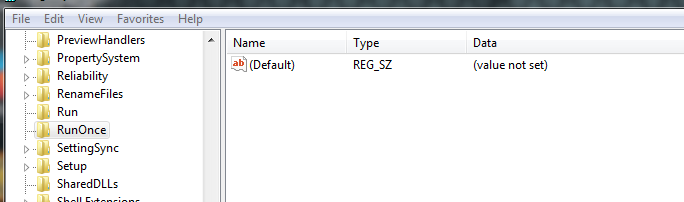
Make screenshot of registry key HKEY_LOCAL_MACHINE\Software\Microsoft\Windows\CurrentVersion\RunOnce
(last one is most likely empty)
 

My Computer My Computer

Computer type
Laptop
Computer Manufacturer/Model Number
ACER ASPIRE 5742G
OS
Microsoft Windows 7 Home Premium 64-bits 7601 Multiprocessor Free Service Pack 1
CPU
Intel(R) Core(TM) i3 CPU M 370 @ 2.40GHz
Motherboard
Acer Aspire 5742G
Memory
4,00 GB
Graphics Card(s)
ATI Mobility Radeon HD 5400 Series
Sound Card
(1) AMD High Definition Audio Device (2) Realtek High Defi
Screen Resolution
1366 x 768 x 32 bits (4294967296 colors) @ 60 Hz
Hard Drives
WDC WD5000BEVT-22ZAT0
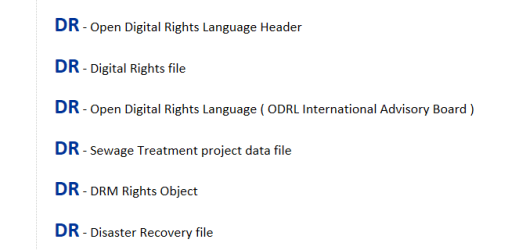
Here is a list of DR file extensions:
 

Attachments

  • 2013-06-19_1804.png
    2013-06-19_1804.png
    6.3 KB · Views: 8

My Computer My Computer

Computer Manufacturer/Model Number
HP, Dell, Gateway, Toshiba - 4 laptops and 2 desktops
OS
Vista, Windows7, Mint Mate, Zorin, Windows 8
CPU
from 1.6GHz Duo to i7
Monitor(s) Displays
2x HP w2207
Hard Drives
5x HDD, 7x SSD, 12x Externals
Keyboard
with trackball - no mices
Mouse
Trackball mice
Internet Speed
DSL 6000
Here is a list of DR file extensions:
It's NOT an extension problem. If it was the "file open" dialog should say someting like:

file: somefile.dr

but it says file: dr

windows is executing a command like: C:\users\dr bla bla\bla bla\bla.bla dd dfg
It thinks dr is file name.

Most likely referenced from (because it also happens after logoff/logon)
HKEY_CURRENT_USER\Software\Microsoft\Windows\CurrentVersion\Run
or maybe
HKEY_CURRENT_USER\Software\Microsoft\Windows\CurrentVersion\RunOnce
 

My Computer My Computer

Computer type
Laptop
Computer Manufacturer/Model Number
ACER ASPIRE 5742G
OS
Microsoft Windows 7 Home Premium 64-bits 7601 Multiprocessor Free Service Pack 1
CPU
Intel(R) Core(TM) i3 CPU M 370 @ 2.40GHz
Motherboard
Acer Aspire 5742G
Memory
4,00 GB
Graphics Card(s)
ATI Mobility Radeon HD 5400 Series
Sound Card
(1) AMD High Definition Audio Device (2) Realtek High Defi
Screen Resolution
1366 x 768 x 32 bits (4294967296 colors) @ 60 Hz
Hard Drives
WDC WD5000BEVT-22ZAT0
j84n4tU.png


Thats all i have 'checked'.
 

My Computer My Computer

Computer type
Laptop
Computer Manufacturer/Model Number
Sony (Vaio)
OS
Windows 7 Home Basic x64
CPU
Intel core i3-2330M Processor
Memory
4 gb
Graphics Card(s)
Nvidia geforce 410m
Antivirus
AVG Free edition
Browser
Chrome
QgJQtAA.png


AjDdlCW.png
 

My Computer My Computer

Computer type
Laptop
Computer Manufacturer/Model Number
Sony (Vaio)
OS
Windows 7 Home Basic x64
CPU
Intel core i3-2330M Processor
Memory
4 gb
Graphics Card(s)
Nvidia geforce 410m
Antivirus
AVG Free edition
Browser
Chrome
Do this. press OK and reboot. Still problems? If still problems... revert the change and uncheck "google updater" instead.
 

Attachments

  • j84n4tU.png
    j84n4tU.png
    33.6 KB · Views: 9

My Computer My Computer

Computer type
Laptop
Computer Manufacturer/Model Number
ACER ASPIRE 5742G
OS
Microsoft Windows 7 Home Premium 64-bits 7601 Multiprocessor Free Service Pack 1
CPU
Intel(R) Core(TM) i3 CPU M 370 @ 2.40GHz
Motherboard
Acer Aspire 5742G
Memory
4,00 GB
Graphics Card(s)
ATI Mobility Radeon HD 5400 Series
Sound Card
(1) AMD High Definition Audio Device (2) Realtek High Defi
Screen Resolution
1366 x 768 x 32 bits (4294967296 colors) @ 60 Hz
Hard Drives
WDC WD5000BEVT-22ZAT0
I asked you to post HKEY_CURRENT_USER\Software\Microsoft\Windows\CurrentVersion\Run

But you did HKEY_LOCAL_MACHINE\Software\Microsoft\Windows\CurrentVersion\Run
 

My Computer My Computer

Computer type
Laptop
Computer Manufacturer/Model Number
ACER ASPIRE 5742G
OS
Microsoft Windows 7 Home Premium 64-bits 7601 Multiprocessor Free Service Pack 1
CPU
Intel(R) Core(TM) i3 CPU M 370 @ 2.40GHz
Motherboard
Acer Aspire 5742G
Memory
4,00 GB
Graphics Card(s)
ATI Mobility Radeon HD 5400 Series
Sound Card
(1) AMD High Definition Audio Device (2) Realtek High Defi
Screen Resolution
1366 x 768 x 32 bits (4294967296 colors) @ 60 Hz
Hard Drives
WDC WD5000BEVT-22ZAT0
in command prompt:
Code:
reg  query  HKCU\Software\Microsoft\Windows\CurrentVersion\Run >regrun.txt

Post file regrun.txt (most likely in folder %userprofile%)
 

My Computer My Computer

Computer type
Laptop
Computer Manufacturer/Model Number
ACER ASPIRE 5742G
OS
Microsoft Windows 7 Home Premium 64-bits 7601 Multiprocessor Free Service Pack 1
CPU
Intel(R) Core(TM) i3 CPU M 370 @ 2.40GHz
Motherboard
Acer Aspire 5742G
Memory
4,00 GB
Graphics Card(s)
ATI Mobility Radeon HD 5400 Series
Sound Card
(1) AMD High Definition Audio Device (2) Realtek High Defi
Screen Resolution
1366 x 768 x 32 bits (4294967296 colors) @ 60 Hz
Hard Drives
WDC WD5000BEVT-22ZAT0
Back
Top