Sound suddenly not working but audio bars still moving. windows 7

teamkilo

New member
Local time
3:58 PM
Messages
7
i turned my pc on and tried to watch a YouTube video when i realised there was no sound playing. i tried to play a video file saved on my pc, still no sound. tried an mp3 and still no sound. everything was working fine 24 hours earlier. the green bar on the sound icon in the tray moves when i play something, but i just cant output anything.

motherboard: ASROCK N68C-S UCC
audio driver: VIA High Definition Audio

latest Windows 7 updates installed.

I've spent 10hrs reading all over the internet and have done the usual troubleshooting:
  • system restore
  • driver updating (from disk as well as site)
  • trying different audio sockets
  • using different external speakers
  • enabled/disabled playback devices
  • system speaker levels are full
  • enabled Loudness equaliser
  • used Microsoft Fix it Audio Playback which found no issues
  • run the audio troubleshooter from Control Panel, no issues found
i even reformatted and reinstalled windows hoping that would sort it out, yet that was pointless as i still have no audio.

can someone please help me find a fix for this.
if a system format did not fix the problem, im only left thinking that the on-board sound has died completely and i need a new sound card?
 

My Computer My Computer

At a glance

Windows 7 Ultimate 32bit
Computer type
PC/Desktop
Computer Manufacturer/Model Number
custom build
OS
Windows 7 Ultimate 32bit
Motherboard
ASROCK N68C-S UCC
Hi teamkilo, welcome to Seven Forums.

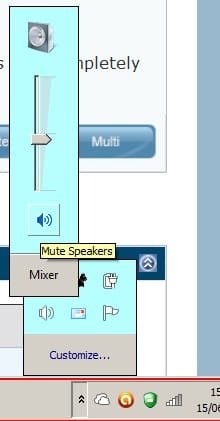
Have you tried this :-

Untitled.jpg
 

My Computer My Computer

At a glance

Win7 H.Prem. 32bit+SP1
Computer Manufacturer/Model Number
Look in my Signature.
OS
Win7 H.Prem. 32bit+SP1
thanks for the welcome and reply.
yes, thats the first thing i thought of, but its already full. every output level i can find i have turned up to max, still no joy.
 

My Computer My Computer

At a glance

Windows 7 Ultimate 32bit
Computer type
PC/Desktop
Computer Manufacturer/Model Number
custom build
OS
Windows 7 Ultimate 32bit
Motherboard
ASROCK N68C-S UCC
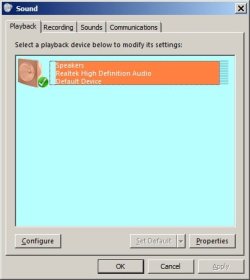
Hi teamkilo, if your speakers are not muted, check your speakers are configured correctly & are 'Set as Default'

Untitled.jpg
 

My Computer My Computer

At a glance

Win7 H.Prem. 32bit+SP1
Computer Manufacturer/Model Number
Look in my Signature.
OS
Win7 H.Prem. 32bit+SP1
It's marked as default and isn't muted. If I right click on the speaker and click 'test' I can see the bars move up and down. Still no sound.
 

My Computer My Computer

At a glance

Windows 7 Ultimate 32bit
Computer type
PC/Desktop
Computer Manufacturer/Model Number
custom build
OS
Windows 7 Ultimate 32bit
Motherboard
ASROCK N68C-S UCC
what am i supposed to do with this program?
 

My Computer My Computer

At a glance

Windows 7 Ultimate 32bit
Computer type
PC/Desktop
Computer Manufacturer/Model Number
custom build
OS
Windows 7 Ultimate 32bit
Motherboard
ASROCK N68C-S UCC
And, I KNOW you checked to be sure that your speakers are plugged in, and that you don't have a set of headphones plugged in that you may have forgotten about. (just checking...my wife is good for errors like that, and you'ld be surprised how often you see that type of thing in a support role.)


edit: Just re-read the post and saw that you tried new speakers... How about making sure that you're not plugging in to onboard sound when you have a separate sound card, or something similar. (I'm the one that is good for that error...)
 
Last edited:

My Computer My Computer

At a glance

Microsoft Windows 10 Home Build 15036Intel(R) Core(TM) i7-860 @ 2.80GHz4.00 GBNVIDIA GeForce GTX 750
Computer type
PC/Desktop
Computer Manufacturer/Model Number
iBuyPower NZXT
OS
Microsoft Windows 10 Home Build 15036
CPU
Intel(R) Core(TM) i7-860 @ 2.80GHz
Motherboard
Gigabyte Technology Co., Ltd. P55-UD3L
Memory
4.00 GB
Graphics Card(s)
NVIDIA GeForce GTX 750
Sound Card
(1) Line 6 UX2 (2) Realtek High Definition Audio
Monitor(s) Displays
23" acer
Screen Resolution
1920 x 1080 x 32 bits (4294967296 colors) @ 60 Hz
Hard Drives
(1) WDC WD5000AAKS-00D2B0 ATA Device (2) Seagate FreeAgent Go 250G USB Device
Cooling
Corsair H75 liquid cooler (Very easy to install, actually)
Internet Speed
60M cable modem-->Linksys E1200-->1Gbps net card
Browser
Chrome
Other Info
This is probably the longest I've ever had a Windows machine run without having to restore it to scratch. I'm used to restoring to "factory" about every 2 yrs. I've run with Win7 since new in 2009 and only recently (Nov, '14) restored to clean up the machine from all my 'xperimenting. LOL!! I may never need another machine.

Upgraded to 10 when it was still free, then installed 2017 update.
i only have onboard sound with front and rear outputs, ive tried both and none of them work (after making sure they are activated in the sound settings).
ive even taken the mobo out and refitted it back in hoping something just came loose, still no joy.
ive literally taken the pc apart and put it back together.
i am the only user of this pc, so i dont know what could have changed in such a short period of time for the sound to stop outputting as there were no software installs inbetween the sound working and then not. the pc isnt even left powered on when not in use.

im going to buy one of those cheap usb sound cards off ebay just to see if there is something wrong with the onboard soundboard hardware. USB EXTERNAL 3D 5.1 CHANNEL AUDIO PC SOUND CARD ADAPTER | eBay

please keep your suggestions coming.
 

My Computer My Computer

At a glance

Windows 7 Ultimate 32bit
Computer type
PC/Desktop
Computer Manufacturer/Model Number
custom build
OS
Windows 7 Ultimate 32bit
Motherboard
ASROCK N68C-S UCC
maybe it is because of your driver sound. just go to the site of your sound company and download the latest driver...and don't forget to update the bios also. works for me
 

My Computer My Computer

At a glance

windows 7 Ultimate x64intel i5 M480 2.7GHz8GB RAMATi Mobility Radeon HD6370
Computer type
Laptop
Computer Manufacturer/Model Number
HP Probook 4421s
OS
windows 7 Ultimate x64
CPU
intel i5 M480 2.7GHz
Memory
8GB RAM
Graphics Card(s)
ATi Mobility Radeon HD6370
Hard Drives
500GB dual boot with centos 6.3 linux
Cooling
3M
Mouse
logitech m325
Antivirus
Kaspersky Internet Security 2012
Browser
Google Chrome, Internet Explorer 9
Driver has been updated, both before and after a format. Will update bios but I'm sure that won't be the issue, there's no reason for the bios to need an update as the sound was working.
 
Last edited:

My Computer My Computer

At a glance

Windows 7 Ultimate 32bit
Computer type
PC/Desktop
Computer Manufacturer/Model Number
custom build
OS
Windows 7 Ultimate 32bit
Motherboard
ASROCK N68C-S UCC
just an update guys.
my cheap usb sound card (linked in previous post) arrived today and plugged my speakers in to it and now my sound works!! it only outputs in dvd quality audio but im not too fussed.
i guess its either something wrong with my onboard soundcard that windows isnt picking up on.
this will do me for now as i only need sound for films and youtube.
 

My Computer My Computer

At a glance

Windows 7 Ultimate 32bit
Computer type
PC/Desktop
Computer Manufacturer/Model Number
custom build
OS
Windows 7 Ultimate 32bit
Motherboard
ASROCK N68C-S UCC
i have a similar problem. when i first turn on my [sony vaio with windows 7] laptop it makes the windows starting up sound but nothing after that. i've tried downloads, searched through all my settings, and searched every thread of google for answers but nothing works. any suggestions? i have already tried setting speakers as my default, that did'nt work. headphones dont either.
 

My Computer My Computer

At a glance

windows 7 home premium
Computer type
Laptop
OS
windows 7 home premium
i have a similar problem. when i first turn on my [sony vaio with windows 7] laptop it makes the windows starting up sound but nothing after that. i've tried downloads, searched through all my settings, and searched every thread of google for answers but nothing works. any suggestions? i have already tried setting speakers as my default, that did'nt work. headphones dont either.

Actually, I'd recommend you'd start a new thread, as you probably have a different issue, and the original issue was solved with a new card.
 

My Computer My Computer

At a glance

Microsoft Windows 10 Home Build 15036Intel(R) Core(TM) i7-860 @ 2.80GHz4.00 GBNVIDIA GeForce GTX 750
Computer type
PC/Desktop
Computer Manufacturer/Model Number
iBuyPower NZXT
OS
Microsoft Windows 10 Home Build 15036
CPU
Intel(R) Core(TM) i7-860 @ 2.80GHz
Motherboard
Gigabyte Technology Co., Ltd. P55-UD3L
Memory
4.00 GB
Graphics Card(s)
NVIDIA GeForce GTX 750
Sound Card
(1) Line 6 UX2 (2) Realtek High Definition Audio
Monitor(s) Displays
23" acer
Screen Resolution
1920 x 1080 x 32 bits (4294967296 colors) @ 60 Hz
Hard Drives
(1) WDC WD5000AAKS-00D2B0 ATA Device (2) Seagate FreeAgent Go 250G USB Device
Cooling
Corsair H75 liquid cooler (Very easy to install, actually)
Internet Speed
60M cable modem-->Linksys E1200-->1Gbps net card
Browser
Chrome
Other Info
This is probably the longest I've ever had a Windows machine run without having to restore it to scratch. I'm used to restoring to "factory" about every 2 yrs. I've run with Win7 since new in 2009 and only recently (Nov, '14) restored to clean up the machine from all my 'xperimenting. LOL!! I may never need another machine.

Upgraded to 10 when it was still free, then installed 2017 update.
Back
Top