Help to make a Windows PE disc

You're welcome. When I get the time will have a look and see if it needs updating.
 

My Computers My Computers

System One System Two

  • Computer type
    PC/Desktop
    OS
    7 X64
    CPU
    i5 8400
    Motherboard
    gigabyte b365m ds3h
    Memory
    2x8gb 3200mhz
    Hard Drives
    various
    PSU
    pure power 11 400w cm
    Case
    Coolermaster
    Cooling
    cryorig m9i
  • Computer type
    PC/Desktop
    OS
    7x64
    CPU
    g5400
    Motherboard
    ga b365m ds3h
    Memory
    8gb ddr4 2400
    PSU
    xfx pro 450w
Hi there
another possibly EASIER suggestion -- download Windows 8 ENTERPRISE version (Free 90 / 180 day trial) and create a very useful WINDOWS to GO system --this is a FULLY functioning Windows system (Not a "Live CD") which BOOTS AND RUNS from an external USB / HDD. You can load / install Windows programs on it such as free recovery software. Install this say on an SSD and it even runs decently fast when booted from a USB2 slot with a SATA==>USB2 adapter -- even better if you have USB3 ports with a SATA ==>USB3 adapter.

http://www.smallbusinesscomputing.com/biztools/windows-8-how-to-set-up-windows-to-go.html

Cheers
jimbo
 

My Computer My Computer

Computer type
PC/Desktop
Computer Manufacturer/Model Number
Custom built, several laptops HP/ASUS
OS
Linux CENTOS 7 / various Windows OS'es and servers
CPU
Intel i7 Intel i5
Memory
8GB, 16GB
Graphics Card(s)
On Motherboard
Sound Card
Realtek HD audio
Monitor(s) Displays
Apple Cinema display, Samsung LCD
Screen Resolution
1920 X 1080
Hard Drives
4 X 1TB SATA
Mouse
Toshiba wireless laser
Internet Speed
> 20MB up
Is that allowed?

Windows 8 is also a snag.

Page 2 of your link says this - bit pointless, then:

To maintain the security of the Windows To Go workspace, the USB Windows To Go USB device can’t see the hard drive(s) of the host system it’s running on. Therefore, you can’t use a Windows To Go device to repair a computer or recover files from it.
 

My Computers My Computers

System One System Two

  • Computer type
    PC/Desktop
    OS
    7 X64
    CPU
    i5 8400
    Motherboard
    gigabyte b365m ds3h
    Memory
    2x8gb 3200mhz
    Hard Drives
    various
    PSU
    pure power 11 400w cm
    Case
    Coolermaster
    Cooling
    cryorig m9i
  • Computer type
    PC/Desktop
    OS
    7x64
    CPU
    g5400
    Motherboard
    ga b365m ds3h
    Memory
    8gb ddr4 2400
    PSU
    xfx pro 450w
Is that allowed?

Windows 8 is also a snag.

Page 2 of your link says this - bit pointless, then:

To maintain the security of the Windows To Go workspace, the USB Windows To Go USB device can’t see the hard drive(s) of the host system it’s running on. Therefore, you can’t use a Windows To Go device to repair a computer or recover files from it.

Hi there
Don't use the workspace or "certified devices" but do it Manually as shown in the link below.

If you create a Windows to go system on a "bog standard" USB device it has full access to all the HOST's HDD's (on any machine --that's why it's PORTABLE).


Creating a Non-Certified Windows To Go USB Drive » ADMIN Magazine

Note on reference to the Image the F1_image file is for 32 bit systems and the F3_image is for 64 bit systems so when reading the article remember to select the correct image.

You also don't need a Microsoft account to download the WAIK either so ignore that piece in the article. If you already have the W7 WAIK that's fine.

I'm actually running this on a W8 to go system which I created as per the article on a Samsung 840 SSD disk. The actual HOST machine is a FRENCH Work computer --can't understand a word so I've booted my own system . No probs whatsoever accessing all the work network HDD's as well.

The response time via SSD and USB port is actually faster than the old W7 system with a spinner in it. !!! (OT here but another reason for always using an SSD where possible for your OS -- W7 performs really fast too with an SSD but I can't make a W7 to go system unfortunately).

Cheers
jimbo
 

My Computer My Computer

Computer type
PC/Desktop
Computer Manufacturer/Model Number
Custom built, several laptops HP/ASUS
OS
Linux CENTOS 7 / various Windows OS'es and servers
CPU
Intel i7 Intel i5
Memory
8GB, 16GB
Graphics Card(s)
On Motherboard
Sound Card
Realtek HD audio
Monitor(s) Displays
Apple Cinema display, Samsung LCD
Screen Resolution
1920 X 1080
Hard Drives
4 X 1TB SATA
Mouse
Toshiba wireless laser
Internet Speed
> 20MB up

My Computer My Computer

OS
ME/XP/Vista/Win7
Another bit of incomplete info from MS, then.

Can you see all partitions in explorer? I may have a way of doing that, but don't have an efi system to test it on.
 

My Computers My Computers

System One System Two

  • Computer type
    PC/Desktop
    OS
    7 X64
    CPU
    i5 8400
    Motherboard
    gigabyte b365m ds3h
    Memory
    2x8gb 3200mhz
    Hard Drives
    various
    PSU
    pure power 11 400w cm
    Case
    Coolermaster
    Cooling
    cryorig m9i
  • Computer type
    PC/Desktop
    OS
    7x64
    CPU
    g5400
    Motherboard
    ga b365m ds3h
    Memory
    8gb ddr4 2400
    PSU
    xfx pro 450w
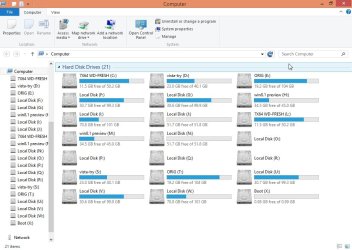
You mean like this?

ALLDRIVES.jpg
 

My Computers My Computers

System One System Two

  • Computer type
    PC/Desktop
    OS
    7 X64
    CPU
    i5 8400
    Motherboard
    gigabyte b365m ds3h
    Memory
    2x8gb 3200mhz
    Hard Drives
    various
    PSU
    pure power 11 400w cm
    Case
    Coolermaster
    Cooling
    cryorig m9i
  • Computer type
    PC/Desktop
    OS
    7x64
    CPU
    g5400
    Motherboard
    ga b365m ds3h
    Memory
    8gb ddr4 2400
    PSU
    xfx pro 450w
Hi there
Not only can you see all the partitions on the host machine but you get Network access to all network drives on your LAN (assuming you have permissions) just like you would when using a "Normal" windows system.

If you are uncomfortable with Windows 8 just install VMware player on the Windows to Go system and then fire up a W7 VM -- response time is fine even if your whole W8togo setup plus the VM's are on an external HDD -- on an SSD response time won't be a problem.

BTW for testing UEFI systems using a VM - VMware virtual bios allows you to set UEFI even on a non UEFI system so you can play around with that feature on a VM whether your host has the feature or not.

Cheers
jimbo
 

My Computer My Computer

Computer type
PC/Desktop
Computer Manufacturer/Model Number
Custom built, several laptops HP/ASUS
OS
Linux CENTOS 7 / various Windows OS'es and servers
CPU
Intel i7 Intel i5
Memory
8GB, 16GB
Graphics Card(s)
On Motherboard
Sound Card
Realtek HD audio
Monitor(s) Displays
Apple Cinema display, Samsung LCD
Screen Resolution
1920 X 1080
Hard Drives
4 X 1TB SATA
Mouse
Toshiba wireless laser
Internet Speed
> 20MB up
It is not for the average user. It is only for enterprise customers, slight snag.

Are there any permissons/access problems deleting/renaming files? I expect so.

Can you see the hidden efi partitions in explorer? I expect not.
 

My Computers My Computers

System One System Two

  • Computer type
    PC/Desktop
    OS
    7 X64
    CPU
    i5 8400
    Motherboard
    gigabyte b365m ds3h
    Memory
    2x8gb 3200mhz
    Hard Drives
    various
    PSU
    pure power 11 400w cm
    Case
    Coolermaster
    Cooling
    cryorig m9i
  • Computer type
    PC/Desktop
    OS
    7x64
    CPU
    g5400
    Motherboard
    ga b365m ds3h
    Memory
    8gb ddr4 2400
    PSU
    xfx pro 450w
has anyone else had any problems downloading the Paragonpev4 or 5 zip file? I get
Invalid Attachment specified. If you followed a valid link, please notify the administrator
 

My Computer My Computer

Computer type
PC/Desktop
Computer Manufacturer/Model Number
Custom Build
OS
Win 7
CPU
Intel i5
Motherboard
Asus
Memory
8 gigs
Hard Drives
3 WD Sata 3
Antivirus
Eset
Browser
Firefox
For Windows to go (or any other OS) I have my own approach. Reqires an external SSD. I run Windows 8 and a collection of Linux distros like that.

http://www.sevenforums.com/tutorials/276540-portable-os-carry-your-os-external-drive.html

Example of Windows 8 running like this.

http://www.sevenforums.com/virtualization/277690-vmware-player-windows-8-demo.html

But if you want something completely independent on a USB stick (USB2 or USB3) to e.g. recover files, I recommend this.

http://www.sevenforums.com/tutorials/287439-emergency-kit-save-your-files-dead-os.html
 

My Computer My Computer

Computer Manufacturer/Model Number
HP, Dell, Gateway, Toshiba - 4 laptops and 2 desktops
OS
Vista, Windows7, Mint Mate, Zorin, Windows 8
CPU
from 1.6GHz Duo to i7
Monitor(s) Displays
2x HP w2207
Hard Drives
5x HDD, 7x SSD, 12x Externals
Keyboard
with trackball - no mices
Mouse
Trackball mice
Internet Speed
DSL 6000
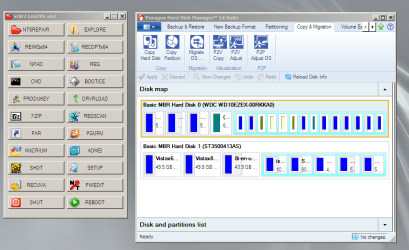
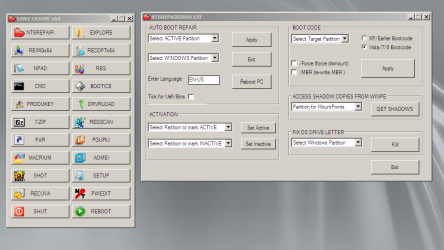
New version in the works.

win7pex64.png

win7pex64-2.png

win7pex64-3.png

win7pex64-4.png
 

My Computers My Computers

System One System Two

  • Computer type
    PC/Desktop
    OS
    7 X64
    CPU
    i5 8400
    Motherboard
    gigabyte b365m ds3h
    Memory
    2x8gb 3200mhz
    Hard Drives
    various
    PSU
    pure power 11 400w cm
    Case
    Coolermaster
    Cooling
    cryorig m9i
  • Computer type
    PC/Desktop
    OS
    7x64
    CPU
    g5400
    Motherboard
    ga b365m ds3h
    Memory
    8gb ddr4 2400
    PSU
    xfx pro 450w
Here you go:

View attachment PEALLv9.zip

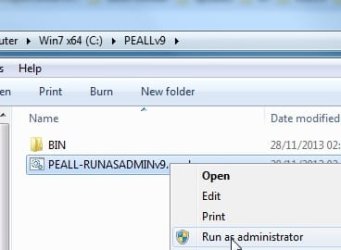
Extract it to the root of of your Drive . You should have C:\PEALLv9. Run as admin on the .cmd file.

PEALLv9.jpg
 

My Computers My Computers

System One System Two

  • Computer type
    PC/Desktop
    OS
    7 X64
    CPU
    i5 8400
    Motherboard
    gigabyte b365m ds3h
    Memory
    2x8gb 3200mhz
    Hard Drives
    various
    PSU
    pure power 11 400w cm
    Case
    Coolermaster
    Cooling
    cryorig m9i
  • Computer type
    PC/Desktop
    OS
    7x64
    CPU
    g5400
    Motherboard
    ga b365m ds3h
    Memory
    8gb ddr4 2400
    PSU
    xfx pro 450w
Nice shot SIW2.. :cool:

I followed your instructions and the ISO booted perfectly.
Will it work the same if made from Windows 8.1, in order to use WinPE 5.0 ?
Into Windows 7x64, I have only minimal installation of WAIK, located into "program files"
Into Windows 8.1x64 , I have WADK into program files (x86) folder. Don't know if the WADK allow WinpE 5.0 x64.
 

My Computer My Computer

OS
Windows 7x64
Yes, it should work for win7/8/8.1.

WAIK and WADK not needed.
 

My Computers My Computers

System One System Two

  • Computer type
    PC/Desktop
    OS
    7 X64
    CPU
    i5 8400
    Motherboard
    gigabyte b365m ds3h
    Memory
    2x8gb 3200mhz
    Hard Drives
    various
    PSU
    pure power 11 400w cm
    Case
    Coolermaster
    Cooling
    cryorig m9i
  • Computer type
    PC/Desktop
    OS
    7x64
    CPU
    g5400
    Motherboard
    ga b365m ds3h
    Memory
    8gb ddr4 2400
    PSU
    xfx pro 450w
Thanks SIW2, Yes it works and produce a WinPE 5.0 Bootable Iso file. Please excuse my ignorance (and bad English), I would like to include to the menu some applications. I have Macrium Reflect Free on my machine, and I see it into the menu. (Launching very slow), but working. I would like to add Aoemi partition assistant. I saw a folder named AOEMI , and installed the program into Windows 8.1, but I can't see it when creating the iso and it's not into the menu. It's x86 program. Is there some files to copy into that folder ? In short .. How to add new applications.? Thanks.
 

My Computer My Computer

OS
Windows 7x64
If you are using 64 bit os, the AOMEI menu entry is for Aomei Backupper.

That is because Aomei Backupper has 64 bit coded files.

Aomei partition Asst only comes 32 bit coded. It cannot run in native 64 bit pe.

If you want a partition manager in native 64 pe, Paragon does, but only the paid versions, using the Boot Media Builder files available from your Pargon account.

The only free 64 bit coded partition manager( as far as I know ) is Partition Guru.If you install partition guru Free or Pro, then create your pe, it should be automatically included under the menu entry "PGURU"

http://www.eassos.com/download.php
 

My Computers My Computers

System One System Two

  • Computer type
    PC/Desktop
    OS
    7 X64
    CPU
    i5 8400
    Motherboard
    gigabyte b365m ds3h
    Memory
    2x8gb 3200mhz
    Hard Drives
    various
    PSU
    pure power 11 400w cm
    Case
    Coolermaster
    Cooling
    cryorig m9i
  • Computer type
    PC/Desktop
    OS
    7x64
    CPU
    g5400
    Motherboard
    ga b365m ds3h
    Memory
    8gb ddr4 2400
    PSU
    xfx pro 450w

My Computers My Computers

System One System Two

  • Computer type
    PC/Desktop
    OS
    7 X64
    CPU
    i5 8400
    Motherboard
    gigabyte b365m ds3h
    Memory
    2x8gb 3200mhz
    Hard Drives
    various
    PSU
    pure power 11 400w cm
    Case
    Coolermaster
    Cooling
    cryorig m9i
  • Computer type
    PC/Desktop
    OS
    7x64
    CPU
    g5400
    Motherboard
    ga b365m ds3h
    Memory
    8gb ddr4 2400
    PSU
    xfx pro 450w
Many thanks for replying so fast.

I understand much better now how it works. Congratulations to have made this possible without the add of WAIK or ADK. It take just 1 minute to create an ISO and one more to test it from an USB tumb drive.

I will check also the advanced PE build. Last year I have built a Windows7 x64 PE, but far from the screenshot I can see in your last link.
Thanks again.
Regards
 

My Computer My Computer

OS
Windows 7x64
Back
Top