Solved External Toshiba HDD can't be installed (system strategy)

MrBlue

New member
Local time
5:23 AM
Messages
12
Location
China
Hello,

I am not able to install an external Toshiba hdd that it using USB 3.0 (the hdd is new and never used before)

Once I connect the hdd to my Windows 7 (family edition) Iam getting the following error msg :

Code:
The install is forbidden by system strategy.

And nothing show up in my computer...

I am the admin of the computer so I am not understanding where is the problem; If somebody can help me...
 

My Computer My Computer

At a glance

Windows 7 Ultimate x64Intel Core 2 Duo T9600 2.8 GHZ8 Go
Computer type
Laptop
Computer Manufacturer/Model Number
Sony VGN-AW41XH
OS
Windows 7 Ultimate x64
CPU
Intel Core 2 Duo T9600 2.8 GHZ
Memory
8 Go
Antivirus
McAfee
Browser
Firefox

My Computer My Computer

At a glance

Windows 7 64 Bit Home Premium SP1i7-3820GSkill F3-14900CL9Q - 16GBEVGA GeForce GTX660 - Driver 352.86
Computer type
PC/Desktop
Computer Manufacturer/Model Number
Home Built - Jan 2013
OS
Windows 7 64 Bit Home Premium SP1
CPU
i7-3820
Motherboard
Asus P9X79-PRO - Bios 4608
Memory
GSkill F3-14900CL9Q - 16GB
Graphics Card(s)
EVGA GeForce GTX660 - Driver 352.86
Sound Card
On board Realtek ALC898
Monitor(s) Displays
Acer S271HL
Screen Resolution
1920 x 1080
Hard Drives
#1- Samsung 840 Pro Series
#2- Western Digital WD1002FAEX Sata3 Black
#3- Western Digital WD1002FAEX Sata3 Black
PSU
Corsair CMPSU-850TX-V2 - 850 watt (by Seasonic)
Case
Corsair Obsidian 550D
Cooling
Standard 3 120mm case fans, Cooler Master Hyper 212 EVO
Keyboard
MS KC-0405
Mouse
Intellimouse 5-button
Internet Speed
56 Mbits/Sec (on a good day)
Antivirus
Avast & Malwarebytes
Browser
Firefox
Other Info
Asus DVD - DRW-24B1ST 24X
I have never seen that message. No idea what it is.

Sorry, the msg was in french so I translated it by myself with my poor english.. :confused:


Yes I already found similar link on google, but they are all talking about software installation problems (I tried to modify the files as they have writed but nothing work).

I think my problem is more related to the USB port installation of an external HDD. There is no software to install.

If somebody can tell me which strategy system policy to modify in windows, for an usb port that could be fine.
 
Last edited:

My Computer My Computer

At a glance

Windows 7 Ultimate x64Intel Core 2 Duo T9600 2.8 GHZ8 Go
Computer type
Laptop
Computer Manufacturer/Model Number
Sony VGN-AW41XH
OS
Windows 7 Ultimate x64
CPU
Intel Core 2 Duo T9600 2.8 GHZ
Memory
8 Go
Antivirus
McAfee
Browser
Firefox
Anytime you add a new device via USB, Windows will install a 'driver' for it (a notification opens that says, basically, "installing new device"). This is really just identification info when it comes to external hard drives and USB sticks.

You could check to see if you have security restrictions concerning installing new devices or drivers.

There is also a possibility that there is software on the new hard drive. Hard drive manufacturers include diagnostic software and utilities - like backup software - on supposedly blank new drives.
Perhaps one of these is trying to install automatically?

EDIT: I've asked for help from the Security guys.
 

My Computer My Computer

At a glance

Windows 7 64 Bit Home Premium SP1i7-3820GSkill F3-14900CL9Q - 16GBEVGA GeForce GTX660 - Driver 352.86
Computer type
PC/Desktop
Computer Manufacturer/Model Number
Home Built - Jan 2013
OS
Windows 7 64 Bit Home Premium SP1
CPU
i7-3820
Motherboard
Asus P9X79-PRO - Bios 4608
Memory
GSkill F3-14900CL9Q - 16GB
Graphics Card(s)
EVGA GeForce GTX660 - Driver 352.86
Sound Card
On board Realtek ALC898
Monitor(s) Displays
Acer S271HL
Screen Resolution
1920 x 1080
Hard Drives
#1- Samsung 840 Pro Series
#2- Western Digital WD1002FAEX Sata3 Black
#3- Western Digital WD1002FAEX Sata3 Black
PSU
Corsair CMPSU-850TX-V2 - 850 watt (by Seasonic)
Case
Corsair Obsidian 550D
Cooling
Standard 3 120mm case fans, Cooler Master Hyper 212 EVO
Keyboard
MS KC-0405
Mouse
Intellimouse 5-button
Internet Speed
56 Mbits/Sec (on a good day)
Antivirus
Avast & Malwarebytes
Browser
Firefox
Other Info
Asus DVD - DRW-24B1ST 24X

My Computer My Computer

At a glance

Windows 7 Home Premium 32 bit
OS
Windows 7 Home Premium 32 bit
You could check to see if you have security restrictions concerning installing new devices or drivers.

Yes that's what I am trying to check, I am 100% sure that there is something in the strategy policy that is blocking the installation of the hdd. But I completely don't know what to modify.

There is also a possibility that there is software on the new hard drive. Hard drive manufacturers include diagnostic software and utilities - like backup software - on supposedly blank new drives.

I've just connect the hdd to the laptop of my wife and it detect it immediatly without any software to install (vista OS).

Just enable the hidden administrator account using option 2 in this tutorial http://www.sevenforums.com/tutorials/507-built-administrator-account-enable-disable.html

Log in as an administrator. Now connect your Toshiba drive. Report the result.
Hi, I've follow all the tutorial, login as the admin but it still give me the same error msg, that the installation is forbidden by the strategy policy. :confused:
 

My Computer My Computer

At a glance

Windows 7 Ultimate x64Intel Core 2 Duo T9600 2.8 GHZ8 Go
Computer type
Laptop
Computer Manufacturer/Model Number
Sony VGN-AW41XH
OS
Windows 7 Ultimate x64
CPU
Intel Core 2 Duo T9600 2.8 GHZ
Memory
8 Go
Antivirus
McAfee
Browser
Firefox
Looks like this is gonna be a hard nut to crack.

This is a family pack. Windows 7 Home Premium. So it must have been installed possibly on two more PCs.

If so can you try it on the other two PCs?

Also what happens when you connect other external HDDs/pendrives on this PC?

Just trying to gather more info so that other heads can get cracking. :)
 

My Computer My Computer

At a glance

Windows 7 Home Premium 32 bit
OS
Windows 7 Home Premium 32 bit
No, I mistake in my previous post, the exact version of my windows is the ultimate one and it is installed only in my vaio laptop.

I am sure this has something to do with the strategy policy located there :

1. Click Start -> Control Panel
2. Open Administrative Tools
3. Open Local Security Settings
4. Click Software Restriction Policies

If somebody know which rules need to be modified for cancel the restriction, please help.
 

My Computer My Computer

At a glance

Windows 7 Ultimate x64Intel Core 2 Duo T9600 2.8 GHZ8 Go
Computer type
Laptop
Computer Manufacturer/Model Number
Sony VGN-AW41XH
OS
Windows 7 Ultimate x64
CPU
Intel Core 2 Duo T9600 2.8 GHZ
Memory
8 Go
Antivirus
McAfee
Browser
Firefox
Also what happens when you connect other external HDDs/pendrives on this PC?


Yes, I also own an external HDD samsung and it can be connected to this PC without any problem.

I don't know if it's related but the toshiba hdd if for USB 3.0 (and also 2.0) and the samsung hdd is using USB 2.0
 

My Computer My Computer

At a glance

Windows 7 Ultimate x64Intel Core 2 Duo T9600 2.8 GHZ8 Go
Computer type
Laptop
Computer Manufacturer/Model Number
Sony VGN-AW41XH
OS
Windows 7 Ultimate x64
CPU
Intel Core 2 Duo T9600 2.8 GHZ
Memory
8 Go
Antivirus
McAfee
Browser
Firefox
It is now clear.

And yes if it is anything Pro and above, the permissions for installing devices can be set under group policy, though I am not familiar with it to give any solutions.

But with that clarification that it is Windows Ultimate, other experts can chip in.
 

My Computer My Computer

At a glance

Windows 7 Home Premium 32 bit
OS
Windows 7 Home Premium 32 bit
OK, here is something I picked up on a quick google search.

Is your PC, or has your PC ever been on a domain at all, e.g. added to a server domain like in a workplace etc?
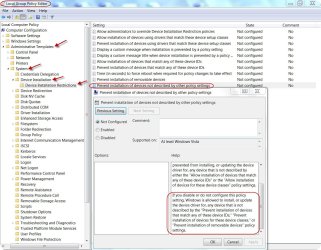
If not, try going to Start > Run, type in gpedit.msc and press OK. Go to Computer Configuration > Administrative templates > System > Device Installation > Device Installation Restrictions.
In here are loads of different settings which apply to installation of new devices, make sure they are all set to "not configured" apart from the very first one which says "Allow administrators to override restrictions" etc.
Another thing: Go to Start > Run, type in rsop.msc and post on here what policies are being applied.
Also post the result of this: Go to Start > Run, type in cmd, into cmd type SET, press enter and post whatever USERDOMAIN= is.

That thread stops ubruptly there. But I think this could form the base for other knowledgeable people here to elaborate on it.
 

My Computer My Computer

At a glance

Windows 7 Home Premium 32 bit
OS
Windows 7 Home Premium 32 bit
In here are loads of different settings which apply to installation of new devices, make sure they are all set to "not configured" apart from the very first one which says "Allow administrators to override restrictions" etc.

Problem resolved. :D

There was only one setting not set to "not configured", so I've change the status and now the hdd can be detected and it works fine.

Just for info the settings was : Prevent installation of devices not described by other policy settings (I've translate it from french to english, not sure if it's exactly the same words).

Thank you so much jumanji, you are great and thanks also to TVeblen for your help.
 

My Computer My Computer

At a glance

Windows 7 Ultimate x64Intel Core 2 Duo T9600 2.8 GHZ8 Go
Computer type
Laptop
Computer Manufacturer/Model Number
Sony VGN-AW41XH
OS
Windows 7 Ultimate x64
CPU
Intel Core 2 Duo T9600 2.8 GHZ
Memory
8 Go
Antivirus
McAfee
Browser
Firefox
Nice work! I learned something new today. Thank you!
 

My Computer My Computer

At a glance

Windows 7 64 Bit Home Premium SP1i7-3820GSkill F3-14900CL9Q - 16GBEVGA GeForce GTX660 - Driver 352.86
Computer type
PC/Desktop
Computer Manufacturer/Model Number
Home Built - Jan 2013
OS
Windows 7 64 Bit Home Premium SP1
CPU
i7-3820
Motherboard
Asus P9X79-PRO - Bios 4608
Memory
GSkill F3-14900CL9Q - 16GB
Graphics Card(s)
EVGA GeForce GTX660 - Driver 352.86
Sound Card
On board Realtek ALC898
Monitor(s) Displays
Acer S271HL
Screen Resolution
1920 x 1080
Hard Drives
#1- Samsung 840 Pro Series
#2- Western Digital WD1002FAEX Sata3 Black
#3- Western Digital WD1002FAEX Sata3 Black
PSU
Corsair CMPSU-850TX-V2 - 850 watt (by Seasonic)
Case
Corsair Obsidian 550D
Cooling
Standard 3 120mm case fans, Cooler Master Hyper 212 EVO
Keyboard
MS KC-0405
Mouse
Intellimouse 5-button
Internet Speed
56 Mbits/Sec (on a good day)
Antivirus
Avast & Malwarebytes
Browser
Firefox
Other Info
Asus DVD - DRW-24B1ST 24X
Glad my little effort to extract information from you bit by bit and from thereon jump to the target solution worked in your favour. In fact I had seen this solution thread even earlier but since you had said family pack I did not bring it early on and was going in circles.

Just like TVeblen corked open a beer bottle yesterday, I think I can uncork one today but I do not stock any alcohol at home except for the beer I drink on parties.:cry:

Have a good day, MrBlue.:) (and don't forget to mark it as solved)
 

My Computer My Computer

At a glance

Windows 7 Home Premium 32 bit
OS
Windows 7 Home Premium 32 bit
.......Just for info the settings was : Prevent installation of devices not described by other policy settings (I've translate it from french to english, not sure if it's exactly the same words)......

Your translation is absolutely correct. Tres bien!

For the benefit of those who may look into this thread to resolve problems of this sort, here is the screen shot on Device Installation Restrictions, with the one that did the trick here.

In General, all should be "Not configured"

DIR.jpg
 

My Computer My Computer

At a glance

Windows 7 Home Premium 32 bit
OS
Windows 7 Home Premium 32 bit
Back
Top