Solved Graphics card not showing in device manager

CityLady

New member
Member
Local time
12:08 PM
Messages
85
Location
Cape Town, South Africa
Hi there, I have recently bought the nvidia geforce GT630 graphics card which is a pci slot card, I have put the card in to the slot and screwed it in place. there are no cables to attach to the motherboard and it's not powering up or installing from the dvd I got with it. When i plug the monitor cable into the card at the back and then boot up I get analogue monitor on power save click power on keyboard or move mouse...yet nothing happens and the monitor goes to sleep. My monitor is a dell as is my keyboard model Sk-8135 the keyboard has no power switch or power button and the monitor light goes orange leaving the screen black.

Please help me....

Citylady
 

My Computer My Computer

Computer type
PC/Desktop
Computer Manufacturer/Model Number
ACPI x 86-based pc
OS
windows 7 64bit Enterprise
CPU
Intel core i5- 3330 CPU @ 3.00GHz
Motherboard
MSI MS-7756
Memory
8gb
Graphics Card(s)
Nvidia GeForce GT630 2Gb ram
Sound Card
High definition audio device
Monitor(s) Displays
Dell 1908 FP (Analog)
Screen Resolution
1440 x900
Hard Drives
Maxtor 2F040L0 ATA 360gb
SATA ST3120026a ATA 120gb
SATA ST332061 3AS 120gb
WD 2tb hard drive
PSU
500watts
Case
not sure
Cooling
not sure
Keyboard
Standard PS/2 Keyboard
Mouse
Logitech wireless HID-compliant mouse
Internet Speed
4MB/s
Hi,

When you switch the PC on, is the fan on the graphics card spinning?

You may want to try re-seating it.
 

My Computer My Computer

OS
Windows 7 Professional 64 bit
I'm with Paul....if it doesn't take any auxiliary power, make sure it is seated in the PCI slot all the way. If it is seated in completely, the latch on the PCI slot should engage itself.
 

My Computer My Computer

Computer type
PC/Desktop
Computer Manufacturer/Model Number
Custom Built
OS
Windows 7 Professional 64bit SP1
CPU
Intel Core i5-3570K @ 4.5GHz
Motherboard
Asus Sabertooth Z77
Memory
Corsair Vengeance 16GB (4x4) @1866MHz CL 9-9-9-24 1T
Graphics Card(s)
EVGA GTX 750 Ti FTW
Sound Card
Onboard Audio
Monitor(s) Displays
Dell S2309W
Screen Resolution
1920x1080
Hard Drives
Samsung 830 128GB SSD - OS
(4) Seagate 5TB HDD
(1) Seagate 2TB HDD
PSU
Seasonic X750 80+ Gold Full Modular
Case
Antec Eleven Hundred Super Mid Tower
Cooling
Intel Liquid Cooler
Keyboard
Max Nighthawk X8 Mechanical keyboard
Mouse
Mionix Naos 7000
Internet Speed
50 Mbps Down / 10 Mbps Up
Antivirus
Microsoft Security Essentials/Malwarebytes Anti-Malware
Browser
Chrome/Firefox
Other Info
Klipsch ProMedia 2.1's
Asus RT-N66R Wireless Router
Hi and thank you for your responses...I have looked again and it seems to be in as far as it will go...there is a clip like thing on the end which clicked when I placed into the pci slot... I will take it out again and try again...
 

My Computer My Computer

Computer type
PC/Desktop
Computer Manufacturer/Model Number
ACPI x 86-based pc
OS
windows 7 64bit Enterprise
CPU
Intel core i5- 3330 CPU @ 3.00GHz
Motherboard
MSI MS-7756
Memory
8gb
Graphics Card(s)
Nvidia GeForce GT630 2Gb ram
Sound Card
High definition audio device
Monitor(s) Displays
Dell 1908 FP (Analog)
Screen Resolution
1440 x900
Hard Drives
Maxtor 2F040L0 ATA 360gb
SATA ST3120026a ATA 120gb
SATA ST332061 3AS 120gb
WD 2tb hard drive
PSU
500watts
Case
not sure
Cooling
not sure
Keyboard
Standard PS/2 Keyboard
Mouse
Logitech wireless HID-compliant mouse
Internet Speed
4MB/s
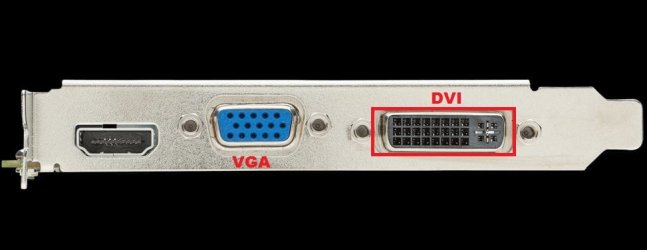
It seems that it was seated correctly if the latch engaged the hook of the card automatically. No problems there. What type of cable were you using to connect your monitor to your video card....VGA, DVI? If you were using VGA, try using a DVI cable(if your monitor has a DVI connection on it) and see what happens then.

Here is what I am talking about:

GT630.JPG

Also, don't use the disk for any drivers....it's outdated by the time it gets to your door. Here is the lastest non-BETA driver for Win7 64-bit: GeForce 320.49 Driver
 

My Computer My Computer

Computer type
PC/Desktop
Computer Manufacturer/Model Number
Custom Built
OS
Windows 7 Professional 64bit SP1
CPU
Intel Core i5-3570K @ 4.5GHz
Motherboard
Asus Sabertooth Z77
Memory
Corsair Vengeance 16GB (4x4) @1866MHz CL 9-9-9-24 1T
Graphics Card(s)
EVGA GTX 750 Ti FTW
Sound Card
Onboard Audio
Monitor(s) Displays
Dell S2309W
Screen Resolution
1920x1080
Hard Drives
Samsung 830 128GB SSD - OS
(4) Seagate 5TB HDD
(1) Seagate 2TB HDD
PSU
Seasonic X750 80+ Gold Full Modular
Case
Antec Eleven Hundred Super Mid Tower
Cooling
Intel Liquid Cooler
Keyboard
Max Nighthawk X8 Mechanical keyboard
Mouse
Mionix Naos 7000
Internet Speed
50 Mbps Down / 10 Mbps Up
Antivirus
Microsoft Security Essentials/Malwarebytes Anti-Malware
Browser
Chrome/Firefox
Other Info
Klipsch ProMedia 2.1's
Asus RT-N66R Wireless Router
Also could you answer my question in my last post regarding the fan?
 

My Computer My Computer

OS
Windows 7 Professional 64 bit
Also could you answer my question in my last post regarding the fan?

Hi sorry for the delay in getting back too you...the fan is not spinning and it's still not running...my pc has been playing up since I put it in it's now out of my system and the pc is working fine. I have called the store where I bought it as i think it may be faulty...they asked me too bring it in so they can test it...

Thanks for all your help I will now see what they at the store say

Sincere regards

CityLady
 

My Computer My Computer

Computer type
PC/Desktop
Computer Manufacturer/Model Number
ACPI x 86-based pc
OS
windows 7 64bit Enterprise
CPU
Intel core i5- 3330 CPU @ 3.00GHz
Motherboard
MSI MS-7756
Memory
8gb
Graphics Card(s)
Nvidia GeForce GT630 2Gb ram
Sound Card
High definition audio device
Monitor(s) Displays
Dell 1908 FP (Analog)
Screen Resolution
1440 x900
Hard Drives
Maxtor 2F040L0 ATA 360gb
SATA ST3120026a ATA 120gb
SATA ST332061 3AS 120gb
WD 2tb hard drive
PSU
500watts
Case
not sure
Cooling
not sure
Keyboard
Standard PS/2 Keyboard
Mouse
Logitech wireless HID-compliant mouse
Internet Speed
4MB/s
Hi there
If your computer already had an on board video card you'll probably have to disable that first otherwise it will continue to use the onboard card. You should find a setting somewhere in the BIOS or have a look at the MOBO manual -- you might have to set a dip switch or something.

Cheers
jimbo
 

My Computer My Computer

Computer type
PC/Desktop
Computer Manufacturer/Model Number
Custom built, several laptops HP/ASUS
OS
Linux CENTOS 7 / various Windows OS'es and servers
CPU
Intel i7 Intel i5
Memory
8GB, 16GB
Graphics Card(s)
On Motherboard
Sound Card
Realtek HD audio
Monitor(s) Displays
Apple Cinema display, Samsung LCD
Screen Resolution
1920 X 1080
Hard Drives
4 X 1TB SATA
Mouse
Toshiba wireless laser
Internet Speed
> 20MB up
Also could you answer my question in my last post regarding the fan?

Hi sorry for the delay in getting back too you...the fan is not spinning and it's still not running...my pc has been playing up since I put it in it's now out of my system and the pc is working fine. I have called the store where I bought it as i think it may be faulty...they asked me too bring it in so they can test it...

Thanks for all your help I will now see what they at the store say

Sincere regards

CityLady

No worries,

If the fan is not spinning then the card is dead/not getting any power so there is no way it will work.
Hopefully the store will test it and confirm it's faulty and give you a new one.

Let us know how you get on.

Paul.
 

My Computer My Computer

OS
Windows 7 Professional 64 bit
Back
Top