Upgraded case - Multiple Issues - Front audio not working + USB cutout

DaCheese

New member
Local time
7:48 PM
Messages
22
Hey there, so i changed my PC case today and have been having the following issues:

Speakers plugged into the rear panel work fine however when i plug my headset into the front panel i can't hear any sound / it doesnt work at all.

Also, my wireless network stick and keyboard keep randomly cutting out?

Any help appreciated.

I am using the AC 97 adapter by the way, when i tried HD audio nothing worked so i changed it
 

My Computer My Computer

Computer type
PC/Desktop
Computer Manufacturer/Model Number
custom
OS
Windows 7 Home Premium 64-bit
CPU
Intel Core i5 3570k 3.40ghz
Motherboard
Asus P8Z77-V LX
Memory
8gb ddr3
Graphics Card(s)
Gainward GTX 660ti
Monitor(s) Displays
1
Screen Resolution
1600x900
Hard Drives
500gb
PSU
Xigmatek 600w
Case
Zalman Z9 Plus
Internet Speed
60mpbs
Antivirus
Avast
Browser
Firefox
Your motherboard manual well have a chapter on configuring the front panel audio. If you don't have a manual google well locate one for you.
 

My Computer My Computer

Computer type
PC/Desktop
Computer Manufacturer/Model Number
Custom, Dell and Lenono LT's
OS
Win8/8.1,Win7-U64, Vista U64, uncounted Linux distor's
CPU
AMD and Intell, 9590, 8350, i5 3570k
Motherboard
CFVFZ, GA990FXA, Z77e-itx
Memory
Corsair G Skill
Graphics Card(s)
Crossfired Sapphire HD 7950 Vapor-X, ASUS R9 280X TOP
Sound Card
Realtek ALC889
Monitor(s) Displays
ViewSonic VX2770SMH 27" / ViewSonic VX2433 LCD 24"
Screen Resolution
1080i HD
Hard Drives
Samsung SSD 840 Pro
OCZ Agility 3's
OCZ Vector's
WD's Blue, red, green, Velociraptors
Seagate USB3 & Hybrid's
ASUS Blu-Ray
ASUS DVD
PSU
Corsair AX1200i, Seasonice 850 Gold
Case
Cooler Master HAF 922 & HAF 932, Lian Li Train case.
Cooling
Air, Glacer 240L expanded, custom EK loop with duel D5's
Keyboard
Microsoft SideWinder X4 USB Keyboard / Logitech 250 PS2
Mouse
Logitech G500 / MS wireless 5000
Internet Speed
Best of 5ms / 75+ dn / 12+ up More or less.
Antivirus
MS esentials-MalwareBytes
Browser
Firefox Chromebook
I managed to fix the issue with sound, however i still have a problem with my wireless network stick and keyboard,

It's definetly not the USB slot as i have tried multiple slots, what happens is that my wireless stick will suddenly not be recognized by the computer and my net will d/c , then i have to replug it to get connection again, whenever this happens the keyboard disconnects with it too?

The keyboard and mouse are definitely not broken and i'm not sure what else this could be
 

My Computer My Computer

Computer type
PC/Desktop
Computer Manufacturer/Model Number
custom
OS
Windows 7 Home Premium 64-bit
CPU
Intel Core i5 3570k 3.40ghz
Motherboard
Asus P8Z77-V LX
Memory
8gb ddr3
Graphics Card(s)
Gainward GTX 660ti
Monitor(s) Displays
1
Screen Resolution
1600x900
Hard Drives
500gb
PSU
Xigmatek 600w
Case
Zalman Z9 Plus
Internet Speed
60mpbs
Antivirus
Avast
Browser
Firefox
In most new/newer motherboards (and if you have an i5 it is a newer motherboard) and cases the HD Audio connector should be used, as it has sensing that the older AC97 does not have. If the HDAudio conector does not work, it may be paritially or fully disconnected from the front panel assembly. I had that happen one time with a new coolermaster case.

Plug in the Keyboard on the rear to one USB hub. Try plugging the Wi-Fi adapter into a different USB hub. Most motherboards have more than one USB hub.
 

My Computer My Computer

Computer type
PC/Desktop
Computer Manufacturer/Model Number
My Own Build
OS
Windows 10 64 bit
CPU
Intel i7 6700K
Motherboard
ASUS ROG Maximus VIII Hero
Memory
16GB Corsair Dominator
Graphics Card(s)
Intel CPU Graphics
Sound Card
RealTek
Monitor(s) Displays
27" Dell S2719dgf
Screen Resolution
2560X1440
Hard Drives
1 TB Samsung 850 EVO SSD for Win 10 Pro
500GB Samsung 850 EVO SSD for Win 10 Insider
2 TB drive for backup
PSU
EVGA Supernova 750G2
Case
BeQuiet Silent Base 600
Cooling
Deepcool Captain 120EX
Keyboard
Microsoft Wireless 2000
Mouse
Microsoft wireless
Internet Speed
100 MB/sec (Cable)
Antivirus
Microsoft Defender and Malwarebytes
Browser
Edge/Firefox
Other Info
Cakewalk (Sonar) by BandLab and Studio One 4.1 Pro recording studio software. MOTU 896Mk3 Hybrid recording interface, Frontier Tranzport wireless control unit, Behringer X-Touch Control Surface.
Five USB connected optical drives for CD Audio production using Nero BurningROM
In most new/newer motherboards (and if you have an i5 it is a newer motherboard) and cases the HD Audio connector should be used, as it has sensing that the older AC97 does not have. If the HDAudio conector does not work, it may be paritially or fully disconnected from the front panel assembly. I had that happen one time with a new coolermaster case.

Plug in the Keyboard on the rear to one USB hub. Try plugging the Wi-Fi adapter into a different USB hub. Most motherboards have more than one USB hub.

Tried that, didn't work, i just turned on my PC and the keyboard wasn't working from boot, i got the the windows login page and tried to type my password and realized the keyboard wasn't working, even though i just turned on the computer. Then i replugged the keyboard and it is working again, no idea what is causing this?
 

My Computer My Computer

Computer type
PC/Desktop
Computer Manufacturer/Model Number
custom
OS
Windows 7 Home Premium 64-bit
CPU
Intel Core i5 3570k 3.40ghz
Motherboard
Asus P8Z77-V LX
Memory
8gb ddr3
Graphics Card(s)
Gainward GTX 660ti
Monitor(s) Displays
1
Screen Resolution
1600x900
Hard Drives
500gb
PSU
Xigmatek 600w
Case
Zalman Z9 Plus
Internet Speed
60mpbs
Antivirus
Avast
Browser
Firefox
Oh, then that is a basic PC/motherboard issue and not really a Windows problem, assuming the keyboard is not flakey and the problem.
 

My Computer My Computer

Computer type
PC/Desktop
Computer Manufacturer/Model Number
My Own Build
OS
Windows 10 64 bit
CPU
Intel i7 6700K
Motherboard
ASUS ROG Maximus VIII Hero
Memory
16GB Corsair Dominator
Graphics Card(s)
Intel CPU Graphics
Sound Card
RealTek
Monitor(s) Displays
27" Dell S2719dgf
Screen Resolution
2560X1440
Hard Drives
1 TB Samsung 850 EVO SSD for Win 10 Pro
500GB Samsung 850 EVO SSD for Win 10 Insider
2 TB drive for backup
PSU
EVGA Supernova 750G2
Case
BeQuiet Silent Base 600
Cooling
Deepcool Captain 120EX
Keyboard
Microsoft Wireless 2000
Mouse
Microsoft wireless
Internet Speed
100 MB/sec (Cable)
Antivirus
Microsoft Defender and Malwarebytes
Browser
Edge/Firefox
Other Info
Cakewalk (Sonar) by BandLab and Studio One 4.1 Pro recording studio software. MOTU 896Mk3 Hybrid recording interface, Frontier Tranzport wireless control unit, Behringer X-Touch Control Surface.
Five USB connected optical drives for CD Audio production using Nero BurningROM
Oh, then that is a basic PC/motherboard issue and not really a Windows problem, assuming the keyboard is not flakey and the problem.


No the keyboard is definitely fine, have tested it on another computer, how would i fix this? is it a driver issue or something?
 

My Computer My Computer

Computer type
PC/Desktop
Computer Manufacturer/Model Number
custom
OS
Windows 7 Home Premium 64-bit
CPU
Intel Core i5 3570k 3.40ghz
Motherboard
Asus P8Z77-V LX
Memory
8gb ddr3
Graphics Card(s)
Gainward GTX 660ti
Monitor(s) Displays
1
Screen Resolution
1600x900
Hard Drives
500gb
PSU
Xigmatek 600w
Case
Zalman Z9 Plus
Internet Speed
60mpbs
Antivirus
Avast
Browser
Firefox
Ok now i'm having other issues, just opened skype and i cant make any calls as "skype cannot access my sound card"

someone please help what is wrong with my computer
 

My Computer My Computer

Computer type
PC/Desktop
Computer Manufacturer/Model Number
custom
OS
Windows 7 Home Premium 64-bit
CPU
Intel Core i5 3570k 3.40ghz
Motherboard
Asus P8Z77-V LX
Memory
8gb ddr3
Graphics Card(s)
Gainward GTX 660ti
Monitor(s) Displays
1
Screen Resolution
1600x900
Hard Drives
500gb
PSU
Xigmatek 600w
Case
Zalman Z9 Plus
Internet Speed
60mpbs
Antivirus
Avast
Browser
Firefox
If the setup was all well in the old case, I suspect you forgot something in the transfer. It could be a misplaced motherboard standoff is touching the back of the board, a power connector not fully seated, or a loose connector in the front panel as Fireberd said.
 

My Computer My Computer

Computer type
PC/Desktop
Computer Manufacturer/Model Number
Home Built Desktop By DataTech
OS
Windows 7 Ultimate X64 SP1
CPU
Intel i5-2550K, Differing ~4.4-4.8GHz No built in GPU
Motherboard
ASUS P8Z68-V PRO/GEN3
Memory
16GB G.Skill Sniper 1866MHz @ 2133MHz 2x8GB
Graphics Card(s)
ASUS GTX650TIB-DC2OC-2GD5, (650TI Boost)
Sound Card
Onboard Realtek 5-1
Monitor(s) Displays
Samsung P2570HD
Screen Resolution
1920x1080
Hard Drives
Samsung 840 Pro 256GB SSD for OS, 500GB Seagate Constellation (Enterprise drive) for Data
PSU
Corsair HX650W
Case
Inwin Dragon Rider
Cooling
Hyper 212 EVO w/two Noctua fans, push-pull, @1300 RPM
Keyboard
E-Z Eyes, bright yellow keys with large characters
Mouse
steelseries SENSEI Laser Pro Gaming
Internet Speed
48-51Mbs Mbs down, 11 Mbs up Xfinity Cable
Antivirus
Norton Internet Security 2013
Browser
IE 10, Opera, Pale Moon if needed
Other Info
4 case fans, LG BluRay-RE, ASUS DVD-RW, Mr. Fusion power supply, 1.21 gigawatts.
If the setup was all well in the old case, I suspect you forgot something in the transfer. It could be a misplaced motherboard standoff is touching the back of the board, a power connector not fully seated, or a loose connector in the front panel as Fireberd said.

The only USB connector i have plugged in is the one that says "USB" and i plugged it into the port "F_USB1"

what is a misplaced motherboard standoff?

COULD IT BE THIS ISSUE: The screws in the motherboard did not line up for only ONE of the holes, so i simply left it with nothing in it, however every other screw lined up correctly , just this one didn't as there was no hole at all beneath it to screw into, so i didn't plug anything into it, could that be the issue?
 

My Computer My Computer

Computer type
PC/Desktop
Computer Manufacturer/Model Number
custom
OS
Windows 7 Home Premium 64-bit
CPU
Intel Core i5 3570k 3.40ghz
Motherboard
Asus P8Z77-V LX
Memory
8gb ddr3
Graphics Card(s)
Gainward GTX 660ti
Monitor(s) Displays
1
Screen Resolution
1600x900
Hard Drives
500gb
PSU
Xigmatek 600w
Case
Zalman Z9 Plus
Internet Speed
60mpbs
Antivirus
Avast
Browser
Firefox
If you are using usb 3.0 try usb 2.0
 

My Computer My Computer

Computer type
PC/Desktop
Computer Manufacturer/Model Number
Home made Desktop
OS
Windows 10 Pro. 64/ version 1709 Windows 7 Pro/64
CPU
Intel i7-6800K @ 4.3
Motherboard
ASUS X-99 Deluxe II
Memory
Corsair Platinum 16 gig @2400
Graphics Card(s)
EVGA GTX 1070 OC
Monitor(s) Displays
Asus 27" LED LCD/VE278Q
Screen Resolution
1920-1080 or 1280-720 HDMI
Hard Drives
INTEL SSD 730-240 Gb Sata 3.0/
PSU
EVGA Platium 1200W
Case
Phanteks Luxe Tempered Glass 8 fans/ one radiator
Cooling
XSPC/ Water Cooled CPU
Keyboard
Das 4 Professional
Mouse
Logitech M705/MX Anywhere 2-S
Internet Speed
100 mbits
Antivirus
Microsoft Security Essentials/ Malwarebytes Premium 3.0/ SAS
Browser
I.E. 11 default/Firefox/ ISP Time Warner Cable/Spectrum
Other Info
LG BluRay Burner/
Sound system-KLipsch-THX/
Icy Dock ssd Hot Swap bays.
If the setup was all well in the old case, I suspect you forgot something in the transfer. It could be a misplaced motherboard standoff is touching the back of the board, a power connector not fully seated, or a loose connector in the front panel as Fireberd said.

The only USB connector i have plugged in is the one that says "USB" and i plugged it into the port "F_USB1"

what is a misplaced motherboard standoff?

COULD IT BE THIS ISSUE: The screws in the motherboard did not line up for only ONE of the holes, so i simply left it with nothing in it, however every other screw lined up correctly , just this one didn't as there was no hole at all beneath it to screw into, so i didn't plug anything into it, could that be the issue?
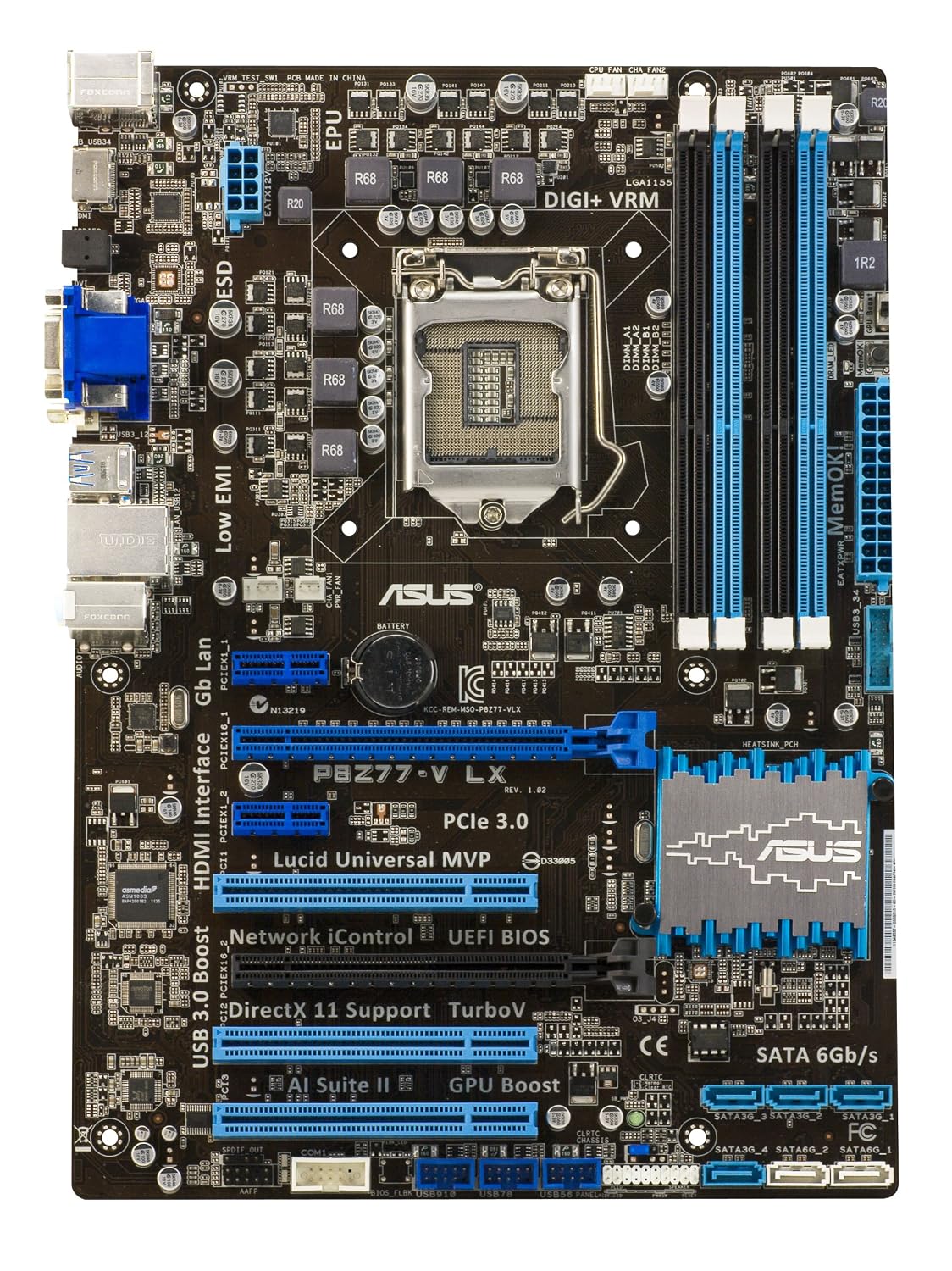
Yes, standoffs are the tiny brass inserts that go in the motherboard tray to which the board screws go into. you may have one screwed in that does not have a hold for it in the board. There should be six screws total and six standoffs, it's not a full size ATX board.

91sxnCbzuXL._SL1500_.jpg
 

My Computer My Computer

Computer type
PC/Desktop
Computer Manufacturer/Model Number
Home Built Desktop By DataTech
OS
Windows 7 Ultimate X64 SP1
CPU
Intel i5-2550K, Differing ~4.4-4.8GHz No built in GPU
Motherboard
ASUS P8Z68-V PRO/GEN3
Memory
16GB G.Skill Sniper 1866MHz @ 2133MHz 2x8GB
Graphics Card(s)
ASUS GTX650TIB-DC2OC-2GD5, (650TI Boost)
Sound Card
Onboard Realtek 5-1
Monitor(s) Displays
Samsung P2570HD
Screen Resolution
1920x1080
Hard Drives
Samsung 840 Pro 256GB SSD for OS, 500GB Seagate Constellation (Enterprise drive) for Data
PSU
Corsair HX650W
Case
Inwin Dragon Rider
Cooling
Hyper 212 EVO w/two Noctua fans, push-pull, @1300 RPM
Keyboard
E-Z Eyes, bright yellow keys with large characters
Mouse
steelseries SENSEI Laser Pro Gaming
Internet Speed
48-51Mbs Mbs down, 11 Mbs up Xfinity Cable
Antivirus
Norton Internet Security 2013
Browser
IE 10, Opera, Pale Moon if needed
Other Info
4 case fans, LG BluRay-RE, ASUS DVD-RW, Mr. Fusion power supply, 1.21 gigawatts.
If the setup was all well in the old case, I suspect you forgot something in the transfer. It could be a misplaced motherboard standoff is touching the back of the board, a power connector not fully seated, or a loose connector in the front panel as Fireberd said.

The only USB connector i have plugged in is the one that says "USB" and i plugged it into the port "F_USB1"

what is a misplaced motherboard standoff?

COULD IT BE THIS ISSUE: The screws in the motherboard did not line up for only ONE of the holes, so i simply left it with nothing in it, however every other screw lined up correctly , just this one didn't as there was no hole at all beneath it to screw into, so i didn't plug anything into it, could that be the issue?
Yes, standoffs are the tiny brass inserts that go in the motherboard tray to which the board screws go into. you may have one screwed in that does not have a hold for it in the board. There should be six screws total and six standoffs, it's not a full size ATX board.

91sxnCbzuXL._SL1500_.jpg

Hmm alright i'll check in a bit, so i just need to count the screws and unscrew them to make sure they're put in properly? does this mean i have to take everything out
 

My Computer My Computer

Computer type
PC/Desktop
Computer Manufacturer/Model Number
custom
OS
Windows 7 Home Premium 64-bit
CPU
Intel Core i5 3570k 3.40ghz
Motherboard
Asus P8Z77-V LX
Memory
8gb ddr3
Graphics Card(s)
Gainward GTX 660ti
Monitor(s) Displays
1
Screen Resolution
1600x900
Hard Drives
500gb
PSU
Xigmatek 600w
Case
Zalman Z9 Plus
Internet Speed
60mpbs
Antivirus
Avast
Browser
Firefox
Yes you'll have to take it all or most of it out. If you have a screw hole in the board but no place for a screw something is wrong. Usually board tray have multiple places to install the stand offs. Lay the board on a piece os paper and mark it with the mounting holes and check to see the case has only the standoffs installed to match them.

You may be able to just remove the cables and your GPU from the board and remove it.
 

My Computer My Computer

Computer type
PC/Desktop
Computer Manufacturer/Model Number
Home Built Desktop By DataTech
OS
Windows 7 Ultimate X64 SP1
CPU
Intel i5-2550K, Differing ~4.4-4.8GHz No built in GPU
Motherboard
ASUS P8Z68-V PRO/GEN3
Memory
16GB G.Skill Sniper 1866MHz @ 2133MHz 2x8GB
Graphics Card(s)
ASUS GTX650TIB-DC2OC-2GD5, (650TI Boost)
Sound Card
Onboard Realtek 5-1
Monitor(s) Displays
Samsung P2570HD
Screen Resolution
1920x1080
Hard Drives
Samsung 840 Pro 256GB SSD for OS, 500GB Seagate Constellation (Enterprise drive) for Data
PSU
Corsair HX650W
Case
Inwin Dragon Rider
Cooling
Hyper 212 EVO w/two Noctua fans, push-pull, @1300 RPM
Keyboard
E-Z Eyes, bright yellow keys with large characters
Mouse
steelseries SENSEI Laser Pro Gaming
Internet Speed
48-51Mbs Mbs down, 11 Mbs up Xfinity Cable
Antivirus
Norton Internet Security 2013
Browser
IE 10, Opera, Pale Moon if needed
Other Info
4 case fans, LG BluRay-RE, ASUS DVD-RW, Mr. Fusion power supply, 1.21 gigawatts.
Ok, i just took it out and checked, i do have 6 screws total, however on the bottom right of the board (if looking from the bottom of pc to top) there is no place for a standoff to fit in the case, so i simply left that one out, but that would total 7 screws?

I moved the USB write into F_USB4 hoping that will fix the problem, any other ideas?
 

My Computer My Computer

Computer type
PC/Desktop
Computer Manufacturer/Model Number
custom
OS
Windows 7 Home Premium 64-bit
CPU
Intel Core i5 3570k 3.40ghz
Motherboard
Asus P8Z77-V LX
Memory
8gb ddr3
Graphics Card(s)
Gainward GTX 660ti
Monitor(s) Displays
1
Screen Resolution
1600x900
Hard Drives
500gb
PSU
Xigmatek 600w
Case
Zalman Z9 Plus
Internet Speed
60mpbs
Antivirus
Avast
Browser
Firefox
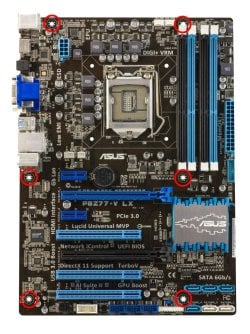
I have circled in red the 6 mounting holes, if you have another hole in the lower right, it's not for mounting.
Is this the correct board?

91sxnCbzuXL__SL1500_.jpg
 

My Computer My Computer

Computer type
PC/Desktop
Computer Manufacturer/Model Number
Home Built Desktop By DataTech
OS
Windows 7 Ultimate X64 SP1
CPU
Intel i5-2550K, Differing ~4.4-4.8GHz No built in GPU
Motherboard
ASUS P8Z68-V PRO/GEN3
Memory
16GB G.Skill Sniper 1866MHz @ 2133MHz 2x8GB
Graphics Card(s)
ASUS GTX650TIB-DC2OC-2GD5, (650TI Boost)
Sound Card
Onboard Realtek 5-1
Monitor(s) Displays
Samsung P2570HD
Screen Resolution
1920x1080
Hard Drives
Samsung 840 Pro 256GB SSD for OS, 500GB Seagate Constellation (Enterprise drive) for Data
PSU
Corsair HX650W
Case
Inwin Dragon Rider
Cooling
Hyper 212 EVO w/two Noctua fans, push-pull, @1300 RPM
Keyboard
E-Z Eyes, bright yellow keys with large characters
Mouse
steelseries SENSEI Laser Pro Gaming
Internet Speed
48-51Mbs Mbs down, 11 Mbs up Xfinity Cable
Antivirus
Norton Internet Security 2013
Browser
IE 10, Opera, Pale Moon if needed
Other Info
4 case fans, LG BluRay-RE, ASUS DVD-RW, Mr. Fusion power supply, 1.21 gigawatts.
Back
Top