
Signature at SevenForums - Create with or without an Image

How to Create a Signature at Seven Forums with or without an Image​


   Information
This tutorial will give you an introduction into the basics of using a signature.
I will inform you on the various usergroups and the signature that fits with each of those usergroups and show you how to apply a signature and a signature image.
   Note

To change or see your signature, please do the following;
  1. Log into your account.
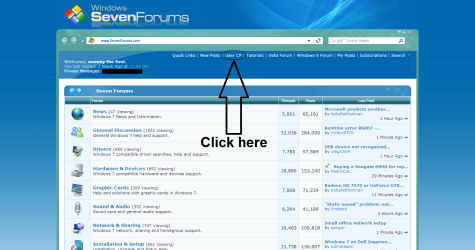
  2. Click on User CP.
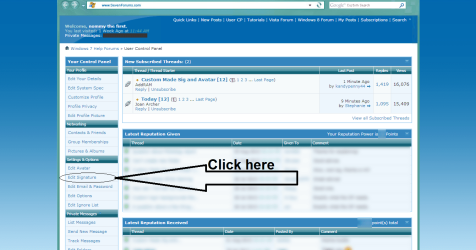
  3. Scroll a bit down, and click on Edit Signature in the Settings & Options menu.
    :info: More detailed directions are given in the edit your signature part of this tutorial.
    :info: Please make sure that your signature doesn't violate the Forum Rules!
   Warning

Admins have the ability to change a users signature to another usergroup. This tutorial will focus on the default usergroups.


All signatures have a limit on the amount of characters used and the size of the sigpic (signature picture). The sigpic can be posted with [SIGPIC] tags.
In this tutorial I will show you how to apply a signature, apply a signature image and I will also show you a few handy tips for the length of your signature :)

1. User Groups
Signatures are limited per usergroup, and this are the restrictions per usergroup:
  • Just Joined:
    Members who have just joined the SevenForums and have the text "New Member" displayed under their username will be unable to have a signature.
    Once they have made a few posts and have been here a few days their status will be upgraded to "Junior Member".
  • Junior Member:
    Junior Members will be able to have a signature. The maximum amount of characters they can use is 500 characters and their signature picture is limited to a size of 600x100 pixels.
  • Member:
    Once a user has achieved the Member badge (min. 35 reputation points + 10 days registered + 10 posts made) the amount of characters he/she can use in their signature will increase to 750 characters.
  • Power User:
    Once a user has achieved the Power User badge (min. 200 reputation points + 30 days registered + 75 posts made), the amount of characters he/she can use will increase to 1.000 characters and the size of their signature will increase to 600x150 pixels.
  • Seven Pro:
    Once a user has achieved the Seven Pro badge (min. 500 reputation points + 60 days registered + 100 posts made), the amount of characters he/she can use in their signature will increase to 1.250 characters and the size of their signature will increase to 650x150 pixels. This is the largest "unlockable" size a signature on the SevenForums can have (with exception of admins).
  • Seven Guru and above:
    Once a user has achieved the Seven Guru badge (min. 1.000 reputation points + 90 days registered + 100 posts made), the amount of characters he/she can use in their signature will increase to 2.000 characters. This is the largest "unlockable" amount (with exception of admins).

    More information on badges, titles and reputation points can be found in the Reputation and Badges thread.
:ar: The amount of characters you can use for your signature includes the BBCode you use.
:ar: If a signature uses more characters than the maximum of the user group you are in, you won't be able to use it.
:ar: If a signature image is bigger than the maximum size of your user group, it will be resized to this size.

2. Editing your signature (text only):
Now that we know when you fall in which usergroup and what signature fits in that group, I will show you how to edit your signature.
A. Click on the User CP to enter your personal menu.
Click User CP.png

B. On the left of your screen will be a taskbar called Your Control Panel. In it, click on Edit Signature under Settings & Options.
Edit Signature.png

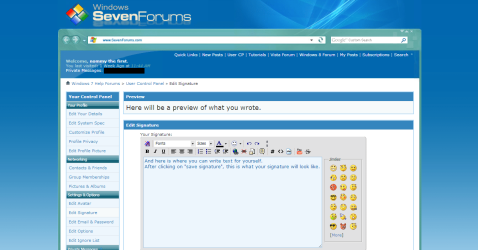
C. Now you are in the window where you can edit your signature. See the image below for more details.
Signature preview.png

D. To see a preview of the text you wrote, click on "Preview Signature" at the bottom of the page.

E. If you are satisfied with what you wrote, click on "Save Signature" to save your signature and take it in use.

3. Editing your signature (image):
Now that you know how to edit your signature, let's look at how you can add an image in there!
A. Navigate to the Edit Signature menu by following steps one and two of the above displayed steps.
Now there are two ways to upload an image; the image upload tool of the SevenForums and using a direct link of the image. Using [IMG] [/IMG] tags will not work.

B. First seek the image that you want as a signature. And be sure that it fits the restrictions of your user group!

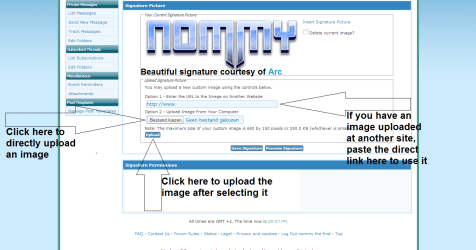
C. When you found a good image, upload it by clicking on the "Choose File" button in the Upload Signature Picture menu. When you have chosen a good file (be sure that the image fits in the restrictions of your usergroup!), click on "Upload"
Alternatively: When you found a good image that you want as your signature, which is uploaded to an image host, right-click the image, and select Open in new tab to get the direct link. When you have the direct link, paste it in the URL box under Option 1. Now click on "Upload".

D. When uploaded, click on "Preview Signature" to see the image you just uploaded in the Your Current Signature Picture menu.

E. Now click on the Insert signature picture link next to the picture to insert the [SIGPIC] [/SIGPIC] tags in your text field.
Hint: If you want to center your image, you can do this by clicking on Align Center. This is the second button of the three buttons with lines under the Fonts option.

F. If you are satisfied with how your signature looks, click on "Save Signature" to save your signature and take it into use.

Here is an image to show you;
Signature Image.png
   Note
SevenForums resizes images to a .JPEG extension if they don't fit within your user groups restrictions, so if you upload an image with another file type, it will lose it's properties!
E.G. .PNG images will lose their opacity and .GIF images will no longer be animated and will also lose their opacity.

4. Useful info:

Here are a few things listed that will help you and answer some questions.

  • Ever seen a user who has a signature created by another user? You probably have. And then you will also have noticed that beneath their signature, they have the name of the user who created their signature, as a link.
    You can do this by simply copying their username from a post they made, and pasting it in the Edit Signature menu. If correctly done, the link should work.
    Alternatively you could always use the [url=http://www.sevenforums.com/members/user-name.html/]Username[/url] tags.
  • Seven Forums also counts your BBCode toward the character limit! So the shorter the links you use, the more characters you will have left!
    For instance, a simple link to the Forum Rules will look like this: [url=http://www.sevenforums.com/general-discussion/8-forum-rules-info-please-read.html]Forum Rules[/url]. That is 104 characters!
    A tip from my side, use a link shortener like goo.gl!. This way the same link will look like this: [url=http://goo.gl/PrhzL9]Forum Rules[/url]. That's only 43 characters! It saved you 61 characters!
  • Use a WYSIWYG or BBCode editor or Notepad to create your sgnature in!
    Why? Because more often than not you will have double or even tripple code using the Edit Signature box (like having [B] [/B] [B] [/B] multiple times in a row).
    Using notepad or a WYSIWYG editor will ensure you that only the BBCode you want to be there is there, so no more double tagging! It could save you several 100 characters.
  • Want a custom made signature? Visit the Custom made Sig and Avatar thread and request one!
  • Make sure that your signature does not violate the Forum Rules! If it does, your signature privileges might be removed.

That's it,
Nommy


Last edited:
For Brink:
  • I added a link to the custom sig and ava thread.
  • Uploaded all images to SF instead of Dropbox.
  • Corrected all spelling and grammatical errors I could find.
  • Added description on how to add sig image from external site.
  • Added description on how to tag members using [url=][/url] tags.

For everyone else:
  • I still need to know the amount of characters a Junior Member can use in it's signature.
  • I still need to know the amount of characters someone with the Member badge can use in it's signature.
  • The link to the Custom made sig and ava thread will outdate, is there a way to always have a working link there?
  • Criticism, criticism, criticism. Bring it on!


Many thanks in advance!
Nommy
 
Last edited:

My Computer My Computer

At a glance

Microsoft Windows 8.1 64-bit ProfessionalIntel(R) Core(TM) i7-4510U CPU @ 2.00GHz8.00 GB (2 x 4.00 GB)AMD Radeon R7 M265
Computer type
Laptop
Computer Manufacturer/Model Number
Dell Inspiron 5547
OS
Microsoft Windows 8.1 64-bit Professional
CPU
Intel(R) Core(TM) i7-4510U CPU @ 2.00GHz
Motherboard
Dell Inc. 08KNCD
Memory
8.00 GB (2 x 4.00 GB)
Graphics Card(s)
AMD Radeon R7 M265
Screen Resolution
1366 x 768 x 4294967296 colors
Hard Drives
(1) 1TB ST1000LM024 HN-M101MBB (2) 2TB Western Digital external hard drive (3) 500GB Packard Bell external hard drive
Mouse
Corsair Vengeance M60
Antivirus
Windows Defender & Malwarebytes
Browser
Firefox, Chromium
Other Info
+ Acer TravelMate 7730G with 32bit Ubuntu 14.04 LTS Trusty Tahr.
Very good work nommy. I do not know the character limits but some one will chime in soon. This looks to be a very useful tutorial!
 

My Computer My Computer

At a glance

Windows 10 Pro X64Intel(R) Core(TM) i5-3570K CPU OC@ 4.5GHZ Turbo8.00 GB DDR3 1600MhzMSI Gaming X GTX 1070
Computer type
PC/Desktop
Computer Manufacturer/Model Number
Dude Build
OS
Windows 10 Pro X64
CPU
Intel(R) Core(TM) i5-3570K CPU OC@ 4.5GHZ Turbo
Motherboard
MSI Z77A-G45 Gaming
Memory
8.00 GB DDR3 1600Mhz
Graphics Card(s)
MSI Gaming X GTX 1070
Sound Card
Realtek High Definition
Monitor(s) Displays
Dell S23O9W, HP L1710
Screen Resolution
DELL-1920 x 1080 HP-1280 x1024
Hard Drives
Crucial m4 256 SSD, WD 7200RPM 500GB WD 1TB
PSU
Seasonic X650 GOLD
Case
Zalman Z12
Cooling
Antec Kuhler 920
Keyboard
Logitech
Mouse
MSI DS100 Interceptor
Internet Speed
50 down and 5 up
Antivirus
MSE
Browser
Chrome, IE 11
Other Info
Logitech X-620 Speakers
Very good work nommy. I do not know the character limits but some one will chime in soon. This looks to be a very useful tutorial!

Thanks Dude!

Spending quite a bit of my time in the custom sig thread, I saw a lot of users asking about signatures and how to use the ones we made them and such, so I decided to give it a try and see if I could make a tut about it to help them:D


Nommy
 

My Computer My Computer

At a glance

Microsoft Windows 8.1 64-bit ProfessionalIntel(R) Core(TM) i7-4510U CPU @ 2.00GHz8.00 GB (2 x 4.00 GB)AMD Radeon R7 M265
Computer type
Laptop
Computer Manufacturer/Model Number
Dell Inspiron 5547
OS
Microsoft Windows 8.1 64-bit Professional
CPU
Intel(R) Core(TM) i7-4510U CPU @ 2.00GHz
Motherboard
Dell Inc. 08KNCD
Memory
8.00 GB (2 x 4.00 GB)
Graphics Card(s)
AMD Radeon R7 M265
Screen Resolution
1366 x 768 x 4294967296 colors
Hard Drives
(1) 1TB ST1000LM024 HN-M101MBB (2) 2TB Western Digital external hard drive (3) 500GB Packard Bell external hard drive
Mouse
Corsair Vengeance M60
Antivirus
Windows Defender & Malwarebytes
Browser
Firefox, Chromium
Other Info
+ Acer TravelMate 7730G with 32bit Ubuntu 14.04 LTS Trusty Tahr.
Changelog:
  • Changed ordered list to manual list on suggestion.
  • Added manual ordered list to titles of subjects for easy referencing.
  • Corrected some spelling errors.

Aaand I accidentally clicked the mark thread as solved button because of it's easy placement next to the Go Advanced button :confused: But that's fixed now.


Nommy
 

My Computer My Computer

At a glance

Microsoft Windows 8.1 64-bit ProfessionalIntel(R) Core(TM) i7-4510U CPU @ 2.00GHz8.00 GB (2 x 4.00 GB)AMD Radeon R7 M265
Computer type
Laptop
Computer Manufacturer/Model Number
Dell Inspiron 5547
OS
Microsoft Windows 8.1 64-bit Professional
CPU
Intel(R) Core(TM) i7-4510U CPU @ 2.00GHz
Motherboard
Dell Inc. 08KNCD
Memory
8.00 GB (2 x 4.00 GB)
Graphics Card(s)
AMD Radeon R7 M265
Screen Resolution
1366 x 768 x 4294967296 colors
Hard Drives
(1) 1TB ST1000LM024 HN-M101MBB (2) 2TB Western Digital external hard drive (3) 500GB Packard Bell external hard drive
Mouse
Corsair Vengeance M60
Antivirus
Windows Defender & Malwarebytes
Browser
Firefox, Chromium
Other Info
+ Acer TravelMate 7730G with 32bit Ubuntu 14.04 LTS Trusty Tahr.
Good work, Nommy.


Wenda.
 

My Computer My Computer

At a glance

Windows 7 Ultimate SP1 32-bit; Windows 7 Home...Intel T6500 Core 2 Duo@2Ghz.3GB DDR2Intel 4500MHD
Computer type
Laptop
Computer Manufacturer/Model Number
Acer AS5735
OS
Windows 7 Ultimate SP1 32-bit; Windows 7 Home Premium 64-bit (VM).
CPU
Intel T6500 Core 2 Duo@2Ghz.
Motherboard
Acer
Memory
3GB DDR2
Graphics Card(s)
Intel 4500MHD
Sound Card
Realtek onboard
Monitor(s) Displays
Built-in, no touch
Screen Resolution
1366x768
Hard Drives
250GB SATA in two equal partitions.
PSU
Stock
Case
Laptop
Cooling
Stock
Keyboard
Full 101-key
Mouse
USB cordless IR
Antivirus
MSE
Browser
IE9, Firefox.
Other Info
A top little machine that hasn't let me down once since the day I removed it from its packaging over four years ago. It's done everything I could want, and more, all without a single issue. 10/10, Acer!!
It's looking really good Nommy.. thanks
 

My Computer My Computer

At a glance

Windows 8 - 64-bit2.2GHz Intel Pentium dual-core B960 processor...8GB DDR3Intel HD Graphics with 128MB of dedicated sys...
Computer type
Laptop
Computer Manufacturer/Model Number
Gateway 17.3" LCD Intel Dual-Core, 8GB RAM 1TB HDD Windows 8 Laptop
OS
Windows 8 - 64-bit
CPU
2.2GHz Intel Pentium dual-core B960 processor with 2MB L3 ca
Memory
8GB DDR3
Graphics Card(s)
Intel HD Graphics with 128MB of dedicated system memory
Monitor(s) Displays
17.3" Ultrabright HD widescreen LED-backlit LCD
Screen Resolution
1280 X 1024
Hard Drives
1TB hard drive-1000 GB HDD
DVD-Super Multi DL drive
PSU
Intel B960 processor
Case
XXXXX
Cooling
XXXXX
Keyboard
Multi Gesture Touchpad
Mouse
USB - portable mouse... I added this
Antivirus
Avast
Browser
I E 10
Other Info
I see nothing about Motherboard info.
I'm not sure about Sound Card
Ports :(3) USB 2.0, (1) HDMI, (1) VGA, (1) Headphone out, (1) Microphone in, (1) Ethernet LAN

•Fast Wi-Fi wireless and wired Gigabit Ethernet networking
•HDMI output
•Kensington lock slot
I have no idea what all this actually means
Thanks Wenda and LPT!
Do any of you maybe know how many characters a junior member or someone with a member badge can use in it's sig?


Nommy
 

My Computer My Computer

At a glance

Microsoft Windows 8.1 64-bit ProfessionalIntel(R) Core(TM) i7-4510U CPU @ 2.00GHz8.00 GB (2 x 4.00 GB)AMD Radeon R7 M265
Computer type
Laptop
Computer Manufacturer/Model Number
Dell Inspiron 5547
OS
Microsoft Windows 8.1 64-bit Professional
CPU
Intel(R) Core(TM) i7-4510U CPU @ 2.00GHz
Motherboard
Dell Inc. 08KNCD
Memory
8.00 GB (2 x 4.00 GB)
Graphics Card(s)
AMD Radeon R7 M265
Screen Resolution
1366 x 768 x 4294967296 colors
Hard Drives
(1) 1TB ST1000LM024 HN-M101MBB (2) 2TB Western Digital external hard drive (3) 500GB Packard Bell external hard drive
Mouse
Corsair Vengeance M60
Antivirus
Windows Defender & Malwarebytes
Browser
Firefox, Chromium
Other Info
+ Acer TravelMate 7730G with 32bit Ubuntu 14.04 LTS Trusty Tahr.
Nommy here is what I copied from the page where I add my Sig., make any changes to it.

Note: The maximum size of your custom image is 650 by 150 pixels or 250.0 KB (whichever is smaller).


I'm not real sure of the exact numbers.. I do know a new member has to have so many ,post or replies before
using a sig.. then once that level has been reached.. they get to use a larger Sig.
I'm sure someone will come along with all the correct info. to help you .
 

My Computer My Computer

At a glance

Windows 8 - 64-bit2.2GHz Intel Pentium dual-core B960 processor...8GB DDR3Intel HD Graphics with 128MB of dedicated sys...
Computer type
Laptop
Computer Manufacturer/Model Number
Gateway 17.3" LCD Intel Dual-Core, 8GB RAM 1TB HDD Windows 8 Laptop
OS
Windows 8 - 64-bit
CPU
2.2GHz Intel Pentium dual-core B960 processor with 2MB L3 ca
Memory
8GB DDR3
Graphics Card(s)
Intel HD Graphics with 128MB of dedicated system memory
Monitor(s) Displays
17.3" Ultrabright HD widescreen LED-backlit LCD
Screen Resolution
1280 X 1024
Hard Drives
1TB hard drive-1000 GB HDD
DVD-Super Multi DL drive
PSU
Intel B960 processor
Case
XXXXX
Cooling
XXXXX
Keyboard
Multi Gesture Touchpad
Mouse
USB - portable mouse... I added this
Antivirus
Avast
Browser
I E 10
Other Info
I see nothing about Motherboard info.
I'm not sure about Sound Card
Ports :(3) USB 2.0, (1) HDMI, (1) VGA, (1) Headphone out, (1) Microphone in, (1) Ethernet LAN

•Fast Wi-Fi wireless and wired Gigabit Ethernet networking
•HDMI output
•Kensington lock slot
I have no idea what all this actually means
Thanks LPT, but I already found what I was looking for, tutorial is completed now:D


Nommy
 

My Computer My Computer

At a glance

Microsoft Windows 8.1 64-bit ProfessionalIntel(R) Core(TM) i7-4510U CPU @ 2.00GHz8.00 GB (2 x 4.00 GB)AMD Radeon R7 M265
Computer type
Laptop
Computer Manufacturer/Model Number
Dell Inspiron 5547
OS
Microsoft Windows 8.1 64-bit Professional
CPU
Intel(R) Core(TM) i7-4510U CPU @ 2.00GHz
Motherboard
Dell Inc. 08KNCD
Memory
8.00 GB (2 x 4.00 GB)
Graphics Card(s)
AMD Radeon R7 M265
Screen Resolution
1366 x 768 x 4294967296 colors
Hard Drives
(1) 1TB ST1000LM024 HN-M101MBB (2) 2TB Western Digital external hard drive (3) 500GB Packard Bell external hard drive
Mouse
Corsair Vengeance M60
Antivirus
Windows Defender & Malwarebytes
Browser
Firefox, Chromium
Other Info
+ Acer TravelMate 7730G with 32bit Ubuntu 14.04 LTS Trusty Tahr.
GREAT news.. I'm glad you found what you needed to complete your tutorial.
We can now refer to it when we have such a need.
Thanks for your hard work.:thumbsup:
 

My Computer My Computer

At a glance

Windows 8 - 64-bit2.2GHz Intel Pentium dual-core B960 processor...8GB DDR3Intel HD Graphics with 128MB of dedicated sys...
Computer type
Laptop
Computer Manufacturer/Model Number
Gateway 17.3" LCD Intel Dual-Core, 8GB RAM 1TB HDD Windows 8 Laptop
OS
Windows 8 - 64-bit
CPU
2.2GHz Intel Pentium dual-core B960 processor with 2MB L3 ca
Memory
8GB DDR3
Graphics Card(s)
Intel HD Graphics with 128MB of dedicated system memory
Monitor(s) Displays
17.3" Ultrabright HD widescreen LED-backlit LCD
Screen Resolution
1280 X 1024
Hard Drives
1TB hard drive-1000 GB HDD
DVD-Super Multi DL drive
PSU
Intel B960 processor
Case
XXXXX
Cooling
XXXXX
Keyboard
Multi Gesture Touchpad
Mouse
USB - portable mouse... I added this
Antivirus
Avast
Browser
I E 10
Other Info
I see nothing about Motherboard info.
I'm not sure about Sound Card
Ports :(3) USB 2.0, (1) HDMI, (1) VGA, (1) Headphone out, (1) Microphone in, (1) Ethernet LAN

•Fast Wi-Fi wireless and wired Gigabit Ethernet networking
•HDMI output
•Kensington lock slot
I have no idea what all this actually means
Nice tutorial Nommy
 

My Computer My Computer

At a glance

Win 7 Pro x64 / Win 10 ProIntel(R) Core(TM) i7-3630QM CPU @ 2.40GHz12 GB(1) Intel(R) HD Graphics 4000 (2) NVIDIA GeFo...
Computer type
Laptop
Computer Manufacturer/Model Number
Sager NP9170
OS
Win 7 Pro x64 / Win 10 Pro
CPU
Intel(R) Core(TM) i7-3630QM CPU @ 2.40GHz
Motherboard
CLEVO P170EM
Memory
12 GB
Graphics Card(s)
(1) Intel(R) HD Graphics 4000 (2) NVIDIA GeForce GTX 675M
Sound Card
(1) Realtek High Definition Audio (2) Intel(R) Display Aud
Monitor(s) Displays
17.3
Screen Resolution
1920x1080
Hard Drives
(1) Samsung 860 EVO 500GB(OS) (1) Samsung 860 EVO 500GB(Data)
Keyboard
Backlite
Antivirus
MSE, Malwarebytes Pro
Browser
Firefox
Other Info
DESKTOP: Custom-built.
OS: Win 10 Pro x64.
CASE: Rosewill R5.
CPU: Intel I5 4670K CPU @ 3.40GHz.
CPU COOLER: Cool Master Hyper 212 EVO.
MOTHERBOARD: Asus Z87-A.
MEMORY: Kingston HyperX 2x4 GB.
GPU: Nvidia Geforce 650 TI.
PSU: Corsair TX750.
DRIVES: (1) Samsung 840 120 GB SSD (2) Western Digital blue 500 GB 7200 RPM.
Many thanks LPT and Bongo! :D


Nommy
 

My Computer My Computer

At a glance

Microsoft Windows 8.1 64-bit ProfessionalIntel(R) Core(TM) i7-4510U CPU @ 2.00GHz8.00 GB (2 x 4.00 GB)AMD Radeon R7 M265
Computer type
Laptop
Computer Manufacturer/Model Number
Dell Inspiron 5547
OS
Microsoft Windows 8.1 64-bit Professional
CPU
Intel(R) Core(TM) i7-4510U CPU @ 2.00GHz
Motherboard
Dell Inc. 08KNCD
Memory
8.00 GB (2 x 4.00 GB)
Graphics Card(s)
AMD Radeon R7 M265
Screen Resolution
1366 x 768 x 4294967296 colors
Hard Drives
(1) 1TB ST1000LM024 HN-M101MBB (2) 2TB Western Digital external hard drive (3) 500GB Packard Bell external hard drive
Mouse
Corsair Vengeance M60
Antivirus
Windows Defender & Malwarebytes
Browser
Firefox, Chromium
Other Info
+ Acer TravelMate 7730G with 32bit Ubuntu 14.04 LTS Trusty Tahr.
good one sephan. :)
 

My Computer My Computer

At a glance

Microsoft Windows 7 Home Premium 64-bit 7600IIx4 amd athelon 635 processor2x2gbati radeon HD 5450
Computer Manufacturer/Model Number
Hewlett packard/p6512uk
OS
Microsoft Windows 7 Home Premium 64-bit 7600
CPU
IIx4 amd athelon 635 processor
Motherboard
FOXCONN 2AA9
Memory
2x2gb
Graphics Card(s)
ati radeon HD 5450
Sound Card
(1) Realtek High Definition Audio (2) AMD High Definition
Monitor(s) Displays
samsung lcd tv 32"
Screen Resolution
1360x 768
Hard Drives
(1) WDC WD10 01FAES-60Z2A0 SATA Disk Device (2) Maxtor OneTouch USB Device (3) ST310003 33AS USB Device (4) WD My Book 1111 USB Device
PSU
?
Cooling
air!
Keyboard
wireless hp
Mouse
wireless Hp,optical
Internet Speed
1.10mb/s
Antivirus
MSE
Browser
Firefox
Thanks Julian! :D

*cough* it's Stefan tho *cough*

Nommy
 

My Computer My Computer

At a glance

Microsoft Windows 8.1 64-bit ProfessionalIntel(R) Core(TM) i7-4510U CPU @ 2.00GHz8.00 GB (2 x 4.00 GB)AMD Radeon R7 M265
Computer type
Laptop
Computer Manufacturer/Model Number
Dell Inspiron 5547
OS
Microsoft Windows 8.1 64-bit Professional
CPU
Intel(R) Core(TM) i7-4510U CPU @ 2.00GHz
Motherboard
Dell Inc. 08KNCD
Memory
8.00 GB (2 x 4.00 GB)
Graphics Card(s)
AMD Radeon R7 M265
Screen Resolution
1366 x 768 x 4294967296 colors
Hard Drives
(1) 1TB ST1000LM024 HN-M101MBB (2) 2TB Western Digital external hard drive (3) 500GB Packard Bell external hard drive
Mouse
Corsair Vengeance M60
Antivirus
Windows Defender & Malwarebytes
Browser
Firefox, Chromium
Other Info
+ Acer TravelMate 7730G with 32bit Ubuntu 14.04 LTS Trusty Tahr.
Nice work nommy Stefan. I think there is another sig size level which is 600x150, unless it's been changed. I think that's the Power User level.
Also the User CP link location changes depending on the forum skin in use. :D
 

My Computer My Computer

At a glance

Windows 7 Ultimate X64 SP1Intel i5-2550K, Differing ~4.4-4.8GHz No buil...16GB G.Skill Sniper 1866MHz @ 2133MHz 2x8GBASUS GTX650TIB-DC2OC-2GD5, (650TI Boost)
Computer type
PC/Desktop
Computer Manufacturer/Model Number
Home Built Desktop By DataTech
OS
Windows 7 Ultimate X64 SP1
CPU
Intel i5-2550K, Differing ~4.4-4.8GHz No built in GPU
Motherboard
ASUS P8Z68-V PRO/GEN3
Memory
16GB G.Skill Sniper 1866MHz @ 2133MHz 2x8GB
Graphics Card(s)
ASUS GTX650TIB-DC2OC-2GD5, (650TI Boost)
Sound Card
Onboard Realtek 5-1
Monitor(s) Displays
Samsung P2570HD
Screen Resolution
1920x1080
Hard Drives
Samsung 840 Pro 256GB SSD for OS, 500GB Seagate Constellation (Enterprise drive) for Data
PSU
Corsair HX650W
Case
Inwin Dragon Rider
Cooling
Hyper 212 EVO w/two Noctua fans, push-pull, @1300 RPM
Keyboard
E-Z Eyes, bright yellow keys with large characters
Mouse
steelseries SENSEI Laser Pro Gaming
Internet Speed
48-51Mbs Mbs down, 11 Mbs up Xfinity Cable
Antivirus
Norton Internet Security 2013
Browser
IE 10, Opera, Pale Moon if needed
Other Info
4 case fans, LG BluRay-RE, ASUS DVD-RW, Mr. Fusion power supply, 1.21 gigawatts.
Merci Gary! Hmm, I think it's changed, as, for example, Kandy can use the sig that Arc made for him, and it's at 650x150.
And yes I know, but most users who have trouble with sigs are new users which use the default skin, so I used that one for the tut:)


Nommy
 

My Computer My Computer

At a glance

Microsoft Windows 8.1 64-bit ProfessionalIntel(R) Core(TM) i7-4510U CPU @ 2.00GHz8.00 GB (2 x 4.00 GB)AMD Radeon R7 M265
Computer type
Laptop
Computer Manufacturer/Model Number
Dell Inspiron 5547
OS
Microsoft Windows 8.1 64-bit Professional
CPU
Intel(R) Core(TM) i7-4510U CPU @ 2.00GHz
Motherboard
Dell Inc. 08KNCD
Memory
8.00 GB (2 x 4.00 GB)
Graphics Card(s)
AMD Radeon R7 M265
Screen Resolution
1366 x 768 x 4294967296 colors
Hard Drives
(1) 1TB ST1000LM024 HN-M101MBB (2) 2TB Western Digital external hard drive (3) 500GB Packard Bell external hard drive
Mouse
Corsair Vengeance M60
Antivirus
Windows Defender & Malwarebytes
Browser
Firefox, Chromium
Other Info
+ Acer TravelMate 7730G with 32bit Ubuntu 14.04 LTS Trusty Tahr.
I think Shawn made an exception in Kandy's case so he could have the animation Archie did for him.
 

My Computer My Computer

At a glance

Windows 7 Ultimate X64 SP1Intel i5-2550K, Differing ~4.4-4.8GHz No buil...16GB G.Skill Sniper 1866MHz @ 2133MHz 2x8GBASUS GTX650TIB-DC2OC-2GD5, (650TI Boost)
Computer type
PC/Desktop
Computer Manufacturer/Model Number
Home Built Desktop By DataTech
OS
Windows 7 Ultimate X64 SP1
CPU
Intel i5-2550K, Differing ~4.4-4.8GHz No built in GPU
Motherboard
ASUS P8Z68-V PRO/GEN3
Memory
16GB G.Skill Sniper 1866MHz @ 2133MHz 2x8GB
Graphics Card(s)
ASUS GTX650TIB-DC2OC-2GD5, (650TI Boost)
Sound Card
Onboard Realtek 5-1
Monitor(s) Displays
Samsung P2570HD
Screen Resolution
1920x1080
Hard Drives
Samsung 840 Pro 256GB SSD for OS, 500GB Seagate Constellation (Enterprise drive) for Data
PSU
Corsair HX650W
Case
Inwin Dragon Rider
Cooling
Hyper 212 EVO w/two Noctua fans, push-pull, @1300 RPM
Keyboard
E-Z Eyes, bright yellow keys with large characters
Mouse
steelseries SENSEI Laser Pro Gaming
Internet Speed
48-51Mbs Mbs down, 11 Mbs up Xfinity Cable
Antivirus
Norton Internet Security 2013
Browser
IE 10, Opera, Pale Moon if needed
Other Info
4 case fans, LG BluRay-RE, ASUS DVD-RW, Mr. Fusion power supply, 1.21 gigawatts.
:thumbsup:
 

My Computer My Computer

At a glance

Windows 10 Home 64BitIntel Core i5 10400 @ 2.90GHz8.00GB Single-Channel Unknown @ 1329MHz (16-2...
Computer type
PC/Desktop
Computer Manufacturer/Model Number
Self assembled
OS
Windows 10 Home 64Bit
CPU
Intel Core i5 10400 @ 2.90GHz
Motherboard
Intel Corporation DG41WV (PROCESSOR)
Memory
8.00GB Single-Channel Unknown @ 1329MHz (16-20-20-38)
Sound Card
Realtek High Definition Audio
Monitor(s) Displays
DELL E170S
Screen Resolution
1280x1024 pixels
Hard Drives
931GB TOSHIBA DT01ACA100 (SATA)
238GB TEAM TM8PS7256G (SATA SSD)
Case
Nothing Fancy
Cooling
Fans
Keyboard
A4 Tech Co LTD
Mouse
A4 Tech Co Ltd/Logitech
Internet Speed
25 Mbps

My Computer My Computer

At a glance

Microsoft Windows 8.1 64-bit ProfessionalIntel(R) Core(TM) i7-4510U CPU @ 2.00GHz8.00 GB (2 x 4.00 GB)AMD Radeon R7 M265
Computer type
Laptop
Computer Manufacturer/Model Number
Dell Inspiron 5547
OS
Microsoft Windows 8.1 64-bit Professional
CPU
Intel(R) Core(TM) i7-4510U CPU @ 2.00GHz
Motherboard
Dell Inc. 08KNCD
Memory
8.00 GB (2 x 4.00 GB)
Graphics Card(s)
AMD Radeon R7 M265
Screen Resolution
1366 x 768 x 4294967296 colors
Hard Drives
(1) 1TB ST1000LM024 HN-M101MBB (2) 2TB Western Digital external hard drive (3) 500GB Packard Bell external hard drive
Mouse
Corsair Vengeance M60
Antivirus
Windows Defender & Malwarebytes
Browser
Firefox, Chromium
Other Info
+ Acer TravelMate 7730G with 32bit Ubuntu 14.04 LTS Trusty Tahr.
Back
Top