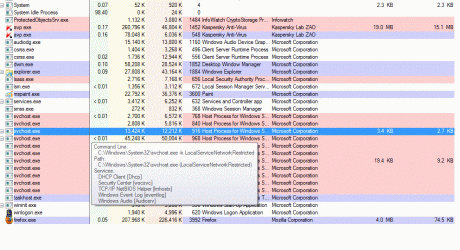
svchost.exe - outbound connection to different ips

PCrazy123

New member
Local time
5:36 PM
Messages
46
Hi everyone. A few days ago I had to change the motherboard of my pc and I reinstalled windows after that. Since then whenever I connect to the internet svchost.exe always forms an outbound connection only for an instant to a different ip everytime - the ip address always starts with 79.140 like 79.140.94.209 , 79.140.94.216 , 79.104.81.64 , etc. Before I reinstalled windows the ip address whenever i noted it was 192.186something.

Also since I have reinstalled windows the incoming data in the AV's firewall for svchost.exe is currently at 64MB+ (this was after I updated windows) whereas in the previous installation it was only at 3-4 MB for the past 5 months. The network activity upon connection only lasts for about 20-30 seconds on average and the outbound connection appears only for 1-2 seconds. I also connected the net in my laptop and the result is the same.

The system itself is working fine, is fully updated (Win7 SP1) and there are no other problems. I regularly scan the system with Kasperky PURE, Malwarebytes, SpybotS&D , TDSSKiller and Malwarebytes Anti-Rootkit.

So is this behaviour by svchost.exe a sign of infection or is this normal ?
 

My Computer My Computer

Computer type
PC/Desktop
OS
Win7 Ultimate 32bit
Did you look up any of the 79.x.x.x IPs to get the name? It might tell you the OS is calling home to MS. If you have a different motherboard maybe it's been noted and the activation checker is trying to figure out if it's legit? I'm just guessing. But you might learn more if you look up the IPs it's calling to.
 

My Computer My Computer

Computer Manufacturer/Model Number
HP Media Center
OS
Windows 7 32 bit
CPU
AMD 5200+ dual core
Memory
2 GB
Graphics Card(s)
NVidia GeForce 6150SE 128 MB
Monitor(s) Displays
CRT
Screen Resolution
1280x1024
Hard Drives
500 GB Sata internal :

SIIG USB 3.0 docking stations w/WD Caviar Black 6 Gb/s drives
Keyboard
PS/2
Mouse
PS/2 Wheel Mouse
Other Info
SIIG USB 3.0 PCIexpress card.
Welcome to the Seven Forums.

I cannot say that what you see is normal or not, I can mention a tool (Process Explorer) that will let you see which services are using the various svchost instances. If you want to post the info mentioned here (http://www.sevenforums.com/windows-...ne-activation-issue-posting-instructions.html) then maybe we can tell if there is an ongoing activation issue.

You can download/use Process Explorer (nothing to install)
Download the zipped (compressed) file
Open the zipped (compressed) file (folder)
Copy the files somewhere
Run the exe as admin
Agree to the EULA

I like to select Option > Difference Highlight Duration... and set that to the max of 9 seconds.

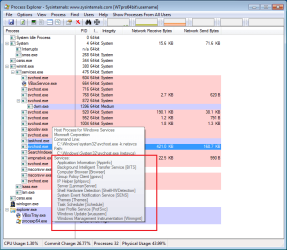
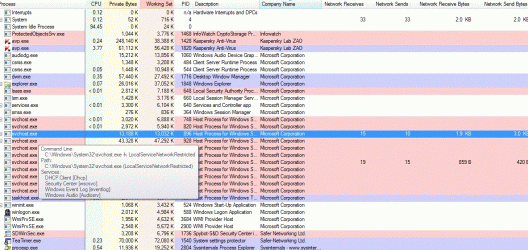
Mouse over each svchost,exe to see the info in a tool tip like this:

svchost-via-process-explorer.png

You can change the columns to display the network traffic as shown above - if desired.

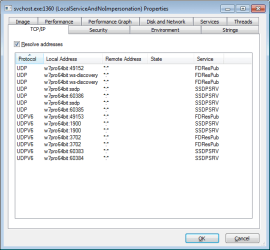
Double clicking on the svchost entry of interest and then selecting the TCP/IP tab should show the connections:

svchost-via-process-explorer2.png
 

My Computer My Computer

Computer type
Laptop
Computer Manufacturer/Model Number
Employer provided Dell Latitude
OS
W7 Pro SP1 64bit
CPU
i7
Memory
8GB
Graphics Card(s)
Intel HD Graphics
Hard Drives
crappy SSD
Antivirus
Employer mandated Symantec Endpoint Protection
Browser
Pale Moon 64bit, IE11 64bit & Chrome 64bit
Did you look up any of the 79.x.x.x IPs to get the name? It might tell you the OS is calling home to MS. If you have a different motherboard maybe it's been noted and the activation checker is trying to figure out if it's legit? I'm just guessing. But you might learn more if you look up the IPs it's calling to.
I looked up one of the IP addresses in the OP before posting. More than one source reported it as being an Akamai Server. Here is one such source: WHOIS Search, Domain Name, Website, and IP Tools - Who.is

When a connection to a network is first made, the Windows OS attempts to determine if it has a connection to the internet. (Windows 7 Network Awareness: How Windows knows it has an internet connection « Super User Blog) Microsoft uses Akamai servers around the world as part of this brief check.

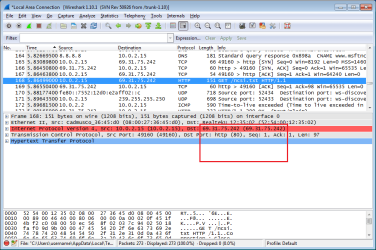
From one of my VMs when I disable/enable the network adapter:
wireshark.png
The IP highlighted above resolves to an Akamai server.
WHOIS Search, Domain Name, Website, and IP Tools - Who.is

edit: this might be a more informative screen:
wireshark2.png
 
Last edited:

My Computer My Computer

Computer type
Laptop
Computer Manufacturer/Model Number
Employer provided Dell Latitude
OS
W7 Pro SP1 64bit
CPU
i7
Memory
8GB
Graphics Card(s)
Intel HD Graphics
Hard Drives
crappy SSD
Antivirus
Employer mandated Symantec Endpoint Protection
Browser
Pale Moon 64bit, IE11 64bit & Chrome 64bit
Thanks for helping.


@MilesAhead I looked up 79.104.81.64 at WHOIS Search, Domain Name, Website, and IP Tools - Who.is as UsernameIssues has already looked up the rest and this ip is from Russia and it seems to be unrelated to Akamai.

@UsernameIssues I will check the svchost.exe via Process Explorer and report back. Please check the 79.104.81.64 ip as I can't understand whether its from Akamai or not.
 

My Computer My Computer

Computer type
PC/Desktop
OS
Win7 Ultimate 32bit
Thanks for helping.


@MilesAhead I looked up 79.104.81.64 at WHOIS Search, Domain Name, Website, and IP Tools - Who.is as UsernameIssues has already looked up the rest and this ip is from Russia and it seems to be unrelated to Akamai.

@UsernameIssues I will check the svchost.exe via Process Explorer and report back. Please check the 79.104.81.64 ip as I can't understand whether its from Akamai or not.
The IP range from 79.0.0.0 to 79.255.255.255 seems to be assigned to this company VimpelCom Ltd. - Wikipedia, the free encyclopedia.
VimpelCom has servers inside Russia using IP addresses in the range of 79.104.0.0 - 79.104.255.25.
 

My Computer My Computer

Computer type
Laptop
Computer Manufacturer/Model Number
Employer provided Dell Latitude
OS
W7 Pro SP1 64bit
CPU
i7
Memory
8GB
Graphics Card(s)
Intel HD Graphics
Hard Drives
crappy SSD
Antivirus
Employer mandated Symantec Endpoint Protection
Browser
Pale Moon 64bit, IE11 64bit & Chrome 64bit
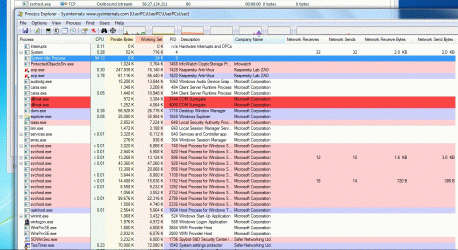
@UsernameIssues Thanks again for helping. I checked with Process Explorer by enabling\disabling the net three times in a row and 58.24.124.211 ip came up two times and when I checked it on WHOIS Search, Domain Name, Website, and IP Tools - Who.is it seems to be from Malaysia.

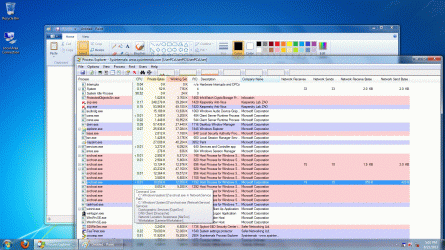
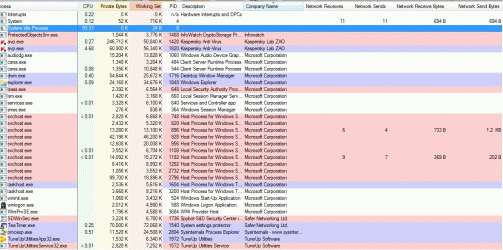
Please check the attached screenshots of the network activity in Process Explorer.

Why is my pc connecting to all these ips in different countries upon every connection ? Also I scanned my pc again and all results were clear.
 

Attachments

  • 3rdcb.gif
    3rdcb.gif
    445.6 KB · Views: 2
  • 3rdca.gif
    3rdca.gif
    173 KB · Views: 1
  • 3rdc.gif
    3rdc.gif
    250.1 KB · Views: 1
  • 2ndc.gif
    2ndc.gif
    200.8 KB · Views: 3
  • 1stc.gif
    1stc.gif
    179.4 KB · Views: 4

My Computer My Computer

Computer type
PC/Desktop
OS
Win7 Ultimate 32bit

My Computer My Computer

Computer type
Laptop
Computer Manufacturer/Model Number
Employer provided Dell Latitude
OS
W7 Pro SP1 64bit
CPU
i7
Memory
8GB
Graphics Card(s)
Intel HD Graphics
Hard Drives
crappy SSD
Antivirus
Employer mandated Symantec Endpoint Protection
Browser
Pale Moon 64bit, IE11 64bit & Chrome 64bit
By the way, do you have a router? You may be able to block the ports they are trying to call out on as a stop gap until you resolve the issue.
 

My Computer My Computer

Computer Manufacturer/Model Number
HP Media Center
OS
Windows 7 32 bit
CPU
AMD 5200+ dual core
Memory
2 GB
Graphics Card(s)
NVidia GeForce 6150SE 128 MB
Monitor(s) Displays
CRT
Screen Resolution
1280x1024
Hard Drives
500 GB Sata internal :

SIIG USB 3.0 docking stations w/WD Caviar Black 6 Gb/s drives
Keyboard
PS/2
Mouse
PS/2 Wheel Mouse
Other Info
SIIG USB 3.0 PCIexpress card.
Thanks for helping. Sorry for late reply I had to reinstall windows due to more motherboard issues. After I reinstalled it I checked everytime I had to download updates for windows and AV and sometimes the connection does not seem to occur to any ips and after the initial connection there is no activity or connection by these ips unless I disable\enable it again.

Do the screenshots I posted indicate any problems ?

@UsernameIssues Will the clean startup disable the Antivirus ? And before connecting to the internet in clean startup should I enable AV or disable it ?

@MilesAhead the port everytime connection is made by these ips is port 80. Will it cause any problems by disabling this port as when I was updating windows and AV this was the port being used.
 

My Computer My Computer

Computer type
PC/Desktop
OS
Win7 Ultimate 32bit
"Will the clean startup disable the Antivirus ?"
It might disable some parts, but the clean boot is just for troubleshooting. You are not going to leave the computer in that state.

"And before connecting to the internet in clean startup should I enable AV or disable it ?"
Try it both ways... the goal is to find the app(s) causing the communication... perhaps a peer to peer app.
 

My Computer My Computer

Computer type
Laptop
Computer Manufacturer/Model Number
Employer provided Dell Latitude
OS
W7 Pro SP1 64bit
CPU
i7
Memory
8GB
Graphics Card(s)
Intel HD Graphics
Hard Drives
crappy SSD
Antivirus
Employer mandated Symantec Endpoint Protection
Browser
Pale Moon 64bit, IE11 64bit & Chrome 64bit
If it's using http port there's not much you can do. Which is probably why they're using it. I don't know what else to suggest at this point though. :)
 

My Computer My Computer

Computer Manufacturer/Model Number
HP Media Center
OS
Windows 7 32 bit
CPU
AMD 5200+ dual core
Memory
2 GB
Graphics Card(s)
NVidia GeForce 6150SE 128 MB
Monitor(s) Displays
CRT
Screen Resolution
1280x1024
Hard Drives
500 GB Sata internal :

SIIG USB 3.0 docking stations w/WD Caviar Black 6 Gb/s drives
Keyboard
PS/2
Mouse
PS/2 Wheel Mouse
Other Info
SIIG USB 3.0 PCIexpress card.
Thanks for helping. Sorry for the late reply.

Could this be an issue from the side of the ISP ? The way it handles the users connection ? All of the ips I checked in the last few days are from Akamai or Google. Also since this issue has been ongoing there have been no problems in internet speed while browsing\downloading\games.

@UsernameIssues This issue is happening on fresh install without any apps installed and on the two laptops that I checked.

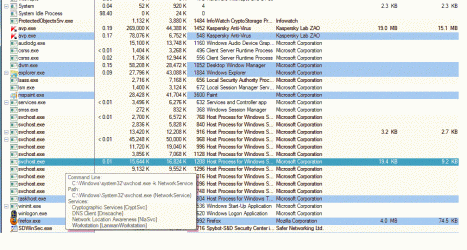
Please check if any of these processes from the screenshots should be disabled ?

@MilesAhead The usage of http port is a sign of a virus ?

Since there are no issues in internet speed and no sign of infection should I keep using it as it is or should I call my ISP (the technical support here is very poor) or are there other ways to check this ?
 

Attachments

  • screen1.gif
    screen1.gif
    107.4 KB · Views: 2
  • screen2.gif
    screen2.gif
    135 KB · Views: 2
  • screen3.gif
    screen3.gif
    115.2 KB · Views: 2

My Computer My Computer

Computer type
PC/Desktop
OS
Win7 Ultimate 32bit
If the screenshots provided are from the laptops that are making these connections, then I would say that you have several apps installed. Your antivirus app and other security related tools probably make connections.

Just as a test, you could try what I mention in this post and see if the connections to the Akamai servers stop.

I would not think that your ISP would have anything to do with these connections... nor would they be of much help in finding out why they are being made.
 

My Computer My Computer

Computer type
Laptop
Computer Manufacturer/Model Number
Employer provided Dell Latitude
OS
W7 Pro SP1 64bit
CPU
i7
Memory
8GB
Graphics Card(s)
Intel HD Graphics
Hard Drives
crappy SSD
Antivirus
Employer mandated Symantec Endpoint Protection
Browser
Pale Moon 64bit, IE11 64bit & Chrome 64bit
Thanks for helping.

@UsernameIssues The screenshots are from the main PC and apps are installed. I meant that when I had reinstallled fresh windows and only AV and no other app the ips were appearing even then. If Kaspersky or Spybot are making the connections is there a way to check this ?

It should be changed to 0x00000000 (1) or 0x0000001 (0) ?
 

My Computer My Computer

Computer type
PC/Desktop
OS
Win7 Ultimate 32bit
.......If Kaspersky or Spybot are making the connections is there a way to check this ?
The best way to test is to uninstall both of them and see if connections are being made. Install only Kaspersky and see if connections are being made. Install Spybot and see if connections are being made.


.......It should be changed to 0x00000000 (1) or 0x0000001 (0) ?
Once you double click on the name EnableActiveProbing, you should see a window like this:

zero.png

Simply change that 1 to a 0 and click on OK. Then see if the connections are being made. Be sure to put it back to 1 after you complete your testing.
 

My Computer My Computer

Computer type
Laptop
Computer Manufacturer/Model Number
Employer provided Dell Latitude
OS
W7 Pro SP1 64bit
CPU
i7
Memory
8GB
Graphics Card(s)
Intel HD Graphics
Hard Drives
crappy SSD
Antivirus
Employer mandated Symantec Endpoint Protection
Browser
Pale Moon 64bit, IE11 64bit & Chrome 64bit
Back
Top