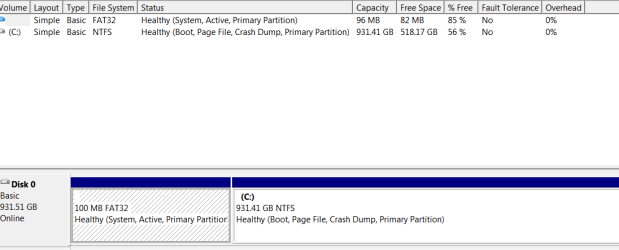
For some reason the 1TB hdd in my custom built Win 7 desktop has an unnamed 93GB Fat32 partition as well as a 931 GB NTFS c: partition. When I try to create a system image it does not complete successfully because of the Fat 32 partition. How can I get rid of the unwanted partition so I can backup my system without starting from scratch, reformatting the disk and labouriously re-installing all the applications?
The error message suggests using the Convert xx command but I don't see how to do this since the unwanted partition does not have a volume label to use.
I don't mind just losing the 93 GB space.
Thanks
absc
The error message suggests using the Convert xx command but I don't see how to do this since the unwanted partition does not have a volume label to use.
I don't mind just losing the 93 GB space.
Thanks
absc
My Computer
At a glance
Windows 7 Pro 64i7-37708 GBon board
- Computer type
- PC/Desktop
- Computer Manufacturer/Model Number
- LENOVO ThinkCentre M92p
- OS
- Windows 7 Pro 64
- CPU
- i7-3770
- Motherboard
- LENOVO MAHOBAY
- Memory
- 8 GB
- Graphics Card(s)
- on board
- Hard Drives
- 256 GB SSD primary and 1 TB for data
- Antivirus
- Norton
- Browser
- IE