Solved Win 7 backup fails to complete because of unnamed Fat32 partition

absc

New member
Local time
6:46 AM
Messages
35
For some reason the 1TB hdd in my custom built Win 7 desktop has an unnamed 93GB Fat32 partition as well as a 931 GB NTFS c: partition. When I try to create a system image it does not complete successfully because of the Fat 32 partition. How can I get rid of the unwanted partition so I can backup my system without starting from scratch, reformatting the disk and labouriously re-installing all the applications?

The error message suggests using the Convert xx command but I don't see how to do this since the unwanted partition does not have a volume label to use.

I don't mind just losing the 93 GB space.

Thanks

absc
 

My Computer My Computer

At a glance

Windows 7 Pro 64i7-37708 GBon board
Computer type
PC/Desktop
Computer Manufacturer/Model Number
LENOVO ThinkCentre M92p
OS
Windows 7 Pro 64
CPU
i7-3770
Motherboard
LENOVO MAHOBAY
Memory
8 GB
Graphics Card(s)
on board
Hard Drives
256 GB SSD primary and 1 TB for data
Antivirus
Norton
Browser
IE
Hello absc and welcome to Seven Forums.

If you're sure there's nothing on the 93GB Fat32 partition that you don't want to lose, you could probably delete that partition which would create unallocated space. Then you could extend or resize the C: partition to add the unallocated 93Gb to it. (Depending where in relation to the C: partition the unallocated space is located. If it's immediately adjacent you could probably resize. If it's separated by another partition you could extend.) There's a free utility called MiniTool Partition Wizard that should be able to do that for you.

MiniTool Partition Wizard - delete a partition

MiniTool Partition Wizard - extend partition

MiniTool Partition Wizard - resize partition
 

My Computer My Computer

At a glance

Win 7 Pro 64-bitIntel i5 2.4 Ghz8GB DDR3Intel HD 3000
Computer type
Laptop
Computer Manufacturer/Model Number
Sony Vaio VPCEB47GM Laptop
OS
Win 7 Pro 64-bit
CPU
Intel i5 2.4 Ghz
Memory
8GB DDR3
Graphics Card(s)
Intel HD 3000
Sound Card
IDT High Definition
Monitor(s) Displays
15.6 WGXA Anti-Glare LED
Screen Resolution
1280x800
Hard Drives
640Gb 7200rpm
Antivirus
MSE
Browser
Opera (primary) with IE9 backup

My Computer My Computer

At a glance

Multi-Boot W7_Pro_x64 W8.1_Pro_x64 W10_Pro_x6...AMD Athlon II x4 6206GB GSkill DDR2 800AMD 4670 GPU + AMD 4200 IGP
Computer type
PC/Desktop
Computer Manufacturer/Model Number
home built
OS
Multi-Boot W7_Pro_x64 W8.1_Pro_x64 W10_Pro_x64 +Linux_VMs +Chromium_VM
CPU
AMD Athlon II x4 620
Motherboard
Gigabyte GA-MA785G-UD3H
Memory
6GB GSkill DDR2 800
Graphics Card(s)
AMD 4670 GPU + AMD 4200 IGP
Sound Card
on board Realtek ALC889A
Monitor(s) Displays
RCA 40" LCD TV, Insignia 32" LCD TV, HP 15" LCD monitor
Screen Resolution
1680 x 1050
Hard Drives
OCZ Vertex 3 120GB,
Samsung F3 1TB (3),
Several others - WD, Seagate, Hitachi, ...
PSU
Corsair 500 W
Case
Rosewill mid tower
Cooling
CM 90mm rifle
Keyboard
Gyration wireless, Logitech wireless, Dell USB wired
Mouse
Gyration wireless, Logitech wireless, V7 USB wired
Internet Speed
Spectrum - 100Mbps D / 10Mbps U
Antivirus
Avast, MBAM3, EMET, WinPatrol
Browser
Pale Moon, Firefox, IE
Other Info
2 multi-boot PC's
Mainly HTPC/Office/Gen purpose (no gaming).
Trendnet USB KVM.
LG DVD burner/Blue Ray Player.
Tray system for removable SATA backup drives.

Not currently OCd, under-volted.
I use Hybrid sleep, rarely re-boot or shutdown.

Hauppauge HD-PVR, Avermedia PCIe TV Tuner, Hauppauge PCI TV Tuner.
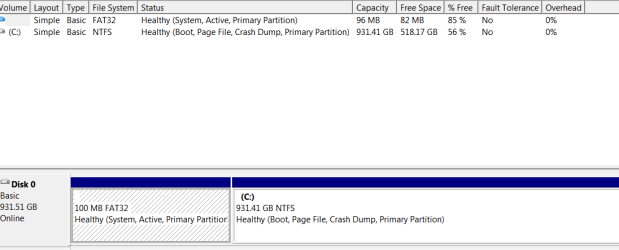
Thanks to both your comments. DM screenshot is attached. My mistake, I thought the unwanted partition was 93 GB not 96.
 

Attachments

  • snip.PNG
    snip.PNG
    4.4 KB · Views: 12

My Computer My Computer

At a glance

Windows 7 Pro 64i7-37708 GBon board
Computer type
PC/Desktop
Computer Manufacturer/Model Number
LENOVO ThinkCentre M92p
OS
Windows 7 Pro 64
CPU
i7-3770
Motherboard
LENOVO MAHOBAY
Memory
8 GB
Graphics Card(s)
on board
Hard Drives
256 GB SSD primary and 1 TB for data
Antivirus
Norton
Browser
IE
The fat32 partition is 96 MB (Megabytes), not GB (Gigabytes), so your partition sizes are correct for a 1 TB HD.
The fat32 partition is the System Active partition, so it is used to boot up Windows.
Don't delete it or you won't be able to boot Windows without making other changes/fixes.

I don't know why it is fat32 and not NTFS.
How did you install Windows 7?
Did you upgrade from some other OS such as XP or Vista?
Where did you get the Win 7 disc?

I'll ask gregrocker to look at this thread.
He's the top installation expert and can give you instructions for moving the boot info to your C partition so you can get rid of the fat32 partition.
I don't want to give you wrong info and get you stuck where Windows won't boot up.

You could also consider using an Imaging program such as Macrium.
Macrium and other imaging programs are better and easier to use than the built in Windows Imaging imho.
I doubt you would have a problem using Macrium, even with the fat32 partition.
http://www.sevenforums.com/tutorials/73828-imaging-free-macrium.html
 

My Computer My Computer

At a glance

Multi-Boot W7_Pro_x64 W8.1_Pro_x64 W10_Pro_x6...AMD Athlon II x4 6206GB GSkill DDR2 800AMD 4670 GPU + AMD 4200 IGP
Computer type
PC/Desktop
Computer Manufacturer/Model Number
home built
OS
Multi-Boot W7_Pro_x64 W8.1_Pro_x64 W10_Pro_x64 +Linux_VMs +Chromium_VM
CPU
AMD Athlon II x4 620
Motherboard
Gigabyte GA-MA785G-UD3H
Memory
6GB GSkill DDR2 800
Graphics Card(s)
AMD 4670 GPU + AMD 4200 IGP
Sound Card
on board Realtek ALC889A
Monitor(s) Displays
RCA 40" LCD TV, Insignia 32" LCD TV, HP 15" LCD monitor
Screen Resolution
1680 x 1050
Hard Drives
OCZ Vertex 3 120GB,
Samsung F3 1TB (3),
Several others - WD, Seagate, Hitachi, ...
PSU
Corsair 500 W
Case
Rosewill mid tower
Cooling
CM 90mm rifle
Keyboard
Gyration wireless, Logitech wireless, Dell USB wired
Mouse
Gyration wireless, Logitech wireless, V7 USB wired
Internet Speed
Spectrum - 100Mbps D / 10Mbps U
Antivirus
Avast, MBAM3, EMET, WinPatrol
Browser
Pale Moon, Firefox, IE
Other Info
2 multi-boot PC's
Mainly HTPC/Office/Gen purpose (no gaming).
Trendnet USB KVM.
LG DVD burner/Blue Ray Player.
Tray system for removable SATA backup drives.

Not currently OCd, under-volted.
I use Hybrid sleep, rarely re-boot or shutdown.

Hauppauge HD-PVR, Avermedia PCIe TV Tuner, Hauppauge PCI TV Tuner.
Did you read the link Disk Management - Post a Screen Capture Image so you'd know how to do it correctly? Please maximize the window and capture the full drive map and listings so we can be sure that the FAT32 is booting Win7.

Please also answer all of David's questions about how this install was done. You should not have a FAT32 System partition unless it was configured that way in advance of install for some reason I've not seen before.

If it's not causing any more problems than with Win7 backup imaging and you want to try another imaging app as suggested, then you might be able to keep it that way. But if you want to change it to be correct, your options are to:

To reinstall correctly you'd want to delete all partitions during install using the Drive Options at Steps 7 and 8 of Clean Install Windows 7 then create and format partitions you want, install to first partition ignoring the 100mb SysReserved the installer will create.

Or you can move the System flag to C so you can delete the FAT32. Mark C Partition Active to run Startup Repair - Run up to 3 Separate Times until the System flag moves to C. It is then safe to delete the FAT partition, recover the space into C if you want using How to extend partition easily with Partition Wizard - video help.

Another possibility is to use free Partition Wizard bootable CD to delete the 96mb partition, create a new NTFS Primary partition there, Modify>Set to Active, label System Reserved, then boot the Win7 installer to run Startup Repair - Run up to 3 Separate Times, copying in the boot files if necessary by temporarily giving it a letter.

Make a full HD backup image first using another app as suggested, and back up your files.

David may need to help you with this as traveling in Europe for two weeks.
 
Last edited:
I had the PC custom built 2 or 3 years ago by a small outfit that regrettably no longer exist. I don't know how they installed the OS but I do have an install disc copy together and a product key. They said they had an OEM licence. They did not normally supply the OS disc and I had to pay extra for it.

I have attached a new shot of the DM screen. I have followed the instructions on posting a screen shot to the letter and I can't find any more information no matter what options I try. I can't find anything on this page about an EFI system partition. I have removed the external HD. I see that what comes up in my reply is a thumbnail of the screen shot. Is that correct or what am I not doing?

As I understand it I do have EFI bootup. I can't find EFI mentioned anywhere in BIOS setup except on the Exit page where one of the options is to "Launch EFI Shell from filesystem device", and the bootup screen instructs to press F2 or del to run UEFI setup.

I'll try to create a disc image with Macrium as you suggest.
 

Attachments

  • Capture.PNG
    Capture.PNG
    9.8 KB · Views: 9

My Computer My Computer

At a glance

Windows 7 Pro 64i7-37708 GBon board
Computer type
PC/Desktop
Computer Manufacturer/Model Number
LENOVO ThinkCentre M92p
OS
Windows 7 Pro 64
CPU
i7-3770
Motherboard
LENOVO MAHOBAY
Memory
8 GB
Graphics Card(s)
on board
Hard Drives
256 GB SSD primary and 1 TB for data
Antivirus
Norton
Browser
IE

My Computer My Computer

At a glance

Win 7 Pro 64-bitIntel i5 2.4 Ghz8GB DDR3Intel HD 3000
Computer type
Laptop
Computer Manufacturer/Model Number
Sony Vaio VPCEB47GM Laptop
OS
Win 7 Pro 64-bit
CPU
Intel i5 2.4 Ghz
Memory
8GB DDR3
Graphics Card(s)
Intel HD 3000
Sound Card
IDT High Definition
Monitor(s) Displays
15.6 WGXA Anti-Glare LED
Screen Resolution
1280x800
Hard Drives
640Gb 7200rpm
Antivirus
MSE
Browser
Opera (primary) with IE9 backup
Thanks very much marsminar. My worry is that I don't have a backup if something goes wrong.

If the Fat 32 partition is used to boot up and I convert it to NTFS, will Windows then boot up correctly from it?
 

My Computer My Computer

At a glance

Windows 7 Pro 64i7-37708 GBon board
Computer type
PC/Desktop
Computer Manufacturer/Model Number
LENOVO ThinkCentre M92p
OS
Windows 7 Pro 64
CPU
i7-3770
Motherboard
LENOVO MAHOBAY
Memory
8 GB
Graphics Card(s)
on board
Hard Drives
256 GB SSD primary and 1 TB for data
Antivirus
Norton
Browser
IE
First create an image of your main (Boot,... ) partition using the free Macrium Reflect. Then follow marsmimar's advice or get rid of the system reserved partition. Why the person who built your PC made system reserved FAT32 is staggering.

You may also want to follow Gregrocker's advice
"Or you can move the System flag to C so you can delete the FAT32. Mark C Partition Active to run Startup Repair - Run up to 3 Separate Times until the System flag moves to C. It is then safe to delete the FAT partition, recover the space into C if you want using How to extend partition easily with Partition Wizard - video help."
 

My Computer My Computer

At a glance

Windows 7x64 Home Premium SP1Intel i7 2600kG.Skill Ripjaws (DDR3-1600) 2x4GBNvidia GeForce GTS 450; Intel HD Graphics 300...
Computer type
PC/Desktop
Computer Manufacturer/Model Number
Own build
OS
Windows 7x64 Home Premium SP1
CPU
Intel i7 2600k
Motherboard
ASUS P8Z68 Deluxe
Memory
G.Skill Ripjaws (DDR3-1600) 2x4GB
Graphics Card(s)
Nvidia GeForce GTS 450; Intel HD Graphics 3000(GT2+)
Monitor(s) Displays
Dell Ultrasharp IPS panel U2311H, Samsung SyncMaster P2350
Screen Resolution
1920x1080
Hard Drives
Samsung 850 Pro SSD 256GB, Samsung SSD 840 120GB, Seagates 1TB Barracuda ST31000528AS x2
PSU
Seasonic M12II 520W
Case
Lian Li Lancool PC-K60
Cooling
Case: 1x120mm, 3x140mm CPU: Hyper 212+
Keyboard
Logitech MK520 (wireless)
Mouse
Logitech MK520
Internet Speed
6-7 Mbps
Antivirus
Norton Security Premium, Malwarebytes on 2 (MSE on 3rd PC)
Browser
FireFox
Other Info
Audio: Logitech Z523 2.1
Thanks to all who contributed to this thread. Macrium worked a treat.

My first priority has been to get a reliable backup in case of a problem. In the past I've kept copies of my files but I was getting increasingly nervous about not having a proper backup. Now I can go in and do a clean install and get rid the Fat partition and accumulated rubbish. However, that's not so urgent now so I'll start in a few days after I've gone through your posts carefully and worked out my options.

Any last words of advice before I take the plunge?

Thanks again.
 

My Computer My Computer

At a glance

Windows 7 Pro 64i7-37708 GBon board
Computer type
PC/Desktop
Computer Manufacturer/Model Number
LENOVO ThinkCentre M92p
OS
Windows 7 Pro 64
CPU
i7-3770
Motherboard
LENOVO MAHOBAY
Memory
8 GB
Graphics Card(s)
on board
Hard Drives
256 GB SSD primary and 1 TB for data
Antivirus
Norton
Browser
IE
Glad to hear you got backup done with Macrium.

For the reinstall, you should follow Greg's advice from post #6 using the Clean Install tutorial:
To reinstall correctly you'd want to delete all partitions during install using the Drive Options at Steps 7 and 8 of Clean Install Windows 7 then create and format partitions you want, install to first partition ignoring the 100mb SysReserved the installer will create.
 

My Computer My Computer

At a glance

Multi-Boot W7_Pro_x64 W8.1_Pro_x64 W10_Pro_x6...AMD Athlon II x4 6206GB GSkill DDR2 800AMD 4670 GPU + AMD 4200 IGP
Computer type
PC/Desktop
Computer Manufacturer/Model Number
home built
OS
Multi-Boot W7_Pro_x64 W8.1_Pro_x64 W10_Pro_x64 +Linux_VMs +Chromium_VM
CPU
AMD Athlon II x4 620
Motherboard
Gigabyte GA-MA785G-UD3H
Memory
6GB GSkill DDR2 800
Graphics Card(s)
AMD 4670 GPU + AMD 4200 IGP
Sound Card
on board Realtek ALC889A
Monitor(s) Displays
RCA 40" LCD TV, Insignia 32" LCD TV, HP 15" LCD monitor
Screen Resolution
1680 x 1050
Hard Drives
OCZ Vertex 3 120GB,
Samsung F3 1TB (3),
Several others - WD, Seagate, Hitachi, ...
PSU
Corsair 500 W
Case
Rosewill mid tower
Cooling
CM 90mm rifle
Keyboard
Gyration wireless, Logitech wireless, Dell USB wired
Mouse
Gyration wireless, Logitech wireless, V7 USB wired
Internet Speed
Spectrum - 100Mbps D / 10Mbps U
Antivirus
Avast, MBAM3, EMET, WinPatrol
Browser
Pale Moon, Firefox, IE
Other Info
2 multi-boot PC's
Mainly HTPC/Office/Gen purpose (no gaming).
Trendnet USB KVM.
LG DVD burner/Blue Ray Player.
Tray system for removable SATA backup drives.

Not currently OCd, under-volted.
I use Hybrid sleep, rarely re-boot or shutdown.

Hauppauge HD-PVR, Avermedia PCIe TV Tuner, Hauppauge PCI TV Tuner.
Sorry gregrocker, I didn't realise I hadn't answered your questions and I certainly do appreciate all your help. Without it I'd still be struggling instead of having a good backup to rely on for the next steps.

Did you see my post of a few days ago?
I had the PC custom built 2 or 3 years ago by a small outfit that regrettably no longer exist. I don't know how they installed the OS but I do have an install disc copy together and a product key. They said they had an OEM licence. They did not normally supply the OS disc and I had to pay extra for it.

I have attached a new shot of the DM screen. I have followed the instructions on posting a screen shot to the letter and I can't find any more information no matter what options I try. I can't find anything on this page about an EFI system partition. I have removed the external HD. I see that what comes up in my reply is a thumbnail of the screen shot. Is that correct or what am I not doing?

As I understand it I do have EFI bootup. I can't find EFI mentioned anywhere in BIOS setup except on the Exit page where one of the options is to "Launch EFI Shell from filesystem device", and the bootup screen instructs to press F2 or del to run UEFI setup.

I'll try to create a disc image with Macrium as you suggest.

I have no idea why the system partition was put in a Fat 32 partition.

Is there anything else that you've asked? Have I missed a post somewhere?

Athough I feel more comfortable now that I have a backup, I've decided to clean up my system and I'm going over your suggestions to see how I should proceed. My thinking at this stage was that I should probably reformat the disc, do a clean install and progressively re-install all my applications, but I have some questions.

Is that a reasonable way to do it or is there an easier way , eg restore from the backup and use something like System Mechanic to clean up?

If I do a restore from the system image taken with the Fat 32 partition, will that re-create the problem Fat 32 partition or doesn't the restore affect that?

I would really appreciate your adice but I'm in no hurry now for the next step so enjoy your vacation.

Thanks
 

My Computer My Computer

At a glance

Windows 7 Pro 64i7-37708 GBon board
Computer type
PC/Desktop
Computer Manufacturer/Model Number
LENOVO ThinkCentre M92p
OS
Windows 7 Pro 64
CPU
i7-3770
Motherboard
LENOVO MAHOBAY
Memory
8 GB
Graphics Card(s)
on board
Hard Drives
256 GB SSD primary and 1 TB for data
Antivirus
Norton
Browser
IE
Hi again gregrocker.

Remember there's an 8 hour time difference between me in Australia and Europe, and 12 to 15 hours for the US, so basically we have to work on a 24 hour turn-around.

Cheers
 

My Computer My Computer

At a glance

Windows 7 Pro 64i7-37708 GBon board
Computer type
PC/Desktop
Computer Manufacturer/Model Number
LENOVO ThinkCentre M92p
OS
Windows 7 Pro 64
CPU
i7-3770
Motherboard
LENOVO MAHOBAY
Memory
8 GB
Graphics Card(s)
on board
Hard Drives
256 GB SSD primary and 1 TB for data
Antivirus
Norton
Browser
IE
Restoring a system image will put the disc back to exactly how it was when you took the image so prob not the best option for you
If you follow the clean install guide linked earlier you cant go wrong or alternatively have a look at gregs re-install guide which is a little bit better IMO http://www.sevenforums.com/tutorials/219487-clean-reinstall-factory-oem-windows-7-a.html just read through the steps and dont rush it, install software bit by bit and make sure you take a backup when your done and you will never have to reinstall again

Also keep away from clean up and optimisation tools like system/registry mechanic, they were ok for older operating systems like XP but are not required for win 7 and often do more harm than good
 

My Computer My Computer

At a glance

Win7 Ultimate X64Intel i5 3570K8GB DDR3 1600Onboard
Computer type
PC/Desktop
Computer Manufacturer/Model Number
Pauly Special
OS
Win7 Ultimate X64
CPU
Intel i5 3570K
Motherboard
Gigabyte Z77X-DS3H
Memory
8GB DDR3 1600
Graphics Card(s)
Onboard
Sound Card
Onboard
Screen Resolution
1280x1024
Hard Drives
Samsung 840 Evo SSD (OS)
1TB Spinner (Data)
PSU
800W Arctic
Case
Cooler Master
Cooling
3x120mm Fans
Keyboard
MS Wireless
Mouse
MS Wireless
Internet Speed
20M
Did your System Builder provide the COA sticker with Product Key, as is required to resell Win7? If they installed it for you then it's required by law to be stuck to the machine, otherwise it can be in the packaging. Make sure you have this. If not then audit the key using Belarc from the Clean Reinstall OEM steps to see what the Product Key is. If it says OEM in the PID string then you have to hope its a legit Builder's OEM copy and not cracked. No OEM in string means full or Upgrade retail.

You can first try the steps I gave you which have had no interaction to move the System flag to C, or delete and rebuild a true NTFS Primary System Reserved partition. Each requires marking it Active then running 3 Startup Repairs. The steps are in my first post.
 
@gregrocker
You are not the only one who took some time to give the OP advice. Actually my advice to use Macrium as an emergency system image backup was what the OP wanted before proceeding any further.
@OP
Glad it worked for you. The next step is up to you. You can fix up or remove the system reserved. Alternatively given you have a Custom Build I would hope the builder (maybe you) have either retail or OEM installation disks for a clean install. I belive an OEM builder is obliged to give you the discs. If you have any paid software (eg. Photoshop) make sure it is deactivated before proceeding with a clean install then reactivate later.
 

My Computer My Computer

At a glance

Windows 7x64 Home Premium SP1Intel i7 2600kG.Skill Ripjaws (DDR3-1600) 2x4GBNvidia GeForce GTS 450; Intel HD Graphics 300...
Computer type
PC/Desktop
Computer Manufacturer/Model Number
Own build
OS
Windows 7x64 Home Premium SP1
CPU
Intel i7 2600k
Motherboard
ASUS P8Z68 Deluxe
Memory
G.Skill Ripjaws (DDR3-1600) 2x4GB
Graphics Card(s)
Nvidia GeForce GTS 450; Intel HD Graphics 3000(GT2+)
Monitor(s) Displays
Dell Ultrasharp IPS panel U2311H, Samsung SyncMaster P2350
Screen Resolution
1920x1080
Hard Drives
Samsung 850 Pro SSD 256GB, Samsung SSD 840 120GB, Seagates 1TB Barracuda ST31000528AS x2
PSU
Seasonic M12II 520W
Case
Lian Li Lancool PC-K60
Cooling
Case: 1x120mm, 3x140mm CPU: Hyper 212+
Keyboard
Logitech MK520 (wireless)
Mouse
Logitech MK520
Internet Speed
6-7 Mbps
Antivirus
Norton Security Premium, Malwarebytes on 2 (MSE on 3rd PC)
Browser
FireFox
Other Info
Audio: Logitech Z523 2.1
Michael I'm sorry I failed to recognize your good help steering the OP to using Macrium to successfully backup since his thread was about Win7 backup imaging not being able to do this due to the FAT32 partition.

It was because you'd already advised this that I focused on how to repair or replace the System partition.

Lee also came up with the novel idea to try converting the FAT32.

I will try to be more cognizant of others' advice and not just focus on my own so much. But I am on vacation now in Berlin.
 
Have not made any more progress as I've been out of town. Will get stuck into it again in the next few days.

As I now have a reliable backup to fall back on I've decided to do a clean reinstall as per gregrocker's first option. It may take longer but at least I'll know I have a clean system at the end of it. Just going through now making sure I have the CDs for all my programs and making export files for Outlook etc. There is a COA sticker on the PC that appears genuine. My Windows cd has the same product key with the last group the same as reported by Belarc, no OEM in the string, so everything should be OK. If not I suppose I'll just have to buy a new Windows cd!!
 

My Computer My Computer

At a glance

Windows 7 Pro 64i7-37708 GBon board
Computer type
PC/Desktop
Computer Manufacturer/Model Number
LENOVO ThinkCentre M92p
OS
Windows 7 Pro 64
CPU
i7-3770
Motherboard
LENOVO MAHOBAY
Memory
8 GB
Graphics Card(s)
on board
Hard Drives
256 GB SSD primary and 1 TB for data
Antivirus
Norton
Browser
IE
Back
Top