(Dell Inspiron) No bootable device

CosmicJest

New member
Member
VIP
Local time
11:34 AM
Messages
152
Hello,
I've got a Dell Inspiron 5520 laptop I purchased new only a few months ago. Several times I've gotten an error re "no bootable device", usually after a reboot (I don't often shut it down unless required to by updates) but also sometimes after a hard crash caused by as-yet-unknown factors.

A bit of research has shown me that I should do some HDD diagnostics, but I can't positively determine the disk manufacturer. The disk is identified as a ST50LM022, which I think is a Seagate, but the Seagate website doesn't acknowledge this as one of their hard drives.

Can someone please help me fix the problem?
 

My Computer My Computer

At a glance

Windows 7 Pro 64-bitAMD 2.9GHz / Intel 3.2GHz8GB / 4GB
Computer type
PC/Desktop
Computer Manufacturer/Model Number
Lenovo ThinkPad E545 / Dell Optiplex 980
OS
Windows 7 Pro 64-bit
CPU
AMD 2.9GHz / Intel 3.2GHz
Memory
8GB / 4GB
Antivirus
AVG / Norton 360
Browser
Firefox & Chrome
Hello,
I've got a Dell Inspiron 5520 laptop I purchased new only a few months ago. Several times I've gotten an error re "no bootable device", usually after a reboot (I don't often shut it down unless required to by updates) but also sometimes after a hard crash caused by as-yet-unknown factors.

A bit of research has shown me that I should do some HDD diagnostics, but I can't positively determine the disk manufacturer. The disk is identified as a ST50LM022, which I think is a Seagate, but the Seagate website doesn't acknowledge this as one of their hard drives.

Can someone please help me fix the problem?

Hi CosmicJest, Have you tried running Dell's HDD Diagnostic utility (F12 at boot) ? ;)
 

My Computer My Computer

At a glance

win 7 ultimate32bit, Win8.1pro wmc 32bitamd phenom x4 9600corsair twinxs 2x2gb2x nvidia 1gb 8500gt
Computer type
PC/Desktop
Computer Manufacturer/Model Number
self build
OS
win 7 ultimate32bit, Win8.1pro wmc 32bit
CPU
amd phenom x4 9600
Motherboard
asus m2n32-sli deluxe
Memory
corsair twinxs 2x2gb
Graphics Card(s)
2x nvidia 1gb 8500gt
Sound Card
onboard
Monitor(s) Displays
23" PB Viseo 233d
Screen Resolution
1920x1080
Hard Drives
maxtor sata 500gb
maxtor sata 320gb
fujitsu sata200gb
PSU
oryxx tornado 750w
Case
thermaltake xaser lll
Cooling
artic freezer64 pro + 7 case fans

My Computer My Computer

At a glance

win 7 ultimate32bit, Win8.1pro wmc 32bitamd phenom x4 9600corsair twinxs 2x2gb2x nvidia 1gb 8500gt
Computer type
PC/Desktop
Computer Manufacturer/Model Number
self build
OS
win 7 ultimate32bit, Win8.1pro wmc 32bit
CPU
amd phenom x4 9600
Motherboard
asus m2n32-sli deluxe
Memory
corsair twinxs 2x2gb
Graphics Card(s)
2x nvidia 1gb 8500gt
Sound Card
onboard
Monitor(s) Displays
23" PB Viseo 233d
Screen Resolution
1920x1080
Hard Drives
maxtor sata 500gb
maxtor sata 320gb
fujitsu sata200gb
PSU
oryxx tornado 750w
Case
thermaltake xaser lll
Cooling
artic freezer64 pro + 7 case fans
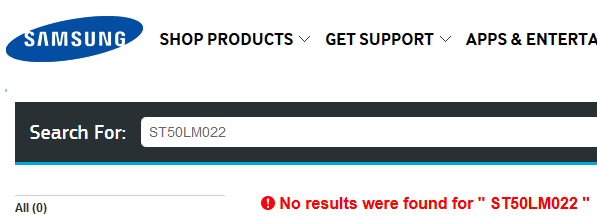
Yes, I have now tried the F12 diagnostic. It was unable to effect any repairs. I also followed the link you supplied, but I'm sorry to say I found no diagnostic software there. I did do a search, and the results were negative (see screenclip). I'm curious how you arrived at the Samsung/Seagate collaboration, when my Googling did not yield results...and I wish that they'd name the hard disks in a more user-friendly manner (e.g. Western Digital "WD" is pretty clear)!
 

Attachments

  • hdd.PNG
    hdd.PNG
    4.9 KB · Views: 9

My Computer My Computer

At a glance

Windows 7 Pro 64-bitAMD 2.9GHz / Intel 3.2GHz8GB / 4GB
Computer type
PC/Desktop
Computer Manufacturer/Model Number
Lenovo ThinkPad E545 / Dell Optiplex 980
OS
Windows 7 Pro 64-bit
CPU
AMD 2.9GHz / Intel 3.2GHz
Memory
8GB / 4GB
Antivirus
AVG / Norton 360
Browser
Firefox & Chrome
Hi CosmicJest, From the link I gave you scrool the page down til' you see "Test your internal HDD" this will bring up this link Samsung Spinpoint M Series Internal Drives | Seagate At the bottom of the Samsung page you will see this:-
©2012 Seagate Technology LLC ;)
 

My Computer My Computer

At a glance

win 7 ultimate32bit, Win8.1pro wmc 32bitamd phenom x4 9600corsair twinxs 2x2gb2x nvidia 1gb 8500gt
Computer type
PC/Desktop
Computer Manufacturer/Model Number
self build
OS
win 7 ultimate32bit, Win8.1pro wmc 32bit
CPU
amd phenom x4 9600
Motherboard
asus m2n32-sli deluxe
Memory
corsair twinxs 2x2gb
Graphics Card(s)
2x nvidia 1gb 8500gt
Sound Card
onboard
Monitor(s) Displays
23" PB Viseo 233d
Screen Resolution
1920x1080
Hard Drives
maxtor sata 500gb
maxtor sata 320gb
fujitsu sata200gb
PSU
oryxx tornado 750w
Case
thermaltake xaser lll
Cooling
artic freezer64 pro + 7 case fans
Pebbly, I had originally clicked on Test your internal HDD, which took me to the Samsung Hard Drives page, where I guessed which hard drive was mine on the default tab (Current Products). What I needed to do was click on the Product Support tab. Once I figured that out, I was able to find the page you linked to in your 2nd post. Scrolling to the bottom, I found the Download Finder link, which I followed to a page where I put in my product S/N etc. Once Samsung knew my HD info, I was able to download the appropriate tool, which I ran (long test). The test found nothing.

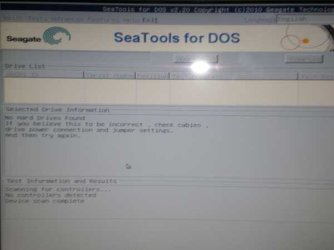
theog, I also downloaded the ISO you linked to, burned it and rebooted (took an F12 to get to the test screen). The tool found NO DISK at all! I took a photo of this (attached).
 

Attachments

  • no disk found.jpg
    no disk found.jpg
    23.6 KB · Views: 15

My Computer My Computer

At a glance

Windows 7 Pro 64-bitAMD 2.9GHz / Intel 3.2GHz8GB / 4GB
Computer type
PC/Desktop
Computer Manufacturer/Model Number
Lenovo ThinkPad E545 / Dell Optiplex 980
OS
Windows 7 Pro 64-bit
CPU
AMD 2.9GHz / Intel 3.2GHz
Memory
8GB / 4GB
Antivirus
AVG / Norton 360
Browser
Firefox & Chrome
Hello,
I've got a Dell Inspiron 5520 laptop I purchased new only a few months ago. Several times I've gotten an error re "no bootable device", usually after a reboot (I don't often shut it down unless required to by updates) but also sometimes after a hard crash caused by as-yet-unknown factors.

A bit of research has shown me that I should do some HDD diagnostics, but I can't positively determine the disk manufacturer. The disk is identified as a ST50LM022, which I think is a Seagate, but the Seagate website doesn't acknowledge this as one of their hard drives.

Can someone please help me fix the problem?

Hi CosmicJest,

We truly regret the inconvenience that has been caused to you and assure you would try our best to resolve this issue to your satisfaction.

You can either run PSA diagnostics on the system by following the link below:

http://dell.to/11NpLCy

And if the system boots sometime then you can run online diagnostics here:

http://dell.to/13X4Rq2

Also, make sure that there is No media( CD,MMC or USB harddrive) connected to the system when you are booting the system.

You can also check this article which might be useful for you:

http://www.sevenforums.com/tutorials/219533-troubleshooting-windows-7-failure-boot.html

Keep us posted with the results so we can advise you further.
 

My Computer My Computer

At a glance

Winndows 7 32 bit
Computer type
PC/Desktop
OS
Winndows 7 32 bit
Thank you, SandeepP. I have followed your links and run the diagnostics. This took quite some time. These diagnostics found no problems either. From one of the Dell links you provided, I connected with Dell Support. The technician updated my BIOS and we will wait to see if the problem is resolved.

I will post back when I have an answer either way. Thank you all for your help!

Cheers!
 

My Computer My Computer

At a glance

Windows 7 Pro 64-bitAMD 2.9GHz / Intel 3.2GHz8GB / 4GB
Computer type
PC/Desktop
Computer Manufacturer/Model Number
Lenovo ThinkPad E545 / Dell Optiplex 980
OS
Windows 7 Pro 64-bit
CPU
AMD 2.9GHz / Intel 3.2GHz
Memory
8GB / 4GB
Antivirus
AVG / Norton 360
Browser
Firefox & Chrome
Thank you, SandeepP. I have followed your links and run the diagnostics. This took quite some time. These diagnostics found no problems either. From one of the Dell links you provided, I connected with Dell Support. The technician updated my BIOS and we will wait to see if the problem is resolved.

I will post back when I have an answer either way. Thank you all for your help!

Cheers!

Hi CosmicJest,

Its great to hear that after BIOS update system seems to be working fine. Please check the system at your convenience and let us know the results.

If you face any further issues then please feel free to reach out to us.
 

My Computer My Computer

At a glance

Winndows 7 32 bit
Computer type
PC/Desktop
OS
Winndows 7 32 bit
Its great to hear that after BIOS update system seems to be working fine. Please check the system at your convenience and let us know the results.
Because of the intermittent nature of this problem (occurring perhaps 10 times over the past three months), whether or not it is resolved is still unknown. I will post back as noted above. Thank you again, for the diagnostic links you provided.
 

My Computer My Computer

At a glance

Windows 7 Pro 64-bitAMD 2.9GHz / Intel 3.2GHz8GB / 4GB
Computer type
PC/Desktop
Computer Manufacturer/Model Number
Lenovo ThinkPad E545 / Dell Optiplex 980
OS
Windows 7 Pro 64-bit
CPU
AMD 2.9GHz / Intel 3.2GHz
Memory
8GB / 4GB
Antivirus
AVG / Norton 360
Browser
Firefox & Chrome
Its great to hear that after BIOS update system seems to be working fine. Please check the system at your convenience and let us know the results.
Because of the intermittent nature of this problem (occurring perhaps 10 times over the past three months), whether or not it is resolved is still unknown. I will post back as noted above. Thank you again, for the diagnostic links you provided.

Hi CosmicJest,

Please check the system at your convenience and if you face any issues with the system then feel free to reach out to us.

If you have any other queries as well, please feel free to contact us.
 

My Computer My Computer

At a glance

Winndows 7 32 bit
Computer type
PC/Desktop
OS
Winndows 7 32 bit
I have had another hard crash. I had closed the computer for a short time, and when I re-opened the lid, I was met with the dreaded black screen. After the patent information came these messages:
Realtek PCIe FE Family Controller Series V1.25 (4/19/11)
PXE-E61: Media test failure, check cable.

PXE-M0F: Exiting PXE Rom.
No boot device found. Press any key to reboot the machine.
Note that pressing "any key" did NOT reboot the machine. I had to shut down and fresh boot, which brought me to an Error Recovery screen with safe mode boot options.

I did boot into safe mode and looked in the Event Viewer Windows Logs, where I found several entries which might possibly prove useful in understanding what's happening here. I saved the entries as an .evtx file, but the forum won't all it to be uploaded. Not sure how to easily provide the information contained in these events...or even if they will be helpful.
 

My Computer My Computer

At a glance

Windows 7 Pro 64-bitAMD 2.9GHz / Intel 3.2GHz8GB / 4GB
Computer type
PC/Desktop
Computer Manufacturer/Model Number
Lenovo ThinkPad E545 / Dell Optiplex 980
OS
Windows 7 Pro 64-bit
CPU
AMD 2.9GHz / Intel 3.2GHz
Memory
8GB / 4GB
Antivirus
AVG / Norton 360
Browser
Firefox & Chrome
Follow this guide on System recovery options and Startup repair, you will need to burn a Windows 7 Pro 64bit Windows 7 ISO for your computer looking at your specs. not only use the top default option, but run FixMBR and chkdsk in the command prompt option in order. Also, If this does not fix your problem, look into this guide >> >> Windows Seven Failure to Start and follolw all possible steps, PLEASE ASK QUESTIONS, do not just skip a step because you don't understand it
 

My Computer My Computer

At a glance

.
Computer type
PC/Desktop
OS
.
Hi redfang, I've created the system recovery disk and ran Startup repair (3 times, per the link instructions). If found no problems. I then ran chkdsk from a DOS prompt with also no problems. I could not get FixMBR to run. Before I proceed to your last instruction, can you help me get FixMBR to run please?
 

My Computer My Computer

At a glance

Windows 7 Pro 64-bitAMD 2.9GHz / Intel 3.2GHz8GB / 4GB
Computer type
PC/Desktop
Computer Manufacturer/Model Number
Lenovo ThinkPad E545 / Dell Optiplex 980
OS
Windows 7 Pro 64-bit
CPU
AMD 2.9GHz / Intel 3.2GHz
Memory
8GB / 4GB
Antivirus
AVG / Norton 360
Browser
Firefox & Chrome
I ran SFC scannow from the system repair disk, but it didn't find/do anything. FixMBR & bootrec.exe both say they're not recognized as an internal or external command, operable command, or batch file.

For the record, I would note that these problems have been occurring almost from Day 1 (if I haven't already said that), and that I do have MBAM Pro installed (one of my long-time trusted tools), and do not feel there is an infection problem.
 

My Computer My Computer

At a glance

Windows 7 Pro 64-bitAMD 2.9GHz / Intel 3.2GHz8GB / 4GB
Computer type
PC/Desktop
Computer Manufacturer/Model Number
Lenovo ThinkPad E545 / Dell Optiplex 980
OS
Windows 7 Pro 64-bit
CPU
AMD 2.9GHz / Intel 3.2GHz
Memory
8GB / 4GB
Antivirus
AVG / Norton 360
Browser
Firefox & Chrome
I ran SFC scannow from the system repair disk, but it didn't find/do anything. FixMBR & bootrec.exe both say they're not recognized as an internal or external command, operable command, or batch file.

For the record, I would note that these problems have been occurring almost from Day 1 (if I haven't already said that), and that I do have MBAM Pro installed (one of my long-time trusted tools), and do not feel there is an infection problem.

Hi CosmicJest,

Please check the system BIOS and let me know if the hard-drive is been detected on the system. If it is detected fine then run the diagnostics on the system posted in earlier post by me.

If it is not detected then you should swap the sata cables with the DVD drive by following the manual at the link below:

Manual for Optiplex 980

Keep us posted with the results so we can advise you further.
 

My Computer My Computer

At a glance

Winndows 7 32 bit
Computer type
PC/Desktop
OS
Winndows 7 32 bit
Please check the system BIOS and let me know if the hard-drive is been detected on the system. If it is detected fine then run the diagnostics on the system posted in earlier post by me.

If it is not detected then you should swap the sata cables with the DVD drive by following the manual at the link below:

Manual for Optiplex 980

Keep us posted with the results so we can advise you further.
I checked the BIOS by rebooting and hitting F2 until Setup came up. Here are the results:
Fixed HDD was present and identified
SATA ODD was PLDs DVD
mSATA Device was [not detected]
I ran the diagnostics you requested as previously stated on page 1 of this thread.

I'm not sure how the Optiplex 980 (mini tower) manual would help me swap any cables on my
Inspiron (laptop), but I guess that doesn't matter since the HDD was detected by BIOS.
 

My Computer My Computer

At a glance

Windows 7 Pro 64-bitAMD 2.9GHz / Intel 3.2GHz8GB / 4GB
Computer type
PC/Desktop
Computer Manufacturer/Model Number
Lenovo ThinkPad E545 / Dell Optiplex 980
OS
Windows 7 Pro 64-bit
CPU
AMD 2.9GHz / Intel 3.2GHz
Memory
8GB / 4GB
Antivirus
AVG / Norton 360
Browser
Firefox & Chrome
Please check the system BIOS and let me know if the hard-drive is been detected on the system. If it is detected fine then run the diagnostics on the system posted in earlier post by me.

If it is not detected then you should swap the sata cables with the DVD drive by following the manual at the link below:

Manual for Optiplex 980

Keep us posted with the results so we can advise you further.
I checked the BIOS by rebooting and hitting F2 until Setup came up. Here are the results:
Fixed HDD was present and identified
SATA ODD was PLDs DVD
mSATA Device was [not detected]
I ran the diagnostics you requested as previously stated on page 1 of this thread.

I'm not sure how the Optiplex 980 (mini tower) manual would help me swap any cables on my
Inspiron (laptop), but I guess that doesn't matter since the HDD was detected by BIOS.

Hi CosmicJest,

Apologies for providing incorrect manual link in the earlier post. This is the reason we always advise users to update the correct system information.

Your system information mentioned that you have Optiplex 980 and that is the reason I mentioned the same.

Kindly update your system specs here by following this.

Also, let me know did the system shipped with MSATA drive which you might be using as a cache device under ISRT( Intel Smart Response Technology).

And have tried clean installing windows on the system as I believe you have exhausted most of the options under:http://www.sevenforums.com/tutorials/219533-troubleshooting-windows-7-failure-boot.html.

Keep us posted with the results so we can advise you further.
 

My Computer My Computer

At a glance

Winndows 7 32 bit
Computer type
PC/Desktop
OS
Winndows 7 32 bit
Back
Top