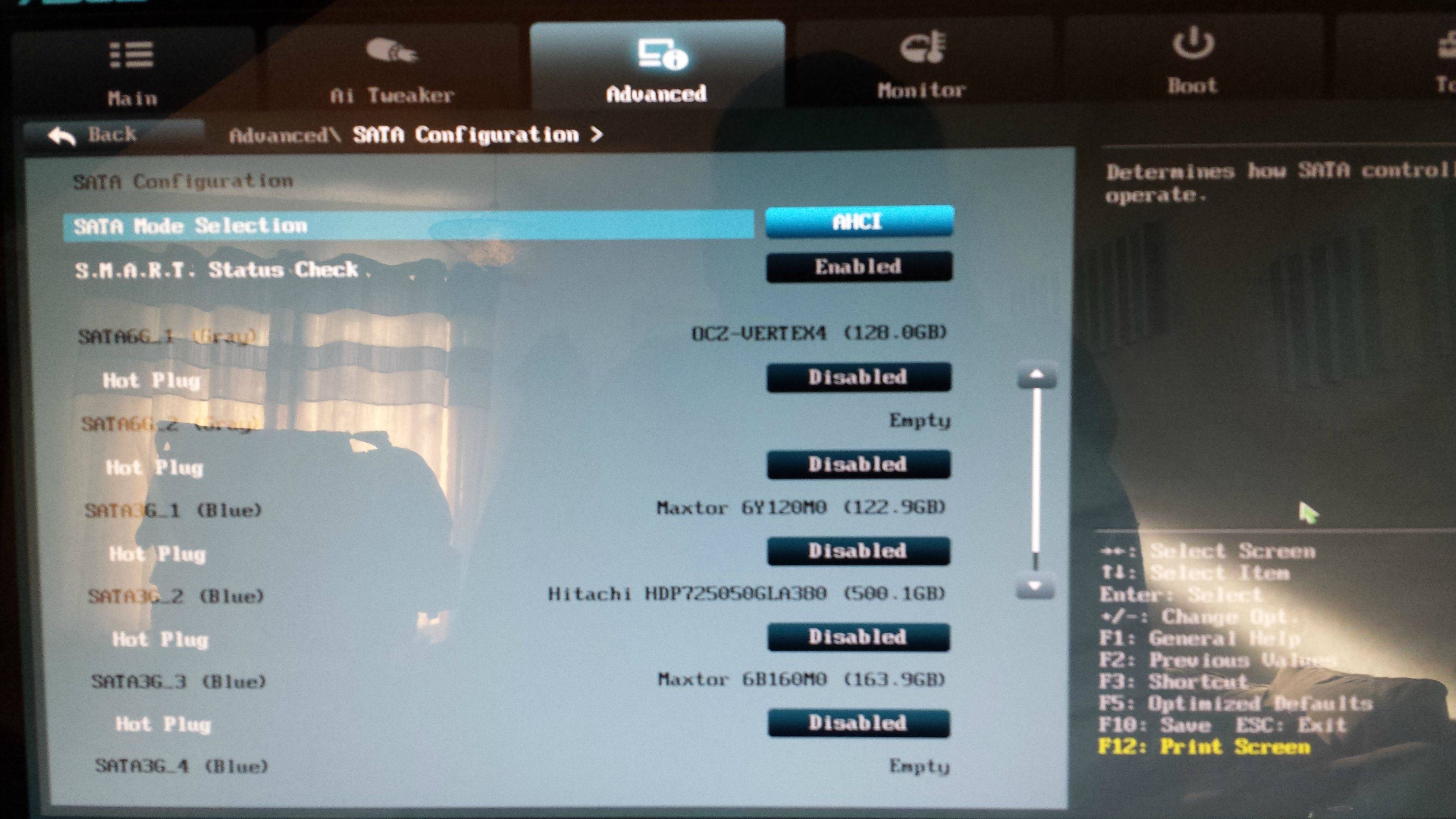
BSOD at random times. Sometimes on shutdown, Sometime during games..

lynxus

New member
Local time
12:16 PM
Messages
8
Hi Guys,
Getting a BSOD at random points.

Sometimes when i try to shutdown, Sometimes while browsing, Sometimes during a game and sometimes just randomly while the PC is idle..

I have recently upgraded the memory, motherboard and CPU without a windows reinstall ( I dont really fancy re-installing everything right now. So hoping I can just find the cause and resolve. )

A google for the error code doesnt help.
Ive run the software on this forum and attached the zip.

Any ideas anyone that may show whats causing the failure..

Thanks for any help here..
-Graham

nDC8qhL.jpg
 

My Computer My Computer

At a glance

Windows 7I58 GbNV GTX 460
Computer type
PC/Desktop
OS
Windows 7
CPU
I5
Motherboard
ASUS P8Z77-V LX
Memory
8 Gb
Graphics Card(s)
NV GTX 460
PSU
750W
Internet Speed
20Mb
Browser
Chrome
Hi welcome to SF :) .
The file you uploaded doesn't contain any dump files.
Unfortunately, from what I can it's a double fault which can't be analyzed using a minidump.
Please copy the MEMORY.DMP file from your Windows directory, zip it and upload it to your skydrive
and post back with the link.

Code:
C:\Windows\[B]MEMORY.DMP[/B]
 

My Computer My Computer

At a glance

Windows 10Intel Core i5 3570K16GB 1600Mhz G.SkillGigabyte GTX 970 G1-Gaming
Computer type
PC/Desktop
OS
Windows 10
CPU
Intel Core i5 3570K
Motherboard
Asus P8Z77V-PRO
Memory
16GB 1600Mhz G.Skill
Graphics Card(s)
Gigabyte GTX 970 G1-Gaming
PSU
Seasonic 1000W Platinum
Case
Fractal Design Define R4
Cooling
Noctua NH-D14
Hmm, I don't see a memory.dmp file.

I've turned on full kernel dump.. Will see what happens next time and update the post.

I hope it ain't faulty hardware as its friggin brand new.
 

My Computer My Computer

At a glance

Windows 7I58 GbNV GTX 460
Computer type
PC/Desktop
OS
Windows 7
CPU
I5
Motherboard
ASUS P8Z77-V LX
Memory
8 Gb
Graphics Card(s)
NV GTX 460
PSU
750W
Internet Speed
20Mb
Browser
Chrome
Happened again today.
It didnt make a MEMORY file :( However everything is checked in the dump options :(

The computer has rebooted from a bugcheck. The bugcheck was: 0x0000007f (0x0000000000000008, 0x0000000080050033, 0x00000000000406f8, 0xfffff80003498f24). A dump was saved in: c:\Minidump\091813-10452-01.dmp. Report Id: 091813-10452-01.

Attached is a zip WITH the .dmp file this time round ( It didnt do one last time, So thats progress? )
 

My Computer My Computer

At a glance

Windows 7I58 GbNV GTX 460
Computer type
PC/Desktop
OS
Windows 7
CPU
I5
Motherboard
ASUS P8Z77-V LX
Memory
8 Gb
Graphics Card(s)
NV GTX 460
PSU
750W
Internet Speed
20Mb
Browser
Chrome
Ok, Apparently this 0x0000007f code could be indicative of a bad bit of hardware, Im just gonna take the lot back and get it replaced.. Chances of two duff bits of kit?
 

My Computer My Computer

At a glance

Windows 7I58 GbNV GTX 460
Computer type
PC/Desktop
OS
Windows 7
CPU
I5
Motherboard
ASUS P8Z77-V LX
Memory
8 Gb
Graphics Card(s)
NV GTX 460
PSU
750W
Internet Speed
20Mb
Browser
Chrome
Ok, Apparently this 0x0000007f code could be indicative of a bad bit of hardware, Im just gonna take the lot back and get it replaced.. Chances of two duff bits of kit?
Do you mean you currently have two different kits of RAM?


I wanted a kernel dump but a minidump is better than none.

Code:
[B]STOP 0x0000007F: UNEXPECTED_KERNEL_MODE_TRAP[/B]
Usual causes:  Memory corruption, Hardware (memory in particular),
[COLOR=Red][U][B]Overclocking failure[/B][/U][/COLOR], Installing a faulty or [COLOR=Red][U][B]mismatched hardware (especially memory)[/B][/U][/COLOR] or a failure after
installing it, 3rd party firewall, Device drivers, SCSI/network/BIOS updates needed, Improperly seated cards,
[COLOR=Red][U][B]Incompatible storage devices[/B][/U][/COLOR], Virus scanner, Backup tool, Bad motherboard, Missing Service Pack
Code:
BugCheck 7F, {8, 80050033, 406f8, fffff80003498f24}

*** WARNING: Unable to verify timestamp for iaStor.sys
*** ERROR: Module load completed but symbols could not be loaded for iaStor.sys
Probably caused by : [U][B]iaStor.sys[/B][/U] ( iaStor+4b2a )
When I dumped the call stack I noticed iaStor.sys is behaving strangely, looping over and over again,
this is a small snip:

Code:
fffff880`03718308  [COLOR=Blue][U][B]fffff880`0126843b iaStor+0x2543b[/B][/U][/COLOR]
fffff880`03718310  [U][B][COLOR=DarkOrchid]00000000`00000000[/COLOR][/B][/U]
fffff880`03718338  [U][B][COLOR=DarkOrange]fffff880`012466b8 iaStor+0x36b8[/COLOR][/B][/U]
fffff880`03718340  [COLOR=Gray][U][B]fffffa80`06f595d0[/B][/U][/COLOR]
fffff880`037183a8  [COLOR=DeepSkyBlue][U][B]fffff880`01295489 iaStor+0x52489[/B][/U][/COLOR]
fffff880`037183b0  [COLOR=DarkOrchid][U][B]00000000`00000000[/B][/U][/COLOR]
fffff880`037183b8  [COLOR=Gray][U][B]fffffa80`06f595d0[/B][/U][/COLOR]
fffff880`037183d8  [COLOR=Red][U][B]fffff880`01270843 iaStor+0x2d843[/B][/U][/COLOR]
fffff880`037183e0  [COLOR=Gray][U][B]fffffa80`06f595d0[/B][/U][/COLOR]
fffff880`03718408  [U][B][COLOR=Green]fffff880`01268370 iaStor+0x25370[/COLOR][/B][/U]
fffff880`03718410  [COLOR=Gray][U][B]fffffa80`06f595d0[/B][/U][/COLOR]
fffff880`03718418  [COLOR=Blue][U][B]fffff880`0126843b iaStor+0x2543b[/B][/U][/COLOR]
fffff880`03718420  [COLOR=DarkOrchid][B][U]00000000`00000000[/U][/B][/COLOR]
fffff880`03718448  [U][B][COLOR=DarkOrange]fffff880`012466b8 iaStor+0x36b8[/COLOR][/B][/U]
fffff880`03718450  [COLOR=Gray][U][B]fffffa80`06f595d0[/B][/U][/COLOR]
fffff880`03718460  [COLOR=Gray][U][B]fffffa80`06f595d0[/B][/U][/COLOR]
fffff880`037184b8  [COLOR=DeepSkyBlue][U][B]fffff880`01295489 iaStor+0x52489[/B][/U][/COLOR]
fffff880`037184c0  [COLOR=DarkOrchid][U][B]00000000`00000000[/B][/U][/COLOR]
fffff880`037184c8  [COLOR=Gray][U][B]fffffa80`06f595d0[/B][/U][/COLOR]
fffff880`037184e8  [U][B][COLOR=Red]fffff880`01270843 iaStor+0x2d843[/COLOR][/B][/U]
fffff880`037184f0  [COLOR=Gray][U][B]fffffa80`06f595d0[/B][/U][/COLOR]
fffff880`03718518  [U][B][COLOR=Green]fffff880`01268370 iaStor+0x25370[/COLOR][/B][/U]
fffff880`03718520  [COLOR=Gray][U][B]fffffa80`06f595d0[/B][/U][/COLOR]
fffff880`03718528  [COLOR=Blue][U][B]fffff880`0126843b iaStor+0x2543b[/B][/U][/COLOR]
fffff880`03718530  [COLOR=DarkOrchid][U][B]00000000`00000000[/B][/U][/COLOR]
fffff880`03718558  [U][B][COLOR=DarkOrange]fffff880`012466b8 iaStor+0x36b8[/COLOR][/B][/U]
The driver is rather old:
Code:
lmvm iaStor
start             end                 module name
fffff880`01243000 fffff880`015e7000   iaStor   T (no symbols)           
    Loaded symbol image file: iaStor.sys
    Image path: iaStor.sys
    Image name: iaStor.sys
    Timestamp:        [COLOR=Red][U][B]Thu Feb 02 02:15:24 2012[/B][/U][/COLOR] (4F29D59C)
I would normally advise to update the driver but I think you have a RAID configuration
we need to get rid of.
Code:
iastordatamgrsvc.exe    c:\program files (x86)\intel\intel(r) rapid storage technology
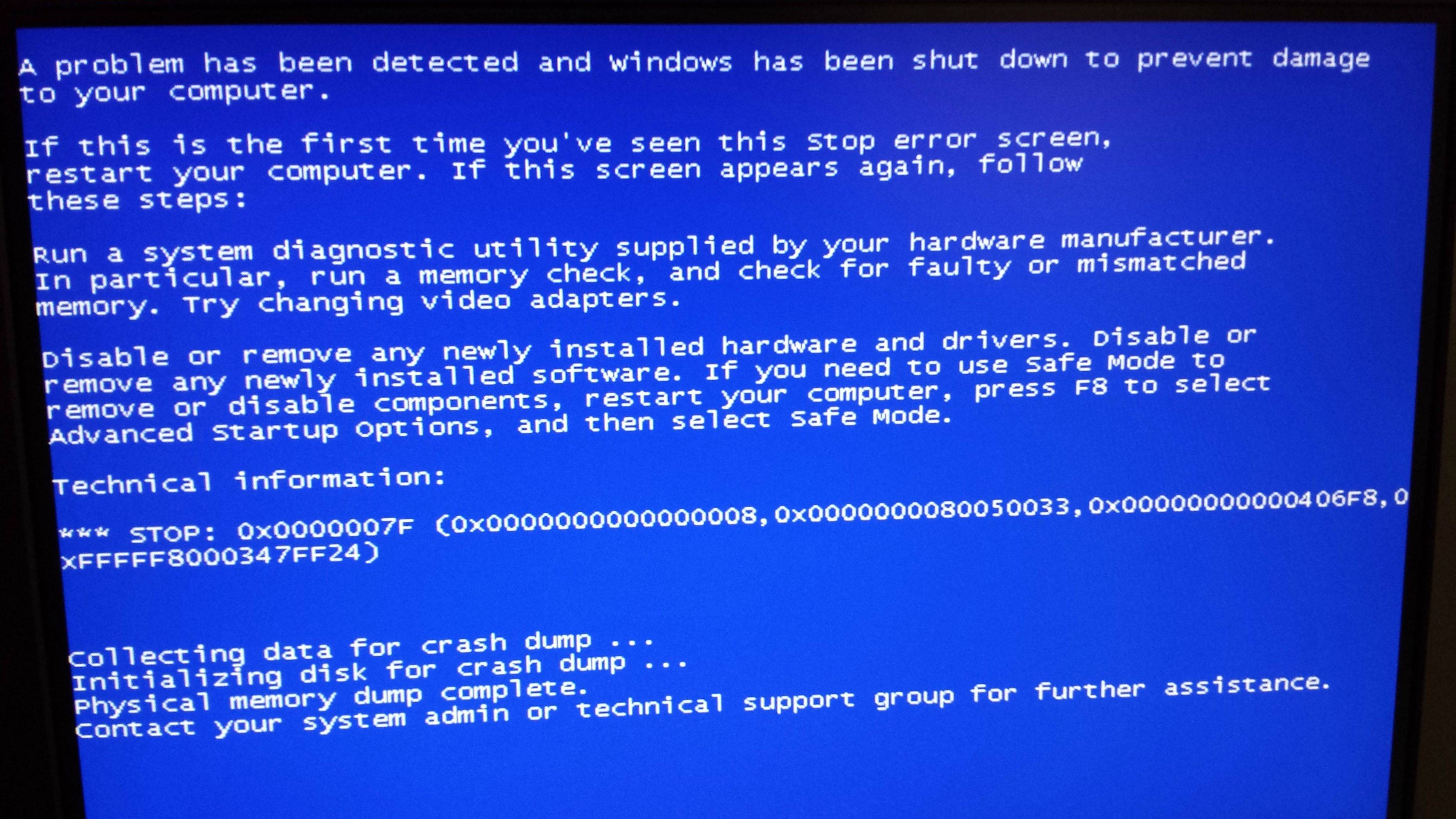
Equip yourself with a camera, go into the BIOS and take a picture of the SATA Mode.
What is it configured to (i.e AHCI / IDE / RAID)?


Are you overclocking?

Code:
!sysinfo cpuspeed
CPUID:        "Intel(R) Core(TM) i5-3570K CPU @ 3.40GHz"
MaxSpeed:     3400
CurrentSpeed: [COLOR=Red][U][B]3410[/B][/U][/COLOR]
Code:
c:\program files (x86)\asus\ai suite ii\
Please revert back any overclocks to the stock speeds!

 

My Computer My Computer

At a glance

Windows 10Intel Core i5 3570K16GB 1600Mhz G.SkillGigabyte GTX 970 G1-Gaming
Computer type
PC/Desktop
OS
Windows 10
CPU
Intel Core i5 3570K
Motherboard
Asus P8Z77V-PRO
Memory
16GB 1600Mhz G.Skill
Graphics Card(s)
Gigabyte GTX 970 G1-Gaming
PSU
Seasonic 1000W Platinum
Case
Fractal Design Define R4
Cooling
Noctua NH-D14
Thanks for the info.

- No over clocking. All stock.
- When i meant two kits, I meat two bad batches of "mobo,ram and cpu" from the shop.
- I only have one 8Gb stick of PC3 memory in it.
- My storage is AHCI, no raid arrays setup.

Ive just powered up using a new mobo , cpu and memory. See if that helps?
If it happens again ill post the dump again..

Any thoughts on what software i should look at updating / removing etc?

Thanks again for your help!


Ok, Apparently this 0x0000007f code could be indicative of a bad bit of hardware, Im just gonna take the lot back and get it replaced.. Chances of two duff bits of kit?
Do you mean you currently have two different kits of RAM?


I wanted a kernel dump but a minidump is better than none.

Code:
[B]STOP 0x0000007F: UNEXPECTED_KERNEL_MODE_TRAP[/B]
Usual causes:  Memory corruption, Hardware (memory in particular),
[COLOR=Red][U][B]Overclocking failure[/B][/U][/COLOR], Installing a faulty or [COLOR=Red][U][B]mismatched hardware (especially memory)[/B][/U][/COLOR] or a failure after
installing it, 3rd party firewall, Device drivers, SCSI/network/BIOS updates needed, Improperly seated cards,
[COLOR=Red][U][B]Incompatible storage devices[/B][/U][/COLOR], Virus scanner, Backup tool, Bad motherboard, Missing Service Pack
Code:
BugCheck 7F, {8, 80050033, 406f8, fffff80003498f24}

*** WARNING: Unable to verify timestamp for iaStor.sys
*** ERROR: Module load completed but symbols could not be loaded for iaStor.sys
Probably caused by : [U][B]iaStor.sys[/B][/U] ( iaStor+4b2a )
When I dumped the call stack I noticed iaStor.sys is behaving strangely, looping over and over again,
this is a small snip:

Code:
fffff880`03718308  [COLOR=Blue][U][B]fffff880`0126843b iaStor+0x2543b[/B][/U][/COLOR]
fffff880`03718310  [U][B][COLOR=DarkOrchid]00000000`00000000[/COLOR][/B][/U]
fffff880`03718338  [U][B][COLOR=DarkOrange]fffff880`012466b8 iaStor+0x36b8[/COLOR][/B][/U]
fffff880`03718340  [COLOR=Gray][U][B]fffffa80`06f595d0[/B][/U][/COLOR]
fffff880`037183a8  [COLOR=DeepSkyBlue][U][B]fffff880`01295489 iaStor+0x52489[/B][/U][/COLOR]
fffff880`037183b0  [COLOR=DarkOrchid][U][B]00000000`00000000[/B][/U][/COLOR]
fffff880`037183b8  [COLOR=Gray][U][B]fffffa80`06f595d0[/B][/U][/COLOR]
fffff880`037183d8  [COLOR=Red][U][B]fffff880`01270843 iaStor+0x2d843[/B][/U][/COLOR]
fffff880`037183e0  [COLOR=Gray][U][B]fffffa80`06f595d0[/B][/U][/COLOR]
fffff880`03718408  [U][B][COLOR=Green]fffff880`01268370 iaStor+0x25370[/COLOR][/B][/U]
fffff880`03718410  [COLOR=Gray][U][B]fffffa80`06f595d0[/B][/U][/COLOR]
fffff880`03718418  [COLOR=Blue][U][B]fffff880`0126843b iaStor+0x2543b[/B][/U][/COLOR]
fffff880`03718420  [COLOR=DarkOrchid][B][U]00000000`00000000[/U][/B][/COLOR]
fffff880`03718448  [U][B][COLOR=DarkOrange]fffff880`012466b8 iaStor+0x36b8[/COLOR][/B][/U]
fffff880`03718450  [COLOR=Gray][U][B]fffffa80`06f595d0[/B][/U][/COLOR]
fffff880`03718460  [COLOR=Gray][U][B]fffffa80`06f595d0[/B][/U][/COLOR]
fffff880`037184b8  [COLOR=DeepSkyBlue][U][B]fffff880`01295489 iaStor+0x52489[/B][/U][/COLOR]
fffff880`037184c0  [COLOR=DarkOrchid][U][B]00000000`00000000[/B][/U][/COLOR]
fffff880`037184c8  [COLOR=Gray][U][B]fffffa80`06f595d0[/B][/U][/COLOR]
fffff880`037184e8  [U][B][COLOR=Red]fffff880`01270843 iaStor+0x2d843[/COLOR][/B][/U]
fffff880`037184f0  [COLOR=Gray][U][B]fffffa80`06f595d0[/B][/U][/COLOR]
fffff880`03718518  [U][B][COLOR=Green]fffff880`01268370 iaStor+0x25370[/COLOR][/B][/U]
fffff880`03718520  [COLOR=Gray][U][B]fffffa80`06f595d0[/B][/U][/COLOR]
fffff880`03718528  [COLOR=Blue][U][B]fffff880`0126843b iaStor+0x2543b[/B][/U][/COLOR]
fffff880`03718530  [COLOR=DarkOrchid][U][B]00000000`00000000[/B][/U][/COLOR]
fffff880`03718558  [U][B][COLOR=DarkOrange]fffff880`012466b8 iaStor+0x36b8[/COLOR][/B][/U]
The driver is rather old:
Code:
lmvm iaStor
start             end                 module name
fffff880`01243000 fffff880`015e7000   iaStor   T (no symbols)           
    Loaded symbol image file: iaStor.sys
    Image path: iaStor.sys
    Image name: iaStor.sys
    Timestamp:        [COLOR=Red][U][B]Thu Feb 02 02:15:24 2012[/B][/U][/COLOR] (4F29D59C)
I would normally advise to update the driver but I think you have a RAID configuration
we need to get rid of.
Code:
iastordatamgrsvc.exe    c:\program files (x86)\intel\intel(r) rapid storage technology
Equip yourself with a camera, go into the BIOS and take a picture of the SATA Mode.
What is it configured to (i.e AHCI / IDE / RAID)?


Are you overclocking?

Code:
!sysinfo cpuspeed
CPUID:        "Intel(R) Core(TM) i5-3570K CPU @ 3.40GHz"
MaxSpeed:     3400
CurrentSpeed: [COLOR=Red][U][B]3410[/B][/U][/COLOR]
Code:
c:\program files (x86)\asus\ai suite ii\
Please revert back any overclocks to the stock speeds!
 

My Computer My Computer

At a glance

Windows 7I58 GbNV GTX 460
Computer type
PC/Desktop
OS
Windows 7
CPU
I5
Motherboard
ASUS P8Z77-V LX
Memory
8 Gb
Graphics Card(s)
NV GTX 460
PSU
750W
Internet Speed
20Mb
Browser
Chrome
And the Bios pictures relating to my post above:
cS4G7uw.jpg


GGRnodr.jpg
 

My Computer My Computer

At a glance

Windows 7I58 GbNV GTX 460
Computer type
PC/Desktop
OS
Windows 7
CPU
I5
Motherboard
ASUS P8Z77-V LX
Memory
8 Gb
Graphics Card(s)
NV GTX 460
PSU
750W
Internet Speed
20Mb
Browser
Chrome
Ive also uninstalled this Intel rapid storage bs, as it doesnt seem to do anything other than run in my taskbar with an icon that seems to give little storage options other than "Hey,, YOU HAVE A HARDDISK!"

Uninstalled..
Lets see how it works now..

Ty for your info again.. Hopefully this will resolve the problems!
 

My Computer My Computer

At a glance

Windows 7I58 GbNV GTX 460
Computer type
PC/Desktop
OS
Windows 7
CPU
I5
Motherboard
ASUS P8Z77-V LX
Memory
8 Gb
Graphics Card(s)
NV GTX 460
PSU
750W
Internet Speed
20Mb
Browser
Chrome
Thanks for the feedback :).
Now that we have established that you don't use a RAID array, my next step would be to remove
IRST as you have done already. Keep us posted!
 

My Computer My Computer

At a glance

Windows 10Intel Core i5 3570K16GB 1600Mhz G.SkillGigabyte GTX 970 G1-Gaming
Computer type
PC/Desktop
OS
Windows 10
CPU
Intel Core i5 3570K
Motherboard
Asus P8Z77V-PRO
Memory
16GB 1600Mhz G.Skill
Graphics Card(s)
Gigabyte GTX 970 G1-Gaming
PSU
Seasonic 1000W Platinum
Case
Fractal Design Define R4
Cooling
Noctua NH-D14
Back
Top