
You are using an out of date browser. It may not display this or other websites correctly.
You should upgrade or use an alternative browser.
You should upgrade or use an alternative browser.
Windows Explorer Status Bar: does not show file size
- Thread starter Champi
- Start date
Hi Champi, welcome to the forums.
I can't think why your setup would not be showing file sizes. Mine displays them fine
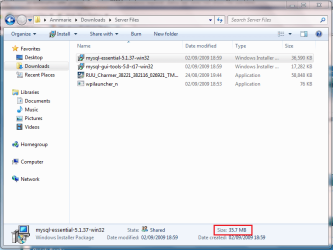
You might want to check some of your 'view' settings (ALT+V within explorer) and see if any of them help.
OS
I can't think why your setup would not be showing file sizes. Mine displays them fine
You might want to check some of your 'view' settings (ALT+V within explorer) and see if any of them help.
OS
My Computer
- Computer Manufacturer/Model Number
- Compaq Desktop
- OS
- Windows 7 Ultimate x64
- CPU
- AMD Sempron Dual Core
- Memory
- 3GB
- Graphics Card(s)
- NVIDIA GeForce 6150SE nForce 430
- Screen Resolution
- 1024x768
- Hard Drives
- 150GB Sata

This info is not enough for you?
Kari
Kari
My Computer
- Computer type
- Laptop
- Computer Manufacturer/Model Number
- HP ENVY 17-1150eg
- OS
- Windows 10 Pro x64 EN-GB
- CPU
- 1.6 GHz Intel Core i7-720QM Processor
- Memory
- 6 GB
- Graphics Card(s)
- ATI Mobility Radeon HD 5850 Graphics
- Sound Card
- Beats sound system with integrated subwoofer
- Monitor(s) Displays
- 17" laptop display, 22" LED and 32" Full HD TV through HDMI
- Screen Resolution
- 1600*900 (1), 1920*1080 (2&3)
- Hard Drives
- Internal: 2 x 500 GB SATA Hard Disk Drive 7200 rpm
External: 2TB for backups, 3TB USB3 network drive for media
- Cooling
- As Envy runs a bit warm, I have it on a Cooler Master pad
- Keyboard
- Logitech diNovo Media Desktop Laser (bluetooth)
- Mouse
- Logitech Performance Mouse MX
- Internet Speed
- 50/10 Mbps VDSL
- Antivirus
- Windows Defender 4.3.9431.0
- Browser
- Maxthon 3.5.2., IE11
Kari, i think we may both be jumping to conclusions as clearly it works for us
What would be nice, Champi, is a screenshot of your explorer as you see it so we can assess more deeply into your issue
What would be nice, Champi, is a screenshot of your explorer as you see it so we can assess more deeply into your issue
My Computer
- Computer Manufacturer/Model Number
- Compaq Desktop
- OS
- Windows 7 Ultimate x64
- CPU
- AMD Sempron Dual Core
- Memory
- 3GB
- Graphics Card(s)
- NVIDIA GeForce 6150SE nForce 430
- Screen Resolution
- 1024x768
- Hard Drives
- 150GB Sata

Well maybe something disabled the "Show preview and filters". Go to Computer and click on organize and in the drop down menu click on "Folder and search options". Now check the "Show preview and filters" option and click apply.
Hope this helps
Hope this helps
My Computer
- Computer type
- Laptop
- Computer Manufacturer/Model Number
- Samsung
- OS
- Windows 8 x64
- CPU
- Intel Core i7 3630QM
- Motherboard
- Intel HM76
- Memory
- Samsung 8 GB DDR3 800 Mhz
- Graphics Card(s)
- ATI Radeon HD Graphics 7670M + Intel HD Graphics 4000
- Screen Resolution
- 1366x768
- Hard Drives
- SAMSUNG Spinpoint M8 1TB
- Internet Speed
- 4 Mb/sDownload Speed, 2 Mb/s Upload Speed
- Antivirus
- avast!
Yeah, that's true. I'm having a bad day at work, though that's not an excuse.Kari, i think we may both be jumping to conclusions as clearly it works for us
What would be nice, Champi, is a screenshot of your explorer as you see it so we can assess more deeply into your issue
Like your new avatar!
Kari
My Computer
- Computer type
- Laptop
- Computer Manufacturer/Model Number
- HP ENVY 17-1150eg
- OS
- Windows 10 Pro x64 EN-GB
- CPU
- 1.6 GHz Intel Core i7-720QM Processor
- Memory
- 6 GB
- Graphics Card(s)
- ATI Mobility Radeon HD 5850 Graphics
- Sound Card
- Beats sound system with integrated subwoofer
- Monitor(s) Displays
- 17" laptop display, 22" LED and 32" Full HD TV through HDMI
- Screen Resolution
- 1600*900 (1), 1920*1080 (2&3)
- Hard Drives
- Internal: 2 x 500 GB SATA Hard Disk Drive 7200 rpm
External: 2TB for backups, 3TB USB3 network drive for media
- Cooling
- As Envy runs a bit warm, I have it on a Cooler Master pad
- Keyboard
- Logitech diNovo Media Desktop Laser (bluetooth)
- Mouse
- Logitech Performance Mouse MX
- Internet Speed
- 50/10 Mbps VDSL
- Antivirus
- Windows Defender 4.3.9431.0
- Browser
- Maxthon 3.5.2., IE11
Cheers, made it yesterday.
Nice thinking The Cool Guy +1
Nice thinking The Cool Guy +1
My Computer
- Computer Manufacturer/Model Number
- Compaq Desktop
- OS
- Windows 7 Ultimate x64
- CPU
- AMD Sempron Dual Core
- Memory
- 3GB
- Graphics Card(s)
- NVIDIA GeForce 6150SE nForce 430
- Screen Resolution
- 1024x768
- Hard Drives
- 150GB Sata

- Local time
- 11:36 AM
- Messages
- 7,146
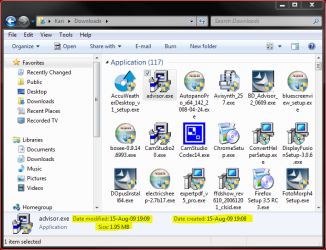
pedantically speaking, what you are looking at is the 'infobar'. the staus bar still exists, and is there to be turned on if desired, but it is uselss now, only showing number of files selected. you can see the status bar on the bottom of kari's snipshot.
so the status bar doesn't show file size (which is title of thread).
so the status bar doesn't show file size (which is title of thread).
My Computer
- Computer Manufacturer/Model Number
- mickey megabyte 1234
- OS
- ultimate 64 sp1
- CPU
- i5 2500K [email protected]
- Motherboard
- MSI P67A-GD53
- Memory
- 8 gigs GSkill Ripjaws 1600
- Graphics Card(s)
- amd hd6950
- Sound Card
- creative x-fi gamer
- Monitor(s) Displays
- samsung 24"
- Screen Resolution
- 1920x1080
- Hard Drives
- ocz vertex 2e 60 gig, samsung f3 1tb, buffalo 2tb ext
- PSU
- antec 550
- Case
- antec three hundred
- Cooling
- i'm a cooling fan
- Keyboard
- saitek eclipse ii
- Mouse
- logitech g3
- Internet Speed
- about 4 Mbps
- Other Info
- i love win7
pedantically speaking, what you are looking at is the 'infobar'. the staus bar still exists, and is there to be turned on if desired, but it is uselss now, only showing number of files selected. you can see the status bar on the bottom of kari's snipshot.
so the status bar doesn't show file size (which is title of thread).
So the question is null & void then.....As the infobar takes place of the status bar.
Nice catch though MM
My Computer
- Computer Manufacturer/Model Number
- Compaq Desktop
- OS
- Windows 7 Ultimate x64
- CPU
- AMD Sempron Dual Core
- Memory
- 3GB
- Graphics Card(s)
- NVIDIA GeForce 6150SE nForce 430
- Screen Resolution
- 1024x768
- Hard Drives
- 150GB Sata

eenbox
New member
- Local time
- 5:36 AM
- Messages
- 3
I most of the time use Total Commander but you got me going on that one - because sometimes I even need that info
My Computer
- Computer Manufacturer/Model Number
- Custom Build
- OS
- Vista 32-bit
- CPU
- Q6600
- Motherboard
- Asus
- Memory
- 4GB
- Graphics Card(s)
- 260GTX Core 216
- Sound Card
- Integrated
- Monitor(s) Displays
- 22" ViewSonic
- Hard Drives
- 320GB 7200rpm SATA II
500GB 7200rpm SATA II
- PSU
- Corsair 750W
- Case
- Antec B1500
- Cooling
- 6x12cm fans
Hi - newbie to the forums here...
I agree with Champi, from the start of this thread. There is no file size (or number of files/ojects) in the folder displayed in the Statusbar of a Windows Explorer window in Windows7. I have enabled all relevant Folder Options.
I also agree that if you click on a file/object, the size info IS displayed in the "Infobar"
The question however, is that no details (size/number of files) are shown in the Statusbar by simply opening a folder, like they are in XP.
(Also frustrating that when opening Recycle Bin, you can't just quickly glance at the Statusbar to see the total size and number of files in the Bin - so if anyone has any ideas, they would be welcomed!)
Thanks in advance
I agree with Champi, from the start of this thread. There is no file size (or number of files/ojects) in the folder displayed in the Statusbar of a Windows Explorer window in Windows7. I have enabled all relevant Folder Options.
I also agree that if you click on a file/object, the size info IS displayed in the "Infobar"
The question however, is that no details (size/number of files) are shown in the Statusbar by simply opening a folder, like they are in XP.
(Also frustrating that when opening Recycle Bin, you can't just quickly glance at the Statusbar to see the total size and number of files in the Bin - so if anyone has any ideas, they would be welcomed!)
Thanks in advance
My Computer
- Computer Manufacturer/Model Number
- HP
- OS
- Windows 7
- CPU
- Intel Core 2 Duo T7200
- Memory
- 1.5 GB
I guess you can't see the file size if u highlight the folder, but you can see the file size if you click on the file or application (eg. songs).
My Computer
- Computer type
- Laptop
- Computer Manufacturer/Model Number
- Samsung
- OS
- Windows 8 x64
- CPU
- Intel Core i7 3630QM
- Motherboard
- Intel HM76
- Memory
- Samsung 8 GB DDR3 800 Mhz
- Graphics Card(s)
- ATI Radeon HD Graphics 7670M + Intel HD Graphics 4000
- Screen Resolution
- 1366x768
- Hard Drives
- SAMSUNG Spinpoint M8 1TB
- Internet Speed
- 4 Mb/sDownload Speed, 2 Mb/s Upload Speed
- Antivirus
- avast!
I guess the OP didn't explain himself too well.
Of course explorer shows the files size but only for 1 to 15 selected files.
The moment you select 16 or more files it switches the the incredibly silly 'click for more details' in the preview pane.
Try it yourself.
Does anyone know of a reg setting...like alwaysshowfilesize or something?
Not very useful.
~ Red.
Of course explorer shows the files size but only for 1 to 15 selected files.
The moment you select 16 or more files it switches the the incredibly silly 'click for more details' in the preview pane.
Try it yourself.
Does anyone know of a reg setting...like alwaysshowfilesize or something?
Not very useful.
~ Red.
My Computer
- Computer Manufacturer/Model Number
- Gateway 530 QS
- OS
- Windows 7
- CPU
- Intel Core 2 Quad 2.4Ghz
- Memory
- 8GB
- Graphics Card(s)
- 8800 GTX
- Sound Card
- On board
- Monitor(s) Displays
- Dual 24" WS LCD
I assume the OP meant something like Windows 7 having less functionality than Windows XP regarding what you can see on the status and/or info bar.
The status and info bar in Windows 7 is for me completely useless.
The constant information, number of objects in folder and remaining disk space. I use that all the time. Having a second window open to see disk usage is just silly for something so trivial. Same is constantly having to open properties to see the numbers.
When having something selected, number of selected items and total size of selected files. There is no excuse for the lack of this information.
Why did they remove this functionality and why are there no option where you can turn this on. I can't think of any valid arguments :/
Except for this - that they aren't willing to spend resources on adding functionality, no matter how simple/little work involved, that is only useful for a minority group like me.
The status and info bar in Windows 7 is for me completely useless.
The constant information, number of objects in folder and remaining disk space. I use that all the time. Having a second window open to see disk usage is just silly for something so trivial. Same is constantly having to open properties to see the numbers.
When having something selected, number of selected items and total size of selected files. There is no excuse for the lack of this information.
Why did they remove this functionality and why are there no option where you can turn this on. I can't think of any valid arguments :/
Except for this - that they aren't willing to spend resources on adding functionality, no matter how simple/little work involved, that is only useful for a minority group like me.
My Computer
- OS
- Windows 7
pedantically speaking, what you are looking at is the 'infobar'. the staus bar still exists, and is there to be turned on if desired, but it is uselss now, only showing number of files selected. you can see the status bar on the bottom of kari's snipshot.
so the status bar doesn't show file size (which is title of thread).
I guess the OP didn't explain himself too well.
Of course explorer shows the files size but only for 1 to 15 selected files.
The moment you select 16 or more files it switches the the incredibly silly 'click for more details' in the preview pane.
Try it yourself.
Does anyone know of a reg setting...like alwaysshowfilesize or something?
Not very useful.
~ Red.
Thanks guys, I learned something new today and I`m a lowly Vista user.

My Computer
- Computer Manufacturer/Model Number
- DELL/Alienware Area-51
- OS
- Windows 7 Ultimate x64
- CPU
- Intel I7 980x @ 3.47 GHz
- Motherboard
- X58
- Memory
- 6 GB (3 x 2GB) 1333 MHz
- Graphics Card(s)
- 2 EVGA GTX 480's in SLI
- Sound Card
- Creative X-Fi Titanium
- Monitor(s) Displays
- DELL Ultra Sharp 2709W
- Screen Resolution
- 1920 x 1200
- Hard Drives
- OS = 750 GB Seagate
Data = 750 GB Seagate
Music = 1 TB WD Black
- PSU
- 1.2 KW
- Case
- DELL Alienware Area-51
- Cooling
- Liquid for CPU
- Keyboard
- Alienware TactX
- Mouse
- Alienware TactX
- Internet Speed
- Cable 5-9 MB
I assume the OP meant something like Windows 7 having less functionality than Windows XP regarding what you can see on the status and/or info bar.
The status and info bar in Windows 7 is for me completely useless.
The constant information, number of objects in folder and remaining disk space. I use that all the time. Having a second window open to see disk usage is just silly for something so trivial. Same is constantly having to open properties to see the numbers.
When having something selected, number of selected items and total size of selected files. There is no excuse for the lack of this information.
Why did they remove this functionality and why are there no option where you can turn this on. I can't think of any valid arguments :/
Except for this - that they aren't willing to spend resources on adding functionality, no matter how simple/little work involved, that is only useful for a minority group like me.
I can't agree more. I signed up just to say this and comment on how retarded it was for MS to take out this 'feature'. It's not even a feature, it's a BASIC EXPLORER/SHELL FUNCTION! They might as well of taken out explorer or letting you copy and rename files. Heck, they might as well of taken out letting you see file names unless you right click the ICON and go to properties! They ALREADY HAD this function in every single windows(even vista i believe), and i doubt it would take more than 1 line of code(well you know what i mean) to add this in. There is NO EXCUSE for not including this, and how can you say we're a minority group? EVERYONE would use this? Who WOULDN'T want this? Who WOULDN'T use this? Everyone competent computer user would use this. How can you claim windows 7 is an improvement when you are taking out basic functionality like this? I really hope they include it with their final release, or in future service packs. Who needs bugs like with vista when you can just intentionally CRIPPLE/HANDICAP your own product? This is such a huge letdown. I hope the people from MS are paying attention. PLEASE PUT IT IN and release a PATCH or UPDATE! IT'S NOT HARD!
My Computer
- OS
- Windows Seven

SquonkSC
New member
I assume the OP meant something like Windows 7 having less functionality than Windows XP regarding what you can see on the status and/or info bar.
The status and info bar in Windows 7 is for me completely useless.
The constant information, number of objects in folder and remaining disk space. I use that all the time. Having a second window open to see disk usage is just silly for something so trivial. Same is constantly having to open properties to see the numbers.
When having something selected, number of selected items and total size of selected files. There is no excuse for the lack of this information.
Why did they remove this functionality and why are there no option where you can turn this on. I can't think of any valid arguments :/
Except for this - that they aren't willing to spend resources on adding functionality, no matter how simple/little work involved, that is only useful for a minority group like me.
I can't agree more. I signed up just to say this and comment on how retarded it was for MS to take out this 'feature'. It's not even a feature, it's a BASIC EXPLORER/SHELL FUNCTION! They might as well of taken out explorer or letting you copy and rename files. Heck, they might as well of taken out letting you see file names unless you right click the ICON and go to properties! They ALREADY HAD this function in every single windows(even vista i believe), and i doubt it would take more than 1 line of code(well you know what i mean) to add this in. There is NO EXCUSE for not including this, and how can you say we're a minority group? EVERYONE would use this? Who WOULDN'T want this? Who WOULDN'T use this? Everyone competent computer user would use this. How can you claim windows 7 is an improvement when you are taking out basic functionality like this? I really hope they include it with their final release, or in future service packs. Who needs bugs like with vista when you can just intentionally CRIPPLE/HANDICAP your own product? This is such a huge letdown. I hope the people from MS are paying attention. PLEASE PUT IT IN and release a PATCH or UPDATE! IT'S NOT HARD!
The only thing missing from Win7 the infobar is the remaining disk size.
For the rest XP status bar is equally useless.
Here some screenshots of XP I just made:
1a. When folder selected it says 1 item selected. How brilliant!
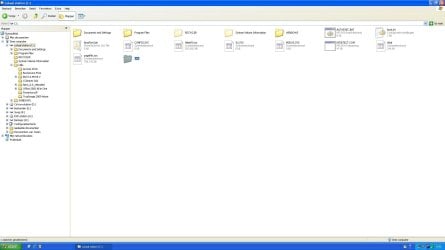
1b. Same info in Win7

2a. When selected in left pane, XP shows number of objects in folder,
and freespace of the disk..
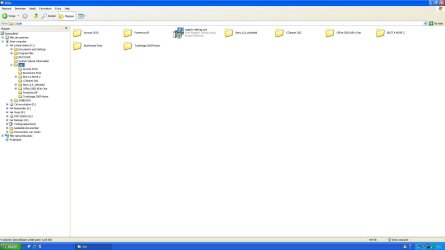
2b. Win7 shows only number of objects.
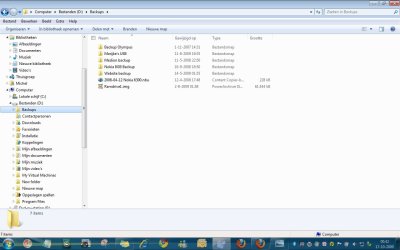
Is that a reason to get so worked up about, and rant?
You speak as if you speak for all. (OR RATHER SHOUT)
But many people, when they want to know the freespace,
they just click on computer in the left pane and see info of all the disks.
Why would we want to know free space all the time?
Seems kind of paranoia to me, since the info is only one click away.
Lets just say MS can't please us all.
I for one would rather see an accurate total amount of bytes in a folder when I click on it, instead of right click, left click properties.
Greetings.
My Computer
- OS
- Win7 Build 7600 x86
- CPU
- Pentium II 300MHz
- Motherboard
- Asus
- Memory
- 32mb EDO RAM
- Graphics Card(s)
- Diamond Viper
- Sound Card
- Soundblaster 16
- Monitor(s) Displays
- 14" AOC CRT 16K color
- Screen Resolution
- 800x600
- Hard Drives
- 300mb Quantum fireball
- PSU
- 110 Watts
- Cooling
- Passive
- Keyboard
- Trust Ergonomic
- Mouse
- Generic
- Internet Speed
- 256K u 128K d
I am new to this forum and I am little confused on this subject. I dont have windows 7. I may get it this fall or at tax time. My computer may be on the last leg.
When you open a folder, what does it show in the status bar? If you highlight a file, does it show the file size? I use that feature a lot in xp.
When you open a folder, what does it show in the status bar? If you highlight a file, does it show the file size? I use that feature a lot in xp.
My Computer
- OS
- Windows xp sp3
SquonkSC
New member
I am new to this forum and I am little confused on this subject. I dont have windows 7. I may get it this fall or at tax time. My computer may be on the last leg.
When you open a folder, what does it show in the status bar? If you highlight a file, does it show the file size? I use that feature a lot in xp.
It shows a bit more than that. (depending on the type of file.)
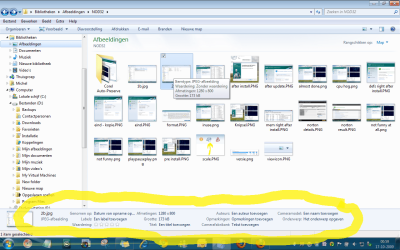
People like to nitpick, don't worry, if you give it some time,
you'll love it.
Greetings
My Computer
- OS
- Win7 Build 7600 x86
- CPU
- Pentium II 300MHz
- Motherboard
- Asus
- Memory
- 32mb EDO RAM
- Graphics Card(s)
- Diamond Viper
- Sound Card
- Soundblaster 16
- Monitor(s) Displays
- 14" AOC CRT 16K color
- Screen Resolution
- 800x600
- Hard Drives
- 300mb Quantum fireball
- PSU
- 110 Watts
- Cooling
- Passive
- Keyboard
- Trust Ergonomic
- Mouse
- Generic
- Internet Speed
- 256K u 128K d
Similar threads
- Replies
- 2
- Views
- 2K
- Replies
- 4
- Views
- 4K

- Replies
- 0
- Views
- 1K
- Replies
- 9
- Views
- 4K

