
Cleanest download of Win Home Premium?

JohnnyScience

New member
Power User
Local time
3:26 PM
Messages
889
Need to do a reinstall on an Acer with Home Premium edition & I only have a copy of Pro.

Anyone have a link to the cleanest & most bloat free download of Windows 7 Home Premium for download & burn to disc for reinstall?

Thanks.
 

My Computer My Computer

At a glance

Windows 7 64 & Ubuntu 64Intel Quad Core Q6600 2.40GHz8gNvidia 9600 GT & 9800 GT
Computer Manufacturer/Model Number
Built it myself
OS
Windows 7 64 & Ubuntu 64
CPU
Intel Quad Core Q6600 2.40GHz
Motherboard
Asus
Memory
8g
Graphics Card(s)
Nvidia 9600 GT & 9800 GT
Sound Card
Turtle Beach 5.1
Monitor(s) Displays
Three 19" Dell's & one 46" Samsung 750

My Computer My Computer

At a glance

Windows 10 Education 64 bitAMD Phenom II X4 980 Black Edition Deneb 3.7GHz8GB 4GBx2 Kingston PC10600 DDR3 1333 MemoryZotac NVIDIA Geforce GT640 2 Gig DDR3 PCIe
Computer type
PC/Desktop
Computer Manufacturer/Model Number
Home Built
OS
Windows 10 Education 64 bit
CPU
AMD Phenom II X4 980 Black Edition Deneb 3.7GHz
Motherboard
Asus M4N68T-M V2 µATX Motherboard
Memory
8GB 4GBx2 Kingston PC10600 DDR3 1333 Memory
Graphics Card(s)
Zotac NVIDIA Geforce GT640 2 Gig DDR3 PCIe
Sound Card
VIA VT1708s High Definition Audio 8-channel Onboard
Monitor(s) Displays
22" LG E2242 1080p and 2 19" I-INC AG191D
Screen Resolution
1280x1024 - 1920x1080 - 1280x1024
Hard Drives
Crucial M100 256 GB SSD and 500 GB WD Blue SATA
PSU
Thermaltake TR 620
Case
Power Up Black ATX Mid-Tower Case
Cooling
Stock heatsink and fan
Keyboard
Logitech Wireless K350 Wave
Mouse
Logitech Wireless M570 Trackman Wheel
Internet Speed
80 Mbps Down 30 Mbps Up
Antivirus
Windows Defender
Browser
Internet Explorer 11
Other Info
HP DVD1040e Lightscribe - External USB2
I just downloaded the regular Home Premium instead of the Universal, (although the Universal option is pretty cool) I already have a Pro CD and will never go past Pro at this point so really only Home Premium was/is needed for me for now.

I downloaded this one, which I believe is the correct & most recent version:

Windows 7 Home Premium x64 SP1 U (media refresh)

Thanks for the help guys.
 

My Computer My Computer

At a glance

Windows 7 64 & Ubuntu 64Intel Quad Core Q6600 2.40GHz8gNvidia 9600 GT & 9800 GT
Computer Manufacturer/Model Number
Built it myself
OS
Windows 7 64 & Ubuntu 64
CPU
Intel Quad Core Q6600 2.40GHz
Motherboard
Asus
Memory
8g
Graphics Card(s)
Nvidia 9600 GT & 9800 GT
Sound Card
Turtle Beach 5.1
Monitor(s) Displays
Three 19" Dell's & one 46" Samsung 750
So I downloaded & tried installing but it seems to get stuck at the part where it wants to choose what drive/partition to put the new install on. The cursor is just the circle showing progress, but after several hours it never changes. 2/3 of the time the computer doesn't even make it this far.

Trying the Repair function does nothing but show a blue screen & a cursor, once again even after several hours of waiting.

Any idea what my problem is or how I can successfully install a new copy of windows? Seems the HDD is pretty corrupted maybe? I'm pretty sure the .iso I made is good, it loads up the windows installation screen & just gets stuck on the choosing partition screen.
 

My Computer My Computer

At a glance

Windows 7 64 & Ubuntu 64Intel Quad Core Q6600 2.40GHz8gNvidia 9600 GT & 9800 GT
Computer Manufacturer/Model Number
Built it myself
OS
Windows 7 64 & Ubuntu 64
CPU
Intel Quad Core Q6600 2.40GHz
Motherboard
Asus
Memory
8g
Graphics Card(s)
Nvidia 9600 GT & 9800 GT
Sound Card
Turtle Beach 5.1
Monitor(s) Displays
Three 19" Dell's & one 46" Samsung 750

My Computer My Computer

At a glance

Windows 10 Pro x64 ; Xubuntu x64Intel i7 860 @ 2.80 GHz O/C'ed to 4.0GHz16GB Corsair Vengance DDR3 @ 661 MHz Dual Cha...EVGA NVidia GTX 560 1024MB
Computer type
PC/Desktop
Computer Manufacturer/Model Number
Golden Mk. I.4
OS
Windows 10 Pro x64 ; Xubuntu x64
CPU
Intel i7 860 @ 2.80 GHz O/C'ed to 4.0GHz
Motherboard
Gigabyte P55A-UD3R Rev.1. Award BIOS F13
Memory
16GB Corsair Vengance DDR3 @ 661 MHz Dual Channel (9-9-9-24)
Graphics Card(s)
EVGA NVidia GTX 560 1024MB
Sound Card
Realtek Integrated
Monitor(s) Displays
Dual Samsung SyncMaster 2494HS
Screen Resolution
1920*1080 and 1920*1080
Hard Drives
1*Samsung 840 EVO 120GB SSD;
1*OCZ Vertex 2 60GB SSD;
2*Samsung F3 SpinPoint 1TB in RAID0;
1*Samsung F1 SpinPoint 1TB;
2*Western Digital 1TB External USB 3.0
1*Western Digital 500GB External USB 3.0
1*Seagate 500GB External USB 2.0
PSU
Thermaltake ToughPower QFan 750W
Case
Thermaltake Element S VK60001W2Z
Cooling
Corsair H60 Water Cooling, 2*230mm and 2*80mm case fans
Keyboard
Logitech G110
Mouse
Logitech MX518
Thank you I will try that later today & report back with any additional issues.
 

My Computer My Computer

At a glance

Windows 7 64 & Ubuntu 64Intel Quad Core Q6600 2.40GHz8gNvidia 9600 GT & 9800 GT
Computer Manufacturer/Model Number
Built it myself
OS
Windows 7 64 & Ubuntu 64
CPU
Intel Quad Core Q6600 2.40GHz
Motherboard
Asus
Memory
8g
Graphics Card(s)
Nvidia 9600 GT & 9800 GT
Sound Card
Turtle Beach 5.1
Monitor(s) Displays
Three 19" Dell's & one 46" Samsung 750
I seem to be having issues yet still. When I first tried to get it to go into DISKPART it wouldn't fully do it & just had a blinking cursor after some initial information. I left it for hours & no changes.

Then I tried again a second time & was able to get it to DISKPART & LIST DISK & even initialize & run CLEAN ALL

But once again it never got past the blinking cursor, even after almost 24 hours. (I know clean all can take a substantial amount of time & I figured 24 hours was enough)

Any suggestions on what my issue could be or how to get the clean all to finish?

I'm going to run it again today here shortly just for the heck of it, hopefully it will take completely.
 

My Computer My Computer

At a glance

Windows 7 64 & Ubuntu 64Intel Quad Core Q6600 2.40GHz8gNvidia 9600 GT & 9800 GT
Computer Manufacturer/Model Number
Built it myself
OS
Windows 7 64 & Ubuntu 64
CPU
Intel Quad Core Q6600 2.40GHz
Motherboard
Asus
Memory
8g
Graphics Card(s)
Nvidia 9600 GT & 9800 GT
Sound Card
Turtle Beach 5.1
Monitor(s) Displays
Three 19" Dell's & one 46" Samsung 750
It sounds like your hard drive may have issues. You should probably run some diagnostics on it. If you go to the hard drive manufacturers web site you should be able to find a diagnostic utility to test it with.
 

My Computer My Computer

At a glance

Windows 10 Education 64 bitAMD Phenom II X4 980 Black Edition Deneb 3.7GHz8GB 4GBx2 Kingston PC10600 DDR3 1333 MemoryZotac NVIDIA Geforce GT640 2 Gig DDR3 PCIe
Computer type
PC/Desktop
Computer Manufacturer/Model Number
Home Built
OS
Windows 10 Education 64 bit
CPU
AMD Phenom II X4 980 Black Edition Deneb 3.7GHz
Motherboard
Asus M4N68T-M V2 µATX Motherboard
Memory
8GB 4GBx2 Kingston PC10600 DDR3 1333 Memory
Graphics Card(s)
Zotac NVIDIA Geforce GT640 2 Gig DDR3 PCIe
Sound Card
VIA VT1708s High Definition Audio 8-channel Onboard
Monitor(s) Displays
22" LG E2242 1080p and 2 19" I-INC AG191D
Screen Resolution
1280x1024 - 1920x1080 - 1280x1024
Hard Drives
Crucial M100 256 GB SSD and 500 GB WD Blue SATA
PSU
Thermaltake TR 620
Case
Power Up Black ATX Mid-Tower Case
Cooling
Stock heatsink and fan
Keyboard
Logitech Wireless K350 Wave
Mouse
Logitech Wireless M570 Trackman Wheel
Internet Speed
80 Mbps Down 30 Mbps Up
Antivirus
Windows Defender
Browser
Internet Explorer 11
Other Info
HP DVD1040e Lightscribe - External USB2
Are you following the steps to get a perfect http://www.sevenforums.com/tutorials/219487-clean-reinstall-factory-oem-windows-7-a.html#post1839164 ?

Try another ISO download for your licensed version from Step 1, then burn to DVD/write to flash stick with the tool from Step 2 to see if it will work correctly. Remember to delete all partitions during Custom install at Steps 7 and 8 of http://www.sevenforums.com/tutorials/1649-clean-install-windows-7-a.html .

If the problem repeats then as suggested try wiping the HD with Diskpart Clean Command and then if necessary next run the HD maker's Hard Drive Diagnostic Procedure extended CD scan to check its condition.
 
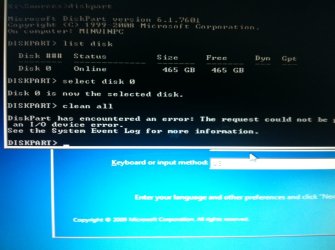
I ran this the other day & got the following error message:

Shift+F10 > diskpart > list disk > select disk 0 (only disk showing up under list disk) > clean all

I let it go the first time for over 24 hours & it never got past the blinking cursor. I tried a couple more unsuccessfull times the following few days & finally got this error message on multiple runs:

Any idea what the issue is now? What next series of steps should I follow?

Thanks for the help everyone as always.
 

Attachments

  • photo.JPG
    photo.JPG
    103.2 KB · Views: 3

My Computer My Computer

At a glance

Windows 7 64 & Ubuntu 64Intel Quad Core Q6600 2.40GHz8gNvidia 9600 GT & 9800 GT
Computer Manufacturer/Model Number
Built it myself
OS
Windows 7 64 & Ubuntu 64
CPU
Intel Quad Core Q6600 2.40GHz
Motherboard
Asus
Memory
8g
Graphics Card(s)
Nvidia 9600 GT & 9800 GT
Sound Card
Turtle Beach 5.1
Monitor(s) Displays
Three 19" Dell's & one 46" Samsung 750
I'd run some diagnostics on the hard drive.
 

My Computer My Computer

At a glance

Windows 10 Education 64 bitAMD Phenom II X4 980 Black Edition Deneb 3.7GHz8GB 4GBx2 Kingston PC10600 DDR3 1333 MemoryZotac NVIDIA Geforce GT640 2 Gig DDR3 PCIe
Computer type
PC/Desktop
Computer Manufacturer/Model Number
Home Built
OS
Windows 10 Education 64 bit
CPU
AMD Phenom II X4 980 Black Edition Deneb 3.7GHz
Motherboard
Asus M4N68T-M V2 µATX Motherboard
Memory
8GB 4GBx2 Kingston PC10600 DDR3 1333 Memory
Graphics Card(s)
Zotac NVIDIA Geforce GT640 2 Gig DDR3 PCIe
Sound Card
VIA VT1708s High Definition Audio 8-channel Onboard
Monitor(s) Displays
22" LG E2242 1080p and 2 19" I-INC AG191D
Screen Resolution
1280x1024 - 1920x1080 - 1280x1024
Hard Drives
Crucial M100 256 GB SSD and 500 GB WD Blue SATA
PSU
Thermaltake TR 620
Case
Power Up Black ATX Mid-Tower Case
Cooling
Stock heatsink and fan
Keyboard
Logitech Wireless K350 Wave
Mouse
Logitech Wireless M570 Trackman Wheel
Internet Speed
80 Mbps Down 30 Mbps Up
Antivirus
Windows Defender
Browser
Internet Explorer 11
Other Info
HP DVD1040e Lightscribe - External USB2
Check the hard drive with the manufacturer's diagnostic tools.
Hard Drive Diagnostics Tools and Utilities (Storage) - TACKtech Corp.

This one seems to be quite a list for Western Digital, can anyone suggest what file I would need to download? It's a 500g WD laptop drive.

Do I need to download the files at BOTH of these links you provided, or just one or the other?


Ok so here is step #2 from this link:

Western Digital - I've had issues with running this from a CD/DVD - try the Hitachi DFT (on older/IDE systems) or the Seagate SeaTools (on newer/SATA systems) - WD Support / Downloads / SATA & SAS Download the Diag504fCD.iso file on this page: WD Support / Downloads / Legacy Internal / WD Raptor
I have hosted a zipped copy of the ISO that I use (at work) here: http://www.box.net/shared/gl0fifqgj4

So I assume I want the Seagate Tools? Or do I need to download the
Diag504fCD.iso file?

I guess I'm just confused which one I'll want to run?

Do you guys think it's even worth it? If a HDD is having issues booting for install, is there really anything that can be done? Should I just replace it? (as cheaply as possibly I might add)
 

My Computer My Computer

At a glance

Windows 7 64 & Ubuntu 64Intel Quad Core Q6600 2.40GHz8gNvidia 9600 GT & 9800 GT
Computer Manufacturer/Model Number
Built it myself
OS
Windows 7 64 & Ubuntu 64
CPU
Intel Quad Core Q6600 2.40GHz
Motherboard
Asus
Memory
8g
Graphics Card(s)
Nvidia 9600 GT & 9800 GT
Sound Card
Turtle Beach 5.1
Monitor(s) Displays
Three 19" Dell's & one 46" Samsung 750
This ISO can I believe be burned to CD using Windows Image Burner to run Data Lifeguard diagnostics: Western Digital Data Lifeguard CD ISO (extract first)

I also found this WD Data Lifeguard Create Diagnostics Flash stick

If you can slave the HD to another PC you can run Data Lifeguard for Windows from WD Support / Downloads / SATA & SAS / WD RE2. They haven't posted up the ISO links for CD.

Otherwise Seagate Seatools can diagnose but not repair

I could try & slave it to my main PC, what would I need a USB to USB cable? I'm not sure what I have to be honest.

Or should I just remove it from the laptop & hook it up via SATA internally? (are laptop SATA's & regular PC SATA's the same?)

If not I will try the WD Data Lifeguard. So it will actually repair as well as detect the problem?
 

My Computer My Computer

At a glance

Windows 7 64 & Ubuntu 64Intel Quad Core Q6600 2.40GHz8gNvidia 9600 GT & 9800 GT
Computer Manufacturer/Model Number
Built it myself
OS
Windows 7 64 & Ubuntu 64
CPU
Intel Quad Core Q6600 2.40GHz
Motherboard
Asus
Memory
8g
Graphics Card(s)
Nvidia 9600 GT & 9800 GT
Sound Card
Turtle Beach 5.1
Monitor(s) Displays
Three 19" Dell's & one 46" Samsung 750
SATA is SATA, it's the same physical connection in a laptop and a desktop. The drive should work regardless of whether its SATA 1,2 or 3. It shouldn't be a problem slaving it in your desktop PC.
 

My Computer My Computer

At a glance

Windows 10 Education 64 bitAMD Phenom II X4 980 Black Edition Deneb 3.7GHz8GB 4GBx2 Kingston PC10600 DDR3 1333 MemoryZotac NVIDIA Geforce GT640 2 Gig DDR3 PCIe
Computer type
PC/Desktop
Computer Manufacturer/Model Number
Home Built
OS
Windows 10 Education 64 bit
CPU
AMD Phenom II X4 980 Black Edition Deneb 3.7GHz
Motherboard
Asus M4N68T-M V2 µATX Motherboard
Memory
8GB 4GBx2 Kingston PC10600 DDR3 1333 Memory
Graphics Card(s)
Zotac NVIDIA Geforce GT640 2 Gig DDR3 PCIe
Sound Card
VIA VT1708s High Definition Audio 8-channel Onboard
Monitor(s) Displays
22" LG E2242 1080p and 2 19" I-INC AG191D
Screen Resolution
1280x1024 - 1920x1080 - 1280x1024
Hard Drives
Crucial M100 256 GB SSD and 500 GB WD Blue SATA
PSU
Thermaltake TR 620
Case
Power Up Black ATX Mid-Tower Case
Cooling
Stock heatsink and fan
Keyboard
Logitech Wireless K350 Wave
Mouse
Logitech Wireless M570 Trackman Wheel
Internet Speed
80 Mbps Down 30 Mbps Up
Antivirus
Windows Defender
Browser
Internet Explorer 11
Other Info
HP DVD1040e Lightscribe - External USB2
If you can slave the HD to another PC you can run Data Lifeguard for Windows from WD Support / Downloads / SATA & SAS / WD RE2.

Ok I am running the Extended test right now via slave on my main computer. It just started so I will update once it's finished.

So this will diagnosis & also repair then?

There was an option to "Write 0's" I think that said it would rewrite the entire drive.

Is that a step I will want to complete or will the Extended Test rewrite once it's done?

Thanks.

BTW the drive had a SMART Status of FAIL when I first opened the Lifeguard program. My other 2 drives passed. (although I believe one of my other drives also has some errors & makes noise upon start up)
 

My Computer My Computer

At a glance

Windows 7 64 & Ubuntu 64Intel Quad Core Q6600 2.40GHz8gNvidia 9600 GT & 9800 GT
Computer Manufacturer/Model Number
Built it myself
OS
Windows 7 64 & Ubuntu 64
CPU
Intel Quad Core Q6600 2.40GHz
Motherboard
Asus
Memory
8g
Graphics Card(s)
Nvidia 9600 GT & 9800 GT
Sound Card
Turtle Beach 5.1
Monitor(s) Displays
Three 19" Dell's & one 46" Samsung 750
Well it already failed out of the Extended Test saying "too many bad sectors" so I'm just trying the Full Erase in Write Zeros, I guess we will see if that fails out too.

If it fails out of Write Zeros, it's totally dead then right?
 

My Computer My Computer

At a glance

Windows 7 64 & Ubuntu 64Intel Quad Core Q6600 2.40GHz8gNvidia 9600 GT & 9800 GT
Computer Manufacturer/Model Number
Built it myself
OS
Windows 7 64 & Ubuntu 64
CPU
Intel Quad Core Q6600 2.40GHz
Motherboard
Asus
Memory
8g
Graphics Card(s)
Nvidia 9600 GT & 9800 GT
Sound Card
Turtle Beach 5.1
Monitor(s) Displays
Three 19" Dell's & one 46" Samsung 750
Ok so now I keep getting the error message over & over but with different sector numbers:

Sector #2340984-09820934809328::Write Zeros error! Continue?

I've hit continue 20 times, clearly there is just a ton of bad sectors. I'm not going to keep at this all night, I just think it needs replaced at this point unless someone else has any ideas.

I found one on ebay, brand new for $54:

500GB Hard Drive for Acer Aspire 5720 5730 5735 5738 5740 5745 5750 5820 5910 | eBay

And a refurb for $46 - but buying a refurb HDD kind of scares me...

500GB Hard Drive for Acer Aspire 5720 5730 5735 5738 5740 5745 5750 5820 5910 | eBay

not too bad I guess. Anyone know of any where that has them cheaper?

Thanks.
 

My Computer My Computer

At a glance

Windows 7 64 & Ubuntu 64Intel Quad Core Q6600 2.40GHz8gNvidia 9600 GT & 9800 GT
Computer Manufacturer/Model Number
Built it myself
OS
Windows 7 64 & Ubuntu 64
CPU
Intel Quad Core Q6600 2.40GHz
Motherboard
Asus
Memory
8g
Graphics Card(s)
Nvidia 9600 GT & 9800 GT
Sound Card
Turtle Beach 5.1
Monitor(s) Displays
Three 19" Dell's & one 46" Samsung 750
Back
Top