Laptop freezes a lot

Jasperkm

New member
Local time
4:50 PM
Messages
18
Hey, I have a question regarding my asus K52JE laptop. I bought this one about 2.5 years ago.

I've been having the following problem ever since the purchase;
The laptop freezes randomly when I am doing stuff (browsing the net, installing something, checking my e-mail (especially outlook 2013, gaming, whatever) and it didn't bother me that much but now i'm getting quite sick of it. This is because I recently wiped my hard drive and did a clean windows 7 install without bloatware etc and this didn't fix my problem.

So what happens when the laptop freezes; I can move my mouse, can't click on stuff most of the times (sometimes can and it will load up after the freeze) and the blinking processor/hard drive light thing (dont know what it indicates exactly) will stop blinking. A couple of seconds before the freeze stops, a rattling sound comes from the laptop and the light starts blinking again. Then it unfreezes. Usually this lasts a couple of minutes, sometimes longer.

When I go to my system event viewer, I see a lot of atapi errors with ID 11. The description: "The driver detected a controller error on \Device\Ide\IdePort0." The laptop works fine in safe mode (no freezes) so I'm thinking the hard drive is good. Also did memtest for the ram, fount no errors, and I ran seagate dos mode long test for my hard drive. It found 1 error but that didn't fix the problem. Maybe I need some drivers for my sata port or something? I don't really now... I x
I'm thinking some drivers will fix this (maybe new bios settings/driver?)


I would really like some help with this.
Thanks a lot in advance.

Regards, Jasper
 

My Computer My Computer

Computer type
Laptop
Computer Manufacturer/Model Number
Asus
OS
Windows 7 64 bit
CPU
intel i3
Memory
4gb ddr3 1333mhz
Graphics Card(s)
radeon hd5470
Hard Drives
seagate momentus st9500325as
Antivirus
avast
Browser
chrome

My Computer My Computer

Computer type
PC/Desktop
Computer Manufacturer/Model Number
Own build (new) Desk1 / Asus ROG Win 7 / Desk2 1st build
OS
Desk1 7 Home Prem / Desk2 10 Pro / Main lap Asus ROG 10 Pro 2 laptop Toshiba 7 Pro Asus P2520 7 & 10
CPU
Desk1 i5 3750K / Laptop i7 GTX 860M / Desk2 i5 2500
Motherboard
Desk1 Asus P877-V / Desk2 Gigabyte H67 UD3H / Laptop ?
Memory
Desk1 8GB (1866) / Desk2 16GB (1333) / Laptop 8Gb DDR3
Graphics Card(s)
Desk 1& 2NVidia GTX 650 & Laptops on board Intel
Sound Card
Desk 1 & 2 -XONAR DG Realtek High Def audio Laptop
Monitor(s) Displays
Desk 1 Benq HD 2450 / Desk2 Philips 24" / Laptop 17.5"
Screen Resolution
1920x1080 D1 & D2 & Laptop 1
Hard Drives
Desk1 Samsung 120GB 830 SSD
Asus ROG 256GB 850 Pro SSD
Desk2 Samsung 840 256 SSD
Toshiba 120GB EVO
PSU
Desk 1 Corsair HX 1050/ Laptop ? / Desk 2 Corsair HX 650
Case
Desk 1 Cooler HAF XM ? Toshiba laptop / Desk2 Coolermaster
Cooling
Fans on all Desk1 -2 Desk2 - all Coolermasters 5 Laptop ?
Keyboard
Desk 1 MS Sidewinder X6 Desk 2 MS Sidewinder X 4
Mouse
Desk 1&2 - Gigabyte MS 900 gamer - laptop - Logitec wireless
Internet Speed
ADSL2+
Other Info
One other Desktop (tester) and spare Toshba laptop both with SSD's
Running Kaspersky 2016 ISS on all machines config'd identically
Logitec audio stereo systems on each machine (x3)
Canon MG5250MFC
Router/modem TP-Link running WPA2SK
I know, ive installed those drivers right after the windows 7 install. This doesnt fix the problem
 

My Computer My Computer

Computer type
Laptop
Computer Manufacturer/Model Number
Asus
OS
Windows 7 64 bit
CPU
intel i3
Memory
4gb ddr3 1333mhz
Graphics Card(s)
radeon hd5470
Hard Drives
seagate momentus st9500325as
Antivirus
avast
Browser
chrome

My Computer My Computer

Computer type
PC/Desktop
Computer Manufacturer/Model Number
Own build (new) Desk1 / Asus ROG Win 7 / Desk2 1st build
OS
Desk1 7 Home Prem / Desk2 10 Pro / Main lap Asus ROG 10 Pro 2 laptop Toshiba 7 Pro Asus P2520 7 & 10
CPU
Desk1 i5 3750K / Laptop i7 GTX 860M / Desk2 i5 2500
Motherboard
Desk1 Asus P877-V / Desk2 Gigabyte H67 UD3H / Laptop ?
Memory
Desk1 8GB (1866) / Desk2 16GB (1333) / Laptop 8Gb DDR3
Graphics Card(s)
Desk 1& 2NVidia GTX 650 & Laptops on board Intel
Sound Card
Desk 1 & 2 -XONAR DG Realtek High Def audio Laptop
Monitor(s) Displays
Desk 1 Benq HD 2450 / Desk2 Philips 24" / Laptop 17.5"
Screen Resolution
1920x1080 D1 & D2 & Laptop 1
Hard Drives
Desk1 Samsung 120GB 830 SSD
Asus ROG 256GB 850 Pro SSD
Desk2 Samsung 840 256 SSD
Toshiba 120GB EVO
PSU
Desk 1 Corsair HX 1050/ Laptop ? / Desk 2 Corsair HX 650
Case
Desk 1 Cooler HAF XM ? Toshiba laptop / Desk2 Coolermaster
Cooling
Fans on all Desk1 -2 Desk2 - all Coolermasters 5 Laptop ?
Keyboard
Desk 1 MS Sidewinder X6 Desk 2 MS Sidewinder X 4
Mouse
Desk 1&2 - Gigabyte MS 900 gamer - laptop - Logitec wireless
Internet Speed
ADSL2+
Other Info
One other Desktop (tester) and spare Toshba laptop both with SSD's
Running Kaspersky 2016 ISS on all machines config'd identically
Logitec audio stereo systems on each machine (x3)
Canon MG5250MFC
Router/modem TP-Link running WPA2SK
Thanks for the reply. I think it cant be malware cause I did a clean install, right? I will run the test later today.
 

My Computer My Computer

Computer type
Laptop
Computer Manufacturer/Model Number
Asus
OS
Windows 7 64 bit
CPU
intel i3
Memory
4gb ddr3 1333mhz
Graphics Card(s)
radeon hd5470
Hard Drives
seagate momentus st9500325as
Antivirus
avast
Browser
chrome
Yes you are right Jasper but I am perhaps bit on the paranoid side and think that as soon as you install and are going through those updates and the like it doesn't mean that something is not trying to creep in.

I don't know what you are using for security but I would be getting some on real quick.

Te scans mate are very quick to do and for the sake of a few minutes of your time if nothing else eliminates the possibility.

They are good to keep too as most of us in here us at least Malwarebytes in addition to the main security I use the free version some use the paid for as general rule I am sure you will know is never to use two AV at the same time real time. The SAS is really good at picking up tracking stuff and that is why I use it a lot. The ADW is for when things are not looking so good and I just load and run it from Downloads which I keep on my desktop. .

The sfc and chkdsk well it is up to you it could be down to a faulty install thats the only reason I suggested those.

Now there are other things that you can try but see how it goes:)
 

My Computer My Computer

Computer type
PC/Desktop
Computer Manufacturer/Model Number
Own build (new) Desk1 / Asus ROG Win 7 / Desk2 1st build
OS
Desk1 7 Home Prem / Desk2 10 Pro / Main lap Asus ROG 10 Pro 2 laptop Toshiba 7 Pro Asus P2520 7 & 10
CPU
Desk1 i5 3750K / Laptop i7 GTX 860M / Desk2 i5 2500
Motherboard
Desk1 Asus P877-V / Desk2 Gigabyte H67 UD3H / Laptop ?
Memory
Desk1 8GB (1866) / Desk2 16GB (1333) / Laptop 8Gb DDR3
Graphics Card(s)
Desk 1& 2NVidia GTX 650 & Laptops on board Intel
Sound Card
Desk 1 & 2 -XONAR DG Realtek High Def audio Laptop
Monitor(s) Displays
Desk 1 Benq HD 2450 / Desk2 Philips 24" / Laptop 17.5"
Screen Resolution
1920x1080 D1 & D2 & Laptop 1
Hard Drives
Desk1 Samsung 120GB 830 SSD
Asus ROG 256GB 850 Pro SSD
Desk2 Samsung 840 256 SSD
Toshiba 120GB EVO
PSU
Desk 1 Corsair HX 1050/ Laptop ? / Desk 2 Corsair HX 650
Case
Desk 1 Cooler HAF XM ? Toshiba laptop / Desk2 Coolermaster
Cooling
Fans on all Desk1 -2 Desk2 - all Coolermasters 5 Laptop ?
Keyboard
Desk 1 MS Sidewinder X6 Desk 2 MS Sidewinder X 4
Mouse
Desk 1&2 - Gigabyte MS 900 gamer - laptop - Logitec wireless
Internet Speed
ADSL2+
Other Info
One other Desktop (tester) and spare Toshba laptop both with SSD's
Running Kaspersky 2016 ISS on all machines config'd identically
Logitec audio stereo systems on each machine (x3)
Canon MG5250MFC
Router/modem TP-Link running WPA2SK
Will do when I get home! Good explanation :)
 

My Computer My Computer

Computer type
Laptop
Computer Manufacturer/Model Number
Asus
OS
Windows 7 64 bit
CPU
intel i3
Memory
4gb ddr3 1333mhz
Graphics Card(s)
radeon hd5470
Hard Drives
seagate momentus st9500325as
Antivirus
avast
Browser
chrome
Will do when I get home! Good explanation :)
Hmm good stuff mate and when you get things sorted there is a goldmone of info in this site to get you up and running at an optimum level.
 

My Computer My Computer

Computer type
PC/Desktop
Computer Manufacturer/Model Number
Own build (new) Desk1 / Asus ROG Win 7 / Desk2 1st build
OS
Desk1 7 Home Prem / Desk2 10 Pro / Main lap Asus ROG 10 Pro 2 laptop Toshiba 7 Pro Asus P2520 7 & 10
CPU
Desk1 i5 3750K / Laptop i7 GTX 860M / Desk2 i5 2500
Motherboard
Desk1 Asus P877-V / Desk2 Gigabyte H67 UD3H / Laptop ?
Memory
Desk1 8GB (1866) / Desk2 16GB (1333) / Laptop 8Gb DDR3
Graphics Card(s)
Desk 1& 2NVidia GTX 650 & Laptops on board Intel
Sound Card
Desk 1 & 2 -XONAR DG Realtek High Def audio Laptop
Monitor(s) Displays
Desk 1 Benq HD 2450 / Desk2 Philips 24" / Laptop 17.5"
Screen Resolution
1920x1080 D1 & D2 & Laptop 1
Hard Drives
Desk1 Samsung 120GB 830 SSD
Asus ROG 256GB 850 Pro SSD
Desk2 Samsung 840 256 SSD
Toshiba 120GB EVO
PSU
Desk 1 Corsair HX 1050/ Laptop ? / Desk 2 Corsair HX 650
Case
Desk 1 Cooler HAF XM ? Toshiba laptop / Desk2 Coolermaster
Cooling
Fans on all Desk1 -2 Desk2 - all Coolermasters 5 Laptop ?
Keyboard
Desk 1 MS Sidewinder X6 Desk 2 MS Sidewinder X 4
Mouse
Desk 1&2 - Gigabyte MS 900 gamer - laptop - Logitec wireless
Internet Speed
ADSL2+
Other Info
One other Desktop (tester) and spare Toshba laptop both with SSD's
Running Kaspersky 2016 ISS on all machines config'd identically
Logitec audio stereo systems on each machine (x3)
Canon MG5250MFC
Router/modem TP-Link running WPA2SK
Okay, I really hope you can help me fix this problem!
 

My Computer My Computer

Computer type
Laptop
Computer Manufacturer/Model Number
Asus
OS
Windows 7 64 bit
CPU
intel i3
Memory
4gb ddr3 1333mhz
Graphics Card(s)
radeon hd5470
Hard Drives
seagate momentus st9500325as
Antivirus
avast
Browser
chrome
Hey, Ive been downloading some more drivers on the asus website, I believe it was the Intel storage manager or something. I rebooted and I've been going without a single freeze for a couple of hours now, so I believe it's fixed! Thanks a lot for your help mate!
 

My Computer My Computer

Computer type
Laptop
Computer Manufacturer/Model Number
Asus
OS
Windows 7 64 bit
CPU
intel i3
Memory
4gb ddr3 1333mhz
Graphics Card(s)
radeon hd5470
Hard Drives
seagate momentus st9500325as
Antivirus
avast
Browser
chrome
Hey, Ive been downloading some more drivers on the asus website, I believe it was the Intel storage manager or something. I rebooted and I've been going without a single freeze for a couple of hours now, so I believe it's fixed! Thanks a lot for your help mate!
Good stuff mate keep us posted just in case.

By the by if you want some more out of the machine try this it speeds things up a bit only you do lose some of the "bling" like transparency if you chose not to have it.
http://www.sevenforums.com/tutorials/11728-optimize-windows-7-a.html
 

My Computer My Computer

Computer type
PC/Desktop
Computer Manufacturer/Model Number
Own build (new) Desk1 / Asus ROG Win 7 / Desk2 1st build
OS
Desk1 7 Home Prem / Desk2 10 Pro / Main lap Asus ROG 10 Pro 2 laptop Toshiba 7 Pro Asus P2520 7 & 10
CPU
Desk1 i5 3750K / Laptop i7 GTX 860M / Desk2 i5 2500
Motherboard
Desk1 Asus P877-V / Desk2 Gigabyte H67 UD3H / Laptop ?
Memory
Desk1 8GB (1866) / Desk2 16GB (1333) / Laptop 8Gb DDR3
Graphics Card(s)
Desk 1& 2NVidia GTX 650 & Laptops on board Intel
Sound Card
Desk 1 & 2 -XONAR DG Realtek High Def audio Laptop
Monitor(s) Displays
Desk 1 Benq HD 2450 / Desk2 Philips 24" / Laptop 17.5"
Screen Resolution
1920x1080 D1 & D2 & Laptop 1
Hard Drives
Desk1 Samsung 120GB 830 SSD
Asus ROG 256GB 850 Pro SSD
Desk2 Samsung 840 256 SSD
Toshiba 120GB EVO
PSU
Desk 1 Corsair HX 1050/ Laptop ? / Desk 2 Corsair HX 650
Case
Desk 1 Cooler HAF XM ? Toshiba laptop / Desk2 Coolermaster
Cooling
Fans on all Desk1 -2 Desk2 - all Coolermasters 5 Laptop ?
Keyboard
Desk 1 MS Sidewinder X6 Desk 2 MS Sidewinder X 4
Mouse
Desk 1&2 - Gigabyte MS 900 gamer - laptop - Logitec wireless
Internet Speed
ADSL2+
Other Info
One other Desktop (tester) and spare Toshba laptop both with SSD's
Running Kaspersky 2016 ISS on all machines config'd identically
Logitec audio stereo systems on each machine (x3)
Canon MG5250MFC
Router/modem TP-Link running WPA2SK
Thanks for the link, i'll look into it!
 
Last edited:

My Computer My Computer

Computer type
Laptop
Computer Manufacturer/Model Number
Asus
OS
Windows 7 64 bit
CPU
intel i3
Memory
4gb ddr3 1333mhz
Graphics Card(s)
radeon hd5470
Hard Drives
seagate momentus st9500325as
Antivirus
avast
Browser
chrome
Okay, so when I checked "Turn off windows write-cache buffer flushing on the device" in the hard drive properties, it started freezing again. Now, I was using the laptop for about 6 hours without any freeze. Then I installed some directx drivers, checked "Turn off windows write-cache buffer flushing on the device" and set my power management to high performance instead of power saver which it was on. The freezes are way less frequent though and they only seem to occur when im playing some game.
The error in the system event log is now an "iaStor" error with ID 9. The description: "The device, \Device\Ide\iaStor0, did not respond within the timeout period."
Hope you can help :)
 
Last edited:

My Computer My Computer

Computer type
Laptop
Computer Manufacturer/Model Number
Asus
OS
Windows 7 64 bit
CPU
intel i3
Memory
4gb ddr3 1333mhz
Graphics Card(s)
radeon hd5470
Hard Drives
seagate momentus st9500325as
Antivirus
avast
Browser
chrome
Ok Jasper that iaStor is an Intel item / driver and from this it seems like the problem.

But when you say you did a clean install what media did you use? I have seen other threads that quote changing the BIOS to ACHI for the SATA so do you know what yours is set for?
 

My Computer My Computer

Computer type
PC/Desktop
Computer Manufacturer/Model Number
Own build (new) Desk1 / Asus ROG Win 7 / Desk2 1st build
OS
Desk1 7 Home Prem / Desk2 10 Pro / Main lap Asus ROG 10 Pro 2 laptop Toshiba 7 Pro Asus P2520 7 & 10
CPU
Desk1 i5 3750K / Laptop i7 GTX 860M / Desk2 i5 2500
Motherboard
Desk1 Asus P877-V / Desk2 Gigabyte H67 UD3H / Laptop ?
Memory
Desk1 8GB (1866) / Desk2 16GB (1333) / Laptop 8Gb DDR3
Graphics Card(s)
Desk 1& 2NVidia GTX 650 & Laptops on board Intel
Sound Card
Desk 1 & 2 -XONAR DG Realtek High Def audio Laptop
Monitor(s) Displays
Desk 1 Benq HD 2450 / Desk2 Philips 24" / Laptop 17.5"
Screen Resolution
1920x1080 D1 & D2 & Laptop 1
Hard Drives
Desk1 Samsung 120GB 830 SSD
Asus ROG 256GB 850 Pro SSD
Desk2 Samsung 840 256 SSD
Toshiba 120GB EVO
PSU
Desk 1 Corsair HX 1050/ Laptop ? / Desk 2 Corsair HX 650
Case
Desk 1 Cooler HAF XM ? Toshiba laptop / Desk2 Coolermaster
Cooling
Fans on all Desk1 -2 Desk2 - all Coolermasters 5 Laptop ?
Keyboard
Desk 1 MS Sidewinder X6 Desk 2 MS Sidewinder X 4
Mouse
Desk 1&2 - Gigabyte MS 900 gamer - laptop - Logitec wireless
Internet Speed
ADSL2+
Other Info
One other Desktop (tester) and spare Toshba laptop both with SSD's
Running Kaspersky 2016 ISS on all machines config'd identically
Logitec audio stereo systems on each machine (x3)
Canon MG5250MFC
Router/modem TP-Link running WPA2SK
My bios is set to AHCI. I haven't changed this. Should I switch to IDE?
 

My Computer My Computer

Computer type
Laptop
Computer Manufacturer/Model Number
Asus
OS
Windows 7 64 bit
CPU
intel i3
Memory
4gb ddr3 1333mhz
Graphics Card(s)
radeon hd5470
Hard Drives
seagate momentus st9500325as
Antivirus
avast
Browser
chrome
No keep it at that Jasper am going to have to look see again and post back if I cannot find anything I will get some help.
 

My Computer My Computer

Computer type
PC/Desktop
Computer Manufacturer/Model Number
Own build (new) Desk1 / Asus ROG Win 7 / Desk2 1st build
OS
Desk1 7 Home Prem / Desk2 10 Pro / Main lap Asus ROG 10 Pro 2 laptop Toshiba 7 Pro Asus P2520 7 & 10
CPU
Desk1 i5 3750K / Laptop i7 GTX 860M / Desk2 i5 2500
Motherboard
Desk1 Asus P877-V / Desk2 Gigabyte H67 UD3H / Laptop ?
Memory
Desk1 8GB (1866) / Desk2 16GB (1333) / Laptop 8Gb DDR3
Graphics Card(s)
Desk 1& 2NVidia GTX 650 & Laptops on board Intel
Sound Card
Desk 1 & 2 -XONAR DG Realtek High Def audio Laptop
Monitor(s) Displays
Desk 1 Benq HD 2450 / Desk2 Philips 24" / Laptop 17.5"
Screen Resolution
1920x1080 D1 & D2 & Laptop 1
Hard Drives
Desk1 Samsung 120GB 830 SSD
Asus ROG 256GB 850 Pro SSD
Desk2 Samsung 840 256 SSD
Toshiba 120GB EVO
PSU
Desk 1 Corsair HX 1050/ Laptop ? / Desk 2 Corsair HX 650
Case
Desk 1 Cooler HAF XM ? Toshiba laptop / Desk2 Coolermaster
Cooling
Fans on all Desk1 -2 Desk2 - all Coolermasters 5 Laptop ?
Keyboard
Desk 1 MS Sidewinder X6 Desk 2 MS Sidewinder X 4
Mouse
Desk 1&2 - Gigabyte MS 900 gamer - laptop - Logitec wireless
Internet Speed
ADSL2+
Other Info
One other Desktop (tester) and spare Toshba laptop both with SSD's
Running Kaspersky 2016 ISS on all machines config'd identically
Logitec audio stereo systems on each machine (x3)
Canon MG5250MFC
Router/modem TP-Link running WPA2SK
I admit, I have not read the whole thread, but might I suggest to hold down the Windows key (the one with the flag) and press R. in the dialogue box type services.msc, and press OK. Scroll down to Intel Rapid Storage Technology, highlight it and right click and select properties. In the drop down box set it to Automatic (delayed) and press OK.

I also noticed you went without a freeze until you '"Turn off windows write-cache buffer flushing on the device"'. Why not turn it back on and see if that helps your freezing problem.
 

My Computers My Computers

System One System Two

  • Computer type
    PC/Desktop
    Computer Manufacturer/Model Number
    ALWAYS UNDER CONSTRUCTION
    OS
    Windows 11 Pro
    CPU
    Ryzen 9 5900X
    Motherboard
    Asus X570 Crosshair Viii Hero
    Memory
    32GB G Skill DDR4-3600
    Graphics Card(s)
    EVGA RTX 3080 FTW 3 Ultra
    Sound Card
    On Board/Sennheiser PC37X Headset
    Monitor(s) Displays
    3 X Asus 27"
    Screen Resolution
    2560x1440
    Hard Drives
    2 X 1 TB NVME drives
    PSU
    EVGA 850
    Case
    Phanteks Eclipse P400A
    Cooling
    EVGA 280 AIO
    Keyboard
    Logitech G510s/ Logitech G13
    Mouse
    Logitech G502
    Internet Speed
    24/1
    Antivirus
    ESET/MBAM Pro/SAS Pro
    Browser
    Chrome/ Firefox/ Edge
  • Computer type
    Laptop
    System Manufacturer/Model Number
    Dell 16 Plus
    OS
    Windows 11 Pro
    CPU
    Intel Ultra 9 288V
    Memory
    32 GB LPDDR5X 8533
    Monitor(s) Displays
    16" Mini-LED HDR600 Touch 90 Hz
    Screen Resolution
    2560X1600
    Hard Drives
    1 TB NVME
I don't see Intel Rapid Storage Technology in services.msc. Only Intel(R) Management and Security Application User Notification Service. Also, of course I turned off the "Turn off windows write-cache buffer flushing on the device" immediately when I experienced freezes again.

The freezes are way less frequent now though (last one was like 2 hours ago) and it seems to only happen when I'm playing games.
 

My Computer My Computer

Computer type
Laptop
Computer Manufacturer/Model Number
Asus
OS
Windows 7 64 bit
CPU
intel i3
Memory
4gb ddr3 1333mhz
Graphics Card(s)
radeon hd5470
Hard Drives
seagate momentus st9500325as
Antivirus
avast
Browser
chrome
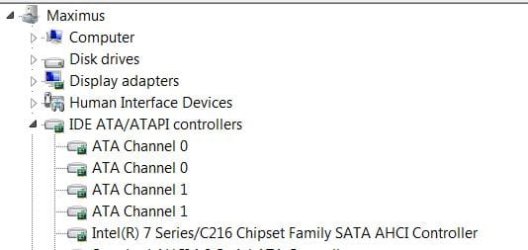
Intel Rapid storage is Intel's Raid application, but it is the only way I know of to get IaStor which is Intel's AHCI driver. Once installed, you don't really need it, only the AHCI driver, otherwise you will be using, MSAHCI, Microsoft's AHCI driver. MASHCI is not bad to use, but you usually get a little better performance using Intel's. Having IRST does not mean you have to use raid and does very little that I know of unless you do. I install it to get iastor. If you installed IRST, there are 2 ways to find it. The easiest is go to control panel (catagory view) uninstall a program and it should be listed there. The other way is Device manager, expand IDE ATA/ATAPI controllers. At the bottom you will either see your chipset AHCI drivers listed or MSAHCI listed. There may be a lot of other stuff listed but that is what you are looking for. This is what mine looks like. The Intel 7 serise/C216 ahci controller is the ahci controller, otherwise it would be MSAHCI if you are in AHCI mode.
z2.JPG

In control panel, uninstall programs this is what you would see if it is installed.

z3.JPG

But, you should not be having freezes whether it is installed or not.
 

My Computers My Computers

System One System Two

  • Computer type
    PC/Desktop
    Computer Manufacturer/Model Number
    ALWAYS UNDER CONSTRUCTION
    OS
    Windows 11 Pro
    CPU
    Ryzen 9 5900X
    Motherboard
    Asus X570 Crosshair Viii Hero
    Memory
    32GB G Skill DDR4-3600
    Graphics Card(s)
    EVGA RTX 3080 FTW 3 Ultra
    Sound Card
    On Board/Sennheiser PC37X Headset
    Monitor(s) Displays
    3 X Asus 27"
    Screen Resolution
    2560x1440
    Hard Drives
    2 X 1 TB NVME drives
    PSU
    EVGA 850
    Case
    Phanteks Eclipse P400A
    Cooling
    EVGA 280 AIO
    Keyboard
    Logitech G510s/ Logitech G13
    Mouse
    Logitech G502
    Internet Speed
    24/1
    Antivirus
    ESET/MBAM Pro/SAS Pro
    Browser
    Chrome/ Firefox/ Edge
  • Computer type
    Laptop
    System Manufacturer/Model Number
    Dell 16 Plus
    OS
    Windows 11 Pro
    CPU
    Intel Ultra 9 288V
    Memory
    32 GB LPDDR5X 8533
    Monitor(s) Displays
    16" Mini-LED HDR600 Touch 90 Hz
    Screen Resolution
    2560X1600
    Hard Drives
    1 TB NVME
Okay so IRST is not installed on my pc. My chipset drivers are AHCI in the device manager. Thank you for the explanation
 

My Computer My Computer

Computer type
Laptop
Computer Manufacturer/Model Number
Asus
OS
Windows 7 64 bit
CPU
intel i3
Memory
4gb ddr3 1333mhz
Graphics Card(s)
radeon hd5470
Hard Drives
seagate momentus st9500325as
Antivirus
avast
Browser
chrome
Back
Top