One other Desktop (tester) and spare Toshba laptop both with SSD's
Running Kaspersky 2016 ISS on all machines config'd identically
Logitec audio stereo systems on each machine (x3)
Canon MG5250MFC
Router/modem TP-Link running WPA2SK
Hmm sounds like you have charge in and ready for charge but no throughput. The mobo you say you replaced it was it new or a used one? Now if it is new then is it under warranty if not then you may have a bad motherboard
Now who did the work on the machine you or a friend or shop. If it was yourself then it might mean taking the whole sheebang out and checking those terminal connections to the board.
My Computer
At a glance
Desk1 7 Home Prem / Desk2 10 Pro / Main lap A...Desk1 i5 3750K / Laptop i7 GTX 860M / Desk2 i...Desk1 8GB (1866) / Desk2 16GB (1333) / Laptop...Desk 1& 2NVidia GTX 650 & Laptops on board Intel
Computer type
PC/Desktop
Computer Manufacturer/Model Number
Own build (new) Desk1 / Asus ROG Win 7 / Desk2 1st build
OS
Desk1 7 Home Prem / Desk2 10 Pro / Main lap Asus ROG 10 Pro 2 laptop Toshiba 7 Pro Asus P2520 7 & 10
One other Desktop (tester) and spare Toshba laptop both with SSD's
Running Kaspersky 2016 ISS on all machines config'd identically
Logitec audio stereo systems on each machine (x3)
Canon MG5250MFC
Router/modem TP-Link running WPA2SK
Please let us know if you replaced these products by us. As, Non OEM chargers and parts might not be compatible and would not work.
If the system is under warranty then please contact me through a private message and provide me your service tag and contact information so I may access your system records.
And, if the system is out of warranty then you contact our Expired Warranty Support at the link below:
Now I don't know a) if the board is genuine b) if you have done what Sandeep has suggested.
So I found this video that shows you how to replace that power jack part - thing is where are you going to get one from?? On the other side of that motherboard you will see the battery sits and also the contacts now they should look and feel (don't be rough) quite solid on the board itself. Best get a magnifying glass and have a real close look at the soldered connections it they show any cracks then they are "dry" and need a touch of solder onto them. The new power jack assembly is just fixed back in.
Now one last thing a quick TIP when I work on laptops the screws are so small and varied and are easily lost. So I get a large bath towel preferably white and duct tape it it the flat top - WHY because if you drop the tiny screws they will invariably skid off a hard surface and be lost forever more on the floor - the towel stops them in their tracks. Also keep the different sized screws separate like this bloke has - in pots I use pots with magnets stuck underneath to retain the little blighter's.
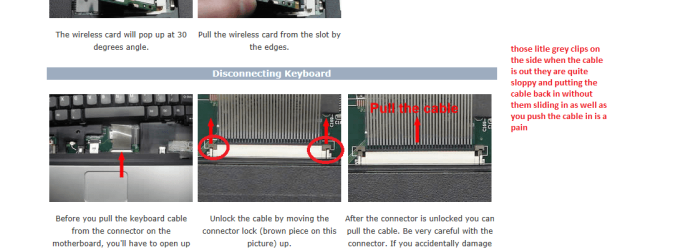
The bit in the video come in at a bout 7.30 minutes but to be sure watch it all and be careful with those ribbons cables they are fragile and the retaining clips are hard to see .
My pic shows a Toshiba but you can see the sort of retaining clips I mean they are fairly standard.
Last TIP take this chance to really give everything a good clean and reseat the cables .
Attachments
TOSH CABLES.PNG
81.7 KB
· Views: 5
My Computer
At a glance
Desk1 7 Home Prem / Desk2 10 Pro / Main lap A...Desk1 i5 3750K / Laptop i7 GTX 860M / Desk2 i...Desk1 8GB (1866) / Desk2 16GB (1333) / Laptop...Desk 1& 2NVidia GTX 650 & Laptops on board Intel
Computer type
PC/Desktop
Computer Manufacturer/Model Number
Own build (new) Desk1 / Asus ROG Win 7 / Desk2 1st build
OS
Desk1 7 Home Prem / Desk2 10 Pro / Main lap Asus ROG 10 Pro 2 laptop Toshiba 7 Pro Asus P2520 7 & 10
One other Desktop (tester) and spare Toshba laptop both with SSD's
Running Kaspersky 2016 ISS on all machines config'd identically
Logitec audio stereo systems on each machine (x3)
Canon MG5250MFC
Router/modem TP-Link running WPA2SK
You can check the connections however, in this system we don't have the power jack port separately. It is integrated to the motherboard.
So until and unless you are proficient with the soldiering the chips you would not be able to replace. Even, if you are able to perform the same finding the replacement port is another challenge.
Please let us know are there any parts which were replaced on the system by us or all the parts are purchased and replaced from non OEM.
Keep us posted with the results so we can advise you further.
One other Desktop (tester) and spare Toshba laptop both with SSD's
Running Kaspersky 2016 ISS on all machines config'd identically
Logitec audio stereo systems on each machine (x3)
Canon MG5250MFC
Router/modem TP-Link running WPA2SK
Thanks for sharing such an insightful video. However, most systems that we ship now goes with DC in cable. In which port is connect to the motherboard with a simple cable which can be detached from the system board and replaced easily.
If it can be replaced easily following this video then definitely OP can try the same and let us know if it resolves the issue.
No probs mate I was just hoping maybe it was an older machine that could be fixed.
The problem though is very odd to say the least if the battery, mobo and adapator have been replaced then maybe the new mobo is no good??
I would really like to have it on the bench to check out the volts on the battery terminals with the battery out adaptor plugged in and the machine powered up just to see if there is any charge going through to the battery.
I suppose one way to try is the let the machine stand switched on and plugged in and then run the machine on battery alone and see how long it lasts. Maybe it is the reporting circuitry not functioning properly.
My Computer
At a glance
Desk1 7 Home Prem / Desk2 10 Pro / Main lap A...Desk1 i5 3750K / Laptop i7 GTX 860M / Desk2 i...Desk1 8GB (1866) / Desk2 16GB (1333) / Laptop...Desk 1& 2NVidia GTX 650 & Laptops on board Intel
Computer type
PC/Desktop
Computer Manufacturer/Model Number
Own build (new) Desk1 / Asus ROG Win 7 / Desk2 1st build
OS
Desk1 7 Home Prem / Desk2 10 Pro / Main lap Asus ROG 10 Pro 2 laptop Toshiba 7 Pro Asus P2520 7 & 10
One other Desktop (tester) and spare Toshba laptop both with SSD's
Running Kaspersky 2016 ISS on all machines config'd identically
Logitec audio stereo systems on each machine (x3)
Canon MG5250MFC
Router/modem TP-Link running WPA2SK
Its great to hear that you were able to replace the same. I understand it is not working at the moment as well.
Please let me know which battery and adapter you have purchased so we can check the specifications for the same and confirm if either one of them is not compatible to each other.
It could be an issue with the motherboard as well and you should try and return the motherboard for different one if it is still under free return policy.



 .
.
