Weird text glitch in volume mixer

Once I got the squares right on a fresh install of windows 7, so no 3rd party software or anything was installed yet.
The problem is present in Windows 8 too. :)
I have them now in Windows 7, and deleting fntcache.dat does not solve the problem anymore...
 

My Computer My Computer

At a glance

Windows 8.1
OS
Windows 8.1
I've got these crazy squares too.
Windows 8 Pro (retail copy) and all patches applied.
I use Realtek HD Audio (because it's built into my PC -- no choice!)
The squares come and go. So annoying. Actually I've seen them in other places in my OS too, e.g. they appeared when installing Update 1 for Visual Studio 2012. No idea where these came from. Seems like a font issue. Just wanted to throw my 0.02c in - hope someone figures this out one day !! :confused:
img2.png
 

My Computer My Computer

At a glance

Windows 7 x64E8600 @4.2GHz8GB G.SKILLHD4850
OS
Windows 7 x64
CPU
E8600 @4.2GHz
Motherboard
Asus P5Q PRO
Memory
8GB G.SKILL
Graphics Card(s)
HD4850
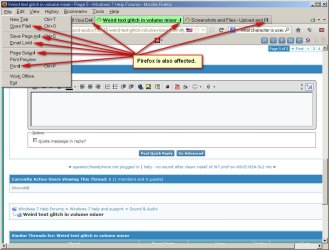
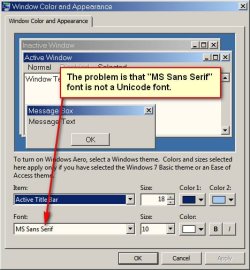
I had the same problem and it was affecting a lot of different programs, including Firefox:
E2.jpg

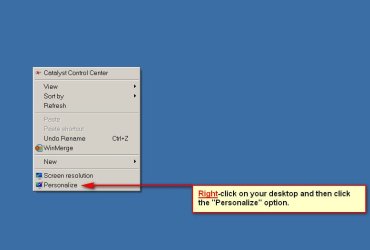
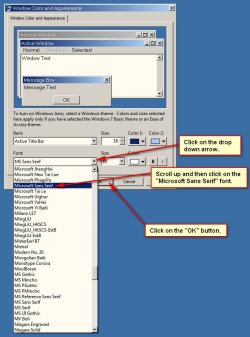
Here are the steps I used to fix it:

Step 1:
E3.jpg
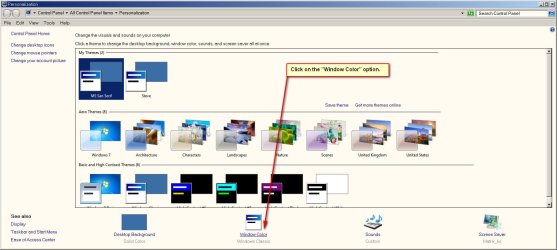
Step 2:
E4.jpg
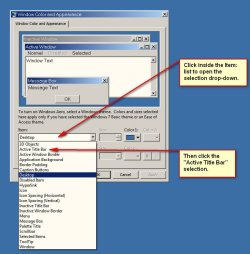
Step 3:
E5.jpg
Step 4:
E6.jpg
Step 5:
E7.jpg
Step 6:
E8.jpg

This fixed all of my "strange text" issues, including Firefox:
E10.jpg

I hope someone else finds this useful.
 

My Computer My Computer

At a glance

Windows 7 Professional x64Intel i7-3770K @ 3.50 GHz32 GBsAMD Radeon HD 7800
Computer type
PC/Desktop
Computer Manufacturer/Model Number
Custom Built
OS
Windows 7 Professional x64
CPU
Intel i7-3770K @ 3.50 GHz
Motherboard
ASUS P8Z77-V PRO
Memory
32 GBs
Graphics Card(s)
AMD Radeon HD 7800
I think i may have found a solution. Its all because of Internet Explorer 9. If you dont use it, uninstall it but if you use IE, please update to IE10. Im doing it now and I think that should fix it.
 

My Computer My Computer

At a glance

Windowss 7 64bitAMD Athlon II4GBATI Radeon
Computer type
Laptop
Computer Manufacturer/Model Number
Acer
OS
Windowss 7 64bit
CPU
AMD Athlon II
Motherboard
Pass
Memory
4GB
Graphics Card(s)
ATI Radeon
Hard Drives
1X 250gb SATA
Antivirus
AVG
Browser
Chrome
Nope, it does not fix it. I have IE 10 nad Realtek on all my system, and encounter this text glitch on all of them from time to time.
 

My Computer My Computer

At a glance

Windows 7 x64 Ultimate SP1Core i7-2630QM6 GB DDR3Nvidia GT 540M / Intel HD 3000 - Optimus swit...
Computer Manufacturer/Model Number
Asus N73SV
OS
Windows 7 x64 Ultimate SP1
CPU
Core i7-2630QM
Motherboard
Intel HM 65
Memory
6 GB DDR3
Graphics Card(s)
Nvidia GT 540M / Intel HD 3000 - Optimus switching
Sound Card
HD Audio (Intel Azalia/Realtek) ALC269
Monitor(s) Displays
LED flat panel
Screen Resolution
1920 x 1080
Hard Drives
2x Seagate Momentus 640 GB - 1,28 TB in total
Internet Speed
4 MB/256 kbps
Other Info
External HDs

WD Elements 1,5 TB
WD MyBook 500 GB
IE9 causes the squares, and so does IE10. I have had them on my brand new Windows 8 laptop too. Nothing out of the ordinary was installed either.

If you have Windows 7, stay on IE8 - since IE9 and 10 cause the squares. If you're on W8, like me, well, what can you do? Help!
0
 
Last edited:

My Computer My Computer

At a glance

Windows 7 Professional, 64 bitIntel Core i7-4510U @ 2.00GHz16GB DDR3Intel HD 4400 (integrated)
Computer type
Laptop
Computer Manufacturer/Model Number
HP 15-ac153sa
OS
Windows 7 Professional, 64 bit
CPU
Intel Core i7-4510U @ 2.00GHz
Memory
16GB DDR3
Graphics Card(s)
Intel HD 4400 (integrated)
Monitor(s) Displays
Inbuilt 15.6 inch HD display
Screen Resolution
1366x768
Hard Drives
2TB HDD, partitioned as 1TB (Windows 7) and 1TB (Windows 10)
2TB external HDD (portable)
Cooling
1x built in laptop fan
Keyboard
HP Slimline Wired Keyboard
Mouse
HP Optical Wired Mouse
Internet Speed
Virgin Media 250Mbps
Antivirus
Microsoft Windows Defender
Browser
Chrome, Firefox
Other Info
Laptop is set up as dual boot with Windows 7 Professional and Windows 10 Home. Windows 7 preferred.
I think i may have found a solution. Its all because of Internet Explorer 9. If you dont use it, uninstall it but if you use IE, please update to IE10. Im doing it now and I think that should fix it.

That's what I thought it was to do with, on Windows 7! However, I would recommend NOT updating to IE10 - instead, drop back to IE8 (which was fine), and use Mozilla Firefox or Google Chrome as your default browser.
Also, you can disable IE totally, from the Control Panel, under Programs and Features.

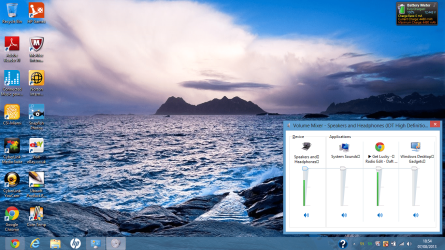
Back on topic, IE10 will also give you the squares. I have IE10 on my Windows 8 machine, and virtually nothing is installed on it. See image

Help :(
 

Attachments

  • Windows 8 squares.png
    Windows 8 squares.png
    429.6 KB · Views: 0
Last edited:

My Computer My Computer

At a glance

Windows 7 Professional, 64 bitIntel Core i7-4510U @ 2.00GHz16GB DDR3Intel HD 4400 (integrated)
Computer type
Laptop
Computer Manufacturer/Model Number
HP 15-ac153sa
OS
Windows 7 Professional, 64 bit
CPU
Intel Core i7-4510U @ 2.00GHz
Memory
16GB DDR3
Graphics Card(s)
Intel HD 4400 (integrated)
Monitor(s) Displays
Inbuilt 15.6 inch HD display
Screen Resolution
1366x768
Hard Drives
2TB HDD, partitioned as 1TB (Windows 7) and 1TB (Windows 10)
2TB external HDD (portable)
Cooling
1x built in laptop fan
Keyboard
HP Slimline Wired Keyboard
Mouse
HP Optical Wired Mouse
Internet Speed
Virgin Media 250Mbps
Antivirus
Microsoft Windows Defender
Browser
Chrome, Firefox
Other Info
Laptop is set up as dual boot with Windows 7 Professional and Windows 10 Home. Windows 7 preferred.
@princechromey

Just wanted to let you know, you have like 3 antivirus programs from what I have seen from your screenshots. I would recommend you only have 1. I have seen avira, norton and mcafee on there.

Sorry I do not know how to fix your issue. But that needs to be corrected. Also for having an i5 your cpu meter was really high for only having 3 programs open...
 

My Computer My Computer

At a glance

Windows 10 ProAMD Ryzen 5 2400G Processor with Radeon RX Ve...G.SKILL Ripjaws V Series 16GB (2 x 8GB) 288-P...2047MB NVIDIA GeForce GTX 1060 6GB (EVGA)
Computer type
PC/Desktop
Computer Manufacturer/Model Number
Custom Built
OS
Windows 10 Pro
CPU
AMD Ryzen 5 2400G Processor with Radeon RX Vega 11 Graphics
Motherboard
ASRock X470 Master SLI/AC AM4 AMD Promontory X470 SATA 6Gb/s
Memory
G.SKILL Ripjaws V Series 16GB (2 x 8GB) 288-Pin DDR4 SDRAM D
Graphics Card(s)
2047MB NVIDIA GeForce GTX 1060 6GB (EVGA)
Sound Card
Motherboard Built in
Monitor(s) Displays
Acer R240HY bidx 23.8-Inch IPS HDMI DVI VGA (1920 x 1080) Wi
Screen Resolution
1920 x 1080
Hard Drives
1TB Sandisk SSD PLUS (Main drive)
500 GB Seagate 7200 RPM (Games)
500 GB Western Digital 7200 RPM (Virtual Machines)
PSU
CORSAIR TX Series TX650M 650W 80+ Gold Modular Power Supply
Case
CORSAIR CARBIDE SPEC-02 Mid-Tower Gaming Case, Red LED Fan
Cooling
220mm, two 120mm, and four 60mm fans
Keyboard
Wired Dell keyboard
Mouse
Wireless Logitech mouse
Internet Speed
250mb down, 30mb up
Antivirus
Panda Cloud Antivirus
Browser
Chrome-ish x64
Other Info
Your awesome for reading this.
@andrew129260

On my Windows 8 machine, we have Norton (which we don't use, and hasn't been activated, so doesn't do anything) and mcAfee. This machine has the squares on it

The Windows 7 machine has Avira, Lavasoft Ad-Aware, and McAfee on it. Maybe it is OTT but I want to make sure that I am protected. All I had open at the time, as Google Chrome and Windows Picture Viewer (or whatever it was) and it had the squares (when IE9 was installed). Once I reverted back to IE8 the squares disappeared. But although CPU usage was high, that isn't my main concern. For a laptop with an i5-480m (TJ Max = 105'C), look at the temperatures reported...

I still don't know how to get rid of my Windows 8 squares though....
 

My Computer My Computer

At a glance

Windows 7 Professional, 64 bitIntel Core i7-4510U @ 2.00GHz16GB DDR3Intel HD 4400 (integrated)
Computer type
Laptop
Computer Manufacturer/Model Number
HP 15-ac153sa
OS
Windows 7 Professional, 64 bit
CPU
Intel Core i7-4510U @ 2.00GHz
Memory
16GB DDR3
Graphics Card(s)
Intel HD 4400 (integrated)
Monitor(s) Displays
Inbuilt 15.6 inch HD display
Screen Resolution
1366x768
Hard Drives
2TB HDD, partitioned as 1TB (Windows 7) and 1TB (Windows 10)
2TB external HDD (portable)
Cooling
1x built in laptop fan
Keyboard
HP Slimline Wired Keyboard
Mouse
HP Optical Wired Mouse
Internet Speed
Virgin Media 250Mbps
Antivirus
Microsoft Windows Defender
Browser
Chrome, Firefox
Other Info
Laptop is set up as dual boot with Windows 7 Professional and Windows 10 Home. Windows 7 preferred.
Just to let you know that the University computers I use at De Montfort University also have the squares, under windows 7.

Reason? They're using IE10!!!!

It's definitely IE9+ that's causing the problem.
 

My Computer My Computer

At a glance

Windows 7 Professional, 64 bitIntel Core i7-4510U @ 2.00GHz16GB DDR3Intel HD 4400 (integrated)
Computer type
Laptop
Computer Manufacturer/Model Number
HP 15-ac153sa
OS
Windows 7 Professional, 64 bit
CPU
Intel Core i7-4510U @ 2.00GHz
Memory
16GB DDR3
Graphics Card(s)
Intel HD 4400 (integrated)
Monitor(s) Displays
Inbuilt 15.6 inch HD display
Screen Resolution
1366x768
Hard Drives
2TB HDD, partitioned as 1TB (Windows 7) and 1TB (Windows 10)
2TB external HDD (portable)
Cooling
1x built in laptop fan
Keyboard
HP Slimline Wired Keyboard
Mouse
HP Optical Wired Mouse
Internet Speed
Virgin Media 250Mbps
Antivirus
Microsoft Windows Defender
Browser
Chrome, Firefox
Other Info
Laptop is set up as dual boot with Windows 7 Professional and Windows 10 Home. Windows 7 preferred.
I would either dowload a different font and set it as the system default or download a third party mixer for Windows
 

My Computer My Computer

At a glance

Windows 7 Home Premium x642.0 GB DDR2 RAM
Computer type
PC/Desktop
OS
Windows 7 Home Premium x64
Memory
2.0 GB DDR2 RAM
Antivirus
AVG 2013
Browser
Google Chrome
I would either dowload a different font and set it as the system default or download a third party mixer for Windows

How would I download a different font? I thought that font was ok, especially seeing that it only happens with IE9+. Any tips on getting this font will be appreciated :)

I am not getting another mixer when Windows Volume Mixer works okay. My home computer on W7 is ok but the W8 one needs sorting, and I'm not going to attempt the university computers since every single machine I log onto would need the font sorting!
 

My Computer My Computer

At a glance

Windows 7 Professional, 64 bitIntel Core i7-4510U @ 2.00GHz16GB DDR3Intel HD 4400 (integrated)
Computer type
Laptop
Computer Manufacturer/Model Number
HP 15-ac153sa
OS
Windows 7 Professional, 64 bit
CPU
Intel Core i7-4510U @ 2.00GHz
Memory
16GB DDR3
Graphics Card(s)
Intel HD 4400 (integrated)
Monitor(s) Displays
Inbuilt 15.6 inch HD display
Screen Resolution
1366x768
Hard Drives
2TB HDD, partitioned as 1TB (Windows 7) and 1TB (Windows 10)
2TB external HDD (portable)
Cooling
1x built in laptop fan
Keyboard
HP Slimline Wired Keyboard
Mouse
HP Optical Wired Mouse
Internet Speed
Virgin Media 250Mbps
Antivirus
Microsoft Windows Defender
Browser
Chrome, Firefox
Other Info
Laptop is set up as dual boot with Windows 7 Professional and Windows 10 Home. Windows 7 preferred.
Back
Top