Trying to install win7x64 on UEFI, without removing other partitions

ng80092a

New member
Local time
6:44 PM
Messages
21
That's pretty much it
i have a hp dm1 4303 (supports legacy and UEFI boot) with win8

a68m amd chipset
some cpu that i dont know


what i have so far:
A rufus ntfs, uefi boot formatted usb pen, with win7x64 install

what i've tried:
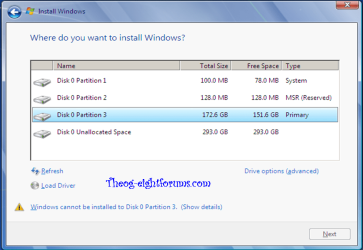
booting up from the pen, got into win7 install setup without problems, BUT when i tried to reach for the c: partition (4th one), it bugged with gtp error (i barely understand what that is now)

so i tried to delete the obvious c: partition, to keep the others, and tried to create a new one with its space
win 7 install gave me an error anyways and didnt install, but on rebooting, i tried to recover it and reached on advanced menu a option about UEFI, that quite didnt read what would do, but i hope it would somehow "reset" the boot on the laptop..

anyways it rebooted without giving me any option, and i tried to install windows 7 this time, and i have the partition D: (wich was the 5th on win7 install) there with my stuff (Yay)

my question is.. did i remove the recovery partitions that came with the laptop? how does it boot now? do i have to keep legacy boot on bios?

thank you for reading, and may you help me

*NEWS UPDATE*
when the computer boots it asks me to choose between windows 8 or windows 7.. some questions:
how do i reduce the time to auto-choose the 1st choice? (it's currently 30 secs)

do they boot as UEFI? how does it work right now?
this is very important for me to understand since i dont wanna screw up later
 

My Computer My Computer

At a glance

7 pro x64E something amd
Computer type
PC/Desktop
Computer Manufacturer/Model Number
hp dm1 4303 ep
OS
7 pro x64
CPU
E something amd
Motherboard
a68m amd chipset
Hard Drives
dunno
Antivirus
avg free
Browser
chrome ftw
yes good sir, here you are

wOUxe.jpg
 

My Computer My Computer

At a glance

7 pro x64E something amd
Computer type
PC/Desktop
Computer Manufacturer/Model Number
hp dm1 4303 ep
OS
7 pro x64
CPU
E something amd
Motherboard
a68m amd chipset
Hard Drives
dunno
Antivirus
avg free
Browser
chrome ftw
   Information

We always assume you have made your Recovery Disks using the OEM manufacturer's Recovery Media Creator app the first day you had your new PC.
& made the Startup Repair CD.
Recovery Drive - Create with USB Flash Drive in Windows 8
System Repair Disc - Create in Windows 8


You can make a Microsoft Recovery USB Drive
Recovery Drive - Create with USB Flash Drive in Windows 8
   Warning
Deleting the Recovery Partition is NOT RECOMMENDED


   Warning
I personally DO NOT RECOMMEND using this METHOD above, as of the ERRORS you may receive below with the Microsoft Recovery USB Drive.You would be best off using the OEM manufacturer's Recovery DVD's or Recovery USB drive.


I would recommend you making the OEM manufacturer's Recovery DVD's or USB drive.
or
You can order the Microsoft official OEM Recovery disks from the OEM manufacturer's website.
https://h10025.www1.hp.com/ewfrf/wc...&dlc=en&lc=en&os=4132&product=5309543&sw_lang=

How to Make Recovery DVD
Creating System Recovery Discs in Windows 8 for HP Computers - YouTube


The Windows Recovery USB drive & Recovery Partition can be very problematic, I recommend you also make a Windows System Image.

System Image - Create in Windows 8

Recovery Drive - Create with USB Flash Drive in Windows 8

System Repair Disc - Create in Windows 8
 

My Computer My Computer

At a glance

ME/XP/Vista/Win7
OS
ME/XP/Vista/Win7
yes good sir, here you are

wOUxe.jpg

Looking at your screenshot, as you have added a drive letter to the Recovery Partition, adding a drive letter will make the Recovery Partition unusable.
 

My Computer My Computer

At a glance

ME/XP/Vista/Win7
OS
ME/XP/Vista/Win7
i didnt add any leter to the recovery partition, actually when i had windows 8, it showed just as that.. there's no difference
 

My Computer My Computer

At a glance

7 pro x64E something amd
Computer type
PC/Desktop
Computer Manufacturer/Model Number
hp dm1 4303 ep
OS
7 pro x64
CPU
E something amd
Motherboard
a68m amd chipset
Hard Drives
dunno
Antivirus
avg free
Browser
chrome ftw
i didnt add any leter to the recovery partition, actually when i had windows 8, it showed just as that.. there's no difference

HP would not add a drive letter to Recovery Partition.
 

My Computer My Computer

At a glance

ME/XP/Vista/Win7
OS
ME/XP/Vista/Win7
Why would you attempt to reinstall without backing up your files first? That's reckless.

You said you deleted the Win8 partition before recreating C which now has Win7 installed on it? It would have been better to delete all partitions in that case because you now have a Dual Boot configured with no other OS, and slow Win7 boot upon selection.

This could have been avoided by deleting all partitions as shown in UEFI (Unified Extensible Firmware Interface) - Install Windows 7 with - Windows 7 Forums or to Bypass UEFI to Install WIn7. The Recovery partition isn't likely to boot now anyway. Hope you made the Recovery Disks first, although you can Clean Reinstall either OS which is a superior install, then save a backup image externally to use for recovery.
 
ty very much :)

anyways, what happens if i boot win8 now? i'm guessing it will take to a recovery partition, also

why there are 2 recovery E: partitions (OEM) and a recovery one as 1?, what's the function of the 2nd partition?
 

My Computer My Computer

At a glance

7 pro x64E something amd
Computer type
PC/Desktop
Computer Manufacturer/Model Number
hp dm1 4303 ep
OS
7 pro x64
CPU
E something amd
Motherboard
a68m amd chipset
Hard Drives
dunno
Antivirus
avg free
Browser
chrome ftw
i didnt add any leter to the recovery partition, actually when i had windows 8, it showed just as that.. there's no difference

HP would not add a drive letter to Recovery Partition.

I can 100% guarantee i did not touch that drives by any means.. they came exactly like that, and also there's another recovery drive at number 1... the computer it's like 6 months old and i barely used the computer for hating win8 so much
 

My Computer My Computer

At a glance

7 pro x64E something amd
Computer type
PC/Desktop
Computer Manufacturer/Model Number
hp dm1 4303 ep
OS
7 pro x64
CPU
E something amd
Motherboard
a68m amd chipset
Hard Drives
dunno
Antivirus
avg free
Browser
chrome ftw
In that case I'd wipe the HD to Clean Reinstall - Factory OEM Windows 7.

After understanding UEFI BIOS vs. Legacy BIOS - YouTube I would consider Bypassing UEFI to Install WIn7.

The reason is that there is not enough benefit to UEFI to have to jump through its hoops, while you'll easier be the master of your own system perfectly installed to a blank HD if you do a normal Clean Reinstall - Factory OEM Windows 7
http://www.sevenforums.com/installa...reinstalled-windows-8-laptop.html#post2178898
 
i didnt add any leter to the recovery partition, actually when i had windows 8, it showed just as that.. there's no difference

HP would not add a drive letter to Recovery Partition.

I can 100% guarantee i did not touch that drives by any means.. they came exactly like that, and also there's another recovery drive at number 1... the computer it's like 6 months old and i barely used the computer for hating win8 so much

All OEM manufacturer's Windows 8 Pre-installed Recovery Partitions, DO NOT HAVE A DRIVE LETTER.

As Windows 8 Recovery will not use a Recovery Partition with a drive letter, to do a REFRESH or a RESET.

ERROR:
SONY Recovery error 001 theog.PNG
 

My Computer My Computer

At a glance

ME/XP/Vista/Win7
OS
ME/XP/Vista/Win7
ok thank you all, you've been a great help, i will backup the data and then re-install a clean w7 copy..
just 2 or 3 things

i follow this guide
http://www.sevenforums.com/tutorial...e-firmware-interface-install-windows-7-a.html
and i install it perfectly
what if i disable uefi on boot? it won't boot as it's said in the tutorial, but is that permanent? or can i re-enable uefi and boot w7 again?

if when i clean the drives i get only 1 partition, and from it, it creates 3, how can i manage to get a secondary big sized partition, like in this picture? (very important)
http://www.sevenforums.com/attachme...ware-interface-install-windows-7-windows7.png

edit: also, what determines if the win7 will be installed as uefi or bios, the bios itself with legacy mode on or off, or the format in wich rufus formats the pen?
 
Last edited:

My Computer My Computer

At a glance

7 pro x64E something amd
Computer type
PC/Desktop
Computer Manufacturer/Model Number
hp dm1 4303 ep
OS
7 pro x64
CPU
E something amd
Motherboard
a68m amd chipset
Hard Drives
dunno
Antivirus
avg free
Browser
chrome ftw
ok thank you all, you've been a great help, i will backup the data and then re-install a clean w7 copy..
just 2 or 3 things

i follow this guide
http://www.sevenforums.com/tutorial...e-firmware-interface-install-windows-7-a.html
and i install it perfectly
what if i disable uefi on boot? it won't boot as it's said in the tutorial, but is that permanent? or can i re-enable uefi and boot w7 again?

theog said:
If you install in UEFI mode, & than reset the UEFI/BIOS firmware to Legacy, Windows will not boot, doing this would be permanent, until you reset back to UEFI.

if when i clean the drives i get only 1 partition, and from it, it creates 3, how can i manage to get a secondary big sized partition, like in this picture? (very important)
http://www.sevenforums.com/attachme...ware-interface-install-windows-7-windows7.png

theog said:
http://www.sevenforums.com/tutorials/52291-partition-hard-drive-windows-7-install.html
Screenshot are in Legacy mode.
Take a look at Step 9, set partition size.
You would than have Unallocated Space for DATA Partition.
Windows 8 Downgrade-012 SB.PNG

edit: also, what determines if the win7 will be installed as uefi or bios, the bios itself with legacy mode on or off, or the format in wich rufus formats the pen?

theog said:
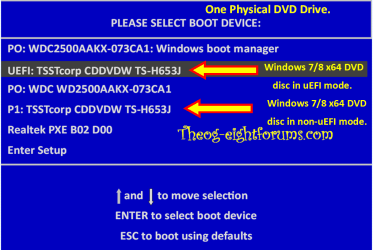
Booting the drive in UEFI mode.
Windows 8 Downgrade-006 SB for posting.PNG


Downgrade to Windows 7.
Downgrade Windows 8 to Windows 7
Warning you must have the UEFI/BIOS firmware setting in Step Three set.

Make sure you read the NOTE at Step three.
 

My Computer My Computer

At a glance

ME/XP/Vista/Win7
OS
ME/XP/Vista/Win7
You already have it set for UEFI mode to install using that tutorial for UEFI (Unified Extensible Firmware Interface) - Install Windows 7 with - Windows 7 Forums.

If you disable UEFI or enable Legacy without Dual mode (if it offers it) then WIn7 will not boot until you change it back.

If you disable UEFI or enable Legacy or CSM, then delete all partitions during install, then you can install without UEFI as shown in Bypass UEFI to Install WIn7. It should allow you to create and format your data partition during install. However if you want more than four partitions you'll need to wait until after install to convert the Data partition to Logical, then you can add as many adjacent Logical partitions as you want.
How to set partition as Primary or Logical.
Partition Wizard Create Partition - Video Help
Partition / Extended : Logical Drives - Windows 7 Forums
 
Back
Top