Can't open system recovery?

Sorry, I misread post #1, it begins saying that the machine boots, but is slow, then you say the problem begins with the options presented.

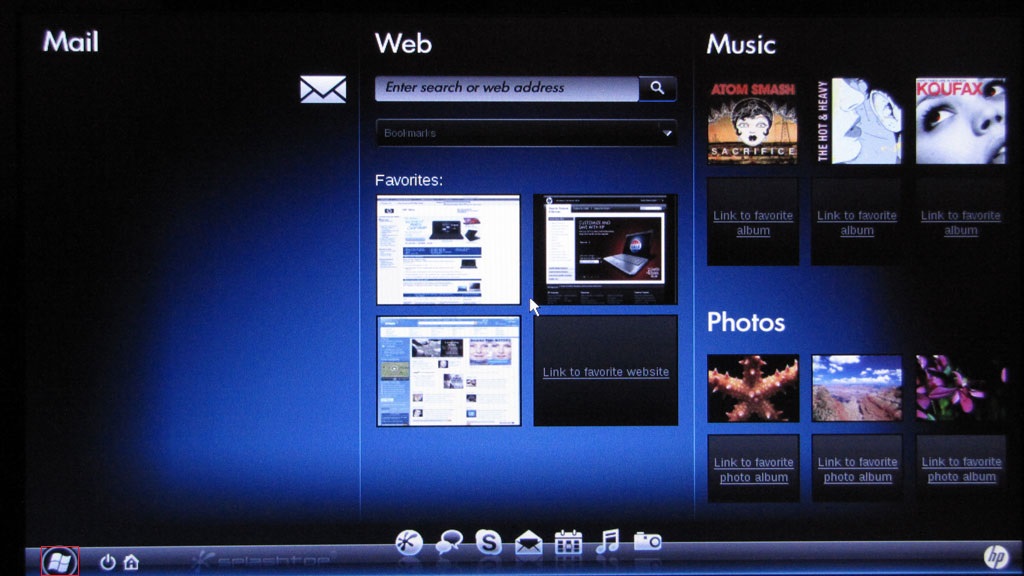
In post #3 you show the following screen, which looks like it might be HP Quick Web.
P6PqAJM.jpg

You might be able to use this to investigate further or use it to create the media. I think it's Linux based and you might have access to your drive. Maybe from there one of the members can get you to the next step to complete a system recovery or a fresh install.

Just commenting on what I see and offering a possible way to get to a solution. I unfortunately don't know how to "break" out of HP Quick Web or how to load drivers you might need (OD, USB) in Linux. Hopefully, a member can help you figure this out or find another way using another machine to create the media.
 

My Computer My Computer

Computer type
Laptop
Computer Manufacturer/Model Number
HP Pavilion dv6-6c10us
OS
x64 (6.3.9600) Win8.1 Pro & soon dual boot x64 (6.1.7601) Win7_SP1 HomePrem
CPU
AMD A6-3420M APU with Radeon(tm) HD Graphics
Motherboard
Hewlett-Packard 1805
Memory
6.00 GB
Graphics Card(s)
AMD Radeon(TM) HD 6520G
Sound Card
(1) AMD High Definition Audio Device (2) IDT High Definiti
Monitor(s) Displays
HP W2072a 20" LCD (1600 x 900) @ 60 Hz
Screen Resolution
1366 x 768 x 32 bits (4294967296 colors) @ 60 Hz
Hard Drives
ST640LM0 00 HM641JI SATA Disk Device
Keyboard
Logitech k520 wireless KB
Mouse
Logitech m320 wireless mouse (bundled with KB)
Internet Speed
15/5 | 54 MB Wireless 'n'
Antivirus
Realtime: Defender or Avast | On-demand: Malwarebytes, ESET
Browser
IE 11 on Win8, IE 10 on win 7
Other Info
Media: [Gimp, Audacity, VLC] || Comm: [WEmail 2012, Skype] || Productivity: [OpenOffice,| Textpad] || Utils: [Sysinternals, cCleaner, Speccy, Defraggler]
Hi ICit2lol, thanks for pitchin' in :thumbsup: , Slarty your mention of "quick web" got me to thinking.....TyGuy,

Do you remember back when you first got the 1071?

Did you change anything in the BIOS, like how the HDD operates, adding partitions, installing quick web?

1.) See if you can disable quick web: how do I disable the start up feature of HP quick web. I alw... - HP Support Forum - 780255 then save/exit BIOS/allow to restart the OS.

1a.) It might also be worth a try to enter the BIOS and reset it to default, but double back and make sure quick web is disabled, save/exit BIOS/allow to restart the OS.

2.) Can you check the setting on the HDD, whether its dynamic or basic, this "quick web" won't work if the HDD is set to dynamic, and when it installs it has a nasty habit of switching the HDD to dynamic, isn't that like cutting your nose off to spite your face???

It might be why you can't see the HDD, if it is switch it back to basic.

If there is no setting you will have to use either paragon or easeus partition manager(s) to switch it. I'm not sure if just un-installing it would change the HDD back.

If #'s 1 or 1a work, don't worry about 2.
 

My Computer My Computer

Computer type
PC/Desktop
Computer Manufacturer/Model Number
Gateway DX4831-01e (Mid-Tower Desktop)
OS
Originally Win 7 Hm Prem x64 Ver 6.1.7600 Build 7601-SP1 | Upgraded to Windows 10 December 14, 2019
CPU
Intel i3 530 2.93GHz, 2933MHz 2 Cores 4 Logical Processors
Motherboard
Gateway H57M01 133 megahertz
Memory
6GB of 1,333MHz DDR3 SDRAM
Graphics Card(s)
32MB Intel Graphics Media Accelerator HD IGChip
Sound Card
Realtek High Definition Audio
Monitor(s) Displays
Gateway HX2000 20inch TFT active matrix TN
Screen Resolution
1600 x 900 x 59 hertz
Hard Drives
WDC WD10EADS-00M2B0 [HDD] (1000.20 GB) -- drive 0,
HL-DT-ST DVDRAM GH41N [CD-ROM dr]
Four card readers, and Four USB 2.0
PSU
300watts.
Case
Mid-Tower Desktop
Cooling
Stock from Gateway
Keyboard
Natural Ergonomic Keyboard 4000, see Other Info
Mouse
Orig. Gateway wore out now using Insignia USB wired optical
Internet Speed
Vz FIOS 10ms png 57.64Mbps down 65.53Mbps up Speedtest.org
Antivirus
Zamana Anti-logger with Anti-malware, MSE, Windows Firewall,
Browser
IE11.0.9600.19399-Upd ver11.0.135, Firefox 68.0.1 x64
Other Info
System Specs by Belarc.

BIOS: American Megatrends Inc. P01-A0 11/17/2009

Replaced the MS 'Natural' Standard PS/2 Enhanced 101-102 Keyboard with a new Natural Ergonomic Keyboard 4000 on August 1st 2014.

Canon Pixma MG3222 Printer.

Updated to IE11 on 12102015 | Fios Quantum Router g1100

Additional AV: SpywareBlaster, manual Mbam, SAS
Do I understand this correctly?
You have a good HP mini 210-1010CA, and a bad HP mini 210-1071CA, and they both have Starter on them?
Yes, this is correct.

Is using the 1010 how were you were able to create a universal OS flash drive, the one where you were stopped because of no drive choices?
Yes.

I'm getting a 16Gb usb flash drive tomorrow, so I will try this then.

Did you change anything in the BIOS, like how the HDD operates, adding partitions, installing quick web?
No, I wasn't smart enough to change anything about the BIOS when I first got it :p

I was able to disable the HP quick web, but couldn't find if the HDD was dynamic or basic.


Also, thanks to everyone who is helping out, I really appreciate it! :)
 

My Computer My Computer

OS
Windows 7 Home Premium 64bit
Thinking is good Anak ;) I do it every once in a while.

Maybe, while I'm thinking.... since TyGuy96 stated that there wasn't any critical data on the mini 210-1071CA and there is another machine - why not create a USB install media on the 1010CA
The machine cannot boot into windows, so I can't access recovery manager.

To create a repair disk, I need another 32-bit computer, but the only other one I have is an HP mini 210-1010CA which doesn't have a disk slot. In order to make a repair usb, I need to convert it from a disk... which again, I can't.
I think there's some confusion here as I have created USB install media from the ISO download directly to the USB using the Windows tool, There isn't any intermediary disc step, just download ISO to USB.

Unless I'm missing something and the 210-1010CA is a diskless workstation.
 

My Computer My Computer

Computer type
Laptop
Computer Manufacturer/Model Number
HP Pavilion dv6-6c10us
OS
x64 (6.3.9600) Win8.1 Pro & soon dual boot x64 (6.1.7601) Win7_SP1 HomePrem
CPU
AMD A6-3420M APU with Radeon(tm) HD Graphics
Motherboard
Hewlett-Packard 1805
Memory
6.00 GB
Graphics Card(s)
AMD Radeon(TM) HD 6520G
Sound Card
(1) AMD High Definition Audio Device (2) IDT High Definiti
Monitor(s) Displays
HP W2072a 20" LCD (1600 x 900) @ 60 Hz
Screen Resolution
1366 x 768 x 32 bits (4294967296 colors) @ 60 Hz
Hard Drives
ST640LM0 00 HM641JI SATA Disk Device
Keyboard
Logitech k520 wireless KB
Mouse
Logitech m320 wireless mouse (bundled with KB)
Internet Speed
15/5 | 54 MB Wireless 'n'
Antivirus
Realtime: Defender or Avast | On-demand: Malwarebytes, ESET
Browser
IE 11 on Win8, IE 10 on win 7
Other Info
Media: [Gimp, Audacity, VLC] || Comm: [WEmail 2012, Skype] || Productivity: [OpenOffice,| Textpad] || Utils: [Sysinternals, cCleaner, Speccy, Defraggler]
I was able to disable the HP quick web, but couldn't find if the HDD was dynamic or basic.


Also, thanks to everyone who is helping out, I really appreciate it! :)
Your welcome.

Just curious,

  • Did you try starting and using only the "escape" key to enter recovery?
  • Did you try restarting the 1071 to see if it would start windows after disabling quick web?


I think there's some confusion here as I have created USB install media from the ISO download directly to the USB using the Windows tool, There isn't any intermediary disc step, just download ISO to USB.
That's good to know, thanks for mentioning that Slarty.

I have a feeling Ty is going to try Using the Downloadable USB Recovery Flash Disk Creation Utility HP Mini 210-2081nr PC | HP® Support before he tries creating the repair flash drive again.

Unless I'm missing something and the 210-1010CA is a diskless workstation.
Ty wasn't specific if these mini's were the same as in his forum system specs that is listed in the lower left corner of his postings, but when I looked up the mini's specs I saw the mini's had Win Starter 32bit installed, and looking at his forum system specs, i.e. Home Premium 64bit. I assumed :o, we were talking apples, and oranges. So, the machines we are working on in this thread are separate from his main station.

According to the system specs for the 1010 and the 1071 they both have a 160GB Drive, it doesn't specify if they are solid state or not, and they are classed as Notebooks. The problem here is neither have an optical drive (CD/DVD).


Ty, just a reminder, you should mention in the beginning if the problem you're having is with the machine listed in your system specs or something different.

And, it would help if you could fill out those specs, there is a tool here: http://www.sevenforums.com/tutorials/180324-system-info-see-your-system-specs.html that will gather and fill out the specs automatically, but you will have to use Internet Explorer.


I'm going to stop thinking for a while now, I have to get out and do some yard work chores. :p :(
 

My Computer My Computer

Computer type
PC/Desktop
Computer Manufacturer/Model Number
Gateway DX4831-01e (Mid-Tower Desktop)
OS
Originally Win 7 Hm Prem x64 Ver 6.1.7600 Build 7601-SP1 | Upgraded to Windows 10 December 14, 2019
CPU
Intel i3 530 2.93GHz, 2933MHz 2 Cores 4 Logical Processors
Motherboard
Gateway H57M01 133 megahertz
Memory
6GB of 1,333MHz DDR3 SDRAM
Graphics Card(s)
32MB Intel Graphics Media Accelerator HD IGChip
Sound Card
Realtek High Definition Audio
Monitor(s) Displays
Gateway HX2000 20inch TFT active matrix TN
Screen Resolution
1600 x 900 x 59 hertz
Hard Drives
WDC WD10EADS-00M2B0 [HDD] (1000.20 GB) -- drive 0,
HL-DT-ST DVDRAM GH41N [CD-ROM dr]
Four card readers, and Four USB 2.0
PSU
300watts.
Case
Mid-Tower Desktop
Cooling
Stock from Gateway
Keyboard
Natural Ergonomic Keyboard 4000, see Other Info
Mouse
Orig. Gateway wore out now using Insignia USB wired optical
Internet Speed
Vz FIOS 10ms png 57.64Mbps down 65.53Mbps up Speedtest.org
Antivirus
Zamana Anti-logger with Anti-malware, MSE, Windows Firewall,
Browser
IE11.0.9600.19399-Upd ver11.0.135, Firefox 68.0.1 x64
Other Info
System Specs by Belarc.

BIOS: American Megatrends Inc. P01-A0 11/17/2009

Replaced the MS 'Natural' Standard PS/2 Enhanced 101-102 Keyboard with a new Natural Ergonomic Keyboard 4000 on August 1st 2014.

Canon Pixma MG3222 Printer.

Updated to IE11 on 12102015 | Fios Quantum Router g1100

Additional AV: SpywareBlaster, manual Mbam, SAS
Cool find Anak,

If the specs of the two HP 210 machines are close enough, Ty might be able to create the recovery media on the 1010 and use it to recover the 1071. The SLIP will be wrong, so the product key will have to be manually changed [Control Panel\All Control Panel Items\System] using the COA on the 1017 as part of the re-install or afterwards.

I haven't compared the specs, so further investigation is warranted before attempting this strategy.
edit: a quick look shows that the 1071 has an integrated camera and mic, the 1010 does not. Everything else looks the same, but another pair of eyes is always good.
 
Last edited:

My Computer My Computer

Computer type
Laptop
Computer Manufacturer/Model Number
HP Pavilion dv6-6c10us
OS
x64 (6.3.9600) Win8.1 Pro & soon dual boot x64 (6.1.7601) Win7_SP1 HomePrem
CPU
AMD A6-3420M APU with Radeon(tm) HD Graphics
Motherboard
Hewlett-Packard 1805
Memory
6.00 GB
Graphics Card(s)
AMD Radeon(TM) HD 6520G
Sound Card
(1) AMD High Definition Audio Device (2) IDT High Definiti
Monitor(s) Displays
HP W2072a 20" LCD (1600 x 900) @ 60 Hz
Screen Resolution
1366 x 768 x 32 bits (4294967296 colors) @ 60 Hz
Hard Drives
ST640LM0 00 HM641JI SATA Disk Device
Keyboard
Logitech k520 wireless KB
Mouse
Logitech m320 wireless mouse (bundled with KB)
Internet Speed
15/5 | 54 MB Wireless 'n'
Antivirus
Realtime: Defender or Avast | On-demand: Malwarebytes, ESET
Browser
IE 11 on Win8, IE 10 on win 7
Other Info
Media: [Gimp, Audacity, VLC] || Comm: [WEmail 2012, Skype] || Productivity: [OpenOffice,| Textpad] || Utils: [Sysinternals, cCleaner, Speccy, Defraggler]
Thank You,

Those are valid concerns.
I did try to find a creation utility that would match the 1071, but had no luck. The link does say:
This document pertains to HP Notebook computers that came with Windows 7 and Vista.
So I was hoping it would be close enough to at least get the 1071 up and running then Ty could do a clean install with the heidoc.net media.

Who knows? With a little bit of luck it might just start the 1071's own recovery partition.
 

My Computer My Computer

Computer type
PC/Desktop
Computer Manufacturer/Model Number
Gateway DX4831-01e (Mid-Tower Desktop)
OS
Originally Win 7 Hm Prem x64 Ver 6.1.7600 Build 7601-SP1 | Upgraded to Windows 10 December 14, 2019
CPU
Intel i3 530 2.93GHz, 2933MHz 2 Cores 4 Logical Processors
Motherboard
Gateway H57M01 133 megahertz
Memory
6GB of 1,333MHz DDR3 SDRAM
Graphics Card(s)
32MB Intel Graphics Media Accelerator HD IGChip
Sound Card
Realtek High Definition Audio
Monitor(s) Displays
Gateway HX2000 20inch TFT active matrix TN
Screen Resolution
1600 x 900 x 59 hertz
Hard Drives
WDC WD10EADS-00M2B0 [HDD] (1000.20 GB) -- drive 0,
HL-DT-ST DVDRAM GH41N [CD-ROM dr]
Four card readers, and Four USB 2.0
PSU
300watts.
Case
Mid-Tower Desktop
Cooling
Stock from Gateway
Keyboard
Natural Ergonomic Keyboard 4000, see Other Info
Mouse
Orig. Gateway wore out now using Insignia USB wired optical
Internet Speed
Vz FIOS 10ms png 57.64Mbps down 65.53Mbps up Speedtest.org
Antivirus
Zamana Anti-logger with Anti-malware, MSE, Windows Firewall,
Browser
IE11.0.9600.19399-Upd ver11.0.135, Firefox 68.0.1 x64
Other Info
System Specs by Belarc.

BIOS: American Megatrends Inc. P01-A0 11/17/2009

Replaced the MS 'Natural' Standard PS/2 Enhanced 101-102 Keyboard with a new Natural Ergonomic Keyboard 4000 on August 1st 2014.

Canon Pixma MG3222 Printer.

Updated to IE11 on 12102015 | Fios Quantum Router g1100

Additional AV: SpywareBlaster, manual Mbam, SAS
Did you try starting and using only the "escape" key to enter recovery?
Yes, but it just brought me to the recovery screen where I can only select "I'd like to identify any problems", which only opens the cmd.

Did you try restarting the 1071 to see if it would start windows after disabling quick web?
Yes, unfortunately it didn't do anything different.

I have a feeling Ty is going to try Using the Downloadable USB Recovery Flash Disk Creation Utility HP Mini 210-2081nr PC | HP® Support before he tries creating the repair flash drive again.
When I entered my hp's serial number to download the HP Recovery Flash Disk Utility, it asked me for my zip code. I live in canada, and postal code wasn't an option.

Ty wasn't specific if these mini's were the same as in his forum system specs...
Sorry, both mini's have the exact same specs, both including webcams and integrated mics. The specs on my forum profile are my main desktop.
 

My Computer My Computer

OS
Windows 7 Home Premium 64bit
I have a feeling Ty is going to try Using the Downloadable USB Recovery Flash Disk Creation Utility HP Mini 210-2081nr PC | HP® Support before he tries creating the repair flash drive again.
When I entered my hp's serial number to download the HP Recovery Flash Disk Utility, it asked me for my zip code. I live in canada, and postal code wasn't an option.
See if this link avoids that: Drivers, Software and Firmware - HP Support Center it's the same file (sp45774), okay and thanks with the rest of your reply.
 

My Computer My Computer

Computer type
PC/Desktop
Computer Manufacturer/Model Number
Gateway DX4831-01e (Mid-Tower Desktop)
OS
Originally Win 7 Hm Prem x64 Ver 6.1.7600 Build 7601-SP1 | Upgraded to Windows 10 December 14, 2019
CPU
Intel i3 530 2.93GHz, 2933MHz 2 Cores 4 Logical Processors
Motherboard
Gateway H57M01 133 megahertz
Memory
6GB of 1,333MHz DDR3 SDRAM
Graphics Card(s)
32MB Intel Graphics Media Accelerator HD IGChip
Sound Card
Realtek High Definition Audio
Monitor(s) Displays
Gateway HX2000 20inch TFT active matrix TN
Screen Resolution
1600 x 900 x 59 hertz
Hard Drives
WDC WD10EADS-00M2B0 [HDD] (1000.20 GB) -- drive 0,
HL-DT-ST DVDRAM GH41N [CD-ROM dr]
Four card readers, and Four USB 2.0
PSU
300watts.
Case
Mid-Tower Desktop
Cooling
Stock from Gateway
Keyboard
Natural Ergonomic Keyboard 4000, see Other Info
Mouse
Orig. Gateway wore out now using Insignia USB wired optical
Internet Speed
Vz FIOS 10ms png 57.64Mbps down 65.53Mbps up Speedtest.org
Antivirus
Zamana Anti-logger with Anti-malware, MSE, Windows Firewall,
Browser
IE11.0.9600.19399-Upd ver11.0.135, Firefox 68.0.1 x64
Other Info
System Specs by Belarc.

BIOS: American Megatrends Inc. P01-A0 11/17/2009

Replaced the MS 'Natural' Standard PS/2 Enhanced 101-102 Keyboard with a new Natural Ergonomic Keyboard 4000 on August 1st 2014.

Canon Pixma MG3222 Printer.

Updated to IE11 on 12102015 | Fios Quantum Router g1100

Additional AV: SpywareBlaster, manual Mbam, SAS

My Computer My Computer

Computer type
Laptop
Computer Manufacturer/Model Number
HP Pavilion dv6-6c10us
OS
x64 (6.3.9600) Win8.1 Pro & soon dual boot x64 (6.1.7601) Win7_SP1 HomePrem
CPU
AMD A6-3420M APU with Radeon(tm) HD Graphics
Motherboard
Hewlett-Packard 1805
Memory
6.00 GB
Graphics Card(s)
AMD Radeon(TM) HD 6520G
Sound Card
(1) AMD High Definition Audio Device (2) IDT High Definiti
Monitor(s) Displays
HP W2072a 20" LCD (1600 x 900) @ 60 Hz
Screen Resolution
1366 x 768 x 32 bits (4294967296 colors) @ 60 Hz
Hard Drives
ST640LM0 00 HM641JI SATA Disk Device
Keyboard
Logitech k520 wireless KB
Mouse
Logitech m320 wireless mouse (bundled with KB)
Internet Speed
15/5 | 54 MB Wireless 'n'
Antivirus
Realtime: Defender or Avast | On-demand: Malwarebytes, ESET
Browser
IE 11 on Win8, IE 10 on win 7
Other Info
Media: [Gimp, Audacity, VLC] || Comm: [WEmail 2012, Skype] || Productivity: [OpenOffice,| Textpad] || Utils: [Sysinternals, cCleaner, Speccy, Defraggler]
I found that to be the case for me also, "no zip prompt" Maybe HP has some digital management rights with Canada?? :(

Nice find, it seems the only difference is, it isn't linked to a specific machine.
 

My Computer My Computer

Computer type
PC/Desktop
Computer Manufacturer/Model Number
Gateway DX4831-01e (Mid-Tower Desktop)
OS
Originally Win 7 Hm Prem x64 Ver 6.1.7600 Build 7601-SP1 | Upgraded to Windows 10 December 14, 2019
CPU
Intel i3 530 2.93GHz, 2933MHz 2 Cores 4 Logical Processors
Motherboard
Gateway H57M01 133 megahertz
Memory
6GB of 1,333MHz DDR3 SDRAM
Graphics Card(s)
32MB Intel Graphics Media Accelerator HD IGChip
Sound Card
Realtek High Definition Audio
Monitor(s) Displays
Gateway HX2000 20inch TFT active matrix TN
Screen Resolution
1600 x 900 x 59 hertz
Hard Drives
WDC WD10EADS-00M2B0 [HDD] (1000.20 GB) -- drive 0,
HL-DT-ST DVDRAM GH41N [CD-ROM dr]
Four card readers, and Four USB 2.0
PSU
300watts.
Case
Mid-Tower Desktop
Cooling
Stock from Gateway
Keyboard
Natural Ergonomic Keyboard 4000, see Other Info
Mouse
Orig. Gateway wore out now using Insignia USB wired optical
Internet Speed
Vz FIOS 10ms png 57.64Mbps down 65.53Mbps up Speedtest.org
Antivirus
Zamana Anti-logger with Anti-malware, MSE, Windows Firewall,
Browser
IE11.0.9600.19399-Upd ver11.0.135, Firefox 68.0.1 x64
Other Info
System Specs by Belarc.

BIOS: American Megatrends Inc. P01-A0 11/17/2009

Replaced the MS 'Natural' Standard PS/2 Enhanced 101-102 Keyboard with a new Natural Ergonomic Keyboard 4000 on August 1st 2014.

Canon Pixma MG3222 Printer.

Updated to IE11 on 12102015 | Fios Quantum Router g1100

Additional AV: SpywareBlaster, manual Mbam, SAS
Alright, so I created the recovery disk, but when I launched it on the mini, is says:

Error
This computer is not supported by the System Recovery Disk.

You will not be able to continue to recover the system with the System Recovery Disk.

Error: This computer is not supported by the System Recovery Disk.
 

My Computer My Computer

OS
Windows 7 Home Premium 64bit
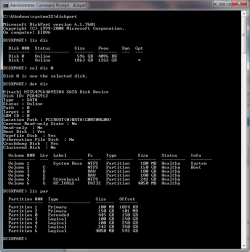
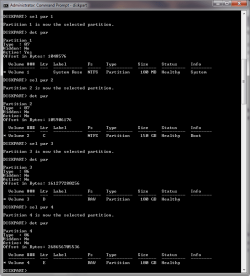
Can you still get to Command Prompt?

post what you get when you type

diskpart
lis dis
sel dis 0
detail dis
lis par (do not type this comment: for each partition, type sel par #, then det par)
exit


Leave it in command prompt

That will tell us what the machine sees on the disk. You'll have to write down the information and type in your reply - or you could post a picture from your camera or phone.

It might be easier to take a picture of each command so it doesn't scroll off the screen.
I can't enter Safe mode w/ cmd prompt, nor can I enter any other mode. I can however bring up the command prompt. The directory for commands is "X:\Windows\RM>".
 

Attachments

  • 74m2_diskpart-a.PNG
    74m2_diskpart-a.PNG
    20.4 KB · Views: 6
  • 74m2_diskpart-b.PNG
    74m2_diskpart-b.PNG
    18.9 KB · Views: 5

My Computer My Computer

Computer type
Laptop
Computer Manufacturer/Model Number
HP Pavilion dv6-6c10us
OS
x64 (6.3.9600) Win8.1 Pro & soon dual boot x64 (6.1.7601) Win7_SP1 HomePrem
CPU
AMD A6-3420M APU with Radeon(tm) HD Graphics
Motherboard
Hewlett-Packard 1805
Memory
6.00 GB
Graphics Card(s)
AMD Radeon(TM) HD 6520G
Sound Card
(1) AMD High Definition Audio Device (2) IDT High Definiti
Monitor(s) Displays
HP W2072a 20" LCD (1600 x 900) @ 60 Hz
Screen Resolution
1366 x 768 x 32 bits (4294967296 colors) @ 60 Hz
Hard Drives
ST640LM0 00 HM641JI SATA Disk Device
Keyboard
Logitech k520 wireless KB
Mouse
Logitech m320 wireless mouse (bundled with KB)
Internet Speed
15/5 | 54 MB Wireless 'n'
Antivirus
Realtime: Defender or Avast | On-demand: Malwarebytes, ESET
Browser
IE 11 on Win8, IE 10 on win 7
Other Info
Media: [Gimp, Audacity, VLC] || Comm: [WEmail 2012, Skype] || Productivity: [OpenOffice,| Textpad] || Utils: [Sysinternals, cCleaner, Speccy, Defraggler]
5oE0yrY.jpg


I think I should be seeing my C: drive here, but I dont. All I see is the usb stick with the recovery on it.

Sorry for the crappy quality... it's a blackberry :/
 

My Computer My Computer

OS
Windows 7 Home Premium 64bit
Ty, Slarty's on to something here and I don't want to say anything to get you/him off track, and don't worry 'bout the pix we've seen much worse.

One thing you could try though is to run the diskpart cmd again, but this time without the USB flash drive in, and see what that tells us.

Slarty should be back a little later tonight, he usually is, so hang in there.
 

My Computer My Computer

Computer type
PC/Desktop
Computer Manufacturer/Model Number
Gateway DX4831-01e (Mid-Tower Desktop)
OS
Originally Win 7 Hm Prem x64 Ver 6.1.7600 Build 7601-SP1 | Upgraded to Windows 10 December 14, 2019
CPU
Intel i3 530 2.93GHz, 2933MHz 2 Cores 4 Logical Processors
Motherboard
Gateway H57M01 133 megahertz
Memory
6GB of 1,333MHz DDR3 SDRAM
Graphics Card(s)
32MB Intel Graphics Media Accelerator HD IGChip
Sound Card
Realtek High Definition Audio
Monitor(s) Displays
Gateway HX2000 20inch TFT active matrix TN
Screen Resolution
1600 x 900 x 59 hertz
Hard Drives
WDC WD10EADS-00M2B0 [HDD] (1000.20 GB) -- drive 0,
HL-DT-ST DVDRAM GH41N [CD-ROM dr]
Four card readers, and Four USB 2.0
PSU
300watts.
Case
Mid-Tower Desktop
Cooling
Stock from Gateway
Keyboard
Natural Ergonomic Keyboard 4000, see Other Info
Mouse
Orig. Gateway wore out now using Insignia USB wired optical
Internet Speed
Vz FIOS 10ms png 57.64Mbps down 65.53Mbps up Speedtest.org
Antivirus
Zamana Anti-logger with Anti-malware, MSE, Windows Firewall,
Browser
IE11.0.9600.19399-Upd ver11.0.135, Firefox 68.0.1 x64
Other Info
System Specs by Belarc.

BIOS: American Megatrends Inc. P01-A0 11/17/2009

Replaced the MS 'Natural' Standard PS/2 Enhanced 101-102 Keyboard with a new Natural Ergonomic Keyboard 4000 on August 1st 2014.

Canon Pixma MG3222 Printer.

Updated to IE11 on 12102015 | Fios Quantum Router g1100

Additional AV: SpywareBlaster, manual Mbam, SAS
When I ran it without the usb, it just said "There are no fixed disks to show."
 

My Computer My Computer

OS
Windows 7 Home Premium 64bit
Well, I'll have to look around. I think I understand the HP USB - it's OEM tied to Mobo or HD, so if the HD can't be read, then the HP recovery utility claims "wrong machine".

The really weird thing about this is Quick Web. It's on the disk!!!!!

Does the 1010 allow you to create a repair 'disc' to a USB? If it does, go ahead and create it, then use it on the 1071. If not....

Let's try this:

On the working 1010 machine
  • Download the Windows 7 x64 System Repair ISO: click here to begin download
  • Download and install the Windows 7 USB/DVD Download tool: click here to begin download
  • run the Win7 USB/DVD tool
    • specify the System Repair ISO
    • specify your USB stick
  • Then boot the 1071 with the USB stick and follow this tutorial: http://www.sevenforums.com/tutorials/681-startup-repair.html

    OPTION TWO: Using a Windows 7 Installation or System Repair Disc
    • Ignore references to disc -> CD or DVD becomes USB in your case:
      • WARNING: Check to make sure that you set the BIOS to have the CD or DVD USB drive listed first in the boot order.
      • (F9 or esc during a restart to get to the boot options - select USB)
    •    Note
      The tutorial suggests running the Repair three (3) times
Let me know if the Win7 USB/DVD complains or the USB stick won't boot.

Bill
 

My Computer My Computer

Computer type
Laptop
Computer Manufacturer/Model Number
HP Pavilion dv6-6c10us
OS
x64 (6.3.9600) Win8.1 Pro & soon dual boot x64 (6.1.7601) Win7_SP1 HomePrem
CPU
AMD A6-3420M APU with Radeon(tm) HD Graphics
Motherboard
Hewlett-Packard 1805
Memory
6.00 GB
Graphics Card(s)
AMD Radeon(TM) HD 6520G
Sound Card
(1) AMD High Definition Audio Device (2) IDT High Definiti
Monitor(s) Displays
HP W2072a 20" LCD (1600 x 900) @ 60 Hz
Screen Resolution
1366 x 768 x 32 bits (4294967296 colors) @ 60 Hz
Hard Drives
ST640LM0 00 HM641JI SATA Disk Device
Keyboard
Logitech k520 wireless KB
Mouse
Logitech m320 wireless mouse (bundled with KB)
Internet Speed
15/5 | 54 MB Wireless 'n'
Antivirus
Realtime: Defender or Avast | On-demand: Malwarebytes, ESET
Browser
IE 11 on Win8, IE 10 on win 7
Other Info
Media: [Gimp, Audacity, VLC] || Comm: [WEmail 2012, Skype] || Productivity: [OpenOffice,| Textpad] || Utils: [Sysinternals, cCleaner, Speccy, Defraggler]
When I tried selecting the iso, it said "The selected file is not a valid ISO file. Please select a valid ISO file and try again."

Btw, the ISO download you provided was the x64 bit version, but neither it or the x32 bit work.
 

My Computer My Computer

OS
Windows 7 Home Premium 64bit
Sorry, looked at your System specs which told me to suggest x64 (I know.... you explained that in another post.... but members use the information in System specs to research - it might be a good ides to change the information to reflect the issue :ar: Win7 x86 Starter)

So the Win7 USB/DVD tool complained about both System Repair ISO files....hmmm

We'll kill this cat one way or another:

  • Download Windows 7 Home Premium x86 SP1 U (media refresh) ISO: Click here to begin download
    • don't worry about starter/Home premium, you're not going to install
    • you're going to use it to repair.
  • run the Win7 USB/DVD tool
    • specify the Windows 7 Home Premium x86 SP1 U ISO
    • specify your USB stick
  • boot the 1071 with the USB
    • Set up your language preferences, and click on the Next button
    • select Repair your computer (lower left)
    • follow this tutorial: http://www.sevenforums.com/tutorials/681-startup-repair.html


      OPTION TWO: Using a Windows 7 Installation or System Repair Disc
      • Ignore references to disc -> CD or DVD becomes USB in your case:
        • WARNING: Check to make sure that you set the BIOS to have the CD or DVD USB drive listed first in the boot order.
        • (F9 or esc during a restart to get to the boot options - select USB)
      • notesmall1.png
        Note
        The tutorial suggests running the Repair three (3) times
 

My Computer My Computer

Computer type
Laptop
Computer Manufacturer/Model Number
HP Pavilion dv6-6c10us
OS
x64 (6.3.9600) Win8.1 Pro & soon dual boot x64 (6.1.7601) Win7_SP1 HomePrem
CPU
AMD A6-3420M APU with Radeon(tm) HD Graphics
Motherboard
Hewlett-Packard 1805
Memory
6.00 GB
Graphics Card(s)
AMD Radeon(TM) HD 6520G
Sound Card
(1) AMD High Definition Audio Device (2) IDT High Definiti
Monitor(s) Displays
HP W2072a 20" LCD (1600 x 900) @ 60 Hz
Screen Resolution
1366 x 768 x 32 bits (4294967296 colors) @ 60 Hz
Hard Drives
ST640LM0 00 HM641JI SATA Disk Device
Keyboard
Logitech k520 wireless KB
Mouse
Logitech m320 wireless mouse (bundled with KB)
Internet Speed
15/5 | 54 MB Wireless 'n'
Antivirus
Realtime: Defender or Avast | On-demand: Malwarebytes, ESET
Browser
IE 11 on Win8, IE 10 on win 7
Other Info
Media: [Gimp, Audacity, VLC] || Comm: [WEmail 2012, Skype] || Productivity: [OpenOffice,| Textpad] || Utils: [Sysinternals, cCleaner, Speccy, Defraggler]
Ok, so I ran the startup repair 3 separate times, restarting the computer in between each. It still can't detect whats wrong.

The diagnostics log says the root cause is: A hard disk could not be found. If a hard disk is installed, it is not responding.
 

My Computer My Computer

OS
Windows 7 Home Premium 64bit
Back
Top