Way to automate USB close down?

Imageman

New member
Member
Local time
6:45 AM
Messages
39
Windows 7 RC1 7100

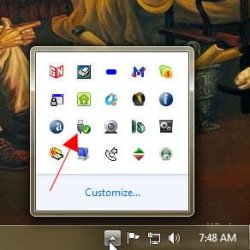
I'm looking for an easier way to close down six USB devices (USB external backup hard drives) than closing them one at a time in the little 'open devices' menu. Is there a utility or setting to automate the process when logging off or shutting down? Thanks for your help - IM
 

My Computer My Computer

OS
Vista Ultimate 64bit
Windows 7 RC1 7100

I'm looking for an easier way to close down six USB devices (USB external backup hard drives) than closing them one at a time in the little 'open devices' menu. Is there a utility or setting to automate the process when logging off or shutting down? Thanks for your help - IM

I'm a bit confused by your question.

Can you make a screenshot of where you close down/open devices?

greetz
 

My Computer My Computer

OS
Win7 Build 7600 x86
CPU
Pentium II 300MHz
Motherboard
Asus
Memory
32mb EDO RAM
Graphics Card(s)
Diamond Viper
Sound Card
Soundblaster 16
Monitor(s) Displays
14" AOC CRT 16K color
Screen Resolution
800x600
Hard Drives
300mb Quantum fireball
PSU
110 Watts
Cooling
Passive
Keyboard
Trust Ergonomic
Mouse
Generic
Internet Speed
256K u 128K d
squonksc - Thanks, here you go!
Snap11.jpg
 

Attachments

  • Snap11.jpg
    Snap11.jpg
    16.6 KB · Views: 151

My Computer My Computer

OS
Vista Ultimate 64bit
squonksc - Thanks, here you go!
Snap11.jpg

That's why I was confused.

At system shutdown and log off you don't have to close them.
They are closed by the OS automatically. (cache is saved, and flushed)

You can disconnect them from the system as soon as the PC is off, or the login screen appears.

With standby, it's a different matter.
In case you wanted to disconnect a drive, you would have to use the close tool you showed, before going to standby.

But why would you want to disconnect each six of them, every time you log off?
I don't understand.

greetz
 

My Computer My Computer

OS
Win7 Build 7600 x86
CPU
Pentium II 300MHz
Motherboard
Asus
Memory
32mb EDO RAM
Graphics Card(s)
Diamond Viper
Sound Card
Soundblaster 16
Monitor(s) Displays
14" AOC CRT 16K color
Screen Resolution
800x600
Hard Drives
300mb Quantum fireball
PSU
110 Watts
Cooling
Passive
Keyboard
Trust Ergonomic
Mouse
Generic
Internet Speed
256K u 128K d
Are you experiencing an issue where the normal process is problematic? You don't need to shut down the devices to shut down the machine.

Excuse me for butting in. I type slowly.
 
Y'all - Thanks for your help.

About a month ago I had a problem here in Windows 7, once after a restart, and another time after a power failure (We have a lot of them here in the Pacific Northwest).

My USB backup drives showed folders, but they were 'empty', no files showed. I rebooted in Vista and in Vista, and the content was there. I don't remember what gyrations I went through, but I finally fixed it in Windows 7, and have been excessively careful to shut them down and turn them off after use since then - IM
 

My Computer My Computer

OS
Vista Ultimate 64bit
Since you experienced the troubles earlier, have you updated chipset and/or other drivers? Upgraded PSU?

You could disable all caching on the externals.


The following is a meta message: Notice how I am not asking for system specs? Even though I could certainly benefit from knowing them?
 
Y'all - Thanks for your help.

About a month ago I had a problem here in Windows 7, once after a restart, and another time after a power failure (We have a lot of them here in the Pacific Northwest).

My USB backup drives showed folders, but they were 'empty', no files showed. I rebooted in Vista and in Vista, and the content was there. I don't remember what gyrations I went through, but I finally fixed it in Windows 7, and have been excessively careful to shut them down and turn them off after use since then - IM

Or buy an UPS.

It's a power backup that will allow you the time to do a clean shutdown when a power failure occurs.

There are some relatively cheap ones that give you 15 minutes.

Greetz
 

My Computer My Computer

OS
Win7 Build 7600 x86
CPU
Pentium II 300MHz
Motherboard
Asus
Memory
32mb EDO RAM
Graphics Card(s)
Diamond Viper
Sound Card
Soundblaster 16
Monitor(s) Displays
14" AOC CRT 16K color
Screen Resolution
800x600
Hard Drives
300mb Quantum fireball
PSU
110 Watts
Cooling
Passive
Keyboard
Trust Ergonomic
Mouse
Generic
Internet Speed
256K u 128K d
I think what he has is the write to cache set for the USBs in Win7.
turn that off. and you should not have an problem again... the USBs shutdown when you shutdown the sytem, with USBs an the icon click switch to show all items... move to the top function and click then every usb attached can be removed.
 
I think what he has is the write to cache set for the USBs in Win7.
turn that off. and you should not have an problem again... the USBs shutdown when you shutdown the sytem, with USBs an the icon click switch to show all items... move to the top function and click then every usb attached can be removed.

The OP stated he knows all this.

The problem he has, is frequent power outs by his energy provider, after which the cache of the disks are scr*wed.

No windows function other than disabling caching all together is going to solve this for him.

However, disabling cache on the disks will totally cripple them.

That's why I recommend getting an UPS.

greetz
 

My Computer My Computer

OS
Win7 Build 7600 x86
CPU
Pentium II 300MHz
Motherboard
Asus
Memory
32mb EDO RAM
Graphics Card(s)
Diamond Viper
Sound Card
Soundblaster 16
Monitor(s) Displays
14" AOC CRT 16K color
Screen Resolution
800x600
Hard Drives
300mb Quantum fireball
PSU
110 Watts
Cooling
Passive
Keyboard
Trust Ergonomic
Mouse
Generic
Internet Speed
256K u 128K d
I live in Kansas, where the local power pops 2 or 3 times a day...
I offered the suggestion because that is what I do... NEVER has it SCREWED nor totally crippled them.

I usually wait about 3 min after the power comes back on, [unch the power botton. then continue where I left off. (just like right now) lost the post had to wait..

Kansas Rural Electricity. pop 805
 
I live in Kansas, where the local power pops 2 or 3 times a day...
I offered the suggestion because that is what I do... NEVER has it SCREWED nor totally crippled them.

I usually wait about 3 min after the power comes back on, [unch the power botton. then continue where I left off. (just like right now) lost the post had to wait..

Kansas Rural Electricity. pop 805

The cache will get screwed only when the cache is enabled.

You said your cache is off, so that figures. :D

Run a disk performance test with cache on, and cache off.

The difference is huge.
 

My Computer My Computer

OS
Win7 Build 7600 x86
CPU
Pentium II 300MHz
Motherboard
Asus
Memory
32mb EDO RAM
Graphics Card(s)
Diamond Viper
Sound Card
Soundblaster 16
Monitor(s) Displays
14" AOC CRT 16K color
Screen Resolution
800x600
Hard Drives
300mb Quantum fireball
PSU
110 Watts
Cooling
Passive
Keyboard
Trust Ergonomic
Mouse
Generic
Internet Speed
256K u 128K d
The OP stated he knows all this.

The problem he has, is frequent power outs by his energy provider, after which the cache of the disks are scr*wed.

No windows function other than disabling caching all together is going to solve this for him.

However, disabling cache on the disks will totally cripple them.

That's why I recommend getting an UPS.

greetz
Focus of a laser beam. +1
 
Back
Top