Alienware x51 won't wake up after Clean Reinstall

Hicoga

New member
Local time
3:11 AM
Messages
33
Did a Clean Reinstall with good performance, but when I choose Sleep all lights go off except large LED on side and Power Button, then won't wake-up without hard Shutdown when powering back up Resumes as if in Hibernate Mode.

To try to resolve this I reinstalled the Alienware Command Center and set AlienFusion (Power) settings to Default but the same behavior continues even with Sleep set to default 0 on High Performance. Hibernate has never showed up on ShutDown button choices so I don't know why it's Resuming after hard Shutdown but that's all it's done.

Have tried all drivers from Windows Update to latest Nvidia to Latest Dell download for Nvidia Geforce GT545. Also disabled Intel onboard graphics in Device Manager.

I left the Recovery partition on the HD so can possibly run it by restoring F8 link or booting it using EasyBCD but would rather stick with the Clean Reinstall if we can make it Sleep and Hibernate correctly. Any help is greatly appreciated.
 

My Computer My Computer

At a glance

Windows 7 Home Premium 64bitIntel(R) Core(TM) i5-2320 CPU @ 3.00GHz8.00 GB(1) Intel(R) HD Graphics (2) NVIDIA GeForce G...
Computer type
PC/Desktop
Computer Manufacturer/Model Number
Alienware x51
OS
Windows 7 Home Premium 64bit
CPU
Intel(R) Core(TM) i5-2320 CPU @ 3.00GHz
Motherboard
Alienware 08PG26
Memory
8.00 GB
Graphics Card(s)
(1) Intel(R) HD Graphics (2) NVIDIA GeForce GT 545
Sound Card
NVIDIA High Definition Audio
Screen Resolution
1360x768
Hard Drives
ST31000524AS ATA Device
After a clean install, which you would rather do, you will have to set all the power settings again. What exactly are you asking? Turn off hibernation and see if that helps
 

My Computer My Computer

At a glance

Windows 10 Pro X64Intel(R) Core(TM) i5-3570K CPU OC@ 4.5GHZ Turbo8.00 GB DDR3 1600MhzMSI Gaming X GTX 1070
Computer type
PC/Desktop
Computer Manufacturer/Model Number
Dude Build
OS
Windows 10 Pro X64
CPU
Intel(R) Core(TM) i5-3570K CPU OC@ 4.5GHZ Turbo
Motherboard
MSI Z77A-G45 Gaming
Memory
8.00 GB DDR3 1600Mhz
Graphics Card(s)
MSI Gaming X GTX 1070
Sound Card
Realtek High Definition
Monitor(s) Displays
Dell S23O9W, HP L1710
Screen Resolution
DELL-1920 x 1080 HP-1280 x1024
Hard Drives
Crucial m4 256 SSD, WD 7200RPM 500GB WD 1TB
PSU
Seasonic X650 GOLD
Case
Zalman Z12
Cooling
Antec Kuhler 920
Keyboard
Logitech
Mouse
MSI DS100 Interceptor
Internet Speed
50 down and 5 up
Antivirus
MSE
Browser
Chrome, IE 11
Other Info
Logitech X-620 Speakers
I've been helping him via Skype and the same problem remains today after running Factory Recovery.

If he chooses Sleep or Hibernate the keyboard, mouse and screen suspend but the case lighting stays on. It won't wake up without doing a hard shut down, then when it powers up it says Resuming Windows like it's coming out of Hibernation.

Doing a Shutdown also leaves the case lights on, requiring a hard shutdown to turn them off. But then it starts normally from power on.

There was a BIOS update from v.6 to v.12 done before the reinstall so he'd like advice on reverting it since it worked correctly before. Research shows other x51's with this issue requiring resetting the CMOS and replacing the mobo.
 
Last edited:
Hicoga, I'm not sure how much assistance I can be as I'm not familar with what kind of options you have in BIOS. Dell usually locks the BIOS down pretty well, but I understand the Area 51's sometimes give you more options. I am more familar with commercial motherboards. But, hibernation and sleep issues have been a problem with many with the 1155 chipset. Do you have the option in BIOS to take pictures of the bios page? I've built 7 or 8 1155 computers and all of them had an option to put a flash drive in and hit F12 and it will put a photo of exactly what you are looking at. This is with the P67, z68 and Z77 chipsets. I'm sure you have one of those chipsets. Some of the BIOS options are hidden inside other menus you have to expand to see them, but most have an option of how to wake from sleep. You may also see if you have CPU power options of C1E, C3, C6 and Package C state. Those are power saving options that affect sleep and hibernation. If you have them, enable them. If you have advanced system options each heading will have an expanded menu. Usually in one of the menus is an option of wake from sleep and allows you to turn on or off keyboard or mouse. I even have one board where if the computer is off you can click the mouse button and it will start. As far as the bios version. I don't know how Dell is doing it, but on all my boards you can flash the bios forward or backward, it does not matter. If you have any questions, please feel free to ask. I will be happy to answer anything I can. Also, if you have the option to use the F12 to take photos of your BIOS, it may help to figure this out. Also, if you have a section in bios to allow you to overclock or set voltages, there is one particular setting which will disable wake from sleep, but I doubt you will have that setting. Again, feel free to ask if you have any questions at all. I don't mind explaining anything I know.

EDIT: Also, you may want to read this article which explains better the sleep options. The older bios versions use S1 ,S3 tct. All of my 1155 boards call it C1, C3 and C6.(http://www.pcworld.com/article/225833/Tweak_Your_Windows_PCs_Sleep_Mode.html)
 

My Computers My Computers

  • At a glance

    Windows 11 ProRyzen 9 5900X32GB G Skill DDR4-3600EVGA RTX 3080 FTW 3 Ultra
    Computer type
    PC/Desktop
    Computer Manufacturer/Model Number
    ALWAYS UNDER CONSTRUCTION
    OS
    Windows 11 Pro
    CPU
    Ryzen 9 5900X
    Motherboard
    Asus X570 Crosshair Viii Hero
    Memory
    32GB G Skill DDR4-3600
    Graphics Card(s)
    EVGA RTX 3080 FTW 3 Ultra
    Sound Card
    On Board/Sennheiser PC37X Headset
    Monitor(s) Displays
    3 X Asus 27"
    Screen Resolution
    2560x1440
    Hard Drives
    2 X 1 TB NVME drives
    PSU
    EVGA 850
    Case
    Phanteks Eclipse P400A
    Cooling
    EVGA 280 AIO
    Keyboard
    Logitech G510s/ Logitech G13
    Mouse
    Logitech G502
    Internet Speed
    24/1
    Antivirus
    ESET/MBAM Pro/SAS Pro
    Browser
    Chrome/ Firefox/ Edge
  • At a glance

    Windows 11 ProIntel Ultra 9 288V32 GB LPDDR5X 8533
    Computer type
    Laptop
    System Manufacturer/Model Number
    Dell 16 Plus
    OS
    Windows 11 Pro
    CPU
    Intel Ultra 9 288V
    Memory
    32 GB LPDDR5X 8533
    Monitor(s) Displays
    16" Mini-LED HDR600 Touch 90 Hz
    Screen Resolution
    2560X1600
    Hard Drives
    1 TB NVME

My Computer My Computer

At a glance

Windows 10 Home Premium 64bit sp1Intel I7-6700K @ 4.6 Ghz 1.344 volts everyday OC32GB G-Skill TridentZ 3200mhz 16-18-18-38 DDR4Sli Gigabyte Windforce GTX 980 G1
Computer type
PC/Desktop
Computer Manufacturer/Model Number
CoreI7-6700K MrFingerIII Special Builds
OS
Windows 10 Home Premium 64bit sp1
CPU
Intel I7-6700K @ 4.6 Ghz 1.344 volts everyday OC
Motherboard
Asrock Fatality K6 Z170 Socket 1151
Memory
32GB G-Skill TridentZ 3200mhz 16-18-18-38 DDR4
Graphics Card(s)
Sli Gigabyte Windforce GTX 980 G1
Sound Card
AC97 Creative Rage Tactic 3D Headphones Bluetooth
Monitor(s) Displays
27" Asus ROG Swift PG278Q G-Sync 48" Vizio Smart HD TV
Screen Resolution
2560x1440p 27"- 48" Currently Gaming at 2560x1440p Res 2K
Hard Drives
250GB Samsung Evo840SSD Seagate baracuda 500 GB WD Mybook 500Gb 1TB Seagate Barracuda
PSU
HX1050w Corsair Silver 80plus certified crosfire/sli
Case
Enthod Pro Full Tower
Cooling
Corsair H110i GT 280 mm High Performance WaterBlock
Keyboard
Logitech wireless keyboard
Mouse
Logitech wireless mouse
Internet Speed
Cox Cable 100+ mb
Antivirus
WebRoot Spysweeper with Antivirus
Browser
IE-10, Chrome, Opera
Other Info
My Other Rig is a AMD FX8320E @4.6Ghz 16GB Ballistic Sport Ram
Mobo Asrock Fatality 990FX 120GB OCZ SSD 1TB Seagate Barracuda Corsair H75 Cooling PSU Corsair CX750
GPU GTX Gigabyte 970G1
And another one hmmm, My aurora would not wake-up from sleep mode. What should I do???? - Alienware Forum - Alienware Club - Dell Community which has a fix which may help you.

Just one more suggestion that may help. Click the start button, in the search box type cmd, when the cmd appears right click it and select run as administrator. In the box that appears type/copy paste this powercfg -h on then hit enter. It will apppear to do nothing. Just type exit and press enter to get rid of the command prompt. Unfortunately, you won't know if it works until you try to wake it up again.
 

My Computers My Computers

  • At a glance

    Windows 11 ProRyzen 9 5900X32GB G Skill DDR4-3600EVGA RTX 3080 FTW 3 Ultra
    Computer type
    PC/Desktop
    Computer Manufacturer/Model Number
    ALWAYS UNDER CONSTRUCTION
    OS
    Windows 11 Pro
    CPU
    Ryzen 9 5900X
    Motherboard
    Asus X570 Crosshair Viii Hero
    Memory
    32GB G Skill DDR4-3600
    Graphics Card(s)
    EVGA RTX 3080 FTW 3 Ultra
    Sound Card
    On Board/Sennheiser PC37X Headset
    Monitor(s) Displays
    3 X Asus 27"
    Screen Resolution
    2560x1440
    Hard Drives
    2 X 1 TB NVME drives
    PSU
    EVGA 850
    Case
    Phanteks Eclipse P400A
    Cooling
    EVGA 280 AIO
    Keyboard
    Logitech G510s/ Logitech G13
    Mouse
    Logitech G502
    Internet Speed
    24/1
    Antivirus
    ESET/MBAM Pro/SAS Pro
    Browser
    Chrome/ Firefox/ Edge
  • At a glance

    Windows 11 ProIntel Ultra 9 288V32 GB LPDDR5X 8533
    Computer type
    Laptop
    System Manufacturer/Model Number
    Dell 16 Plus
    OS
    Windows 11 Pro
    CPU
    Intel Ultra 9 288V
    Memory
    32 GB LPDDR5X 8533
    Monitor(s) Displays
    16" Mini-LED HDR600 Touch 90 Hz
    Screen Resolution
    2560X1600
    Hard Drives
    1 TB NVME
Well by digging up your particular issue the only fix is to disable sleep mode supposedly this has been a issue since 2008 Alienware has issue waking from sleep/hibernation


View topic - "Wake-From-Sleep" Problem With Alienware Area-51 m - Maximum PC Forums


Alienware M17x Stuck in Sleep Mode - Laptop General Hardware Forum - Laptop - Dell Community

Alien Aurora will not come out of sleep mode. - Fixya

If you do want to disable hibernation use the same procedure I told you about before with the command prompt (elevated command prompt is what it's called) except type powercfg -h off and press enter. That will disable hibernate. Sleep can be disabled by clicking the start button, type sleep in the search box and select change when the computer sleeps. You can set the time the monitor goes off and the hard drive goes off, just scroll down in the hard drive section until you get to never. That's how I have mine set, monitor 1 hour and hard drive never.
 

My Computers My Computers

  • At a glance

    Windows 11 ProRyzen 9 5900X32GB G Skill DDR4-3600EVGA RTX 3080 FTW 3 Ultra
    Computer type
    PC/Desktop
    Computer Manufacturer/Model Number
    ALWAYS UNDER CONSTRUCTION
    OS
    Windows 11 Pro
    CPU
    Ryzen 9 5900X
    Motherboard
    Asus X570 Crosshair Viii Hero
    Memory
    32GB G Skill DDR4-3600
    Graphics Card(s)
    EVGA RTX 3080 FTW 3 Ultra
    Sound Card
    On Board/Sennheiser PC37X Headset
    Monitor(s) Displays
    3 X Asus 27"
    Screen Resolution
    2560x1440
    Hard Drives
    2 X 1 TB NVME drives
    PSU
    EVGA 850
    Case
    Phanteks Eclipse P400A
    Cooling
    EVGA 280 AIO
    Keyboard
    Logitech G510s/ Logitech G13
    Mouse
    Logitech G502
    Internet Speed
    24/1
    Antivirus
    ESET/MBAM Pro/SAS Pro
    Browser
    Chrome/ Firefox/ Edge
  • At a glance

    Windows 11 ProIntel Ultra 9 288V32 GB LPDDR5X 8533
    Computer type
    Laptop
    System Manufacturer/Model Number
    Dell 16 Plus
    OS
    Windows 11 Pro
    CPU
    Intel Ultra 9 288V
    Memory
    32 GB LPDDR5X 8533
    Monitor(s) Displays
    16" Mini-LED HDR600 Touch 90 Hz
    Screen Resolution
    2560X1600
    Hard Drives
    1 TB NVME
Hicoga, please let us know how you get along with these suggestions you are getting.
 

My Computers My Computers

  • At a glance

    Windows 11 ProRyzen 9 5900X32GB G Skill DDR4-3600EVGA RTX 3080 FTW 3 Ultra
    Computer type
    PC/Desktop
    Computer Manufacturer/Model Number
    ALWAYS UNDER CONSTRUCTION
    OS
    Windows 11 Pro
    CPU
    Ryzen 9 5900X
    Motherboard
    Asus X570 Crosshair Viii Hero
    Memory
    32GB G Skill DDR4-3600
    Graphics Card(s)
    EVGA RTX 3080 FTW 3 Ultra
    Sound Card
    On Board/Sennheiser PC37X Headset
    Monitor(s) Displays
    3 X Asus 27"
    Screen Resolution
    2560x1440
    Hard Drives
    2 X 1 TB NVME drives
    PSU
    EVGA 850
    Case
    Phanteks Eclipse P400A
    Cooling
    EVGA 280 AIO
    Keyboard
    Logitech G510s/ Logitech G13
    Mouse
    Logitech G502
    Internet Speed
    24/1
    Antivirus
    ESET/MBAM Pro/SAS Pro
    Browser
    Chrome/ Firefox/ Edge
  • At a glance

    Windows 11 ProIntel Ultra 9 288V32 GB LPDDR5X 8533
    Computer type
    Laptop
    System Manufacturer/Model Number
    Dell 16 Plus
    OS
    Windows 11 Pro
    CPU
    Intel Ultra 9 288V
    Memory
    32 GB LPDDR5X 8533
    Monitor(s) Displays
    16" Mini-LED HDR600 Touch 90 Hz
    Screen Resolution
    2560X1600
    Hard Drives
    1 TB NVME
Also, upload your MSINFO32.nfo file.

  1. Click on the start button
  2. Type "msinfo32" (without quotes) in the search bar of the start menu, click the resulting link. It will open the System Information window.
  3. File>Save. In the "File Name" filed, put "MSINFO32" (without Quote), give the save location to desktop, and click the "save" button.
  4. Give the time for processing, it will save a .nfo file on your desktop.
  5. Zip it, and upload it following the instruction.
It will help us to know what is going on there, though only a partial idea, but a good idea as a starting point.
 

My Computer My Computer

At a glance

Microsoft Windows 10 Pro Insider Preview 64-bitIntel(R) Core(TM) i3-4130 CPU @ 3.40GHzCorsair Vengence 4GB x2 (8.00GB Dual-Channel ...2047MB GeForce GTS 450 (ZOTAC International)
Computer type
PC/Desktop
Computer Manufacturer/Model Number
Self Assembled
OS
Microsoft Windows 10 Pro Insider Preview 64-bit
CPU
Intel(R) Core(TM) i3-4130 CPU @ 3.40GHz
Motherboard
Gigabyte Technology Co., Ltd. B85M-D3H
Memory
Corsair Vengence 4GB x2 (8.00GB Dual-Channel DDR3 @ 798MHz)
Graphics Card(s)
2047MB GeForce GTS 450 (ZOTAC International)
Sound Card
Onboard (Realtek High Definition Audio)
Monitor(s) Displays
LG Flatron E2040T
Screen Resolution
1600x900
Hard Drives
Western Digital 1 TB
Seagate 500 GB
PSU
Corsair VS550
Case
Cooler Master K380
Cooling
Cooler Master Seidon 120V Plus
Keyboard
Logitech MK260r
Mouse
Logitech MK260r
Internet Speed
PMPL Broadband
Antivirus
Windows Defender + MBAM
Browser
Firefox
Other Info
Dell Studio 15" Laptop

My Computer My Computer

At a glance

Windows 7 Ultimate X64 SP1Intel i5-2550K, Differing ~4.4-4.8GHz No buil...16GB G.Skill Sniper 1866MHz @ 2133MHz 2x8GBASUS GTX650TIB-DC2OC-2GD5, (650TI Boost)
Computer type
PC/Desktop
Computer Manufacturer/Model Number
Home Built Desktop By DataTech
OS
Windows 7 Ultimate X64 SP1
CPU
Intel i5-2550K, Differing ~4.4-4.8GHz No built in GPU
Motherboard
ASUS P8Z68-V PRO/GEN3
Memory
16GB G.Skill Sniper 1866MHz @ 2133MHz 2x8GB
Graphics Card(s)
ASUS GTX650TIB-DC2OC-2GD5, (650TI Boost)
Sound Card
Onboard Realtek 5-1
Monitor(s) Displays
Samsung P2570HD
Screen Resolution
1920x1080
Hard Drives
Samsung 840 Pro 256GB SSD for OS, 500GB Seagate Constellation (Enterprise drive) for Data
PSU
Corsair HX650W
Case
Inwin Dragon Rider
Cooling
Hyper 212 EVO w/two Noctua fans, push-pull, @1300 RPM
Keyboard
E-Z Eyes, bright yellow keys with large characters
Mouse
steelseries SENSEI Laser Pro Gaming
Internet Speed
48-51Mbs Mbs down, 11 Mbs up Xfinity Cable
Antivirus
Norton Internet Security 2013
Browser
IE 10, Opera, Pale Moon if needed
Other Info
4 case fans, LG BluRay-RE, ASUS DVD-RW, Mr. Fusion power supply, 1.21 gigawatts.
Did a Clean Reinstall with good performance, but when I choose Sleep all lights go off except large LED on side and Power Button, then won't wake-up without hard Shutdown when powering back up Resumes as if in Hibernate Mode.

To try to resolve this I reinstalled the Alienware Command Center and set AlienFusion (Power) settings to Default but the same behavior continues even with Sleep set to default 0 on High Performance. Hibernate has never showed up on ShutDown button choices so I don't know why it's Resuming after hard Shutdown but that's all it's done.

Have tried all drivers from Windows Update to latest Nvidia to Latest Dell download for Nvidia Geforce GT545. Also disabled Intel onboard graphics in Device Manager.

I left the Recovery partition on the HD so can possibly run it by restoring F8 link or booting it using EasyBCD but would rather stick with the Clean Reinstall if we can make it Sleep and Hibernate correctly. Any help is greatly appreciated.

Hi Hicoga,

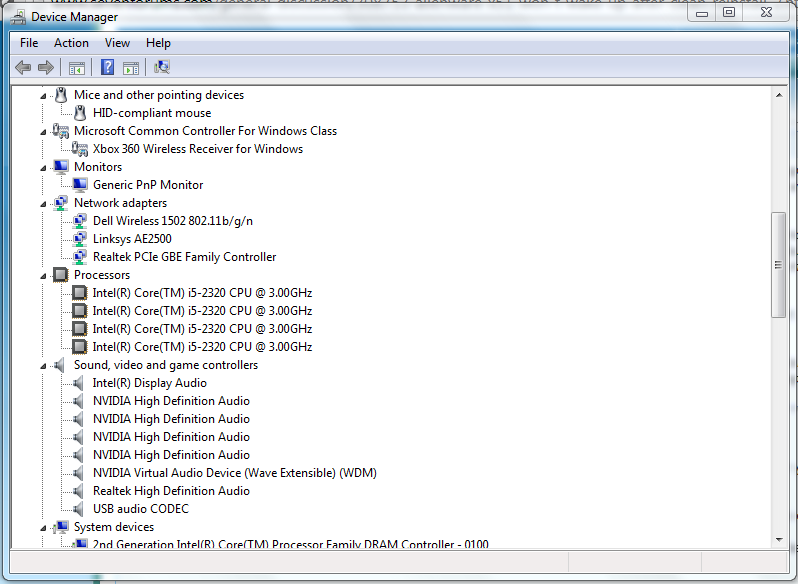
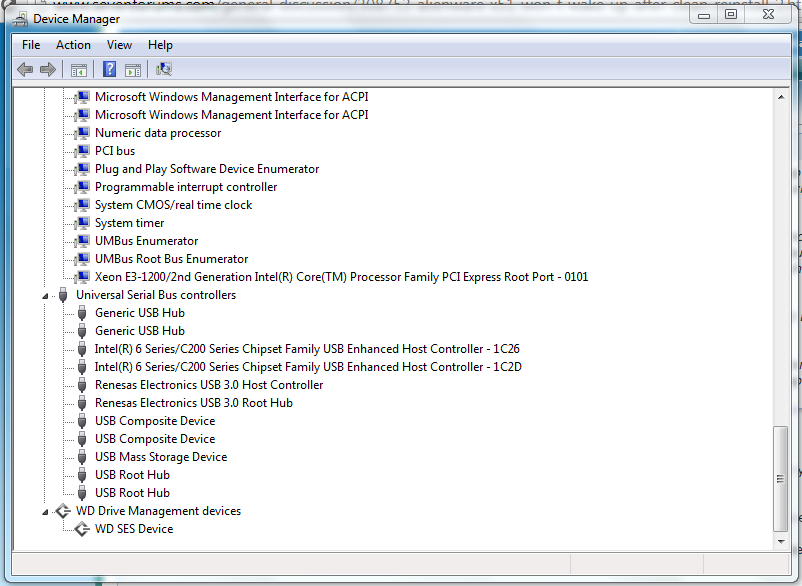
Apologies for checking this late. First of all kindly post the screenshot for your device manger so we can check all the devices are installed properly or not.

Regarding the sleep issue, have you ensure that mouse and keyboard are enabled to wake up from sleep.

It could be an issue that indicates to the chipset/motherboard issue. Make sure that chipset driver is updated from the link below:

Chipset

If we diagnose that it is a hardware issue I can arrange for the faulty part to be replaced on the system. However, prior to that please follow the various suggestions here and let us know the outcome of it.

Keep us posted with the results so we can advise you further.
 

My Computer My Computer

At a glance

Winndows 7 32 bit
Computer type
PC/Desktop
OS
Winndows 7 32 bit
I also wonder if the trace would reveal what exactly is interfering with sleep: Gathering a Startup, Shutdown, Sleep, Hibernate, or Reboot Trace - Windows 7 Forums. The author Carl will help read the trace if you post back it's output in tutorial thread.

I'm not sure we tried disabling Hibernation to see what it does then when attempting sleep, since it was Resuming Windows after forced shutdown when it wouldn't wake up before. This reveals it was in some sort of hibernation. So disabling Hibernate would be interesting to see what transpires. Hibernate - Enable or Disable - Windows 7 Forums

Hicoga you have excellent help here from top hardware experts, our top crashes analyst and our Dell resident who can hook you up with anything possible from Dell. Please work thoroughly through each of their steps.
 
Sorry guys, been really busy the past few days and haven't had time to check on here and see all of the replies I've been getting.

Just an update to let you know I'm here and I'll get to work on some of the stuff that has been suggested.
 

My Computer My Computer

At a glance

Windows 7 Home Premium 64bitIntel(R) Core(TM) i5-2320 CPU @ 3.00GHz8.00 GB(1) Intel(R) HD Graphics (2) NVIDIA GeForce G...
Computer type
PC/Desktop
Computer Manufacturer/Model Number
Alienware x51
OS
Windows 7 Home Premium 64bit
CPU
Intel(R) Core(TM) i5-2320 CPU @ 3.00GHz
Motherboard
Alienware 08PG26
Memory
8.00 GB
Graphics Card(s)
(1) Intel(R) HD Graphics (2) NVIDIA GeForce GT 545
Sound Card
NVIDIA High Definition Audio
Screen Resolution
1360x768
Hard Drives
ST31000524AS ATA Device
Sorry guys, been really busy the past few days and haven't had time to check on here and see all of the replies I've been getting.

Just an update to let you know I'm here and I'll get to work on some of the stuff that has been suggested.

Hi Hicoga,

Sure please perform the steps at your convenience and let us know the results. So we can advise you further if required.
 

My Computer My Computer

At a glance

Winndows 7 32 bit
Computer type
PC/Desktop
OS
Winndows 7 32 bit
Sorry for the very long absence. I had finals for a bit there and had completely forgotten about this.

Here are all the screenshots of my Device Manager.
ZshBJHg.png

5K7ZQpU.png

QzCVebl.png

qDVaXTO.png


I made sure the chipset was up to date and it was.

If it helps any, I believe the problem to be that when we updated the BIOS during the clean reinstall that is messed something up with the sleep and power functions. I think this because the problem only occured after the BIOS was updated and not just after the reinstall.
 

My Computer My Computer

At a glance

Windows 7 Home Premium 64bitIntel(R) Core(TM) i5-2320 CPU @ 3.00GHz8.00 GB(1) Intel(R) HD Graphics (2) NVIDIA GeForce G...
Computer type
PC/Desktop
Computer Manufacturer/Model Number
Alienware x51
OS
Windows 7 Home Premium 64bit
CPU
Intel(R) Core(TM) i5-2320 CPU @ 3.00GHz
Motherboard
Alienware 08PG26
Memory
8.00 GB
Graphics Card(s)
(1) Intel(R) HD Graphics (2) NVIDIA GeForce GT 545
Sound Card
NVIDIA High Definition Audio
Screen Resolution
1360x768
Hard Drives
ST31000524AS ATA Device
Anyone here?
 

My Computer My Computer

At a glance

Windows 7 Home Premium 64bitIntel(R) Core(TM) i5-2320 CPU @ 3.00GHz8.00 GB(1) Intel(R) HD Graphics (2) NVIDIA GeForce G...
Computer type
PC/Desktop
Computer Manufacturer/Model Number
Alienware x51
OS
Windows 7 Home Premium 64bit
CPU
Intel(R) Core(TM) i5-2320 CPU @ 3.00GHz
Motherboard
Alienware 08PG26
Memory
8.00 GB
Graphics Card(s)
(1) Intel(R) HD Graphics (2) NVIDIA GeForce GT 545
Sound Card
NVIDIA High Definition Audio
Screen Resolution
1360x768
Hard Drives
ST31000524AS ATA Device
Hi Hicoga and Merry Christmas to you!

Did you get a chance to work on these steps?

I also wonder if the trace would reveal what exactly is interfering with sleep: Gathering a Startup, Shutdown, Sleep, Hibernate, or Reboot Trace - Windows 7 Forums. The author Carl will help read the trace if you post back it's output in tutorial thread.

I'm not sure we tried disabling Hibernation to see what it does then when attempting sleep, since it was Resuming Windows after forced shutdown when it wouldn't wake up before. This reveals it was in some sort of hibernation. So disabling Hibernate would be interesting to see what transpires. Hibernate - Enable or Disable - Windows 7 Forums

Hicoga you have excellent help here from top hardware experts, our top crashes analyst and our Dell resident who can hook you up with anything possible from Dell. Please work thoroughly through each of their steps.

If nothing else that's been suggested so far helps then I think you need to have our Dell resident SanDeep help you try to reflash the BIOS to the earlier version, or set it up for service. I agree that is the most likely cause. However try everything else suggested first to see if it will help.
 
Hi Hicoga,

It seems all the drivers are updated correctly. Have you checked in the BIOS settings if there are some options that you can change and check related to power state of the system.

As BIOS flash would make the default settings on the BIOS. Make sure you have the latest BIOS installed from here:

Driver Details | Dell US

Also, make sure all peripherals connected to the system should be removed. Is it a wireless mouse and keyboard that you are using?

Make the system to clean boot and then check if it helps:

Clean Boot

Keep us posted with the results so we can advise you further.
 

My Computer My Computer

At a glance

Winndows 7 32 bit
Computer type
PC/Desktop
OS
Winndows 7 32 bit
Sandeep, as the Sleep/Hibernate problem seems to have occurred when Hicoga flashed to the latest BIOS (and a search shows this happened to some others too) is it possible a solution might be to flash back to the older BIOS? Can you or Dell help him do this if all else fails?
 
Greg, as I posted earlier in post #9, some files may help us to figure an idea about exactly what is going on during sleep-hibernate power transition.

Upload your MSINFO32.nfo file.

  1. Click on the start button
  2. Type "msinfo32" (without quotes) in the search bar of the start menu, click the resulting link. It will open the System Information window.
  3. File>Save. In the "File Name" filed, put "MSINFO32" (without Quote), give the save location to desktop, and click the "save" button.
  4. Give the time for processing, it will save a .nfo file on your desktop.
  5. Zip it, and upload it following the instruction.
Upload the list of all the third party drivers Using NirSoft DriverView :

  • Download and execute Driverview
  • View > Hide Microsoft Drivers
  • Edit > Select all
  • File > Save Selected Items
  • In the Save dialog, Set the path to desktop, Put "Driverview" in the name field, and save.
  • Zip the .txt file and upload it.
If the OP follows it, I can have a look.
 

My Computer My Computer

At a glance

Microsoft Windows 10 Pro Insider Preview 64-bitIntel(R) Core(TM) i3-4130 CPU @ 3.40GHzCorsair Vengence 4GB x2 (8.00GB Dual-Channel ...2047MB GeForce GTS 450 (ZOTAC International)
Computer type
PC/Desktop
Computer Manufacturer/Model Number
Self Assembled
OS
Microsoft Windows 10 Pro Insider Preview 64-bit
CPU
Intel(R) Core(TM) i3-4130 CPU @ 3.40GHz
Motherboard
Gigabyte Technology Co., Ltd. B85M-D3H
Memory
Corsair Vengence 4GB x2 (8.00GB Dual-Channel DDR3 @ 798MHz)
Graphics Card(s)
2047MB GeForce GTS 450 (ZOTAC International)
Sound Card
Onboard (Realtek High Definition Audio)
Monitor(s) Displays
LG Flatron E2040T
Screen Resolution
1600x900
Hard Drives
Western Digital 1 TB
Seagate 500 GB
PSU
Corsair VS550
Case
Cooler Master K380
Cooling
Cooler Master Seidon 120V Plus
Keyboard
Logitech MK260r
Mouse
Logitech MK260r
Internet Speed
PMPL Broadband
Antivirus
Windows Defender + MBAM
Browser
Firefox
Other Info
Dell Studio 15" Laptop
Back
Top