Pictures lost, how can I recover them?

rik1603

New member
Local time
10:23 AM
Messages
8
Hello all,

I am wondering if anyone can help with a bit of a nightmare situation I am having?

I went to upload a picture yesterday and when doing so realised all of my pictures had gone. There were stored in the usual My Pictures folder and was around 15GB of pictures from the last 10 years (our wedding, honeymoon, holidays, family evens etc), obviously now I cannot find this I am beginning to panic a little.

So far I have tried a programme called Recuva (which seemed to find loads of images (1.2 million infact) but not one of them being from this folder) and Shadow Explorer which seems a bit more difficult to use and the folder always looks empty.

I use Avast! antivirus and run Windows 7, being the idiot I am I have no backup setup. Is there anything I can try?

Thanks in advance for any help!
 

My Computer My Computer

At a glance

Windows 7
Computer type
Laptop
Computer Manufacturer/Model Number
Sony
OS
Windows 7
Also tried Wise Data Recovery which feels similar to Recuva
 

My Computer My Computer

At a glance

Windows 7
Computer type
Laptop
Computer Manufacturer/Model Number
Sony
OS
Windows 7
Based on my experience at doing this successfully, my suggestions are the following:
1) Download and install the trial version of RecoverMyFiles from Runtime Software in MS Windows.
2) Right-click the RecoverMyFiles shortcut and select "Run as Administrator"
3) Select the option to Recover a Drive
4) You will get a list of drive, scroll down to find the one for your USB stick or memory card
5) Select Automatic Driver recovery, press Start button
6) It will run for a while but when done, will show a directory tree in the left pane. Do NOT interrupt it.
7) When done, browse the folders in the directory tree -- and be SURE to check the filesizes of the files you want to recover. If the filesize is zero, the file is trashed and you will NOT be able to recover it.
If the files look OK, you will need to contact Runtime Software to purchase a license for the recovery. You won't have to reinstall the app; instead, they will email you an activation code which you can use to turn on the recovery feature.
According to their website, the "standard" version of the app is $70 USD. They also have a Pro version for $99 dollars, but if you go to the website below, you can compare the features and (at least for me) the extra cost wasn't worth it:
Recover My Files: Purchase Recover My Files data recovery software
Your data ... your money ... your choice.
 

My Computer My Computer

At a glance

Win7 Pro 32-bit, Win8 Pro 32-bitAMD Phenom II X6 1090T4GB ddr3 1300AMD HD 4290 onboard
Computer type
PC/Desktop
Computer Manufacturer/Model Number
Custom
OS
Win7 Pro 32-bit, Win8 Pro 32-bit
CPU
AMD Phenom II X6 1090T
Motherboard
Gigabyte
Memory
4GB ddr3 1300
Graphics Card(s)
AMD HD 4290 onboard
Sound Card
Builtin Realtek HD Audio
Monitor(s) Displays
Samsung 24" widescreen, LG 23" widescreen
Screen Resolution
1920x1200/1920x1080
Hard Drives
Kingston 256GB SSD
Keyboard
Logitech Illuminated Keyboard
Mouse
Logitech M705 wireless mouse
Antivirus
Norton Av 2013
Browser
IE v10
Thanks Mark. It was on my C: rather than a memeroy card but I will try the software.

Also tried showing hidden files and searching for some of the folder names I know but nothing. It seems really bizarre that these are the only things missing and its not like I could accidentally delete 15BG. Could it be virus related?
 

My Computer My Computer

At a glance

Windows 7
Computer type
Laptop
Computer Manufacturer/Model Number
Sony
OS
Windows 7
I would think that you should forthwith stop using the C drive to prevent any overwriting and try recovery from a bootable DOS pen drive. PhotoRec lends itself to it.

Download Rufus Rufus - Create bootable USB drives the easy way and create a bootable disk using:MS-DOS

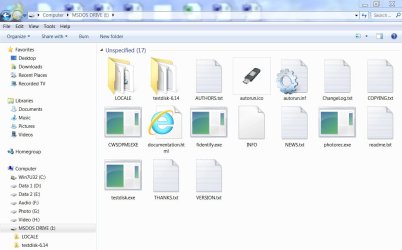
Download TestDisk & PhotoRec 6.14 Dos/Win9x version from TestDisk Download - CGSecurity Extract the zip file into the bootable DOS pen drive you just created. You will find a testdisk-6.14 folder in the bootable DOS pen drive. To make life easier select all the files in that folder and move them to the root of the pen drive. At the end of it your DOS bootable pendrive will look like this:

22-10-2013 21-18-33.jpg

(Do all these on another computer so that you do not overwrite anything on the C drive of your computer.)

Connect an external drive to which you want to recover to your computer,, boot it from the bootable DOS pen drive, against the C:> prompt type photorec.exe and press ENTER to run PhotoRec

Some help on running PhotoRec here http://www.sevenforums.com/software/193467-guide-using-photorec-recovery-software.html

In the screen where you have to select the file types select only the file types you want to recover - may be .jpg - so that you get to recover only those files.

Provided that your files had already been not-overwritten, I think that this would work in recovering your photos.

Good luck.
 

My Computer My Computer

At a glance

Windows 7 Home Premium 32 bit
OS
Windows 7 Home Premium 32 bit
Thanks jumanji, seems a complex piece of software (or not very user friendly should I say) so coulnt work out how to export .jpg files only so running it on everything and I will filter myself when its do. Fingers crossed.
 

My Computer My Computer

At a glance

Windows 7
Computer type
Laptop
Computer Manufacturer/Model Number
Sony
OS
Windows 7

My Computer My Computer

At a glance

Vista, Windows7, Mint Mate, Zorin, Windows 8from 1.6GHz Duo to i7
Computer Manufacturer/Model Number
HP, Dell, Gateway, Toshiba - 4 laptops and 2 desktops
OS
Vista, Windows7, Mint Mate, Zorin, Windows 8
CPU
from 1.6GHz Duo to i7
Monitor(s) Displays
2x HP w2207
Hard Drives
5x HDD, 7x SSD, 12x Externals
Keyboard
with trackball - no mices
Mouse
Trackball mice
Internet Speed
DSL 6000
Hmm, that suggests that your pictures folder was already corrupted for a while. But are you certain that you drilled down to the correct pictures folder - C:\Users\Your Name\Pictures
 

My Computer My Computer

At a glance

Vista, Windows7, Mint Mate, Zorin, Windows 8from 1.6GHz Duo to i7
Computer Manufacturer/Model Number
HP, Dell, Gateway, Toshiba - 4 laptops and 2 desktops
OS
Vista, Windows7, Mint Mate, Zorin, Windows 8
CPU
from 1.6GHz Duo to i7
Monitor(s) Displays
2x HP w2207
Hard Drives
5x HDD, 7x SSD, 12x Externals
Keyboard
with trackball - no mices
Mouse
Trackball mice
Internet Speed
DSL 6000
Thanks jumanji, seems a complex piece of software (or not very user friendly should I say) so coulnt work out how to export .jpg files only so running it on everything and I will filter myself when its do. Fingers crossed.

It does appear complex and daunting for the first time user but once you play around with it for a while , you will get a grip on it. And if you use PhotoRec you can run it any number of times and it is absolutely safe since it does not write anything to the drive under recovery. There is no way you can mess up with the drive under recovery even if you do some mistakes.

As for copying the recovered files to an external drive, http://www.sevenforums.com/hardware...suddenly-became-unllocated-3.html#post2395385 (applies to PhotoRec also)

EDIT: Here is a booster dose :) for you http://www.sevenforums.com/software/271545-best-recovery-software-windows-7-a-2.html#post2263441
 
Last edited:

My Computer My Computer

At a glance

Windows 7 Home Premium 32 bit
OS
Windows 7 Home Premium 32 bit
It does appear complex and daunting for the first time user but once you play around with it for a while , you will get a grip on it. And if you use PhotoRec you can run it any number of times and it is absolutely safe since it does not write anything to the drive under recovery. There is no way you can mess up with the drive under recovery even if you do some mistakes.

As for copying the recovered files to an external drive, http://www.sevenforums.com/hardware...suddenly-became-unllocated-3.html#post2395385 (applies to PhotoRec also)

EDIT: Here is a booster dose :) for you http://www.sevenforums.com/software/271545-best-recovery-software-windows-7-a-2.html#post2263441

I left it running over night and it found the same sort of files as the others, loads of browsing history stuff, work pictures etc but not one of my pictures section. It seems very odd to me that nothing can find a single one of these pictures?
 

My Computer My Computer

At a glance

Windows 7
Computer type
Laptop
Computer Manufacturer/Model Number
Sony
OS
Windows 7
Hmm, that suggests that your pictures folder was already corrupted for a while. But are you certain that you drilled down to the correct pictures folder - C:\Users\Your Name\Pictures

Thanks WHS, it's odd that nothing else is missing though isn't it?

I only have one users on the computer but checked the public one too. Also tried doing a search for all .jpg files but none of them were found.
 

My Computer My Computer

At a glance

Windows 7
Computer type
Laptop
Computer Manufacturer/Model Number
Sony
OS
Windows 7
Well, I don't know why all photos in that folder went missing.

But if I remember correctly there is one setting in Windows Media Player which says " delete from the library but do not delete the original (wherever it is)" or something like that. Unless one checks it, if you delete the file in the Library , it will also be deleted in its location. Do you remember anytime you had all your photos in the Windows Media Player library, selected those enmasse and deleted those from the library? I am just guessing.
 

My Computer My Computer

At a glance

Windows 7 Home Premium 32 bit
OS
Windows 7 Home Premium 32 bit
Hello,

Just to update people on this as I don't like to start a thread and not post a solution if I find one.

Although Recuva didn't work on my laptop or external hard drive where the images had been stores I got my old PC out, set it back up and ran the software on it. Again the were 1 million + images found and it did contain my personal pictures.

At an estimate I think around 10% of pictures were lost due to file corruption but I would call this a great result all considered.

Rikki
 

My Computer My Computer

At a glance

Windows 7
Computer type
Laptop
Computer Manufacturer/Model Number
Sony
OS
Windows 7
Back
Top