
Best Performance Settings for Windows 7 32bit and 64bit

sanssan

New member
Local time
8:06 PM
Messages
16
hi

I really need to know what is the best performance settings for my 7.
I have installed 32 bit 7 with 1600 DDR3 4GB and no paging file. I know that it can support 4GB of RAM but when I looking at my system setting it says that 3.25 (usable)... What does this mean...? Also, I saw an option " Automatically manage paging file size for all drives"... Should I use this option...?

If you have better experience in this settings plizz give me some advices.

Thanxxx
 

My Computer My Computer

Computer Manufacturer/Model Number
Microsift Windiws 7 32bit
OS
windows 7
CPU
Core2Quad [email protected]
Motherboard
Asus P2Q 3
Memory
DDR3 1600 4GB
Graphics Card(s)
Asus 8800GTS
Sound Card
M-Audio FW410
Monitor(s) Displays
HPL2445W
Hard Drives
3x500 GB
Case
Cooler Master Cavalier
Cooling
Cooler Master
Hello Sanssan,

Since you have the 32-bit Windows 7 installed, you're system will only use up to 3.25 GB of your available RAM. You would need to install the 64-bit Windows 7 instead to make full use of all of your RAM instead.

It's usually best to allow Windows 7 to use that default Automatically manage paging file size for all drives setting for Virtual Memory (page file) unless you have separate physical hard drive that you want to have the page file on instead for better performance.

Hope this helps,
Shawn
 

My Computer My Computer

Computer type
PC/Desktop
Computer Manufacturer/Model Number
Self built custom
OS
64-bit Windows 11 Pro for Workstations
CPU
Intel i7-8700K OC'd to 5 GHz
Motherboard
ASUS ROG Maximus XI Formula Z390
Memory
64 GB (4x16GB) G.SKILL TridentZ RGB DDR4 3600 MHz
Graphics Card(s)
ASUS ROG-STRIX-GTX1080TI-O11G-GAMING
Sound Card
Integrated
Monitor(s) Displays
2 x Samsung Odyssey G7 27"
Screen Resolution
2560x1440
Hard Drives
1TB Samsung 990 PRO M.2,
4TB Samsung 990 PRO PRO M.2,
TerraMaster F8 SSD Plus NAS
PSU
Seasonic Prime Titanium 850W
Case
Thermaltake Core P3
Cooling
Corsair Hydro H115i
Keyboard
Logitech wireless K800
Mouse
Logitech MX Master 4
Internet Speed
2 Gb/s Download and 100 Mb/s Upload
Antivirus
Malwarebyte Anti-Malware Premium
Browser
Google Chrome
Other Info
Logitech Z625 speaker system,
Logitech BRIO 4K Pro webcam,
HP Color LaserJet Pro MFP M477fdn,
APC SMART-UPS RT 1000 XL - SURT1000XLI,
Galaxy S23 Plus phone
32-bit Windows 7 will only see at a range of 3GB-3.5GB. I would recommend installing a 64-bit edition of Windows 7 (note this requires a clean install). For the page file I always base it first upon -HD Space, second -Memory available. For me I have a 120GB HD and 4GB RAM.

For my PF I use 1/8 of the RAM due to -HD Space -I won't be running Memory intensive tasks. I could turn the PF off but I know of some apps that complain about its absence so I decided to keep it
 

My Computer My Computer

Computer Manufacturer/Model Number
Compal JFT02 (Custom Build Laptop)
OS
Windows 7 Home Premium x64 - Mac OS X 10.6.4 x64
CPU
Intel Core 2 Duo T9300 2.5 GHz
Motherboard
JFT02
Memory
4GB Kingston DDR2-800
Graphics Card(s)
NVIDIA Geforce 8600M GT (512MB Model)
Sound Card
Realtek HD Audio
Monitor(s) Displays
WUXGA Standard Laptop Display
Screen Resolution
1680*1050
Hard Drives
Toshiba 320GB 5400RPM Laptop HD
PSU
Standard Laptop Power Supply
Case
Standard Laptop Case
Cooling
Standard Laptop Cooling
Keyboard
Standard Laptop 105 Key-Keyboard
Mouse
Synaptics Touchpad
Internet Speed
Verizion Online DSL 3360/864 kbs (dl/up)
Thanx a lot guys...:)) I think I'll change my OS with x64 version.
 

My Computer My Computer

Computer Manufacturer/Model Number
Microsift Windiws 7 32bit
OS
windows 7
CPU
Core2Quad [email protected]
Motherboard
Asus P2Q 3
Memory
DDR3 1600 4GB
Graphics Card(s)
Asus 8800GTS
Sound Card
M-Audio FW410
Monitor(s) Displays
HPL2445W
Hard Drives
3x500 GB
Case
Cooler Master Cavalier
Cooling
Cooler Master
You're welcome. Please let us know how it went for you.

Be sure to have all of your 64-bit device drivers downloaded and ready to install first to make it easier. :)
 

My Computer My Computer

Computer type
PC/Desktop
Computer Manufacturer/Model Number
Self built custom
OS
64-bit Windows 11 Pro for Workstations
CPU
Intel i7-8700K OC'd to 5 GHz
Motherboard
ASUS ROG Maximus XI Formula Z390
Memory
64 GB (4x16GB) G.SKILL TridentZ RGB DDR4 3600 MHz
Graphics Card(s)
ASUS ROG-STRIX-GTX1080TI-O11G-GAMING
Sound Card
Integrated
Monitor(s) Displays
2 x Samsung Odyssey G7 27"
Screen Resolution
2560x1440
Hard Drives
1TB Samsung 990 PRO M.2,
4TB Samsung 990 PRO PRO M.2,
TerraMaster F8 SSD Plus NAS
PSU
Seasonic Prime Titanium 850W
Case
Thermaltake Core P3
Cooling
Corsair Hydro H115i
Keyboard
Logitech wireless K800
Mouse
Logitech MX Master 4
Internet Speed
2 Gb/s Download and 100 Mb/s Upload
Antivirus
Malwarebyte Anti-Malware Premium
Browser
Google Chrome
Other Info
Logitech Z625 speaker system,
Logitech BRIO 4K Pro webcam,
HP Color LaserJet Pro MFP M477fdn,
APC SMART-UPS RT 1000 XL - SURT1000XLI,
Galaxy S23 Plus phone
Even if you have a lot of RAM, always have a page/swap file. Your best bet is to leave the OS to manage it for you. A page/swap files is more then just a place for the OS to store an inactive process' RAM allocation.
 

My Computer My Computer

Computer type
PC/Desktop
Computer Manufacturer/Model Number
Alienware Aurora ALX R4
OS
Windows 10 Pro (x64)
CPU
Intel Core i7-3930K (3.2GHz - 4.5GHz)
Motherboard
Alienware Aurora-R4 x79
Memory
4x Samsung 4GB PC3-12800 DDR3 (16GB 1600MHz)
Graphics Card(s)
Nvidia Geforce GTX 690
Sound Card
SteelSeries Siberia Elite
Monitor(s) Displays
Dell UltraSharp U3011
Screen Resolution
2560x1600
Hard Drives
Samsung 850 Pro 256 GB, Seagate 1TB Desktop Hybrid HDD, 2x Western Digital 4TB Green HDD
PSU
875W Some Dell PSU <.<
Case
Alienware Aurora ALX
Cooling
Custom Liquid Cooling (EK CPU & GPU blocks) dual EK 480RAD
Keyboard
Logitech G710+ Mechanical
Mouse
Logitech G700s
Internet Speed
Verizon Fios (50 mbps average)
Other Info
Server: Intel NUC D54250WYK: i5-4250U, 16GB, 256 GB mSATA, Windows Server 2012 R2

My Computers My Computers

System One System Two

  • Computer type
    PC/Desktop
    Computer Manufacturer/Model Number
    ChillBlast - Custom to my design
    OS
    Windows 11 Pro x64 [Latest Release and Release Preview]
    CPU
    Ryzen 9 5950X, 3.8 - 5.2 MHz
    Motherboard
    Asus Prime X570-Pro
    Memory
    64GB [2 x 32GB] DDR4 3200MHz
    Graphics Card(s)
    4GB NVIDIA GEFORCE GTX 1650 Ti
    Sound Card
    On-board SPDIF to 5.1 System + HDMI [5.1 system]
    Monitor(s) Displays
    32" UHD 32 Bit HDR Monitor + 43" UHD 4K 32Bit HDR TV
    Screen Resolution
    2 x 3840 x 2160 @60Hz
    Hard Drives
    1TB M2 SSD OS, 500GB Fast Access SSD, 2 x 8TB Data + Various Externals from 1TB to 4TB, 10TB NAS
    PSU
    NZXT C750 80 PLUS Gold 750W Modular PSU
    Case
    Workstation Case [Matt Black]
    Cooling
    NZXT Kraken X63 280mm CPU Cooler +2x Quiet Case fans
    Keyboard
    Logitech Wireless MX Keys & K400 + others
    Mouse
    Logitech Wireless MX Master 3S
    Internet Speed
    920 MB Down 50 MB Up
    Antivirus
    BitDefender Total Security Pro
    Browser
    Chrome (always run latest Non-Beta)
    Other Info
    Also run ...
    Laptop - Quad 8GB - Windows 10 Pro x64
    Nexus 7 Android tablet x2
    Samsung 10.2" tablet
    Blackview TAB 8 4G Android Tablet c/w Keyboard
    Wacom Intuos Pro Medium Pen Pad
    Wacom Intuos Pro Small Pen Pad
    Wacom Expresskeys Remote
    Loopdeck+ Graphics Controller
    Shuttle Pro v2 Control
  • Computer type
    Laptop
    System Manufacturer/Model Number
    Dell XPS 17 10750H
    OS
    Windows 11 Pro x64 Latest RP
    CPU
    Intel I7 10750H 5.0GHz
    Motherboard
    Dell XPS
    Memory
    32GB [2x16GB] DDR4 2933 MHz
    Graphics Card(s)
    nVidia GTX1650Ti 4 GB GDDR6
    Sound Card
    Stock [Realtek] 4 Speaker
    Monitor(s) Displays
    17" IPS UHD+ Infinity Edge Touchscreen
    Screen Resolution
    3840 x 2400
    Hard Drives
    2TB M2 NVMe, 4TB External + various 500GB & 1TB External NVMe (also have access to spinner HDD from
    PSU
    Stock
    Case
    Stock XPS Aluminium & Carbon Fibre
    Cooling
    Stock - Active Fan Control
    Keyboard
    Backlit + Various Logitech
    Mouse
    Stock Track Pad + Logitech MX Trackball
    Internet Speed
    72 MB Down 18MB Up
    Browser
    Chrome
    Other Info
    Also run ...
    Laptop - Quad 8GB - Windows 10 Pro x64
    Nexus 7 Android tablet x2
    10.2" tablet
    Sony Z3 Android Smartphone
    Wacom Intuos Pro Medium Pen Pad
    Wacom Intuos Pro Small Pen Pad
    Wacom Expresskeys Remote
    Loopdeck+ Graphics Controller
    Shuttle Pro v2 Control Pad
    10TB NAS
...with 1600 DDR3 4GB ...
Am I missing something? Isn't the singlemost effective tweak here 6GB? Or 3GB?

I cant see anything missing from the above ;) - DDR3 = 3x Multiples of matched RAM for best efficiency
But the OP has 4GB of DDR3...which means he doesn't have 3x multiples of matched RAM. Like Antman said, go with 3GB ( 3x1 ) or 6GB (3 x 2)...to make the most use of the RAM. And as you know know, if you go the 6GB route...you gotta run 64-bit to be able to use all the RAM.
 

My Computer My Computer

Computer Manufacturer/Model Number
Self-Built in July 2009
OS
Windows 7 Ultimate x64
CPU
Intel Q9550 2.83Ghz OC'd to 3.40Ghz
Motherboard
Gigabyte GA-EP45-UD3R rev. 1.1, F12 BIOS
Memory
8GB G.Skill PI DDR2-800, 4-4-4-12 timings
Graphics Card(s)
EVGA 1280MB Nvidia GeForce GTX570
Sound Card
Realtek ALC899A 8 channel onboard audio
Monitor(s) Displays
23" Acer x233H
Screen Resolution
1920x1080
Hard Drives
Intel X25-M 80GB Gen 2 SSD
Western Digital 1TB Caviar Black, 32MB cache. WD1001FALS
PSU
Corsair 620HX modular
Case
Antec P182
Cooling
stock
Keyboard
ABS M1 Mechanical
Mouse
Logitech G9 Laser Mouse
Internet Speed
15/2 cable modem
Other Info
Windows and Linux enthusiast. Logitech G35 Headset.
Am I missing something? Isn't the singlemost effective tweak here 6GB? Or 3GB?

I cant see anything missing from the above ;) - DDR3 = 3x Multiples of matched RAM for best efficiency
But the OP has 4GB of DDR3...which means he doesn't have 3x multiples of matched RAM. Like Antman said, go with 3GB ( 3x1 ) or 6GB (3 x 2)...to make the most use of the RAM. And as you know know, if you go the 6GB route...you gotta run 64-bit to be able to use all the RAM.

There seems to be a little confusion here - my statement was made in agreement to the one above mine -Antman's
 

My Computers My Computers

System One System Two

  • Computer type
    PC/Desktop
    Computer Manufacturer/Model Number
    ChillBlast - Custom to my design
    OS
    Windows 11 Pro x64 [Latest Release and Release Preview]
    CPU
    Ryzen 9 5950X, 3.8 - 5.2 MHz
    Motherboard
    Asus Prime X570-Pro
    Memory
    64GB [2 x 32GB] DDR4 3200MHz
    Graphics Card(s)
    4GB NVIDIA GEFORCE GTX 1650 Ti
    Sound Card
    On-board SPDIF to 5.1 System + HDMI [5.1 system]
    Monitor(s) Displays
    32" UHD 32 Bit HDR Monitor + 43" UHD 4K 32Bit HDR TV
    Screen Resolution
    2 x 3840 x 2160 @60Hz
    Hard Drives
    1TB M2 SSD OS, 500GB Fast Access SSD, 2 x 8TB Data + Various Externals from 1TB to 4TB, 10TB NAS
    PSU
    NZXT C750 80 PLUS Gold 750W Modular PSU
    Case
    Workstation Case [Matt Black]
    Cooling
    NZXT Kraken X63 280mm CPU Cooler +2x Quiet Case fans
    Keyboard
    Logitech Wireless MX Keys & K400 + others
    Mouse
    Logitech Wireless MX Master 3S
    Internet Speed
    920 MB Down 50 MB Up
    Antivirus
    BitDefender Total Security Pro
    Browser
    Chrome (always run latest Non-Beta)
    Other Info
    Also run ...
    Laptop - Quad 8GB - Windows 10 Pro x64
    Nexus 7 Android tablet x2
    Samsung 10.2" tablet
    Blackview TAB 8 4G Android Tablet c/w Keyboard
    Wacom Intuos Pro Medium Pen Pad
    Wacom Intuos Pro Small Pen Pad
    Wacom Expresskeys Remote
    Loopdeck+ Graphics Controller
    Shuttle Pro v2 Control
  • Computer type
    Laptop
    System Manufacturer/Model Number
    Dell XPS 17 10750H
    OS
    Windows 11 Pro x64 Latest RP
    CPU
    Intel I7 10750H 5.0GHz
    Motherboard
    Dell XPS
    Memory
    32GB [2x16GB] DDR4 2933 MHz
    Graphics Card(s)
    nVidia GTX1650Ti 4 GB GDDR6
    Sound Card
    Stock [Realtek] 4 Speaker
    Monitor(s) Displays
    17" IPS UHD+ Infinity Edge Touchscreen
    Screen Resolution
    3840 x 2400
    Hard Drives
    2TB M2 NVMe, 4TB External + various 500GB & 1TB External NVMe (also have access to spinner HDD from
    PSU
    Stock
    Case
    Stock XPS Aluminium & Carbon Fibre
    Cooling
    Stock - Active Fan Control
    Keyboard
    Backlit + Various Logitech
    Mouse
    Stock Track Pad + Logitech MX Trackball
    Internet Speed
    72 MB Down 18MB Up
    Browser
    Chrome
    Other Info
    Also run ...
    Laptop - Quad 8GB - Windows 10 Pro x64
    Nexus 7 Android tablet x2
    10.2" tablet
    Sony Z3 Android Smartphone
    Wacom Intuos Pro Medium Pen Pad
    Wacom Intuos Pro Small Pen Pad
    Wacom Expresskeys Remote
    Loopdeck+ Graphics Controller
    Shuttle Pro v2 Control Pad
    10TB NAS
to follow on from this I've not had much experience of Triple channel memory as yet, not sure which would give the best performance

3 x 1GB in matched bank plus 1GB in another bank or just the 3 x 1GB in the matched bank alone.

would be interesting to see some actual results :)
 

My Computers My Computers

System One System Two

  • Computer type
    PC/Desktop
    Computer Manufacturer/Model Number
    ChillBlast - Custom to my design
    OS
    Windows 11 Pro x64 [Latest Release and Release Preview]
    CPU
    Ryzen 9 5950X, 3.8 - 5.2 MHz
    Motherboard
    Asus Prime X570-Pro
    Memory
    64GB [2 x 32GB] DDR4 3200MHz
    Graphics Card(s)
    4GB NVIDIA GEFORCE GTX 1650 Ti
    Sound Card
    On-board SPDIF to 5.1 System + HDMI [5.1 system]
    Monitor(s) Displays
    32" UHD 32 Bit HDR Monitor + 43" UHD 4K 32Bit HDR TV
    Screen Resolution
    2 x 3840 x 2160 @60Hz
    Hard Drives
    1TB M2 SSD OS, 500GB Fast Access SSD, 2 x 8TB Data + Various Externals from 1TB to 4TB, 10TB NAS
    PSU
    NZXT C750 80 PLUS Gold 750W Modular PSU
    Case
    Workstation Case [Matt Black]
    Cooling
    NZXT Kraken X63 280mm CPU Cooler +2x Quiet Case fans
    Keyboard
    Logitech Wireless MX Keys & K400 + others
    Mouse
    Logitech Wireless MX Master 3S
    Internet Speed
    920 MB Down 50 MB Up
    Antivirus
    BitDefender Total Security Pro
    Browser
    Chrome (always run latest Non-Beta)
    Other Info
    Also run ...
    Laptop - Quad 8GB - Windows 10 Pro x64
    Nexus 7 Android tablet x2
    Samsung 10.2" tablet
    Blackview TAB 8 4G Android Tablet c/w Keyboard
    Wacom Intuos Pro Medium Pen Pad
    Wacom Intuos Pro Small Pen Pad
    Wacom Expresskeys Remote
    Loopdeck+ Graphics Controller
    Shuttle Pro v2 Control
  • Computer type
    Laptop
    System Manufacturer/Model Number
    Dell XPS 17 10750H
    OS
    Windows 11 Pro x64 Latest RP
    CPU
    Intel I7 10750H 5.0GHz
    Motherboard
    Dell XPS
    Memory
    32GB [2x16GB] DDR4 2933 MHz
    Graphics Card(s)
    nVidia GTX1650Ti 4 GB GDDR6
    Sound Card
    Stock [Realtek] 4 Speaker
    Monitor(s) Displays
    17" IPS UHD+ Infinity Edge Touchscreen
    Screen Resolution
    3840 x 2400
    Hard Drives
    2TB M2 NVMe, 4TB External + various 500GB & 1TB External NVMe (also have access to spinner HDD from
    PSU
    Stock
    Case
    Stock XPS Aluminium & Carbon Fibre
    Cooling
    Stock - Active Fan Control
    Keyboard
    Backlit + Various Logitech
    Mouse
    Stock Track Pad + Logitech MX Trackball
    Internet Speed
    72 MB Down 18MB Up
    Browser
    Chrome
    Other Info
    Also run ...
    Laptop - Quad 8GB - Windows 10 Pro x64
    Nexus 7 Android tablet x2
    10.2" tablet
    Sony Z3 Android Smartphone
    Wacom Intuos Pro Medium Pen Pad
    Wacom Intuos Pro Small Pen Pad
    Wacom Expresskeys Remote
    Loopdeck+ Graphics Controller
    Shuttle Pro v2 Control Pad
    10TB NAS
Have not used it myself, but it seems reasonable that a fourth stick would cause it to run at 1x or 2x rather than 3x.
 
Have not used it myself, but it seems reasonable that a fourth stick would cause it to run at 1x or 2x rather than 3x.
I can verify that some of my hardware major friends from College have said that the BIOS will try to equalize the RAM...meaning the higher RAM gets clocked down
 

My Computer My Computer

Computer Manufacturer/Model Number
Compal JFT02 (Custom Build Laptop)
OS
Windows 7 Home Premium x64 - Mac OS X 10.6.4 x64
CPU
Intel Core 2 Duo T9300 2.5 GHz
Motherboard
JFT02
Memory
4GB Kingston DDR2-800
Graphics Card(s)
NVIDIA Geforce 8600M GT (512MB Model)
Sound Card
Realtek HD Audio
Monitor(s) Displays
WUXGA Standard Laptop Display
Screen Resolution
1680*1050
Hard Drives
Toshiba 320GB 5400RPM Laptop HD
PSU
Standard Laptop Power Supply
Case
Standard Laptop Case
Cooling
Standard Laptop Cooling
Keyboard
Standard Laptop 105 Key-Keyboard
Mouse
Synaptics Touchpad
Internet Speed
Verizion Online DSL 3360/864 kbs (dl/up)
Seems a reasonable assumption

If adding the extra stick reduces performance it is a retrograde step - unless the fact that the extra stick is available prevents the use of virtual memory, which may make the whole system worse off.

probably easier to just say always install in threes :D
 

My Computers My Computers

System One System Two

  • Computer type
    PC/Desktop
    Computer Manufacturer/Model Number
    ChillBlast - Custom to my design
    OS
    Windows 11 Pro x64 [Latest Release and Release Preview]
    CPU
    Ryzen 9 5950X, 3.8 - 5.2 MHz
    Motherboard
    Asus Prime X570-Pro
    Memory
    64GB [2 x 32GB] DDR4 3200MHz
    Graphics Card(s)
    4GB NVIDIA GEFORCE GTX 1650 Ti
    Sound Card
    On-board SPDIF to 5.1 System + HDMI [5.1 system]
    Monitor(s) Displays
    32" UHD 32 Bit HDR Monitor + 43" UHD 4K 32Bit HDR TV
    Screen Resolution
    2 x 3840 x 2160 @60Hz
    Hard Drives
    1TB M2 SSD OS, 500GB Fast Access SSD, 2 x 8TB Data + Various Externals from 1TB to 4TB, 10TB NAS
    PSU
    NZXT C750 80 PLUS Gold 750W Modular PSU
    Case
    Workstation Case [Matt Black]
    Cooling
    NZXT Kraken X63 280mm CPU Cooler +2x Quiet Case fans
    Keyboard
    Logitech Wireless MX Keys & K400 + others
    Mouse
    Logitech Wireless MX Master 3S
    Internet Speed
    920 MB Down 50 MB Up
    Antivirus
    BitDefender Total Security Pro
    Browser
    Chrome (always run latest Non-Beta)
    Other Info
    Also run ...
    Laptop - Quad 8GB - Windows 10 Pro x64
    Nexus 7 Android tablet x2
    Samsung 10.2" tablet
    Blackview TAB 8 4G Android Tablet c/w Keyboard
    Wacom Intuos Pro Medium Pen Pad
    Wacom Intuos Pro Small Pen Pad
    Wacom Expresskeys Remote
    Loopdeck+ Graphics Controller
    Shuttle Pro v2 Control
  • Computer type
    Laptop
    System Manufacturer/Model Number
    Dell XPS 17 10750H
    OS
    Windows 11 Pro x64 Latest RP
    CPU
    Intel I7 10750H 5.0GHz
    Motherboard
    Dell XPS
    Memory
    32GB [2x16GB] DDR4 2933 MHz
    Graphics Card(s)
    nVidia GTX1650Ti 4 GB GDDR6
    Sound Card
    Stock [Realtek] 4 Speaker
    Monitor(s) Displays
    17" IPS UHD+ Infinity Edge Touchscreen
    Screen Resolution
    3840 x 2400
    Hard Drives
    2TB M2 NVMe, 4TB External + various 500GB & 1TB External NVMe (also have access to spinner HDD from
    PSU
    Stock
    Case
    Stock XPS Aluminium & Carbon Fibre
    Cooling
    Stock - Active Fan Control
    Keyboard
    Backlit + Various Logitech
    Mouse
    Stock Track Pad + Logitech MX Trackball
    Internet Speed
    72 MB Down 18MB Up
    Browser
    Chrome
    Other Info
    Also run ...
    Laptop - Quad 8GB - Windows 10 Pro x64
    Nexus 7 Android tablet x2
    10.2" tablet
    Sony Z3 Android Smartphone
    Wacom Intuos Pro Medium Pen Pad
    Wacom Intuos Pro Small Pen Pad
    Wacom Expresskeys Remote
    Loopdeck+ Graphics Controller
    Shuttle Pro v2 Control Pad
    10TB NAS
Seems a reasonable assumption

If adding the extra stick reduces performance it is a retrograde step - unless the fact that the extra stick is available prevents the use of virtual memory, which may make the whole system worse off.

probably easier to just say always install in threes :D
if it is DDR3 that is

DDR4 anytime soon;)
 

My Computer My Computer

Computer Manufacturer/Model Number
Compal JFT02 (Custom Build Laptop)
OS
Windows 7 Home Premium x64 - Mac OS X 10.6.4 x64
CPU
Intel Core 2 Duo T9300 2.5 GHz
Motherboard
JFT02
Memory
4GB Kingston DDR2-800
Graphics Card(s)
NVIDIA Geforce 8600M GT (512MB Model)
Sound Card
Realtek HD Audio
Monitor(s) Displays
WUXGA Standard Laptop Display
Screen Resolution
1680*1050
Hard Drives
Toshiba 320GB 5400RPM Laptop HD
PSU
Standard Laptop Power Supply
Case
Standard Laptop Case
Cooling
Standard Laptop Cooling
Keyboard
Standard Laptop 105 Key-Keyboard
Mouse
Synaptics Touchpad
Internet Speed
Verizion Online DSL 3360/864 kbs (dl/up)
You can't run triple channel with a C2Q. The amount of Ram is 4GB which is correct.
This is dual channel.

System Manufacturer/Model Number Microsift Windiws 7 32bit
OS windows 7
CPU Core2Quad [email protected]
Motherboard Asus P2Q 3
Memory DDR3 1600 4GB
Graphics Card Asus 8800GTS
Sound Card M-Audio FW410
Monitor(s) Displays HPL2445W
 

My Computer My Computer

Computer type
PC/Desktop
Computer Manufacturer/Model Number
Home built
OS
Windows 7 Ult, Windows 8.1 Pro,
CPU
Q9650-4.275GHz, E8600 4.5GHz, E6750-3.8GHz
Motherboard
Evga 780i FTW
Memory
G.Skill PC2 9600 1200Mhz 5 5 5 15 2T
Graphics Card(s)
GTX480
Sound Card
Asus Xonar D2
Monitor(s) Displays
HannsG
Screen Resolution
1680X1050
Hard Drives
GSkill Phoenix Pro 120GB SSD
PSU
ThermalTake Toughpower 1000Watt modular
Case
ThermalTake XaserV
Cooling
Xigmatek S1283
Keyboard
Logitech G15
Mouse
Logitech G9
Internet Speed
T1
Am I missing something? Isn't the singlemost effective tweak here 6GB? Or 3GB?

I cant see anything missing from the above ;) - DDR3 = 3x Multiples of matched RAM for best efficiency
But the OP has 4GB of DDR3...which means he doesn't have 3x multiples of matched RAM. Like Antman said, go with 3GB ( 3x1 ) or 6GB (3 x 2)...to make the most use of the RAM. And as you know know, if you go the 6GB route...you gotta run 64-bit to be able to use all the RAM.


First of all, the OP has a Core2Quad CPU, which means Intel LGA 775 socket architecture, which in turn means dual-channel memory controller.

I couldnt find his mobo on Asus site to see exactly which chipset it has, but P35 Intel chipset has the support for DDR3 memory.
DDR3 does not mean it automatically has to be used in 3,6, 12 GB, not in LGA 775 socket architecture anyway.

DDR3 means something else :
DDR3 SDRAM - Wikipedia, the free encyclopedia

AnandTech: DDR3 vs. DDR2

DDR3 triple-channel memory controller was introduced with Intel LGA 1366 socket
( Core i7 processor 920/950/975, and X58 chipset).
In this architecture, you put memory in 3s
( either 3, 6, or 12 GB ).

However, this fall, Intel will introduce Core i5 and Core i7 processors for LGA 1156 socket, and P55 chipset, which will have again dual channel memory controller, which means you will need to put memory in pairs.

Intel's New Core i7 and Core i5 Processors Explained - PC World
 

My Computer My Computer

Computer Manufacturer/Model Number
custom built
OS
Windows 7 Home Basic 64bit
CPU
Intel Core 2 Duo 6420 (2.13 Ghz)
Motherboard
Asus P5B-E Plus
Memory
2x1 GB Kingston KVR DDR2 800Mhz
Graphics Card(s)
Saphire ATI HD4870 512MB
Sound Card
Creative Audigy 4 PCI
Monitor(s) Displays
Samsung SyncMaster T220
Screen Resolution
1680x1050
Hard Drives
WD 320GB (Sata2)
Maxtor 250GB (ATA133)
Maxtor 80GB (ATA133)
PSU
Coolermaster Silent Pro 700Watt
Case
Chieftec midi tower case
Cooling
stock cpu cooler/fan
Keyboard
Logitech UltraX Premium Keyboard (usb 2.0)
Mouse
Logitech MX518 gaming grade optical mouse 1800dpi(usb2.0)
First of all, the OP has a Core2Quad CPU, which means Intel LGA 775 socket architecture, which in turn means dual-channel memory controller...
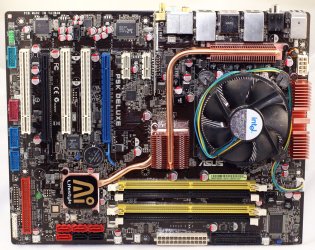
I tried to fit this knew perspective into my knowledgebase, but there is no P2Q mobo at the Asus site.

But this pic of a P5K3 put it all into perspective. I still do not find specific statement that addresses how many sticks are most efficient. It is likely a moot point. I did learn.
 

Attachments

  • p5b.jpg
    p5b.jpg
    351.9 KB · Views: 308
Back
Top