Solved Windows 7 x64 SP1, various files are either corrupt or missing

TemplarLord

New member
Local time
11:34 PM
Messages
11
OCZ Vector, various system files missing or corrupt

I've posted a solution(hopefully) here.

Hey guys I need some more help again :confused:

After successfully (hopefully more like it) beating the BSOD issue, the trouble just doesn't stop :D

I noticed sometime after deleting OptimizerPro with MBAM some strange issues with various software started happening on my PC. First and foremost was missing configuration or skin files from the chat client Trillian. One day it was all working fine, but then after shutting down the PC overnight or maybe closing the program and starting it again it would say something like missing skin file upon starting Trillian again. And sure enough after reinstalling the chat client it worked again. Until again it didn't.

I started a chkdsk on C: and it found a bunch of errors and repaired them. After that I noticed that a game from Steam I didn't play in some time, STALKER CoP, was missing a bunch of files too.

Next was XBMC, a guisettings.xml was totally corrupted and it wouldn't start the program after leaving the PC off overnight, while it worked perfectly well the day before.

All the while this was happening Trillian had the most issues, either the skin files were corrupt, or the config files or a couple of times even the skypekit.exe it uses.

I should mention that Windows worked fine even after numerous chkdsk repairs. Again I chalked it up to malware and it was again pretty bad. I don't have the exact logs anymore since I formatted the entire PC last night. I did this because System File Checker was saying that it couldn't fix Windows.

Code:
Windows Resource Protection found corrupt files but was unable to fix some of them.
Details are included in the CBS.Log windir\Logs\CBS\CBS.log. For example
C:\Windows\Logs\CBS\CBS.log
After reinstalling Windows, I downloaded the latest drivers from Gigabyte, ASUS and nVidia and fully updated Windows. I should mention that after this, SFC said everything was fine. I mentioned in my previous thread that I though OptimizerPro came from either KMPlayer or DaemonTools. I failed to predict that even the new version of Unlocker comes with adware and possible malware(NOD32 reported Somoto.A and C variants, pointing to Unlocker directories).

After uninstalling Unlocker I scanned the system with TDSSkiller, NOD32, MBAM, SpyBot(full scan and rootkit deep scan) and it seems to be clean.

What worries me, is that SFC doesn't complete successfully. Also last night before going to sleep I ran another chkdsk on C: and it did find some errors but repaired them.
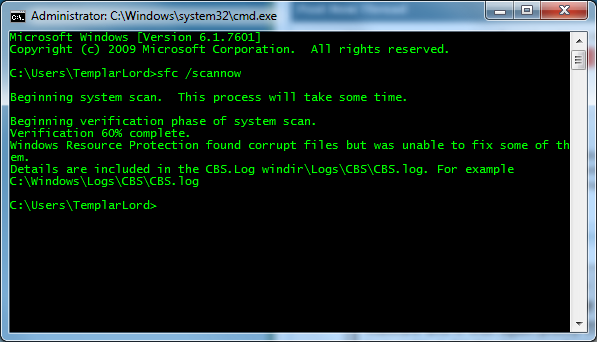
3mkeSQO.png


Here is the complete CBS.log and sfcdetails.txt. I acquired the sfcdetails.txt running the following command.

Code:
findstr /c:"[SR]" %windir%\logs\cbs\cbs.log >C:\sfcdetails.txt
The somewhat simplified sfcdetails.txt does not show any corrupt or missing files. I haven't tried doing another chkdsk today but I'm pretty sure it would find something to repair again. Also none of my software is faulty, for now, but I'm inclined to think some data corruption will occur sooner rather than later.

I again ask for your assistance, I'm pretty much at a loss what to do next.
 
Last edited:

My Computer My Computer

At a glance

Windows 7 Ultimate x64Intel Core i5 4670kCorsair Vengeance 16GB (4x4)MSI nVidia GTX 770 Gaming
Computer type
PC/Desktop
Computer Manufacturer/Model Number
Custom Rig
OS
Windows 7 Ultimate x64
CPU
Intel Core i5 4670k
Motherboard
Gigabyte Z87X-UD3H
Memory
Corsair Vengeance 16GB (4x4)
Graphics Card(s)
MSI nVidia GTX 770 Gaming
Sound Card
ASUS Xonar DGX
Monitor(s) Displays
LG W2453TQ
Screen Resolution
1920x1080
Hard Drives
Samsung 840 PRO 256GB
PSU
SeaSonic M12D 850W
Case
Thermaltake Element V Black
Cooling
Corsair H80
Keyboard
Logitech G510
Mouse
Razer Imperator
Internet Speed
10mbit
Antivirus
NOD32 Smart Security v4
Browser
Palemoon
Hi TemplarLord,

If you have a Windows 7 Installation DVD, you can follow these steps:
  1. Boot up into the DVD.
  2. Under the "Install Now" option, click "Repair My Computer".
  3. Open up the Command Prompt
  4. Run the commands you were running in Windows, and the files should be restored.

If you are having any troubles, post back.

techhead287

If you found this post useful, help me out by clicking the the little "Add to techhead287's reputation" button at the top of this post.
 

My Computer My Computer

At a glance

Windows 7 Ultimate 64-bitIntel Core i732GB RAM
Computer type
PC/Desktop
Computer Manufacturer/Model Number
Custom Build
OS
Windows 7 Ultimate 64-bit
CPU
Intel Core i7
Motherboard
ASUS
Memory
32GB RAM
Monitor(s) Displays
2
Hard Drives
1TB HDD
160GB SSD
2TB HDD
Cooling
3 Fans, water cooling
Keyboard
Microsoft
Mouse
Microsoft
Internet Speed
Around 70mbps
Antivirus
AVG Internet Security 2014
Browser
IE11, Google Chrome (default browser is Chrome)
Can any one see those files? I'm getting a string of "*******" in the link. Is Croatia blocked?

+1 for Techhead.
 

My Computer My Computer

At a glance

Windows 7 Pro-x64i7-2600 3.4GHz - 3.8GHz Turbo8Gb - 2x4GB, Muskin 991770 PC3-1333Integrated Intel HD 2000
Computer type
PC/Desktop
Computer Manufacturer/Model Number
Built 2/11/2011
OS
Windows 7 Pro-x64
CPU
i7-2600 3.4GHz - 3.8GHz Turbo
Motherboard
Intel DH67BL-B3
Memory
8Gb - 2x4GB, Muskin 991770 PC3-1333
Graphics Card(s)
Integrated Intel HD 2000
Sound Card
Integrated Intel 10.1 HD, RealTek ALC892
Monitor(s) Displays
Asus LCD VH222H, Haier HL24XSL2a
Screen Resolution
1920x1080, 1920x1080
Hard Drives
Crucial SSD C300-128Gb,
Western Digital WD5002AALX - 500Gb,
Western Digital WD7501AALS - 750Gb
PSU
Seasonic 650W 80+ Gold Modular
Case
Rosewill Defender
Cooling
Stock CPU, Four 120mm case fans, PCH fan added
Keyboard
Logitech EX100 Y-RBH94 Wireless
Mouse
Logitech EX100 M-RCE95 Wireless
Internet Speed
3.0/1.5 Mbs
Antivirus
Microsoft Security Essentials
Browser
Microsoft Internet Explorer 11
Other Info
Antec Veris Premier-Multimedia IR Station,
Cyber Accoustics-3602 Speakers,
AFT XM-5U Card Reader,
Hauppauge TV-HVR-2250,
Sony LX300 USB Turntable
Hi TemplarLord,

If you have a Windows 7 Installation DVD, you can follow these steps:
  1. Boot up into the DVD.
  2. Under the "Install Now" option, click "Repair My Computer".
  3. Open up the Command Prompt
  4. Run the commands you were running in Windows, and the files should be restored.

If you are having any troubles, post back.

techhead287

If you found this post useful, help me out by clicking the the little "Add to techhead287's reputation" button at the top of this post.

Thanks bro I'll try it out and let you know, might take a few days for the issue to replicate itself. Will post back results later.

Can any one see those files? I'm getting a string of "*******" in the link. Is Croatia blocked?

+1 for Techhead.

I think the forum doesn't like Mediafire links, if you exchange *** with mediafire you get the correct link.
 

My Computer My Computer

At a glance

Windows 7 Ultimate x64Intel Core i5 4670kCorsair Vengeance 16GB (4x4)MSI nVidia GTX 770 Gaming
Computer type
PC/Desktop
Computer Manufacturer/Model Number
Custom Rig
OS
Windows 7 Ultimate x64
CPU
Intel Core i5 4670k
Motherboard
Gigabyte Z87X-UD3H
Memory
Corsair Vengeance 16GB (4x4)
Graphics Card(s)
MSI nVidia GTX 770 Gaming
Sound Card
ASUS Xonar DGX
Monitor(s) Displays
LG W2453TQ
Screen Resolution
1920x1080
Hard Drives
Samsung 840 PRO 256GB
PSU
SeaSonic M12D 850W
Case
Thermaltake Element V Black
Cooling
Corsair H80
Keyboard
Logitech G510
Mouse
Razer Imperator
Internet Speed
10mbit
Antivirus
NOD32 Smart Security v4
Browser
Palemoon
Hi TemplarLord,

If you have a Windows 7 Installation DVD, you can follow these steps:
  1. Boot up into the DVD.
  2. Under the "Install Now" option, click "Repair My Computer".
  3. Open up the Command Prompt
  4. Run the commands you were running in Windows, and the files should be restored.

If you are having any troubles, post back.

techhead287

If you found this post useful, help me out by clicking the the little "Add to techhead287's reputation" button at the top of this post.

Hey thanks for you reply.

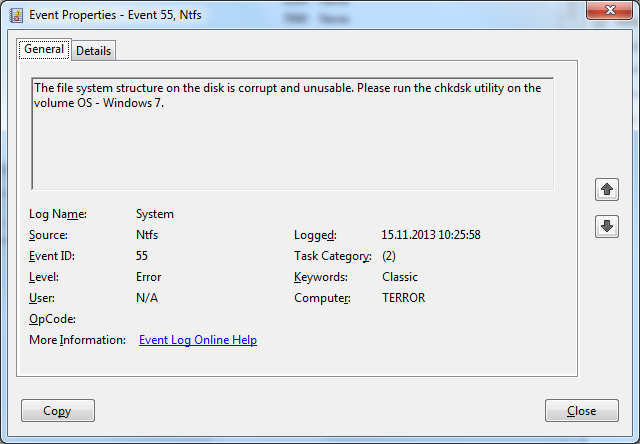
I saw yesterday in Event Viewer -> System, 4 Error events, NTFS Event ID 55, a couple of minutes apart.

HEEMdpe.png


Code:
The file system structure on the disk is corrupt and unusable. Please run the chkdsk utility on the volume OS - Windows 7.
I immediately scheduled a chkdsk on C: and restarted the PC. The chkdsk completed successfully as usual repairing quite a bunch of stuff. I let it run like that until today when I tried to run

Code:
chkdsk c:
from an elevated Windows 7 command prompt and got that the system is again corrupt. Then I tried your method by booting from my Windows 7 installation DVD, going into 'Repair your computer', starting Command prompt and executing SFC. Got the following error message.

Code:
Error: There is a system repair pending which requires a reboot to complete. Restart windows and run sfc again.
And I rebooted the PC and again booting into the DVD and executing SFC gave me again that error.

After the 2 chkdsk attempts I should mention that no data corruption occurred on any software and Windows was always able to start successfully. What should I do next?
 

My Computer My Computer

At a glance

Windows 7 Ultimate x64Intel Core i5 4670kCorsair Vengeance 16GB (4x4)MSI nVidia GTX 770 Gaming
Computer type
PC/Desktop
Computer Manufacturer/Model Number
Custom Rig
OS
Windows 7 Ultimate x64
CPU
Intel Core i5 4670k
Motherboard
Gigabyte Z87X-UD3H
Memory
Corsair Vengeance 16GB (4x4)
Graphics Card(s)
MSI nVidia GTX 770 Gaming
Sound Card
ASUS Xonar DGX
Monitor(s) Displays
LG W2453TQ
Screen Resolution
1920x1080
Hard Drives
Samsung 840 PRO 256GB
PSU
SeaSonic M12D 850W
Case
Thermaltake Element V Black
Cooling
Corsair H80
Keyboard
Logitech G510
Mouse
Razer Imperator
Internet Speed
10mbit
Antivirus
NOD32 Smart Security v4
Browser
Palemoon
Is the HDD old? Sometimes this factor can bring up false positives in chkdsk.
 

My Computer My Computer

At a glance

Windows 7 Ultimate 64-bitIntel Core i732GB RAM
Computer type
PC/Desktop
Computer Manufacturer/Model Number
Custom Build
OS
Windows 7 Ultimate 64-bit
CPU
Intel Core i7
Motherboard
ASUS
Memory
32GB RAM
Monitor(s) Displays
2
Hard Drives
1TB HDD
160GB SSD
2TB HDD
Cooling
3 Fans, water cooling
Keyboard
Microsoft
Mouse
Microsoft
Internet Speed
Around 70mbps
Antivirus
AVG Internet Security 2014
Browser
IE11, Google Chrome (default browser is Chrome)
Is the HDD old? Sometimes this factor can bring up false positives in chkdsk.

I bought the SSD about half a year ago so it's almost brand new. It's an OCZ Vector 256GB. CrystalDiskInfo says the drive is at 98% health.

EDIT: Today I tried to run VLC and it said a .dll file was corrupt.

Code:
Application popup: vlc.exe - Bad Image : C:\Program Files (x86)\VideoLAN\VLC\libvlccore.dll is either not designed to run on Windows or it contains an error. Try installing the program again using the original installation media or contact your system administrator or the software vendor for support.

I reinstalled VLC and it was working okay (without deleting preferences and cache). Afterwards I ran another chkdsk on C: and it again found a couple of files to fix and it repaired them.
 
Last edited:

My Computer My Computer

At a glance

Windows 7 Ultimate x64Intel Core i5 4670kCorsair Vengeance 16GB (4x4)MSI nVidia GTX 770 Gaming
Computer type
PC/Desktop
Computer Manufacturer/Model Number
Custom Rig
OS
Windows 7 Ultimate x64
CPU
Intel Core i5 4670k
Motherboard
Gigabyte Z87X-UD3H
Memory
Corsair Vengeance 16GB (4x4)
Graphics Card(s)
MSI nVidia GTX 770 Gaming
Sound Card
ASUS Xonar DGX
Monitor(s) Displays
LG W2453TQ
Screen Resolution
1920x1080
Hard Drives
Samsung 840 PRO 256GB
PSU
SeaSonic M12D 850W
Case
Thermaltake Element V Black
Cooling
Corsair H80
Keyboard
Logitech G510
Mouse
Razer Imperator
Internet Speed
10mbit
Antivirus
NOD32 Smart Security v4
Browser
Palemoon
If chkdsk repaired the files, is the computer working OK now?
 

My Computer My Computer

At a glance

Windows 7 Ultimate 64-bitIntel Core i732GB RAM
Computer type
PC/Desktop
Computer Manufacturer/Model Number
Custom Build
OS
Windows 7 Ultimate 64-bit
CPU
Intel Core i7
Motherboard
ASUS
Memory
32GB RAM
Monitor(s) Displays
2
Hard Drives
1TB HDD
160GB SSD
2TB HDD
Cooling
3 Fans, water cooling
Keyboard
Microsoft
Mouse
Microsoft
Internet Speed
Around 70mbps
Antivirus
AVG Internet Security 2014
Browser
IE11, Google Chrome (default browser is Chrome)

My Computer My Computer

At a glance

Win 7 x64 Home Premium (and x86 VirtualBox VM...i3 370M/i7 6500U8GB - finally :)/8GBit's an i3, dude!/dual Intel&nVidia
Computer type
Laptop
Computer Manufacturer/Model Number
Asus K52F or Lenovo B51-80
OS
Win 7 x64 Home Premium (and x86 VirtualBox VM)/Win10
CPU
i3 370M/i7 6500U
Motherboard
Asus/Lenovo
Memory
8GB - finally :)/8GB
Graphics Card(s)
it's an i3, dude!/dual Intel&nVidia
Sound Card
onboard
Monitor(s) Displays
15.6" built-in
Screen Resolution
1366x768/1920x1080
Hard Drives
750GB Seagate internal
Sundry external drives attached to other computers on the local network
1TB SSD on the Lenovo
PSU
n/a
Internet Speed
as much as I can get - usually on a dongle/phone, so <1MB/s
Antivirus
MSE/Defender
Browser
IE11/12/Edge/Chrome/FF(if I must)
If chkdsk repaired the files, is the computer working OK now?

After turning on the PC today and running a read-only chkdsk it again said that there were files it couldn't repair.

Please follow the Windows Update Posting Instructions and post the requested data - it'll give us real data to work with and allow us to repair the file errors.

1. System Update Readiness Tool (SURT)

Downloaded the Win7x64 file(435MB), ran it and it only asked to install a hotfix for Windows (KB947821). Took some time(less than 10 minutes) and said Installation complete.

2. SFC Scan

SFC was able to reach 100% this time. Before it only managed to get to 60%, then later to 59 before ending abruptly. Unfortunately still says it found corrupt files and is unable to repair them; like before.

3. Windows update error codes

No error codes, before or after.

4. Log files

I tried to attach them with the post, but the .zip file limit is 8MB and my zip was 10.9MB. I uploaded the files to Dropbox this time, also included the latest sfcdetails.txt.

CBS.zip
sfcdetails.txt

Warning, I wasn't able to copy CBS.log as it was in use by some other process. I was able to copy everything from the log file and copy it to another text document.

Also, I noticed that the data corruption occurs after leaving the PC shut down overnight. For example, yesterday I ran chkdsk c: in the morning and when I got into Windows, running chkdsk c: in CMD said there were no errors. I also ran the command in the evening before shutting down the PC and still it said no errors. But after turning it on today, after running the command it said it found some errors and needs to fix them.
 

My Computer My Computer

At a glance

Windows 7 Ultimate x64Intel Core i5 4670kCorsair Vengeance 16GB (4x4)MSI nVidia GTX 770 Gaming
Computer type
PC/Desktop
Computer Manufacturer/Model Number
Custom Rig
OS
Windows 7 Ultimate x64
CPU
Intel Core i5 4670k
Motherboard
Gigabyte Z87X-UD3H
Memory
Corsair Vengeance 16GB (4x4)
Graphics Card(s)
MSI nVidia GTX 770 Gaming
Sound Card
ASUS Xonar DGX
Monitor(s) Displays
LG W2453TQ
Screen Resolution
1920x1080
Hard Drives
Samsung 840 PRO 256GB
PSU
SeaSonic M12D 850W
Case
Thermaltake Element V Black
Cooling
Corsair H80
Keyboard
Logitech G510
Mouse
Razer Imperator
Internet Speed
10mbit
Antivirus
NOD32 Smart Security v4
Browser
Palemoon
CheckSUR found these problems...
Code:
Checking Component Store
(f) CSI Payload File Missing 0x00000000 TsUsbHubFilter.inf amd64_tsusbhubfilter.inf_31bf3856ad364e35_7.1.7601.16398_none_68892afee5e71e34 
(f) CSI Payload File Missing 0x00000000 TsUsbGD.sys amd64_tsgenericusbdriver.inf_31bf3856ad364e35_7.1.7601.16398_none_8990d94eb5ecd1da 
(f) CSI Payload File Missing 0x00000000 TSGenericUSBDriver.inf amd64_tsgenericusbdriver.inf_31bf3856ad364e35_7.1.7601.16398_none_8990d94eb5ecd1da

...and was unable to fix them

SFC found them also...
Code:
 2013-11-18 18:35:24, Info                  CSI    0000090c [SR] Repairing 2 components
 Line 19348: 2013-11-18 18:35:24, Info                  CSI    0000090d [SR] Beginning Verify and Repair transaction
 Line 19349: 2013-11-18 18:35:24, Info                  CSI    0000090e [SR] Cannot repair member file [l:22{11}]"TsUsbGD.sys" of tsgenericusbdriver.inf, Version = 7.1.7601.16398, pA = PROCESSOR_ARCHITECTURE_AMD64 (9), Culture neutral, VersionScope = 1 nonSxS, PublicKeyToken = {l:8 b:31bf3856ad364e35}, Type = [l:24{12}]"driverUpdate", TypeName neutral, PublicKey neutral in the store, file is missing
 Line 19350: 2013-11-18 18:35:24, Info                  CSI    0000090f [SR] Cannot repair member file [l:44{22}]"TSGenericUSBDriver.inf" of tsgenericusbdriver.inf, Version = 7.1.7601.16398, pA = PROCESSOR_ARCHITECTURE_AMD64 (9), Culture neutral, VersionScope = 1 nonSxS, PublicKeyToken = {l:8 b:31bf3856ad364e35}, Type = [l:24{12}]"driverUpdate", TypeName neutral, PublicKey neutral in the store, file is missing
 Line 19351: 2013-11-18 18:35:24, Info                  CSI    00000910 [SR] Cannot repair member file [l:36{18}]"TsUsbHubFilter.inf" of tsusbhubfilter.inf, Version = 7.1.7601.16398, pA = PROCESSOR_ARCHITECTURE_AMD64 (9), Culture neutral, VersionScope = 1 nonSxS, PublicKeyToken = {l:8 b:31bf3856ad364e35}, Type = [l:24{12}]"driverUpdate", TypeName neutral, PublicKey neutral in the store, file is missing
...and was also unable to fix them.

I'll post a fix protocol later, when I'm not at work ;)
 

My Computer My Computer

At a glance

Win 7 x64 Home Premium (and x86 VirtualBox VM...i3 370M/i7 6500U8GB - finally :)/8GBit's an i3, dude!/dual Intel&nVidia
Computer type
Laptop
Computer Manufacturer/Model Number
Asus K52F or Lenovo B51-80
OS
Win 7 x64 Home Premium (and x86 VirtualBox VM)/Win10
CPU
i3 370M/i7 6500U
Motherboard
Asus/Lenovo
Memory
8GB - finally :)/8GB
Graphics Card(s)
it's an i3, dude!/dual Intel&nVidia
Sound Card
onboard
Monitor(s) Displays
15.6" built-in
Screen Resolution
1366x768/1920x1080
Hard Drives
750GB Seagate internal
Sundry external drives attached to other computers on the local network
1TB SSD on the Lenovo
PSU
n/a
Internet Speed
as much as I can get - usually on a dongle/phone, so <1MB/s
Antivirus
MSE/Defender
Browser
IE11/12/Edge/Chrome/FF(if I must)
I've uploaded a file - tldaa.zip - to my SkyDrive at Noel's SkyDrive
Please download and save it.

Right-click on the saved file and select Extract all...
Change the target to C:\ and click on Extract
Close all windows (it would be a good idea to print these instructions!)
Now reboot to the Repair Environment - as soon as the machine restarts, start tapping F8 - this should bring up the Advanced Boot Menu, at the top of which should be the option 'Repair my Computer'
Pick that
You'll have to log in with your username and password.

Pick the option to use a Command Prompt
At the prompt type
DIR C:\tldaa
hit the enter key - if you get a 'Not Found' error try
DIR D:\tldaa
or
DIR E:\tldaa


The drive letter in use when you find the folder will need to be substituted (for<drive>) into the following command...

XCOPY <drive>:\tldaa <drive>:\windows\winsxs /y /i /s /v /h

(e.g. XCOPY P:\wfire P:\windows\winsxs /y /i /s /v /h )

run the command (it should take almost no time)and when the prompt returns, type
EXIT
and hit the Enter key to exit Command Prompt - reboot to Normal Mode Windows.

Now run SFC /SCANNOW in an Elevated Command Prompt
then reboot and upload the new CBS.log file to your reply


My Computer My Computer

At a glance

Win 7 x64 Home Premium (and x86 VirtualBox VM...i3 370M/i7 6500U8GB - finally :)/8GBit's an i3, dude!/dual Intel&nVidia
Computer type
Laptop
Computer Manufacturer/Model Number
Asus K52F or Lenovo B51-80
OS
Win 7 x64 Home Premium (and x86 VirtualBox VM)/Win10
CPU
i3 370M/i7 6500U
Motherboard
Asus/Lenovo
Memory
8GB - finally :)/8GB
Graphics Card(s)
it's an i3, dude!/dual Intel&nVidia
Sound Card
onboard
Monitor(s) Displays
15.6" built-in
Screen Resolution
1366x768/1920x1080
Hard Drives
750GB Seagate internal
Sundry external drives attached to other computers on the local network
1TB SSD on the Lenovo
PSU
n/a
Internet Speed
as much as I can get - usually on a dongle/phone, so <1MB/s
Antivirus
MSE/Defender
Browser
IE11/12/Edge/Chrome/FF(if I must)
@NoelDP

Thanks for your input bro, but I didn't have a chance to try it out. 3 weeks ago after my last post here I've been going to various manufacturer forums of my hardware and have found out that, ultimately I hope, the problem was the SSD.

You see, with an OCZ Vector SSD it isn't enough, and it's downright catastrophical, to just format it in Win7 setup. If you do it this way, as I did when I got a new MBO/CPU, you'll get all sorts of filesystem errors. There's plenty of evidence of this in my posts.

What you have to do is 'Secure Erase' it using OCZ bootable tools, after this you can install Win7 and hopefully there will be no issues.

I've been running this Windows 7 copy for about 3 weeks now, with no file degradation and chkdsk and SFC all report that everything's nice and tidy. Before, it wouldn't go 4 days without something going bad. I still pray that it's going to be OK now (knocks on wood), and I still always monitor the screen to see if CHKDSK will start running or not when booting Windows. :mad:

Now I want to elaborate, this SSD was always working great with my old system configuration, I never had 1 issue with it before this. Then again it doesn't exactly inspire confidence in the brand, and even more so with this news that they've gone bankrupt and have been bought by Toshiba, who might or might not honor existing warranties(I still have about 4 years and 7 months on it). If they won't, and if the drive ever breaks for good, I'll have a $350 paperweight(and it won't even be good for that as it's so light :D ).

So, the procedure I used(this procedure is for OCZ Vector, it might or might not work with other OCZ drives and it definitely won't work for any other):
ADDENDUM -- OCZ also provides pretty good all-in-1 instructions here

1. Get OCZ bootable tools from here.
2. Either burn it to a CD or create a bootable USB with Universal USB Installer (OCZ instructions)
3. Boot from CD/USB and enter the Toolbox. I've personally had this fail multiple times when booting from USB on Z87 chipset, to counter this turn XHCI off in UEFI/BIOS.
4. When you're in, Secure Erase it. Do it 2-3 times just to burn him goooood. :devil: (OCZ instructions)
5. Hope for the best, expect the worst.

Thanks goes to techhead287, carwiz and NoelDP for all the help, you guys are real bros.

Also, I have a couple of Event Viewer errors that I'd appreciate some help with, should I just post them here or create a new thread?
 

My Computer My Computer

At a glance

Windows 7 Ultimate x64Intel Core i5 4670kCorsair Vengeance 16GB (4x4)MSI nVidia GTX 770 Gaming
Computer type
PC/Desktop
Computer Manufacturer/Model Number
Custom Rig
OS
Windows 7 Ultimate x64
CPU
Intel Core i5 4670k
Motherboard
Gigabyte Z87X-UD3H
Memory
Corsair Vengeance 16GB (4x4)
Graphics Card(s)
MSI nVidia GTX 770 Gaming
Sound Card
ASUS Xonar DGX
Monitor(s) Displays
LG W2453TQ
Screen Resolution
1920x1080
Hard Drives
Samsung 840 PRO 256GB
PSU
SeaSonic M12D 850W
Case
Thermaltake Element V Black
Cooling
Corsair H80
Keyboard
Logitech G510
Mouse
Razer Imperator
Internet Speed
10mbit
Antivirus
NOD32 Smart Security v4
Browser
Palemoon
Probably best to start a new thread in a more appropriate section of the forum for your Event errors.

Glad you managed to get it sorted - it does seem as if OCZ drives have more than their fair share of problems, to me (just lucky I can't afford an SSD, I guess! - quite apart from them not making 750GB ones, yet :) )

Good luck with it!
 

My Computer My Computer

At a glance

Win 7 x64 Home Premium (and x86 VirtualBox VM...i3 370M/i7 6500U8GB - finally :)/8GBit's an i3, dude!/dual Intel&nVidia
Computer type
Laptop
Computer Manufacturer/Model Number
Asus K52F or Lenovo B51-80
OS
Win 7 x64 Home Premium (and x86 VirtualBox VM)/Win10
CPU
i3 370M/i7 6500U
Motherboard
Asus/Lenovo
Memory
8GB - finally :)/8GB
Graphics Card(s)
it's an i3, dude!/dual Intel&nVidia
Sound Card
onboard
Monitor(s) Displays
15.6" built-in
Screen Resolution
1366x768/1920x1080
Hard Drives
750GB Seagate internal
Sundry external drives attached to other computers on the local network
1TB SSD on the Lenovo
PSU
n/a
Internet Speed
as much as I can get - usually on a dongle/phone, so <1MB/s
Antivirus
MSE/Defender
Browser
IE11/12/Edge/Chrome/FF(if I must)
guys!

I also has OCZ Vector and my system files also corrupt sometimes.

OCZ released new firmware for OCZ Vector in july and they promised: "Improved robustness of unexpected power loss handling"! I want to install new firmware but all data will be lost :( Hope it is will be helpful
 

My Computer My Computer

At a glance

Windows 8.1 Pro x64
Computer type
PC/Desktop
OS
Windows 8.1 Pro x64
If you've already experienced data corruption, in my experience it was irreversible and a complete OS re-format was necessary.
 

My Computer My Computer

At a glance

Windows 7 Ultimate x64Intel Core i5 4670kCorsair Vengeance 16GB (4x4)MSI nVidia GTX 770 Gaming
Computer type
PC/Desktop
Computer Manufacturer/Model Number
Custom Rig
OS
Windows 7 Ultimate x64
CPU
Intel Core i5 4670k
Motherboard
Gigabyte Z87X-UD3H
Memory
Corsair Vengeance 16GB (4x4)
Graphics Card(s)
MSI nVidia GTX 770 Gaming
Sound Card
ASUS Xonar DGX
Monitor(s) Displays
LG W2453TQ
Screen Resolution
1920x1080
Hard Drives
Samsung 840 PRO 256GB
PSU
SeaSonic M12D 850W
Case
Thermaltake Element V Black
Cooling
Corsair H80
Keyboard
Logitech G510
Mouse
Razer Imperator
Internet Speed
10mbit
Antivirus
NOD32 Smart Security v4
Browser
Palemoon
I reinstalled OS twice with full formatting and it didn't help me. Today I updated the firmware of the drive. Let's see how it will work.
 

My Computer My Computer

At a glance

Windows 8.1 Pro x64
Computer type
PC/Desktop
OS
Windows 8.1 Pro x64
In that case it's likely a hardware problem - check your RAM as well as the HD/SSD.
 

My Computer My Computer

At a glance

Win 7 x64 Home Premium (and x86 VirtualBox VM...i3 370M/i7 6500U8GB - finally :)/8GBit's an i3, dude!/dual Intel&nVidia
Computer type
Laptop
Computer Manufacturer/Model Number
Asus K52F or Lenovo B51-80
OS
Win 7 x64 Home Premium (and x86 VirtualBox VM)/Win10
CPU
i3 370M/i7 6500U
Motherboard
Asus/Lenovo
Memory
8GB - finally :)/8GB
Graphics Card(s)
it's an i3, dude!/dual Intel&nVidia
Sound Card
onboard
Monitor(s) Displays
15.6" built-in
Screen Resolution
1366x768/1920x1080
Hard Drives
750GB Seagate internal
Sundry external drives attached to other computers on the local network
1TB SSD on the Lenovo
PSU
n/a
Internet Speed
as much as I can get - usually on a dongle/phone, so <1MB/s
Antivirus
MSE/Defender
Browser
IE11/12/Edge/Chrome/FF(if I must)
Back
Top