Problem with DNS errors with laptop's wifi and unstable connection

wws

New member
Local time
11:06 PM
Messages
20
Hello.

First time poster here, thanks for having this great forum!

Anyway my problem is, since Friday of last week, I have been having connection problems with my laptop. The wifi card will not hold a connection to the router and shows the yellow triangle constantly. In the Event Viewer there are errors saying "Name resolution for website x timed out after none of the configured DNS servers responded." The laptop will also not respond to local pings from other computers on the network.

Few of the things I have tried to fix this.
1. Did a complete virus scan with avast 2014. Nothing was found.
2. Tried flushing the DNS cache, along with releasing and renewing my IP address.
3. Reset the TCP/IP stack.
4. Disabled all network adapters except my wifi card, including the "Microsoft Virtual Wifi Miniport Adapter"

If someone could help, that would be great, because i really need my network connection back ASAP. (Finals and such soon!)

Thanks,
wws
 

My Computer My Computer

Computer type
PC/Desktop
OS
Windows 7 64 bit
Hello.

First time poster here, thanks for having this great forum!

Anyway my problem is, since Friday of last week, I have been having connection problems with my laptop. The wifi card will not hold a connection to the router and shows the yellow triangle constantly. In the Event Viewer there are errors saying "Name resolution for website x timed out after none of the configured DNS servers responded." The laptop will also not respond to local pings from other computers on the network.

Few of the things I have tried to fix this.
1. Did a complete virus scan with avast 2014. Nothing was found.
2. Tried flushing the DNS cache, along with releasing and renewing my IP address.
3. Reset the TCP/IP stack.
4. Disabled all network adapters except my wifi card, including the "Microsoft Virtual Wifi Miniport Adapter"

If someone could help, that would be great, because i really need my network connection back ASAP. (Finals and such soon!)

Thanks,
wws

Well you actually did most of things that I would have done.

I should ask have you tried resetting the router?

Can you post a screen shot of the ipconfig/all from this machine? :)
 

My Computer My Computer

Computer type
PC/Desktop
Computer Manufacturer/Model Number
Home built
OS
Windows 7 Ult, Windows 8.1 Pro,
CPU
Q9650-4.275GHz, E8600 4.5GHz, E6750-3.8GHz
Motherboard
Evga 780i FTW
Memory
G.Skill PC2 9600 1200Mhz 5 5 5 15 2T
Graphics Card(s)
GTX480
Sound Card
Asus Xonar D2
Monitor(s) Displays
HannsG
Screen Resolution
1680X1050
Hard Drives
GSkill Phoenix Pro 120GB SSD
PSU
ThermalTake Toughpower 1000Watt modular
Case
ThermalTake XaserV
Cooling
Xigmatek S1283
Keyboard
Logitech G15
Mouse
Logitech G9
Internet Speed
T1
  • Like
Reactions: wws
Hello.

First time poster here, thanks for having this great forum!

Anyway my problem is, since Friday of last week, I have been having connection problems with my laptop. The wifi card will not hold a connection to the router and shows the yellow triangle constantly. In the Event Viewer there are errors saying "Name resolution for website x timed out after none of the configured DNS servers responded." The laptop will also not respond to local pings from other computers on the network.

Few of the things I have tried to fix this.
1. Did a complete virus scan with avast 2014. Nothing was found.
2. Tried flushing the DNS cache, along with releasing and renewing my IP address.
3. Reset the TCP/IP stack.
4. Disabled all network adapters except my wifi card, including the "Microsoft Virtual Wifi Miniport Adapter"

If someone could help, that would be great, because i really need my network connection back ASAP. (Finals and such soon!)

Thanks,
wws

Well you actually did most of things that I would have done.

I should ask have you tried resetting the router?

Can you post a screen shot of the ipconfig/all from this machine? :)

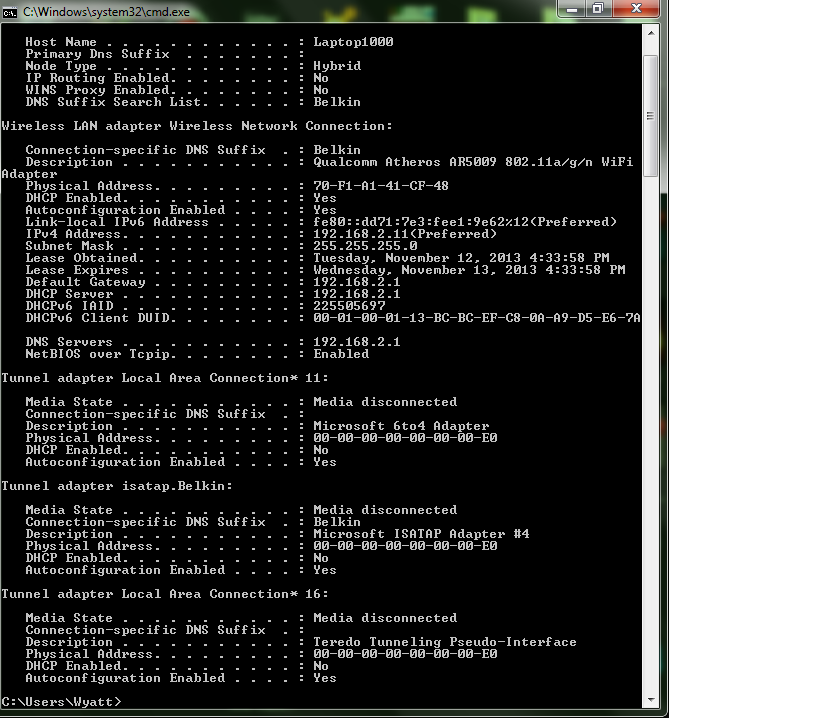
Hey, thanks for the quick response. Yes I have tried restarting the router several times. I should have mentioned that my laptop is the only one experiencing these connectivity issues; all other devices on the network haven't been affected. Here is a screenshot of the ipconfig /all as you requested.

8t87OUN.png
 

My Computer My Computer

Computer type
PC/Desktop
OS
Windows 7 64 bit
This looks good.

Have you tried disabling Avast or working with the firewall settings in Avast for wireless connections, there may be a ndis type filter turn on.

This could also be a channel crossover problem with the intermittent connection.

In order check for this problem please install the inSSIDer software which is very small and can show us a picture of the wireless landscape in your area. Posting a screen shot of inSSIDer would be very helpful.

http://www.metageek.net/products/inssider/
 

My Computer My Computer

Computer type
PC/Desktop
Computer Manufacturer/Model Number
Home built
OS
Windows 7 Ult, Windows 8.1 Pro,
CPU
Q9650-4.275GHz, E8600 4.5GHz, E6750-3.8GHz
Motherboard
Evga 780i FTW
Memory
G.Skill PC2 9600 1200Mhz 5 5 5 15 2T
Graphics Card(s)
GTX480
Sound Card
Asus Xonar D2
Monitor(s) Displays
HannsG
Screen Resolution
1680X1050
Hard Drives
GSkill Phoenix Pro 120GB SSD
PSU
ThermalTake Toughpower 1000Watt modular
Case
ThermalTake XaserV
Cooling
Xigmatek S1283
Keyboard
Logitech G15
Mouse
Logitech G9
Internet Speed
T1
This looks good.

Have you tried disabling Avast or working with the firewall settings in Avast for wireless connections, there may be a ndis type filter turn on.

This could also be a channel crossover problem with the intermittent connection.

In order check for this problem please install the inSSIDer software which is very small and can show us a picture of the wireless landscape in your area. Posting a screen shot of inSSIDer would be very helpful.

inSSIDer for Home ? Discover The Wi-Fi Around You | MetaGeek

I will install that. However, I have a desktop compuer right next to my laptop, and it connects to my network just fine. (It's what I am using to type this) Right now Windows says there are five other networks near my laptop, one being "Other Network". Don't know if that is odd or not. I have tried disabling avast's File System Shield, Web Shield, and Mail Shield, but that did not make any difference. I have the free version of avast, so I don't believe it includes a firewall.

It's displayed the yellow triangle steadily for the past few hours now :(

Thanks,
wws
 

My Computer My Computer

Computer type
PC/Desktop
OS
Windows 7 64 bit
This looks good.

Have you tried disabling Avast or working with the firewall settings in Avast for wireless connections, there may be a ndis type filter turn on.

This could also be a channel crossover problem with the intermittent connection.

In order check for this problem please install the inSSIDer software which is very small and can show us a picture of the wireless landscape in your area. Posting a screen shot of inSSIDer would be very helpful.

inSSIDer for Home ? Discover The Wi-Fi Around You | MetaGeek

I will install that. However, I have a desktop compuer right next to my laptop, and it connects to my network just fine. (It's what I am using to type this) Right now Windows says there are five other networks near my laptop, one being "Other Network". Don't know if that is odd or not. I have tried disabling avast's File System Shield, Web Shield, and Mail Shield, but that did not make any difference. I have the free version of avast, so I don't believe it includes a firewall.

It's displayed the yellow triangle steadily for the past few hours now :(

Thanks,
wws

inSSIDer shows me quite a bit more information that just signal strength so should be helpful.

Just to fix any problems with the network stack, try running the IPReset file in the link, this will fix any problems related to the network stack and flush the DNS then will reboot the machine. I realize you tried this but this file may work better than just one at a time commands. :)
 

Attachments

My Computer My Computer

Computer type
PC/Desktop
Computer Manufacturer/Model Number
Home built
OS
Windows 7 Ult, Windows 8.1 Pro,
CPU
Q9650-4.275GHz, E8600 4.5GHz, E6750-3.8GHz
Motherboard
Evga 780i FTW
Memory
G.Skill PC2 9600 1200Mhz 5 5 5 15 2T
Graphics Card(s)
GTX480
Sound Card
Asus Xonar D2
Monitor(s) Displays
HannsG
Screen Resolution
1680X1050
Hard Drives
GSkill Phoenix Pro 120GB SSD
PSU
ThermalTake Toughpower 1000Watt modular
Case
ThermalTake XaserV
Cooling
Xigmatek S1283
Keyboard
Logitech G15
Mouse
Logitech G9
Internet Speed
T1
This looks good.

Have you tried disabling Avast or working with the firewall settings in Avast for wireless connections, there may be a ndis type filter turn on.

This could also be a channel crossover problem with the intermittent connection.

In order check for this problem please install the inSSIDer software which is very small and can show us a picture of the wireless landscape in your area. Posting a screen shot of inSSIDer would be very helpful.

inSSIDer for Home ? Discover The Wi-Fi Around You | MetaGeek

I will install that. However, I have a desktop compuer right next to my laptop, and it connects to my network just fine. (It's what I am using to type this) Right now Windows says there are five other networks near my laptop, one being "Other Network". Don't know if that is odd or not. I have tried disabling avast's File System Shield, Web Shield, and Mail Shield, but that did not make any difference. I have the free version of avast, so I don't believe it includes a firewall.

It's displayed the yellow triangle steadily for the past few hours now :(

Thanks,
wws

inSSIDer shows me quite a bit more information that just signal strength so should be helpful.

Just to fix any problems with the network stack, try running the IPReset file in the link, this will fix any problems related to the network stack and flush the DNS then will reboot the machine. I realize you tried this but this file may work better than just one at a time commands. :)

I downloaded inSSIDer for Home off their website and ran your file. I did not run it as administrator, should I have? It seems to have not fixed the issue unfortunately :devil:
 

My Computer My Computer

Computer type
PC/Desktop
OS
Windows 7 64 bit
I will install that. However, I have a desktop compuer right next to my laptop, and it connects to my network just fine. (It's what I am using to type this) Right now Windows says there are five other networks near my laptop, one being "Other Network". Don't know if that is odd or not. I have tried disabling avast's File System Shield, Web Shield, and Mail Shield, but that did not make any difference. I have the free version of avast, so I don't believe it includes a firewall.

It's displayed the yellow triangle steadily for the past few hours now :(

Thanks,
wws

inSSIDer shows me quite a bit more information that just signal strength so should be helpful.

Just to fix any problems with the network stack, try running the IPReset file in the link, this will fix any problems related to the network stack and flush the DNS then will reboot the machine. I realize you tried this but this file may work better than just one at a time commands. :)

I downloaded inSSIDer for Home off their website and ran your file. I did not run it as administrator, should I have? It seems to have not fixed the issue unfortunately :devil:

Very good.

If you can post the inSSIDer page then run a simple system file scan it may tell us more.

Run the following command in an elevated command prompt, might take a little while to check the system files. Let me know what the scan says.

Code:
sfc /scannow
 

My Computer My Computer

Computer type
PC/Desktop
Computer Manufacturer/Model Number
Home built
OS
Windows 7 Ult, Windows 8.1 Pro,
CPU
Q9650-4.275GHz, E8600 4.5GHz, E6750-3.8GHz
Motherboard
Evga 780i FTW
Memory
G.Skill PC2 9600 1200Mhz 5 5 5 15 2T
Graphics Card(s)
GTX480
Sound Card
Asus Xonar D2
Monitor(s) Displays
HannsG
Screen Resolution
1680X1050
Hard Drives
GSkill Phoenix Pro 120GB SSD
PSU
ThermalTake Toughpower 1000Watt modular
Case
ThermalTake XaserV
Cooling
Xigmatek S1283
Keyboard
Logitech G15
Mouse
Logitech G9
Internet Speed
T1
inSSIDer shows me quite a bit more information that just signal strength so should be helpful.

Just to fix any problems with the network stack, try running the IPReset file in the link, this will fix any problems related to the network stack and flush the DNS then will reboot the machine. I realize you tried this but this file may work better than just one at a time commands. :)

I downloaded inSSIDer for Home off their website and ran your file. I did not run it as administrator, should I have? It seems to have not fixed the issue unfortunately :devil:

Very good.

If you can post the inSSIDer page then run a simple system file scan it may tell us more.

Run the following command in an elevated command prompt, might take a little while to check the system files. Let me know what the scan says.

Code:
sfc /scannow

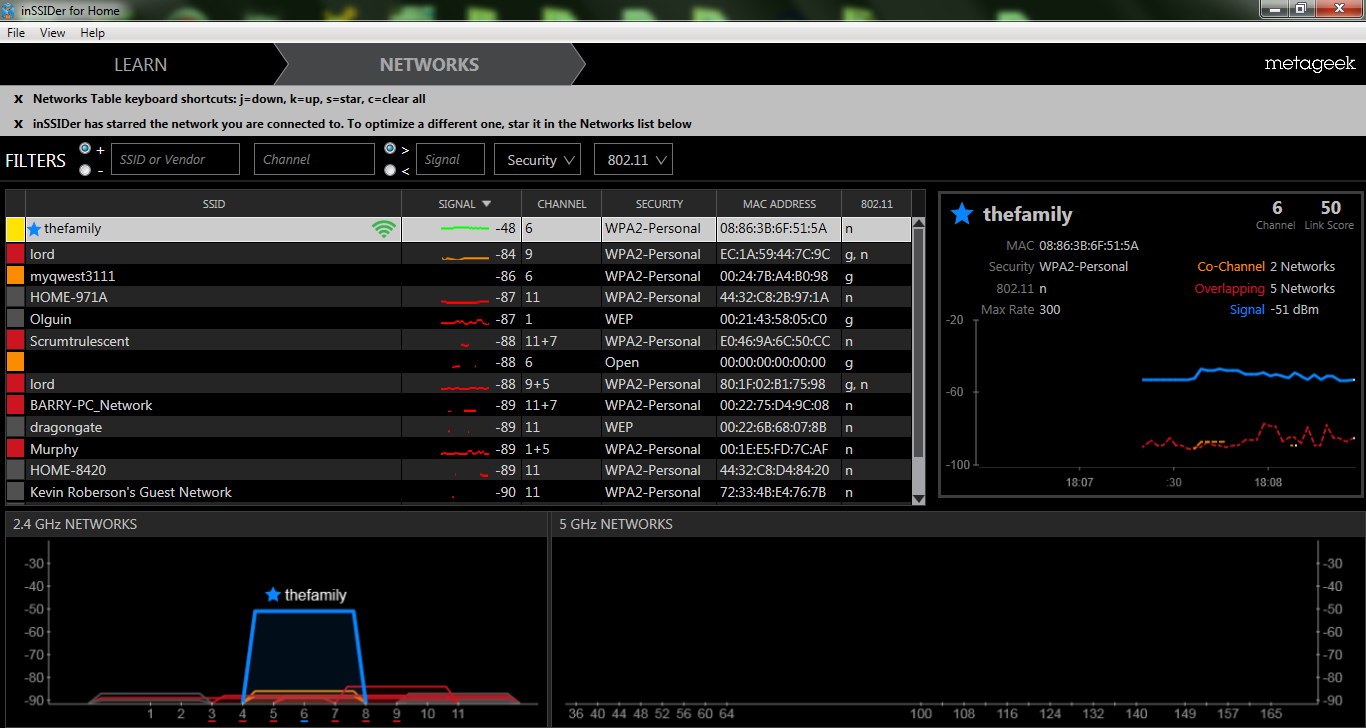
Here's the inSSIDer report. The "thefamily" network is my network. The sfc /scannow command came back with no problems.

1ecyu4T.png
 

My Computer My Computer

Computer type
PC/Desktop
OS
Windows 7 64 bit
I downloaded inSSIDer for Home off their website and ran your file. I did not run it as administrator, should I have? It seems to have not fixed the issue unfortunately :devil:

Very good.

If you can post the inSSIDer page then run a simple system file scan it may tell us more.

Run the following command in an elevated command prompt, might take a little while to check the system files. Let me know what the scan says.

Code:
sfc /scannow

Here's the inSSIDer report. The "thefamily" network is my network. The sfc /scannow command came back with no problems.

1ecyu4T.png

I'm really not seeing any problems here and the neighbors all have weak signals so overlap isn't a problem although changing the router to channel 1 may help.

Updating the drivers from the manufacture's site or visiting the Windows Update Center might be worth while.

Besides that Avast may create problems with network connections but it's hard to nail down the cause without uninstalling.

Starting in safe mode with networking may help nail down the problem to something installed on the system.

http://www.sevenforums.com/tutorials/69585-safe-mode.html
 

My Computer My Computer

Computer type
PC/Desktop
Computer Manufacturer/Model Number
Home built
OS
Windows 7 Ult, Windows 8.1 Pro,
CPU
Q9650-4.275GHz, E8600 4.5GHz, E6750-3.8GHz
Motherboard
Evga 780i FTW
Memory
G.Skill PC2 9600 1200Mhz 5 5 5 15 2T
Graphics Card(s)
GTX480
Sound Card
Asus Xonar D2
Monitor(s) Displays
HannsG
Screen Resolution
1680X1050
Hard Drives
GSkill Phoenix Pro 120GB SSD
PSU
ThermalTake Toughpower 1000Watt modular
Case
ThermalTake XaserV
Cooling
Xigmatek S1283
Keyboard
Logitech G15
Mouse
Logitech G9
Internet Speed
T1
Very good.

If you can post the inSSIDer page then run a simple system file scan it may tell us more.

Run the following command in an elevated command prompt, might take a little while to check the system files. Let me know what the scan says.

Code:
sfc /scannow

Here's the inSSIDer report. The "thefamily" network is my network. The sfc /scannow command came back with no problems.

1ecyu4T.png

I'm really not seeing any problems here and the neighbors all have weak signals so overlap isn't a problem although changing the router to channel 1 may help.

Updating the drivers from the manufacture's site or visiting the Windows Update Center might be helpful.

Besides that Avast may create problems with network connections but it's hard to nail down the cause without uninstalling.

Starting in safe mode with networking may help nail down the problem to something installed on the system.

http://www.sevenforums.com/tutorials/69585-safe-mode.html

I had the same idea with starting in safe mode so I did and the problem still exists there. I also have the latest unofficial drivers that have worked fine on all my other computers. I may be in the market for a repair or new laptop soon :/
 

My Computer My Computer

Computer type
PC/Desktop
OS
Windows 7 64 bit
Here's the inSSIDer report. The "thefamily" network is my network. The sfc /scannow command came back with no problems.

1ecyu4T.png

I'm really not seeing any problems here and the neighbors all have weak signals so overlap isn't a problem although changing the router to channel 1 may help.

Updating the drivers from the manufacture's site or visiting the Windows Update Center might be helpful.

Besides that Avast may create problems with network connections but it's hard to nail down the cause without uninstalling.

Starting in safe mode with networking may help nail down the problem to something installed on the system.

http://www.sevenforums.com/tutorials/69585-safe-mode.html

I had the same idea with starting in safe mode so I did and the problem still exists there. I also have the latest unofficial drivers that have worked fine on all my other computers. I may be in the market for a repair or new laptop soon :/

Or just purchase a USB dongle for like 12 bucks from Amazon although I might try using the official Windows WHQL drivers first.

I would also uninstall Avast completely using the special uninstall tool before I threw in the towel. ;)
http://www.avast.com/uninstall-utility
 
Last edited:

My Computer My Computer

Computer type
PC/Desktop
Computer Manufacturer/Model Number
Home built
OS
Windows 7 Ult, Windows 8.1 Pro,
CPU
Q9650-4.275GHz, E8600 4.5GHz, E6750-3.8GHz
Motherboard
Evga 780i FTW
Memory
G.Skill PC2 9600 1200Mhz 5 5 5 15 2T
Graphics Card(s)
GTX480
Sound Card
Asus Xonar D2
Monitor(s) Displays
HannsG
Screen Resolution
1680X1050
Hard Drives
GSkill Phoenix Pro 120GB SSD
PSU
ThermalTake Toughpower 1000Watt modular
Case
ThermalTake XaserV
Cooling
Xigmatek S1283
Keyboard
Logitech G15
Mouse
Logitech G9
Internet Speed
T1
Dns issue

Its because of wifi unstable privileges manually add pc into router setting fix presently but change your wifi of computer setting in router to Always assign this network device the same IPv4 address
fix it. dual band 5ghz issue are simple power saver bumps pppoe setting simple refresh at modem works or wait till doe it self
 

My Computer My Computer

Computer type
PC/Desktop
Computer Manufacturer/Model Number
Custom
OS
win7 pro 64
CPU
fx 8320
Motherboard
gigabyte 970A-D3p
Memory
g skill 1833 16gb
Graphics Card(s)
msi geforce gt 740
Hard Drives
1 tb 2 tb wd green black
Antivirus
avg
Browser
firefox
Back
Top