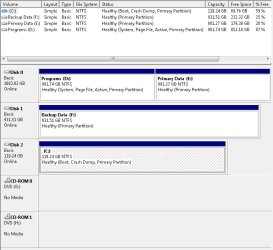
I recently upgraded from winXP x64 to win7 Ultimate. I added a 128 GB SSD drive (C) and have one 2 tb (D & E) and one 1 tb (F) hard drive. I've been installing most of my applications on the D partition and data on E and a data backup on F.
Everything was fine until I temporarily added another hard drive which I formatted to prepare it as a backup drive. This seemed to go fine too, but when I rebooted I got the dual (triple in this case) screen with Ubuntu, earlier version of windows, and win7. I realized where the non-win7 version were coming from; my D drive where I had winXP and Ubuntu.
I checked the System Configuration Boot tab and it shows only Windows 7 (C:\Windows) : Current OS; Default OS. But under the disk management, it shows only drive D has an active partition.
So I know why I'm seeing the triple boot screen, but I'm not sure if I can safely make C active and D not active?
Everything was fine until I temporarily added another hard drive which I formatted to prepare it as a backup drive. This seemed to go fine too, but when I rebooted I got the dual (triple in this case) screen with Ubuntu, earlier version of windows, and win7. I realized where the non-win7 version were coming from; my D drive where I had winXP and Ubuntu.
I checked the System Configuration Boot tab and it shows only Windows 7 (C:\Windows) : Current OS; Default OS. But under the disk management, it shows only drive D has an active partition.
So I know why I'm seeing the triple boot screen, but I'm not sure if I can safely make C active and D not active?
My Computer
- Computer type
- PC/Desktop
- Computer Manufacturer/Model Number
- custom
- OS
- Windows 7 Ultimate x64
- CPU
- AMD FX8350
- Motherboard
- Gigabyte GA-970A-DS3
- Memory
- 16GB DUal Channel DDR3 805Mhz (9-9-9-24)
- Graphics Card(s)
- Geforce GTX 760 (EVGA)
- Hard Drives
- Samsung SSD 830 Series
1TB WD1002FAEX-00Z3A0 SATA
2TB Seagate ST2000DM001-1CH164 SATA
- Antivirus
- Windows Essentials
- Browser
- Chrome