How to create a recovery partition for a blank HD

medwatt

New member
Local time
5:08 AM
Messages
16
Hello,
Although this is my first post here, I am no stranger to this forum. So I have a blank hard drive which is for a notebook laptop with no DVD drive. I am planning to install windows 7 but I also do not have a 4GB (:shock:) flash disk, at least not at the present.
So I though of creating a recovery partition. I am using windows 7 on my laptop and I have a SATA to USB cord. I have been creating partitions for some time now so I though it will be just the same process except that it is on another HD. Here is what I usually type on the console window.

Code:
diskpart
list disk
select disk X
list partition
select partition X
active
exit
X:\boot\bootsect.exe /nt60 X:

But when I was done with the process, transferred the HD to the notebook it did not boot into the set up process.
Although I don't know the problem, I suspect that the problem might be this last line :

Code:
X:\boot\bootsect.exe /nt60 X:

Please help if you can.

Thanks.
 

My Computer My Computer

At a glance

Windows 6 Ultimate x64i5-24506GBNvidia Cuda
Computer type
Laptop
Computer Manufacturer/Model Number
Lenovo
OS
Windows 6 Ultimate x64
CPU
i5-2450
Memory
6GB
Graphics Card(s)
Nvidia Cuda

My Computer My Computer

At a glance

Vista, Windows7, Mint Mate, Zorin, Windows 8from 1.6GHz Duo to i7
Computer Manufacturer/Model Number
HP, Dell, Gateway, Toshiba - 4 laptops and 2 desktops
OS
Vista, Windows7, Mint Mate, Zorin, Windows 8
CPU
from 1.6GHz Duo to i7
Monitor(s) Displays
2x HP w2207
Hard Drives
5x HDD, 7x SSD, 12x Externals
Keyboard
with trackball - no mices
Mouse
Trackball mice
Internet Speed
DSL 6000
I think you are better off to make a USB recovery stick. Those sticks cost pennies.

Newegg.com - $0 - $10, usb stick

Please, you are not answering my question. The thing is I do not want to use a USB because I could have bought one as you pointed out. I want to have a permanent recovery partition.
 

My Computer My Computer

At a glance

Windows 6 Ultimate x64i5-24506GBNvidia Cuda
Computer type
Laptop
Computer Manufacturer/Model Number
Lenovo
OS
Windows 6 Ultimate x64
CPU
i5-2450
Memory
6GB
Graphics Card(s)
Nvidia Cuda
If your notebook has a recovery partition, you can just transfer it to the blank drive (together with the C partition and the 100MB system partition). For that you use imaging.

http://www.sevenforums.com/tutorials/73828-imaging-free-macrium.html?ltr=I

Here is some other little tutorial I made for transferring the OS. It was made for new SSDs but is the same for HDDs. You just have to define all the required partitions on the HDD.

http://www.sevenforums.com/tutorials/149969-ssd-install-transfer-operating-system.html

Btw: The commands for creating partition are below. If you create several, you have to specify the offset for the second and third (in MBs) in the 'create' command.

Diskpart
List disk
Select disk n (where n is the number that was given for your Disk in List disk)
Clean
Create partition primary
Format fs=ntfs quick
Active
Exit

http://technet.microsoft.com/en-us/library/cc727978(v=ws.10).aspx
 

My Computer My Computer

At a glance

Vista, Windows7, Mint Mate, Zorin, Windows 8from 1.6GHz Duo to i7
Computer Manufacturer/Model Number
HP, Dell, Gateway, Toshiba - 4 laptops and 2 desktops
OS
Vista, Windows7, Mint Mate, Zorin, Windows 8
CPU
from 1.6GHz Duo to i7
Monitor(s) Displays
2x HP w2207
Hard Drives
5x HDD, 7x SSD, 12x Externals
Keyboard
with trackball - no mices
Mouse
Trackball mice
Internet Speed
DSL 6000
Thanks for the reply. I think that what you're implying is too much. I wouldn't be needing the windows file for my computer since it is almost certain that the HD will not boot on the other computer as the hardware on both are not the same. I will just see the blue screen of death.
What I want is a way of installing windows 7 from a partition to another partition on the same disk when the disk is empty. i.e. The partition will not be made by an operating system on the HD but rather by another operating system.
 

My Computer My Computer

At a glance

Windows 6 Ultimate x64i5-24506GBNvidia Cuda
Computer type
Laptop
Computer Manufacturer/Model Number
Lenovo
OS
Windows 6 Ultimate x64
CPU
i5-2450
Memory
6GB
Graphics Card(s)
Nvidia Cuda

My Computer My Computer

At a glance

Windows 10 Pro x64Intel Core i7 6700KGSkill TridentZ RGB 16GB 3600 16-16-16-36EVGA GTX 980 Ti SC x2
Computer type
PC/Desktop
Computer Manufacturer/Model Number
Skylake Special #666
OS
Windows 10 Pro x64
CPU
Intel Core i7 6700K
Motherboard
Asus Sabertooth Z170 Mark 1
Memory
GSkill TridentZ RGB 16GB 3600 16-16-16-36
Graphics Card(s)
EVGA GTX 980 Ti SC x2
Sound Card
Realtek High Definition
Monitor(s) Displays
AOC G2460PG
Screen Resolution
1920 x 1080 144Hz
Hard Drives
Samsung 860 Pro 256GB, Seagate Barracuda 4TB x2
PSU
EVGA 1000 P2, EVGA White Custom Braided Cables
Case
Corsair Vengeance C70 Gunmetal Black
Cooling
Corsair H100i v2, Corsair ML120 x2, Thermal Grizzly Kryonaut
Keyboard
Logitech G910 Orion Spectrum
Mouse
Logitech G700s
Internet Speed
Verizon Fios Quantum Gateway 75/75
Antivirus
Windows Defender, Malwarebytes Free 3.8.3
Browser
Chrome
Other Info
Corsair SP120 x4, LG Blu-ray Drive, Durabrand HT-395 100 Watt Dolby Digital Amp, Corsair H2100 Wireless 7.1 Headset
How about if you ask us what works best so we can share what we've learned from helping tens of thousands of users with Win7 since before it was even released?

It isn't worth the trouble to install from bootable HD.

To use a partition or HD for Recovery what works is to store a backup image there, then boot with the Win7 disk to reimage C from the stored image. However since this image can be placed anywhere there is no sense putting it on the same HD where it would be lost along with the OS if the HD fails.

But if you have another OS onboard we can show you how to run Win7 installation files from a partition or another HD so that it overwrites C, or set those files to boot from a Boot menu at startup to reinstall or run repairs with this method: http://www.sevenforums.com/installation-setup/309891-install-os-hard-drive.html
 
Last edited:
How about if you ask us what works best so we can share what we've learned from helping tens of thousands of users with Win7 since before it was even released?

It isn't worth the trouble to install from HD. To use a partition or HD for Recovery what works is to store a backup image there, then boot with the Win7 disk to reimage C from the stored image. However since this image can be placed anywhere there is no sense putting it on the same HD where it would be lost along with the OS if the HD fails.

If you have another OS onboard we can show you how to run Win7 installation files from a partition or another HD so that it overwrites C, or set those files to boot from a Boot menu at startup to reinstall or run repairs with this method: http://www.sevenforums.com/installation-setup/309891-install-os-hard-drive.html

I don't understand exactly what you're saying. The thing is I have already made a partition on the new HD and copied the entire windows 7 installation disk just the same I do when doing it on the same HD. But the setup cannot boot from the HD when as would be the case when not done on an external HD.
So if you know why this is the case and can offer me a solution I'll be happy. If you can suggest another method (as you claim) without the use of a DVD drive or USB flash drive I'll be glad too.
You know I already have a 1.5TB external HD and would have used it to install the windows but every tutorial that I read I see that I must format the drive which is not advisable in my case since it has almost every piece of data that matters to me. Is there a way, as in linux distros, to create a bootable USB without formatting ?
 

My Computer My Computer

At a glance

Windows 6 Ultimate x64i5-24506GBNvidia Cuda
Computer type
Laptop
Computer Manufacturer/Model Number
Lenovo
OS
Windows 6 Ultimate x64
CPU
i5-2450
Memory
6GB
Graphics Card(s)
Nvidia Cuda
I think we don't understand what you are trying to do. Your story is very confusing.

If you want to create a recovery partition using the partition from another system, I don't think that will work. What exactly is installed on the system for which you want to create a recovery partition. And what are the specs of that system.
 

My Computer My Computer

At a glance

Vista, Windows7, Mint Mate, Zorin, Windows 8from 1.6GHz Duo to i7
Computer Manufacturer/Model Number
HP, Dell, Gateway, Toshiba - 4 laptops and 2 desktops
OS
Vista, Windows7, Mint Mate, Zorin, Windows 8
CPU
from 1.6GHz Duo to i7
Monitor(s) Displays
2x HP w2207
Hard Drives
5x HDD, 7x SSD, 12x Externals
Keyboard
with trackball - no mices
Mouse
Trackball mice
Internet Speed
DSL 6000
Is there a way, as in linux distros, to create a bootable USB without formatting ?
This doesn't make any sense to me....to create a bootable Linux USB you usually have to format it. Im quite confused over what you are trying to do....
 

My Computer My Computer

At a glance

Windows 10 Pro x64 ; Xubuntu x64Intel i7 860 @ 2.80 GHz O/C'ed to 4.0GHz16GB Corsair Vengance DDR3 @ 661 MHz Dual Cha...EVGA NVidia GTX 560 1024MB
Computer type
PC/Desktop
Computer Manufacturer/Model Number
Golden Mk. I.4
OS
Windows 10 Pro x64 ; Xubuntu x64
CPU
Intel i7 860 @ 2.80 GHz O/C'ed to 4.0GHz
Motherboard
Gigabyte P55A-UD3R Rev.1. Award BIOS F13
Memory
16GB Corsair Vengance DDR3 @ 661 MHz Dual Channel (9-9-9-24)
Graphics Card(s)
EVGA NVidia GTX 560 1024MB
Sound Card
Realtek Integrated
Monitor(s) Displays
Dual Samsung SyncMaster 2494HS
Screen Resolution
1920*1080 and 1920*1080
Hard Drives
1*Samsung 840 EVO 120GB SSD;
1*OCZ Vertex 2 60GB SSD;
2*Samsung F3 SpinPoint 1TB in RAID0;
1*Samsung F1 SpinPoint 1TB;
2*Western Digital 1TB External USB 3.0
1*Western Digital 500GB External USB 3.0
1*Seagate 500GB External USB 2.0
PSU
Thermaltake ToughPower QFan 750W
Case
Thermaltake Element S VK60001W2Z
Cooling
Corsair H60 Water Cooling, 2*230mm and 2*80mm case fans
Keyboard
Logitech G110
Mouse
Logitech MX518
I think we are all confused.
 

My Computer My Computer

At a glance

Vista, Windows7, Mint Mate, Zorin, Windows 8from 1.6GHz Duo to i7
Computer Manufacturer/Model Number
HP, Dell, Gateway, Toshiba - 4 laptops and 2 desktops
OS
Vista, Windows7, Mint Mate, Zorin, Windows 8
CPU
from 1.6GHz Duo to i7
Monitor(s) Displays
2x HP w2207
Hard Drives
5x HDD, 7x SSD, 12x Externals
Keyboard
with trackball - no mices
Mouse
Trackball mice
Internet Speed
DSL 6000
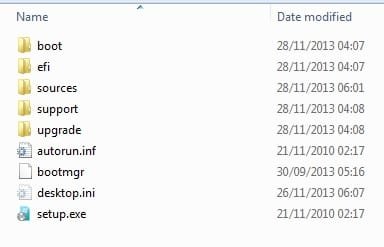
Copy the the 7 install dvd onto any partition ( except the one containing your current windows installation).

It will look like this:

recovpart1.jpg

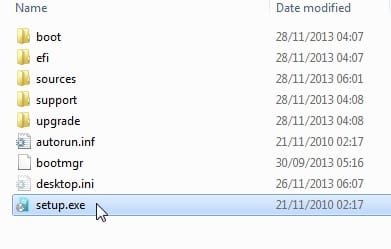
With these guys inside that folder:

recovpart2.jpg


1. You can run setup.exe from within your existing installation for a repair ( also called upgrade ) install.

repairinst3.jpg


2. You can set up your recovery image, like the oems but without the crapware. Very simple.
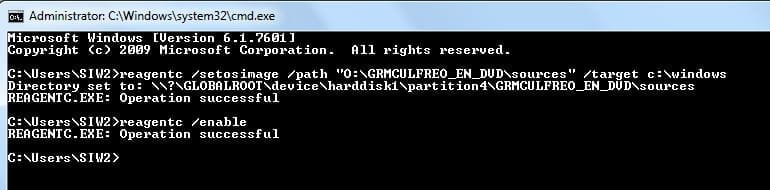
Open an elevated command and type:

reagentc /setosimage [/path <dir_name> [/target <dir_name>]

My image ( install.wim ) is on partition O in GRMCULFREO_EN_DVD\sources folder

Therefore, I type:

reagentc /setosimage /path "O:\GRMCULFREO_EN_DVD\sources" /target c:\windows

(then press enter)

reagentc /enable


(then press enter)

Like this:

setosimage.jpg

Job done. Very very simple.
 

My Computers My Computers

  • At a glance

    7 X64i5 84002x8gb 3200mhz
    Computer type
    PC/Desktop
    OS
    7 X64
    CPU
    i5 8400
    Motherboard
    gigabyte b365m ds3h
    Memory
    2x8gb 3200mhz
    Hard Drives
    various
    PSU
    pure power 11 400w cm
    Case
    Coolermaster
    Cooling
    cryorig m9i
  • At a glance

    7x64g54008gb ddr4 2400
    Computer type
    PC/Desktop
    OS
    7x64
    CPU
    g5400
    Motherboard
    ga b365m ds3h
    Memory
    8gb ddr4 2400
    PSU
    xfx pro 450w
You'd need an OS onboard to make the bootable installation partition, which only gives the ability to reinstall or repair by booting it.

By comparison a stored image in the same space (or preferablly externally) can be up and running in 20 minutes since it's already your customized ideal install and doesn't require hours or days of reinstalling and setup.

Hopefully these options are helping to better shape what you want. Keep asking back until you find your perfect solution.
 
Is there a way, as in linux distros, to create a bootable USB without formatting ?
This doesn't make any sense to me....to create a bootable Linux USB you usually have to format it. Im quite confused over what you are trying to do....
No I really create linux distros without formatting at all. I use LiLi USB creator and there is an option to uncheck 'format' and I always uncheck it.
 

My Computer My Computer

At a glance

Windows 6 Ultimate x64i5-24506GBNvidia Cuda
Computer type
Laptop
Computer Manufacturer/Model Number
Lenovo
OS
Windows 6 Ultimate x64
CPU
i5-2450
Memory
6GB
Graphics Card(s)
Nvidia Cuda
Thats because you have formatted it previously :rolleyes:
 

My Computer My Computer

At a glance

Windows 10 Pro x64 ; Xubuntu x64Intel i7 860 @ 2.80 GHz O/C'ed to 4.0GHz16GB Corsair Vengance DDR3 @ 661 MHz Dual Cha...EVGA NVidia GTX 560 1024MB
Computer type
PC/Desktop
Computer Manufacturer/Model Number
Golden Mk. I.4
OS
Windows 10 Pro x64 ; Xubuntu x64
CPU
Intel i7 860 @ 2.80 GHz O/C'ed to 4.0GHz
Motherboard
Gigabyte P55A-UD3R Rev.1. Award BIOS F13
Memory
16GB Corsair Vengance DDR3 @ 661 MHz Dual Channel (9-9-9-24)
Graphics Card(s)
EVGA NVidia GTX 560 1024MB
Sound Card
Realtek Integrated
Monitor(s) Displays
Dual Samsung SyncMaster 2494HS
Screen Resolution
1920*1080 and 1920*1080
Hard Drives
1*Samsung 840 EVO 120GB SSD;
1*OCZ Vertex 2 60GB SSD;
2*Samsung F3 SpinPoint 1TB in RAID0;
1*Samsung F1 SpinPoint 1TB;
2*Western Digital 1TB External USB 3.0
1*Western Digital 500GB External USB 3.0
1*Seagate 500GB External USB 2.0
PSU
Thermaltake ToughPower QFan 750W
Case
Thermaltake Element S VK60001W2Z
Cooling
Corsair H60 Water Cooling, 2*230mm and 2*80mm case fans
Keyboard
Logitech G110
Mouse
Logitech MX518
I'm sorry to be posting this late.

Can you suggest how I can avoid formatting my HD if I want to create a bootable Win 7 USB ?
 

My Computer My Computer

At a glance

Windows 6 Ultimate x64i5-24506GBNvidia Cuda
Computer type
Laptop
Computer Manufacturer/Model Number
Lenovo
OS
Windows 6 Ultimate x64
CPU
i5-2450
Memory
6GB
Graphics Card(s)
Nvidia Cuda
I am myself a little bit confused in presenting what I want done.
Ok once more.
1. I want to install win 7 on a blank HDD which has no DVD drive
2. I already have a 1.5TB HDD which is semi full formatted as NTFS
3. I already have an ISO image of win 7
4. How to make the 1.5TB HDD a win 7 bootable installation disk without formatting it (1.e. retaining all files)
 

My Computer My Computer

At a glance

Windows 6 Ultimate x64i5-24506GBNvidia Cuda
Computer type
Laptop
Computer Manufacturer/Model Number
Lenovo
OS
Windows 6 Ultimate x64
CPU
i5-2450
Memory
6GB
Graphics Card(s)
Nvidia Cuda
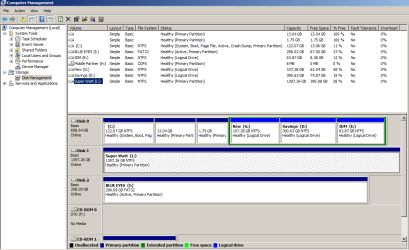
ad 4) If you post a disk management picture of this 1.5TB disk, we could have a look on how to go about it.
 

My Computer My Computer

At a glance

Vista, Windows7, Mint Mate, Zorin, Windows 8from 1.6GHz Duo to i7
Computer Manufacturer/Model Number
HP, Dell, Gateway, Toshiba - 4 laptops and 2 desktops
OS
Vista, Windows7, Mint Mate, Zorin, Windows 8
CPU
from 1.6GHz Duo to i7
Monitor(s) Displays
2x HP w2207
Hard Drives
5x HDD, 7x SSD, 12x Externals
Keyboard
with trackball - no mices
Mouse
Trackball mice
Internet Speed
DSL 6000
Please see the attachment !
 

Attachments

  • disk.png
    disk.png
    29.9 KB · Views: 3

My Computer My Computer

At a glance

Windows 6 Ultimate x64i5-24506GBNvidia Cuda
Computer type
Laptop
Computer Manufacturer/Model Number
Lenovo
OS
Windows 6 Ultimate x64
CPU
i5-2450
Memory
6GB
Graphics Card(s)
Nvidia Cuda
Back
Top