Hello,
Although this is my first post here, I am no stranger to this forum. So I have a blank hard drive which is for a notebook laptop with no DVD drive. I am planning to install windows 7 but I also do not have a 4GB shock flash disk, at least not at the present.
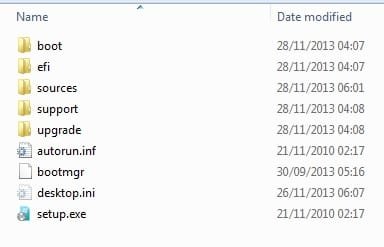
So I though of creating a recovery partition. I am using windows 7 on my laptop and I have a SATA to USB cord. I have been creating partitions for some time now so I though it will be just the same process except that it is on another HD. Here is what I usually type on the console window.
But when I was done with the process, transferred the HD to the notebook it did not boot into the set up process.
Although I don't know the problem, I suspect that the problem might be this last line :
Please help if you can.
Thanks.
Although this is my first post here, I am no stranger to this forum. So I have a blank hard drive which is for a notebook laptop with no DVD drive. I am planning to install windows 7 but I also do not have a 4GB
shock flash disk, at least not at the present.So I though of creating a recovery partition. I am using windows 7 on my laptop and I have a SATA to USB cord. I have been creating partitions for some time now so I though it will be just the same process except that it is on another HD. Here is what I usually type on the console window.
Code:
diskpart
list disk
select disk X
list partition
select partition X
active
exit
X:\boot\bootsect.exe /nt60 X:
But when I was done with the process, transferred the HD to the notebook it did not boot into the set up process.
Although I don't know the problem, I suspect that the problem might be this last line :
Code:
X:\boot\bootsect.exe /nt60 X:Please help if you can.
Thanks.
My Computer
At a glance
Windows 6 Ultimate x64i5-24506GBNvidia Cuda
- Computer type
- Laptop
- Computer Manufacturer/Model Number
- Lenovo
- OS
- Windows 6 Ultimate x64
- CPU
- i5-2450
- Memory
- 6GB
- Graphics Card(s)
- Nvidia Cuda