Can't install windows 7 ultimate on my notebook

What does the rest of that error message say? You got a VSD Error. :eek:
 

My Computer My Computer

Computer type
PC/Desktop
Computer Manufacturer/Model Number
Built 2/11/2011
OS
Windows 7 Pro-x64
CPU
i7-2600 3.4GHz - 3.8GHz Turbo
Motherboard
Intel DH67BL-B3
Memory
8Gb - 2x4GB, Muskin 991770 PC3-1333
Graphics Card(s)
Integrated Intel HD 2000
Sound Card
Integrated Intel 10.1 HD, RealTek ALC892
Monitor(s) Displays
Asus LCD VH222H, Haier HL24XSL2a
Screen Resolution
1920x1080, 1920x1080
Hard Drives
Crucial SSD C300-128Gb,
Western Digital WD5002AALX - 500Gb,
Western Digital WD7501AALS - 750Gb
PSU
Seasonic 650W 80+ Gold Modular
Case
Rosewill Defender
Cooling
Stock CPU, Four 120mm case fans, PCH fan added
Keyboard
Logitech EX100 Y-RBH94 Wireless
Mouse
Logitech EX100 M-RCE95 Wireless
Internet Speed
3.0/1.5 Mbs
Antivirus
Microsoft Security Essentials
Browser
Microsoft Internet Explorer 11
Other Info
Antec Veris Premier-Multimedia IR Station,
Cyber Accoustics-3602 Speakers,
AFT XM-5U Card Reader,
Hauppauge TV-HVR-2250,
Sony LX300 USB Turntable
Hmm,disk 1 is the second part of my usb stick(I told you that it has 2 parts,dont know why-secure F,and public G). And this disk 2 is probably the other part(public G). So disk 0 remain to be my HDD? My HDD is 320gb...So I guess i have to choose disk 2 then?

Use a normal standard usb stick!!
 

My Computer My Computer

Computer type
Laptop
Computer Manufacturer/Model Number
ACER ASPIRE 5742G
OS
Microsoft Windows 7 Home Premium 64-bits 7601 Multiprocessor Free Service Pack 1
CPU
Intel(R) Core(TM) i3 CPU M 370 @ 2.40GHz
Motherboard
Acer Aspire 5742G
Memory
4,00 GB
Graphics Card(s)
ATI Mobility Radeon HD 5400 Series
Sound Card
(1) AMD High Definition Audio Device (2) Realtek High Defi
Screen Resolution
1366 x 768 x 32 bits (4294967296 colors) @ 60 Hz
Hard Drives
WDC WD5000BEVT-22ZAT0
Unplug all other HD's and peripherals,

Boot into BIOS setup, reset to defaults, save changes. If an EFI BIOS you'll need to decide if you want UEFI BIOS vs. Legacy BIOS. If UEFI follow these special steps for Install, otherwise enable Legacy BIOS or Compatibility Support Module to proceed with normal install:

Set DVD drive first to boot, HD second, set SATA controller to AHCI, Save changes and Exit.

Then boot into Windows 7 installer DVD or flash stick burned or written using tool and latest ISO for your licensed OS version here. I would use a fresh ISO written with tool in Step 2 as yours is in question; run Diskpart Clean All on the stick first before doing this.

At first installer screen Press Shift + F10, or enter System Recovery Options to open a Command Box, type:

DISKPART
LIST DISK
SELECT DISK 0 (after confirming Windows 7 target HD #)
CLEAN
CREATE PARTITION PRIMARY
FORMAT FS=NTFS LABEL="WINDOWS 7"
ACTIVE
EXIT
EXIT

Next click Install Now, then Custom install to Clean Install Windows 7 to the partition you created. If it fails then report back at which step and the verbatim error message.

In addition read over these steps to understand the tools and methods which work best to get and maintain a perfect Clean Reinstall - Factory OEM Windows 7. The steps are the same for retail.

After install you can adjust partition size or Create new partitions for data, etc. in Disk Mgmt. You are creating the partition here for the purpose of wiping the HD and marking Active which overcomes certain install failures.
 
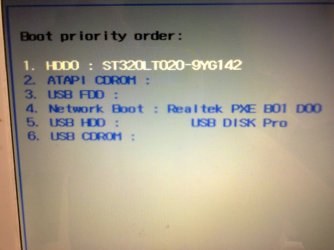
Hello,Gregrocker! here's my pic when I setup my BIOS to defaults:
 

Attachments

  • Photo0625.jpg
    Photo0625.jpg
    173.3 KB · Views: 1

My Computer My Computer

Computer type
PC/Desktop
Computer Manufacturer/Model Number
Packard bell dot s
OS
Windows 7 Ultimate 32 bit
CPU
Intel Atom N2600
Motherboard
Intel GMA 3600
Memory
2GB
Graphics Card(s)
GMA 3600
Hard Drives
HDD 320GB
I dont understand what is UEFI and what should I choose as first option here? I think my usb stick is under number 5-usb HDD
 

My Computer My Computer

Computer type
PC/Desktop
Computer Manufacturer/Model Number
Packard bell dot s
OS
Windows 7 Ultimate 32 bit
CPU
Intel Atom N2600
Motherboard
Intel GMA 3600
Memory
2GB
Graphics Card(s)
GMA 3600
Hard Drives
HDD 320GB
the first number is my HDD drive-HDD0 I understood it now... As you said- "Set DVD drive first to boot, HD second, set SATA controller to AHCI, Save changes and Exit." Tell me please how to set this by numbers you see on my pic. I'm a complete newbie :(
 

My Computer My Computer

Computer type
PC/Desktop
Computer Manufacturer/Model Number
Packard bell dot s
OS
Windows 7 Ultimate 32 bit
CPU
Intel Atom N2600
Motherboard
Intel GMA 3600
Memory
2GB
Graphics Card(s)
GMA 3600
Hard Drives
HDD 320GB
If that ATAPI CDROM device is also a DVD drive, then use the down arrow to highlight it, click enter. Then follow the Help shown to move the device up to first position, often using the + key but different for some models. It will always show this nearby or by choosing the Help menu.

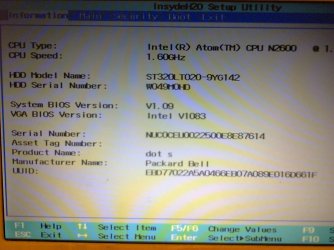
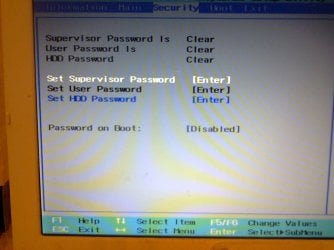
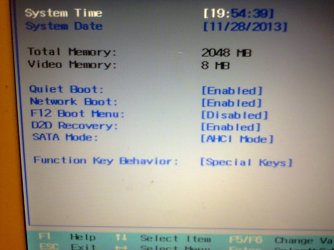
It doesn't look like you have UEFI but look over all the settings in the BIOS to see if you see any for UEFI, Legacy BIOS or CSM (Compatibiility Support Module).
 
here's my Bios pages:
 

Attachments

  • Photo0630.jpg
    Photo0630.jpg
    177.7 KB · Views: 1

My Computer My Computer

Computer type
PC/Desktop
Computer Manufacturer/Model Number
Packard bell dot s
OS
Windows 7 Ultimate 32 bit
CPU
Intel Atom N2600
Motherboard
Intel GMA 3600
Memory
2GB
Graphics Card(s)
GMA 3600
Hard Drives
HDD 320GB
this
 

Attachments

  • Photo0629.jpg
    Photo0629.jpg
    156.3 KB · Views: 0

My Computer My Computer

Computer type
PC/Desktop
Computer Manufacturer/Model Number
Packard bell dot s
OS
Windows 7 Ultimate 32 bit
CPU
Intel Atom N2600
Motherboard
Intel GMA 3600
Memory
2GB
Graphics Card(s)
GMA 3600
Hard Drives
HDD 320GB
and this
 

Attachments

  • Photo0628.jpg
    Photo0628.jpg
    184.9 KB · Views: 0

My Computer My Computer

Computer type
PC/Desktop
Computer Manufacturer/Model Number
Packard bell dot s
OS
Windows 7 Ultimate 32 bit
CPU
Intel Atom N2600
Motherboard
Intel GMA 3600
Memory
2GB
Graphics Card(s)
GMA 3600
Hard Drives
HDD 320GB
I cant see any UEFI or CSM...But at least my "SATA Mode is on "AHCI mode" whatever this means....
 

My Computer My Computer

Computer type
PC/Desktop
Computer Manufacturer/Model Number
Packard bell dot s
OS
Windows 7 Ultimate 32 bit
CPU
Intel Atom N2600
Motherboard
Intel GMA 3600
Memory
2GB
Graphics Card(s)
GMA 3600
Hard Drives
HDD 320GB
If you are using flash stick installer, I would enable F12 Boot Menu in BIOS, then set the HDD first to boot, trigger the flash stick to boot by tapping the F12 key at startup. This may avoid the flash stick reloading during the required reboots during install. But if it happens, just unplug the stick so it can take up with the install where it left off - stick isn't needed anyway since files are already copied off it.
 
The installation run normally from the usb,but when I get to "where do you want to install windows" it gave me this error... What should I type in the CMD to get the installation proceed normally?
 

My Computer My Computer

Computer type
PC/Desktop
Computer Manufacturer/Model Number
Packard bell dot s
OS
Windows 7 Ultimate 32 bit
CPU
Intel Atom N2600
Motherboard
Intel GMA 3600
Memory
2GB
Graphics Card(s)
GMA 3600
Hard Drives
HDD 320GB
Hey,Guys! I did it finally! Thank you all for your patience,I am complete newbie and never installed Windows so far... I am very glad that I managed to learn some things and now I'm confident that I can make it! Thank you all one more time and have a great day! :)
 

My Computer My Computer

Computer type
PC/Desktop
Computer Manufacturer/Model Number
Packard bell dot s
OS
Windows 7 Ultimate 32 bit
CPU
Intel Atom N2600
Motherboard
Intel GMA 3600
Memory
2GB
Graphics Card(s)
GMA 3600
Hard Drives
HDD 320GB
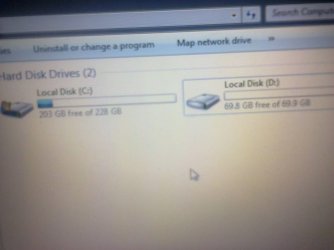
I have one more question...My HDD is 320GB and during the installation I separated disks C: and D: respectively to 69.9 Gb for C: and 228 for D:. But today I saw this:
 

Attachments

  • Photo0634.jpg
    Photo0634.jpg
    133.2 KB · Views: 0

My Computer My Computer

Computer type
PC/Desktop
Computer Manufacturer/Model Number
Packard bell dot s
OS
Windows 7 Ultimate 32 bit
CPU
Intel Atom N2600
Motherboard
Intel GMA 3600
Memory
2GB
Graphics Card(s)
GMA 3600
Hard Drives
HDD 320GB
I have obviously exchanged them! :D So if this is a big problem and what should I do? P.S. Windows 7 is installed in disk C:....
 

My Computer My Computer

Computer type
PC/Desktop
Computer Manufacturer/Model Number
Packard bell dot s
OS
Windows 7 Ultimate 32 bit
CPU
Intel Atom N2600
Motherboard
Intel GMA 3600
Memory
2GB
Graphics Card(s)
GMA 3600
Hard Drives
HDD 320GB
Drive letters like C and D can differ! in winpe (boot from dvd). C can be called D and vice versa. If you have another win vista, win7 or winxp installed.... drive letters can be different.

In common: if you start winxp, win vista, win7, win8 .... the windows partition is called C. In your case win7 has been installed on the 228GB partition. What's the problem?
 

My Computer My Computer

Computer type
Laptop
Computer Manufacturer/Model Number
ACER ASPIRE 5742G
OS
Microsoft Windows 7 Home Premium 64-bits 7601 Multiprocessor Free Service Pack 1
CPU
Intel(R) Core(TM) i3 CPU M 370 @ 2.40GHz
Motherboard
Acer Aspire 5742G
Memory
4,00 GB
Graphics Card(s)
ATI Mobility Radeon HD 5400 Series
Sound Card
(1) AMD High Definition Audio Device (2) Realtek High Defi
Screen Resolution
1366 x 768 x 32 bits (4294967296 colors) @ 60 Hz
Hard Drives
WDC WD5000BEVT-22ZAT0
I have one more question...My HDD is 320GB and during the installation I separated disks C: and D: respectively to 69.9 Gb for C: and 228 for D:. But today I saw this:

They are 2 physical drives, or just 2 partitions on 1 physical drive?
Post screenshot of disk management please
 

My Computer My Computer

Computer type
Laptop
Computer Manufacturer/Model Number
ACER ASPIRE 5742G
OS
Microsoft Windows 7 Home Premium 64-bits 7601 Multiprocessor Free Service Pack 1
CPU
Intel(R) Core(TM) i3 CPU M 370 @ 2.40GHz
Motherboard
Acer Aspire 5742G
Memory
4,00 GB
Graphics Card(s)
ATI Mobility Radeon HD 5400 Series
Sound Card
(1) AMD High Definition Audio Device (2) Realtek High Defi
Screen Resolution
1366 x 768 x 32 bits (4294967296 colors) @ 60 Hz
Hard Drives
WDC WD5000BEVT-22ZAT0
Back
Top