Solved BSOD right after "Starting Windows" screen goes away

Ok, the fans should be fine, I thought normally one fan is too little but I realize you have a water cooling system.
About the HDD cable, I don't think it hardly matters, but if you want, for testing, it might be a good idea to switch.

Also, I researched a bit about the PSU giving out abnormally high voltages, and it is indeed not normal at all. 7 volts is simply way too high. I suggest you either borrow a psu or check if you have a spare to test it. I strongly believe its the problem. Perhaps can you try accessing the BIOS and normally there is a "monitor" tab to check voltages. Just browse a bit and see, but don't alter anything!
 

My Computer My Computer

At a glance

Windows 7 Enterprise x64Intel(R) Core(TM) i5-3570k Ivy Bridge @ 3.40Ghz4GBEVGA 2GB NVIDIA GTX 760
Computer type
PC/Desktop
Computer Manufacturer/Model Number
Custom Build
OS
Windows 7 Enterprise x64
CPU
Intel(R) Core(TM) i5-3570k Ivy Bridge @ 3.40Ghz
Motherboard
ASUS P8Z77-v LX
Memory
4GB
Graphics Card(s)
EVGA 2GB NVIDIA GTX 760
Monitor(s) Displays
SAMSUNG
Screen Resolution
1920 x 1080
Hard Drives
Seagate Barracuda
WesternDigital
PSU
Corsair CX750M 750W Modular PSU
Case
Modded Case
Cooling
3 Input Fans 1 Exhaust fan 2 GPU Exhaust Fans 1 CPU Fan
Keyboard
Logitech Wireless Combo mk360 Keyboard
Mouse
Logitech G400 Gaming Mouse; Logitech Wireless Combo mk360
Internet Speed
27mbps (download) & 7mbps (upload) (FREE, France)
Antivirus
Microsoft Security Essentials
Browser
Google Chrome
Other Info
New Custom built gaming rig.
Ok, the fans should be fine, I thought normally one fan is too little but I realize you have a water cooling system.
About the HDD cable, I don't think it hardly matters, but if you want, for testing, it might be a good idea to switch.

Also, I researched a bit about the PSU giving out abnormally high voltages, and it is indeed not normal at all. 7 volts is simply way too high. I suggest you either borrow a psu or check if you have a spare to test it. I strongly believe its the problem. Perhaps can you try accessing the BIOS and normally there is a "monitor" tab to check voltages. Just browse a bit and see, but don't alter anything!

IdoOblM.jpg


ZEUDjMN.jpg


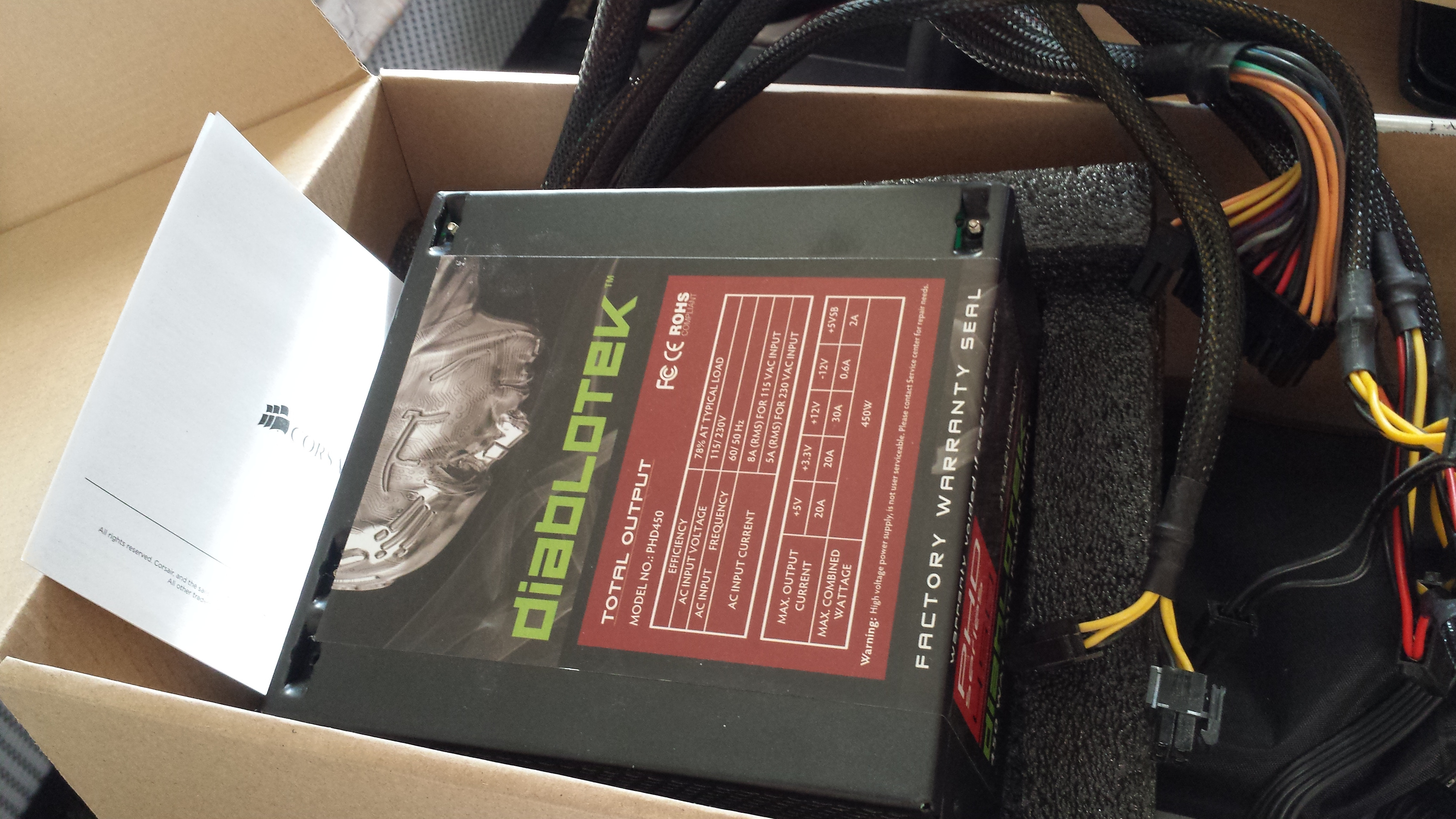
This is my PSU before I purchased the newer one. Would a 450W do for testing purposes? If so what would I be looking for once installed.
 

My Computer My Computer

At a glance

Microsoft Windows 7 Home Premium 64-bit 7601 ...AMD Athlon(tm) II X4 630 Processor4.00 GBNVIDIA GeForce GT 220
Computer type
PC/Desktop
Computer Manufacturer/Model Number
Cyber Power PC
OS
Microsoft Windows 7 Home Premium 64-bit 7601 Multiprocessor Free Service Pack 1
CPU
AMD Athlon(tm) II X4 630 Processor
Motherboard
ASUSTeK Computer INC. M4A77TD
Memory
4.00 GB
Graphics Card(s)
NVIDIA GeForce GT 220
Sound Card
(1) NVIDIA High Definition Audio (2) NVIDIA High Definitio
Monitor(s) Displays
Generic PnP
Screen Resolution
1920 x 1080 x 32 bits (4294967296 colors) @ 59 Hz
Hard Drives
ST1000DM003-9YN162 ATA Device
PSU
HX Series 750 Watt 80 PLUS® Gold Certified Modular
Keyboard
Rosewill RK-9100
Mouse
Razer Naga
Antivirus
Microsoft Security Essentials & Malwarebytes
450W should work ok if you don't stress your computer (playing games, running CPU intensive programs). If it boots up and runs fine for long enough and you don't experience ANY of your problems, I think we can blame the PSU. If you get any problems again, tell us, as it may also be due to low power. Again, do NOT run anything demanding because it will give unexpected things.
 

My Computer My Computer

At a glance

Windows 7 Enterprise x64Intel(R) Core(TM) i5-3570k Ivy Bridge @ 3.40Ghz4GBEVGA 2GB NVIDIA GTX 760
Computer type
PC/Desktop
Computer Manufacturer/Model Number
Custom Build
OS
Windows 7 Enterprise x64
CPU
Intel(R) Core(TM) i5-3570k Ivy Bridge @ 3.40Ghz
Motherboard
ASUS P8Z77-v LX
Memory
4GB
Graphics Card(s)
EVGA 2GB NVIDIA GTX 760
Monitor(s) Displays
SAMSUNG
Screen Resolution
1920 x 1080
Hard Drives
Seagate Barracuda
WesternDigital
PSU
Corsair CX750M 750W Modular PSU
Case
Modded Case
Cooling
3 Input Fans 1 Exhaust fan 2 GPU Exhaust Fans 1 CPU Fan
Keyboard
Logitech Wireless Combo mk360 Keyboard
Mouse
Logitech G400 Gaming Mouse; Logitech Wireless Combo mk360
Internet Speed
27mbps (download) & 7mbps (upload) (FREE, France)
Antivirus
Microsoft Security Essentials
Browser
Google Chrome
Other Info
New Custom built gaming rig.
It's been a few days with no problem booting and no BSOD. I haven't switched out the PSU yet though. It started functioning properly after I reseated the cables inside. Going to wait a few more days and if no problems I'll mark as solved. Thank you very much Surge and Arc for all the help and patience.
 

My Computer My Computer

At a glance

Microsoft Windows 7 Home Premium 64-bit 7601 ...AMD Athlon(tm) II X4 630 Processor4.00 GBNVIDIA GeForce GT 220
Computer type
PC/Desktop
Computer Manufacturer/Model Number
Cyber Power PC
OS
Microsoft Windows 7 Home Premium 64-bit 7601 Multiprocessor Free Service Pack 1
CPU
AMD Athlon(tm) II X4 630 Processor
Motherboard
ASUSTeK Computer INC. M4A77TD
Memory
4.00 GB
Graphics Card(s)
NVIDIA GeForce GT 220
Sound Card
(1) NVIDIA High Definition Audio (2) NVIDIA High Definitio
Monitor(s) Displays
Generic PnP
Screen Resolution
1920 x 1080 x 32 bits (4294967296 colors) @ 59 Hz
Hard Drives
ST1000DM003-9YN162 ATA Device
PSU
HX Series 750 Watt 80 PLUS® Gold Certified Modular
Keyboard
Rosewill RK-9100
Mouse
Razer Naga
Antivirus
Microsoft Security Essentials & Malwarebytes
No problem, I'm glad to have helped. Are you running with the 450w psu or the 750w? Anyways, I'm very happy to hear you fixed it, it was probably, after all, a loose cable somewhere.
 
Last edited:

My Computer My Computer

At a glance

Windows 7 Enterprise x64Intel(R) Core(TM) i5-3570k Ivy Bridge @ 3.40Ghz4GBEVGA 2GB NVIDIA GTX 760
Computer type
PC/Desktop
Computer Manufacturer/Model Number
Custom Build
OS
Windows 7 Enterprise x64
CPU
Intel(R) Core(TM) i5-3570k Ivy Bridge @ 3.40Ghz
Motherboard
ASUS P8Z77-v LX
Memory
4GB
Graphics Card(s)
EVGA 2GB NVIDIA GTX 760
Monitor(s) Displays
SAMSUNG
Screen Resolution
1920 x 1080
Hard Drives
Seagate Barracuda
WesternDigital
PSU
Corsair CX750M 750W Modular PSU
Case
Modded Case
Cooling
3 Input Fans 1 Exhaust fan 2 GPU Exhaust Fans 1 CPU Fan
Keyboard
Logitech Wireless Combo mk360 Keyboard
Mouse
Logitech G400 Gaming Mouse; Logitech Wireless Combo mk360
Internet Speed
27mbps (download) & 7mbps (upload) (FREE, France)
Antivirus
Microsoft Security Essentials
Browser
Google Chrome
Other Info
New Custom built gaming rig.
No problem, I'm glad to have helped. Are you running with the 450w psu or the 750w? Anyways, I'm very happy to hear you fixed it, it was probably, after all, a loose cable somewhere.

The 750 still. The 450 was lead to have caused BSOD in the past which is why I replaced it. I thought running it without stressing anything but I decided not to take the risk. Only problem I have now is the temps. Are those normal temps to have?
 

My Computer My Computer

At a glance

Microsoft Windows 7 Home Premium 64-bit 7601 ...AMD Athlon(tm) II X4 630 Processor4.00 GBNVIDIA GeForce GT 220
Computer type
PC/Desktop
Computer Manufacturer/Model Number
Cyber Power PC
OS
Microsoft Windows 7 Home Premium 64-bit 7601 Multiprocessor Free Service Pack 1
CPU
AMD Athlon(tm) II X4 630 Processor
Motherboard
ASUSTeK Computer INC. M4A77TD
Memory
4.00 GB
Graphics Card(s)
NVIDIA GeForce GT 220
Sound Card
(1) NVIDIA High Definition Audio (2) NVIDIA High Definitio
Monitor(s) Displays
Generic PnP
Screen Resolution
1920 x 1080 x 32 bits (4294967296 colors) @ 59 Hz
Hard Drives
ST1000DM003-9YN162 ATA Device
PSU
HX Series 750 Watt 80 PLUS® Gold Certified Modular
Keyboard
Rosewill RK-9100
Mouse
Razer Naga
Antivirus
Microsoft Security Essentials & Malwarebytes
I'm very sorry for the late response, i've been somewhat busy lately. 111F is about 40 C which isn't too hot. Were you gaming? If you were idle it may be something to worry about... are your fans working fine? Do you hear weird sounds? I mean, the motherboard itself is abnormally hot.
Open up your case and check if every fan spins up. That includes GPU fans if yours has one.
 

My Computer My Computer

At a glance

Windows 7 Enterprise x64Intel(R) Core(TM) i5-3570k Ivy Bridge @ 3.40Ghz4GBEVGA 2GB NVIDIA GTX 760
Computer type
PC/Desktop
Computer Manufacturer/Model Number
Custom Build
OS
Windows 7 Enterprise x64
CPU
Intel(R) Core(TM) i5-3570k Ivy Bridge @ 3.40Ghz
Motherboard
ASUS P8Z77-v LX
Memory
4GB
Graphics Card(s)
EVGA 2GB NVIDIA GTX 760
Monitor(s) Displays
SAMSUNG
Screen Resolution
1920 x 1080
Hard Drives
Seagate Barracuda
WesternDigital
PSU
Corsair CX750M 750W Modular PSU
Case
Modded Case
Cooling
3 Input Fans 1 Exhaust fan 2 GPU Exhaust Fans 1 CPU Fan
Keyboard
Logitech Wireless Combo mk360 Keyboard
Mouse
Logitech G400 Gaming Mouse; Logitech Wireless Combo mk360
Internet Speed
27mbps (download) & 7mbps (upload) (FREE, France)
Antivirus
Microsoft Security Essentials
Browser
Google Chrome
Other Info
New Custom built gaming rig.
I'm very sorry for the late response, i've been somewhat busy lately. 111F is about 40 C which isn't too hot. Were you gaming? If you were idle it may be something to worry about... are your fans working fine? Do you hear weird sounds? I mean, the motherboard itself is abnormally hot.
Open up your case and check if every fan spins up. That includes GPU fans if yours has one.

That is idle. While gaming the graphics going up to about 150 and sits there. All fans are working and that is including the gpu fan.

Not too sure how to read this but does this mean some fans are not working?
 
Last edited:

My Computer My Computer

At a glance

Microsoft Windows 7 Home Premium 64-bit 7601 ...AMD Athlon(tm) II X4 630 Processor4.00 GBNVIDIA GeForce GT 220
Computer type
PC/Desktop
Computer Manufacturer/Model Number
Cyber Power PC
OS
Microsoft Windows 7 Home Premium 64-bit 7601 Multiprocessor Free Service Pack 1
CPU
AMD Athlon(tm) II X4 630 Processor
Motherboard
ASUSTeK Computer INC. M4A77TD
Memory
4.00 GB
Graphics Card(s)
NVIDIA GeForce GT 220
Sound Card
(1) NVIDIA High Definition Audio (2) NVIDIA High Definitio
Monitor(s) Displays
Generic PnP
Screen Resolution
1920 x 1080 x 32 bits (4294967296 colors) @ 59 Hz
Hard Drives
ST1000DM003-9YN162 ATA Device
PSU
HX Series 750 Watt 80 PLUS® Gold Certified Modular
Keyboard
Rosewill RK-9100
Mouse
Razer Naga
Antivirus
Microsoft Security Essentials & Malwarebytes
Marking as solved since there hasn't been any reoccurring BSOD. Once again Thanks to Surge and Arc for the help. The temp. problem I believe has another section I can get assistance for. Happy Holidays!
 

My Computer My Computer

At a glance

Microsoft Windows 7 Home Premium 64-bit 7601 ...AMD Athlon(tm) II X4 630 Processor4.00 GBNVIDIA GeForce GT 220
Computer type
PC/Desktop
Computer Manufacturer/Model Number
Cyber Power PC
OS
Microsoft Windows 7 Home Premium 64-bit 7601 Multiprocessor Free Service Pack 1
CPU
AMD Athlon(tm) II X4 630 Processor
Motherboard
ASUSTeK Computer INC. M4A77TD
Memory
4.00 GB
Graphics Card(s)
NVIDIA GeForce GT 220
Sound Card
(1) NVIDIA High Definition Audio (2) NVIDIA High Definitio
Monitor(s) Displays
Generic PnP
Screen Resolution
1920 x 1080 x 32 bits (4294967296 colors) @ 59 Hz
Hard Drives
ST1000DM003-9YN162 ATA Device
PSU
HX Series 750 Watt 80 PLUS® Gold Certified Modular
Keyboard
Rosewill RK-9100
Mouse
Razer Naga
Antivirus
Microsoft Security Essentials & Malwarebytes
No problem for me! I'm always willing to help ;) I'm glad to help and, maybe, I'll come to help with the temps. Only problem is that I'm so darn busy now during the holidays! Happy new year!
 

My Computer My Computer

At a glance

Windows 7 Enterprise x64Intel(R) Core(TM) i5-3570k Ivy Bridge @ 3.40Ghz4GBEVGA 2GB NVIDIA GTX 760
Computer type
PC/Desktop
Computer Manufacturer/Model Number
Custom Build
OS
Windows 7 Enterprise x64
CPU
Intel(R) Core(TM) i5-3570k Ivy Bridge @ 3.40Ghz
Motherboard
ASUS P8Z77-v LX
Memory
4GB
Graphics Card(s)
EVGA 2GB NVIDIA GTX 760
Monitor(s) Displays
SAMSUNG
Screen Resolution
1920 x 1080
Hard Drives
Seagate Barracuda
WesternDigital
PSU
Corsair CX750M 750W Modular PSU
Case
Modded Case
Cooling
3 Input Fans 1 Exhaust fan 2 GPU Exhaust Fans 1 CPU Fan
Keyboard
Logitech Wireless Combo mk360 Keyboard
Mouse
Logitech G400 Gaming Mouse; Logitech Wireless Combo mk360
Internet Speed
27mbps (download) & 7mbps (upload) (FREE, France)
Antivirus
Microsoft Security Essentials
Browser
Google Chrome
Other Info
New Custom built gaming rig.
Back
Top