
I have a System Reserved drive showing up in My Computer, but it isn't showing up in Disk Management so that I can remove the drive letter from it. Screenshots are attached.
Any help removing this rouge drive letter will be greatly appreciated!
Any help removing this rouge drive letter will be greatly appreciated!
Attachments
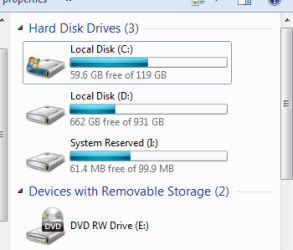
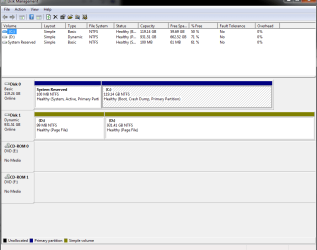
My Computer
At a glance
Windows 7 64 biti5 2500k overclocked to 4.3 GHz12 GB DDR3 1066MHzRadeon HD 5870
- Computer Manufacturer/Model Number
- I built it myself
- OS
- Windows 7 64 bit
- CPU
- i5 2500k overclocked to 4.3 GHz
- Motherboard
- Asus something, I don't feel like finding the model number.
- Memory
- 12 GB DDR3 1066MHz
- Graphics Card(s)
- Radeon HD 5870
- Sound Card
- whatever realtek 8 channel thing is built into the mobo
- Monitor(s) Displays
- emachines and acer
- Screen Resolution
- both are 1080p
- Hard Drives
- Internal desktop hard drives:
WD Black 2 TB (7200 rpm)
Samsung spinpoint 1 TB (7200 rpm)
External hard drive (usb 3.0!):
Samsung spinpoint eco green 2 TB (5400 rpm)
Spare unused hard drives:
WD black 1 TB (7200 rpm)
WD green 500 GB (idk rpm)
- PSU
- 1080 watts
- Case
- Xclio (can't find model number)
- Cooling
- see other info
- Keyboard
- el cheapo basic keyboard; I hate fancy keyboards.
- Mouse
- R.A.T. 7 (it's friggin awesome)
- Internet Speed
- 12 Mb/s (usually hovers around 11.5 Mb/s for speed tests)
- Other Info
- Case fans:
2 x 180mm top fans (256 color led)
1 x 250mm front fan (256 color led)
1 x 120mm rear fan
Cpu cooler: Scythe Yasya (massive thing with a 120mm fan)
Psu fan: 180mm (blue led)
gpu fan: idk, at least it's not loud.


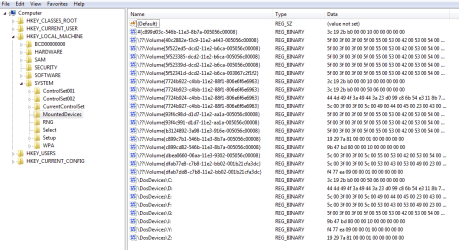


 Removed.


