Solved Drive showing in My Computer but not in Disk Managment

holydevil

New member
Local time
12:45 PM
Messages
17
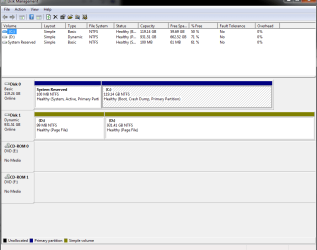
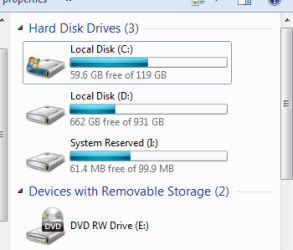
I have a System Reserved drive showing up in My Computer, but it isn't showing up in Disk Management so that I can remove the drive letter from it. Screenshots are attached.

Any help removing this rouge drive letter will be greatly appreciated!
 

Attachments
  • 2013-12-12 12_08_12-Computer.png
    2013-12-12 12_08_12-Computer.png
    8.1 KB · Views: 20
  • 2013-12-12 12_08_36-Disk Management.png
    2013-12-12 12_08_36-Disk Management.png
    18.6 KB · Views: 3

My Computer My Computer

At a glance

Windows 7 64 biti5 2500k overclocked to 4.3 GHz12 GB DDR3 1066MHzRadeon HD 5870
Computer Manufacturer/Model Number
I built it myself
OS
Windows 7 64 bit
CPU
i5 2500k overclocked to 4.3 GHz
Motherboard
Asus something, I don't feel like finding the model number.
Memory
12 GB DDR3 1066MHz
Graphics Card(s)
Radeon HD 5870
Sound Card
whatever realtek 8 channel thing is built into the mobo
Monitor(s) Displays
emachines and acer
Screen Resolution
both are 1080p
Hard Drives
Internal desktop hard drives:
WD Black 2 TB (7200 rpm)
Samsung spinpoint 1 TB (7200 rpm)
External hard drive (usb 3.0!):
Samsung spinpoint eco green 2 TB (5400 rpm)
Spare unused hard drives:
WD black 1 TB (7200 rpm)
WD green 500 GB (idk rpm)
PSU
1080 watts
Case
Xclio (can't find model number)
Cooling
see other info
Keyboard
el cheapo basic keyboard; I hate fancy keyboards.
Mouse
R.A.T. 7 (it's friggin awesome)
Internet Speed
12 Mb/s (usually hovers around 11.5 Mb/s for speed tests)
Other Info
Case fans:
2 x 180mm top fans (256 color led)
1 x 250mm front fan (256 color led)
1 x 120mm rear fan
Cpu cooler: Scythe Yasya (massive thing with a 120mm fan)
Psu fan: 180mm (blue led)
gpu fan: idk, at least it's not loud.
Last edited:

My Computer My Computer

At a glance

64-bit Windows 11 Pro for WorkstationsIntel i7-8700K OC'd to 5 GHz64 GB (4x16GB) G.SKILL TridentZ RGB DDR4 3600...ASUS ROG-STRIX-GTX1080TI-O11G-GAMING
Computer type
PC/Desktop
Computer Manufacturer/Model Number
Self built custom
OS
64-bit Windows 11 Pro for Workstations
CPU
Intel i7-8700K OC'd to 5 GHz
Motherboard
ASUS ROG Maximus XI Formula Z390
Memory
64 GB (4x16GB) G.SKILL TridentZ RGB DDR4 3600 MHz
Graphics Card(s)
ASUS ROG-STRIX-GTX1080TI-O11G-GAMING
Sound Card
Integrated
Monitor(s) Displays
2 x Samsung Odyssey G7 27"
Screen Resolution
2560x1440
Hard Drives
1TB Samsung 990 PRO M.2,
4TB Samsung 990 PRO PRO M.2,
TerraMaster F8 SSD Plus NAS
PSU
Seasonic Prime Titanium 850W
Case
Thermaltake Core P3
Cooling
Corsair Hydro H115i
Keyboard
Logitech wireless K800
Mouse
Logitech MX Master 4
Internet Speed
2 Gb/s Download and 100 Mb/s Upload
Antivirus
Malwarebyte Anti-Malware Premium
Browser
Google Chrome
Other Info
Logitech Z625 speaker system,
Logitech BRIO 4K Pro webcam,
HP Color LaserJet Pro MFP M477fdn,
APC SMART-UPS RT 1000 XL - SURT1000XLI,
Galaxy S23 Plus phone

Attachments

  • 2013-12-12 15_02_24-Registry Editor.png
    2013-12-12 15_02_24-Registry Editor.png
    23.2 KB · Views: 0

My Computer My Computer

At a glance

Windows 7 64 biti5 2500k overclocked to 4.3 GHz12 GB DDR3 1066MHzRadeon HD 5870
Computer Manufacturer/Model Number
I built it myself
OS
Windows 7 64 bit
CPU
i5 2500k overclocked to 4.3 GHz
Motherboard
Asus something, I don't feel like finding the model number.
Memory
12 GB DDR3 1066MHz
Graphics Card(s)
Radeon HD 5870
Sound Card
whatever realtek 8 channel thing is built into the mobo
Monitor(s) Displays
emachines and acer
Screen Resolution
both are 1080p
Hard Drives
Internal desktop hard drives:
WD Black 2 TB (7200 rpm)
Samsung spinpoint 1 TB (7200 rpm)
External hard drive (usb 3.0!):
Samsung spinpoint eco green 2 TB (5400 rpm)
Spare unused hard drives:
WD black 1 TB (7200 rpm)
WD green 500 GB (idk rpm)
PSU
1080 watts
Case
Xclio (can't find model number)
Cooling
see other info
Keyboard
el cheapo basic keyboard; I hate fancy keyboards.
Mouse
R.A.T. 7 (it's friggin awesome)
Internet Speed
12 Mb/s (usually hovers around 11.5 Mb/s for speed tests)
Other Info
Case fans:
2 x 180mm top fans (256 color led)
1 x 250mm front fan (256 color led)
1 x 120mm rear fan
Cpu cooler: Scythe Yasya (massive thing with a 120mm fan)
Psu fan: 180mm (blue led)
gpu fan: idk, at least it's not loud.
Odd. Does it still show after restarting the PC?

If so, then you might see if adding a drive letter to the "System Reserved" partition in Disk Management, then removing the drive letter may toggle it to not show in Computer anymore.

I also noticed that the two dynamic partitions on Disk 1 have the same drive letter D: . Are these spanned volumes? If so, then nothing to worry about. Personally, I think it would be better for it to be a basic disk instead of dynamic.
 

My Computer My Computer

At a glance

64-bit Windows 11 Pro for WorkstationsIntel i7-8700K OC'd to 5 GHz64 GB (4x16GB) G.SKILL TridentZ RGB DDR4 3600...ASUS ROG-STRIX-GTX1080TI-O11G-GAMING
Computer type
PC/Desktop
Computer Manufacturer/Model Number
Self built custom
OS
64-bit Windows 11 Pro for Workstations
CPU
Intel i7-8700K OC'd to 5 GHz
Motherboard
ASUS ROG Maximus XI Formula Z390
Memory
64 GB (4x16GB) G.SKILL TridentZ RGB DDR4 3600 MHz
Graphics Card(s)
ASUS ROG-STRIX-GTX1080TI-O11G-GAMING
Sound Card
Integrated
Monitor(s) Displays
2 x Samsung Odyssey G7 27"
Screen Resolution
2560x1440
Hard Drives
1TB Samsung 990 PRO M.2,
4TB Samsung 990 PRO PRO M.2,
TerraMaster F8 SSD Plus NAS
PSU
Seasonic Prime Titanium 850W
Case
Thermaltake Core P3
Cooling
Corsair Hydro H115i
Keyboard
Logitech wireless K800
Mouse
Logitech MX Master 4
Internet Speed
2 Gb/s Download and 100 Mb/s Upload
Antivirus
Malwarebyte Anti-Malware Premium
Browser
Google Chrome
Other Info
Logitech Z625 speaker system,
Logitech BRIO 4K Pro webcam,
HP Color LaserJet Pro MFP M477fdn,
APC SMART-UPS RT 1000 XL - SURT1000XLI,
Galaxy S23 Plus phone
In addition to Disk 1 being dynamic you appear to have pagefiles on it. I think the pagefile is best on your Disk 0 OS partition. Brink may comment further and on his tutorial
Virtual Memory Paging File - Change
I'm guessing Disk 0 is an SSD and disk 1 is your old HDD OS disk ????
 

My Computer My Computer

At a glance

Windows 7x64 Home Premium SP1Intel i7 2600kG.Skill Ripjaws (DDR3-1600) 2x4GBNvidia GeForce GTS 450; Intel HD Graphics 300...
Computer type
PC/Desktop
Computer Manufacturer/Model Number
Own build
OS
Windows 7x64 Home Premium SP1
CPU
Intel i7 2600k
Motherboard
ASUS P8Z68 Deluxe
Memory
G.Skill Ripjaws (DDR3-1600) 2x4GB
Graphics Card(s)
Nvidia GeForce GTS 450; Intel HD Graphics 3000(GT2+)
Monitor(s) Displays
Dell Ultrasharp IPS panel U2311H, Samsung SyncMaster P2350
Screen Resolution
1920x1080
Hard Drives
Samsung 850 Pro SSD 256GB, Samsung SSD 840 120GB, Seagates 1TB Barracuda ST31000528AS x2
PSU
Seasonic M12II 520W
Case
Lian Li Lancool PC-K60
Cooling
Case: 1x120mm, 3x140mm CPU: Hyper 212+
Keyboard
Logitech MK520 (wireless)
Mouse
Logitech MK520
Internet Speed
6-7 Mbps
Antivirus
Norton Security Premium, Malwarebytes on 2 (MSE on 3rd PC)
Browser
FireFox
Other Info
Audio: Logitech Z523 2.1
In addition to Disk 1 being dynamic you appear to have pagefiles on it. I think the pagefile is best on your Disk 0 OS partition. Brink may comment further and on his tutorial
Virtual Memory Paging File - Change
I'm guessing Disk 0 is an SSD and disk 1 is your old HDD OS disk ????

:ditto:
 

My Computer My Computer

At a glance

64-bit Windows 11 Pro for WorkstationsIntel i7-8700K OC'd to 5 GHz64 GB (4x16GB) G.SKILL TridentZ RGB DDR4 3600...ASUS ROG-STRIX-GTX1080TI-O11G-GAMING
Computer type
PC/Desktop
Computer Manufacturer/Model Number
Self built custom
OS
64-bit Windows 11 Pro for Workstations
CPU
Intel i7-8700K OC'd to 5 GHz
Motherboard
ASUS ROG Maximus XI Formula Z390
Memory
64 GB (4x16GB) G.SKILL TridentZ RGB DDR4 3600 MHz
Graphics Card(s)
ASUS ROG-STRIX-GTX1080TI-O11G-GAMING
Sound Card
Integrated
Monitor(s) Displays
2 x Samsung Odyssey G7 27"
Screen Resolution
2560x1440
Hard Drives
1TB Samsung 990 PRO M.2,
4TB Samsung 990 PRO PRO M.2,
TerraMaster F8 SSD Plus NAS
PSU
Seasonic Prime Titanium 850W
Case
Thermaltake Core P3
Cooling
Corsair Hydro H115i
Keyboard
Logitech wireless K800
Mouse
Logitech MX Master 4
Internet Speed
2 Gb/s Download and 100 Mb/s Upload
Antivirus
Malwarebyte Anti-Malware Premium
Browser
Google Chrome
Other Info
Logitech Z625 speaker system,
Logitech BRIO 4K Pro webcam,
HP Color LaserJet Pro MFP M477fdn,
APC SMART-UPS RT 1000 XL - SURT1000XLI,
Galaxy S23 Plus phone
Odd. Does it still show after restarting the PC?

If so, then you might see if adding a drive letter to the "System Reserved" partition in Disk Management, then removing the drive letter may toggle it to not show in Computer anymore.

I also noticed that the two dynamic partitions on Disk 1 have the same drive letter D: . Are these spanned volumes? If so, then nothing to worry about. Personally, I think it would be better for it to be a basic disk instead of dynamic.

I tried setting system reserved to I and setting it back to nothing before making the thread. No dice. Also it has persisted through the two or thee reboots I've done in the last few weeks.

It turned into dynamic when I extended it, but it isn't related to that being dynamic because I only changed that a day ago when messing with stuff, which I wish I hadn't done. I'll just have to deal with that and make it "normal" when I get a chance to copy data off that drive. Here's hoping that reformatting that disk and getting rid of the extra 100 MB thing gets rid of the I drive, although I don't see any reason for it to since it's not set to I.


In addition to Disk 1 being dynamic you appear to have pagefiles on it. I think the pagefile is best on your Disk 0 OS partition. Brink may comment further and on his tutorial
Virtual Memory Paging File - Change
I'm guessing Disk 0 is an SSD and disk 1 is your old HDD OS disk ????

My pagefile is 16 GB because I have 16 GB of ram, so it would take up way too much space on the SSD. I could probably just delete the page file though since 16 GB would be way more than enough for what I do on that computer.

Yes, Disk 0 is the OS disk and Disk 1 used to have Windows 7 on it, and when I formatted it I forgot to delete the 100 MB partition and just formatted the larger one.
 

My Computer My Computer

At a glance

Windows 7 64 biti5 2500k overclocked to 4.3 GHz12 GB DDR3 1066MHzRadeon HD 5870
Computer Manufacturer/Model Number
I built it myself
OS
Windows 7 64 bit
CPU
i5 2500k overclocked to 4.3 GHz
Motherboard
Asus something, I don't feel like finding the model number.
Memory
12 GB DDR3 1066MHz
Graphics Card(s)
Radeon HD 5870
Sound Card
whatever realtek 8 channel thing is built into the mobo
Monitor(s) Displays
emachines and acer
Screen Resolution
both are 1080p
Hard Drives
Internal desktop hard drives:
WD Black 2 TB (7200 rpm)
Samsung spinpoint 1 TB (7200 rpm)
External hard drive (usb 3.0!):
Samsung spinpoint eco green 2 TB (5400 rpm)
Spare unused hard drives:
WD black 1 TB (7200 rpm)
WD green 500 GB (idk rpm)
PSU
1080 watts
Case
Xclio (can't find model number)
Cooling
see other info
Keyboard
el cheapo basic keyboard; I hate fancy keyboards.
Mouse
R.A.T. 7 (it's friggin awesome)
Internet Speed
12 Mb/s (usually hovers around 11.5 Mb/s for speed tests)
Other Info
Case fans:
2 x 180mm top fans (256 color led)
1 x 250mm front fan (256 color led)
1 x 120mm rear fan
Cpu cooler: Scythe Yasya (massive thing with a 120mm fan)
Psu fan: 180mm (blue led)
gpu fan: idk, at least it's not loud.
A 1GB pagefile will suffice and should be on C.
 

My Computer My Computer

At a glance

Vista, Windows7, Mint Mate, Zorin, Windows 8from 1.6GHz Duo to i7
Computer Manufacturer/Model Number
HP, Dell, Gateway, Toshiba - 4 laptops and 2 desktops
OS
Vista, Windows7, Mint Mate, Zorin, Windows 8
CPU
from 1.6GHz Duo to i7
Monitor(s) Displays
2x HP w2207
Hard Drives
5x HDD, 7x SSD, 12x Externals
Keyboard
with trackball - no mices
Mouse
Trackball mice
Internet Speed
DSL 6000

My Computer My Computer

At a glance

Windows 7 Professional (x64/SP1) /Linux Mint 16Intel i5-3570k 3.40 GHz @ 4.6 GHz8GB (2133MHz) DDR3Asus GTX560 Ti (Nvidia)
Computer type
PC/Desktop
Computer Manufacturer/Model Number
GIGABYTE Rig (Custom)
OS
Windows 7 Professional (x64/SP1) /Linux Mint 16
CPU
Intel i5-3570k 3.40 GHz @ 4.6 GHz
Motherboard
GIGABYTE Z77X-D3H
Memory
8GB (2133MHz) DDR3
Graphics Card(s)
Asus GTX560 Ti (Nvidia)
Monitor(s) Displays
HP 23", Acer 19" and a Dell 17"
Screen Resolution
1080p, 1440x900 and 1280x1024
Hard Drives
Sandisk Extreme 120GB (SSD), WD 2TB green and 4 other HDDs
PSU
Antec 620w High Current Gamer
Case
Corsair Obsidian 600D
Cooling
CPU - Antec KÜHLER H₂O 920
Keyboard
Steelseries 6Gv2
Mouse
Roccat LUA
Internet Speed
4 - 6mb/s
Antivirus
ESET NOD32
Browser
Chrome/Firefox
Other Info
Intel Gigabit CT (PCIE NIC) and Thinkpad T61p,

My Computer My Computer

At a glance

64-bit Windows 11 Pro for WorkstationsIntel i7-8700K OC'd to 5 GHz64 GB (4x16GB) G.SKILL TridentZ RGB DDR4 3600...ASUS ROG-STRIX-GTX1080TI-O11G-GAMING
Computer type
PC/Desktop
Computer Manufacturer/Model Number
Self built custom
OS
64-bit Windows 11 Pro for Workstations
CPU
Intel i7-8700K OC'd to 5 GHz
Motherboard
ASUS ROG Maximus XI Formula Z390
Memory
64 GB (4x16GB) G.SKILL TridentZ RGB DDR4 3600 MHz
Graphics Card(s)
ASUS ROG-STRIX-GTX1080TI-O11G-GAMING
Sound Card
Integrated
Monitor(s) Displays
2 x Samsung Odyssey G7 27"
Screen Resolution
2560x1440
Hard Drives
1TB Samsung 990 PRO M.2,
4TB Samsung 990 PRO PRO M.2,
TerraMaster F8 SSD Plus NAS
PSU
Seasonic Prime Titanium 850W
Case
Thermaltake Core P3
Cooling
Corsair Hydro H115i
Keyboard
Logitech wireless K800
Mouse
Logitech MX Master 4
Internet Speed
2 Gb/s Download and 100 Mb/s Upload
Antivirus
Malwarebyte Anti-Malware Premium
Browser
Google Chrome
Other Info
Logitech Z625 speaker system,
Logitech BRIO 4K Pro webcam,
HP Color LaserJet Pro MFP M477fdn,
APC SMART-UPS RT 1000 XL - SURT1000XLI,
Galaxy S23 Plus phone
7. To Remove a Drive Letter
A) In the command prompt, type remove letter=letter and press Enter. (see screenshot below)


Little problem Shawn - there is no screenshot below - only above.
 

My Computer My Computer

At a glance

Vista, Windows7, Mint Mate, Zorin, Windows 8from 1.6GHz Duo to i7
Computer Manufacturer/Model Number
HP, Dell, Gateway, Toshiba - 4 laptops and 2 desktops
OS
Vista, Windows7, Mint Mate, Zorin, Windows 8
CPU
from 1.6GHz Duo to i7
Monitor(s) Displays
2x HP w2207
Hard Drives
5x HDD, 7x SSD, 12x Externals
Keyboard
with trackball - no mices
Mouse
Trackball mice
Internet Speed
DSL 6000
:o:D Removed.
 

My Computer My Computer

At a glance

64-bit Windows 11 Pro for WorkstationsIntel i7-8700K OC'd to 5 GHz64 GB (4x16GB) G.SKILL TridentZ RGB DDR4 3600...ASUS ROG-STRIX-GTX1080TI-O11G-GAMING
Computer type
PC/Desktop
Computer Manufacturer/Model Number
Self built custom
OS
64-bit Windows 11 Pro for Workstations
CPU
Intel i7-8700K OC'd to 5 GHz
Motherboard
ASUS ROG Maximus XI Formula Z390
Memory
64 GB (4x16GB) G.SKILL TridentZ RGB DDR4 3600 MHz
Graphics Card(s)
ASUS ROG-STRIX-GTX1080TI-O11G-GAMING
Sound Card
Integrated
Monitor(s) Displays
2 x Samsung Odyssey G7 27"
Screen Resolution
2560x1440
Hard Drives
1TB Samsung 990 PRO M.2,
4TB Samsung 990 PRO PRO M.2,
TerraMaster F8 SSD Plus NAS
PSU
Seasonic Prime Titanium 850W
Case
Thermaltake Core P3
Cooling
Corsair Hydro H115i
Keyboard
Logitech wireless K800
Mouse
Logitech MX Master 4
Internet Speed
2 Gb/s Download and 100 Mb/s Upload
Antivirus
Malwarebyte Anti-Malware Premium
Browser
Google Chrome
Other Info
Logitech Z625 speaker system,
Logitech BRIO 4K Pro webcam,
HP Color LaserJet Pro MFP M477fdn,
APC SMART-UPS RT 1000 XL - SURT1000XLI,
Galaxy S23 Plus phone
Sooner or later you should convert disk 1 to BASIC.
http://www.sevenforums.com/tutorials/26829-convert-dynamic-disk-basic-disk.html
I'd go for option 1 but backup critical data from disk 1 first.
Alternatively backup your disk 1 data and use the other option of formatting disk 1.
A small pagefile on your OS partition (disk 0 partition 2) is all you need with an SSD as WHS has indicated.
Again see the tutorial for pagefile management
http://www.vistax64.com/tutorials/132201-virtual-memory-paging-file-change.html
 

My Computer My Computer

At a glance

Windows 7x64 Home Premium SP1Intel i7 2600kG.Skill Ripjaws (DDR3-1600) 2x4GBNvidia GeForce GTS 450; Intel HD Graphics 300...
Computer type
PC/Desktop
Computer Manufacturer/Model Number
Own build
OS
Windows 7x64 Home Premium SP1
CPU
Intel i7 2600k
Motherboard
ASUS P8Z68 Deluxe
Memory
G.Skill Ripjaws (DDR3-1600) 2x4GB
Graphics Card(s)
Nvidia GeForce GTS 450; Intel HD Graphics 3000(GT2+)
Monitor(s) Displays
Dell Ultrasharp IPS panel U2311H, Samsung SyncMaster P2350
Screen Resolution
1920x1080
Hard Drives
Samsung 850 Pro SSD 256GB, Samsung SSD 840 120GB, Seagates 1TB Barracuda ST31000528AS x2
PSU
Seasonic M12II 520W
Case
Lian Li Lancool PC-K60
Cooling
Case: 1x120mm, 3x140mm CPU: Hyper 212+
Keyboard
Logitech MK520 (wireless)
Mouse
Logitech MK520
Internet Speed
6-7 Mbps
Antivirus
Norton Security Premium, Malwarebytes on 2 (MSE on 3rd PC)
Browser
FireFox
Other Info
Audio: Logitech Z523 2.1
I have figured out that the drive causing the problem is the System Reserved on Disk 0. If I set it to another drive letter such as "G", the "I" drive goes away, but when I remove the drive letter I set, the "I" drive comes back. I tried option 3 on Brink's tutorial. I got an error saying "Virtual Disk Service error: The path is not found."

If I delete the partition after backing it up, then recreate it and restore the files, will that mess up Windows' ability to use that should it ever need to?

Also as for the pagefile and the oddly formatted drive, I removed the pagefile completely, and am in progress backing up data off that drive to reformat it properly. I will add the pagefile in the future if I ever need to but I've never had a problem with 16 or 32GB of ram and no page file on other computers.

At the moment, the "I" drive is not showing in My Computer. Sometimes it goes away for an hour or two but it has always come back.

Have you tried this as a solution?

Hide physical drives in Windows Explorer

Really it's for XP but works on Vista and thusly it should work on 7.

Here is the link to demonstrate it on Vista Hide Drives from Your Computer in Windows 7 or Vista

If it works it isn't as complete of a solution as removing the drive letter but hopefully it will hide it from explorer. It's a wildshot but could work. :)

I'd do that, but it would only be a band-aid that will come to bite me later if I try to set something as the "I" drive and forget I set that.
 

My Computer My Computer

At a glance

Windows 7 64 biti5 2500k overclocked to 4.3 GHz12 GB DDR3 1066MHzRadeon HD 5870
Computer Manufacturer/Model Number
I built it myself
OS
Windows 7 64 bit
CPU
i5 2500k overclocked to 4.3 GHz
Motherboard
Asus something, I don't feel like finding the model number.
Memory
12 GB DDR3 1066MHz
Graphics Card(s)
Radeon HD 5870
Sound Card
whatever realtek 8 channel thing is built into the mobo
Monitor(s) Displays
emachines and acer
Screen Resolution
both are 1080p
Hard Drives
Internal desktop hard drives:
WD Black 2 TB (7200 rpm)
Samsung spinpoint 1 TB (7200 rpm)
External hard drive (usb 3.0!):
Samsung spinpoint eco green 2 TB (5400 rpm)
Spare unused hard drives:
WD black 1 TB (7200 rpm)
WD green 500 GB (idk rpm)
PSU
1080 watts
Case
Xclio (can't find model number)
Cooling
see other info
Keyboard
el cheapo basic keyboard; I hate fancy keyboards.
Mouse
R.A.T. 7 (it's friggin awesome)
Internet Speed
12 Mb/s (usually hovers around 11.5 Mb/s for speed tests)
Other Info
Case fans:
2 x 180mm top fans (256 color led)
1 x 250mm front fan (256 color led)
1 x 120mm rear fan
Cpu cooler: Scythe Yasya (massive thing with a 120mm fan)
Psu fan: 180mm (blue led)
gpu fan: idk, at least it's not loud.
No. You really don't want to delete or mess with the "System Reserved" partition like that. Doing so could make your Windows unbootable, and will be a real pain to sort out.

When using Option Three, does it show the I: letter after "list volume"? If not, then that would be why you got the error. If you haven't already, try Option Three when the I: letter is showing in your My Computer window to see if it may also show in the command prompt to hopefully be able to remove it.
 

My Computer My Computer

At a glance

64-bit Windows 11 Pro for WorkstationsIntel i7-8700K OC'd to 5 GHz64 GB (4x16GB) G.SKILL TridentZ RGB DDR4 3600...ASUS ROG-STRIX-GTX1080TI-O11G-GAMING
Computer type
PC/Desktop
Computer Manufacturer/Model Number
Self built custom
OS
64-bit Windows 11 Pro for Workstations
CPU
Intel i7-8700K OC'd to 5 GHz
Motherboard
ASUS ROG Maximus XI Formula Z390
Memory
64 GB (4x16GB) G.SKILL TridentZ RGB DDR4 3600 MHz
Graphics Card(s)
ASUS ROG-STRIX-GTX1080TI-O11G-GAMING
Sound Card
Integrated
Monitor(s) Displays
2 x Samsung Odyssey G7 27"
Screen Resolution
2560x1440
Hard Drives
1TB Samsung 990 PRO M.2,
4TB Samsung 990 PRO PRO M.2,
TerraMaster F8 SSD Plus NAS
PSU
Seasonic Prime Titanium 850W
Case
Thermaltake Core P3
Cooling
Corsair Hydro H115i
Keyboard
Logitech wireless K800
Mouse
Logitech MX Master 4
Internet Speed
2 Gb/s Download and 100 Mb/s Upload
Antivirus
Malwarebyte Anti-Malware Premium
Browser
Google Chrome
Other Info
Logitech Z625 speaker system,
Logitech BRIO 4K Pro webcam,
HP Color LaserJet Pro MFP M477fdn,
APC SMART-UPS RT 1000 XL - SURT1000XLI,
Galaxy S23 Plus phone
No. You really don't want to delete or mess with the "System Reserved" partition like that. Doing so could make your Windows unbootable, and will be a real pain to sort out.

When using Option Three, does it show the I: letter after "list volume"? If not, then that would be why you got the error. If you haven't already, try Option Three when the I: letter is showing in your My Computer window to see if it may also show in the command prompt to hopefully be able to remove it.

I'm just gonna go ahead and delete the partition to have this problem over with because I've done it a few times in the past and no issues have shown up from doing that. I just wanted to see if I could get the I: drive thing fixed without having to delete the partition.

And pain to sort out doesn't apply to me :P
I reinstall windows every few months just because anyway, and horribly messing up my system would just give me a good reason to do it again.

No, it didn't show that drive when I used list volume.
 

My Computer My Computer

At a glance

Windows 7 64 biti5 2500k overclocked to 4.3 GHz12 GB DDR3 1066MHzRadeon HD 5870
Computer Manufacturer/Model Number
I built it myself
OS
Windows 7 64 bit
CPU
i5 2500k overclocked to 4.3 GHz
Motherboard
Asus something, I don't feel like finding the model number.
Memory
12 GB DDR3 1066MHz
Graphics Card(s)
Radeon HD 5870
Sound Card
whatever realtek 8 channel thing is built into the mobo
Monitor(s) Displays
emachines and acer
Screen Resolution
both are 1080p
Hard Drives
Internal desktop hard drives:
WD Black 2 TB (7200 rpm)
Samsung spinpoint 1 TB (7200 rpm)
External hard drive (usb 3.0!):
Samsung spinpoint eco green 2 TB (5400 rpm)
Spare unused hard drives:
WD black 1 TB (7200 rpm)
WD green 500 GB (idk rpm)
PSU
1080 watts
Case
Xclio (can't find model number)
Cooling
see other info
Keyboard
el cheapo basic keyboard; I hate fancy keyboards.
Mouse
R.A.T. 7 (it's friggin awesome)
Internet Speed
12 Mb/s (usually hovers around 11.5 Mb/s for speed tests)
Other Info
Case fans:
2 x 180mm top fans (256 color led)
1 x 250mm front fan (256 color led)
1 x 120mm rear fan
Cpu cooler: Scythe Yasya (massive thing with a 120mm fan)
Psu fan: 180mm (blue led)
gpu fan: idk, at least it's not loud.
Ah, good. Yeah, I'm usually having to reinstall every few months as well with all the tinkering I do.
 

My Computer My Computer

At a glance

64-bit Windows 11 Pro for WorkstationsIntel i7-8700K OC'd to 5 GHz64 GB (4x16GB) G.SKILL TridentZ RGB DDR4 3600...ASUS ROG-STRIX-GTX1080TI-O11G-GAMING
Computer type
PC/Desktop
Computer Manufacturer/Model Number
Self built custom
OS
64-bit Windows 11 Pro for Workstations
CPU
Intel i7-8700K OC'd to 5 GHz
Motherboard
ASUS ROG Maximus XI Formula Z390
Memory
64 GB (4x16GB) G.SKILL TridentZ RGB DDR4 3600 MHz
Graphics Card(s)
ASUS ROG-STRIX-GTX1080TI-O11G-GAMING
Sound Card
Integrated
Monitor(s) Displays
2 x Samsung Odyssey G7 27"
Screen Resolution
2560x1440
Hard Drives
1TB Samsung 990 PRO M.2,
4TB Samsung 990 PRO PRO M.2,
TerraMaster F8 SSD Plus NAS
PSU
Seasonic Prime Titanium 850W
Case
Thermaltake Core P3
Cooling
Corsair Hydro H115i
Keyboard
Logitech wireless K800
Mouse
Logitech MX Master 4
Internet Speed
2 Gb/s Download and 100 Mb/s Upload
Antivirus
Malwarebyte Anti-Malware Premium
Browser
Google Chrome
Other Info
Logitech Z625 speaker system,
Logitech BRIO 4K Pro webcam,
HP Color LaserJet Pro MFP M477fdn,
APC SMART-UPS RT 1000 XL - SURT1000XLI,
Galaxy S23 Plus phone
Hmm, aren't you guys using images. And for tinkering, a VMware virtual partition is preferable. The VMware folder is easy to copy for backup.
 

My Computer My Computer

At a glance

Vista, Windows7, Mint Mate, Zorin, Windows 8from 1.6GHz Duo to i7
Computer Manufacturer/Model Number
HP, Dell, Gateway, Toshiba - 4 laptops and 2 desktops
OS
Vista, Windows7, Mint Mate, Zorin, Windows 8
CPU
from 1.6GHz Duo to i7
Monitor(s) Displays
2x HP w2207
Hard Drives
5x HDD, 7x SSD, 12x Externals
Keyboard
with trackball - no mices
Mouse
Trackball mice
Internet Speed
DSL 6000
Oh, yes. I use images, but it usually only takes me about 20 minutes for a full clean install of Windows 8.1 and getting it fully setup. I'm getting to where I can do it in my sleep now. LOL

I usually use VMs for most tinkering, but some things can only be tested on the main installation.
 

My Computer My Computer

At a glance

64-bit Windows 11 Pro for WorkstationsIntel i7-8700K OC'd to 5 GHz64 GB (4x16GB) G.SKILL TridentZ RGB DDR4 3600...ASUS ROG-STRIX-GTX1080TI-O11G-GAMING
Computer type
PC/Desktop
Computer Manufacturer/Model Number
Self built custom
OS
64-bit Windows 11 Pro for Workstations
CPU
Intel i7-8700K OC'd to 5 GHz
Motherboard
ASUS ROG Maximus XI Formula Z390
Memory
64 GB (4x16GB) G.SKILL TridentZ RGB DDR4 3600 MHz
Graphics Card(s)
ASUS ROG-STRIX-GTX1080TI-O11G-GAMING
Sound Card
Integrated
Monitor(s) Displays
2 x Samsung Odyssey G7 27"
Screen Resolution
2560x1440
Hard Drives
1TB Samsung 990 PRO M.2,
4TB Samsung 990 PRO PRO M.2,
TerraMaster F8 SSD Plus NAS
PSU
Seasonic Prime Titanium 850W
Case
Thermaltake Core P3
Cooling
Corsair Hydro H115i
Keyboard
Logitech wireless K800
Mouse
Logitech MX Master 4
Internet Speed
2 Gb/s Download and 100 Mb/s Upload
Antivirus
Malwarebyte Anti-Malware Premium
Browser
Google Chrome
Other Info
Logitech Z625 speaker system,
Logitech BRIO 4K Pro webcam,
HP Color LaserJet Pro MFP M477fdn,
APC SMART-UPS RT 1000 XL - SURT1000XLI,
Galaxy S23 Plus phone
WOW, 20 minutes for an installation. It takes me a day to process the 360 updates - for Windows 7. But I guess in Windows 8.1 there are not so many yet.

Last summer I reinstalled a Vista system on my wife's laptop in Germany. That was really fun. The recovery partition was from March 2007 without SP1, SP2 and all the other updates. Then she had Office from about the same time. And she also uses AOL which is a major installation if you want to have the real thing - not the browser version.
 

My Computer My Computer

At a glance

Vista, Windows7, Mint Mate, Zorin, Windows 8from 1.6GHz Duo to i7
Computer Manufacturer/Model Number
HP, Dell, Gateway, Toshiba - 4 laptops and 2 desktops
OS
Vista, Windows7, Mint Mate, Zorin, Windows 8
CPU
from 1.6GHz Duo to i7
Monitor(s) Displays
2x HP w2207
Hard Drives
5x HDD, 7x SSD, 12x Externals
Keyboard
with trackball - no mices
Mouse
Trackball mice
Internet Speed
DSL 6000
Back
Top