Solved Urgent, need help.

KingzofDawn

New member
Local time
4:12 PM
Messages
14
Some person with an Indian voice called and told me I was hacked. I was foolish enough to believe them and my computer was connected to their "technician". I was tricked to click the bottom technician thing on their website, winithub.com.

Somebody, please tell me. I forced shut down my computer. Are they still connected and do I have to disconnect them somehow. Luckily they did not get my personal information. Please I need an answer quick.
 

My Computer

OS
Windows 7 Ultimate x64
Can you take the computer off of the internet while we look into this for you?

Can you visit this forum via smartphone or another computer?
 

My Computer

Computer type
Laptop
Computer Manufacturer/Model Number
Employer provided Dell Latitude
OS
W7 Pro SP1 64bit
CPU
i7
Memory
8GB
Graphics Card(s)
Intel HD Graphics
Hard Drives
crappy SSD
Antivirus
Employer mandated Symantec Endpoint Protection
Browser
Pale Moon 64bit, IE11 64bit & Chrome 64bit
I am on my laptop for the time being while I sort this out.
 

My Computer

OS
Windows 7 Ultimate x64
The winithub.com website has 3 "technician links" at the bottom.

The first link is to a remote control tool from ammyy.
The second link is to a remote control tool from logmein.
The third link is to a remote control tool from teamviewer.

Do you recall which one you used?
 

My Computer

Computer type
Laptop
Computer Manufacturer/Model Number
Employer provided Dell Latitude
OS
W7 Pro SP1 64bit
CPU
i7
Memory
8GB
Graphics Card(s)
Intel HD Graphics
Hard Drives
crappy SSD
Antivirus
Employer mandated Symantec Endpoint Protection
Browser
Pale Moon 64bit, IE11 64bit & Chrome 64bit
Then you probably have a file named AA_v3.exe on your computer.

I've used that remote control tool before...
...but I'm not familiar with every single feature that it offers.
So, I cannot say if it has a "call back" or reconnect feature.

How does the desktop* connect to your network?
LAN cable?
Wireless?

*I'm guessing that the computer that you downloaded the file to is a desktop...
...you did not say.
 

My Computer

Computer type
Laptop
Computer Manufacturer/Model Number
Employer provided Dell Latitude
OS
W7 Pro SP1 64bit
CPU
i7
Memory
8GB
Graphics Card(s)
Intel HD Graphics
Hard Drives
crappy SSD
Antivirus
Employer mandated Symantec Endpoint Protection
Browser
Pale Moon 64bit, IE11 64bit & Chrome 64bit
Disconnect the LAN cable and turn the computer back on.

Do you know where the file that you downloaded is?

In the top left corner of this forum webpage, there should be a link named Quick Links. Click on that and select Live Posts. Once that page loads, put a check in the option for subscribed threads only.
 

My Computer

Computer type
Laptop
Computer Manufacturer/Model Number
Employer provided Dell Latitude
OS
W7 Pro SP1 64bit
CPU
i7
Memory
8GB
Graphics Card(s)
Intel HD Graphics
Hard Drives
crappy SSD
Antivirus
Employer mandated Symantec Endpoint Protection
Browser
Pale Moon 64bit, IE11 64bit & Chrome 64bit
I have no idea where it is downloaded. I clicked run.
 

My Computer

OS
Windows 7 Ultimate x64
What browser were you using? If you were using Internet Explorer, then the file is most likely in your temporary files area.

Is the desktop* disconnected from your network and turned on?

*I'm guessing that the computer that you downloaded the file to is a desktop...
...you did not say.
 

My Computer

Computer type
Laptop
Computer Manufacturer/Model Number
Employer provided Dell Latitude
OS
W7 Pro SP1 64bit
CPU
i7
Memory
8GB
Graphics Card(s)
Intel HD Graphics
Hard Drives
crappy SSD
Antivirus
Employer mandated Symantec Endpoint Protection
Browser
Pale Moon 64bit, IE11 64bit & Chrome 64bit
I guess I'll try to find it and delete it. I'll get back after a while.
 

My Computer

OS
Windows 7 Ultimate x64
Sorry - I did not mean to imply that you should delete anything just yet.
 

My Computer

Computer type
Laptop
Computer Manufacturer/Model Number
Employer provided Dell Latitude
OS
W7 Pro SP1 64bit
CPU
i7
Memory
8GB
Graphics Card(s)
Intel HD Graphics
Hard Drives
crappy SSD
Antivirus
Employer mandated Symantec Endpoint Protection
Browser
Pale Moon 64bit, IE11 64bit & Chrome 64bit
Just locate the EXE - because there should also be a log file in the same folder.
 

My Computer

Computer type
Laptop
Computer Manufacturer/Model Number
Employer provided Dell Latitude
OS
W7 Pro SP1 64bit
CPU
i7
Memory
8GB
Graphics Card(s)
Intel HD Graphics
Hard Drives
crappy SSD
Antivirus
Employer mandated Symantec Endpoint Protection
Browser
Pale Moon 64bit, IE11 64bit & Chrome 64bit
You have not confirmed that you disconnected the computer from your network.
 

My Computer

Computer type
Laptop
Computer Manufacturer/Model Number
Employer provided Dell Latitude
OS
W7 Pro SP1 64bit
CPU
i7
Memory
8GB
Graphics Card(s)
Intel HD Graphics
Hard Drives
crappy SSD
Antivirus
Employer mandated Symantec Endpoint Protection
Browser
Pale Moon 64bit, IE11 64bit & Chrome 64bit
After a little bit of research, i found that "ammyy" is quite often used to scam people, post after post on the MS forums, To ensure they dont get into your computer, from what i read, the best way is just to locate and delete the .EXE after this, if that is the ONLY thing they asked and succeeded in getting you to do, once that file is deleted, i think your safe buddy, You could run scans etc to be on the safe side, good luck
 

My Computer

Computer type
Laptop
Computer Manufacturer/Model Number
Packard Bell
OS
Windows 7 Home Premium 64Bit
CPU
AMD A6-3420M 1.5GHZ OC - 2.0GHZ
Memory
4GB DDR3 1600MHZ
Graphics Card(s)
AMD RADEON 6520G+AMD RADEON HD7470M 1GB DDR3
Screen Resolution
1366x768
Hard Drives
500GB SATA
Internet Speed
18Mb Unlimited
Antivirus
AVAST!
Browser
MOZILLA FIREFOX
Ok thanks guys, I fixed the problem, ran multiple scans on my computer and I can safely say it is fixed. Thanks for the help
 

My Computer

OS
Windows 7 Ultimate x64
We don't have near enough info to declare this computer safe or clean.
 

My Computer

Computer type
Laptop
Computer Manufacturer/Model Number
Employer provided Dell Latitude
OS
W7 Pro SP1 64bit
CPU
i7
Memory
8GB
Graphics Card(s)
Intel HD Graphics
Hard Drives
crappy SSD
Antivirus
Employer mandated Symantec Endpoint Protection
Browser
Pale Moon 64bit, IE11 64bit & Chrome 64bit
I'd recommend running some scans and posting the logs back here to ensure you are safe,

Please download Junkware Removal Tool to your desktop.
  • Shut down your protection software now to avoid potential conflicts.
  • Run the tool by double-clicking it. If you are using Windows Vista, 7, or 8; instead of double-clicking, right-mouse click JRT.exe and select "Run as Administrator".
  • The tool will open and start scanning your system.
  • Please be patient as this can take a while to complete depending on your system's specifications.
  • On completion, a log (JRT.txt) is saved to your desktop and will automatically open.
  • Post the contents of JRT.txt into your next message.
Another


download AdwCleaner by Xplode and save to your Desktop.

  • Double click on AdwCleaner.exe to run the tool.
    Vista/Windows 7/8 users right-click and select Run As Administrator.
  • Click on the Scan button.
  • AdwCleaner will begin...be patient as the scan may take some time to complete.
  • After the scan has finished, click on the Report button...a logfile (AdwCleaner[R#].txt) will open in Notepad for review (where the largest value of # represents the most recent report).
  • The contents of the log file may be confusing. Unless you see a program name that you know should not be removed, don't worry about it. If you see an entry you want to keep, let me know about it.
  • Copy and paste the contents of that logfile in your next reply.
  • A copy of all logfiles are saved in the C:\AdwCleaner folder which was created when running the tool.
Using AdwCleaner v3: Scan & Clean:
Double click on AdwCleaner.exe to run the tool again.
Click on the Scan button.
AdwCleaner will begin to scan your computer like it did before.
After the scan has finished...

This time click on the Clean button.
Press OK when asked to close all programs and follow the onscreen prompts.
Press OK again to allow AdwCleaner to restart the computer and complete the removal process.
After rebooting, a logfile report (AdwCleaner[S#].txt) will open automatically (where the largest value of # represents the most recent report).
Copy and paste the contents of that logfile in your next reply.
A copy of that logfile will also be saved in the C:\AdwCleaner folder
 

My Computer

Computer type
Laptop
Computer Manufacturer/Model Number
Packard Bell
OS
Windows 7 Home Premium 64Bit
CPU
AMD A6-3420M 1.5GHZ OC - 2.0GHZ
Memory
4GB DDR3 1600MHZ
Graphics Card(s)
AMD RADEON 6520G+AMD RADEON HD7470M 1GB DDR3
Screen Resolution
1366x768
Hard Drives
500GB SATA
Internet Speed
18Mb Unlimited
Antivirus
AVAST!
Browser
MOZILLA FIREFOX
We don't have near enough info to declare this computer safe or clean.

Your are absolutely correct. Not enough information.
Maybe the OP will get back to you.
 

My Computer

Computer type
PC/Desktop
Computer Manufacturer/Model Number
Home made Desktop
OS
Windows 10 Pro. 64/ version 1709 Windows 7 Pro/64
CPU
Intel i7-6800K @ 4.3
Motherboard
ASUS X-99 Deluxe II
Memory
Corsair Platinum 16 gig @2400
Graphics Card(s)
EVGA GTX 1070 OC
Monitor(s) Displays
Asus 27" LED LCD/VE278Q
Screen Resolution
1920-1080 or 1280-720 HDMI
Hard Drives
INTEL SSD 730-240 Gb Sata 3.0/
PSU
EVGA Platium 1200W
Case
Phanteks Luxe Tempered Glass 8 fans/ one radiator
Cooling
XSPC/ Water Cooled CPU
Keyboard
Das 4 Professional
Mouse
Logitech M705/MX Anywhere 2-S
Internet Speed
100 mbits
Antivirus
Microsoft Security Essentials/ Malwarebytes Premium 3.0/ SAS
Browser
I.E. 11 default/Firefox/ ISP Time Warner Cable/Spectrum
Other Info
LG BluRay Burner/
Sound system-KLipsch-THX/
Icy Dock ssd Hot Swap bays.
We don't have near enough info to declare this computer safe or clean.

Your are absolutely correct. Not enough information.
Maybe the OP will get back to you.
I'm not holding out much hope for a slow and methodical examination of this incident.


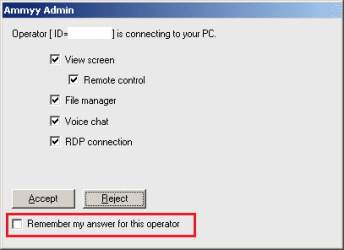
This remote admin tool (RAT) has the ability to transfer files in both directions without additional warnings after the initial screen is accepted:
ammyy-1.png

We don't know if the OP placed a check by "Remember my answer for this operator"* or what options were agreed to. We don't even know if the person that called the OP ever took remote control of the computer in question. If so, did that person run any apps? That kind of seems important.

*removing the ammyy folder from the programdata area makes the app "forget".

After the incident:
We don't know if the computer was taken off of the network while the issue is being worked.

We don't know what browser was used to download the RAT (which might help us to find the log file). That said, the logging seems to only detail errors. A successful transfer of files would not be logged :-(


I could have handled this thread better. I'm not thinking all that clearly after staying up all night clearing stubborn infections (via remote control) from two computers that I support. More poor marks for MSE :-(


I should have made my first post to this thread read something like:
You may feel panicked right now, but the best course of action is to slow down and do nothing without careful consideration. Leave the computer in question turned off until we develop a plan to examine it.

I also should have stopped going forward until my questions were answered. Specifically, was the computer off of the network.


Ammyy makes a legit RAT that is used by lots of companies. There are many other RATs that operate in much the same way (e.g. nothing to install, convey your ID to the other person to allow remote control).

 
Last edited:

My Computer

Computer type
Laptop
Computer Manufacturer/Model Number
Employer provided Dell Latitude
OS
W7 Pro SP1 64bit
CPU
i7
Memory
8GB
Graphics Card(s)
Intel HD Graphics
Hard Drives
crappy SSD
Antivirus
Employer mandated Symantec Endpoint Protection
Browser
Pale Moon 64bit, IE11 64bit & Chrome 64bit
Back
Top