i think i have got virus

Mysterious

unknown
Member
VIP
Local time
5:10 AM
Messages
108
Location
India,Punjab
Hi guys,it is the 4-5th time i have got virus in windows 7.i think windows 7 catch virus more frequently than windows 8,because windows 8 have windows defender which is good than windows 7's windows defender.i didn't installed any antivirus because i thought windows defender works as good as in windows 8 & tell me if i have any virus in my pc,e.g when i connect any usb or media device to my pc.
but i was wrong my friend gave me some videos in his pen drive & i just copy pasted them in my hard drive.i thought windows defender will tell me if it have any viruses or any problem.
just after that my laptop fan running very fast & when i open task manager my cpu usage goes to 90% but after some seconds it goes to normal 5-6%.
i already ran malwarebytes anti-malware latest version full scan & also updated it.but it didn't caught anything.
i also ran windows defender full scan,but no use.still fan running fast & as of this my laptop battery also draining fast.it only lasts for 1 & a half hour.before it lasts for 3-3.5 hours.
what i should do now,i don't want to re-install windows,plz help :confused:
 

My Computer My Computer

Computer type
Laptop
Computer Manufacturer/Model Number
Asus
OS
Windows 7 Ultimate x86
CPU
Intel® Pentium® Dual Core CPU B950 @ 2.10GHz
Motherboard
Asustek Computer Inc.
Memory
2GB DDR3
Graphics Card(s)
Intel® HD Graphics
Sound Card
Realtek High Definition Audio(ALC269) With Sonic Master
Screen Resolution
1366x768
Hard Drives
320GB Seagate
Keyboard
Keyboard Device Filter (Provider-ATK)
Mouse
HID-compliant mouse,Microsoft PS2/Mouse
Internet Speed
Very Slow
Antivirus
Kaspersky Internet Security 2013/Malwarebytes Anti-Malware
Browser
Goggle Chrome
Windows Defender in Windows 8 is NOT the same as Windows Defender in Windows 7. Windows Defender in Windows 8 is the same as running Microsoft Security Essentials which helps guard against viruses, spyware, and other malicious software. It provides real-time protection for your home or small business PCs.

Windows Defender in Windows 7 is an anti-spyware product, not an anti-virus product.

Windows Defender - Turn On or Off in Windows 8

Windows Defender - Microsoft Windows

I would suggest you install a full featured anti-virus suite on your Windows 7 computer. Without getting into the old argument of which anti-virus is the best, there are many reputable AV products available. Some are free and some are not.
 

My Computer My Computer

Computer type
Laptop
Computer Manufacturer/Model Number
Sony Vaio VPCEB47GM Laptop
OS
Win 7 Pro 64-bit
CPU
Intel i5 2.4 Ghz
Memory
8GB DDR3
Graphics Card(s)
Intel HD 3000
Sound Card
IDT High Definition
Monitor(s) Displays
15.6 WGXA Anti-Glare LED
Screen Resolution
1280x800
Hard Drives
640Gb 7200rpm
Antivirus
MSE
Browser
Opera (primary) with IE9 backup
Have you installed any new third party software recently? Windows defender is not enough as a security tool and I'd highly recommend to install antivirus software if you use the internet. I'd recommend doing scans with Microsoft Security Essentials or avast! . I would also recommend to always scan removable devices like usb pen drives, CDs and external hard disks with actual antivirus software before opening them.

Microsoft Security Essentials:
http://windows.microsoft.com/en-us/windows/security-essentials-all-versions

Avast!:
http://www.avast.com/index-win
 

My Computer My Computer

Computer type
Laptop
Computer Manufacturer/Model Number
Dell Inspiron N4030
OS
Windows 10 Home 64-Bit
CPU
Intel Core i3 380M @ 2.53GHz Arrandale 32nm Technology
Motherboard
Dell Inc. 0K13WN (CPU 1)
Memory
Total RAM = 4.00 GB and Usable RAM = 3.80 GB
Graphics Card(s)
Generic PnP Monitor (1366x768@60Hz) Intel HD Graphics (Dell)
Sound Card
IDT High Definition Audio CODEC Bluetooth Hands-free Audio
Monitor(s) Displays
1
Screen Resolution
1366 x 768 x 32 bits (4294967296 colors) @ 59 Hz
Hard Drives
ATA WDC WD3200BEVT-7 SCSI Disk Device Size = 320.00 GB
Internet Speed
6-14 Mbps Max and 153 Kbps Min
Antivirus
MBAM Pro, Windows Defender, SuperAntiSpyware, SpyBot S&D
Browser
Microsoft Edge, IE11, Google Chrome, Firefox
Other Info
Your dude.
Please download Junkware Removal Tool to your desktop.
  • Shut down your protection software now to avoid potential conflicts.
  • Run the tool by double-clicking it. If you are using Windows Vista, 7, or 8; instead of double-clicking, right-mouse click JRT.exe and select "Run as Administrator".
  • The tool will open and start scanning your system.
  • Please be patient as this can take a while to complete depending on your system's specifications.
  • On completion, a log (JRT.txt) is saved to your desktop and will automatically open.
  • Post the contents of JRT.txt into your next message.
Another useful one to use.


download AdwCleaner by Xplode and save to your Desktop.


  • Double click on AdwCleaner.exe to run the tool.
    Vista/Windows 7/8 users right-click and select Run As Administrator.
  • Click on the Scan button.
  • AdwCleaner will begin...be patient as the scan may take some time to complete.
  • After the scan has finished, click on the Report button...a logfile (AdwCleaner[R#].txt) will open in Notepad for review (where the largest value of # represents the most recent report).
  • The contents of the log file may be confusing. Unless you see a program name that you know should not be removed, don't worry about it. If you see an entry you want to keep, let me know about it.
  • Copy and paste the contents of that logfile in your next reply.
  • A copy of all logfiles are saved in the C:\AdwCleaner folder which was created when running the tool.
Using AdwCleaner v3: Scan & Clean:
Double click on AdwCleaner.exe to run the tool again.
Click on the Scan button.
AdwCleaner will begin to scan your computer like it did before.
After the scan has finished...

This time click on the Clean button.
Press OK when asked to close all programs and follow the onscreen prompts.
Press OK again to allow AdwCleaner to restart the computer and complete the removal process.
After rebooting, a logfile report (AdwCleaner[S#].txt) will open automatically (where the largest value of # represents the most recent report).
Copy and paste the contents of that logfile in your next reply.
A copy of that logfile will also be saved in the C:\AdwCleaner folder
 

My Computer My Computer

Computer type
Laptop
Computer Manufacturer/Model Number
Packard Bell
OS
Windows 7 Home Premium 64Bit
CPU
AMD A6-3420M 1.5GHZ OC - 2.0GHZ
Memory
4GB DDR3 1600MHZ
Graphics Card(s)
AMD RADEON 6520G+AMD RADEON HD7470M 1GB DDR3
Screen Resolution
1366x768
Hard Drives
500GB SATA
Internet Speed
18Mb Unlimited
Antivirus
AVAST!
Browser
MOZILLA FIREFOX
  • Like
Reactions: Arc
Ok Thank you all,i'll try all your suggestions & let u know how it goes :)
 

My Computer My Computer

Computer type
Laptop
Computer Manufacturer/Model Number
Asus
OS
Windows 7 Ultimate x86
CPU
Intel® Pentium® Dual Core CPU B950 @ 2.10GHz
Motherboard
Asustek Computer Inc.
Memory
2GB DDR3
Graphics Card(s)
Intel® HD Graphics
Sound Card
Realtek High Definition Audio(ALC269) With Sonic Master
Screen Resolution
1366x768
Hard Drives
320GB Seagate
Keyboard
Keyboard Device Filter (Provider-ATK)
Mouse
HID-compliant mouse,Microsoft PS2/Mouse
Internet Speed
Very Slow
Antivirus
Kaspersky Internet Security 2013/Malwarebytes Anti-Malware
Browser
Goggle Chrome
ok..this is the txt report of JRT >>
wait some time,i'll also post Adwcleaner report !!
 

Attachments

My Computer My Computer

Computer type
Laptop
Computer Manufacturer/Model Number
Asus
OS
Windows 7 Ultimate x86
CPU
Intel® Pentium® Dual Core CPU B950 @ 2.10GHz
Motherboard
Asustek Computer Inc.
Memory
2GB DDR3
Graphics Card(s)
Intel® HD Graphics
Sound Card
Realtek High Definition Audio(ALC269) With Sonic Master
Screen Resolution
1366x768
Hard Drives
320GB Seagate
Keyboard
Keyboard Device Filter (Provider-ATK)
Mouse
HID-compliant mouse,Microsoft PS2/Mouse
Internet Speed
Very Slow
Antivirus
Kaspersky Internet Security 2013/Malwarebytes Anti-Malware
Browser
Goggle Chrome
You were 99% clean on the JRT log, got rid of one little folder, Clean in the respect, lets see how the other log looks when you have time.
 

My Computer My Computer

Computer type
Laptop
Computer Manufacturer/Model Number
Packard Bell
OS
Windows 7 Home Premium 64Bit
CPU
AMD A6-3420M 1.5GHZ OC - 2.0GHZ
Memory
4GB DDR3 1600MHZ
Graphics Card(s)
AMD RADEON 6520G+AMD RADEON HD7470M 1GB DDR3
Screen Resolution
1366x768
Hard Drives
500GB SATA
Internet Speed
18Mb Unlimited
Antivirus
AVAST!
Browser
MOZILLA FIREFOX
You were 99% clean on the JRT log, got rid of one little folder, Clean in the respect, lets see how the other log looks when you have time.

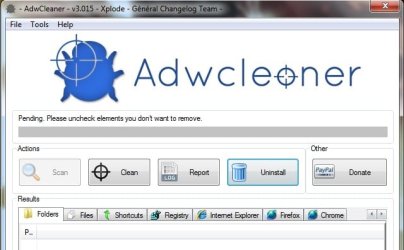
Hi devlin,about 2 hours left.Adwcleaner still on pending choose which programs you don't want to remove screen.when it will finish ?
When the all bar fills up ?
 

My Computer My Computer

Computer type
Laptop
Computer Manufacturer/Model Number
Asus
OS
Windows 7 Ultimate x86
CPU
Intel® Pentium® Dual Core CPU B950 @ 2.10GHz
Motherboard
Asustek Computer Inc.
Memory
2GB DDR3
Graphics Card(s)
Intel® HD Graphics
Sound Card
Realtek High Definition Audio(ALC269) With Sonic Master
Screen Resolution
1366x768
Hard Drives
320GB Seagate
Keyboard
Keyboard Device Filter (Provider-ATK)
Mouse
HID-compliant mouse,Microsoft PS2/Mouse
Internet Speed
Very Slow
Antivirus
Kaspersky Internet Security 2013/Malwarebytes Anti-Malware
Browser
Goggle Chrome
yeah when the bar fills up mate, it should only have taken 10minutes 20 max depending on system spec, for it to be taking 2 hours is most unusual!
 

My Computer My Computer

Computer type
Laptop
Computer Manufacturer/Model Number
Packard Bell
OS
Windows 7 Home Premium 64Bit
CPU
AMD A6-3420M 1.5GHZ OC - 2.0GHZ
Memory
4GB DDR3 1600MHZ
Graphics Card(s)
AMD RADEON 6520G+AMD RADEON HD7470M 1GB DDR3
Screen Resolution
1366x768
Hard Drives
500GB SATA
Internet Speed
18Mb Unlimited
Antivirus
AVAST!
Browser
MOZILLA FIREFOX
yeah when the bar fills up mate, it should only have taken 10minutes 20 max depending on system spec, for it to be taking 2 hours is most unusual!

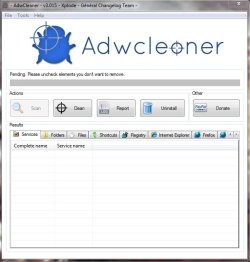
bar doesn't filling up.so i clicked on report button & saved it as text & also clicked on uninstall button & it's uninstalled now.here is txt repport & screenshot of it >>
 

Attachments

My Computer My Computer

Computer type
Laptop
Computer Manufacturer/Model Number
Asus
OS
Windows 7 Ultimate x86
CPU
Intel® Pentium® Dual Core CPU B950 @ 2.10GHz
Motherboard
Asustek Computer Inc.
Memory
2GB DDR3
Graphics Card(s)
Intel® HD Graphics
Sound Card
Realtek High Definition Audio(ALC269) With Sonic Master
Screen Resolution
1366x768
Hard Drives
320GB Seagate
Keyboard
Keyboard Device Filter (Provider-ATK)
Mouse
HID-compliant mouse,Microsoft PS2/Mouse
Internet Speed
Very Slow
Antivirus
Kaspersky Internet Security 2013/Malwarebytes Anti-Malware
Browser
Goggle Chrome
My bad buddy, In the instructions it said to hit the CLEAN which would remove all aspects found, im assuming you didnt do that so id ask you to re-download and run it again.
 

My Computer My Computer

Computer type
Laptop
Computer Manufacturer/Model Number
Packard Bell
OS
Windows 7 Home Premium 64Bit
CPU
AMD A6-3420M 1.5GHZ OC - 2.0GHZ
Memory
4GB DDR3 1600MHZ
Graphics Card(s)
AMD RADEON 6520G+AMD RADEON HD7470M 1GB DDR3
Screen Resolution
1366x768
Hard Drives
500GB SATA
Internet Speed
18Mb Unlimited
Antivirus
AVAST!
Browser
MOZILLA FIREFOX
My bad buddy, In the instructions it said to hit the CLEAN which would remove all aspects found, im assuming you didnt do that so id ask you to re-download and run it again.

ok i'll run it again.but what about pending screen?
 

My Computer My Computer

Computer type
Laptop
Computer Manufacturer/Model Number
Asus
OS
Windows 7 Ultimate x86
CPU
Intel® Pentium® Dual Core CPU B950 @ 2.10GHz
Motherboard
Asustek Computer Inc.
Memory
2GB DDR3
Graphics Card(s)
Intel® HD Graphics
Sound Card
Realtek High Definition Audio(ALC269) With Sonic Master
Screen Resolution
1366x768
Hard Drives
320GB Seagate
Keyboard
Keyboard Device Filter (Provider-ATK)
Mouse
HID-compliant mouse,Microsoft PS2/Mouse
Internet Speed
Very Slow
Antivirus
Kaspersky Internet Security 2013/Malwarebytes Anti-Malware
Browser
Goggle Chrome
When it comes up PENDING that means the scan is done and its then time to hit CLEAN
 

My Computer My Computer

Computer type
Laptop
Computer Manufacturer/Model Number
Packard Bell
OS
Windows 7 Home Premium 64Bit
CPU
AMD A6-3420M 1.5GHZ OC - 2.0GHZ
Memory
4GB DDR3 1600MHZ
Graphics Card(s)
AMD RADEON 6520G+AMD RADEON HD7470M 1GB DDR3
Screen Resolution
1366x768
Hard Drives
500GB SATA
Internet Speed
18Mb Unlimited
Antivirus
AVAST!
Browser
MOZILLA FIREFOX
When it comes up PENDING that means the scan is done and its then time to hit CLEAN

ok now this screen appears,so i hit clean button ? >>

ok i hitted the clean button,this is report >>
 

Attachments

My Computer My Computer

Computer type
Laptop
Computer Manufacturer/Model Number
Asus
OS
Windows 7 Ultimate x86
CPU
Intel® Pentium® Dual Core CPU B950 @ 2.10GHz
Motherboard
Asustek Computer Inc.
Memory
2GB DDR3
Graphics Card(s)
Intel® HD Graphics
Sound Card
Realtek High Definition Audio(ALC269) With Sonic Master
Screen Resolution
1366x768
Hard Drives
320GB Seagate
Keyboard
Keyboard Device Filter (Provider-ATK)
Mouse
HID-compliant mouse,Microsoft PS2/Mouse
Internet Speed
Very Slow
Antivirus
Kaspersky Internet Security 2013/Malwarebytes Anti-Malware
Browser
Goggle Chrome
i'm going to re-install windows,because my system is totally messed up.any advice before i do this.plz reply fast,because i'm in hurry :rolleyes:
 

My Computer My Computer

Computer type
Laptop
Computer Manufacturer/Model Number
Asus
OS
Windows 7 Ultimate x86
CPU
Intel® Pentium® Dual Core CPU B950 @ 2.10GHz
Motherboard
Asustek Computer Inc.
Memory
2GB DDR3
Graphics Card(s)
Intel® HD Graphics
Sound Card
Realtek High Definition Audio(ALC269) With Sonic Master
Screen Resolution
1366x768
Hard Drives
320GB Seagate
Keyboard
Keyboard Device Filter (Provider-ATK)
Mouse
HID-compliant mouse,Microsoft PS2/Mouse
Internet Speed
Very Slow
Antivirus
Kaspersky Internet Security 2013/Malwarebytes Anti-Malware
Browser
Goggle Chrome
Hi when i attached my wired usb mouse to my laptop after re-installing windows,a message saying that enabling wakiung up computer will disable instant on,continue ? What should i do ?
Plz reply fast because my laptop is on pause...
 

My Computer My Computer

Computer type
Laptop
Computer Manufacturer/Model Number
Asus
OS
Windows 7 Ultimate x86
CPU
Intel® Pentium® Dual Core CPU B950 @ 2.10GHz
Motherboard
Asustek Computer Inc.
Memory
2GB DDR3
Graphics Card(s)
Intel® HD Graphics
Sound Card
Realtek High Definition Audio(ALC269) With Sonic Master
Screen Resolution
1366x768
Hard Drives
320GB Seagate
Keyboard
Keyboard Device Filter (Provider-ATK)
Mouse
HID-compliant mouse,Microsoft PS2/Mouse
Internet Speed
Very Slow
Antivirus
Kaspersky Internet Security 2013/Malwarebytes Anti-Malware
Browser
Goggle Chrome
The JRT log shows no infections, waiting for the Adwcleaner log.

Some advice, if you keep getting viruses it is from what you download or put on the machine. Never trust someone's USB drive, it may be infected without the owner knowing. Don't use site like Source Forge, Major Geeks, Download.com, c|NET, go to the developers' sites. The 3rd party files hosters can and do add unwanted payloads to free downloads at times.
 

My Computer My Computer

Computer type
PC/Desktop
Computer Manufacturer/Model Number
Home Built Desktop By DataTech
OS
Windows 7 Ultimate X64 SP1
CPU
Intel i5-2550K, Differing ~4.4-4.8GHz No built in GPU
Motherboard
ASUS P8Z68-V PRO/GEN3
Memory
16GB G.Skill Sniper 1866MHz @ 2133MHz 2x8GB
Graphics Card(s)
ASUS GTX650TIB-DC2OC-2GD5, (650TI Boost)
Sound Card
Onboard Realtek 5-1
Monitor(s) Displays
Samsung P2570HD
Screen Resolution
1920x1080
Hard Drives
Samsung 840 Pro 256GB SSD for OS, 500GB Seagate Constellation (Enterprise drive) for Data
PSU
Corsair HX650W
Case
Inwin Dragon Rider
Cooling
Hyper 212 EVO w/two Noctua fans, push-pull, @1300 RPM
Keyboard
E-Z Eyes, bright yellow keys with large characters
Mouse
steelseries SENSEI Laser Pro Gaming
Internet Speed
48-51Mbs Mbs down, 11 Mbs up Xfinity Cable
Antivirus
Norton Internet Security 2013
Browser
IE 10, Opera, Pale Moon if needed
Other Info
4 case fans, LG BluRay-RE, ASUS DVD-RW, Mr. Fusion power supply, 1.21 gigawatts.
The JRT log shows no infections, waiting for the Adwcleaner log.

Some advice, if you keep getting viruses it is from what you download or put on the machine. Never trust someone's USB drive, it may be infected without the owner knowing. Don't use site like Source Forge, Major Geeks, Download.com, c|NET, go to the developers' sites. The 3rd party files hosters can and do add unwanted payloads to free downloads at times.

He posted the AdwCleaner logs britton mate. They deleted a few registry items and a browser item or two.
 

My Computer My Computer

Computer type
Laptop
Computer Manufacturer/Model Number
Packard Bell
OS
Windows 7 Home Premium 64Bit
CPU
AMD A6-3420M 1.5GHZ OC - 2.0GHZ
Memory
4GB DDR3 1600MHZ
Graphics Card(s)
AMD RADEON 6520G+AMD RADEON HD7470M 1GB DDR3
Screen Resolution
1366x768
Hard Drives
500GB SATA
Internet Speed
18Mb Unlimited
Antivirus
AVAST!
Browser
MOZILLA FIREFOX
Ok..when i attached my wired usb mouse,i selected no when it asked for enabling wake up computer will disable instant on,continue ?
i also re-installed windows now & installed microsoft security essentials.is microsoft security essentials enough ?
Because it says that running any antivirus with microsoft security essentials may conflict with it?

@ britton no i'm not installing aything from third party website.
Virus came from my friend's pen drive :(
Edit-i think virus is still in my pc.because laptop fan still running fast & when i click on task manger it shows 90-95% usage but in 5 seconds it again goes normal to 5-6%.what should be the problem ?
I copy pasted all content from pen drive in the c drive.but now i formatted & re-instaled windows.
Still cpu usage & fan problem :(
 

My Computer My Computer

Computer type
Laptop
Computer Manufacturer/Model Number
Asus
OS
Windows 7 Ultimate x86
CPU
Intel® Pentium® Dual Core CPU B950 @ 2.10GHz
Motherboard
Asustek Computer Inc.
Memory
2GB DDR3
Graphics Card(s)
Intel® HD Graphics
Sound Card
Realtek High Definition Audio(ALC269) With Sonic Master
Screen Resolution
1366x768
Hard Drives
320GB Seagate
Keyboard
Keyboard Device Filter (Provider-ATK)
Mouse
HID-compliant mouse,Microsoft PS2/Mouse
Internet Speed
Very Slow
Antivirus
Kaspersky Internet Security 2013/Malwarebytes Anti-Malware
Browser
Goggle Chrome
No, MSE should is enough on its own, i always find it handy to run the programs in this thread http://www.sevenforums.com/system-security/313772-helpful-security-programs.html Every two weeks or so just to be sure my systems in tip top shape, the programs there are my personel preference, peoples preferences are different and others may recommend other programs on top of the ones i listed but this should be a good enough!, anyway, good luck and have a Merry Christmas and a Happy New Year!
 

My Computer My Computer

Computer type
Laptop
Computer Manufacturer/Model Number
Packard Bell
OS
Windows 7 Home Premium 64Bit
CPU
AMD A6-3420M 1.5GHZ OC - 2.0GHZ
Memory
4GB DDR3 1600MHZ
Graphics Card(s)
AMD RADEON 6520G+AMD RADEON HD7470M 1GB DDR3
Screen Resolution
1366x768
Hard Drives
500GB SATA
Internet Speed
18Mb Unlimited
Antivirus
AVAST!
Browser
MOZILLA FIREFOX
Back
Top